
- What Are Automotive Service Appointment Reminders?
- Why Customers Forget Service Appointments
- How Email-to-SMS Reminders Work for Your Service Department
- Five Ways Service Reminders Improve Your Shop’s Efficiency
- Best Practices for Service Appointment Reminder Messages
- Reduce No-Shows Without Adding More Work to Your Day
- Frequently Asked Questions
Stop Losing Revenue to No-Shows
How to Reduce Missed Service Appointments Without Calling Customers

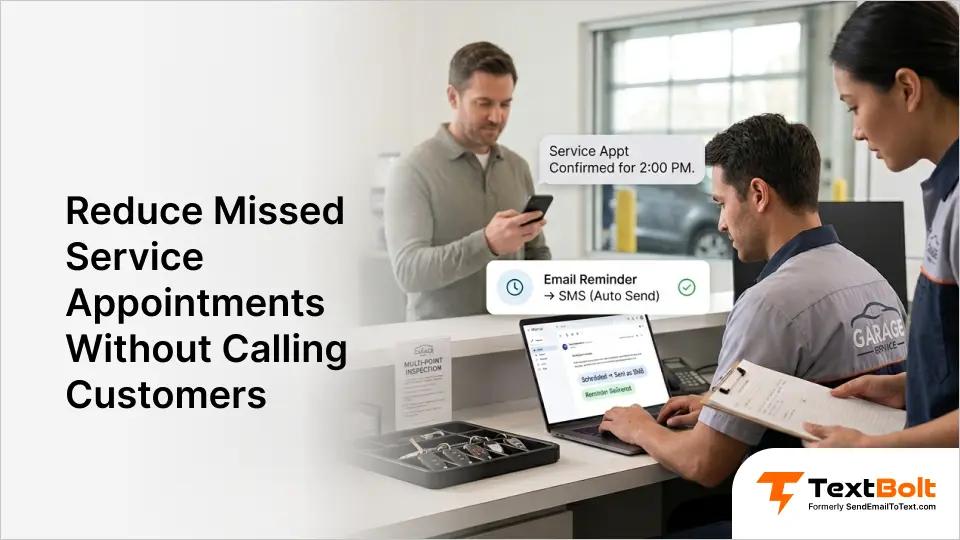
You spend 90 minutes every morning calling customers to confirm oil changes and tire rotations. Many don’t pick up. Some forget anyway. Phone tag wastes your time, customers still forget, and no-shows cost you money.
Automated email-to-SMS reminders solve this problem without adding work to your day. Services like TextBolt let you schedule reminders directly from Gmail or Outlook, and your customers receive professional text messages without you lifting the phone. Your appointment reminder system runs on autopilot while you focus on customers who actually show up.
What Are Automotive Service Appointment Reminders?
Automotive service appointment reminders are automated notifications sent to customers before scheduled maintenance appointments via SMS, ensuring they remember their oil changes, tire rotations, and inspections without requiring phone calls from your service team. Text messaging for automotive businesses covers more than just reminders from pickup notifications to service status updates.
Here’s how it works: You schedule emails that convert to text messages at optimal times, typically 24-48 hours before appointments. Your customer books an oil change on Monday for Friday at 2 PM. On Thursday at 10 AM, they automatically receive a text message that says, “Reminder: Your vehicle service is tomorrow at 2 PM at Main Street Auto. Reply YES to confirm.”
This differs fundamentally from phone calls because you set it once and it runs automatically. You’re not spending staff time dialing numbers, leaving voicemails, or playing phone tag. The reminder sends itself at exactly the right time, and your customer reads it on their schedule, not when you happen to call. You can schedule SMS messages from Gmail using tools you already have, without learning any new software.
Stop Playing Phone Tag with Customers Who Already Booked
TextBolt schedules reminders from Gmail or Outlook. No apps, no phone calls, no wasted mornings.
Why Customers Forget Service Appointments
Understanding why no-shows happen helps you fix the problem at its source. Here are the three main reasons your customers forget their appointments, even when they genuinely intended to show up.
1. Life Gets Busy Between Booking and Service Day
Your customers book appointments with good intentions, but life happens between the booking call and the service day. They schedule an oil change three weeks out, then work deadlines pile up, family obligations appear, and other errands push car service completely out of mind.
The appointment you booked on February 1st for February 21st competes with everything else that happened in those three weeks. Your customers aren’t being disrespectful when they forget. They genuinely intended to show up when they booked.
But without a reminder system, that appointment exists only in your calendar, not theirs. By the time service day arrives, they’ve forgotten completely or double-booked themselves without realizing it.
2. Phone Calls Don’t Reach Customers When You Need Them To
Your reminder call at 9 AM doesn’t help when your customer is in a meeting, driving, or screening unknown numbers. Many calls go to voicemail during business hours, and customers rarely listen to voicemail from businesses they don’t immediately recognize.
You leave a message saying their appointment is tomorrow, but they’re focused on work deadlines or picking up kids from school. Your voicemail sits unheard until evening, and by then it’s too late to adjust their schedule if needed.
Worse, you’ve spent 15-20 minutes of staff time making calls that didn’t actually reach anyone. Phone calls interrupt your customer’s day at a time convenient for you, not them. Text messages let them read appointment details when they have a free moment, whether that’s during lunch, between meetings, or while waiting in line at the grocery store. Pair this with voicemail text alerts so inbound voicemails land as SMS too.
3. There’s No Record of Whether Your Customer Actually Got the Reminder
When you call and leave a voicemail, you have no idea if they listened to it. When your service advisor says, “I called everyone yesterday,” you can’t verify who answered, who heard the message, or who confirmed they’re still coming.
This creates problems when customers claim they never received a reminder and dispute no-show fees.
Here’s how phone calls compare to text reminders:
| Phone Calls | Text Reminders |
| Requires your staff time (15-20 min per day) | Automated, zero staff time |
| Many don’t answer during business hours | Most read within minutes |
| No proof customer received reminder | Written confirmation with timestamp |
| Interrupts customer’s day | Customer reads at their convenience |
| No reply confirmation | Customer can reply YES to confirm |
Text reminders create a paper trail. You know exactly when the message was sent, when it was delivered, and if the customer confirmed. This protects you from disputes and helps you reduce missed appointments with SMS reminders systematically.
How Email-to-SMS Reminders Work for Your Service Department
You don’t need expensive software or complex systems. Here’s exactly how you send automated service reminders from your existing email.
Step 1: Customer Books Their Appointment
Your customer calls, books online, or schedules an appointment in person for their next oil change or tire rotation. You add the appointment to your calendar or scheduling system like you always do.
You already have their phone number from previous visits or from the booking form they filled out. Nothing changes in your current booking process.
Step 2: You Schedule the Reminder Email (Takes 2 Minutes)
Open your Gmail or Outlook account. Compose a new email and address it to [customerphonenumber]@sendemailtotext.com. For example, if your customer’s phone number is 555-123-4567, you’d address the email to 5551234567@sendemailtotext.com.
In the email body, write your reminder message: “Reminder: Your oil change is tomorrow at 2 PM at Main Street Auto. Reply YES to confirm or CANCEL to reschedule.”
Click “Schedule Send” in Gmail (or the equivalent in Outlook) and set the delivery time for 24-48 hours before the appointment. That’s it. You never think about this reminder again.
Step 3: TextBolt Converts Your Email to SMS
At the scheduled time you selected, your email is sent automatically from your inbox. TextBolt receives it and instantly converts it to a text message.
Your customer receives a professional SMS from your business number, not a random carrier address or personal phone number. This entire process happens in the background while you work on other tasks. You’re changing oil, talking to walk-in customers, or closing out yesterday’s invoices. The reminder sends itself without requiring any additional action from you.
Step 4: Customer Receives Text and Confirms
The text message arrives on your customer’s phone 24-48 hours before their appointment. They see your shop name and the appointment details immediately.
Most text messages are read within minutes of receipt, giving you much higher engagement than phone calls that often go unanswered. Your customer can reply YES to confirm they’re coming, ask questions about what to bring, or reply CANCEL if they need to reschedule.
Their reply comes back to your email inbox as a standard email reply, exactly like any other email conversation. You don’t need to log into a separate dashboard or check another system.
Step 5: You Track Everything in Your Dashboard
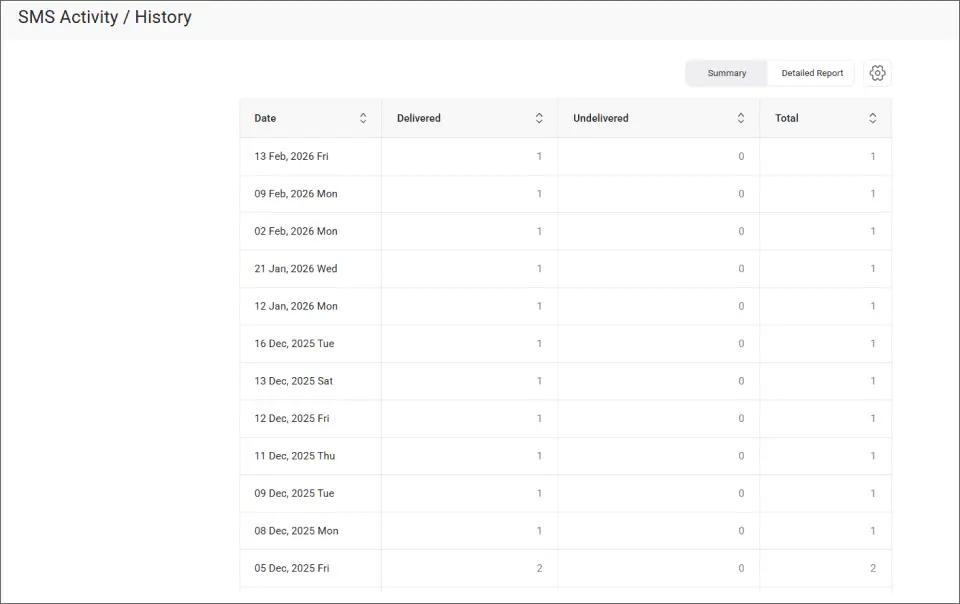
TextBolt provides a dashboard where you can see the delivery status 2-5 minutes after sending each reminder. You can view message history organized by customer phone number, check who confirmed and who didn’t respond, and follow up only with non-responders if needed.
Getting started with email-to-SMS reminders requires nothing more than what you already have. Here’s your complete setup checklist:
What Your Customers See in the Text:
- Your shop name and location
- Appointment date and time
- Service type (oil change, tire rotation, inspection)
- Simple confirmation request
- Your business number (not a random carrier address)
What You Need to Get Started:
- Gmail or Outlook account (you already have this)
- Customer phone numbers (you already collect these)
- TextBolt account (10-30 minute setup, then up to 48 hours for 10DLC approval)
The entire TextBolt setup process takes less time than one morning of making reminder phone calls, and then it runs automatically for every appointment you book.
Five Ways Service Reminders Improve Your Shop’s Efficiency
Text reminders do more than prevent no-shows. They transform how your entire service department operates, creating benefits you’ll see immediately.
1. You Free Your Service Advisors from Reminder Calls
Calculate the time you currently spend on reminder calls: 90 minutes per day equals 7.5 hours per week, which equals 30 hours per month. That’s nearly a full work week your service advisors spend on the phone every month just confirming appointments.
When you automate reminders, your advisors focus on upselling services to customers who are actually in the shop, answering technical questions, and greeting walk-ins who need immediate help. No more morning phone marathons before the shop even opens. Your team becomes more productive and less frustrated.
2. You Fill Empty Appointment Slots Faster
When a customer cancels via text message, you know immediately because their reply lands in your email inbox the moment they send it. You can fill that empty slot the same day instead of discovering a no-show when the customer was supposed to arrive.
This matters for revenue. Every filled appointment slot represents $50-$200+ in service revenue, depending on the work. If you prevent just two no-shows per week by getting early cancellation notices, that’s $400-$1,600 in recovered revenue every month. The reminder system pays for itself many times over.
3. You Build Better Customer Communication Records
Text message timestamps provide proof that you sent the appointment notification. This helps when customers dispute charges or claim “I never knew about the appointment.” You can show exactly when the reminder was sent, when it was delivered, and whether they replied to confirm.
This complete audit trail stores automatically in your email inbox. You don’t need to keep paper logs or remember who you called. Every reminder creates a permanent record that protects your business from disputes. No more “he said, she said” situations about whether someone was properly notified. Shops that rely on personal texting can’t access this level of visibility, which is why many choose to stop technicians from using personal phones to text customers and keep all conversations documented.
4. You Reduce Day-of Disruptions to Your Schedule
Customers who receive reminders confirm or cancel in advance, not when they’re supposed to walk through your door. You plan technician schedules better based on confirmed appointments rather than hoping everyone shows up. Shops that keep technicians aligned with real-time SMS alerts make sure those schedule changes actually reach the bay instead of sitting in a booking system nobody checks.
This reduces the scrambling that happens when someone doesn’t show, and a service bay sits empty while you try to pull in a walk-in or call the next day’s appointments to see if anyone can come early. Your shop runs smoother, your technicians stay busy, and you serve more customers per day. Texting vehicle repair status updates throughout the service keeps that smooth schedule intact by preventing the flood of “where’s my car?” calls that disrupt your afternoon.
5. You Increase Customer Satisfaction
Your customers appreciate convenient reminders that don’t interrupt their workday with phone calls. They can read appointment details on their schedule, confirm with a quick text reply, and feel respected by a shop that makes service easy.
This professionalism builds trust for future service visits. Customers are more likely to return to a shop that communicates clearly and makes appointments convenient. They tell friends about the shop that “even sends text reminders as my dentist does.” You differentiate your service department from competitors who still rely on phone calls.
Many small business texting platforms offer these same benefits across different industries, proving that email-to-SMS reminders work for any business struggling with appointment no-shows.
Your Service Advisors Shouldn’t Spend Mornings on the Phone
Stop phone tag. Schedule email-to-SMS reminders from Gmail. Start your free trial with 10 free messages.
Best Practices for Service Appointment Reminder Messages
Not all reminder messages perform equally. Here’s what works based on what successful auto shops actually send.
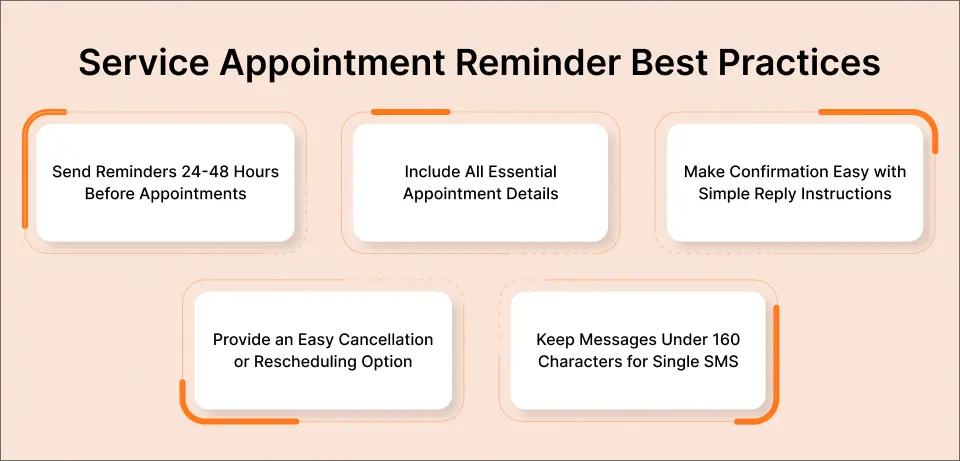
1. Send Reminders 24-48 Hours Before Appointments
This timing window gives your customers enough advance notice to confirm or reschedule while keeping the appointment top-of-mind. Send reminders too early (a week before) and they’ll forget again by appointment day.
Send them morning-of, and it’s too late for customers who’ve already made other plans or forgotten to block time in their schedule. The 24-48 hour window is the sweet spot. Your customer receives the reminder on Tuesday for a Wednesday appointment, or on Thursday for a Friday service. They still have time to rearrange their schedule if needed, but the appointment is close enough that they’ll actually remember it.
2. Include All Essential Appointment Details
Your reminder needs five critical pieces of information: your shop name that customers recognize, the specific appointment date and time, the service type they’re coming in for, your location if you have multiple shops, and a clear confirmation request.
Example: “Reminder: Your oil change is tomorrow at 2 PM at Main Street Auto. Reply YES to confirm.”
Notice this message includes the service (oil change), the time (tomorrow at 2 PM), and the location (Main Street Auto). Your customer knows exactly what’s happening, when, and where, all in one quick text they can read in 10 seconds.
3. Make Confirmation Easy with Simple Reply Instructions
Add “Reply YES to confirm” or similar clear action to your reminder messages. Customers who actively confirm their appointments are significantly more likely to actually show up compared to customers who receive reminders but don’t respond.
Confirmation replies come straight to your email inbox as standard email replies. You instantly know who’s confirmed versus who needs follow-up.
Some shops send a second reminder on appointment day only to customers who didn’t confirm the first reminder, maximizing attendance while minimizing message volume.
4. Provide an Easy Cancellation or Rescheduling Option
Include “Reply CANCEL to reschedule” or “Call us to change your appointment” in your reminder. This might seem counterintuitive (why make it easy to cancel?), but it’s actually smart business.
When customers cancel in advance via text, you know immediately and can fill their slot instead of losing revenue to a no-show. A customer who cancels Tuesday for a Wednesday appointment gives you time to call tomorrow’s appointments and offer earlier service.
You recover that revenue instead of watching a service bay sit empty. Better they cancel 24 hours early than not show up at all. You respect their time and schedule changes, and they appreciate a shop that handles last-minute reschedules smoothly instead of making the process frustrating.
5. Keep Messages Under 155 Characters for Single SMS
Longer messages are split into multiple segments, and each segment costs 1 message credit. Short messages also deliver faster, and customers read brief texts more thoroughly.
Make every word earn its place in the message. The example reminder we’ve been using throughout this article is only 138 characters: “Reminder: Your oil change is tomorrow at 2 PM at Main Street Auto. Reply YES to confirm or CANCEL to reschedule. See you soon!” That’s everything your customer needs in one SMS segment.
Reminder Message Dos and Don’ts:
| Do | Don’t |
| Include appointment time and date | Send day-of (too late to plan) |
| Make confirmation easy (reply YES) | Assume they’ll call to confirm |
| Keep message concise and clear | Write paragraphs of text |
| Use shop name customers recognize | Send from random phone number |
| Provide cancellation option | Make rescheduling difficult |
Reduce No-Shows Without Adding More Work to Your Day
Automated SMS reminders replace the phone calls your service advisors make every morning, reduce no-shows by giving customers convenient reminders they actually read, and free your team to focus on customers who actually arrive at the shop.
The system works from the email you already use, requires no new software to learn, and setup takes only 10-30 minutes of initial configuration. The result is more confirmed appointments, better schedule management throughout the day, and higher revenue per day because you’re filling service bays instead of making phone calls.
TextBolt makes this simple. You schedule reminders from Gmail, reach customers reliably with up to 98% delivery rates, and track confirmations automatically in your email inbox.
Over 500 businesses trust TextBolt for appointment reminders across automotive, healthcare, and service industries. Start your free trial today, send 10 reminders free, and see results this week. Check TextBolt pricing to find the plan that matches your monthly appointment volume.
Frequently Asked Questions
How far in advance should I send service appointment reminders?
Send reminders 24-48 hours before appointments for best results. This gives your customers enough notice to confirm or reschedule while keeping the appointment top-of-mind. Sending too early (a week before) reduces effectiveness because they’ll forget again by appointment day.
Can customers reply to appointment reminders?
Yes. TextBolt supports two-way messaging, so replies come directly to your email inbox. Your customers can confirm with YES, ask questions about what to bring, or request reschedules by replying CANCEL, all without calling your shop during business hours.
What if my customer doesn’t have a smartphone?
SMS works on any mobile phone, not just smartphones. Text messages deliver to basic flip phones and older devices, reaching virtually all your customers regardless of what phone type they use. SMS is supported by every mobile carrier and every phone manufactured in the last 20 years.
Do I need IT or technical skills to set up automated reminders?
No. TextBolt works directly from Gmail or Outlook using email you already send. Setup takes 10-30 minutes with no coding, no API integration, and no technical expertise required. If you can send email and use Gmail’s “Schedule Send” feature, you can send automated appointment reminders.
What happens if a customer cancels via text reminder?
Their reply comes to your email inbox immediately, just like any other email. You can fill the empty appointment slot the same day instead of discovering a no-show when they’re supposed to arrive, maximizing your shop’s service revenue for the day and keeping your technicians busy.