
- Why Last-Minute Reschedules Create Confusion in Auto Shops
- How Service Advisors Send Reschedule Confirmations From Email
- How SMS Reschedule Alerts Improve Your Shop’s Efficiency
- Best Practices for Sending Automotive Reschedule Notifications
- Ready to Handle Reschedules Without Extra Work?
- Frequently Asked Questions
Stop the Rescheduling Chaos
How to Handle Last-Minute Service Reschedules Smoothly with Email-to-SMS


A customer calls to move their oil change from Tuesday morning to Thursday afternoon. Your service advisor updates the booking system, but the technician still expects the car on Tuesday.
Meanwhile, the customer shows up Thursday to find no bay reserved. This kind of miscommunication happens daily in automotive shops. It frustrates customers, wastes technician time, and costs your business revenue.
The fix does not require new scheduling software. With TextBolt, your team sends instant reschedule confirmations from their existing email. Everyone stays informed the moment a change is made.
Here is how real-time SMS alerts help your shop handle last-minute service reschedules without the confusion, and why more automotive shops are using text messaging to eliminate scheduling miscommunication.
Why Last-Minute Reschedules Create Confusion in Auto Shops
When a schedule change happens, the information has to reach multiple people through multiple channels. Most shops rely on methods that create delays and errors at every step.
1. Three Parties Need the Same Update but Only One Gets It
When a customer reschedules, the customer, the service technician, and the front desk all need to know. In most shops, the person taking the call updates one system and assumes everyone else will check it.
Technicians rarely check the booking system during their shift. They plan their day based on the morning schedule. A midday reschedule sits in the software until the original appointment time arrives and no car shows up. This is the same communication gap that makes it hard to keep technicians aligned on busy service days when priorities shift throughout the morning.
The front desk may update a whiteboard or shared calendar, but those tools only work if everyone is physically present. Off-site staff miss changes entirely.
2. Confirmation Calls Go to Voicemail and Stay There
Many shops confirm reschedules by calling the customer back. If the customer does not answer, the confirmation sits in limbo. Did they get the new time? Are they coming?
Your advisor moves on to the next repair order and forgets to follow up. The customer assumes everything is confirmed because they already spoke to someone. Two people walk away with different assumptions about what happens next.
This pattern repeats multiple times per week in busy shops, adding up to hours of wasted phone time.
3. Sticky Notes and Verbal Handoffs Fail Under Pressure
Some service advisors write reschedule notes on sticky pads or mention them during shift handoffs. These informal methods work occasionally but fail when it matters most.
A busy afternoon with three reschedules, two walk-ins, and a parts delay is exactly when written notes get buried. Shops that use automated text messages solve this by replacing informal handoffs with documented, instant notifications.
These communication gaps are preventable. Email-to-SMS alerts close them by turning every reschedule into a clear, timestamped confirmation.
How Service Advisors Send Reschedule Confirmations From Email
Your service advisor composes a regular email, and TextBolt delivers it as an SMS to the customer’s phone within seconds. The entire process works through your existing email client with no new software to install.
Step 1: Compose a Confirmation Email to the Customer’s Phone Number
After the customer calls to reschedule, your advisor opens Gmail, Outlook, or any email client. They address a new email to the customer’s phone number followed by @sendemailtotext.com.
For example: 5551234567@sendemailtotext.com. The email body becomes the text message. Something like: “Hi Mark, your brake inspection is now set for Wednesday at 2 PM. See you then.”
Step 2: Type the Updated Appointment Details in the Email Body
Include the new date, time, service type, and your shop’s name in the message. Keep it under 155 characters to use a single credit.
A complete message might read: “Your oil change at Main Street Auto is now Thursday, March 5 at 2:00 PM. Reply YES to confirm.” Clear, actionable, and easy to reference later.
Step 3: Send the Email and TextBolt Delivers It as SMS
Click send like any other email. TextBolt converts it into a standard text message delivered from your dedicated business number, not a random email address or carrier code.
The customer sees a professional text with their updated appointment details. You can verify delivery in your TextBolt dashboard within 2 to 5 minutes.
When you need to confirm a specific reschedule notification reached the customer, the dashboard shows full delivery details for any individual message.
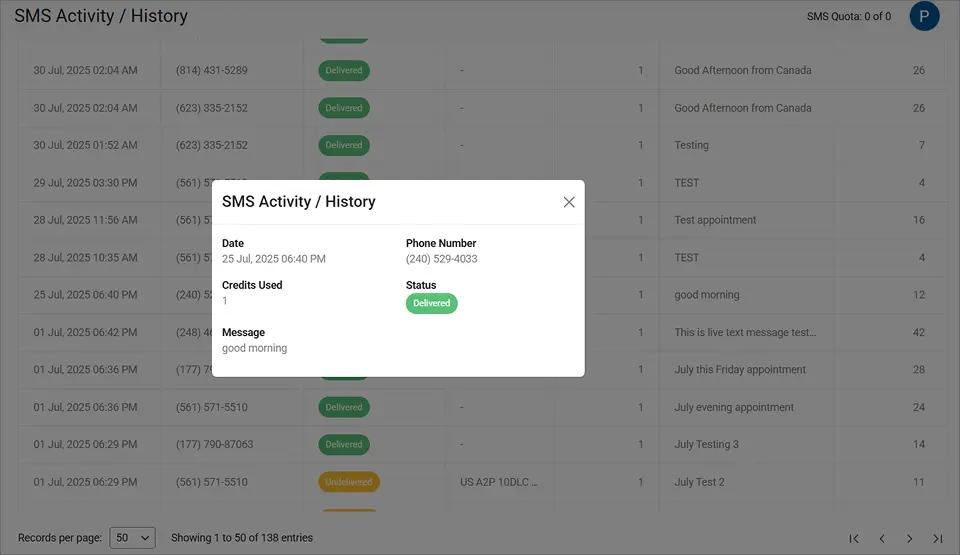
This delivery confirmation gives your team proof the customer received the updated appointment time, preventing any “I was never told” disputes.
Step 4: Continue the Conversation Through Email Replies
If the customer replies with a question or further change, that response arrives in your advisor’s email inbox as a standard email. No app switching needed.
Your advisor can also BCC other team members on the original confirmation. The technician, shop manager, or parts department will all receive the update simultaneously. Every message is logged in your email account, creating a complete audit trail. Businesses operating more than one branch can extend this workflow to coordinate customer messaging in multiple locations, ensuring every site sees the same reschedule updates.
To get started, set up TextBolt and register your business. Most shops complete setup in under 30 minutes.
The workflow is straightforward, but the impact on your shop extends well beyond preventing missed messages.
Your Reschedules Deserve Instant Clarity
Send schedule changes straight to your customers’ phones from Gmail. No confusion, no missed updates.
How SMS Reschedule Alerts Improve Your Shop’s Efficiency
Instant SMS notifications reduce wasted time, prevent customer frustration, and keep your service bays productive throughout the day. Here is what changes when your shop adopts real-time text alerts for reschedules.
1. Fewer No-Shows From Rescheduled Appointments Customers Forget
When customers reschedule but never receive a clear confirmation, they often forget the new time. They may show up at the original time or skip the appointment entirely.
An SMS confirmation locks in the new appointment on the customer’s phone for easy reference. This simple step can significantly reduce missed service appointments with SMS reminders and keep your calendar accurate throughout the week.
2. Hours of Weekly Phone Time Replaced by Single-Send Confirmations
Your front desk staff may spend hours each week calling customers to confirm rescheduled appointments. Most of those calls go to voicemail, requiring callbacks and follow-ups.
A single email-to-SMS confirmation replaces the entire call cycle. Even 30 minutes per advisor per day adds up to over seven hours per week of unproductive phone time your shop gets back.
3. Any Team Member Can Review the Full Reschedule History
When reschedule confirmations live in email, anyone with inbox access can review what was communicated and when. New advisors, substitute staff, or the shop manager can all see the full history.
This eliminates the “I didn’t know about the change” friction between the front desk and the service bay. Your shop can also track which team member sent each notification, improving accountability across shifts.
4. Timestamped Records Resolve “I Was Never Told” Disputes
Occasionally a customer claims they were told a different time or were not notified about a change. Without documentation, these disputes are difficult to resolve fairly.
With email-to-SMS, every confirmation is logged in your email account with timestamps. You have a verifiable record of exactly what was sent, when, and to whom.
TextBolt’s dashboard also lets you search past messages by keyword, so your team can pull up a specific customer’s reschedule confirmation in seconds.
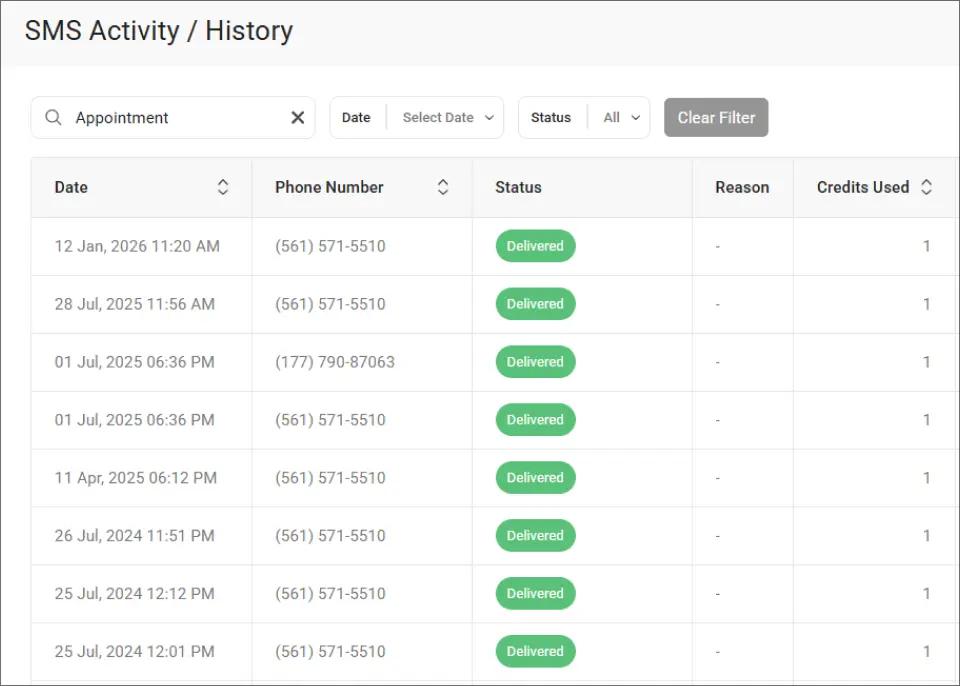
This search capability turns your message history into a quick-reference tool whenever a scheduling question comes up at the front counter.
Sending fast notifications matters, but the content of those messages matters just as much. The right wording can mean the difference between a confirmed appointment and a confused customer. And reschedules aren’t the only messages customers miss. Emailed invoices get buried the same way. Shops that text invoices to customers see faster payments using the same email-to-SMS workflow.
Reschedule Notifications in Seconds, Not Hours
Send instant SMS confirmations from your email. No software to learn, no calls to make.
Best Practices for Sending Automotive Reschedule Notifications
Getting the format and timing right ensures your customers actually read and act on the notification. These practices work well for shops handling multiple reschedules per day.
1. Send the Confirmation Within Minutes of the Schedule Change
The longer you wait to confirm a reschedule, the more likely the customer will forget the new details. Send the SMS while the phone conversation is still fresh.
If a customer calls at 10:00 a.m. to reschedule, the text should arrive by 10:05 a.m. This immediacy reinforces the new time and prevents any doubt about the appointment.
2. Include Date, Time, Service Type, and Shop Name in One Message
Every reschedule notification should contain all essential details so the customer does not need to remember anything from the phone call. Keep the message under 155 characters to use one credit and display cleanly on all phones.
A complete example: “Hi Mark, your oil change at Main St Auto is now Thursday 3/5 at 2 PM. Reply YES to confirm.” You can learn more about SMS character limits to optimize your messaging costs.
3. Pair Instant Confirmations With Day-Before Reminder Texts
For reschedules made days in advance, pair the instant confirmation with a follow-up reminder the day before the new appointment. You can schedule SMS from Gmail using Gmail’s built-in scheduling feature.
This double-touch approach catches customers who confirmed the change but forgot about it by the new date.
| Message Type | Example | Result |
| Too vague | “Your appointment has been changed.” | Customer confused, calls back |
| Too long | “Dear valued customer, we would like to inform you that your previously scheduled service appointment has been rescheduled to a new date and time…” | Splits into multiple texts, feels impersonal |
| Just right | “Hi Mark, your oil change at Main St Auto is now Thursday 3/5 at 2 PM. Reply YES to confirm.” | Clear, actionable, under 155 characters |
With these practices in place, your shop can handle any volume of reschedules without confusion. Consistency across your entire team is what makes the difference.
Ready to Handle Reschedules Without Extra Work?
Last-minute service reschedules do not have to create chaos. With email-to-SMS alerts, your team sends instant confirmations from the same email they already use every day.
Customers get clear, timely updates. Your technicians stay informed. Every notification is documented automatically in your email account for future reference.
Over 500 businesses already use TextBolt to simplify customer communication. Plans start at $29 per month, and every plan includes 10 user accounts with no per-user fees. Check TextBolt pricing to find the right fit for your shop.
Up to 98% of messages are delivered successfully.*
*Delivery rates vary based on carrier policies, message content, and compliance factors.
Frequently Asked Questions
How quickly does the customer receive the reschedule text?
Most messages arrive within seconds of sending the email. TextBolt converts your email to SMS almost instantly. Delivery status updates appear in your dashboard within 2 to 5 minutes.
Can multiple team members send reschedule notifications?
Yes. All TextBolt plans include 10 user accounts. Any authorized team member can send confirmations from their own email. Messages appear from the same business number regardless of who sends them.
Do customers need to install an app to receive the text?
No. Reschedule notifications arrive as standard SMS on any mobile phone. Customers do not need to download an app, create an account, or have internet access.
Can customers reply to the reschedule text?
Yes. Customer replies come back to your email inbox as standard email replies. You can continue the conversation without switching to a different app. Two-way messaging is included on all plans.
What email providers work with TextBolt?
TextBolt works with Gmail, Outlook, Apple Mail, Zoho, ProtonMail, and any email client that supports standard email sending. You do not need to switch providers.
How much does it cost to send reschedule notifications?
TextBolt plans start at $29 per month with 500 message credits. Each standard text message under 155 characters uses one credit. Most reschedule confirmations fit within a single credit per recipient.