
- Why Businesses Need to Schedule SMS From Gmail
- How TextBolt Sends and Schedules SMS From Gmail (Step-by-Step)
- Real-World Use Cases Across Industries
- Why TextBolt Is the Best Tool for Scheduling SMS from Gmail
- Why TextBolt Beats Other Tools
- Eliminate Missed Messages With TextBolt
- Frequently Asked Questions
Stop Missing Important Messages
How to Schedule SMS Messages Directly from Your Gmail Account

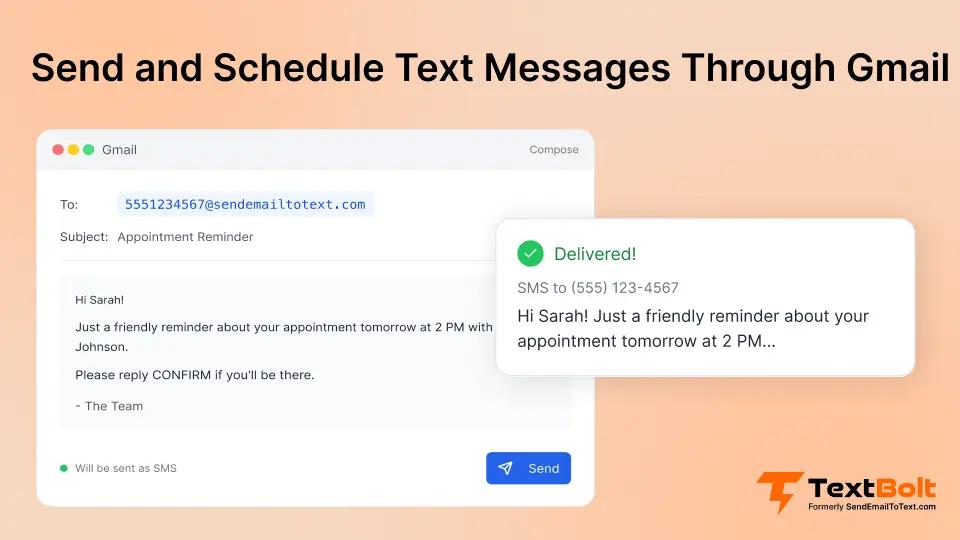
If your business depends on timely communication with customers, you already know that a late message can mean a lost appointment, a missed payment, or a dissatisfied client. Whether you’re sending reminders, updates, confirmations, or follow-ups, it’s not just about what you send, it’s about delivering it at the perfect moment to make an impact.
But here’s the problem:
Gmail doesn’t support SMS delivery or SMS scheduling natively.
That means businesses juggle tools, manually track reminders, or even forget to send important customer messages entirely.
This is why many businesses search for one simple solution:
How can I schedule an SMS directly from Gmail?
In this guide, you’ll discover:
- Why businesses need scheduled SMS, especially for reminders, alerts, and confirmations.
- How a modern email-to-SMS solution eliminates complexity, manual effort, and missed opportunities.
- Why TextBolt is the simplest and most reliable way to send and schedule SMS right from your Gmail account, with confidence and ease.
Why Businesses Need to Schedule SMS From Gmail
When timing matters, businesses across every industry face common communication challenges and missed messages often lead to lost opportunities. Here’s how scheduling SMS from Gmail with TextBolt helps solve everyday pain points:
Problem 1: Customers Forget Appointments and Don’t Show Up
In businesses like healthcare, salons, real estate or consulting, managing appointments can be a nightmare. Staff are often busy with clients and struggle to send timely reminders. No-shows and late arrivals hurt your schedule and revenue.
How TextBolt solves this: With TextBolt you send and schedule SMS reminders directly from your Gmail account. You simply compose an email and TextBolt delivers it as a text message, reaching your customers at the right time, so no-shows drop and your schedule stays on track. Learn more about sending appointment reminders via email to reduce missed visits.
Problem 2: Manual Client Follow-Ups Get Missed
For agencies, financial advisors, or insurance providers, following up is crucial for closing deals and building relationships. But it’s easy to forget to send the next day or next week follow-up when you get buried in tasks.
How TextBolt solves this: With TextBolt, you draft your client follow-up as an email, schedule it, and it’s automatically delivered as an SMS. This ensures every client gets timely, professional follow-ups even when you’re busy.
Problem 3: School Communications Don’t Reach Parents on Time
Schools constantly need to inform parents and students about exams, meetings, or urgent updates. Manual messages are easy to miss and emails can get ignored.
How TextBolt solves this: Using TextBolt, schools can schedule important updates as emails, which TextBolt sends as SMS at the exact right time. Parents and students never miss crucial information, and engagement increases.
Problem 4: Operational Alerts Get Overlooked
In logistics, dispatch, or delivery operations, team members need updates on tasks, routes, and timing. Relying on calls or last-minute messages causes confusion and delays.
How TextBolt solves this: TextBolt allows you to set up and schedule operation alerts as emails, and have them delivered to team members as SMS. This way, every team member receives critical updates straight to their phone, precisely when needed.
Problem 5: Internal Team Reminders Get Lost
Busy teams juggle meetings, deadlines, and check-ins, and reminders often get buried in emails or scattered across multiple tools.
How TextBolt solves this: With TextBolt, team leaders can write an email, schedule it, and have it land on colleagues’ phones as SMS reminders. Everyone stays organized, no missed meetings, no lost updates.
Problem 6: Overdue Payment & Billing Reminders
If customers forget bill due dates or subscription renewals, businesses lose revenue or deal with collections headaches.
How TextBolt solves this: You can schedule automatic billing and payment reminders as SMS from Gmail, helping customers pay on time and improving your cash flow.
Turn Missed Appointments Into Confirmed Visits
Automated SMS reminders scheduled right from Gmail help you stay organized and boost revenue.
How TextBolt Sends and Schedules SMS From Gmail (Step-by-Step)
TextBolt connects your Gmail account directly to mobile carriers enabling you to send SMS without leaving your inbox.
1. Install the TextBolt Gmail add-on: Search for TextBolt in Google workspace marketplace and install it in your Gmail.
2. Complete business verification: A quick 30-minute verification ensures your messages are trusted and delivered through approved 10DLC channels.
3. Import or sync your contacts: Use Google Contacts or upload your customer list.
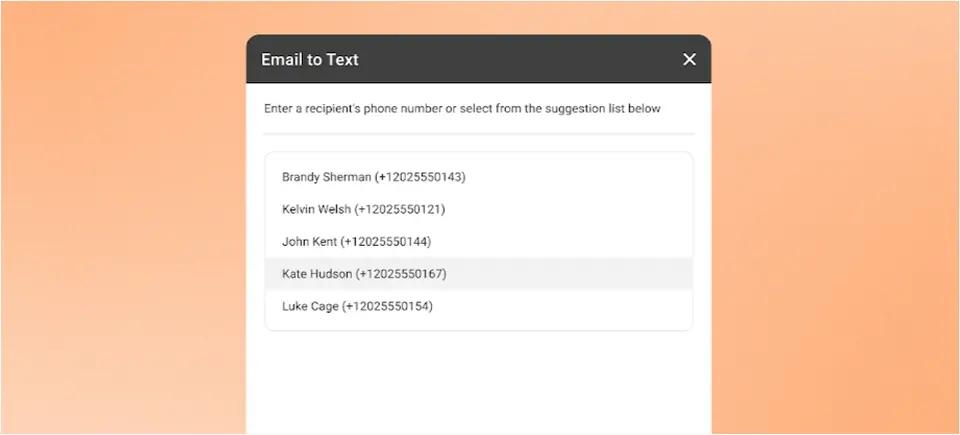
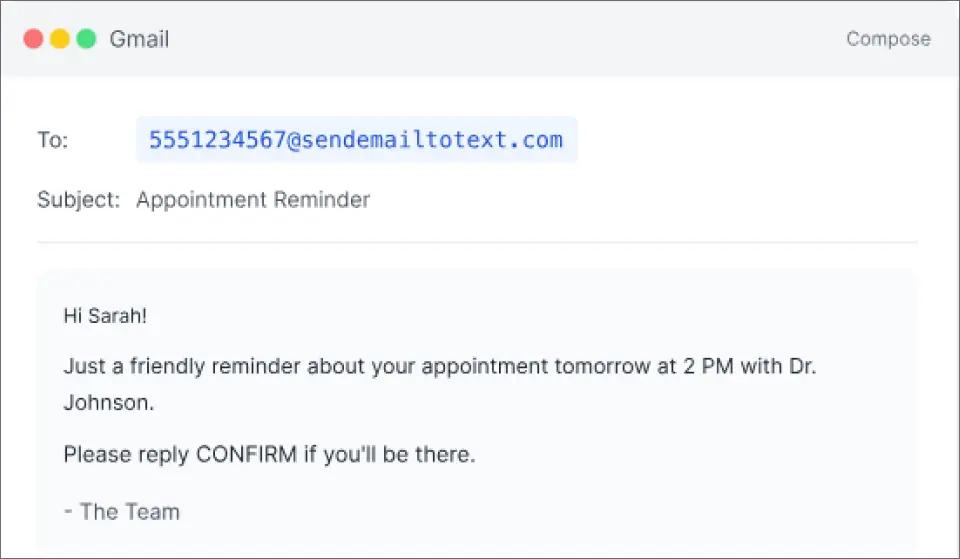
4. Compose an email in Gmail: Address the email to the customer’s phone number using your unique TextBolt SMS format.
5. Use Gmail’s “schedule send”: Pick the date and time you want your text delivered.
6. TextBolt Delivers the SMS Automatically: Replies from customers come straight back to your Gmail inbox, keeping everything searchable and organized.
Want to see how it works in real workflows? Watch demo
Real-World Use Cases Across Industries
TextBolt makes it easy for any organization to reach people instantly—with scheduled SMS sent right from Gmail. Here’s how different industries put it to work:
- Healthcare: Confirm patient appointments, send gentle reminders, follow up after visits, and notify about vaccinations or health checks all scheduled in advance for maximum reliability.
- Salons & spas: Remind clients of their bookings, keep waitlists moving, and send personalized promotional offers. TextBolt ensures every customer gets the right update at just the right time.
- Schools & coaching centers: Schedule reminders for upcoming events, share exam dates, and issue emergency alerts. With instant SMS delivery, parents and students never miss a critical announcement.
- Logistics & dispatch: Alert drivers to deliver ETAs, route changes, and provide last-minute instructions direct to their phones. Teams stay on schedule even when plans shift fast.
- Finance & insurance: Automate payment alerts, renewal reminders, policy updates, and timely follow-ups. Clients are always informed, reducing overdue collections and boosting trust.
- Internal teams: Schedule meeting reminders, shift updates, urgent task alerts, and compliance deadlines. Everyone stays coordinated and informed, even if they aren’t checking email regularly.
- Retail & e-commerce: Send flash sale notifications, order confirmations, shipping/delivery updates, and personalized offers to drive sales and improve customer satisfaction.
- Hotels & restaurants: Send booking confirmations, reservation reminders, special promotions, and feedback requests to guests or diners through email-to-SMS reservation confirmations.
- Event management: Send event reminders, last-minute updates, attendee instructions, or cancellation notices.
- Utilities & service providers: Notify customers about planned outages, service technician arrivals, maintenance schedules, or bill payment alerts.
- Legal & consulting services: Automate reminders for court dates, document deadlines, consultation follow-ups, and policy updates.
- Recruitment & staffing: Coordinate interview reminders, onboarding steps, shift changes, and job alerts for candidates or team members.
- Small businesses: Auto shops, clinics, tutors, cleaners, and local retailers use TextBolt to confirm appointments, send reminders, share promotions, and follow up with clients all from Gmail, saving time and never missing an opportunity.
TextBolt fits seamlessly into any business that needs fast, reliable, and inbox-native communication making every important message count, no matter the industry.
Why TextBolt Is the Best Tool for Scheduling SMS from Gmail
Businesses need a solution that is not only simple, but also reliable, efficient, and purpose-built for real-world needs. Here’s why TextBolt stands out as the best choice:
- Works directly from Gmail: Send and schedule SMS without ever leaving your Gmail inbox. There’s no need to learn a new dashboard or switch between tools—just use the email client you already rely on every day. If you want to learn more, see our guide on how to send text messages from your computer.
- Zero technical learning curve: Setup is fast and intuitive. Add the TextBolt add-on, complete one-time business verification, and you’re ready to send and schedule texts all in under 30 minutes.
- Effortless scheduling: With TextBolt, simply write your message as an email in Gmail and use the native “Schedule Send” feature. Your email is delivered as a text message (SMS) at exactly the right time.
- Reliable delivery: TextBolt uses 10DLC registered numbers and handles carrier compliance in the background, ensuring your messages are delivered reliably (not flagged as spam or blocked).
- High deliverability & reliability: TextBolt maintains up to 98% SMS delivery rate.
- All replies, one inbox: With TextBolt, when someone responds to your text, their reply goes straight to your Gmail—so you manage SMS conversations just like you manage your emails, without switching tools.
- Enhanced security: TextBolt encrypts all business data and conversations, uses carrier-verified messaging channels, and follows best practices to prevent spam and ensure privacy. For regulated industries (e.g., healthcare), TextBolt adheres to current standards, but users should review the privacy policy and consult with compliance officers for specific needs.
- Scalable and affordable: Whether you send dozens or thousands of SMS per month, TextBolt offers flexible, business-friendly plans that grow with you. Here’s a quick look at TextBolt’s pricing plans designed to fit every business size.
TextBolt pricing plans:
| Plan | Monthly Price | Message Credits | Best For |
| Basic | $29/month | 500 credits | Solo practitioners, consultants |
| Standard | $49/month | 1,000 credits | Growing businesses, medical practices |
| Professional | $99/month | 2,500 credits | Busy practices, multi-locations |
| Enterprise | Custom | 5,000+ credits | Large organizations, healthcare networks |
With TextBolt, you can be confident that every scheduled SMS will reach the right person at the right time.
Why TextBolt Beats Other Tools
When it comes to scheduling SMS directly from email, many messaging platforms fall short. But when you look at how to send email to text reliably and efficiently, TextBolt stands out clearly compared to other popular tools.
| Feature | Google Voice | SimpleTexting | Twilio | TextBolt |
| Send SMS from Gmail / Email | ❌ No native integration for sending SMS directly via Gmail. | ⚠️ Not built for email-to-SMS: you’d need to use Zapier or automation to convert Gmail. | ❌ No built-in “write email → send SMS” flow. Twilio is API-based. | ✅ Yes — TextBolt supports email-to-SMS: you compose in Gmail, send to a special address, and it becomes SMS. |
| Schedule SMS from Gmail / Email | ❌ No | ⚠️ SimpleTexting supports scheduling in its dashboard, but not via Gmail directly. | ✅ Yes — Twilio supports programmatic scheduling of SMS via its Messaging API. | ✅ Yes — You can schedule the email in Gmail, and TextBolt will deliver it as SMS at that time. |
| Dashboard-Free Workflow | ❌ Requires using Google Voice UI or app | ❌ Requires using SimpleTexting platform for scheduling messaging | ❌ Requires building through API / developer tools | ✅ True — All SMS can be sent and managed inside Gmail using TextBolt. |
| Two-Way SMS in Gmail | ❌ Not a native Gmail conversation experience | ⚠️ Two-way conversation happens inside SimpleTexting’s platform, not Gmail. | ⚠️ Twilio supports two-way SMS, but replies do not go to your Gmail natively, you would need to build that. | ✅ Replies come back into your Gmail inbox, so you can manage conversations from there. |
| Setup Complexity / Time | ✅ Very simple for Voice, but not for email-to-SMS | ⚠️ Moderate: you set up in SimpleTexting, but automations to connect email need more work | ❌ High: Requires developer or technical setup for API, messaging service, and scheduling. | ✅ Relatively fast setup; TextBolt claims 30-minute setup to send SMS after Gmail integration. |
Send SMS Directly From Gmail in Seconds
No extra tools required—schedule messages, reminders, and alerts with full compliance and reliable delivery.
Eliminate Missed Messages With TextBolt
The right tool for sending and scheduling SMS from Gmail should do more than just deliver messages. It should reach your customers at the right time, ensure replies come back directly to your inbox, and integrate seamlessly with the tools you already use. It must be reliable, affordable, and easy to set up so you never miss a message again.
With TextBolt, you get:
- Send and schedule SMS directly from Gmail with no extra dashboard
- Fast setup be ready to send in under 30 minutes
- Two-way SMS inside Gmail, replies go straight back to your inbox
- High deliverability with 10DLC-verified numbers
- Automation for appointment reminders, alerts, and follow-ups
- Scalable plans for businesses of all sizes
- All-in-one solution that keeps your messages organized, searchable, and secure
- 7-day free trial
Take control of your communication. Stop missed messages, stay on schedule, and make every customer interaction count all directly from Gmail.
Frequently Asked Questions
Can Gmail send SMS by itself?
No—Gmail cannot send or schedule SMS on its own. You need a tool like TextBolt to deliver your emails as text messages.
Can I schedule SMS from Gmail with TextBolt?
Yes! Simply use Gmail’s “Schedule Send” feature and TextBolt will convert your email into an SMS, delivering it at exactly the time you choose.
Do replies to my texts come back to Gmail?
Absolutely. All SMS replies are delivered as email threads to your Gmail inbox, so you can manage every conversation in one place.
Is any technical setup required?
No, the setup is quick and user-friendly. Most businesses are up and running with TextBolt in about 30 minutes.
What industries use TextBolt?
TextBolt is trusted by healthcare, schools, insurance, salons, hotels, field service, real estate, restaurants, and small businesses basically, any service based business that needs reliable SMS from email.
Will this work with all US and Canada carriers?
Yes, TextBolt is 10DLC registered for high deliverability and compatibility across all major US and Canadian mobile carriers.
Will my messages get flagged as spam?
No, TextBolt automatically manages compliance, opt-out handling, and follows SMS best practices to ensure your messages reach inboxes not spam folders.