
- Why Shop Floor Updates Never Reach Your Technicians
- How Service Advisors Send Bay Updates as Text Messages
- Which Shop Floor Updates Deserve an Instant SMS Alert
- How Text Alerts Cut Wasted Labor and Increase Daily Car Count
- Best Practices for Writing Effective Shop Floor Text Alerts
- Ready to Keep Every Bay Running on the Same Information?
- Frequently Asked Questions
Your Team Deserves Updates That Actually Arrive
How to Keep Technicians Aligned During Busy Service Days With Email-to-Text Alerts

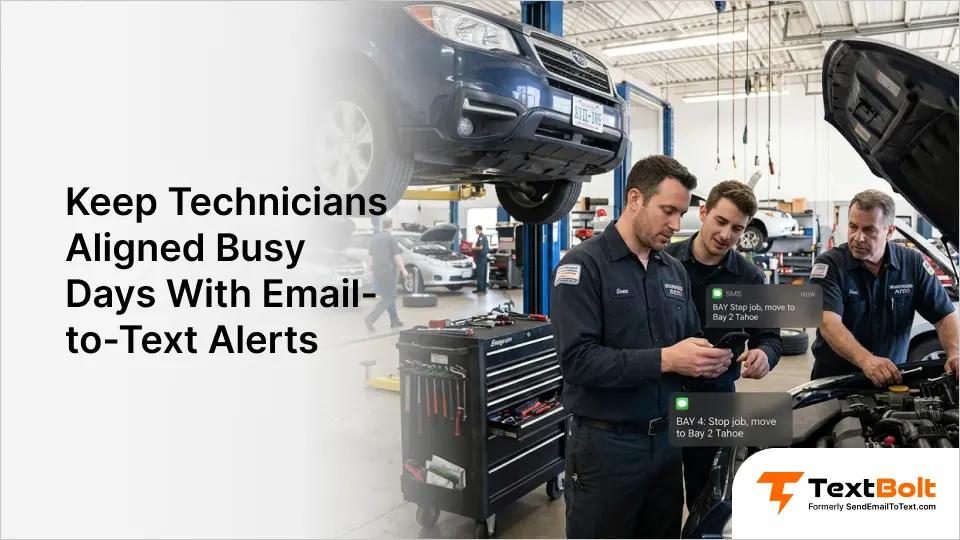
A busy service day falls apart when technicians miss a single update. Priority changes, parts arrivals, and RO modifications get lost in the noise of impact wrenches and engine lifts.
When your service advisor sends an update and three techs never see it, you get wasted flat-rate hours, frustrated customers, and cars sitting idle on lifts. Internal communication breakdowns cost dealerships and independent repair shops real revenue every week.
Email-to-SMS alerts turn your service desk emails into text messages that reach technicians directly on their phones. No apps to install, no training sessions, no pulling techs off the floor to stare at a screen.
This guide covers why shop floor communication fails, how email-to-text alerts fix it, and best practices for keeping every bay productive during your busiest days. It’s a proven automotive text messaging approach that keeps your entire team in sync.
Why Shop Floor Updates Never Reach Your Technicians
Shop floor communication breaks down for predictable reasons. Understanding these gaps is the first step toward keeping your team aligned.
1. Technicians Work Under Cars, Not at Desks
Most techs spend their entire shift under a vehicle or hunched over an engine bay. They do not check email, and they rarely hear announcements over compressor noise.
A message posted on the shop whiteboard or sent through your DMS might as well not exist when a tech is buried in a brake job three bays away.
2. Verbal Handoffs Get Lost in the Rush
Service advisors relay changes verbally between ROs. When the shop is running six or more jobs at once, messages get forgotten, garbled, or delivered to the wrong technician.
A verbal update about a priority change at 9 a.m. is completely forgotten by 10 a.m. during a Monday morning rush. There is no record and no confirmation. The problem compounds at multi-site operations, which is why many shops now coordinate customer messaging across multiple locations through one shared workflow.
3. Shop Management Apps Require Stopping Work
DMS platforms and messaging apps require technicians to stop, clean their hands, and interact with a screen. During peak hours, that interruption simply does not happen.
The result is a growing gap between what the service desk knows and what technicians on the floor are actually doing.
| Communication Method | Reaches Techs on Floor? | Requires Stopping Work? | Creates a Record? |
| No | Yes | Yes | |
| Whiteboard | Sometimes | Yes | No |
| Verbal handoff | Sometimes | No | No |
| Shop management app | No | Yes | Yes |
| SMS alert | Yes | No | Yes |
Text messages cut through because they arrive on the device already in a technician’s pocket. Most texts are read within minutes, even in a loud, busy shop.
The challenge is not getting technicians to care about updates. It is delivering those updates in a format that reaches them where they actually work.
Your Team Deserves Updates That Actually Arrive
Send internal alerts from your existing email. Technicians get SMS on their phones, no apps needed.
How Service Advisors Send Bay Updates as Text Messages
Email-to-SMS lets your service desk send a regular email that arrives as a text message on a technician’s phone. The entire process uses whatever email client your shop already runs.
Step 1: Write the Update in Your Shop’s Existing Email Client
Open Gmail, Outlook, or whichever email client your service desk uses. Write the update in the email body, keeping it concise and action-oriented.
Example: “Bay 4, hold on the Camry brake job. Customer approved full rotor replacement. Parts arriving by 11 a.m.”
Step 2: Address It to the Technician’s Phone via @sendemailtotext.com
Enter the technician’s 10-digit phone number followed by @sendemailtotext.com. For example: 5551234567@sendemailtotext.com.
Save these addresses in Google Contacts for quick access, or create a group for all your technicians to alert the entire floor with one email.
Step 3: Send the Email and TextBolt Delivers It as SMS
The email sends through TextBolt’s 10DLC-compliant system and arrives as a standard SMS on the technician’s phone. No app download, no login, no setup on their end.
If the technician replies by text, that reply comes back to your email inbox. You can continue the conversation without switching tools.
Step 4: Confirm Delivery on the TextBolt Dashboard
The TextBolt dashboard shows delivery status for each message within two to five minutes. You will know whether the alert reached the technician or needs follow-up.
Setup requires any email client, a TextBolt account set up in minutes, and your technician phone numbers saved as contacts. Technicians receive a standard text from your business number and can reply directly.
Knowing how to send alerts is only half the equation. The real question is which updates deserve a text message and which can wait for the whiteboard.
Which Shop Floor Updates Deserve an Instant SMS Alert
Not every shop communication needs a text message. SMS alerts work best for time-sensitive updates that affect a technician’s current or next job.
1. Priority and Schedule Changes That Affect Active Jobs
When a customer approves additional work or a vehicle needs to jump the queue, technicians need to know immediately. An SMS alert prevents a tech from wasting an hour on a job that is no longer the top priority. These priority shifts often trigger last-minute service reschedules that your front desk can confirm with customers via text at the same time.
2. Parts Arrival Notifications to Eliminate Counter Trips
A technician waiting on parts can start a different job, but only if they know the parts have arrived. A quick text like “Civic front struts at parts counter” keeps work flowing without unnecessary trips to check.
3. Customer Pickup ETAs That Create Bay Urgency
When a customer calls to say they are arriving in 30 minutes, the technician working on that vehicle needs to know. SMS creates urgency without requiring the service advisor to walk across the shop. Shops that proactively send vehicle repair updates to customers get fewer of these last-minute pickup calls in the first place.
4. Safety Alerts and Shift Handoff Notes
Recall notices, equipment issues, and end-of-shift handoffs all need clear documentation. A text message ensures every technician gets the alert, not just whoever walks past the bulletin board. When a job carries over, the incoming tech knows exactly where the previous shift left off.
| Alert Type | Example Message | When to Send |
| Priority change | “Bay 4: Stop current job, move to Bay 2 Tahoe” | Immediately |
| Parts arrival | “F-150 water pump at parts counter” | On arrival |
| Customer ETA | “Bay 7 customer arriving in 20 min” | On customer call |
| Safety alert | “Lift 3 out of service until inspection” | Immediately |
| Shift handoff | “Bay 5 Accord: needs test drive tomorrow AM” | Before shift end |
These alert types cover the most common causes of wasted labor in busy shops. But sending alerts is only effective if it translates into measurable efficiency gains across your bays.
How Text Alerts Cut Wasted Labor and Increase Daily Car Count
SMS alerts reduce the friction between what your service desk decides and what your technicians execute. The efficiency gains show up across multiple areas.
1. Fewer Wasted Hours When Priority Changes Reach Techs in Minutes
When a priority change reaches technicians within minutes instead of hours, they stop working on the wrong job sooner. Even saving 20 minutes per technician per day adds up to significant flat-rate hour recovery across a six-bay shop.
2. Faster Parts-to-Bay Turnaround Without Counter Trips
A text notification when parts arrive eliminates back-and-forth trips to the parts counter. Technicians get notified, pick up what they need, and get back under the hood faster.
3. Every Alert Creates a Searchable Record for Accountability
Every SMS alert creates a record in both the TextBolt dashboard and your email account. If there is a dispute about whether a priority change was communicated, you have proof with timestamps and delivery confirmation.
The Status filter on TextBolt’s dashboard lets your service desk quickly sort alerts by delivery outcome, confirming which technicians received the update and which need follow-up.
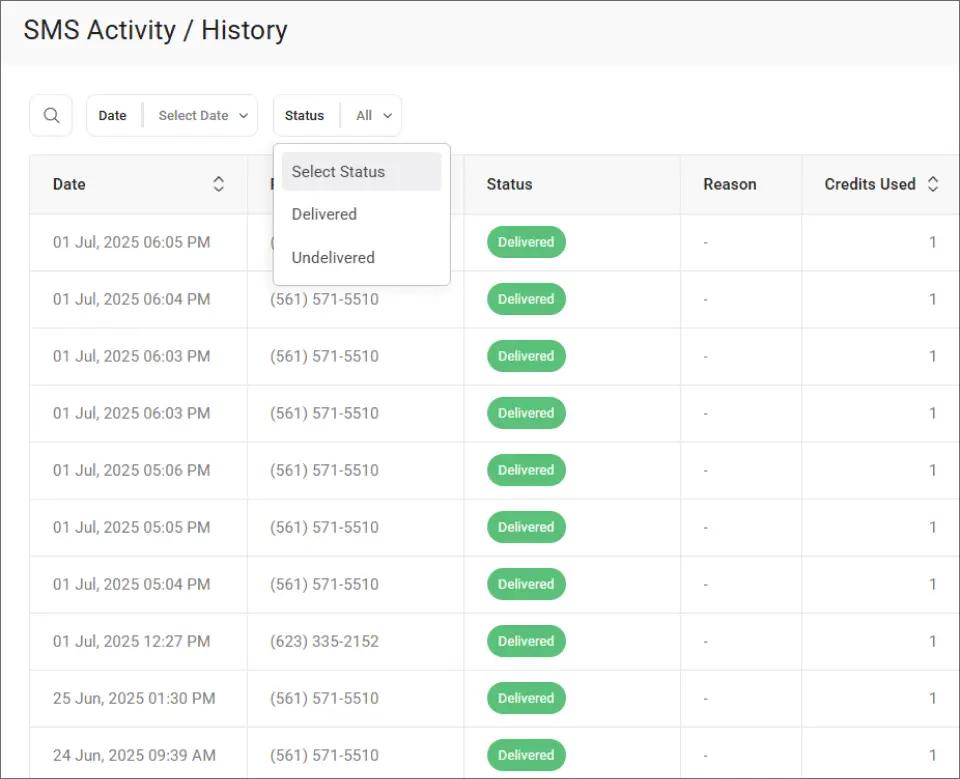
This filtering makes it easy to spot undelivered alerts and resend them before a miscommunication causes wasted labor or a missed promise time.
With TextBolt, all plans include 10 user accounts at no extra per-user cost. Your service advisors, shop foreman, and parts desk can all send alerts from their own email without additional fees. Learn how to multiple staff text customers from email without losing conversation history.
Getting the most from SMS alerts requires a few practical guidelines that keep messages clear and actionable on the shop floor.
Best Practices for Writing Effective Shop Floor Text Alerts
Effective internal SMS alerts are short, specific, and actionable. Following a few guidelines ensures your technicians actually read and respond to them.
1. Keep Messages Under 155 Characters for One-Credit Delivery
A standard SMS segment is 155 characters. Staying under this limit keeps messages to one credit and makes them easy to scan between tasks.
Good example: “Bay 6: Hold on alignment. Customer adding tire rotation. Updated ETA 2pm.”
2. Lead Every Alert With the Bay Number and Action Required
Technicians need to know immediately whether a message applies to them. Start every alert with the bay number, vehicle, or technician name, followed by what to do.
“Parts at counter” is less useful than “Grab Accord brake pads from parts counter, Bay 3 priority.”
3. Use Google Contact Groups for Shop-Wide Announcements
Save your technician phone numbers as a Google Contacts group. When you need to alert the entire floor, send one email to the group and each technician gets an individual text.
4. Set Alert Categories So Techs Know What Demands Immediate Attention
Let technicians know what types of updates will come via text. When they understand that SMS means “urgent, read now,” they treat every alert with appropriate priority.
TextBolt’s SMS history dashboard shows a clear breakdown of delivered and undelivered messages, giving your shop foreman visibility into which alerts reached the floor.
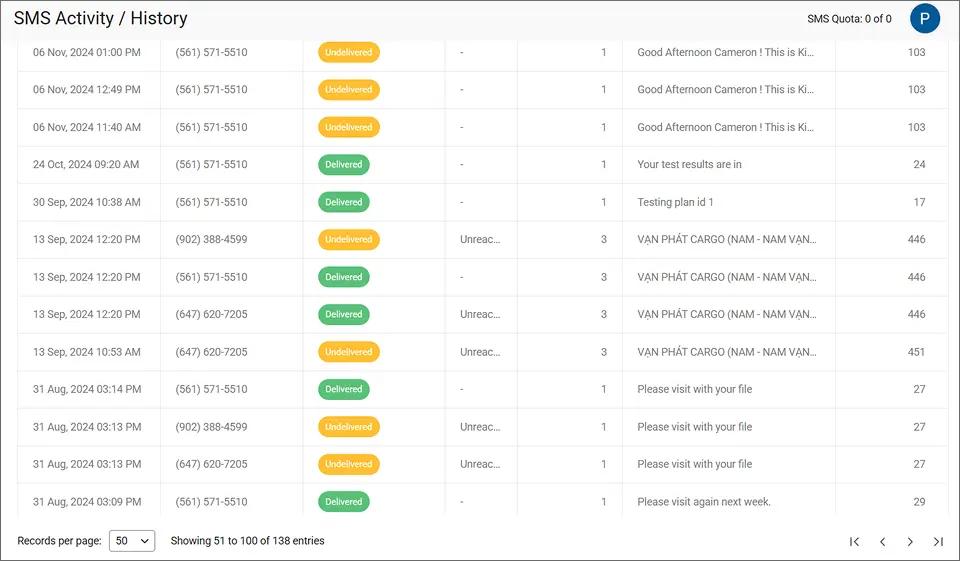
Reviewing mixed delivery results daily helps your team catch phone number errors and refine your contact list before gaps cause real problems on the shop floor.
Ready to Keep Every Bay Running on the Same Information?
Keeping technicians aligned during busy service days does not require new software or lengthy training. It requires getting the right message to the right person at the right time.
Email-to-SMS alerts let your service desk send updates from the tools they already use. Technicians receive standard text messages without downloading an app or creating an account.
TextBolt pricing starts at $29/month with 500 message credits, includes 10 user accounts on every plan, and sets up in under 30 minutes. More than 500 businesses already use it for critical internal communication.
Frequently Asked Questions
Do technicians need to install an app to receive alerts?
No. Alerts arrive as standard SMS text messages on any phone. Technicians do not need to download anything, create an account, or log in to receive updates.
Can technicians reply to SMS alerts?
Yes. When a technician replies by text, the response arrives in the sender’s email inbox. You can continue the conversation without switching tools.
How quickly do SMS alerts reach technicians?
Most messages are delivered within seconds. TextBolt provides delivery status updates in the dashboard within two to five minutes after sending.
What if a technician’s phone is off or out of range?
The message will be delivered when the phone reconnects to the network. TextBolt’s dashboard shows delivery status so you can follow up if needed.