Send SMS Alerts Directly from Grafana
Turn any Grafana alert into an instant SMS with TextBolt. Reach on-call engineers without OnCall OSS or Cloud IRM seats.
-
 Add an email contact and Grafana alerts become SMS
-
Works with your 10DLC business number
-
Replies thread back to the admin’s inbox



Works with tools you already use
Every tool below already sends email notifications. Point them at +1[phone]@sendemailtotext.com , and the emails arrive as SMS. No plugin, no webhook, no developer.
 New Relic
 Nagios
 Zabbix
 Datadog
 Prometheus
Adding Compliant SMS on Top of Grafana Alerting
Grafana routes alerts to email, Slack, Teams, webhooks, and IRM platforms, but SMS sits outside that native contact-point list. TextBolt slots in on top of your existing Grafana alerting setup. Six challenges SREs, DevOps engineers, platform engineers, and on-call engineers hit when adding SMS to Grafana alerting.

SMS Sits Outside Grafana’s Native Contact-Point List
Grafana Alerting natively supports email, Slack, Microsoft Teams, webhook, PagerDuty, OpsGenie, and more. SMS isn’t part of that built-in list. The Grafana Labs Community Forum has multiple ongoing requests for SMS contact points, and GitHub issue grafana/grafana#24546 captures the gap. TextBolt slots into the email contact point you already know how to configure, so SMS becomes one more contact-point variant on top of your Grafana setup rather than a separate stack.

Email Contact Points Don’t Wake On-Call Engineers
Grafana’s email contact point delivers alerts to an inbox. After-hours, weekend, vacation, or distracted SREs, DevOps engineers, platform engineers, and on-call engineers miss the alert because email push notifications are easy to silence. Grafana’s own documentation acknowledges this and recommends phone calls and SMS as backup options for critical alerts. Without SMS, the email contact alone isn’t enough for incident response.

Grafana OnCall OSS Was Archived in March 2026
The Grafana OnCall OSS GitHub project went read-only on 2026-03-24. Active development moved to paid Grafana Cloud IRM. Self-hosted teams that built SMS routing through OnCall OSS plus Twilio now face a forced migration: pay for Grafana Cloud IRM with per-seat licensing, rebuild SMS routing through a different stack, or lose the SMS path entirely.

Grafana Cloud IRM Uses a 2-Minute SMS Bundle Window
Grafana IRM’s notification logic bundles SMS by design: the first alert triggers an immediate text, then a 2-minute window collects additional alerts before another SMS goes out. That’s a sensible default for noisy alert streams, but for critical incidents where every notification needs to fire instantly (production server down, deployment failure, security trigger), teams route SMS through TextBolt’s email contact point on top of their existing Grafana setup so each alert lands without a bundle window.

Webhook Plus Twilio Requires Code, Maintenance, and Per-Seat Billing
The community-standard DIY SMS path is webhook to Twilio (or Vonage, Exotel, AWS SNS via Python or Flask). Each path adds developer work for the webhook handler, API key management, a separate billing relationship, no shared inbox for replies, and audit logs scattered across Grafana, the SMS provider, and individual engineers’ channels. Twilio also blocks SMS to high-risk regions, leaking those restrictions through to Grafana users

OnCall and IRM SMS Templates Have Fixed Wording
GitHub issue grafana/oncall#197 documents that the SMS body shipped through Grafana OnCall and IRM includes fixed surrounding text — references to “Grafana OnCall,” ASCII hearts, and links — with only a small dynamic string in the middle. International teams who don’t read English or regulated industries that need controlled message wording for compliance reviews shape the SMS body more flexibly through TextBolt’s email contact path, since the email body becomes the SMS verbatim.
How TextBolt Adds SMS to Grafana
TextBolt connects Grafana to a registered 10DLC business number through the email contact point you already know how to configure. No webhook handler to write, no Twilio account to bill, no Cloud IRM seat to buy, no 2-minute bundling delay.

SMS to On-Call Engineers in Seconds
Each Grafana alert email becomes an SMS within seconds, not after a 2-minute bundle window. Critical alerts (host down, deployment failed, error budget burn) reach the SRE, DevOps engineer, or platform engineer on rotation before user-facing impact compounds.

Point Your Grafana Email Contact at the Gateway
In Grafana Alerting, add an email contact point with the address +1[phone]@sendemailtotext.com. That’s the entire integration. Notification policies, label matchers, and grouping rules all work as configured. No webhook handler, no Lambda, no Apps Script.
10DLC-Compliant Business Number
TextBolt registers your sender identity with The Campaign Registry during onboarding. SMS routes through carrier-approved 10DLC infrastructure with up to 98% delivery rate, a professional toll-free business number, and no spam-folder filtering on the recipient side.

Customizable SMS Body, No Locked Template
The SMS body is whatever your Grafana alert email body is. Use Grafana’s notification templates, label substitutions, and silent fields to shape the message. No fixed “Grafana OnCall” wrapper, no ASCII hearts, no surrounding text you cannot remove.

Replies Thread Back to the Admin Inbox
When an on-call engineer replies “ack” or “rerouting to Sam” by SMS, the reply lands as an email in the inbox of whoever sent the original alert. The whole rotation sees acknowledgments without logging into a separate IRM dashboard.

No Twilio, No Cloud IRM Seat, No Python Plus SNS Hack
TextBolt is email-based. There is no webhook handler to maintain, no Twilio account to bill, no Cloud IRM per-seat licensing, no Python plus AWS SNS service to keep alive. If your Grafana instance can send an email contact, your team can send SMS.
Performance Metrics

Up to 98%
SMS Delivery Rate

Two-Way
SMS Replies to Your Inbox

Carrier-Grade
Routes & Infrastructure

Up to 10
Team Members on Shared Account
Set Up Grafana SMS in About 30 Minutes
Hands-on setup takes around 30 minutes. TextBolt handles 10DLC business verification with The Campaign Registry on your behalf in parallel. No Lambda function, no webhook handler, no Cloud IRM migration to author.
01 Sign Up for TextBolt
Create your TextBolt account using your work email. Account creation takes about 2 minutes. The account links to your domain so you can add coworkers later.
02 Choose a Toll-Free Business Number
Pick a dedicated toll-free number for outbound SMS. One-time $45/year setup fee. The number is the sender ID on every SMS Grafana sends through TextBolt.
03 TextBolt Handles 10DLC Business Verification
Provide your business details during TextBolt onboarding. TextBolt handles 10DLC business and campaign registration with The Campaign Registry on your behalf, so you don’t manage the registration process yourself. Once approved, your number is enabled for compliant business SMS.
04 Add an Email Contact Point in Grafana
In Grafana Alerting, go to Contact Points, add a new email contact, and set the address to +15551234567@sendemailtotext.com with the on-call engineer’s actual phone number. Save and attach to your notification policy.
05 Trigger a Test Alert
Use Grafana’s built-in Test button on the contact point or fire a real alert rule. The SMS should land within seconds. Check the TextBolt delivery log to confirm and view the audit trail entry.
06 Add Up to 10 Team Members
Invite the rest of your on-call rotation to the shared TextBolt account. Use Grafana notification policies to route different alerts to different recipient phone numbers (one TextBolt email contact point per phone).
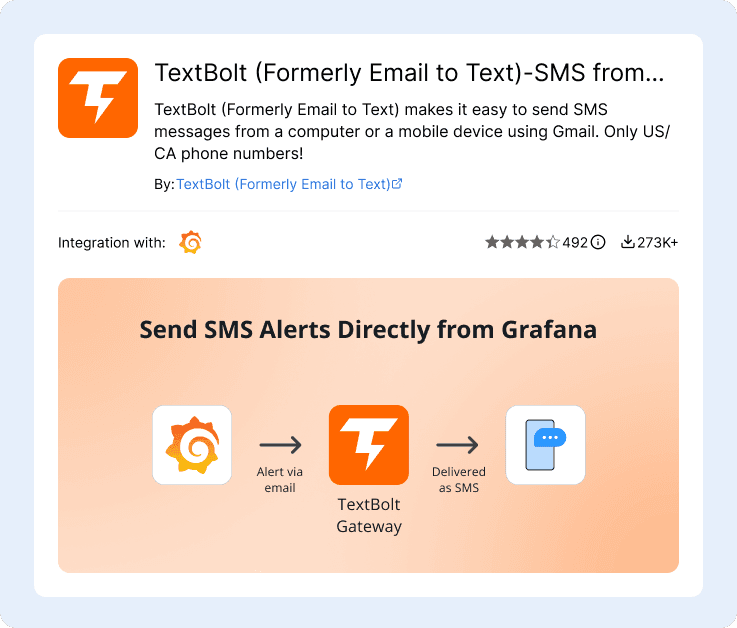
Three Ways to Send SMS from Grafana
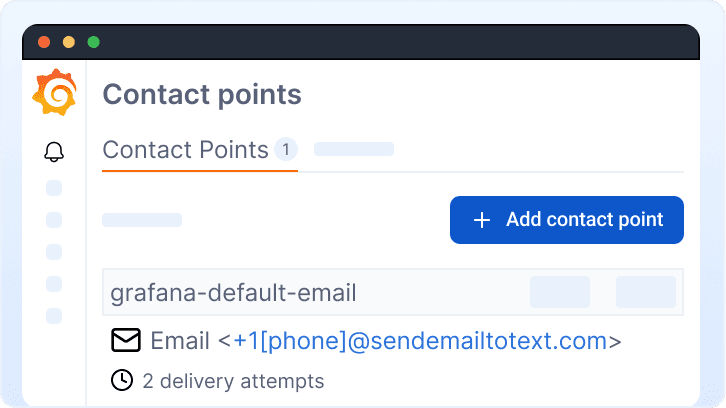
Single Email Contact Point (Most Common)
Add one email contact point in Grafana Alerting addressed to +1[phone]@sendemailtotext.com. Attach to your notification policy. Every matching alert becomes an SMS from your business number. Clean for solo on-call rotations or single-recipient escalation.
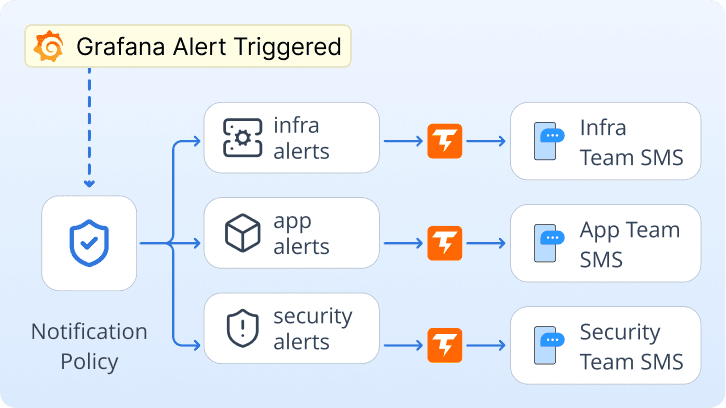
Notification Policies Routing to Per-Team Contacts
Create one TextBolt-bound email contact point per on-call rotation member or per team. Use Grafana notification policy label matchers to route infrastructure alerts to the infra rotation, application alerts to the app team, and security alerts to security. Each recipient gets only the SMS that match their team.
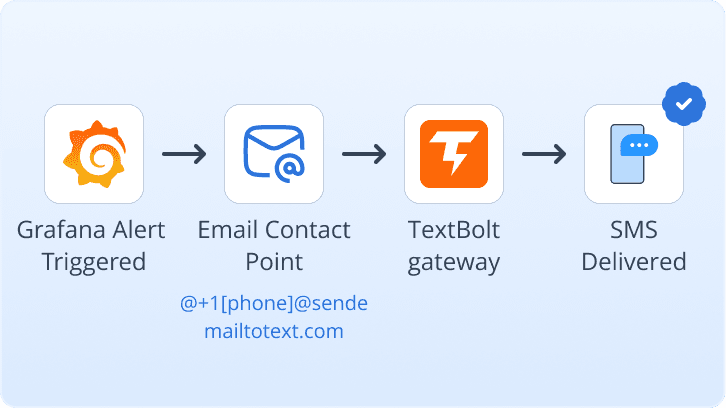
Migrating From Grafana OnCall OSS or Cloud IRM
Replace your existing Twilio webhook contact in OnCall OSS with a TextBolt email contact. Same notification policies, same alert rules. The SMS body now reflects your Grafana template, not the locked OnCall wrapper. No Cloud IRM seat needed, and the OSS archive ceases to be a problem
Grafana Monitoring Workflows That Use TextBolt SMS
Six common Grafana monitoring categories where SMS to on-call engineers replaces a Twilio webhook handler, a per-seat IRM platform, or an unread email alert. Each links a Grafana alert rule to an on-call phone in seconds.
Server Monitoring
CPU saturation, memory pressure, disk-full thresholds, and host-down alerts from Node Exporter or your server monitoring stack. SMS the on-call SysAdmin or NOC operator the moment a host crosses a critical threshold.
Application Performance and APM
Request latency spikes, error rate breaches, p99 regressions, and traffic anomalies from your APM data source. SMS application engineers and SREs before user-visible degradation compounds into a full incident.
Network Monitoring
Packet loss thresholds, bandwidth saturation, link-down events, and latency spikes from SNMP exporter or ping checks. Network engineers get SMS the moment a circuit, interface, or upstream provider degrades.
Cloud Infrastructure
AWS CloudWatch, Azure Monitor, and GCP Monitoring data sources surfaced in Grafana send SMS for cloud-side incidents: instance failures, autoscaling events, billing anomalies, and managed-service disruptions.
Database Monitoring
Slow query thresholds, replication lag, connection-pool exhaustion, and storage growth from PostgreSQL, MySQL, or MongoDB exporters. Database administrators get SMS the moment a query backlog or replica falls behind.
Custom Dashboards and Business SLOs
Revenue dips, signup drops, payment-failure spikes, and SLI breaches surfaced in custom Grafana dashboards. Business and product on-call rotations get SMS for the metrics that matter to engineering leadership.

Built for Compliance and Security

10DLC Compliant

Carrier Approved

Complete Audit Trail
Grafana SMS Options: OnCall + Twilio, TextBolt, or PagerDuty
Three common paths for adding SMS to Grafana, three different mental models. Grafana OnCall plus Twilio is a build-it-yourself integration. PagerDuty and OpsGenie are full IRM platforms charging per seat. TextBolt is a gateway your existing Grafana email contact already knows how to use.
Grafana OnCall + Twilio DIY
OSS archived, Cloud IRM per-seat
The historical path: OnCall OSS plus Twilio webhook. OSS went read-only March 2026. Cloud IRM has 2-minute bundle delay, locked SMS template, and per-seat licensing. Migration ahead either way.
-
 OnCall OSS archived March 2026
-
Cloud IRM 2-minute bundle delay
-
Locked SMS body template
-
Per-seat Cloud IRM licensing
-
Twilio webhook to maintain
Recommended

$49/month (Standard plan)
Email-to-SMS gateway. Add a Grafana email contact point addressed to +1[phone]@sendemailtotext.com and the alert becomes an SMS from your business number. Replies thread back to the admin’s inbox.
-
 Up to 98% delivery rate
-
10DLC-compliant business number
-
Multi-user access: up to 10 team members
-
SMS in seconds, no bundle delay
-
Customizable SMS body via Grafana templates
-
Replies in admin’s inbox
PagerDuty / OpsGenie / Splunk On-Call
$19+/user/month per seat
Full IRM platforms with SMS bundled inside escalation policies, schedules, and incident management. Powerful, but per-seat pricing scales with rotation size and most teams just need the SMS path.
-
$19+/user/month, scales with team
-
Full IRM platform learning curve
-
Separate dashboard from Grafana
-
Overkill for SMS-only need
-
Account migration if vendor changes
How Teams Use TextBolt with Grafana
Three ways customers route SMS through Grafana with TextBolt: replacing OnCall OSS after archival, skipping Cloud IRM seats, and dropping Twilio webhook receivers.
Why On-Call Teams Pick TextBolt for Grafana
The numbers that matter when wiring SMS into a Grafana alerting stack.
Up to 98%
SMS Delivery Rate
30 min
End-to-End Setup
$49/mo
Standard Plan, 10 Users
4.4★
Workspace Marketplace (493 reviews)
Frequently Asked Questions
Does Grafana have native SMS support?
No. Grafana Alerting ships with email, Slack, Microsoft Teams, webhook, PagerDuty, OpsGenie, and other contact-point integrations, but SMS is not one of them. GitHub issue grafana/grafana#24546 has been open without a native fix. To send SMS from Grafana, the alerting system needs a connection to an external service like TextBolt (via the email contact point) or a custom webhook to Twilio, Vonage, or AWS SNS.
What replaced Grafana OnCall OSS for SMS after the March 2026 archive?
The Grafana OnCall OSS GitHub project went read-only on 2026-03-24. Active development moved to paid Grafana Cloud IRM. Self-hosted users have three options: pay for Cloud IRM with per-seat licensing (and accept the 2-minute SMS bundle delay and locked message template), rebuild SMS routing through a separate stack, or replace the SMS step with TextBolt’s email contact point path. TextBolt is the no-migration option: same Grafana alert rules, same notification policies, swap the OnCall + Twilio contact for a TextBolt email contact and you’re done.
How do I send Grafana alerts via SMS without Twilio or webhook code?
Sign up for TextBolt and complete onboarding (TextBolt handles 10DLC business verification with The Campaign Registry on your behalf). Once your number is approved, in Grafana Alerting add an email contact point with the address +1[phone]@sendemailtotext.com. Attach the contact point to your notification policy. Every matching alert becomes an SMS in seconds. No webhook handler, no Twilio account, no Lambda or AWS SNS service. The whole integration is the email contact point.
Can I use my existing Grafana email contact point for SMS?
Yes. The integration uses the standard Grafana email contact point, just with the TextBolt gateway address (+1[phone]@sendemailtotext.com) instead of a person’s email. Your existing notification policies, label matchers, alert grouping, and template configuration all carry over. If your Grafana instance can already send email alerts, it can send SMS through TextBolt.
Does TextBolt have the 2-minute SMS bundle delay that Grafana Cloud IRM has?
No. Grafana Cloud IRM bundles SMS by triggering an immediate first SMS, then waiting 2 minutes to bundle additional alerts into a single second SMS. TextBolt sends each alert email straight through as an individual SMS in seconds. For critical incidents (production server down, deployment failure, security trigger), the on-call rotation gets every alert immediately rather than waiting for a bundle window to close.
Can I customize the SMS body for Grafana alerts?
Yes. The TextBolt SMS body is whatever the Grafana alert email body is. Use Grafana’s notification templates, label substitutions, and silent fields to shape the message exactly the way you want. There is no fixed “Grafana OnCall” wrapper, no ASCII heart, no surrounding text you cannot remove. International teams that need translated SMS or regulated industries that need compliance-controlled wording have full control via Grafana templates.
Is Grafana SMS via TextBolt 10DLC compliant?
Yes. TextBolt registers your sender identity with The Campaign Registry as part of onboarding so SMS sent through TextBolt routes through carrier-approved 10DLC infrastructure. This satisfies FCC business SMS requirements and avoids the spam-folder filtering that hits unregistered traffic. TextBolt is not HIPAA compliant; healthcare-adjacent monitoring with PHI requirements should contact sales for Enterprise options.
Can on-call engineers reply to acknowledge Grafana alerts via SMS?
Yes. When an on-call engineer replies “ack,” “rerouting to Sam,” or any other text to a TextBolt-sent SMS, the reply lands as an email in the inbox of whoever the alert came from (typically the Grafana admin or alert-distribution mailbox). The whole rotation sees acknowledgments without logging into a separate IRM dashboard. Replies are routed reliably regardless of the carrier.
How is TextBolt different from PagerDuty or OpsGenie for Grafana alerts?
PagerDuty, OpsGenie, and Splunk On-Call are full incident-response management platforms with escalation policies, on-call schedules, postmortem tooling, and SMS bundled inside. They charge per user per month (typically $19+ per seat) and require their own dashboard and configuration. TextBolt is just the SMS path: email contact point in Grafana, SMS to the on-call engineer, replies threaded back to the admin’s inbox. If you need full IRM, the platforms make sense. If you just need SMS, TextBolt is $49/month flat for up to 10 team members and skips the platform learning curve.
How long does it take to set up Grafana-to-SMS with TextBolt?
About 30 minutes of hands-on configuration: account creation, toll-free business number selection, and adding the email contact point in Grafana. TextBolt handles 10DLC business verification with The Campaign Registry on your behalf in parallel; once the carriers approve your number, trigger a test alert and the first SMS lands in seconds.
Reach SREs, DevOps, and On-Call Engineers Without a Webhook or IRM Seat
Send SMS from any Grafana alert in about 30 minutes. No Twilio, no Cloud IRM, no Python plus AWS SNS. Just an email contact point.