Send SMS Alerts Directly from Datadog
Turn any Datadog monitor alert into an instant SMS with TextBolt. Reach on-call engineers without a PagerDuty seat.
-
 Tag any Datadog monitor and the alert becomes SMS
-
Works with your 10DLC business number
-
Replies thread back to the admin’s inbox



Works with tools you already use
 New Relic
 Nagios
 PRTG
PRTG
 Zabbix
 Grafana
 Prometheus
Adding Compliant SMS on Top of Datadog Monitors
Datadog routes alerts to email, Slack, Teams, PagerDuty, and OpsGenie, but SMS sits outside that native channel list. TextBolt slots in on top of your existing Datadog setup. Six challenges SREs, DevOps engineers, application engineers, and on-call engineers hit when adding SMS to Datadog alerting.

SMS Sits Outside Datadog’s Native Channel List
Datadog Monitors natively support email, Slack, Microsoft Teams, ServiceNow, PagerDuty, OpsGenie, VictorOps, and webhooks. SMS isn’t part of that built-in list. Datadog’s own engineering blog “Send SMS alerts with webhooks and Twilio” captures the gap and recommends a custom Twilio webhook as one workaround. TextBolt slots into the email channel you already tag monitors with, so SMS becomes one more channel variant on top of your Datadog setup.

Email Tagging Pointed at Carrier Gateways Is Broken
The lightweight workaround was tagging @[phone]@vtext.com directly in the monitor message body, sending the alert through Datadog’s email channel to a carrier gateway. AT&T retired txt.att.net in June 2025. T-Mobile took tmomail.net offline in December 2024. Verizon’s vtext.com shutdown completes by March 31, 2027. SREs and DevOps engineers who relied on that pattern have broken alerts.

The Twilio Webhook Path Requires Custom JSON Payload Maintenance
Datadog’s documented SMS path is a custom webhook to Twilio with a JSON payload mapping monitor variables to Twilio’s API parameters. DevOps engineers maintain the JSON template, manage Twilio API credentials and Auth Token rotation, and update payload mapping when Datadog monitor schemas change. Plus Twilio per-message billing on top of Datadog’s per-host pricing.

PagerDuty and OpsGenie Stack Per-Seat Costs On Top of Datadog’s Per-Host Pricing
The “real” SMS path most Datadog shops settle on is routing through PagerDuty or OpsGenie. PagerDuty starts at $10-$19+/user/month. OpsGenie starts at $9/user/month and scales to $29/user/month for Enterprise. This per-seat IRM cost stacks on top of Datadog’s per-host pricing. Engineering managers see double-billing for SMS that feels like it should be a Datadog feature.

OpsGenie Is Being Absorbed Into Jira Service Management
Atlassian announced OpsGenie capabilities are moving into Jira Service Management and Compass. SREs and DevOps engineers running Datadog → OpsGenie for SMS routing face a forced migration: stay on the deprecated OpsGenie product, switch to Jira Service Management with a different pricing model, or rebuild SMS routing through PagerDuty or another platform.

No 10DLC Compliance, No Two-Way Acknowledgment via SMS
The Twilio webhook path doesn’t produce a 10DLC-compliant audit trail by default. The IRM-routed path supports SMS-to-acknowledge for the IRM platform’s incident, but the relationship to Datadog requires the platform-specific incident-management layer. SREs and on-call engineers replying “ack” via SMS need a path that closes the loop without forcing a separate IRM platform.
How TextBolt Adds SMS to Datadog
TextBolt connects Datadog to a registered 10DLC business number through the same email tagging mechanism your monitors already use. No webhook code, no Twilio account, no PagerDuty or OpsGenie seat.

SMS to SREs and DevOps in Seconds
Each Datadog monitor alert becomes an SMS within seconds. Critical incidents (SLO budget burn, APM error rate spike, host down, log anomaly) reach the on-call SRE, DevOps engineer, or application engineer immediately, before user-facing impact compounds.

Tag the Gateway Address in the Monitor Message
In any Datadog monitor, add @+1[phone]@sendemailtotext.com to the monitor message body. Datadog’s standard email channel routes the alert to TextBolt’s gateway, which converts the email to SMS. Same monitor configuration, same tags, same template variables. One-line addition.

10DLC-Compliant Business Number
TextBolt registers your sender identity with The Campaign Registry during onboarding. SMS routes through carrier-approved 10DLC infrastructure with up to 98% delivery rate, a professional toll-free business number, and an exportable audit trail for federal-contractor and regulated cloud-engineering teams running Datadog.

No Twilio Webhook, No PagerDuty Seat, No OpsGenie Migration
Skip the JSON payload maintenance, the Twilio API credential rotation, the PagerDuty per-seat fee, and the OpsGenie-to-Jira-Service-Management migration that engineering managers running Datadog otherwise have to absorb. TextBolt is one flat monthly fee covering up to 10 team members.

Replies Thread Back to the Admin Inbox
When a SRE or on-call engineer replies “ack,” “rerouting to Sam,” or “investigating” by SMS, the reply lands as an email in the inbox of the alert sender. The whole rotation sees acknowledgments without paying for a PagerDuty seat just for the SMS-to-ack flow.

Works Across Datadog APM, RUM, Logs, Synthetics, and Infrastructure
The email tagging pattern is consistent across every Datadog monitor type: APM trace alerts, RUM session alerts, log query alerts, synthetic test failures, infrastructure metric alerts, and SLO breaches. One TextBolt account covers your entire Datadog footprint with no per-product configuration.
Performance Metrics

Up to 98%
SMS Delivery Rate

Two-Way
SMS Replies to Your Inbox

Carrier-Grade
Routes & Infrastructure

Up to 10
Team Members on Shared Account
Set Up Datadog SMS in About 30 Minutes
Hands-on setup takes around 30 minutes. TextBolt handles 10DLC business verification with The Campaign Registry on your behalf in parallel. No webhook to configure, no JSON payload to template, no PagerDuty seat to provision.
01 Sign Up for TextBolt
Create your TextBolt account using your work email. Account creation takes about 2 minutes. The account ties to your domain so you can add coworkers later.
02 Choose a Toll-Free Business Number
Pick a dedicated toll-free number for outbound SMS. One-time $45/year setup fee. The number is the sender ID on every SMS Datadog sends through TextBolt.
03 TextBolt Handles 10DLC Business Verification
Provide your business details during TextBolt onboarding. TextBolt handles 10DLC business and campaign registration with The Campaign Registry on your behalf, so you don’t manage the registration process yourself. Once approved, your number is enabled for compliant business SMS.
04 Tag the Gateway Address in Your Datadog Monitor Message
Open any Datadog monitor. In the message body, add @+15551234567@sendemailtotext.com using the engineer’s actual phone. Save the monitor. Datadog’s email channel routes the alert through to TextBolt automatically.
05 Trigger a Test Alert
Use Datadog’s “Test Notifications” button on the monitor edit page, or temporarily lower the threshold to fire a real alert. The SMS should land within seconds. Check the TextBolt delivery log to confirm.
06 Add Up to 10 Team Members
Invite the rest of your SRE and DevOps rotation to the shared TextBolt account. Tag each engineer’s TextBolt-bound recipient address in monitor messages. Use Datadog’s @-mention conditionals to route alerts to the right rotation member based on tags or severity.
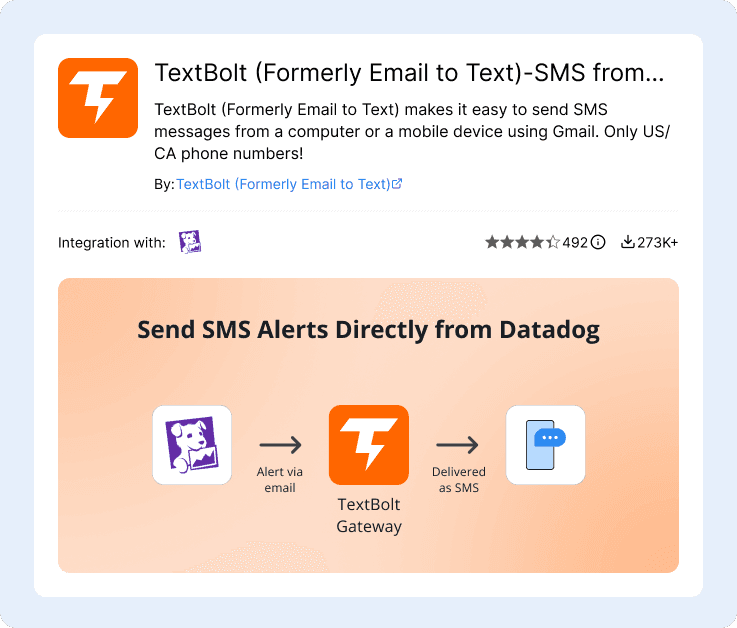
Three Ways to Send SMS from Datadog
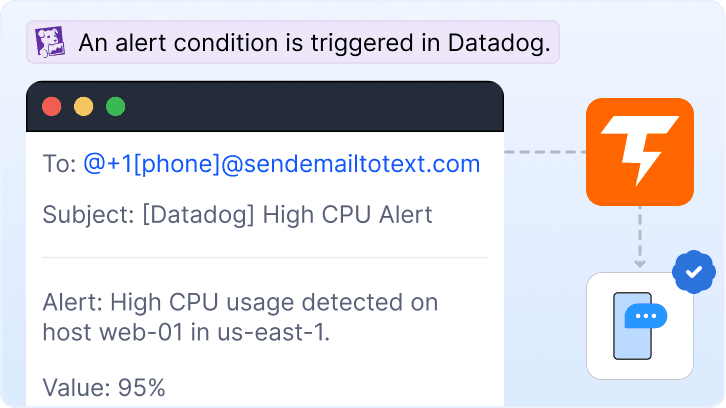
Single Email Tag in Monitor Message (Most Common)
Add @+1[phone]@sendemailtotext.com to the monitor message body. Datadog’s standard email notification routes through to TextBolt and the alert becomes an SMS. Clean for solo on-call rotations or single-recipient escalation.
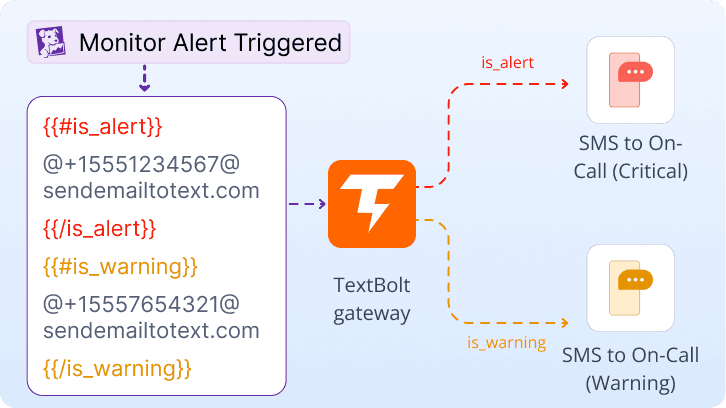
Conditional Routing With @-Mention Logic
Use Datadog’s conditional template syntax ({{#is_alert}}, {{#is_warning}}) to route critical alerts to one TextBolt recipient and warnings to another. Different SREs get different SMS based on severity, region, or tag. All without a webhook.
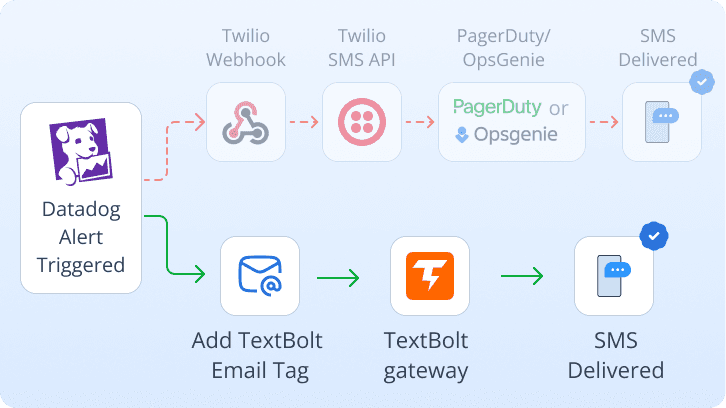
Migrating From Twilio Webhook or PagerDuty/OpsGenie
Replace the existing Twilio webhook integration or remove the PagerDuty/OpsGenie SMS step from your routing. Add the TextBolt email tag to the monitor message instead. Same alert flow, same engineers, but the JSON payload, API credentials, IRM seat fees, and OpsGenie-to-Jira migration all go away.
Datadog Monitor Types That Use TextBolt SMS
Six common Datadog monitor categories where SMS to the on-call engineer replaces a Twilio webhook, a PagerDuty seat, or a dead carrier gateway. The same email tag works across every Datadog product.
APM and Trace Monitoring
Application engineers running Datadog APM get SMS for trace error spikes, p99 latency regressions, and downstream dependency failures. The same email tag works on APM monitors, span-based monitors, and service-level objectives.
Infrastructure Monitoring
SREs and DevOps engineers running Datadog Infrastructure get SMS for host-down events, CPU/memory/disk threshold breaches, container restarts, and node-pool failures. Standard email tag in any infrastructure metric monitor.
Log Management Alerts
Application engineers get SMS for log query alerts: error rate spikes, security event patterns, ERROR-log volume thresholds, and pattern-detection anomalies. Datadog log monitors route through the same email-tag mechanism.
Synthetic and Real User Monitoring
SREs running Datadog Synthetics get SMS when API tests fail or browser tests detect user-facing regressions. Application engineers running RUM get SMS for session error spikes, frontend JavaScript exceptions, and core-web-vitals regressions.
Cloud Infrastructure (AWS, Azure, GCP)
DevOps engineers running Datadog with AWS, Azure, or GCP integrations get SMS for cloud-side incidents: instance failures, autoscaling events, billing anomalies, RDS replication lag, and managed-service disruptions surfaced through Datadog dashboards.
SLO Burn Rate Alerts
SREs running Datadog SLOs get SMS for fast-burn and slow-burn budget alerts before SLO budget exhaustion turns into a customer-facing incident. The same TextBolt-bound recipient tag works on SLO alerts as on any monitor.

Built for Compliance and Security

10DLC Compliant

Carrier Approved

Complete Audit Trail
Datadog SMS Options: Twilio Webhook, TextBolt, or PagerDuty Stack
Three common paths for adding SMS to Datadog. Twilio webhook requires custom JSON. PagerDuty/OpsGenie stack per-seat costs. TextBolt slots into the email tagging Datadog already supports.
Twilio Webhook + Custom JSON
Custom code plus per-message billing
Datadog’s documented DIY path. Wire a webhook to Twilio with a JSON payload mapping monitor variables to API parameters. Maintain the JSON template, rotate API keys, update payload mapping when Datadog schemas change.
-
 Custom JSON payload to maintain
-
Twilio API credentials and Auth Token
-
Per-message Twilio billing
-
No two-way replies to inbox
-
Schema changes break the integration
Recommended

$49/month (Standard plan)
Email-to-SMS gateway. Tag @+1[phone]@sendemailtotext.com in your Datadog monitor message. Standard email channel, standard template variables. Now compliant, audit-trail, two-way.
-
 Up to 98% delivery rate
-
10DLC-compliant business number
-
Zero IRM seats to provision
-
Multi-user access: up to 10 team members
-
Replies in admin’s inbox
-
Works across APM, RUM, Logs, Infra, SLOs
PagerDuty / OpsGenie / VictorOps
$10-$29+/user/month per seat
Full IRM platforms with native Datadog integrations. Powerful escalation and scheduling, but per-seat pricing stacks on top of Datadog’s per-host bill. OpsGenie is also being absorbed into Jira Service Management.
-
$10-$29+/user/month per seat
-
Stacks on Datadog per-host pricing
-
OpsGenie absorbed into Jira Service Management
-
Separate dashboard and config to learn
-
Overkill for SMS-only need
How Teams Use TextBolt with Datadog
Three ways customers route SMS through Datadog with TextBolt: skipping per-seat IRM stacks, replacing custom Twilio webhooks, and reaching on-call without buying another platform.
Why Datadog Teams Pick TextBolt
The numbers that matter when wiring SMS into a Datadog monitor stack.
Up to 98%
SMS Delivery Rate
30 min
End-to-End Setup
$49/mo
Standard Plan, 10 Users
4.4★
Workspace Marketplace (493 reviews)
Frequently Asked Questions
Does Datadog have native SMS support?
No. Datadog Monitors support email, Slack, Microsoft Teams, ServiceNow, PagerDuty, OpsGenie, VictorOps, and webhooks as built-in notification channels. SMS is not in the list. Datadog’s own engineering blog “Send SMS alerts with webhooks and Twilio” recommends a custom Twilio webhook integration. The cleaner path is to tag a TextBolt gateway address in the monitor message and route through Datadog’s existing email channel.
What replaced the email-tagging carrier gateway path for Datadog?
After AT&T retired txt.att.net in June 2025, T-Mobile took tmomail.net offline in December 2024, and Verizon’s vtext.com shutdown completes by March 2027, Datadog shops have three options: replace the carrier gateway tag with TextBolt’s gateway in the monitor message (closest one-line replacement), build a Twilio webhook integration with custom JSON, or pay for PagerDuty/OpsGenie. TextBolt preserves the email-tag mental model unchanged.
How do I send SMS from Datadog without Twilio webhook code?
Sign up for TextBolt, complete 10DLC business verification, and add @+1[phone]@sendemailtotext.com to your Datadog monitor message body. Save the monitor. Trigger a test alert. The SMS lands in seconds. No webhook to configure, no JSON payload to template, no Twilio API credentials to manage. Datadog’s standard email channel handles the routing.
Can I use my existing Datadog monitor message tagging for SMS?
Yes. The integration uses Datadog’s standard @email-address tag mechanism in the monitor message body. Replace the dead carrier gateway tag (@[phone]@vtext.com) with @+1[phone]@sendemailtotext.com. Existing template variables, conditional logic ({{#is_alert}}, {{#is_warning}}), and tag-based routing all work unchanged.
How is this different from PagerDuty or OpsGenie for Datadog SMS?
PagerDuty and OpsGenie are full IRM platforms with native Datadog integrations, escalation policies, on-call schedules, and SMS bundled inside, charging $10-$29+/user/month per seat. TextBolt is just the SMS path: email tag in the monitor message, SMS to the on-call engineer, replies threaded back to the admin’s inbox. $49/month flat for up to 10 team members, no platform learning curve, no IRM seat to provision. Note: OpsGenie is also being absorbed into Jira Service Management, which adds migration risk to that path.
Is Datadog SMS via TextBolt 10DLC compliant?
Yes. TextBolt registers your sender identity with The Campaign Registry during onboarding so SMS routes through carrier-approved 10DLC infrastructure. This satisfies FCC business SMS requirements and produces the audit trail federal-contractor and regulated cloud-engineering teams need. TextBolt is not HIPAA compliant; healthcare-adjacent monitoring with PHI requirements should contact sales for Enterprise options.
Can engineers reply to acknowledge Datadog alerts via SMS?
Yes. Replies to a TextBolt-sent SMS land as an email in the inbox of whoever sent the original alert. The whole rotation sees acknowledgments without paying for a PagerDuty seat. Note: TextBolt replies don’t automatically resolve or mute the Datadog monitor (Datadog’s UI or Mute API is required for that). For full SMS-to-resolve automation, route the reply through your existing Datadog tooling.
Does this work with Datadog APM, RUM, Logs, and Synthetics monitors?
Yes. The email tag mechanism is consistent across every Datadog monitor type: APM trace monitors, span-based monitors, RUM session monitors, log query monitors, synthetic test alerts, infrastructure metric monitors, SLO burn-rate alerts, security signals, and forecast alerts. One TextBolt account covers your entire Datadog footprint with no per-product configuration.
How much does it cost to send SMS from Datadog with TextBolt?
Basic $29/month (500 credits, single user), Standard $49/month (1,000 credits, up to 10 team members), Professional $99/month (2,500 credits, up to 10 team members), Enterprise custom (5,000+ credits). One-time $20 setup fee. Annual plans 20% off. Compares favorably to PagerDuty ($10-$19+/user/month) or OpsGenie ($9-$29/user/month) stacked on top of Datadog’s per-host pricing.
How long does it take to set up Datadog-to-SMS with TextBolt?
About 30 minutes of hands-on configuration: account creation, toll-free number selection, and adding the email tag to a Datadog monitor. TextBolt handles 10DLC business verification with The Campaign Registry on your behalf in parallel; once the carriers approve your number, your team can start sending SMS.
Reach SREs and DevOps Without a PagerDuty Seat
Send SMS from any Datadog monitor in about 30 minutes. Tag the gateway address in the monitor message and your existing template variables and routing logic keep working, now compliant and two-way.