
- Why IT Teams Default to Personal Phones for Client Alerts
- Security, Compliance, and Operational Risks of Personal Phone Alerting
- How Email-to-SMS Replaces Personal Phones for IT Client Alerts
- Benefits of Switching to a Business-Owned SMS Number for IT Alerts
- Best Practices for Professional IT Alert Messages via Text
- Ready to Eliminate Personal Phone Alerting From Your IT Team?
- Frequently Asked Questions
Stop Sending Client Alerts From Personal Phones
How to Stop IT Staff Using Personal Phones for Alerts With Email-to-SMS

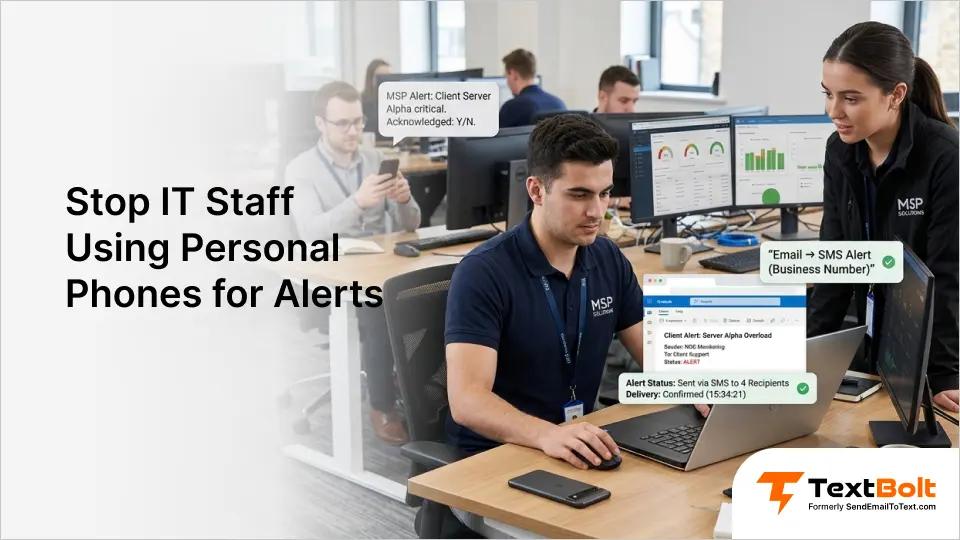
Your IT team sends client alerts from personal cell phones. It works until someone leaves the company, loses their device, or sends a message that creates a compliance problem.
Personal phone alerting puts your managed services operation at risk. When one engineer’s phone holds all client communication, you have zero visibility and no audit trail.
There is a better approach. Email-to-SMS for IT teams lets your staff send alerts from a single business-owned number. Every alert stays professional, accountable, and under company control.
This guide covers why personal phone alerting persists in IT departments, what risks it creates, and how to replace it with a business-owned SMS number your entire team can manage from email.
Why IT Teams Default to Personal Phones for Client Alerts
IT departments default to personal phones because they are fast, familiar, and already in everyone’s pocket. The pattern starts small and becomes entrenched before anyone notices.
One technician texts a client during an outage. The client responds. That personal number becomes the communication channel for an entire managed services account. Within months, client alerts scatter across five or six personal devices with no central record.
1. Outage Pressure Turns Quick Fixes Into Permanent Habits
When a server crashes at 2 a.m., nobody thinks about messaging policy. The on-call engineer grabs their phone and texts the client directly. This reaction makes sense during critical incidents. A compliant alternative is email-to-text through a managed gateway, which lets teams deliver MSP client emergency notifications from monitoring tools without routing through personal numbers.
But each shortcut reinforces a pattern. Personal phone texting stops being the exception and becomes the default workflow for the entire NOC team. What started as one urgent text becomes the standard for routine status updates.
2. Enterprise SMS Platforms Cost Too Much for Routine Alert Volume
Enterprise SMS platforms carry steep monthly fees. API solutions like Twilio require significant development time and ongoing code maintenance.
For an MSP that sends 50 client alerts per week, those options feel excessive. The team needs a simple notification channel, not a marketing automation platform.
Many IT managers recognize the problem. But the perceived cost of switching, combined with evaluating new tools, keeps teams stuck on personal phones by default.
3. Problems Stay Invisible Until a Departure or Audit Exposes Them
When alerts get delivered and clients respond, personal phone texting appears functional. There is no obvious failure pushing the team toward change.
Lost message history, privacy complaints, and SLA documentation gaps only appear when something goes wrong. A departing engineer takes client conversations with them, or a compliance audit exposes the gap.
By then, the damage is already done. Reactive fixes cost significantly more than proactive solutions. The convenience of personal phones masks real risks that grow with every text sent from an unmanaged device.
Security, Compliance, and Operational Risks of Personal Phone Alerting
Personal phone alerting exposes your business to risks that compound over time. The biggest threat is loss of control over client communication.
1. Client Data Sits on Devices Your Company Cannot Control
Every alert sent from a personal phone stores client contact information and message content on an unmanaged device. If that phone is lost, stolen, or compromised, client data goes with it.
Your company has no ability to remotely wipe those messages. For MSPs handling sensitive infrastructure for healthcare, finance, or government clients, this creates a security exposure most businesses would never tolerate.
2. Departing Engineers Take Client Conversations With Them
When an engineer leaves, their personal phone number goes with them. Clients who saved that number may continue texting someone who no longer works for you.
There is no way to transfer those conversations. Message history, client preferences, and open tickets all disappear. Your new hire starts from scratch with zero context, and clients notice the disruption.
3. No Centralized Audit Trail for Compliance or Disputes
Many industries require businesses to maintain records of client communications. Personal phone texting creates no centralized audit trail.
If a client disputes a notification timeline, you have no company-owned proof of what was sent and when. For MSPs supporting regulated industries, this gap creates serious problems during audits.
The cost of a single compliance failure often dwarfs the cost of switching to a proper notification system.
4. Zero Visibility Into Who Sent What and When
When five engineers text clients from personal phones, no manager sees the full picture. There is no dashboard showing which alerts were sent, to whom, or whether they were delivered.
One engineer sends detailed updates while another sends vague one-liners. Clients receiving alerts from random personal numbers may question whether the message is legitimate.
A business messaging platform with a dedicated number eliminates both problems. Clients recognize the number, and managers see every message.
These risks add up quietly until a single incident makes them impossible to ignore. The fix does not require a complex migration.
How Email-to-SMS Replaces Personal Phones for IT Client Alerts
Email-to-SMS routes text messages through your team’s existing email accounts using a single business-owned phone number. It eliminates personal devices from client communication entirely.
Your engineer composes a regular email in Gmail, Outlook, or any email client. They address it to the client’s phone number using a format like 5551234567@sendemailtotext.com.
The email converts to a standard SMS delivered from your company’s dedicated business number. The client sees a professional text, not a random personal number.
When the client replies, that response arrives as an email in your team’s inbox. The full conversation stays in your email to text service where it is searchable and backed up.
Any team member with email access can send or monitor alerts. If the on-call engineer is unavailable, someone else covers without the client noticing any change.
Setup takes 10 to 30 minutes for account creation, with 10DLC business verification completing within 48 hours. Your staff already knows how to send email, so there is no training required.
With the mechanics covered, here is what a business-owned SMS number delivers for your IT department.
Take Control of Your IT Alert Workflow
Stop sending client alerts from personal phones. Switch to a business-owned SMS number in minutes.
Benefits of Switching to a Business-Owned SMS Number for IT Alerts
A business-owned SMS number gives your IT department control, visibility, and professionalism that personal phones cannot match.
1. Client Conversations Stay With the Company When Staff Leave
Every message sent through your business number belongs to your company. When an employee leaves, the number and conversation history stay with you.
Clients continue texting the same number without interruption. Your replacement engineer picks up exactly where the previous one left off. No scrambling to recover relationships after a departure.
2. Every Alert Logged With Timestamps and Delivery Confirmation
Every text is logged in your email system with timestamps, sender identification, and delivery status. You know who sent which alert, to which client, and when.
This documentation satisfies compliance requirements and protects your business during disputes. Search for any message by recipient, date, or keyword.
TextBolt’s Detailed Report view lets your team verify exactly which notifications went through, including message content, character count, and delivery outcome for each alert.
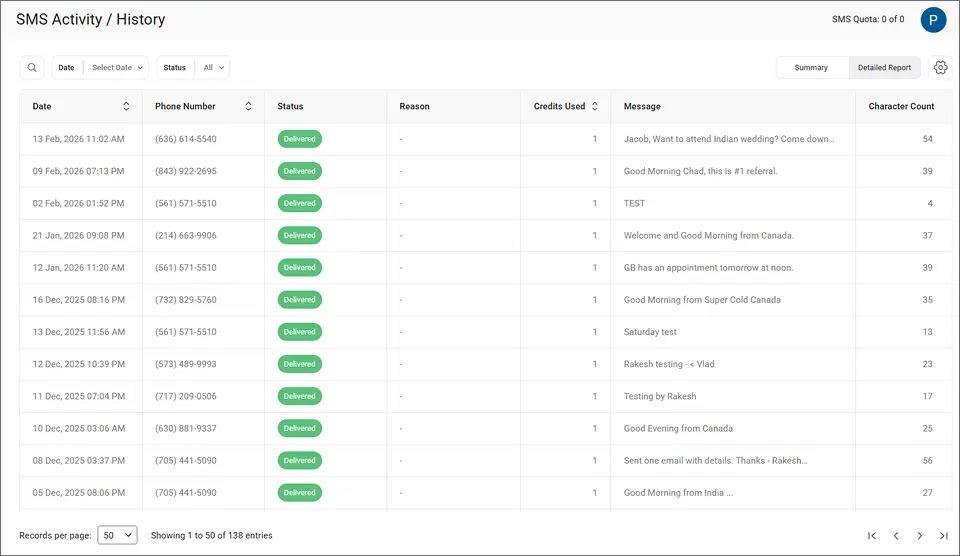
This level of tracking replaces the guesswork of personal phone alerting with documented proof of every client communication.
3. Ten Team Members Send Alerts From Their Own Email Accounts
All plans include 10 user accounts with no per-user fees. Your entire IT department can send and receive alerts from their own email accounts.
Shift handoffs become simple. The overnight engineer’s alerts are visible to the morning team without forwarding screenshots or checking someone else’s phone. Coverage gaps disappear when any team member can step in.
4. Clients Recognize Your Business Number and Trust the Alert
Clients receive alerts from a consistent business number they recognize. No more “Who is this?” responses to critical notifications.
A dedicated number reduces the chance of alerts being flagged as spam. This trust factor matters most during genuine emergencies when you need clients to read and act immediately.
Your Monitoring Tools Already Send Email. Now They Send Texts
Connect existing alert systems to SMS delivery. No API development or coding required.
Best Practices for Professional IT Alert Messages via Text
Following a few messaging guidelines ensures your IT alerts are clear, actionable, and compliant with carrier regulations from day one.
1. Keep Alerts Under 155 Characters for Single-Credit Delivery
Standard SMS messages use one credit per 155-character segment. Keeping alerts concise saves credits and ensures the full message displays without splitting.
A good IT alert includes the system name, issue, and required action. Example: “Server DB-04 disk at 92%. Investigate within 30 min.” Following this format helps when you notify the team about server downtime so recipients can act fast.
2. Standardize Templates With Priority, System, and Action Fields
Create a standard template for different alert types. Use a structure like: [Priority] [System] [Issue] [Action Required]. Consistency helps recipients quickly identify severity and required response.
Document your templates so all 10 user accounts send messages that look and feel the same regardless of who is on shift.
3. Schedule Maintenance Notifications via Gmail Send Later
For planned maintenance windows, use Gmail’s built-in Schedule send feature to deliver client messages at the right time.
Compose the alert in advance and set the delivery time. The message sends automatically without requiring someone to be online at that hour. This is especially useful for after-hours maintenance when your team is focused on the work, not notifications.
4. Reserve SMS for High-Priority Alerts to Prevent Client Fatigue
Use automated email triggers for critical system alerts that need immediate SMS delivery. Keep routine updates and non-urgent communication in email.
Matching the channel to the severity prevents alert fatigue. Clients who receive too many non-critical texts start ignoring all of them. Reserve SMS for messages that genuinely require attention.
When reviewing your alert channel, use TextBolt’s Status filter to sort messages by delivery outcome and verify which notifications reached clients.
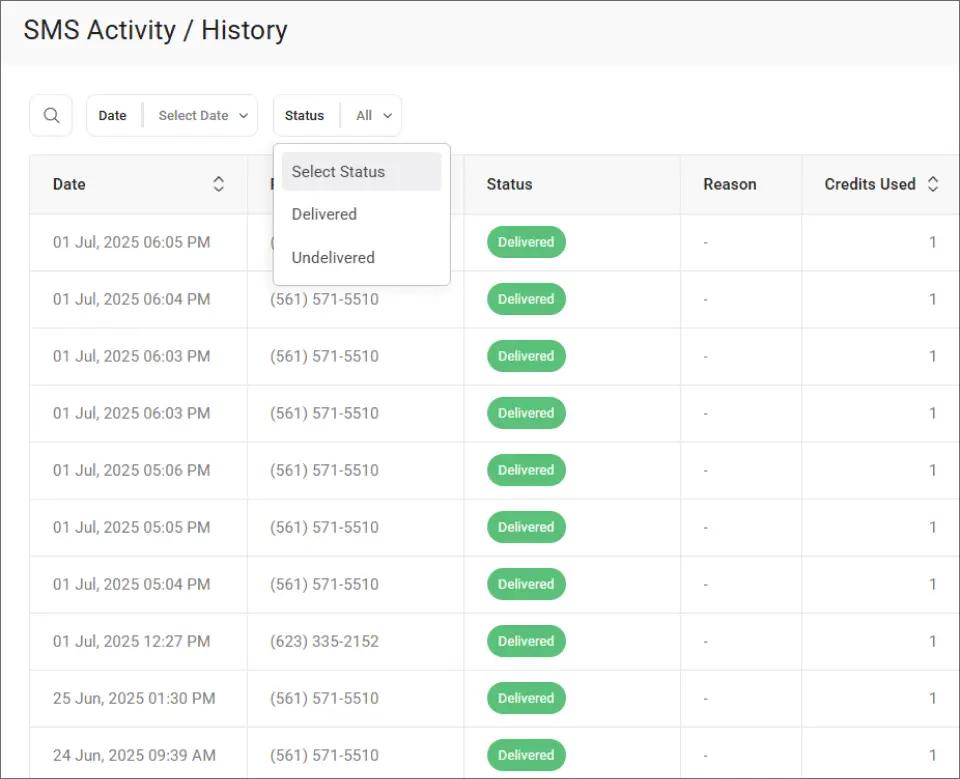
This filtering makes it easy to spot undelivered messages and resend them before a client misses a critical update.
| Practice | Personal Phone | Business Email-to-SMS |
| Audit trail | None | Complete email records |
| Team access | Single device | 10 users, any device |
| Employee departure | Number leaves with them | Number stays with company |
| Message format | Inconsistent | Standardized templates |
| After-hours coverage | Depends on one person | Any team member covers |
These practices create a reliable, professional alerting system that scales with your MSP team and protects your client relationships.
Ready to Eliminate Personal Phone Alerting From Your IT Team?
Replacing personal phones with business-owned SMS takes minutes, not weeks. TextBolt works with your existing email and monitoring tools, so there is nothing new to learn.
Your team already sends email. Now that email delivers automated text messages to clients from a professional business number. No apps, no training, no developer time.
500+ businesses trust TextBolt for professional messaging with an up to 98% delivery rate.* Plans start at $29 per month with no per-user fees.
Start your free 7-day trial with 10 message credits and take control of your IT alert workflow today.
*Delivery rates vary based on carrier policies, message content, and compliance factors.
Frequently Asked Questions
How long does it take to set up a business-owned SMS number?
Account creation takes 10 to 30 minutes. 10DLC business verification requires up to 48 hours for carrier approval. Once approved, your team starts sending alerts immediately from their email.
Can multiple IT staff members send alerts from the same business number?
Yes. TextBolt plans include 10 user accounts. Each team member sends from their own email, but clients see the same business number on every message.
What happens to client conversations when an employee leaves?
Your business number and message history stay with the company. The departing employee never owned the number. A replacement team member picks up conversations with full context in their email inbox.
Do clients need to install any app to receive alerts?
No. Messages arrive as standard SMS on any mobile phone. Clients reply by texting back, and responses appear in your team’s email inbox as regular emails.