
- Why Clients Miss IT Emergency Notifications Sent by Email
- How IT Teams Send Emergency Notifications to Clients via Email-to-SMS
- Which IT Emergency Notifications Deserve SMS Delivery Over Email
- How SMS Delivery Reduces Missed Notifications and Inbound Support Calls
- Best Practices for Sending IT Emergency Notifications by Text Message
- Ready to Ensure Every Emergency Notification Reaches Your Clients?
- Frequently Asked Questions
Stop Clients From Missing Emergency Notifications
How to Make Sure Clients See Emergency Notifications With Email-to-Text

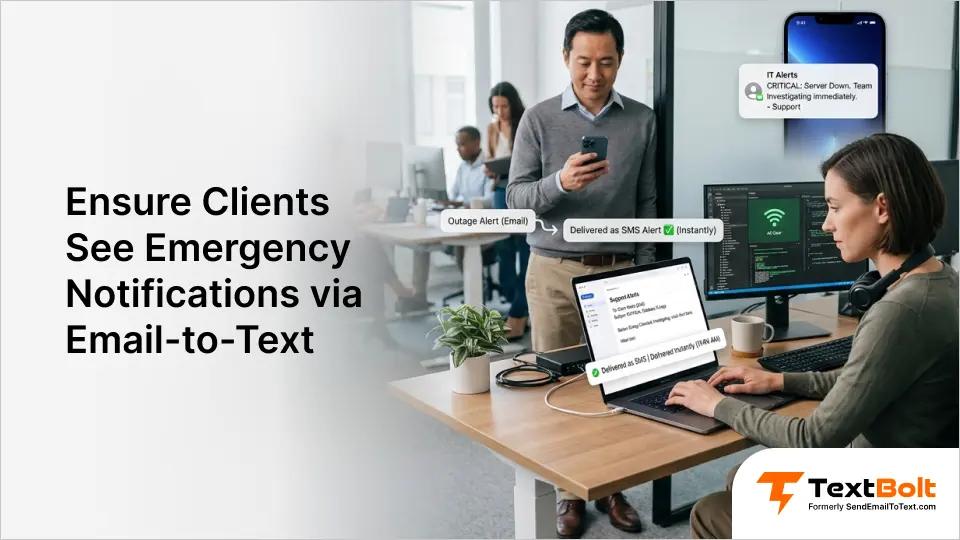
When a critical outage hits at 2 a.m., every minute matters. Your team fires off the emergency notification by email. But the client’s inbox is buried under hundreds of messages, and the alert gets lost.
Every minute of delayed communication means frustrated clients, unnecessary support calls, and damaged trust. Whether you manage network infrastructure, production servers, or customer-facing platforms, the damage compounds with every unread notification.
The problem is not your response time. Most IT teams already respond within minutes. The real problem is delivery, which is exactly why email-to-text for IT departments has become essential for client communication. Email notifications disappear into overloaded inboxes. Phone calls go to voicemail.
Email-to-SMS converts your emergency notifications into text messages that reach your client’s phone within seconds. No new software, no separate platform, no workflow changes required.
Why Clients Miss IT Emergency Notifications Sent by Email
Clients miss emergency notifications because email is overwhelmed by volume, poor timing, and aggressive inbox filtering. The problem is not your communication. It is the channel.
1. 120 Daily Emails Bury Your Midnight Emergency Notification
The average professional receives over 120 emails per day. Your emergency server outage notification competes with newsletters, meeting invites, and vendor promotions for attention.
Even well-written subject lines get lost in the noise. If a client checks email every few hours, your midnight emergency alert sits unread until morning.
By then, they have already noticed the problem themselves. That delay creates the perception your team is slow, when in reality you responded within minutes.
2. Spam Filters and Inbox Tabs Quietly Divert Automated Notifications
Modern email clients sort messages aggressively. Gmail’s Promotions and Updates tabs frequently catch automated notifications. Corporate spam filters may flag messages with technical terminology.
Your client might have filters they do not even know about. Emergency notifications end up in folders that rarely get checked.
SMS arrives directly in a phone’s message app with no sorting or filtering layer between your notification and your client.
3. After-Hours Timing Puts Your Notification at the Bottom of the Morning Queue
IT emergencies do not follow business hours. Server outages, security incidents, and backup failures often happen overnight or on weekends.
Email sent at 3 a.m. sits in a queue of unread messages. When clients open their inbox the next morning, your notification is buried below dozens of newer messages.
Emergency alerts sent via SMS bypass this timing problem entirely. Text messages create immediate visibility regardless of when they are sent.
Understanding why email fails makes the solution clear: add a channel clients actually check in real time.
How IT Teams Send Emergency Notifications to Clients via Email-to-SMS
IT teams send emergency notifications by composing a regular email addressed to a phone number instead of an email address. The process works entirely within tools you already use.
Compose an email in Gmail, Outlook, or any email client. Instead of entering the client’s email address, enter their phone number followed by @sendemailtotext.com.
To text a client at 555-123-4567, address the email to 5551234567@sendemailtotext.com. Type your emergency notification in the email body and hit send. The message arrives as a standard text.
If the client replies, their response comes back to your email inbox. You can continue the conversation without switching tools or logging into a separate platform.
Your team does not need training or new software. Anyone who can send an email can send an email to text. Any technician on shift can send notifications, not just one designated person.
Setup takes 10 to 30 minutes. After completing business verification and 10DLC approval (which takes up to 48 hours), your team can start sending.
With the basics covered, the next step is knowing which notifications deserve SMS delivery and which can stay in email.
Ready to Keep Clients in the Loop?
Send IT emergency notifications directly to your clients’ phones from your existing email. No new software to learn.
Which IT Emergency Notifications Deserve SMS Delivery Over Email
Reserve SMS for any notification where delayed client awareness would cause business impact, escalation, or lost trust. Routine weekly reports and minor patch notes can stay in email.
1. Outage Notifications That Confirm Your Team Is Already on It
When a client’s shop management system, network infrastructure, or production server goes down during business hours, they need to know immediately. An emergency outage notification via SMS confirms your team is aware and working on a resolution.
The follow-up restoration alert closes the loop. These two messages prevent the most common client complaint: “Nobody told me what was happening.”
TextBolt’s message detail view confirms exactly when each notification was delivered and what it contained, giving your team proof the client was informed.
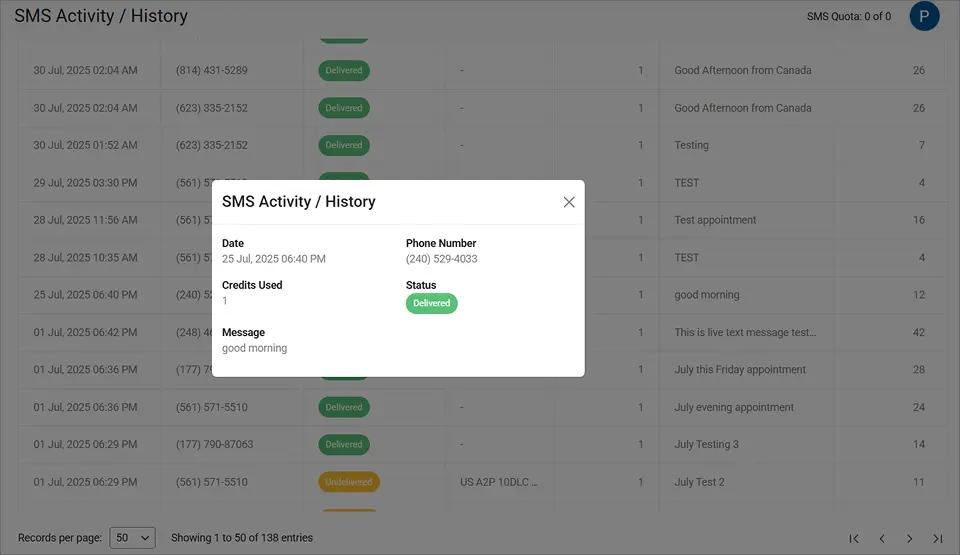
This delivery confirmation protects your team during SLA reviews and gives clients confidence that your alert process works.
2. Maintenance Window Reminders Clients Need Before Work Gets Disrupted
Scheduled maintenance on a client’s point-of-sale system, diagnostic tools, or core business software affects daily operations. Sending a reminder 24 hours before and again one hour before ensures clients plan accordingly.
Email reminders for maintenance windows often go unread until the interruption is already underway. SMS reminders give clients enough notice to save work and notify their own teams.
This small step significantly reduces post-maintenance complaints and shows respect for your clients’ schedules.
3. Security Incident Alerts Requiring Immediate Client Action
Security events require immediate action from clients. Password resets, suspicious login attempts, or data exposure incidents cannot wait in an inbox.
An emergency text message creates urgency that email does not. Clients who receive security alerts via SMS respond faster and feel more confident in your team’s vigilance.
Delayed security communication can have serious financial and legal consequences for both your client and your team.
4. Project Milestone and Deadline Shifts Clients Cannot Afford to Miss
Managed service providers and IT consultants track project milestones. When a migration completes, a new system goes live, or a deadline shifts, texting the client ensures they see it.
A brief text with the key facts keeps projects moving without the back-and-forth of “Did you get my email?”
These notification types share one trait: they all affect your client’s business directly. The visibility SMS provides changes how clients perceive your entire service quality.
How SMS Delivery Reduces Missed Notifications and Inbound Support Calls
SMS delivery ensures emergency notifications are read within minutes instead of hours or days. The downstream effects go beyond simple visibility.
1. Clients Acknowledge Outages in Minutes Instead of Hours
Most text messages are read within minutes of delivery. When you send an emergency outage notification via SMS, your client sees it almost immediately.
This eliminates the “I didn’t know” conversations that waste everyone’s time. Clients can inform their own staff, postpone affected tasks, or confirm receipt. One text replaces a chain of missed emails and voicemails.
2. Proactive Emergency Notifications Cut Inbound Support Call Volume
When clients do not see emergency notifications, they call. Those reactive calls interrupt your team’s ability to actually fix the problem.
Proactive SMS notifications reduce inbound call volume significantly. Your technicians spend more time resolving issues and less time explaining the situation to anxious clients. A well-timed emergency text can prevent dozens of incoming calls during a major outage.
3. Consistent Communication Builds Client Trust and Retention
Clients judge IT providers by communication as much as technical skill. Consistent, timely updates build confidence that your team is responsive and reliable.
Clients who feel informed are less likely to shop for alternatives. You can boost customer engagement via SMS while maintaining the accountability IT clients expect.
Every SMS sent through email-to-SMS is logged in your email account with timestamps and delivery confirmation. TextBolt’s Summary dashboard gives your team a daily overview of delivered and undelivered messages.
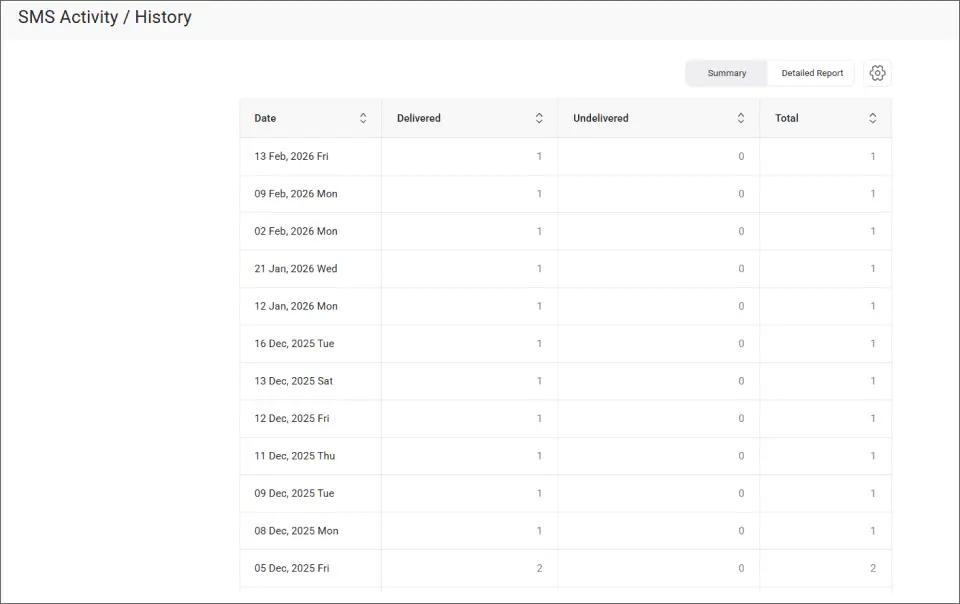
This visibility helps you catch delivery issues before they become client complaints, keeping your communication consistent across every account.
These benefits compound when your team follows a few key practices for writing and sending emergency notifications by text.
Stop Losing Clients to Missed Notifications
Turn email emergency notifications into texts your clients actually read. Plans include 10 user accounts for your IT team.
Best Practices for Sending IT Emergency Notifications by Text Message
The most effective IT emergency texts are brief, specific, and reserved for notifications that genuinely require immediate attention.
1. Keep Emergency Notifications Under 155 Characters for Single Credit Delivery
Standard SMS allows 155 characters per segment. Staying within this limit keeps your notification in a single text and uses just one message credit.
Focus on the essential facts: what happened, what is being done, and when to expect resolution. For detailed context, send a brief SMS with the key point and follow up with a full email.
2. Reserve SMS for Notifications Clients Need Within the Hour
If you text clients about every minor change, they will start ignoring SMS the same way they ignore email. Protect the channel by using it only for genuine emergencies.
A good rule: if the client would want to know within the hour, send a text. If it can wait until their next email check, keep it in email. This discipline keeps SMS as your “signal through the noise” channel.
3. Include the Next Step So Clients Know Whether to Act or Wait
Every emergency notification should tell the client what happens next. “Server restored. No action needed.” is more useful than “Server restored.”
When action is required, be specific. “Reset your password at [URL] within 24 hours” gives the client everything they need in one message. This small addition reduces follow-up questions significantly.
4. Automate Recurring Monitoring Alerts via Gmail Filters
For monitoring alerts that trigger frequently, set up automation. Gmail filters and rules can trigger SMS notifications from email based on subject lines, senders, or keywords from your monitoring tools.
Nagios, Zabbix, PRTG, or any system that sends email alerts can automatically notify clients via text. This ensures critical alerts go out even when your team is busy troubleshooting.
| Communication Method | Client Visibility | Response Time | Audit Trail |
| Email only | Low (buried in inbox) | Hours to days | Email records |
| Phone call | High (if answered) | Immediate or missed | None |
| SMS from email | High (read in minutes) | Minutes | Email + dashboard |
| Separate SMS platform | High | Minutes | Platform only |
Adding SMS from email gives you the highest client visibility with the strongest audit trail, all without leaving your current tools.
Ready to Ensure Every Emergency Notification Reaches Your Clients?
Your clients are not ignoring you. They are drowning in email. Email-to-SMS delivery means your most important emergency notifications get read within minutes instead of sitting unread for hours.
The process fits into tools your team already uses. Compose an email, address it to a phone number, and send. 500+ businesses already use TextBolt for exactly this.
Up to 98% delivery rate.* Plans start at $29 per month with 10 user accounts and no per-user fees. Start your free 7-day trial with 10 message credits today.
Frequently Asked Questions
Can I send emergency notifications to multiple clients at once?
Yes. Use Google Contacts groups to send one email that delivers individual texts to each client. Segment clients by service tier, location, or project for targeted notifications.
Do clients need to install anything to receive emergency notifications?
No. Messages arrive as standard SMS on any mobile phone. Clients do not need an app, account, or internet connection to receive and reply.
Can I automate emergency SMS alerts from monitoring tools?
Yes. Any monitoring tool that sends email alerts, including Nagios, Zabbix, and PRTG, can trigger SMS delivery automatically through Gmail filters. No coding is required.
What happens if a client replies to an emergency notification?
The reply arrives in your email inbox as a standard email. Reply to that email and TextBolt delivers it as another SMS to the client. Full conversations stay in one place.