
- Why IT Teams Miss Critical Server Alerts
- How Email-to-SMS Converts Monitoring Alerts to Text Messages
- Text Alerts Transform Incident Response
- Connecting Your Monitoring Tools to Email-to-SMS Step by Step
- Best Practices for Server Downtime Alerts via SMS
- Ready to Protect Your Systems From Costly Downtime?
- Frequently Asked Questions
Never Miss a Critical System Alert
Notify Your Team About Server Downtime With Email-to-SMS Alerts

When a critical server goes down at 2 a.m., every minute matters. The monitoring tool fires an email alert. But the on-call technician’s inbox is buried under hundreds of notifications, and the critical message gets lost.
Every minute of undetected downtime means lost revenue, broken workflows, and frustrated customers. Whether you run customer facing applications, internal platforms, or payment systems, the damage compounds with every unanswered alert.
The problem isn’t detection. Most monitoring tools already identify failures fast. The real problem is delivery, which is exactly why SMS for IT departments has become essential. Email alerts disappear into overloaded inboxes. Phone calls go to voicemail. The same delivery gap hits client communication, which is why IT teams and MSPs increasingly use email-to-text to alert clients during IT emergencies instead of relying on inbox notifications.”
Email-to-SMS alerts convert monitoring emails into text messages that reach your team’s phones within seconds. No new software, no API development, no developer time required.
Why IT Teams Miss Critical Server Alerts
Most alerts get ignored because they arrive through channels your team has learned to tune out during high-volume periods and off-hours. Three patterns cause the most damage.
1. Routine System Emails Bury Urgent Alerts in the Same Inbox
IT teams receive hundreds of automated emails daily. Health checks, deployment logs, performance monitoring pings, and backup confirmations flood inboxes around the clock.
When a critical alert lands in that same inbox, it looks identical to every other automated message. There is no way to distinguish a downed production server from a completed backup at a glance.
By the time someone spots the alert, your customer-facing systems may have been offline for 30 minutes or more. That delay means failed transactions, broken workflows, and support tickets piling up.
2. False Positives Train Your Team to Ignore Every Notification
When monitoring tools fire alerts for every minor threshold breach, IT staff stop paying attention. A brief CPU spike on your application server generates the same notification as a complete system failure.
After weeks of false alarms, technicians start dismissing every notification reflexively. The critical alert about a downed production database gets the same reaction as a routine warning about temporary memory usage.
3. Overnight and Weekend Gaps Leave Critical Systems Unmonitored
Production systems don’t fail only during business hours. APIs process requests at midnight. Databases run backups around the clock. Payment systems and customer portals never stop.
Email-based alerts rely on someone actively checking their inbox. At 11 p.m., that is unlikely. The alert sits unread until the morning shift discovers that customers have been locked out of your platform since midnight.
SMS notifications from work email are active and immediate, demanding attention the moment they arrive on your technician’s phone.
| Notification Channel | Inbox Visibility | Off-Hours Reliability | Alert Fatigue Risk |
| Low (buried) | Poor (requires checking) | High | |
| Slack/Teams | Medium (muted channels) | Poor (notifications off) | High |
| SMS | High (phone alert) | Strong (wakes recipient) | Low |
The root cause across all three scenarios is the same: email is the wrong channel for urgent system alerts. Converting those emails to SMS changes the equation entirely.
How Email-to-SMS Converts Monitoring Alerts to Text Messages
Your monitoring tools already send email alerts when something goes wrong. TextBolt turns those same emails into SMS without API development or new software installations.
Here’s the process. Your monitoring system detects a server issue and sends its standard email alert. Instead of directing that email to an inbox, you address it to [phonenumber]@sendemailtotext.com.
TextBolt receives the email and converts it to a standard text message. The on-call technician’s phone buzzes within seconds. They read the alert, assess severity, and begin troubleshooting before users even notice.
Messages arrive from your dedicated business number, not a random carrier address. If someone replies to the text, their response arrives as a standard email in your inbox. Your team coordinates without switching apps.
The entire setup takes 10 to 30 minutes. You configure your monitoring tool to send alerts to the TextBolt address. No code changes, no API keys, no developer resources needed.
TextBolt’s SMS History Dashboard lets you verify that every alert was delivered to the right team member.
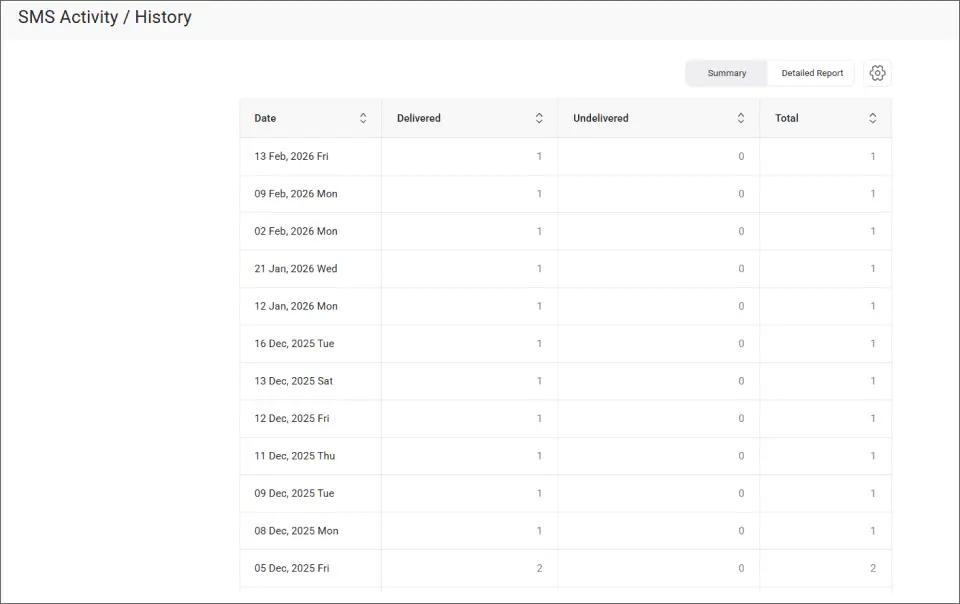
The Summary view shows daily counts of delivered and undelivered messages, giving your IT manager a quick snapshot of alert volume and delivery reliability across all systems.
With a reliable alert channel established, the benefits extend well beyond faster notification.
Your Users Can’t Wait for Someone to Check Email
Convert system alerts to instant SMS. Reach your on-call team the moment something goes wrong.
Text Alerts Transform Incident Response
Moving from email-only alerts to SMS changes how your entire team handles incidents, from detection through resolution.
1. On-Call Staff Read Alerts in Seconds Instead of Hours
Most text messages are read within minutes of delivery. Compare that to email, where critical alerts can sit unread for hours during off-hours shifts.
When your production server goes down at midnight, an SMS alert wakes the on-call technician immediately. An email alert waits until someone opens their inbox the next morning, after customers have already lost access to your platform.
TextBolt delivers messages with an up to 98% delivery rate.* That reliability matters when the alert is the difference between a five-minute fix and an overnight outage affecting thousands of users.
2. Text Messages Cut Through the Inbox Noise That Buries Email Alerts
SMS arrives in a separate channel from work email, Slack, and other collaboration tools. There’s no competing with hundreds of routine notifications in the same feed.
Your team’s phone buzzes with a distinct sound and vibration. That physical interruption is exactly what critical system alerts need to break through the noise during off-hours shifts.
3. Every Team Member on Rotation Gets the Same Alert Simultaneously
Send one monitoring email to multiple [phonenumber]@sendemailtotext.com addresses, and every technician on your on-call list receives the alert at the same time.
If the primary responder is unavailable, other team members are already aware and can step in. No more relying on one person to catch an email about a critical system failure.
All TextBolt plans include 10 user accounts with no per-user fees. Your entire on-call rotation can send and receive from the same business messaging platform.
4. Timestamped Delivery Records Support SLA and Compliance Reporting
Every SMS is logged in your email account with timestamps, delivery confirmation, and sender identification. You know exactly when each alert was sent and delivered. This also helps you stop IT staff from using personal phones for alerts by routing all communication through a centralized, auditable channel.
For teams with SLA commitments to clients or internal stakeholders, this audit trail proves your team was notified within seconds of an outage. During post-incident reviews, your team traces the complete timeline from detection through response without guessing.
The Status filter on the TextBolt dashboard lets you quickly verify which alerts were successfully delivered.
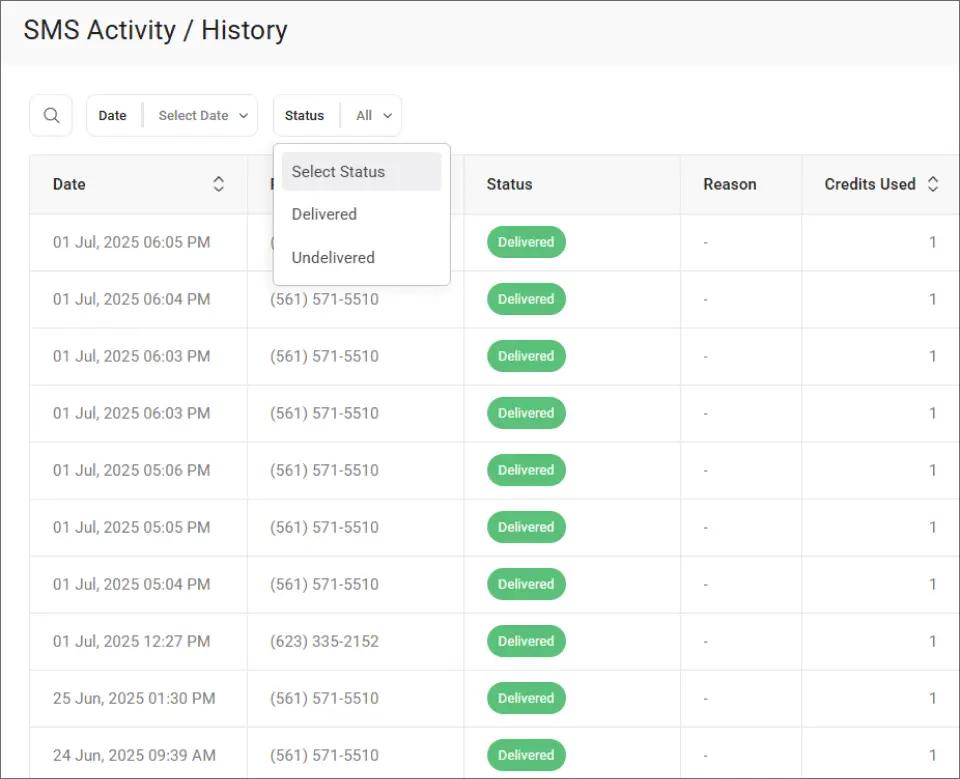
Filtering by delivery status makes it easy to confirm every critical alert reached the intended technician, and to identify any that need follow-up or resending.
Setting up this alert pipeline takes less time than you might expect. Most IT teams complete the full configuration in under an hour.
Stop Losing Hours to Missed System Alerts
Set up email-to-SMS alerts for your monitoring tools. No developers, no API, no new software.
Connecting Your Monitoring Tools to Email-to-SMS Step by Step
Most IT teams already have email-based alerting configured. Converting those alerts to SMS requires minimal changes to your existing setup.
Step 1: List Every Tool That Currently Sends Email Alerts
Document every monitoring tool that sends email notifications. Common sources include Nagios, PagerDuty, and any platform with built-in email alerting.
Check each tool’s alert configuration to confirm it supports email delivery. If a system can send an email, it can send an SMS through TextBolt.
Step 2: Create Your TextBolt Account and Complete Verification
Sign up and complete business verification. TextBolt handles all 10DLC compliance registration automatically on your behalf.
The setup process takes 10 to 30 minutes for account creation. 10DLC approval typically takes 24 to 48 hours after submission. Keep email alerting active until your TextBolt account is fully approved and tested.
Step 3: Add TextBolt Addresses to Your Alert Recipients
In each monitoring tool, add the TextBolt format as an alert recipient: [phonenumber]@sendemailtotext.com. Replace the phone number with your on-call technician’s number.
For on-call rotations, add multiple TextBolt addresses so every team member on duty receives alerts simultaneously. You can keep original email recipients as a backup.
Step 4: Format Alert Messages for SMS Delivery
Keep alert messages concise. Include the server name, environment, alert type, and severity level. Shorter messages use fewer credits and arrive faster.
Standard SMS supports 155 characters per segment. Each segment uses one credit. Review SMS character limits to plan your alert format. Strip unnecessary HTML from your monitoring tool’s email templates.
Example format: “CRITICAL: api-prod-01 down. Last seen 02:14 EST. Check immediately.”
Step 5: Test the Full Alert Pipeline During Off-Hours
Send a test alert from each monitoring tool to verify delivery. Check that messages arrive within seconds and contain the correct server and severity information.
Run a full test overnight to confirm alerts reach on-call staff when it matters most. Verify that your automated text message workflow handles both routine warnings and critical failures properly.
After confirming delivery, you can check individual message details in the TextBolt dashboard.
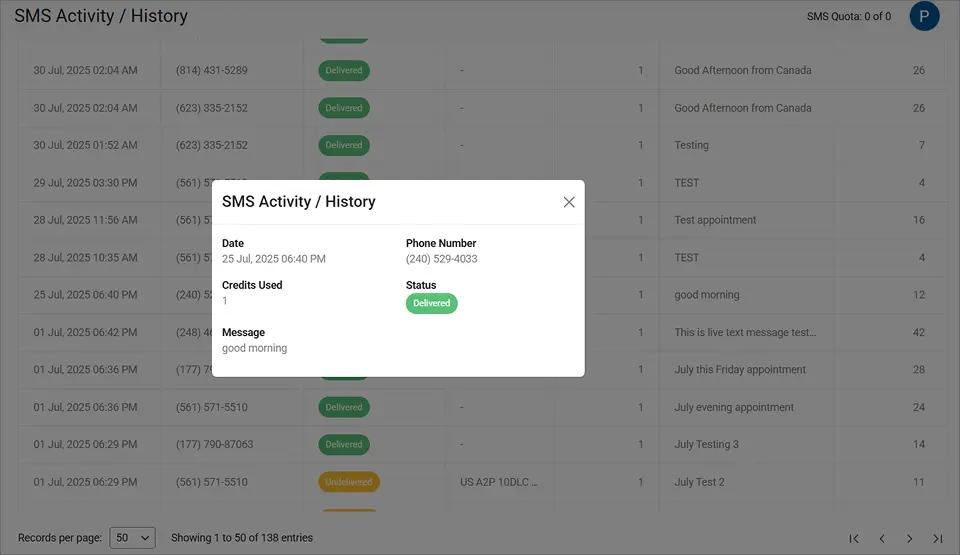
The message detail view shows delivery status, timestamps, and the full message content, confirming your test alert was successfully delivered to the right team member.
With your pipeline connected and tested, a few best practices will keep it effective as your infrastructure grows.
Best Practices for Server Downtime Alerts via SMS
The difference between a useful SMS alert and a useless one comes down to content, timing, and escalation strategy.
1. Keep Each Alert Under 155 Characters With a Clear Severity Tag
Each standard SMS segment holds 155 characters. Messages that fit in one segment use one credit and arrive as a single text on your technician’s phone.
Start each message with a severity indicator. “CRITICAL: api-prod-01 down” tells your technician everything before they unlock their phone. Consistent labeling helps teams prioritize across multiple systems.
2. Build Escalation Tiers for Primary and Backup Responders
Send initial alerts to the primary on-call technician. If the issue isn’t acknowledged within a set time window, trigger a second alert to the backup and the team lead.
This layered approach ensures coverage even when the first responder is unavailable. Configure your monitoring tool to send follow-up emails to additional TextBolt addresses at timed intervals.
3. Reserve SMS for Customer-Impacting Outages and Use Email for Routine Reports
Not every monitoring event needs a text message. Reserve SMS for incidents that require immediate human intervention and affect customer-facing systems like APIs, payment processing, or login services.
Use email for informational alerts like daily health reports, backup confirmations, and performance summaries. When technicians know every text is urgent, they respond faster to each one.
| Alert Type | Recommended Channel | Example Message |
| Production API down | SMS (immediate) | “CRITICAL: api-prod-01 down” |
| Database failure | SMS (immediate) | “CRITICAL: db-primary offline” |
| High CPU/memory threshold | SMS or email (by severity) | “WARNING: db-01 CPU at 92%” |
| Daily health report | Email only | “Daily status: all systems normal” |
| Backup completion | Email only | “Backup complete: 2.4 TB archived” |
4. Test Your Alert Pipeline Monthly Before a Real Incident Does
Run monthly tests to confirm every link in your chain works: monitoring tool sends email, TextBolt converts to SMS, technician receives the text and acknowledges.
Systems change over time. A server migration, monitoring update, or email configuration change can silently break your pipeline. Regular testing catches gaps before a real outage exposes them.
With these practices in place, your IT team has a reliable, tested alert system that works when it matters most.
Ready to Protect Your Systems From Costly Downtime?
Start with the tools you already have. Your monitoring system sends emails. TextBolt converts those emails to text messages. Your team responds in seconds instead of hours.
Email-to-SMS eliminates the gap between alert detection and human response. Your technicians get notified on their phones regardless of whether they are checking email, asleep, or away from their desk.
TextBolt works with any platform that sends email alerts. All plans include 10 user accounts with no per-user fees. Setup takes 10 to 30 minutes with no coding required.
See TextBolt pricing and start your free trial with 10 message credits included.
Frequently Asked Questions
Does TextBolt work with my monitoring tools?
Yes. Any tool that sends email alerts works with TextBolt. If it can send an email, TextBolt can convert it to an SMS.
How many SMS alerts can I send per month?
Plans range from 500 to 2,500+ monthly credits starting at $29 per month. Each standard SMS segment uses one credit. Enterprise plans offer custom volume with dedicated support.
Do I need developers to set up TextBolt for server alerting?
No. Setup takes 10 to 30 minutes with no coding required. You update your monitoring tool’s email recipient field, and TextBolt handles 10DLC compliance registration automatically.
Can I keep email alerts running alongside SMS notifications?
Yes. Keep your existing email recipients and add TextBolt addresses as additional notification targets. Most IT teams run both channels permanently for documentation and redundancy.