
- SimpleTexting at a Glance: Quick Facts
- SimpleTexting Platform Ratings
- What Is SimpleTexting?
- SimpleTexting Pricing Plans Breakdown
- SimpleTexting Pros and Cons: What Users Actually Say
- Is SimpleTexting Good for Your Business?
- SimpleTexting vs TextBolt: Feature Comparison
- Why Businesses Choose TextBolt Over SimpleTexting
- Final Verdict: Is SimpleTexting Worth It?
- Frequently Asked Questions
Send Texts Without Another Dashboard
SimpleTexting Reviews 2026: Pros & Cons and Features

Searching for SimpleTexting reviews before committing to an SMS marketing platform? Smart move. aWith SMS marketing now a $12.6 billion industry and 80% of businesses using text messaging, choosing the right platform matters more than ever.
SimpleTexting has served small businesses and marketing teams since 2010. But SimpleTexting customer reviews tell a mixed story. Some praise its ease of use. Others report delivery delays, escalating costs, and frustrating compliance issues.
This comprehensive review breaks down what real users say about SimpleTexting in 2026. We’ll cover pricing, the SimpleTexting pros and cons, common complaints, and whether it’s the right choice for your business. If you’re exploring TextBolt email-to-text alternatives that skip traditional dashboards entirely, we’ll cover those too.
SimpleTexting at a Glance: Quick Facts
| Feature | Details |
| Founded | 2010 |
| Starting Price | $39/month (500 messages) |
| Free Trial | Yes (14 days) |
| 10DLC Compliance | Yes (additional $4 registration fee) |
| Two-Way Messaging | Yes |
| Team Access | $20/month per additional user |
| Mobile App | Yes (iOS and Android) |
| Best For | Marketing campaigns, promotional texting |
| Not Ideal For | Time-sensitive alerts, multi-user teams |
Quick comparison: TextBolt starts at $29/month with 500 messages, includes unlimited team member access (up to 10 on Standard), and delivers up to 98%.
SimpleTexting Platform Ratings
Before diving into the details, here’s how SimpleTexting scores across major review platforms:
| Platform | Rating | Total Reviews |
| G2 | 4.6/5 | 300+ reviews |
| Capterra | 4.6/5 | 200+ reviews |
| GetApp | 4.6/5 | 200+ reviews |
| Software Advice | 4.6/5 | 200+ reviews |
The takeaway: SimpleTexting’s high ratings reflect users whose needs align with its marketing-focused dashboard platform. However, users with different needs migrate silently to alternatives.
Who leaves SimpleTexting:
- Time-sensitive messaging teams → Experience 30+ minute delays; switch to 10DLC-compliant platforms (TextBolt: 98% in 2-3 minutes)
- Growing teams → Find $20/month per-user fees unsustainable; adopt platforms with free team access (TextBolt includes unlimited users)
- Email-workflow organizations → Move away from dashboard context-switching (TextBolt: send/receive directly from Gmail)
- Appointment-based businesses → Lose revenue from delayed reminders; switch to reliable platforms
- Scaling businesses → See costs escalate quickly; migrate to fixed-price platforms
This isn’t a quality issue it’s a use-case mismatch. SimpleTexting excels for marketing campaigns. For operational messaging, teams, or email integration, you’re fighting its design philosophy.
Different platforms solve different problems: SimpleTexting handles marketing campaigns, TextBolt handles operational messaging + teams, Twilio handles developer flexibility. Choose based on YOUR needs.
What Is SimpleTexting?
SimpleTexting is an SMS marketing platform designed primarily for small to mid-sized businesses in the United States and Canada. The platform focuses on mass texting, promotional campaigns, and customer engagement through text messaging.
Founded in 2010, SimpleTexting positions itself as a user-friendly solution for businesses that want to run SMS marketing campaigns without technical complexity. For businesses that prefer working from their existing email inbox, sending texts from a computer offers a simpler alternative to dashboard-based platforms like SimpleTexting.
Core SimpleTexting Features
1. Mass Text Messaging Send promotional messages to your entire subscriber list with a few clicks. SimpleTexting supports bulk messaging with basic personalization options.
The limitation: Users report messages can get stuck in monitoring queues for 30+ minutes during high-volume periods.
2. Two-Way SMS Conversations Receive and respond to customer replies directly within the platform dashboard.
The limitation: Requires logging into a separate platform rather than managing conversations from your existing email inbox.
3. Automated Text Responses Set up autoresponders for common inquiries and drip campaigns for subscriber nurturing.
The limitation: Automation features are basic compared to dedicated marketing automation platforms.
4. Scheduled Message Sending Queue messages to send at specific times for optimal engagement. If you need scheduled SMS from Gmail, you’ll need a different solution.
The limitation: Some users report scheduled messages arriving late due to delivery delays.
5. Contact Segmentation Organize subscribers into groups for targeted messaging campaigns.
The limitation: Segmentation options are functional but not as sophisticated as enterprise platforms.
Who SimpleTexting Is Built For
According to the company and SimpleTexting reviews, the platform targets:
- Marketing managers running promotional campaigns
- Small business owners handling customer communication
- Real estate agents
- Restaurants and food service
- Nonprofits (they offer nonprofit discounts)
- Event coordinators
Looking for a Simpler Alternative?
Skip the dashboard entirely. TextBolt lets you send texts directly from Gmail or Outlook.
SimpleTexting Pricing Plans Breakdown
One of the most common questions in SimpleTexting reviews concerns pricing. The platform uses a tiered monthly subscription model based on message volume. For a deeper dive into costs and hidden fees, check our complete SimpleTexting pricing plans guide.
Current SimpleTexting Pricing (2026)
| Messages Per Month | Monthly Cost | Cost Per Message |
| 500 | $39 | $0.078 |
| 1,000 | $59 | $0.059 |
| 2,000 | $89 | $0.045 |
| 3,000 | $119 | $0.040 |
| 7,500 | $239 | $0.032 |
| 50,000+ | Contact sales | Custom |
TextBolt Pricing Comparison
| Plan | Monthly Cost | Annual Cost | Messages Included | Team Members |
| Basic | $29/month | $23.20/month | 500 | 1 |
| Standard | $49/month | $39.20/month | 1,000 | Up to 10 |
| Professional | $99/month | $79.20/month | 2,500 | Up to 10 |
| Enterprise | Custom | Custom | 5,000+ | Unlimited |
Key differences: TextBolt includes team members free (Standard+), credits never expire, and there are no hidden telecom fees. Check TextBolt pricing page for more details.
Additional Costs to Consider in SimpleTexting Pricing
Beyond the base subscription, users report several additional fees:
- One-time carrier registration fee: $4
- Additional phone numbers: $10/month each
- Additional team members: $20/month per user
- Overage charges: Varies by plan
The per-user fee is particularly significant for businesses with multiple staff members who need to send texts. A five-person team adds $80/month to your bill.
SimpleTexting Pros and Cons: What Users Actually Say
To provide a balanced SimpleTexting review, let’s examine what users genuinely appreciate and where they encounter problems.
What Users Like About SimpleTexting
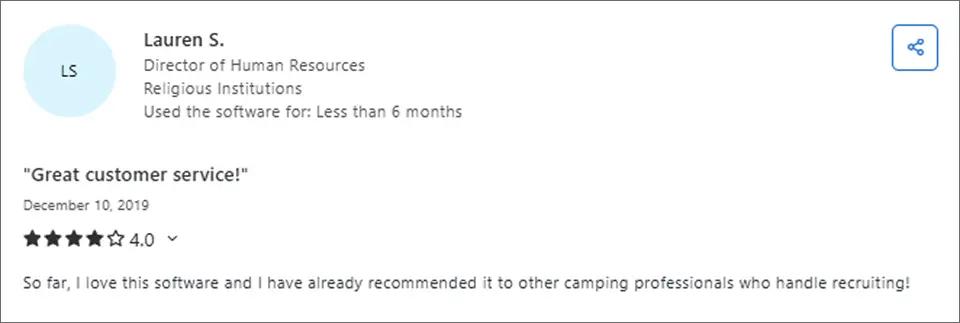
1. Easy-to-Use Interface
The most consistent positive feedback concerns usability. Users frequently describe the interface as intuitive and accessible, even for those new to SMS marketing.
2. All Features on All Plans
Unlike many competitors that gate advanced features behind expensive tiers, SimpleTexting includes most features on every plan:
- Automations and autoresponders
- Unlimited segmentation
- Two-way messaging
- Analytics
This all-inclusive approach appeals to budget-conscious businesses who want automation without paying enterprise prices.
3. Solid Mobile App
SimpleTexting offers a mobile app with full functionality matching the desktop platform. Users can manage campaigns, respond to customers, and monitor analytics from their phones.
4. Free Trial Available
New users can test the platform with a free trial before committing. This reduces risk when evaluating whether SimpleTexting fits your needs.
Common SimpleTexting Complaints and Issues
Now for the critical part of any honest SimpleTexting review. User complaints reveal patterns that potential customers should consider carefully.
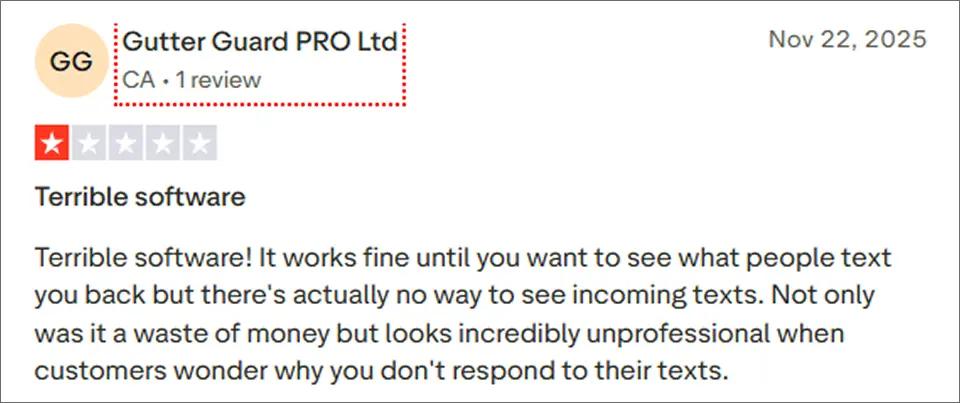
Incoming Message Visibility Issues
Some users report that incoming replies are not clearly visible or easy to manage within the dashboard.
This lack of visibility can result in missed customer responses, delayed follow-ups, and a poor communication experience, making businesses appear unresponsive or unprofessional.
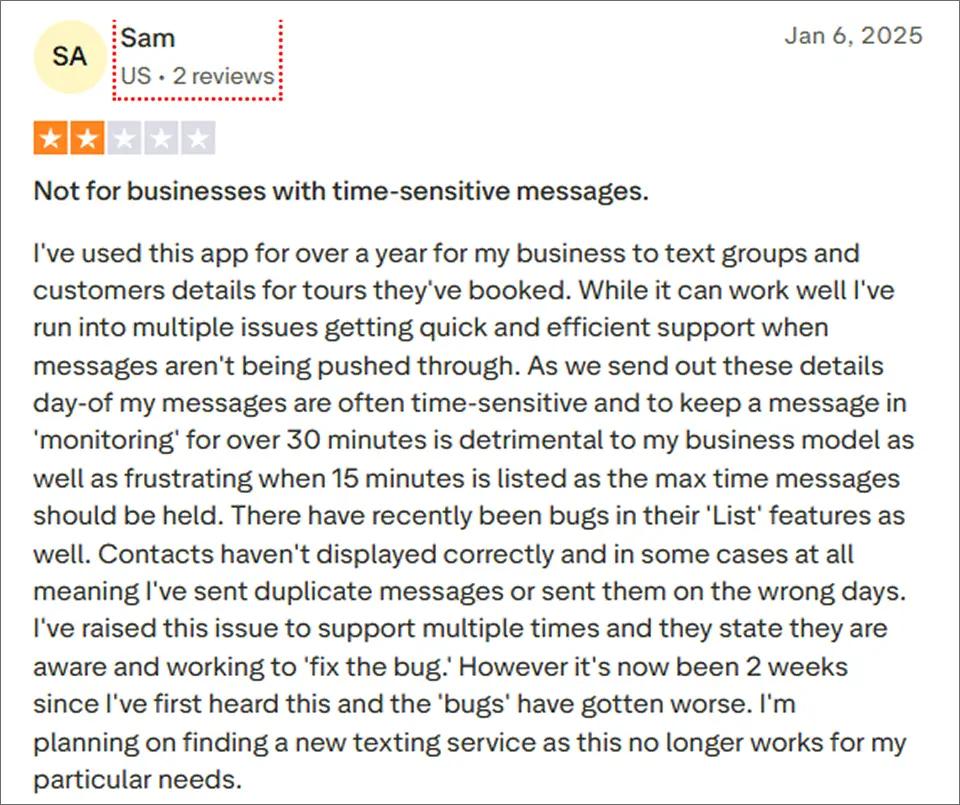
Not Reliable for Time Sensitive Messaging
Users report delays in message delivery and prolonged “monitoring” states, which can be problematic for businesses that rely on real-time or day-of notifications.
Customer Support Concerns
Reviews on Capterra and other platforms frequently mention support issues:
- Slow response times to tickets
- Unfulfilled promises from support staff
- Denied refund requests despite money-back guarantees
- Difficulty reaching human support for urgent issues
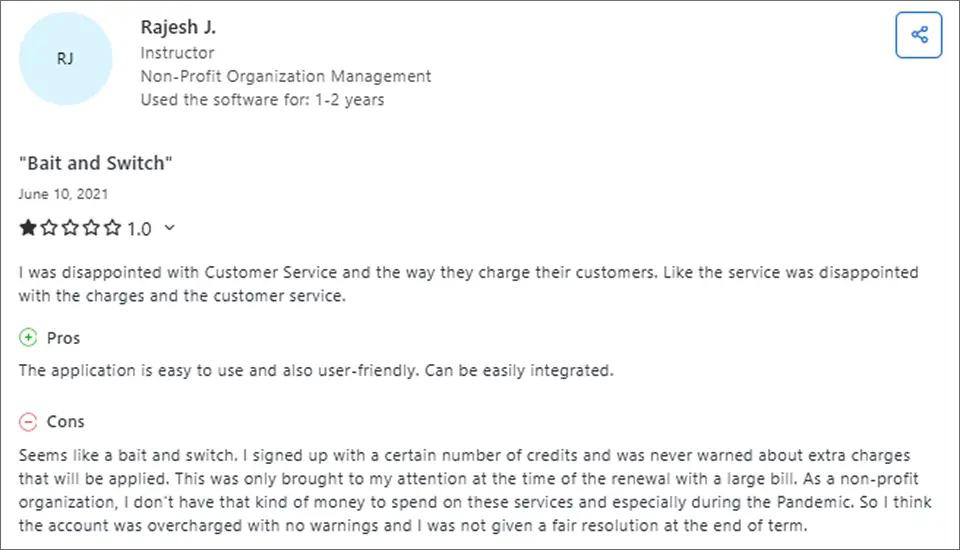
Unexpected Overage Charges
Some users report being allowed to exceed their monthly message limits without clear or immediate warnings. When usage goes beyond the plan allowance, overage charges can accumulate quietly over time, resulting in unexpectedly high bills. This lack of real-time visibility makes it difficult for businesses to monitor usage and control messaging costs, especially when multiple staff members have access to the account.
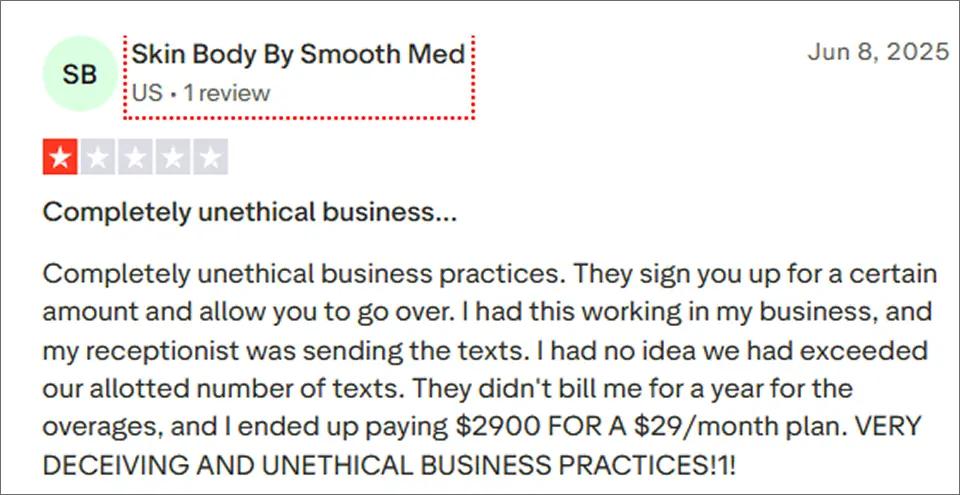
Because of these issues, many businesses explore other platforms. We’ve broken down the top options in our guide to the best SimpleTexting alternatives, including tools built for time-sensitive alerts, multi-user teams, and email-based workflows.
Tired of Delivery Delays and Per-User Fees?
TextBolt delivers up to 98% delivery rates with 10DLC compliance handled automatically. Plus, your entire team is included at no extra cost.
Is SimpleTexting Good for Your Business?
Based on comprehensive SimpleTexting reviews, here’s an honest assessment of who should and shouldn’t consider the platform.
SimpleTexting May Be a Good Fit If:
- You primarily run marketing campaigns (not time-sensitive alerts)
- You have a single user or small team (to avoid per-user fees)
- You can tolerate occasional delivery delays
- You prefer a traditional dashboard-based SMS platform
SimpleTexting May Not Be Ideal If:
- You send time-sensitive messages (appointments, alerts, reminders)
- You have multiple team members who need access
- You’re migrating from carrier gateways like AT&T, Verizon, or T-Mobile and want familiar email-to-text workflow
- You need guaranteed rapid delivery for critical communications
- You work in healthcare or IT where reliability is paramount
- You want per-message costs to stay predictable at scale
SimpleTexting vs TextBolt: Feature Comparison
If the common complaints concern you, here’s how TextBolt addresses these specific pain points as a SimpleTexting alternative:
| Feature | TextBolt | SimpleTexting |
| Works from email (Gmail/Outlook) | ✓ | ✗ |
| Starting price | $29/month | $39/month |
| Messages included | 500 | 500 |
| Additional team members | ✓ Included free | $20/month each |
| Setup time | 30 minutes | 1-2 hours |
| Learning curve | Zero | Moderate |
| 10DLC registration | ✓ Included | $4 additional |
| Delivery rate | Up to 98% | Variable |
| Two-way messaging | ✓ | ✓ |
| Mobile app | Via email app | Dedicated app |
| Best for | Notifications, reminders | Marketing campaigns |
If you want a deeper, side-by-side breakdown of pricing, delivery reliability, team access, and workflows, read our full SimpleTexting vs TextBolt comparison.
Why Businesses Choose TextBolt Over SimpleTexting
No New Platform to Learn
TextBolt works directly from your existing email. Send a text by composing an email to phonenumber@sendemailtotext.com. Your team already knows how to use email, so there’s zero training required.
Entire Team Included Free
SimpleTexting charges $20/month per additional user. With TextBolt, anyone on your team can send texts from their email at no extra cost. When Sarah’s out sick, Tom can cover appointment reminders seamlessly.
Up to 98% Delivery Rate
TextBolt uses 10DLC-registered business messaging routes for carrier-approved delivery. No more wondering if your messages actually arrived.
Final Verdict: Is SimpleTexting Worth It?
SimpleTexting reviews paint a picture of a platform that works well for basic SMS marketing but struggles with reliability, costs at scale, and customer support. Here’s the bottom line:
Choose SimpleTexting If:
- You primarily run marketing campaigns and promotional texts
- You have a single user or very small team
- You can tolerate occasional delivery delays
- You prefer a traditional dashboard-based platform
Choose TextBolt If:
- You send time-sensitive messages (appointments, alerts, reminders)
- You have multiple team members who need access (unlimited users included free)
- You want to work from your existing email inbox (Gmail/Outlook)
- You need reliable delivery rates (up to 98%)
- You’re migrating from carrier gateways and want familiar workflow
- You work in healthcare or IT where reliability matters
Ready to try a simpler approach? TextBolt lets you send texts directly from Outlook or Gmail. Setup takes 30 minutes. See pricing or learn how it works.
Frequently Asked Questions
Does SimpleTexting have hidden fees?
Beyond the monthly subscription, SimpleTexting charges $4 for carrier registration, $10/month for additional phone numbers, and $20/month per additional team member. Users should factor these into total cost calculations. See our detailed SimpleTexting pricing breakdown for the full picture.
Can I use SimpleTexting for appointment reminders?
Yes, but some users report delivery delays that make time-sensitive reminders problematic. For reliable appointment reminders via email-to-SMS, consider platforms with higher delivery rate guarantees.
Is SimpleTexting HIPAA compliant?
SimpleTexting is not explicitly HIPAA compliant. Healthcare providers should verify compliance requirements directly with the company and consider healthcare-specific solutions.
Where can I find more SimpleTexting reviews?
You can find SimpleTexting customer reviews on G2, Capterra, GetApp, and Software Advice. These platforms aggregate verified user experiences.