
- What is SMS Deadline Reinforcement?
- Why do students keep missing deadlines despite email reminders?
- How do SMS reminders improve deadline compliance?
- 1. Phone Vibration Creates a Physical Interruption That Demands Immediate Attention
- 2. Students Check Texts Within Minutes — Emails Sit Unread for Days
- 3. One Text, One Deadline, One Action — No Inbox Sorting Required
- 4. Standard SMS Works on Any Phone With No App Download or Account Creation
- 5. Text Messages Trigger Higher Urgency Response Than Identical Email Content
- How Do You Set Up SMS Deadline Reminders From Your Existing Email?
- 1. Send the First Reminder 48-72 Hours Before and a Final Warning at 24 Hours
- 2. Lead With Assignment Name, Exact Deadline With Time Zone, and Submission Link
- 3. Trigger Reminders Automatically From Google Calendar, Outlook, or Your LMS
- 4. Keep Messages Under 160 Characters so Students Read and Act Immediately
- How Does Email-to-Text Integrate With Canvas, Blackboard, and Gmail?
- 1. Faculty Compose the Same Reminder Email — It Just Delivers as SMS Instead
- 2. LMS Deadline Notifications Route Through Email-to-Text as Automatic Texts
- 3. Calendar Events Trigger SMS Reminders That Repeat Weekly Without Manual Work
- 4. Any Faculty Member Can Send Reminders From Their Own Inbox — No Bottleneck
- Best Practices for SMS Deadline Reminders
- 1. Collect Student Opt-in During Registration With a Simple Syllabus Acknowledgment
- 2. FERPA Limits What Academic Information You Can Include in Text Message
- 3. Set Clear Expectations on Whether SMS Is One-Way or Conversational
- 4. Same Timing Pattern for Every Deadline Builds Student Trust and Reliance
- 5. Snow Days and Portal Outages Are When SMS Urgency Matters Most
- How Do You Measure Whether SMS Reminders Are Working?
- 1. Document Your Current Late Submission Rate Before Sending a Single Text
- 2. Track Late Submission Decrease, Opt-in Rates, and Faculty Time Savings After Launch
- 3. High Opt-Out Rates Signal Your Messages Are Too Frequent or Poorly Timed
- 4. Compare Semester-Over-Semester Data to Refine Which Deadlines Get SMS Reinforcement
- Reduce Missed Academic Deadlines With TextBolt
- Frequently Asked Questions
Stop Letting Students Miss Deadlines Because They Miss Emails
How Schools Use Email-to-Text to Reduce Missed Academic Deadlines

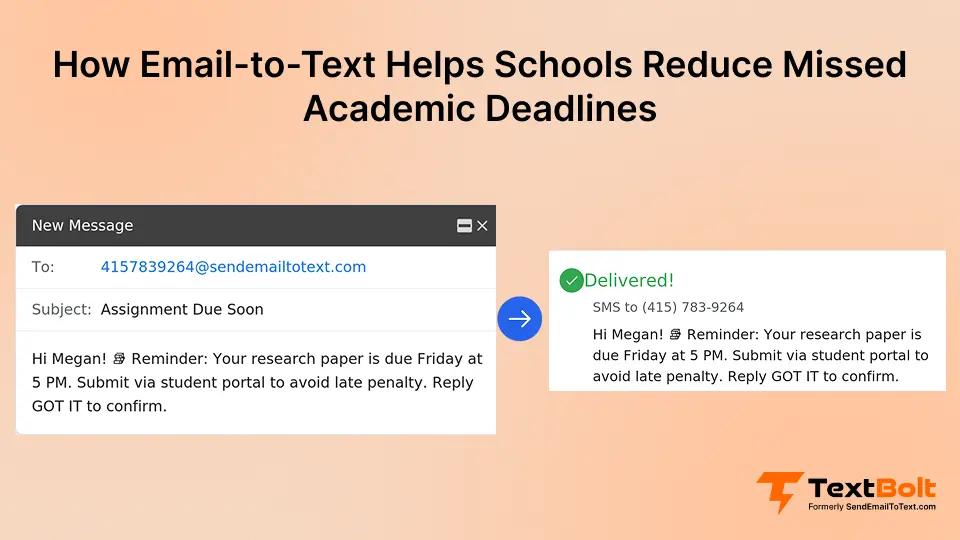
Your students swear they set calendar reminders, but assignments still get forgotten at 2 AM on deadline day. You’ve sent email reminders, posted LMS announcements, and added calendar notifications. Still, student inboxes are battlefields where dozens of daily notifications bury your deadline alerts under promotional emails and social media pings.
When your students miss deadlines, it affects their grades, delays graduation timelines, and creates administrative headaches for your faculty. The problem isn’t that students don’t care. It’s that your reminders get lost in digital noise.
This guide shows you how SMS deadline reminders reinforce your existing communication systems to dramatically reduce missed submissions. You won’t replace anything you’re already doing. You’ll just add a reminder layer that uses automated text messages to cut through notification fatigue.
What is SMS Deadline Reinforcement?
SMS deadline reinforcement means using text messages as a secondary notification channel that complements (not replaces) your existing academic communication systems like email, LMS portals, and calendar apps.
Here’s why it works: Industry research shows text messages achieve 98% open rates, significantly higher than typical email engagement. SMS bypasses notification fatigue because it creates a physical interruption (phone vibration, distinctive sound) that demands immediate attention.
Here’s a basic example: You send an assignment email on Monday. Your LMS posts the deadline. But 24 hours before Thursday’s due date, your student receives an SMS reminder with the assignment name, exact deadline, and submission link. That impossible-to-ignore text becomes the checkpoint that prevents last-minute panic.
The key difference: You’re not replacing email or your LMS. You’re adding a reminder layer that students can’t swipe away or scroll past. Your existing workflow stays intact. You’re just enhancing it with an email to text service that actually reaches students when it matters.
Turn the Deadline Emails You Already Send Into Text Messages Your Students Can’t Miss
Your faculty already sends deadline reminders by email. TextBolt converts those same emails into SMS notifications without requiring new software for your team to learn or a portal for students to check.
Why do students keep missing deadlines despite email reminders?
Your students don’t ignore deadlines intentionally. Here’s what’s actually happening:
- Notification overload: Students face constant notification overload with dozens of alerts daily across apps, email, and social media
- Email burial: Your assignment reminders get lost between promotional emails, social notifications, and subscription newsletters
- Calendar swipe fatigue: Students dismiss notifications without reading (reflex action, not deliberate choice)
- Portal blindness: Students rarely check your LMS unless they’re actively submitting work
- Memory overconfidence: “I’ll remember this” rarely translates to actual memory when juggling 15 credit hours plus work and extracurriculars
Even conscientious students miss deadlines when your reminders disappear into inbox clutter. The problem isn’t student motivation. It’s that traditional notification channels don’t create the interruption needed to break through digital noise.
Your email reminder system works perfectly on paper. Students receive notification of upcoming deadlines with all necessary details. But between receiving your email and the actual due date, that message gets buried under dozens of new notifications. By the time your deadline arrives, your carefully crafted reminder is buried on page 3 of their inbox, completely forgotten.
How do SMS reminders improve deadline compliance?
When you add text messages to your existing deadline reminder workflow, you leverage psychological and behavioral factors that email can’t match:
1. Phone Vibration Creates a Physical Interruption That Demands Immediate Attention
SMS creates a phone vibration or sound that demands immediate acknowledgment. Unlike email notifications that students scroll past, texts interrupt whatever activity they’re doing (studying, scrolling social media, or even sleeping).
2. Students Check Texts Within Minutes — Emails Sit Unread for Days
Students typically check texts immediately. Email can sit unread for days. That time difference matters when your deadline is 24 hours away.
3. One Text, One Deadline, One Action — No Inbox Sorting Required
One text, one deadline, one required action. No inbox sorting, no navigation through LMS menus, no hunting for buried information. Students see the deadline and know exactly what’s required.
4. Standard SMS Works on Any Phone With No App Download or Account Creation
SMS works on any phone with no download required, no account creation, no platform learning curve. Your students already know how to read a text. There’s no barrier between seeing your reminder and understanding what action they need to take.
5. Text Messages Trigger Higher Urgency Response Than Identical Email Content
Text messages create a sense of immediacy that email doesn’t. When students receive a text about an upcoming deadline, their brain processes it as more urgent and actionable than an email with identical content. This psychological difference translates to higher completion rates.
The combination of physical interruption, immediate visibility, and psychological urgency makes SMS uniquely effective at cutting through the notification noise that buries your email reminders.
How Do You Set Up SMS Deadline Reminders From Your Existing Email?
Successful SMS deadline reinforcement requires strategic timing, clear messaging, and automation that doesn’t create extra work for your faculty.
1. Send the First Reminder 48-72 Hours Before and a Final Warning at 24 Hours
An effective reminder pattern combines multiple touchpoints:
- 48-72 hours before deadline: Initial awareness reminder when students still have time to plan
- 24 hours before deadline: Final warning that creates urgency without panic
- Day-of morning reminder (critical deadlines only): Last checkpoint for major assignments or exams
Avoid sending reminders too far in advance. Students dismiss notifications for deadlines weeks away. The sweet spot is close enough to create urgency but far enough to allow completion.
Consider your assignment complexity when planning reminder timing. A 10-page research paper might benefit from reminders at 72 hours, 48 hours, and 24 hours before the deadline. A simple discussion post might only need a single 24-hour reminder.
You can also adjust timing based on historical data. If you notice students typically start assignments 2-3 days before deadlines, send your first reminder at that point to catch them when they’re ready to begin work.
2. Lead With Assignment Name, Exact Deadline With Time Zone, and Submission Link
Effective deadline reminders include:
- Assignment name (specific: “Research Paper Draft” not “Assignment”)
- Exact deadline with time zone (Thursday, March 15 at 11:59 PM EST)
- Submission method (Canvas portal, email, in-person)
- Direct link if submitting online
Keep messages under 160 characters when possible. Brevity improves action rates. Your students need essential details only, not full instructions.
Example effective message: “Research Paper Draft due Thu 3/15 at 11:59 PM EST. Submit via Canvas: [link].”
Example ineffective message: “Hi! Just a friendly reminder that your research paper draft assignment that we discussed in class last week is due soon. Please remember to submit it through the Canvas learning management system portal. Don’t forget to check the rubric!”
The first message delivers the necessary information in 15 words. The second message says the same thing in 47 words with no additional value. Students are more likely to read and act on the concise version.
3. Trigger Reminders Automatically From Google Calendar, Outlook, or Your LMS
You can set up SMS reminders to trigger from:
- Your existing email reminder system
- Calendar events in Google Calendar or Outlook
- LMS notification triggers (requires configuring email forwarding from Canvas, Blackboard, Moodle)
- Spreadsheet deadline trackers
Automation eliminates manual reminder sending. Your faculty configures triggers once; reminders are sent automatically every semester without additional effort. Learn more about how to trigger SMS notifications from email for advanced automation setups.
For example, if you maintain assignment deadlines in a Google Calendar, you can set each calendar event to trigger an SMS reminder at your preferred timing (48 hours before, 24 hours before, etc.). Once configured, every deadline in your calendar automatically generates the appropriate SMS reminders without any manual work.
4. Keep Messages Under 160 Characters so Students Read and Act Immediately
How Does Email-to-Text Integrate With Canvas, Blackboard, and Gmail?
The most effective deadline reminder systems don’t require platform switching or workflow disruption. Here’s how to layer SMS onto your current communication infrastructure:
1. Faculty Compose the Same Reminder Email — It Just Delivers as SMS Instead
Your faculty already sends deadline reminder emails. Email-to-SMS conversion turns those existing messages into text notifications without changing what your team does. You compose the same reminder email. It just delivers via SMS instead of (or in addition to) email.
This preserves your current workflow: same recipients, same messaging, same sending process. Your faculty doesn’t learn new software or log into separate dashboards.
Here’s how it works in practice: Professor Martinez composes her standard assignment reminder email in Gmail. Instead of sending to student email addresses, she sends to phone numbers formatted as [number]@sendemailtotext.com. The email content becomes an SMS message that students receive as a text. Professor Martinez never left her email inbox, but students got a text message instead of an easily buried email.
2. LMS Deadline Notifications Route Through Email-to-Text as Automatic Texts
Most learning management systems (Canvas, Blackboard, Moodle) send email notifications for upcoming deadlines. You can configure email forwarding to route these automatic LMS emails through TextBolt as SMS reminders, converting system-generated deadline alerts into text messages your students actually see.
This creates a “set it and forget it” system where your LMS deadline dates automatically generate SMS reminders with zero manual intervention.
For example, when you create an assignment in Canvas with a due date, Canvas automatically sends email reminders to students. By configuring email forwarding to route those LMS-generated emails through TextBolt, those same reminders arrive as text messages instead. You set the due date once in your LMS; everything else happens automatically.
3. Calendar Events Trigger SMS Reminders That Repeat Weekly Without Manual Work
If your faculty tracks assignment deadlines in Google Calendar or Outlook, you can add SMS reminders to calendar events. When the reminder triggers, it sends as a text message instead of (or alongside) calendar notifications that students typically dismiss.
This is particularly useful for recurring deadlines like weekly discussion posts or regular lab reports. Set up the calendar event once with SMS reminders; it repeats automatically each week with text message notifications going out at your specified timing.
4. Any Faculty Member Can Send Reminders From Their Own Inbox — No Bottleneck
Multiple faculty members can send deadline reminders without creating bottlenecks or single points of failure. Unlike systems where only one administrator has access, email-to-SMS enables your entire department to send reminders from their own email accounts.
When Professor Smith is out sick, Professor Jones can cover deadline reminders without password sharing or access requests. This prevents missed notifications when staff are unavailable.
This distributed access also means adjunct faculty, teaching assistants, and administrative staff can all send deadline reminders as needed. You’re not dependent on one person managing all student communications. Faculty can send SMS from Outlook or schedule SMS from Gmail, depending on their preferred email platform.
Your Faculty Already Sends Deadline Emails. Make Them Impossible to Ignore
TextBolt turns your existing deadline reminder emails into SMS messages. No new software for your team to learn, no portal for students to check. Your faculty sends from Gmail or Outlook; students receive texts.
Best Practices for SMS Deadline Reminders
Effective SMS deadline systems require more than just sending texts. Follow these guidelines to maintain student trust, legal compliance, and message effectiveness.
1. Collect Student Opt-in During Registration With a Simple Syllabus Acknowledgment
Students must provide written consent before you send SMS communications. Best practices:
- Collect opt-ins during course registration or orientation
- Maintain records of who consented and when
- Provide clear opt-out instructions in every message
- Honor opt-out requests immediately (STOP keyword compliance)
- Never share student phone numbers with third parties
Document your consent process. FERPA applies to educational records, and proper consent protects your institution.
Consider including SMS consent as part of your standard course syllabus acknowledgment form. Students sign at the beginning of the semester, confirming they consent to receive deadline reminders via text message. This creates a clear record of permission while streamlining the opt-in process.
2. FERPA Limits What Academic Information You Can Include in Text Message
Write concise deadline reminders that respect character limits:
- Lead with the deadline: “Research Paper due Thursday 3/15 at 11:59 PM”
- Include submission location: “Submit via Canvas”
- Add direct link if applicable
- Avoid jargon or abbreviations that students might not recognize
Test messages on different phone types to ensure formatting displays correctly. What looks perfect on an iPhone might break awkwardly on an Android device. Send test messages to multiple devices before rolling out to your full student population.
Pay special attention to links in SMS messages. Some carriers or devices handle links differently. Use link shortening services if your submission URLs are long, and always test that shortened links work properly before sending to students.
3. Set Clear Expectations on Whether SMS Is One-Way or Conversational
Maintain a reliable reminder schedule, so students know what to expect:
- Same timing pattern for all deadlines (e.g., always 24 hours before)
- Consistent message format and structure
- Predictable frequency (don’t bombard some weeks and disappear others)
Consistency builds trust. Students learn to rely on your reminders when they arrive predictably.
If you establish a pattern of sending 24-hour deadline reminders, students will come to expect and rely on those texts. Breaking that pattern (skipping reminders for some assignments, sending at random times) undermines the system’s effectiveness. Students stop trusting the reminders when they become unpredictable.
4. Same Timing Pattern for Every Deadline Builds Student Trust and Reliance
Decide how you’ll manage student questions that come via text reply:
- Will faculty respond to SMS replies?
- Should responses direct students to email or office hours?
- Who monitors incoming messages?
Set clear expectations with students about whether SMS is one-way or conversational. If you plan to respond to text replies, establish response time expectations (within 24 hours, during business hours only, etc.). If SMS is one-way only, include that information in your initial opt-in communication so students know not to expect replies.
5. Snow Days and Portal Outages Are When SMS Urgency Matters Most
Use SMS for urgent deadline changes:
- Weather-related extensions
- Last-minute due date modifications
- Critical submission portal issues
Students check texts immediately, making SMS ideal for time-sensitive updates that can’t wait for email. When your campus closes due to a snowstorm, and you need to extend assignment deadlines, SMS ensures every student gets the update quickly, even if they’re not checking email during the weather event.
How Do You Measure Whether SMS Reminders Are Working?
Track these metrics to evaluate your SMS reminder system and make data-driven improvements:
1. Document Your Current Late Submission Rate Before Sending a Single Text
Before implementing SMS reminders, document:
- Current late submission rate (percentage of assignments submitted after the deadline)
- Number of deadline extension requests per semester
- Faculty time spent manually reminding students
- Student complaints about missed deadline communications
These baseline numbers let you measure improvement accurately. Without baseline data, you can’t prove whether your SMS system is actually working or just creating busywork.
For example, if your baseline shows 15% of assignments submitted late and that drops to 8% after implementing SMS reminders, you have concrete evidence of effectiveness. But if you never measured the baseline, you can’t demonstrate that improvement.
2. Track Late Submission Decrease, Opt-in Rates, and Faculty Time Savings After Launch
After implementing SMS deadline reminders, monitor:
- Late submission rate change: Calculate the percentage decrease in missed deadlines
- Student feedback: Survey students about reminder helpfulness and frequency preferences
- Faculty time savings: Measure reduction in manual reminder work
- Opt-in rates: Track what percentage of students consent to SMS reminders
Compare these metrics to your baseline data to quantify improvement. A 50% reduction in late submissions represents significant success. Even a 20% reduction demonstrates a meaningful impact.
Don’t rely solely on quantitative metrics. Qualitative feedback from students matters too. If students report feeling less stressed about deadlines because they trust your reminder system, that’s a success even if the numbers show only modest improvement.
3. High Opt-Out Rates Signal Your Messages Are Too Frequent or Poorly Timed
Modify your system when you notice:
- High opt-out rates: Messages may be too frequent or poorly timed
- No improvement in late submissions: Timing or content may need revision
- Student complaints: Balance helpfulness with perceived spam
Pay attention to these warning signs. If 30% of students opt out within the first month, something is wrong with your messaging frequency or content. Investigate and adjust before you lose more participants.
Similarly, if you implement SMS reminders but see no change in late submission rates after a full semester, your timing or message content likely needs revision. Don’t assume the system is working just because you’re sending messages.
4. Compare Semester-Over-Semester Data to Refine Which Deadlines Get SMS Reinforcement
Compare semester-over-semester performance:
- Are late submission rates continuing to decline?
- Do different student populations (freshmen vs. seniors) respond differently?
- Which assignment types benefit most from SMS reminders?
Use this data to refine your approach each semester. You might discover that freshmen benefit significantly from SMS reminders while seniors show minimal change. That insight lets you focus resources where they have the most impact.
You might also find that certain assignment types (major papers, group projects) see larger improvements from SMS reminders than others (weekly quizzes, discussion posts). This helps you prioritize which deadlines get SMS reinforcement when you have limited message budgets. For broader insights on how text messaging improves engagement across different audiences, see our guide on how to boost customer engagement via SMS.
Reduce Missed Academic Deadlines With TextBolt
Your students don’t miss deadlines because they don’t care. They miss them because your email reminders get lost in digital noise. When you add SMS as a reinforcement layer to your existing communication systems, you create an impossible-to-ignore checkpoint that cuts through notification fatigue.
The implementation reality: You don’t need to replace your current workflow. You’re just enhancing your existing deadline emails with text message delivery.
TextBolt enables this without disrupting your faculty’s workflow. Your team sends deadline reminder texts directly from their Gmail or Outlook accounts with no new software to learn. Track delivery and manage users through the simple dashboard. Get started with our email to text service or learn how to schedule SMS from Gmail for advanced planning.
Start your 7-day free trial with 10 message credits to test this with your next assignment deadline.
Frequently Asked Questions
How far in advance should you send deadline reminders?
An effective pattern combines 48-72 hours before your deadline (initial awareness) with 24 hours before (final warning). For critical deadlines, add a day-of morning reminder as a last checkpoint.
Do SMS reminders work for all student demographics?
Yes. Students across all demographics check texts quickly, regardless of age group or background. Graduate students, traditional undergrads, and non-traditional students all show higher SMS engagement than email.
Can automated reminders reduce your faculty’s workload??
Yes. Once you configure automation, deadline reminders trigger automatically from your calendar or LMS events. Your faculty stops manually sending reminders while student compliance improves. Learn more about setting up automated text messages for your institution.
What information should your academic deadline reminders include?
Assignment name, exact deadline (date + time + timezone), submission location (portal/email/classroom), and direct link if applicable. Brevity improves action rates. Limit messages to essential details only to maintain clarity.
How do you handle students who don’t respond to any reminders?
SMS complements other outreach, not replaces it. Maintain escalation protocols: personal email follow-up, advisor notification, or direct meeting for chronic non-responders. Focus SMS on preventing issues before they require intervention.
Are there legal requirements for sending academic SMS reminders?
Students must provide written consent to receive SMS communications. Maintain opt-in/opt-out records. FERPA applies to educational records. Avoid including grades or sensitive academic information in text messages.