
- Why SMS Converts Leads 2.3 Times Better Than Email Alone
- The Lead Follow-Up Challenges Most Businesses Face
- How Email-to-SMS Transforms Your Lead Conversion Process
- 5 Strategies to Maximize Lead Conversion with Email-to-SMS
- Industry Use Cases: Converting More Leads Across Sectors
- Setting Up TextBolt Email-to-SMS for Lead Conversion (Step-by-Step)
- Measuring and Optimizing Your SMS Lead Conversion
- Start Converting More Leads with Email-to-SMS Today
- Frequently Asked Questions
Never Miss a Lead Again
How to Increase Lead Conversion Rates with Email-to-SMS (Complete Guide)

You generate leads. They fill out a form. They request a quote. They ask for more information. Then what happens?
For most businesses, the answer is disappointing: those leads go cold before anyone follows up. Your sales team sends an email that sits unread in a crowded inbox. By the time someone picks up the phone to call, the prospect has already chosen a competitor who responded faster.
Here is the reality every business faces: speed determines conversions. Research shows that responding to a lead within five minutes makes businesses up to 21–100× more likely to connect compared to waiting 30 minutes. But email response rates hover around 20-32%, and phone calls go to voicemail 80% of the time.
SMS changes everything. Text messages achieve up to 98% open rates, and most people read them within three minutes of receiving them. According to Omnisend research, SMS messages convert at 2.3 times the rate of email campaigns alone.
The problem? Most SMS platforms add friction new software, separate dashboards, and team training that slow down response times.
That’s where email-to-SMS tools like TextBolt come in. Instead of switching platforms, your team can send lead follow-up texts directly from Gmail or Outlook the same inbox they already use making fast SMS outreach effortless.
This guide shows exactly how to increase lead conversion rates using email-to-SMS, helping you reach prospects before your competitors do.
Why SMS Converts Leads 2.3 Times Better Than Email Alone
Before diving into strategies, let’s examine why SMS dramatically outperforms email for lead conversion.
The Numbers Tell the Story
The performance gap between SMS and email is staggering:
| Metric | SMS | |
| Open Rate | Around 98% | Around 20-32% |
| Response Time | 90 seconds average | 90 minutes average |
| Click-Through Rate | 20-35% | 1-10% |
| Conversion Rate | 2.1-3.7% | 1.5-2.9% |
According to Mobile Text Alerts research, 40% of mobile users check text notifications within five minutes. Nearly 19% check within one minute. Compare that to email, where 23% are opened within the first hour, and most never get opened at all.
Why Speed Matters for Lead Conversion
When a lead requests information from your business, they are in peak buying mode. Their attention is focused. Their need is immediate. Every minute you delay, their attention shifts elsewhere.
Leads contacted within five minutes are up to 21× more likely to enter the sales process than those contacted after 30 minutes. The first vendor to respond typically wins the business.
SMS delivers that speed. Your message arrives instantly and gets read immediately. No spam folder. No inbox competition. Just direct, immediate communication. This immediacy is why businesses looking to boost customer engagement via SMS see dramatically better results than email alone.
The Multi-Channel Advantage
Research from Attentive shows that 58% of consumers are more likely to make a purchase when receiving the same promotion across multiple channels. Multi-channel subscribers are 2.4 times more likely to purchase than single-channel recipients.
The combination of email and SMS creates a powerful conversion engine. Use email for detailed information, and use SMS for immediate attention and quick responses. For a deeper comparison of these channels, see our guide on SMS marketing vs email marketing.
Now that you understand why SMS converts better, let’s look at the challenges most businesses face when trying to implement it.
The Lead Follow-Up Challenges Most Businesses Face
Despite knowing that SMS works better, most businesses struggle to implement effective text-based lead follow-up. Here are the barriers that prevent faster lead conversion:
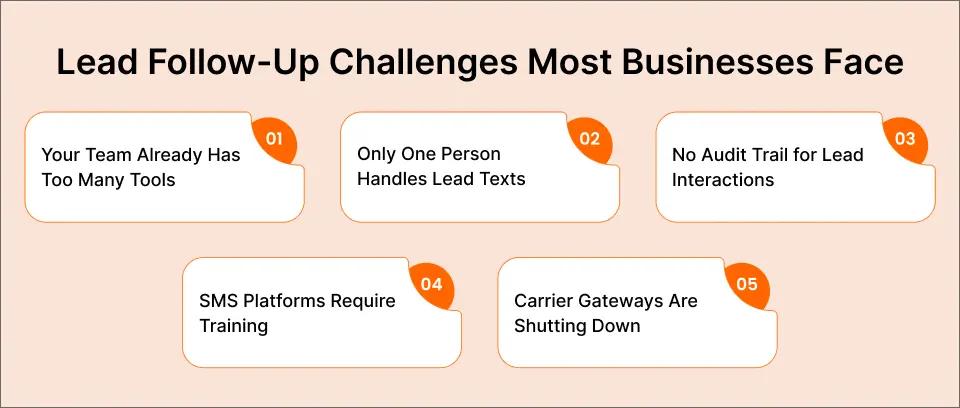
Challenge 1: Your Team Already Has Too Many Tools
Your sales and customer service teams manage email, CRM systems, phone calls, and chat. Adding another platform for SMS means another login, another dashboard, another system to monitor throughout the day.
The result: Messages get delayed because team members forget to check the SMS platform. Leads go cold while your people focus on the tools they use most often.
Challenge 2: Only One Person Handles Lead Texts
In many businesses, texting happens from one person’s phone or one dedicated SMS account. When that person is busy, on vacation, or calls in sick, lead follow-up stops completely.
This single point of failure costs businesses thousands in lost conversions. A lead that came in at 4:55 PM on Friday might not get a response until Monday morning, by which time they have already hired your competitor.
Challenge 3: No Audit Trail for Lead Interactions
When leads are texted from personal phones or basic SMS apps, there is no record of what was said, when it was sent, or who responded. This creates compliance risks and makes it impossible to analyze what is working.
If a lead claims they never received a follow-up, you cannot prove otherwise. If a team member sends an inappropriate message, you may never know until a complaint arrives. Understanding SMS compliance laws becomes critical when scaling your lead follow-up efforts.
Challenge 4: SMS Platforms Require Training and Onboarding
Most dedicated SMS platforms require significant setup time and team training. Your staff needs to learn new interfaces, understand new terminology, and develop new habits.
That learning curve delays implementation. Meanwhile, leads keep flowing in, and response times remain slow.
Challenge 5: Carrier Gateways Are Shutting Down
Businesses that previously used carrier email-to-text gateways (like @txt.att.net or @vtext.com) have lost that capability entirely. AT&T shut down their service in June 2025, with Verizon and T-Mobile following in August 2025.
These shutdowns left thousands of businesses scrambling for alternatives, often choosing complex platforms when simpler options exist. Many businesses that relied on AT&T email-to-text or VText have already made the switch to professional solutions, such as dedicated email-to-SMS services designed to replace carrier gateways.
Learn more about the best AT&T email-to-text alternative and how businesses are migrating without changing their workflow read our guide.
The good news? Email-to-SMS solves all of these challenges by letting your team send texts from the inbox they already use.
Tired of Slow Lead Follow-Up Killing Your Conversions?
TextBolt lets your entire team send lead follow-up texts directly from Gmail. No new software to learn. No single point of failure. Up to 98% delivery rates.
How Email-to-SMS Transforms Your Lead Conversion Process
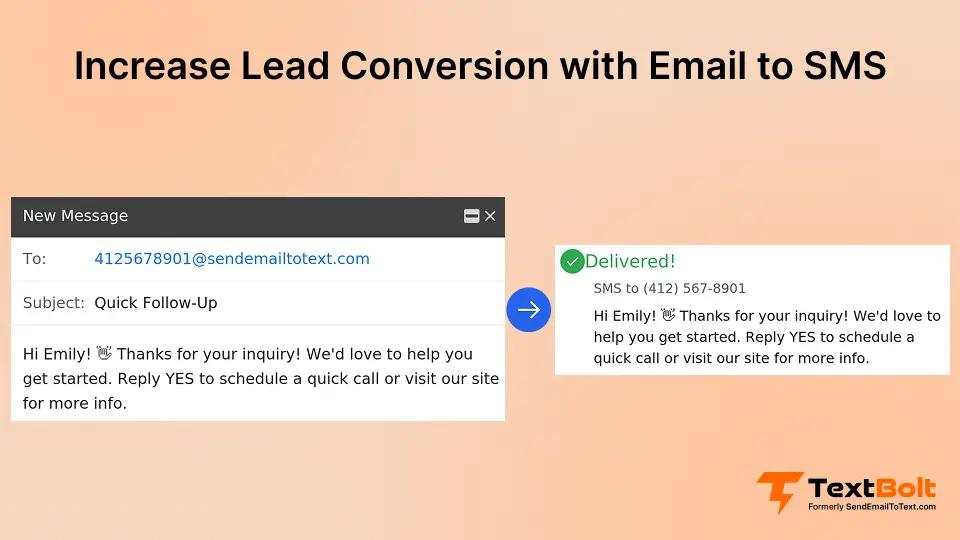
Email-to-SMS is exactly what it sounds like: sending text messages by composing an email. You write your message in Gmail or Outlook, address it to a special format, and the recipient receives it as a standard SMS on their phone.
How It Works with TextBolt
- Compose an email in Gmail like you normally would
- Address it to the phone number @sendemailtotext.com (example: 5551234567@sendemailtotext.com)
- Write your message (up to 303 characters)
- Hit send and TextBolt delivers it as a professional SMS
- Replies come back to your email inbox for easy follow-up
The entire process takes 30 seconds. Your team already knows how to send email, so they already know how to send text messages.
Why This Approach Works Better for Lead Conversion
- Zero learning curve: Staff can start following up with leads immediately. No training required.
- Team resilience: Any team member with email access can respond to leads. When someone is out, coverage continues seamlessly.
- Complete audit trail: Every text is logged in Gmail with timestamps, sender information, and delivery confirmation. Perfect for compliance and performance analysis.
- Faster response times: Because texting happens in the same inbox where lead notifications arrive, there is no context-switching delay. See a lead come in, send a follow-up text, move on.
- Professional appearance: Messages come from your dedicated business number, not personal phones or random addresses. Recipients see a legitimate business reaching out.
This workflow eliminates the barriers that slow down lead follow-up while maintaining the speed advantages that make SMS effective.
With the workflow in place, let’s explore specific strategies to maximize your lead conversion rates.
5 Strategies to Maximize Lead Conversion with Email-to-SMS
These proven strategies combine email-to-SMS efficiency with conversion best practices to help you turn more leads into customers.
Strategy 1: Respond to New Leads Within 5 Minutes
Speed is the single most important factor in lead conversion. The first business to respond typically wins.
How to implement with email-to-SMS:
Set up email notifications for new lead submissions. When a notification arrives in your inbox, immediately compose a brief text message:
Hi [Name], thanks for reaching out to [Business Name] about [Topic]. I’m available to help right now. What’s the best time to chat?
Because you are already in your email, this takes 20 seconds. The lead receives your text before they have even moved on to the next browser tab.
Why this works: Research from Lead Response Management found that responding within five minutes increases contact rates by 100 times compared to waiting 30 minutes. Email-to-SMS lets you hit that window every time.
Strategy 2: Use the SMS-Email One-Two Punch
Combine the strengths of both channels for maximum impact. Email delivers detailed information. SMS creates urgency and ensures attention.
The sequence:
- Immediately after lead submission: Send a brief text confirming receipt and setting expectations
- Within 15 minutes: Send a detailed email with pricing, information, or next steps
- If no response after 2 hours: Send a text reminder to check their email
- Next morning (if still no response): Text with a direct question to re-engage
You can even schedule SMS messages from Gmail to automate this sequence
Example follow-up text:
Hi [Name], I just sent you an email with the information you requested. Let me know if you have any questions.
According to Attentive research, using SMS and email together drives 2.4 times higher purchase likelihood than either channel alone.
Strategy 3: Personalize Every Message
Generic messages get ignored. Personalized messages get responses.
Personalization elements to include:
- Their name: Always address leads by first name
- Their specific request: Reference what they asked about
- Timing context: Acknowledge when they reached out
- Local relevance: If applicable, mention their location or situation
Generic message (low conversion):
Thanks for your interest. We’ll be in touch soon.
Personalized message (high conversion):
Hi Sarah, got your question about kitchen remodeling in Austin. I’ve helped dozens of homeowners in your area. When works best for a quick call, today at 3 or tomorrow morning?
The personalized version tells Sarah you read her actual request, you have relevant experience, and you are ready to help right now.
Strategy 4: Create Urgency Without Pressure
Leads delay decisions when they do not feel urgency. But aggressive sales tactics backfire with modern consumers.
Effective urgency tactics:
- Availability windows: “I have an opening at 2 PM today if that works for you”
- Limited capacity: “We’re booking 3 weeks out, but I can squeeze you in next Tuesday”
- Time-sensitive offers: “The quote I sent is valid through Friday”
- Progress indicators: “Just need two more details to finish your quote”
Example message:
Hi [Name], following up on your roof inspection request. We have a crew in your neighborhood Thursday. Should I add you to the schedule?
This creates genuine urgency (crew availability) without pushy sales language.
Strategy 5: Segment and Automate Based on Lead Source
Different leads need different follow-up approaches. A lead from a pricing page is further along than one from a blog post.
Segmentation approach:
| Lead Source | Intent Level | Follow-Up Focus |
| Pricing page | High | Schedule call, offer quote |
| Contact form | Medium-High | Answer questions, provide value |
| Content download | Medium | Nurture, educate, build trust |
| Blog subscriber | Low | Warm touch, offer resource |
For high-intent leads (pricing inquiries, quote requests):
Hi [Name], thanks for requesting a quote. I can have numbers for you within an hour. Any details I should know before I put this together?
For medium-intent leads (general inquiries):
Hi [Name], got your message about [topic]. Happy to answer any questions. What’s most important for you to know right now?
Using automated text messages can help you trigger the right follow-up based on lead source without manual intervention. You can also trigger SMS notifications directly from email when specific events occur in your CRM or lead management system.
Ready to Convert More Leads with Faster Follow-Up?
Your competitors respond slowly. That’s your advantage. TextBolt lets you reach leads in minutes, not hours, directly from the email tools you already use.
Industry Use Cases: Converting More Leads Across Sectors
Email-to-SMS lead conversion works across virtually every industry. Here’s how different sectors use it to close more business.
Healthcare and Dental Practices
Patients requesting appointments often choose the first practice that responds. A text within minutes of a website inquiry dramatically increases booking rates.
Use case: New patient inquiry follow-up
Hi [Name], thanks for reaching out to Lakeside Dental. We have openings Tuesday and Thursday this week. Which works better for you?
Healthcare providers also use email-to-SMS to reduce missed appointments with reminders, further improving practice efficiency. Learn more about SMS solutions for healthcare.
Home Services (HVAC, Plumbing, Roofing)
Homeowners with urgent problems choose the contractor who responds first. Fast text follow-up captures emergency business that would otherwise go to competitors. Small business owners in home services see particularly strong results from speed-focused lead conversion.
Use case: Emergency service request
Hi [Name], received your AC repair request. A technician can be there within 2 hours. Reply YES to confirm or call us at [number].
Real Estate
Buyers and sellers shopping for agents typically contact multiple professionals. The agent who responds immediately wins the listing.
Use case: Listing inquiry follow-up
Hi [Name], saw your interest in 123 Main St. I can arrange a showing today or tomorrow. What time works for you?
Professional Services (Legal, Financial, Consulting)
High-value leads in professional services expect prompt, professional communication. Text follow-up demonstrates responsiveness that builds trust.
Use case: Consultation request
Hi [Name], thanks for your consultation request. I reviewed your situation and have some thoughts. When can we schedule a 15-minute call to discuss?
E-commerce and Retail
Abandoned cart recovery and product inquiry follow-up benefit from SMS immediacy. Email-to-SMS allows personalized outreach that feels human, not automated.
Use case: Product inquiry follow-up
Hi [Name], you asked about sizing for [Product]. Happy to help, what measurements would you like me to check?
For promotional campaigns, businesses can also leverage email-to-SMS for promotional offers to drive immediate action. After purchase, collecting customer feedback via SMS helps improve future conversion rates.
B2B Sales
Enterprise leads involve longer sales cycles, but initial response time still matters. A quick text after a demo request sets the tone for the entire relationship.
Use case: Demo request follow-up
Hi [Name], looking forward to showing you [Product]. I have availability tomorrow at 10 AM or 2 PM. Which works for your team?
For smoother transitions from lead to customer, consider incorporating email-to-SMS for client onboarding into your post-sale process.
Setting Up TextBolt Email-to-SMS for Lead Conversion (Step-by-Step)
Getting started with email-to-SMS takes about 30 minutes. Here’s the complete process:
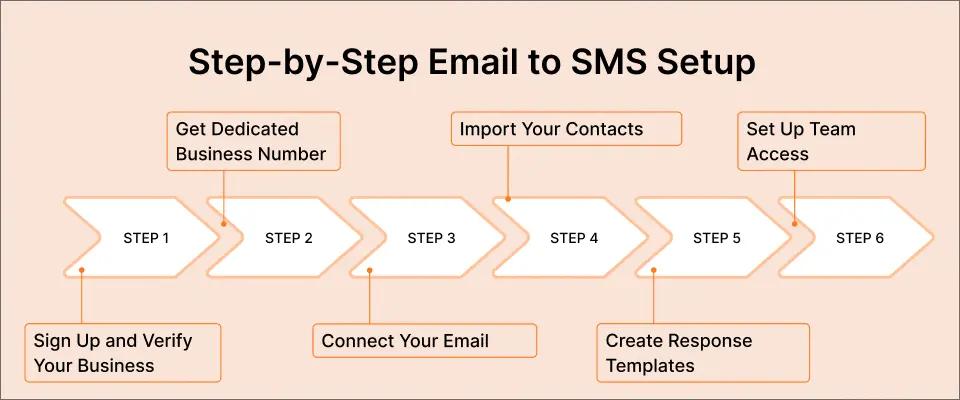
Step 1: Sign Up and Verify Your Business
Create your TextBolt account and complete business verification. This 10DLC registration ensures your messages are carrier-approved and delivered reliably. Our complete setup guide walks through every step.
Time required: 10-15 minutes What you’ll need: Business name, address, EIN, and use case description
Step 2: Get Your Dedicated Business Number
TextBolt assigns you a toll-free or local business number. This number appears on all outgoing texts, giving your messages a professional appearance.
Why this matters: Messages from verified business numbers achieve higher delivery rates and build recipient trust.
Step 3: Connect Your Email
TextBolt works with any email client: Gmail, Outlook, Apple Mail, or your company’s email system. For Gmail users, our Gmail text messaging integration provides the smoothest experience.
Step 4: Import Your Contacts
Sync your Google Contacts or upload your lead database. This lets you send by name rather than typing phone numbers each time.
Step 5: Create Response Templates
Build templates for common lead types to speed up your response time:
New lead acknowledgment:
Hi [Name], got your inquiry about [Topic]. I’ll have information for you within the hour. Any specific questions I should prioritize?
Quote follow-up:
Hi [Name], just sent your quote via email. Have a look and let me know if you have questions. I’m available now.
Re-engagement:
Hi [Name], following up on our conversation last week. Are you still interested in [Service]? Happy to answer any remaining questions.
Step 6: Set Up Team Access
Add team members so anyone can respond to leads. This eliminates single points of failure and ensures coverage during all business hours. Check our pricing page to see which plan fits your team size.
Measuring and Optimizing Your SMS Lead Conversion
What gets measured gets improved. Track these metrics to optimize your email-to-SMS lead conversion over time.
Key Metrics to Track
- Response time: How quickly do you respond to new leads? Target under 5 minutes for highest conversion rates.
- Reply rate: What percentage of leads respond to your initial text? Industry average is around 45% for SMS.
- Conversion rate: What percentage of text conversations result in sales or appointments? Compare this to your email-only conversion rate.
- Time to conversion: How long from first text to closed deal? SMS typically shortens this timeline significantly.
A/B Testing Your Messages
Test different elements to find what works best for your audience:
- Opening lines: “Hi [Name]” vs. “Thanks for reaching out”
- Message length: Brief (50 characters) vs. detailed (150 characters)
- CTA style: Question (“When works for you?”) vs. statement (“I’m available at 3 PM”)
- Timing: Immediate vs. 5-minute delay vs. specific hours
Continuous Improvement Process
- Baseline: Measure current conversion rates before implementing email-to-SMS
- Track: Monitor all metrics weekly for the first month
- Analyze: Identify which lead sources, message types, and team members perform best
- Optimize: Apply learnings across all lead follow-up
- Repeat: Continue testing and refining
Tracking these metrics over time reveals which strategies drive the best results for your specific audience and industry.
Start Converting More Leads with Email-to-SMS Today
The math is simple: faster response times mean higher conversion rates. SMS achieves 98% open rates and 45% response rates. Email-to-SMS lets you capture those advantages without changing your workflow or training your team on new software.
Every minute you wait to respond, your competitors get closer to winning your leads. Every complex platform you evaluate delays the speed improvements that actually drive conversions.
TextBolt gives you:
- Immediate follow-up from the inbox you already use
- Team coverage so leads never wait for one person
- Up to 98% delivery rates with professional business numbers
- Complete audit trail for every lead interaction
- 30-minute setup with no developers required
Your leads are waiting for someone to respond. Make sure that someone is you.
Frequently Asked Questions
How quickly should I follow up with leads via text?
Research consistently shows that responding within five minutes dramatically increases conversion rates. Leads contacted within five minutes are 21 times more likely to enter your sales process. Email-to-SMS makes this possible because you are already in your inbox when lead notifications arrive.
Is it legal to text leads without permission?
You need consent before sending marketing texts. However, when someone submits a lead form requesting information, that often constitutes implied consent for follow-up communication. Always include opt-out instructions and honor STOP requests immediately. TextBolt handles opt-out compliance automatically.
What’s the ideal text message length for lead follow-up?
Keep messages under 160 characters when possible. This ensures delivery as a single SMS segment and improves readability on mobile devices. Focus on one clear message and one simple call-to-action per text.
Can multiple team members respond to the same lead?
Yes. With email-to-SMS through TextBolt, any team member with email access can follow up with leads using the same business number. All conversations are logged, so anyone can see the history and provide seamless coverage.
What delivery rates can I expect?
TextBolt achieves up to 98% delivery rates through 10DLC-compliant carrier connections. This significantly exceeds the delivery rates from carrier gateways (which often failed 30-40% of the time before shutting down entirely).