
- Why Do School Event Reminders Get Ignored?
- Why Does Reminder Timing Matter More Than Frequency?
- When Should You Send Reminders for Maximum Attendance?
- How to Structure Your Reminder Sequence?
- Why SMS Outperforms Email for Event Reminders
- How Can You Schedule Event Reminders Once and Automate Delivery?
- How Do You Know If Your Reminder Strategy Is Working?
- Use TextBolt to Send Event Reminders That Parents Actually See
- Frequently Asked Questions
Stop Losing Parents to Email Overload
How to Improve Attendance at School Events With Email-to-SMS

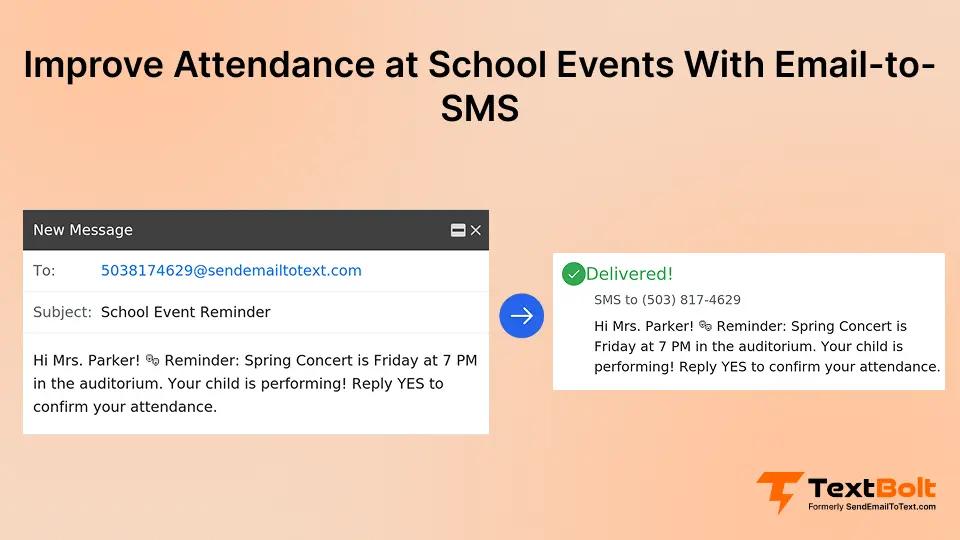
Picture this: you sent reminders for the spring concert two weeks early. Then again, three days before. Then the morning of the event. Half the seats are still empty when the curtain rises. Here, the channel for those reminders acts as a crucial factor when trying to improve attendance at school events.
The problem isn’t parent disengagement. It’s that your reminders are competing with overflowing email inboxes and calendar chaos. Parents see your message, intend to attend, and then forget by the time the event actually happens.
The solution lies in sending them at the right times through channels parents actually monitor. Strategic reminder timing combined with SMS delivery cuts through the noise and lands where parents are already paying attention. Schools using email to SMS for event invitations see measurably higher attendance because text messages reach parents in real time, not whenever they next check email.
Why Do School Event Reminders Get Ignored?
School event reminders are notifications sent to parents about upcoming activities like parent-teacher conferences, fundraisers, sports events, performances, and school meetings. They serve one purpose: to ensure parents know when something is happening and remember to attend.
Parents ignore these reminders for predictable reasons. Email gets buried under promotional messages. Reminders sent too early get forgotten. Reminders sent too late compete with existing commitments. Reminder fatigue sets in when schools send multiple messages without adding new value.
Example: You email about the fall festival three weeks early. Parents see it but never calendar it. The day arrives, and they’ve double-booked a soccer game. They wanted to attend but forgot until rearranging was impossible.
The fix lies in the delivery method and timing. Send messages through channels parents check constantly, timed when they’re making immediate decisions, and attendance improves.
Stop Losing Parents in Overflowing Inboxes
TextBolt sends SMS reminders directly from Gmail. No apps, no platforms. Messages that actually reach parents.
Why Does Reminder Timing Matter More Than Frequency?
Most schools approach reminders the wrong way. They send more messages, hoping parents will eventually pay attention. But flooding inboxes creates fatigue, not engagement. The solution is understanding how memory works and when parents make decisions.
1. The Recency Principle
Human memory works on the recency principle. People remember what they’ve encountered recently and forget what happened weeks ago. When you send a reminder three weeks early, parents file it away mentally. By the time the event arrives, it’s completely forgotten.
But if you send that same reminder the morning of the event, it competes with a dozen other priorities that day.
2. The Optimal Balance
The optimal reminder strategy balances advance notice with recent memory. Parents need enough warning to clear their schedule, but not so much time that the event fades from awareness. Research on prospective memory shows that people perform best when reminded at the moment they need to take action and again at strategic intervals leading up to that moment.
SMS amplifies this timing advantage because of channel characteristics. Text messages have significantly higher open rates than email, with most texts read within minutes of delivery.
When you send a text reminder two hours before an event, parents see it while they’re still making decisions about their evening. When you send an email reminder at the same time, it might sit unread for days.
3. Multiple Touchpoints Beat Volume
Multiple touchpoints also outperform single reminders, but only when each message adds new value. Three strategically timed reminders beat ten redundant ones.
Your first message should establish awareness. Your second message should handle logistics. Your final message should trigger immediate action. This sequence respects parent attention while maximizing recall.
The science is clear. Reminder effectiveness depends more on when you send messages than how many you send. Getting the timing right drives attendance. Getting the channel right ensures parents actually see your carefully timed reminders.
When Should You Send Reminders for Maximum Attendance?
Different event types require different reminder windows. A parent-teacher conference needs more advance notice than a Friday night basketball game. Emergency meetings operate on completely different timelines.
Here’s what works for common school events:
1. Event-Specific Timing Windows
| Event Type | Initial Reminder | Follow-Up Reminder | Final Reminder |
| Parent-Teacher Conferences | 2 weeks before | 3 days before | Morning of |
| Fundraisers/Galas | 3 weeks before | 1 week before | Day before |
| Sports Games/Performances | 1 week before | 2 days before | 2 hours before |
| Emergency Meetings | 48 hours before | 12 hours before | 1 hour before |
Now, let’s take a detailed look at each scenario:
- Parent-Teacher Conferences: Parent-teacher conferences require the longest lead time because parents need to coordinate with work schedules and arrange childcare. Your initial reminder two weeks out gives parents time to request time off. The three-day reminder catches parents who haven’t yet committed. The morning-of reminder ensures attendance from parents who marked their calendar but might forget without a final nudge.
- Fundraisers and Galas: Fundraisers and galas benefit from a three-week initial window because ticket sales and RSVP tracking take time. Your one-week reminder creates urgency for last-minute registrations. The day-before reminder functions as a final attendance confirmation and lets you finalize headcounts.
- Sports Games and Performances: Sports games and performances operate on shorter timelines because they’re recurring events with less schedule disruption. Parents expect these activities and plan around them. Your one-week initial reminder establishes awareness. The two-day reminder handles logistics like parking and start times. The two-hour reminder catches parents running late or who lost track of time.
- Emergency Meetings: Emergency meetings compress the entire sequence because urgency demands immediate response. Forty-eight hours gives parents maximum flexibility to adjust their schedule. Twelve hours serve as the critical reminder for those who saw the first message but haven’t yet committed. One hour before is the final call to action.
2. Weekend vs Weekday Timing
Weekend events differ from weekday events in parent availability. Weekend reminders can arrive later in the sequence because parents have more schedule flexibility. Weekday events need longer lead times because work commitments are harder to adjust on short notice.
3. The Universal Pattern
The universal pattern is this: longer lead time for the initial reminder when schedule coordination is complex, tighter intervals as the event approaches to maintain top-of-mind awareness.
How to Structure Your Reminder Sequence?
Each reminder in your sequence should serve a distinct purpose. When you just repeat the same message three times, parents tune out. When each message adds new information, parents stay engaged, and attendance improves.
1. Initial Announcement: Build Awareness
Your initial announcement establishes awareness and covers fundamental details:
- Event name and purpose: “Annual Spring Concert featuring 4th and 5th grade choir”
- Date and time: “Thursday, May 15th at 7:00 PM”
- Location: “School auditorium, enter through main doors”
- Why attendance matters: “Students have been practicing for months and are excited to perform for families”
- RSVP or registration if required: “Please confirm attendance by May 10th”
This first message answers the core questions parents ask: What is this? When is it? Where do I go? Why should I care? Keep the tone informative and welcoming. You’re building excitement, not pressuring attendance.
2. Mid-Point Reminder: Handle Logistics
Your mid-point reminder shifts to logistics and removes barriers to attendance:
- Parking and arrival instructions: “Parking available in lot B, arrive 15 minutes early for seating”
- What to bring: “No tickets required, feel free to bring cameras for photos”
- Accessibility information: “Wheelchair accessible entrance on east side”
- RSVP reminder for those who haven’t responded: “Haven’t confirmed yet? Let us know by tomorrow”
- Contact for questions: “Questions? Email events@school.edu”
This second message makes attendance easier by handling practical concerns. Parents who were on the fence now have the information they need to commit.
3. Final Reminder: Trigger Immediate Action
Your final reminder triggers immediate action with urgency and last-minute details:
- Time-based urgency: “Spring concert starts in 2 hours”
- Last-minute logistics: “Doors open at 6:45 PM, performance begins promptly at 7:00 PM”
- Weather or emergency updates if relevant: “Indoor event, no weather concerns”
- Contact for day-of questions: “Running late? Text this number”
This third message catches parents who marked their calendar but lost track of time. It also serves as a final confirmation for parents who are already planning to attend.
Tone variation matters across the sequence. Your initial message is warm and informative. Your mid-point message is helpful and practical. Your final message is friendly but urgent. This progression guides parents from awareness to decision to action without feeling pushy or repetitive.
Your Reminder Strategy Is Only as Good as Your Delivery Method
TextBolt bridges the gap. Schedule SMS reminders from your school email and reach parents instantly.
Why SMS Outperforms Email for Event Reminders
You’ve sent the perfect reminder email, but it’s sitting unread in a parent’s inbox next to 47 other messages. When you send that same reminder as a text, it appears on their lock screen within seconds.
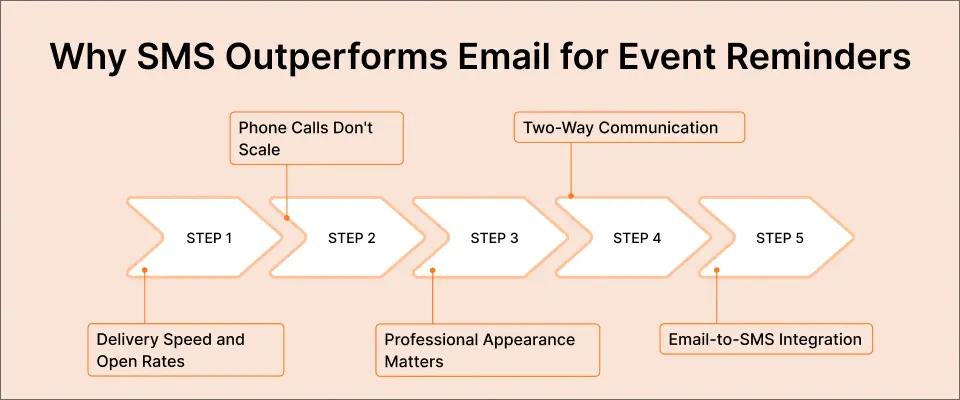
1. Delivery Speed and Open Rates
The numbers tell the story. SMS messages achieve up to a 98% open rate according to mobile marketing research. Email typically averages 20-30% open rates for school communications. More importantly, the vast majority of text messages are read within minutes of delivery. Email sits unread for hours or days, if it gets opened at all.
Parent behavior explains the gap. Parents check their phones constantly throughout the day. They glance at text notifications while waiting in line, during work breaks, and between activities.
Email requires opening an app, scrolling through messages, and deciding what to read. Texts bypass all those friction points.
2. Phone Calls Don’t Scale
Phone calls scale poorly for school communications. Calling 200 families about an event takes hours of staff time. Many parents don’t answer calls from unknown numbers. Voicemail messages get deleted without listening. Texts deliver the same information instantly to your entire parent community, which is why schools also rely on SMS for emergency alerts.
3. Professional Appearance Matters
Beyond delivery speed, professional appearance matters for school communications. When you send texts from your school’s business number, parents recognize the sender immediately. Messages look official and trustworthy. Compare this to texts from personal cell phones, which blur professional boundaries and create confusion about who’s actually communicating.
4. Two-Way Communication
Two-way messaging solves the response problem that email creates. When you send event reminders via email-to-SMS, parent replies come directly back to your email inbox. You don’t need to monitor a separate platform or switch between tools.
Parents can ask questions, confirm attendance, or request accommodations through the same channel they received the reminder. You see their responses in your normal email workflow and can respond from your regular inbox.
5. Email-to-SMS Integration
Email-to-SMS services like TextBolt let you send text reminders without changing your existing workflow. You compose messages in Gmail or Outlook just like regular emails. The system delivers them as text messages to parent phone numbers.
Your staff doesn’t learn new software. Your technology requirements don’t change. You just get better delivery rates for the messages you’re already sending.
The channel you choose determines whether parents see your carefully crafted reminders. Email works for detailed information that parents can reference later. SMS works for time-sensitive reminders that need immediate attention. For event attendance, where timing drives behavior, SMS wins decisively.
How Can You Schedule Event Reminders Once and Automate Delivery?
You compose all three reminders on Monday morning. Schedule them for Tuesday (initial reminder), Friday (follow-up), and Monday morning (final reminder). The system handles delivery automatically while you focus on preparing the actual event.
1. The Time-Saving Power of Automation
This automation approach saves massive time compared to manual reminder sending. You spend five minutes upfront scheduling versus 45 minutes manually sending three separate reminders. For schools managing multiple events per month, the time savings compound dramatically.
2. Native Email Scheduling
The scheduling process works through your existing email client. Gmail and Outlook both include native “Schedule Send” features. You compose your message, click the schedule option, and select the date and time for delivery. The email sits in your scheduled folder until the designated moment, then sends automatically.
3. Email-to-SMS Integration
Combining this scheduling capability with SMS delivery creates a fully automated text message reminder system. When you combine scheduled email with email-to-SMS conversion, your text reminders are automated completely. Compose your reminder as an email addressed to parent phone numbers using the format 5551234567@sendemailtotext.com. Schedule the send time. When that time arrives, your email is delivered and automatically converted to a text message that parents receive instantly.
4. Zero New Software to Learn
No new software means no staff training. Your team already knows how to schedule emails. They already know how to compose messages in Gmail. Scheduling SMS from Gmail just connects these existing skills to text message delivery.
5. Staff Redundancy Protection
Staff redundancy protects against single points of failure. When anyone on your team can send event reminders from their email account, you’re not dependent on one person’s availability.
If your administrative assistant is out sick the day before an event, any authorized staff member can send the final reminder from their own inbox. The messages still come from your school’s official number and maintain a consistent professional appearance.
6. Consistency Across All Events
Automation also ensures consistency across events. When you schedule reminder sequences for every event at the start of the school year, nothing falls through the cracks. Parent-teacher conferences always get three reminders at optimal intervals. Fundraisers always follow the same proven pattern. You eliminate the risk of forgetting a reminder or sending it at a suboptimal time.
7. Simple Technical Setup
Setting up this automated system is straightforward. The technical setup is minimal. Your school needs email-to-SMS service access and a business phone number for sending. Initial account setup takes 10-30 minutes, followed by 10DLC compliance approval within 48 hours. After approval, every event reminder follows the same simple process: compose, schedule, let the system deliver.
How Do You Know If Your Reminder Strategy Is Working?
Track which reminder gets the most parent responses. If you see a spike in attendance after adding a morning-of text, you’ve found your winning strategy. But measurement requires deliberate tracking, not just intuition.
1. Establish Your Baseline
Start with baseline attendance rates before implementing any reminder changes. Here’s the process:
- Calculate current attendance percentage for each event type. Track this for at least three events to establish a reliable average. For example, if 60 out of 100 families attend parent-teacher conferences on average, your baseline is 60% attendance.
- Implement your new reminder timing strategy for the next event cycle. Keep everything else constant: same messaging, same invitation process, same event format. Change only the reminder timing and delivery channel.
- Calculate your new average attendance rate after three events with the new approach.
- Compare the results. If attendance jumped from 60% to 73%, you’ve found a winning strategy. If attendance stayed flat or declined, your timing needs adjustment.
Statistical significance matters less for small schools than directional trends. Even small percentage improvements translate to meaningful attendance gains when you’re hosting a dozen events per year.
2. Track RSVP Rates by Touchpoint
Dig deeper by tracking individual reminder performance. RSVP rates by reminder touchpoint show which messages drive parent decisions. When you request RSVP confirmation in each reminder, track when parents actually respond.
If 40% of RSVPs come after the initial reminder but 50% come after the mid-point reminder, that second message is your highest-value touchpoint. Consider strengthening that message with better logistics information or stronger calls to action.
3. Gather Parent Feedback
Beyond quantitative metrics, parent feedback provides qualitative data that numbers miss. After the events, survey a sample of attendees about communication preferences. Ask questions like “Which reminder was most helpful in ensuring your attendance?” and “What information would have made planning easier?” Parents often identify pain points you hadn’t considered, like difficulty finding parking or confusion about event duration.
4. Test and Iterate
One school moved its final reminder from the day before to the morning of for parent-teacher conferences. Attendance improved measurably because parents who had forgotten their appointment saw the text while still in a position to rearrange their afternoon schedule. The day-before reminder came too early to trigger immediate action but too late for parents to plan around conflicts.
Isolate Variables Carefully
When running your own tests, test one variable at a time:
- Change reminder timing, delivery channel, OR message content (not all three)
- Test across different events to avoid confounding factors
- Example: Test morning-of versus day-before final reminders for spring conferences. If that works, keep it and test initial reminder timing for fall events.
Document Your Findings
Capture your findings systematically. Maintain a simple spreadsheet tracking:
- Event type
- Reminder schedule
- Attendance rate
- Notes about what worked
After a year of data collection, you’ll have an evidence-based playbook for maximizing attendance at every event category your school hosts.
This data-driven approach transforms your strategy from guesswork into science. You stop assuming what works and start knowing what drives parent attendance.
Use TextBolt to Send Event Reminders That Parents Actually See
Low event attendance isn’t about parent disengagement. It’s about competing priorities and ineffective reminder timing. Strategic SMS reminders, sent at optimal intervals, cut through inbox clutter and land where parents are already paying attention.
TextBolt makes scheduled SMS reminders effortless for schools and educational institutions. Send from Gmail or Outlook, schedule your reminder sequence in minutes, and let messages deliver automatically. No apps, no training, and no single-point-of-failure when key staff are unavailable. See pricing plans that fit your school’s budget and event volume.
Frequently Asked Questions
How many reminders should I send for a school event?
Three reminders typically perform best: initial announcement (2-3 weeks early), mid-point follow-up (3-7 days before), and final reminder (morning-of or day-before). More than four reminders risk annoying parents and reducing effectiveness.
What’s the best time of day to send event reminders?
Send reminders between 8-10 AM or 6-8 PM when parents are most likely to check their phones. Avoid sending during school hours or late evening when messages get overlooked.
Should I use email or text for school event reminders?
Text messages have significantly higher open rates than email (often approaching 98% versus 20-30%), making SMS more effective for time-sensitive event reminders. Many schools use email for initial announcements and text for follow-up reminders.
How far in advance should I send the first event reminder?
Initial reminders should go out 2-3 weeks before most events, giving parents time to plan but not so early that they forget. Emergency or urgent events require a 48-hour notice minimum.
Can I automate school event reminders?
Yes. Email-to-SMS services let you schedule reminder sequences in advance using your email client’s built-in scheduling feature. Messages are delivered automatically at your specified times without manual intervention.
Why do parents ignore my event reminders?
Parents typically ignore reminders due to poor timing (too early or too late), wrong delivery channel (email gets buried), or reminder fatigue from too many messages. Focus on strategic timing over volume.