
- Why Is It Harder to Text From a Computer?
- 6 Ways to Text From Your Computer
- Method 1: TextBolt — Send Business Texts From Your Computer via Email
- Method 2: Text From a PC With Microsoft Phone Link (Windows)
- Method 3: Text From a Mac With iMessage (Apple Users)
- Method 4: Text From a PC With Google Messages for Web (Android)
- Method 5: Text From Your Computer With WhatsApp Web
- Method 6: Traditional Email Gateways (Mostly Dead)
- How TextBolt Compares to Other Business Texting Tools
- Making the Right Choice for Your Needs
- Why Smart Businesses Choose TextBolt
- Frequently Asked Questions
Start Sending Texts from Your Computer
How to Text From a Computer in 2026: 6 Methods That Work

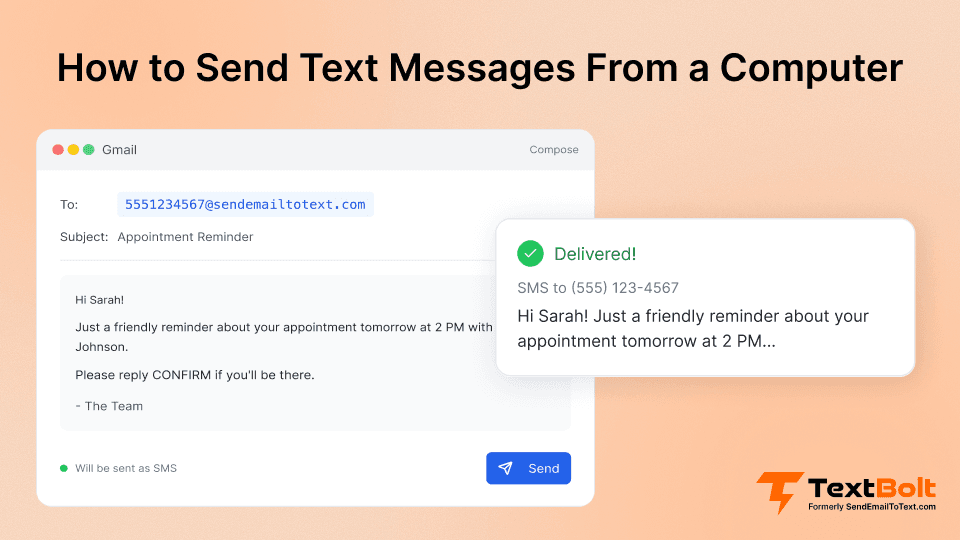
Need to text from your computer but not sure which method actually works in 2026?
Whether you want to text from a PC, Mac, or Chromebook for personal messages or business SMS this guide covers every reliable option available right now. We compare 6 methods side by side from free built-in tools like iMessage and Google Messages to business-grade platforms like TextBolt that let you send texts directly from your email without needing a phone at all.
Some methods that worked a few years ago are completely dead now. Others have new limitations. And a few options didn’t exist before 2026. This guide cuts through the noise so you can pick the method that fits your situation whether you’re texting clients, coordinating with your team, or just replying to friends from a bigger screen.
Here’s what we’ll cover:
- 6 tested methods to send texts from a computer (free and paid)
- Which methods work without a phone connected
- A comparison table for business texting tools
- Which option fits personal vs. business use
Why Is It Harder to Text From a Computer?
In mid-2025, AT&T and Verizon shut down their free email-to-text gateways services millions of businesses had quietly depended on for over a decade. T-Mobile’s gateway stopped working reliably around the same time. All three major US carriers effectively killed the simplest way businesses had to text from a computer.
These gateways let anyone send an SMS by emailing a special address like 5551234567@txt.att.net. They weren’t perfect—delivery rates had dropped to 30–40% in their final years but they were simple. For many businesses, they were the entire texting workflow.
Once they shut down, teams scrambled:
- Staff went back to texting customers from personal phones
- Appointment reminders stopped going out, leading to no-shows
- IT alerts that triggered via email suddenly had nowhere to go
- HIPAA and TCPA compliance risks spiked with personal device texting
The good news: there are now six reliable ways to text from a computer, and most of them work better than the old gateways ever did. Some are free and built into your operating system. Others are purpose-built for business messaging with compliance, team access, and delivery tracking. Let’s walk through each one.
6 Ways to Text From Your Computer
| Method | Pros | Cons | Reliability |
| TextBolt | Inbox-native, business-grade SMS, compliance-ready | Subscription(but start with $29) | Up to 98% |
| Windows Phone Link | Free, mirrors phone | Phone must stay online, no compliance | Medium |
| Mac iMessage | Works well on Apple devices | Personal number only, not scalable | Medium |
| Google Messages Web | Browser-based Android texting | Phone mirroring, no logs | Low |
| WhatsApp Web | Free, encrypted, no phone needed after setup | Not SMS, both sides need app | Medium |
| Legacy Email Gateways | Historically used | Mostly dead, 30–40% delivery | Low |
Method 1: TextBolt — Send Business Texts From Your Computer via Email
Most Reliable | No Phone Required | Built as a Replacement for AT&T/Verizon Gateways
TextBolt is the most reliable email to text service for businesses and professionals. It emerged as the direct replacement for AT&T’s discontinued service, but with major improvements. Unlike carrier gateways that failed 70% of the time, TextBolt consistently achieves up to 98% delivery rates through 10DLC carrier registration and dedicated toll-free numbers.
It’s ideal for appointment heavy businesses, healthcare groups, real estate, restaurants, schools, banks, salons and insurance agencies all needed a reliable way to:
- Send SMS from Gmail/Outlook
- Maintain centralized communication
- Ensure delivery (and avoid spam filtering)
- Remain compliant
- Enable teams to collaborate
How TextBolt Works:
Setting up TextBolt is refreshingly simple, if you can send an email, you’re already 90% trained. Unlike complex SMS platforms that require weeks of training and IT support, TextBolt integrates seamlessly with the email system your team already uses every day. The entire setup process takes just 30 minutes, and you can start sending texts immediately while your business registration processes in the background.
Initial setup with TextBolt (30 minutes, one time):
- Sign up at TextBolt.com and complete business verification
- TextBolt handles your 10DLC registration automatically (1-2 days in background)
- Receive your dedicated toll-free number (like 855-TEXTBOLT)
- Save @sendemailtotext.com to your email contacts
- Start your 7-day free trial immediately while registration processes
Sending texts with TextBolt (30 seconds):

- Open Gmail, Outlook, or any email client you already use
- Address email to: 5551234567@sendemailtotext.com (just the phone number)
- Type your message in the email body. Standard SMS supports 160 characters per segment (70 with emojis or special characters). Longer messages automatically split into multiple segments, each using one credit.
- Hit send – TextBolt delivers as professional SMS from your business number
- Replies come directly back to your email inbox
Unlike consumer phone-mirroring tools, TextBolt:
- Does not depend on a phone
- Does not disconnect
- Does not require staff to use personal numbers
- Does not limit you to one user
- Does not break when a device is offline
It’s built for operations teams, clinics, service businesses, and anyone who needs reliable, scalable customer communication.
Want to see how easy it is? Watch Demo Video
What TextBolt Solves:
- Staff texting from personal phones: Compliance issues, privacy risks, fragmented communication, TextBolt centralizes everything into a shared inbox.
- Missed appointments and revenue loss: For clinics, auto shops, insurance agencies, tutoring centers, salons, dental practices, and many other service-based businesses, even a single missed appointment can cost more than a month of a TextBolt subscription, which is why consistent reminders matter. You can also streamline this using our guide on how to send appointment reminders via email.
- Operational overload with SMS dashboards: Many SMS tools require teams to learn new, complicated software. TextBolt eliminates this burden by letting teams send and receive messages directly from the email inbox they already use every day.
- Inconsistent delivery: Legacy gateways often failed, resulting in missed reminders, delayed notifications, frustrated customers, and lower show rates. TextBolt’s carrier-approved routing ensures reliable delivery every time, giving teams confidence that messages reach their recipients.
- Compliance risk: HIPAA, TCPA, and enterprise-grade audit requirements demand automatic opt-out handling, Business Associate Agreements (BAAs) for healthcare, encrypted infrastructure, and comprehensive message logging. Consumer texting tools can’t meet these standards but TextBolt delivers full compliance out of the box.
Enterprise-Grade Security and Compliance
TextBolt supports 10DLC-registered business messaging with encrypted delivery and automated TCPA opt-out handling. Healthcare organizations can request a Business Associate Agreement (BAA) for messaging with HIPAA considerations. For specific compliance requirements, consult your compliance team.
Real User Stories:
I trained our new receptionist in 2 minutes. Show her how to send an email? Done. Show her our texting ‘system’? Also done.
Dr. Martinez- Family Practice, Phoenix
We tried a $300/month texting app. The staff hated it. TextBolt through email? They didn’t even notice the change.
Jennifer K.- Office Manager, Austin
TextBolt Key Features:
Here are the professional features for TextBolt:
- Carrier-Approved Infrastructure: Registered numbers + validated routes = predictable deliverability
- Two-Way SMS via Email: Replies go straight to your inbox
- Team Collaboration: Multiple staff can send/receive messages from the same number
- Message Templates: Reminders, confirmations, follow-ups
- Automatic Opt-Out Handling: TCPA compliance
- HIPAA-Ready Messaging: Audit logs + BAAs
- International Sending: US + Canada supported
- Bulk Messaging: Fully compliant BCC from inbox
TextBolt Pricing:
TextBolt pricing plans fit any business size:
| Plan | Monthly Price | Message Credits | Best For |
| Basic | $29/month | 500 credits | Solo practitioners, consultants |
| Standard | $49/month | 1,000 credits | Growing businesses, medical practices |
| Professional | $99/month | 2,500 credits | Busy practices, multi-locations |
| Enterprise | Custom | 5,000+ credits | Large organizations, healthcare networks |
Text From Your Computer — Finally Reliable, Business Grade SMS
Send and receive texts right from your email inbox. No phone needed. Up to 98% delivery, compliance ready. Start your free trial in minutes.
Method 2: Text From a PC With Microsoft Phone Link (Windows)
Microsoft Phone Link comes pre-installed on Windows 10 and 11 and lets you send texts from your PC by mirroring your phone’s messages. It works with both Android and iPhone, though the setup and features differ slightly.
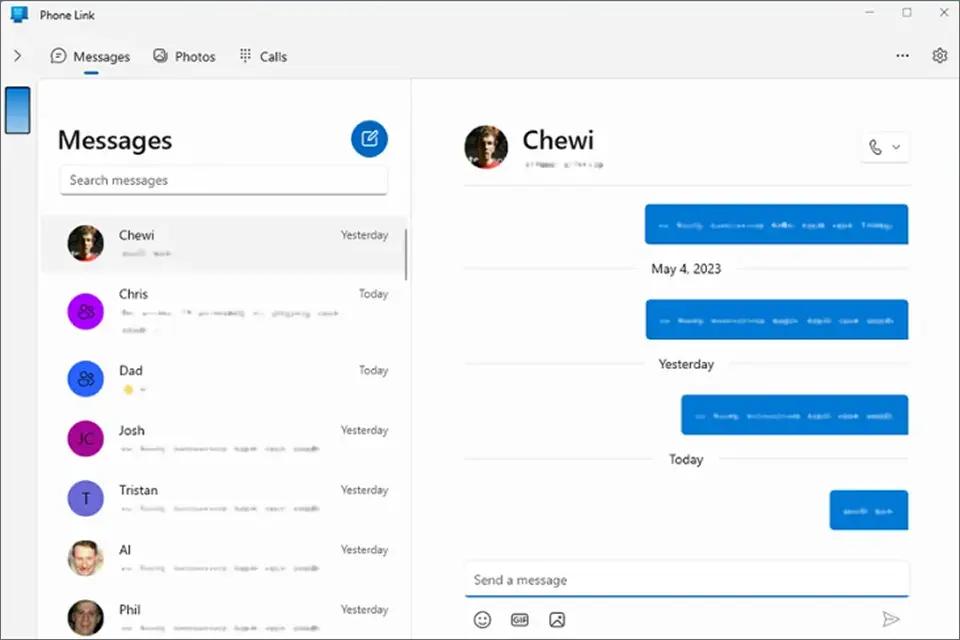
How to Set It Up (Android Users):
- Open the **Phone Link** app on your Windows PC (search ‘Phone Link’ in the Start menu).
- Download the **Link to Windows** app on your Android phone from the Google Play Store.
- Follow the on-screen prompts to scan the QR code and pair your devices.
- Grant the required permissions (messages, notifications, contacts).
- Once paired, click the **Messages** tab in Phone Link on your PC.
- Click **New Message**, enter a contact name or number, type your message, and send.
How to Set It Up (iPhone Users):
The setup is similar, but pairing happens via Bluetooth instead of QR code. iPhone support has some limitations—no group texts, no image sending, and you must keep your phone physically close to your PC.
Limitations:
- Your phone must stay nearby and connected (Bluetooth for iPhone, Wi-Fi for Android)
- iPhone users cannot send group messages or MMS through Phone Link
- Only shows messages from the last 30 days
- No business number—uses your personal phone number
- No compliance features, bulk messaging, or team access
Best for: Windows PC users who want to reply to personal texts without picking up their phone. For business texting that doesn’t depend on a physical phone, TextBolt works directly from your email no phone connection needed.
Method 3: Text From a Mac With iMessage (Apple Users)
If you have a Mac and an iPhone, Apple’s Messages app lets you send and receive texts directly from your computer. iMessages (blue bubbles) sync automatically. With a quick settings change, you can also send standard SMS texts (green bubbles) to non-Apple contacts.
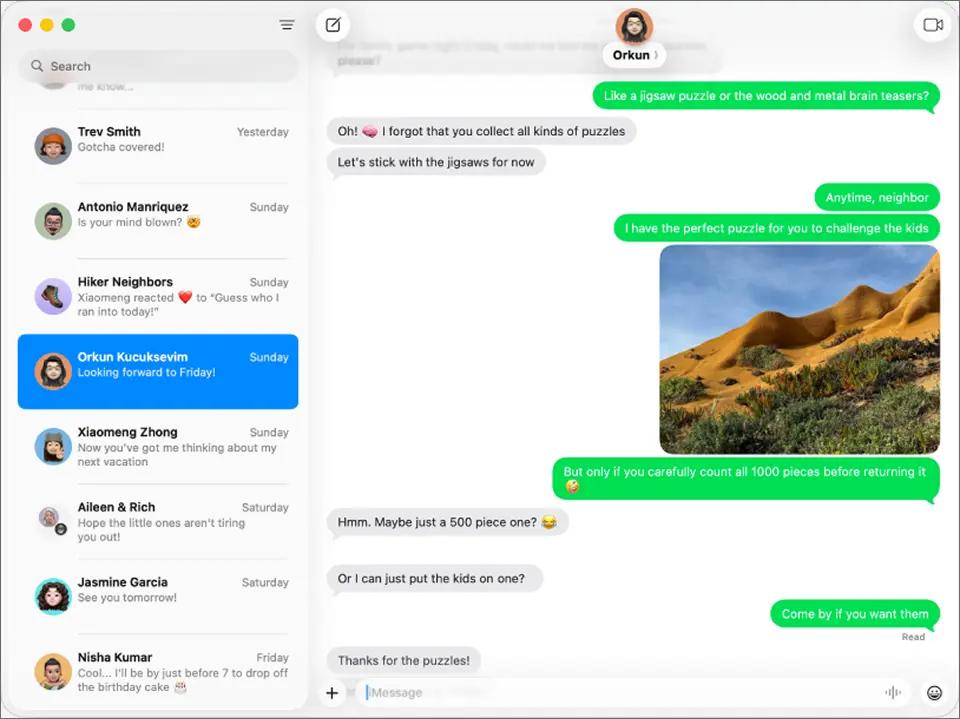
How to Set It Up:
- Make sure your iPhone and Mac are signed into the same Apple ID.
- On your iPhone, go to **Settings > Messages > Text Message Forwarding**.
- Toggle on your Mac from the list of devices.
- Open the Messages app on your Mac.
- Click the **New Message** button (pencil icon), enter a phone number or contact name, and type your message.
- Hit Enter to send. SMS and iMessages both work.
Messages sync across all your Apple devices—iPhone, iPad, Mac, even Apple Watch. If someone replies, you’ll see it on every device.
Limitations:
- Your iPhone must stay powered on and connected to the internet
- Only works within the Apple ecosystem—no Windows or Chromebook support
- Uses your personal phone number (not a business number)
- No bulk messaging, scheduling, or team collaboration features
- Not suitable for HIPAA or TCPA-regulated business communication
Best for: Apple users who want to text friends, family, or individual clients from a bigger screen. For professional team-based messaging, a business platform like TextBolt is a better fit.
Method 4: Text From a PC With Google Messages for Web (Android)
Android users can text from any computer using Google Messages for Web. It mirrors your phone’s messages in a browser window, so you can type with a full keyboard while your phone stays in your pocket.
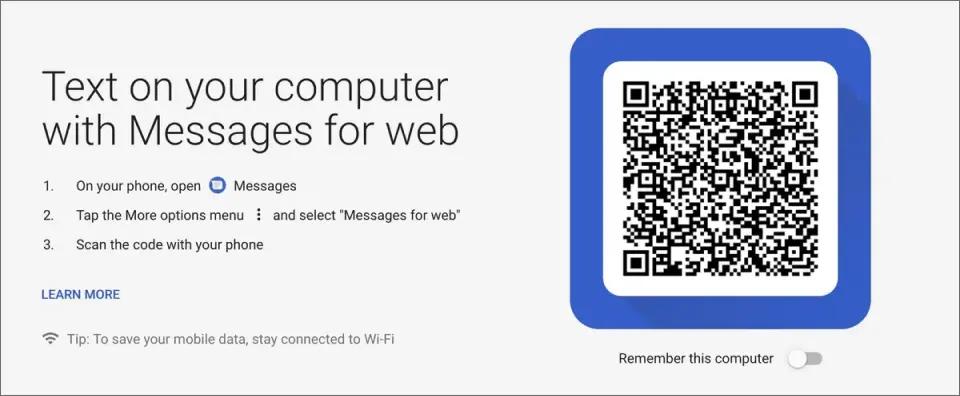
How to Set It Up:
- Open the **Messages** app on your Android phone.
- Tap your **profile picture** > **Device pairing**.
- On your computer, go to **messages.google.com** in any browser (Chrome, Firefox, Safari, or Edge).
- Tap **QR code scanner** on your phone and scan the code on your computer screen.
- Your conversations will load in the browser. Click any thread to reply, or start a new message.
Once paired, you can send and receive SMS and MMS messages from your computer. Google Messages also supports RCS (Rich Communication Services) for enhanced messaging between Android users.
Limitations:
- Your Android phone must stay powered on and connected to the internet
- The web session expires every 1–2 weeks—you’ll need to re-pair
- If your phone battery dies or loses signal, the web connection drops
- No multi-user access, scheduling, or message analytics
- Uses your personal number only
Best for: Android users who want a quick, free way to text on computer from a larger scree
Method 5: Text From Your Computer With WhatsApp Web
WhatsApp is the most popular messaging app globally, and its web version lets you text from any computer without installing software. After an initial phone pairing, WhatsApp Web works independently—your phone doesn’t need to stay connected.
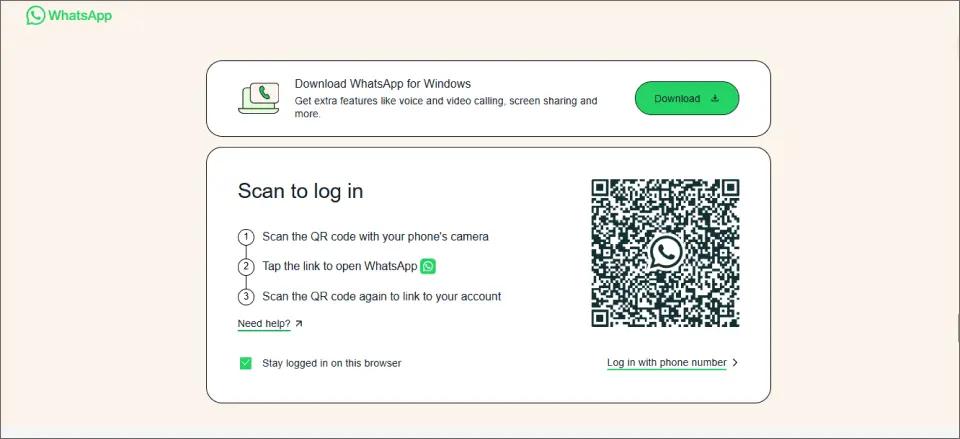
How to Set It Up:
- Go to **web.whatsapp.com** in any browser on your computer.
- Open WhatsApp on your phone and tap **Settings > Linked Devices > Link a Device**.
- Scan the QR code shown on your computer screen.
- Your chats will sync to the browser. You can send and receive messages from your computer immediately.
WhatsApp uses end-to-end encryption for all messages, making it one of the more secure options on this list. You can send text, photos, videos, documents, and voice messages all from your keyboard.
Limitations:
- Both you AND the recipient need WhatsApp installed—it’s not standard SMS
- Uses your personal phone number
- No business number, scheduling, or bulk messaging features
- Not suitable for sending texts to people who don’t use WhatsApp
- No compliance features for regulated industries
Best for: Personal messaging and international communication. WhatsApp is free and works worldwide, making it ideal for texting contacts who already use the app. For sending standard SMS to any phone number especially for business TextBolt is the more reliable choice.
Method 6: Traditional Email Gateways (Mostly Dead)
The original method is extinct. AT&T already shut down, Verizon is gone, and T-Mobile’s gateway no longer works reliably. Businesses affected by these shutdowns have been forced to evaluate best T-Mobile and VText alternatives that offer modern delivery and compliance.
Why You Shouldn’t Use Email Gateways
Even if you find a carrier that still accepts email to text, here’s why you shouldn’t bother:
- No delivery confirmation (messages vanish)
- Recipients see email address (looks like spam)
- No replies possible
- Must know exact carrier (impossible with porting)
- 160 character limit
- Being discontinued by all carriers
If your business relied on carrier gateways, TextBolt was built as a direct replacement same email-based workflow, but with 10DLC compliance and up to 98% delivery rate.
Why Carrier Gateways End:
Carriers shut down these gateways because of massive spam abuse, zero sender authentication, and no delivery accountability. Without 10DLC registration, there was no way to verify that messages came from legitimate businesses.
How TextBolt Compares to Other Business Texting Tools
When evaluating SMS solutions for your business, it’s not enough to look at features in isolation. Teams need tools that fit naturally into existing workflows, scale across multiple users, and maintain compliance without adding operational overhead.
The table below highlights how TextBolt stacks up against popular alternatives, showing where consumer-grade or developer-focused tools fall short:
| Feature | TextBolt | Salesmsg | Google Voice | Twilio | SimpleTexting |
| Inbox-native workflow | ✅ | ❌ | ❌ | ❌ | ❌ |
| Compliance (HIPAA/TCPA) | ✅ | ✅ | ❌ | ❌ | ✅ |
| Multi-user access | ✅ | Limited | Limited | Developer required | ❌ |
| Templates | ✅ | ✅ | ❌ | ❌ | ✅ |
| Ease of setup | 30 min | Training required | Setup per user | Dev required | Dashboard training |
Looking Ahead—What’s Next in Business Texting?
- RCS Messaging: The next protocols (RCS) promise read receipts and richer media, but aren’t yet supported reliably across US carriers for B2C.
- AI & Automation: Modern tools increasingly enable automated message flows, smart reminders, and analytics businesses adopting these see better engagement rates. For example, setting up automated text messages from email can significantly reduce manual workload and no-shows.
- Compliance & Regulation: TCPA, HIPAA, and global rules will keep evolving. It’s vital to pick a provider whose roadmap addresses privacy and cross-border identity verification.
Making the Right Choice for Your Needs
The death of carrier gateways isn’t a loss, it’s an upgrade opportunity. Every alternative works better than the old carrier gateways ever did.
For Personal Use:
Start with your operating system’s free solution. Mac users get iMessage, Windows users have Phone Link, Android users can use Google Messages. These work adequately when your phone is nearby and you’re texting friends occasionally.
For Business Use:
Free solutions are convenient for personal use, but not reliable enough for business critical messaging. TextBolt email to text service costs less than one missed appointment while providing:
- Team access so anyone can cover
- Up to 98% delivery rate (vs 30% for gateways)
- Professional business number
- Works without any phone
- HIPAA compliance available
- Bulk messaging to hundreds
Empower Your Team to Send SMS From Email
No new tools to learn. Your staff can message customers directly from the inbox they already use every day.
Why Smart Businesses Choose TextBolt
While free methods keep failing when your phone dies or disconnects, TextBolt just works. Built on carrier-approved infrastructure with 10DLC compliance, it delivers what consumer methods can’t with actual reliability. For businesses that need precise timing, TextBolt also makes it easy to schedule SMS directly from Gmail instead of relying on manual texts.
When AT&T shut down, over 500 businesses switched to TextBolt and discovered something unexpected: their messaging got better. No more crossed fingers hoping messages arrive. No more panic when the texting person calls in sick. Just reliable messaging that works like email should have worked all along.
TextBolt’s up to 98% delivery rate isn’t just a number, it’s appointments that don’t get missed, customers who actually receive updates, and teams that can finally trust their messaging system. Setup takes 30 minutes and you can test everything risk free for 7 days.
Join the businesses that stopped hoping their texts deliver and started knowing they do. Start your free 7-day trial today.
Frequently Asked Questions
Do I need to install special software to use TextBolt?
No. TextBolt works seamlessly within your existing email client such as Gmail or Outlook without requiring any new apps or dashboards to learn. Simply follow a short setup process and send SMS right from your regular inbox.
Can multiple team members use one TextBolt account?
Yes. TextBolt supports multi-user access and shared inbox functionality, allowing several staff members to send and receive SMS using a single business number. This is ideal for teams, call centers, or any business with shared responsibilities.
Does TextBolt work for international messaging?
Currently, TextBolt supports phone numbers in the U.S. and Canada for both sending and receiving SMS.
Does TextBolt meet HIPAA and TCPA requirements?
TextBolt supports messaging with HIPAA considerations—including encrypted delivery, automated opt-out handling, and business verification for all accounts. Healthcare organizations can request a Business Associate Agreement (BAA). For specific compliance requirements, we recommend consulting your compliance team to ensure TextBolt fits your needs.
How do I text from my PC without a phone?
Use a cloud-based service that doesn’t depend on a phone connection. TextBolt lets you send SMS directly from Gmail, Outlook, or any email client—no phone needed. WhatsApp Web also works independently after the initial setup. Services like Google Messages and Phone Link require your phone to stay on and connected.
Does TextBolt integrate with other software or CRMs?
TextBolt works out of the box with all major email platforms and offers API access for custom integrations. For specific CRM or EHR integrations, enterprise customers can request personalized solutions.
How do I migrate from carrier gateways or another SMS provider?
TextBolt’s onboarding specialists provide hands-on migration support, helping you switch from carrier gateways or other platforms without service interruption. Many businesses have successfully migrated in just one business day.