
- Why Legal Staff Miss Critical Policy Changes
- What Outdated Policies Cost Your Firm
- How Email-to-SMS Delivers Policy Alerts to Your Legal Team
- Why This Approach Works Better Than Email Alone for Law Firms
- Best Practices for Keeping Legal SMS Alerts Effective
- Ready to Close the Gap Between Sending Updates and Staff Reading Them?
- Frequently Asked Questions
Stop Losing Policy Updates in Crowded Inboxes
How to Ensure Legal Staff See Internal Updates With Email-to-SMS Alerts

Your firm updated its conflict-checking procedure last Monday. The email went out to everyone. By Thursday, two associates ran checks using the old process.
This pattern repeats at law firms everywhere. Policy changes, compliance updates, and procedural memos pile up in crowded inboxes alongside client correspondence, court notifications, and opposing counsel replies.
The real cost is not just wasted time. Outdated practices create compliance gaps, inconsistent client service, and potential liability that no firm can afford.
You can fix this by adding one step to your current workflow. When updates are critical, send SMS notifications from work email to put them directly on your team’s phones.
This guide explains why email-only communication fails in legal settings and how email-to-text alerts keep your entire firm informed. See how firms use TextBolt’s SMS solutions for legal teams to streamline internal communication.
Why Legal Staff Miss Critical Policy Changes
Legal professionals miss updates because email inboxes are overcrowded and policy memos compete with billable work, client deadlines, and court filings for attention. Several factors drive this problem, and most have nothing to do with your team’s commitment.
1. Email Volume Buries Internal Memos Between Client Deadlines
Attorneys receive a high volume of email every day. Client correspondence, court filings, opposing counsel replies, discovery documents, and internal memos all land in the same inbox.
A policy update from the managing partner sits next to a time-sensitive motion deadline. The deadline wins. The policy email gets marked “unread” and slowly sinks out of view.
Even with folders, labels, and sorting rules, critical internal updates get lost in the noise. Your staff is not ignoring you. They are overwhelmed by volume.
2. No Urgency Signal Separates a Policy Memo From a Lunch Invite
Email treats every message with equal weight. A compliance policy change that affects client data handling looks identical to a meeting invite or a lunch order.
Subject line tags like “[URGENT]” or “[ACTION REQUIRED]” help at first. After weeks of overuse across the firm, your staff starts ignoring them.
Without a dedicated channel for high-priority messages, there is no reliable way to separate routine communication from updates that require immediate action.
3. Remote and Hybrid Schedules Create Dangerous Timing Gaps
Many attorneys and paralegals split time between offices, courthouses, client sites, and home offices. They check email at different times on different devices.
A policy update sent at 9 a.m. might not be seen until the next afternoon by an attorney who spent the morning in depositions. By then, they may have already followed the old procedure on a client matter.
4. Billable Hour Pressure Pushes Internal Email to the Bottom
Legal professionals focus on client deadlines and billable hours above all else. Internal emails, even important ones, get mentally categorized as “later” tasks.
Later rarely arrives. By the end of the week, that policy memo is buried under dozens of newer messages. An automated text message breaks this cycle by delivering updates through a channel that feels immediate and personal.
The consequences of these missed updates extend far beyond inconvenience, touching every area of your practice.
What Outdated Policies Cost Your Firm
Missed updates lead to compliance violations, malpractice exposure, and wasted billable hours that add up faster than most managing partners realize.
1. Regulatory Penalties From Non-Compliant Practices
Law firms operate under strict regulatory frameworks. When staff miss a policy update about records retention, conflict checks, or client communication protocols, the firm risks falling out of compliance.
Regulatory bodies do not accept “we sent an email” as a valid defense. Fines, sanctions, and reputational damage follow. For firms practicing in regulated areas like healthcare law or financial services, the stakes multiply.
Understanding SMS compliance laws helps your firm build a compliant communication system from the start.
2. Inconsistent Client Service Across Attorneys
When half your attorneys follow the new billing procedure and the other half use the old one, clients notice. For firms serving the same client across multiple attorneys, inconsistent practices lead to conflicting advice and formal complaints.
One missed update about a new retainer agreement format can cause billing disputes that take weeks to resolve.
3. Malpractice Liability From Procedural Errors
Missed procedural updates raise the chance of errors that could constitute malpractice. An outdated filing procedure, a missed deadline rule change, or an incorrect compliance step can all create liability.
Courts increasingly examine whether firms maintain adequate internal communication systems. Relying solely on email with no confirmation of receipt weakens your position in any dispute.
4. Billable Hours Lost to Fixing Preventable Mistakes
When staff follow outdated processes, someone has to fix the work. That means redoing filings, correcting client communications, or reworking documents that should have been right the first time.
Every hour spent on rework is an hour not spent serving clients. Over time, missed updates also create widening knowledge gaps as new hires trained by out-of-date staff inherit those gaps.
With the true cost of missed updates clear, the solution is straightforward: add an SMS escalation layer to your existing workflow.
Your Policy Updates Deserve to Be Read
Send internal alerts as texts from your work email. No new tools for your legal team to learn.
How Email-to-SMS Delivers Policy Alerts to Your Legal Team
Email-to-SMS converts any email you send into a standard text message delivered to your staff’s phones. Instead of hoping attorneys check their inbox, you escalate critical updates to the channel they check within minutes.
Step 1: Compose Your Policy Alert in Your Existing Email Client
Open Gmail, Outlook, or whatever system your firm already uses. Write a concise alert stating what changed, when it takes effect, and where to find the full policy document.
Address it to a phone number at a special domain, like 5551234567@sendemailtotext.com. For group alerts, create a contact group called “All Attorneys” or “Litigation Team” in Google Contacts and send one email to reach everyone.
Step 2: Send the Email and Let TextBolt Handle Delivery
Hit send. TextBolt converts your email to SMS and delivers it to each recipient’s phone in seconds. No app to download, no portal to log into.
Your compliance officer or office manager sends the alert the same way they send any other email.
Step 3: Receive Replies and Confirm Understanding in Your Inbox
When an attorney has a question about the update, they reply to the text. The response appears in your email inbox as a standard reply, creating a documented conversation thread.
This turns email-to-SMS into an operational escalation tool. Routine updates stay in email. When a policy change demands immediate awareness, you escalate it to SMS.
Why This Approach Works Better Than Email Alone for Law Firms
Most text messages are read within minutes of delivery. Reserving SMS for high-priority updates trains your staff to pay attention when a text arrives from the firm. They learn that a text means “read this now.”
This creates a natural two-tier communication system. Routine announcements stay in email. Compliance changes, deadline updates, and procedural shifts escalate to SMS.
TextBolt’s dashboard tracks delivery status for every alert, updated within two to five minutes of sending. For legal firms where documentation matters, this audit trail proves updates were sent and delivered.
Your firm’s compliance coordinator can verify delivery status directly from the dashboard, confirming which team members received each alert.
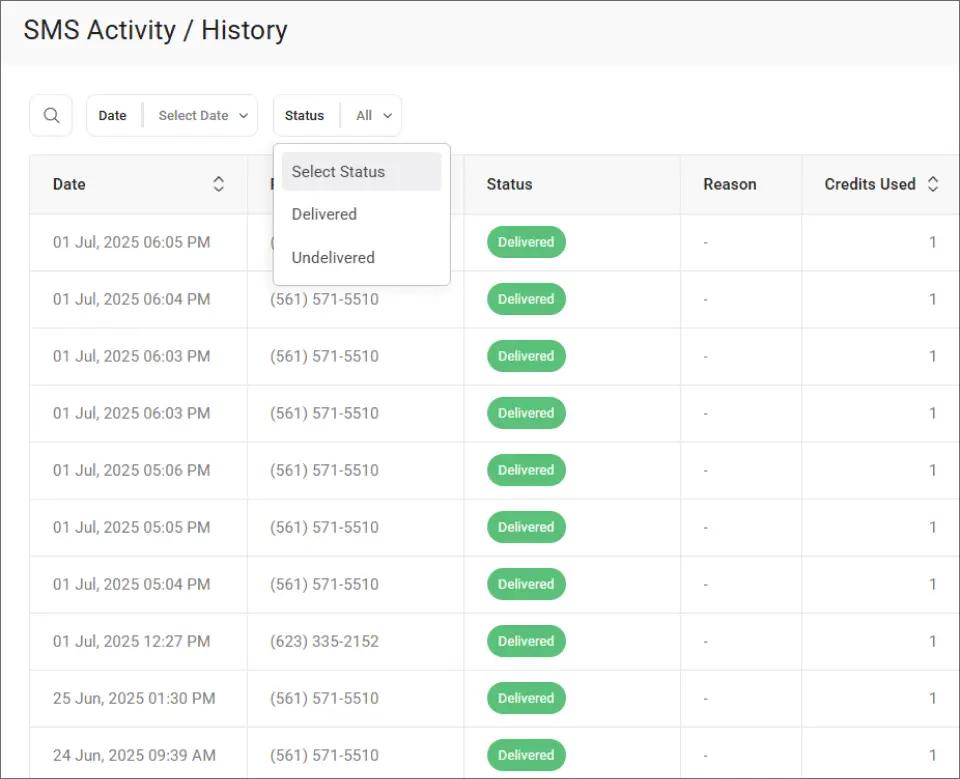
This filtering makes it easy to identify any undelivered messages and follow up individually before a missed policy creates compliance exposure.
All TextBolt plans include 10 user accounts with no per-user fees. Your compliance coordinator, managing partner, and office staff can all send alerts independently. If the office manager is out, a paralegal covers without disruption.
You can also trigger SMS notifications from email using filters and rules, automating alerts for recurring updates like monthly compliance reminders.
Now that the mechanism is in place, a few simple guidelines will keep SMS alerts effective and prevent alert fatigue across your team.
Best Practices for Keeping Legal SMS Alerts Effective
Effective internal SMS alerts follow a consistent pattern: brief messages, clear identification of what changed, and reserved use for updates that genuinely require immediate attention.
1. Reserve SMS Exclusively for Updates That Affect Client Work
If you text your team about everything, SMS loses its urgency signal. Save text alerts for policy changes, compliance deadlines, and procedural updates that require immediate awareness.
The distinction is simple: if staff can read it tomorrow without consequences, it belongs in email. If they need to know before their next client intake or court appearance, send an SMS.
2. State the Change, the Effective Date, and Where to Read More
SMS works best for brief alerts. State what changed, when it takes effect, and where to find the full details in one or two sentences.
For example: “Updated conflict check procedure effective today. Full policy in shared drive. Read before next client intake.” Your attorneys know exactly what to do.
3. Schedule Alerts to Land When Attorneys Are Between Tasks
Not every update needs to go out the moment it is finalized. You can schedule SMS from Gmail to send alerts when your team is most likely to act on them.
Schedule policy alerts for early morning when attorneys arrive, or 15 minutes before a team meeting where the update will be discussed.
4. Verify Delivery for Compliance-Critical Policy Changes
Check your TextBolt dashboard to confirm alerts were delivered to every recipient. Delivery status confirmations appear within two to five minutes of sending.
TextBolt’s summary view gives your compliance coordinator a daily snapshot of message delivery across the firm, so you can verify that critical alerts reached everyone.
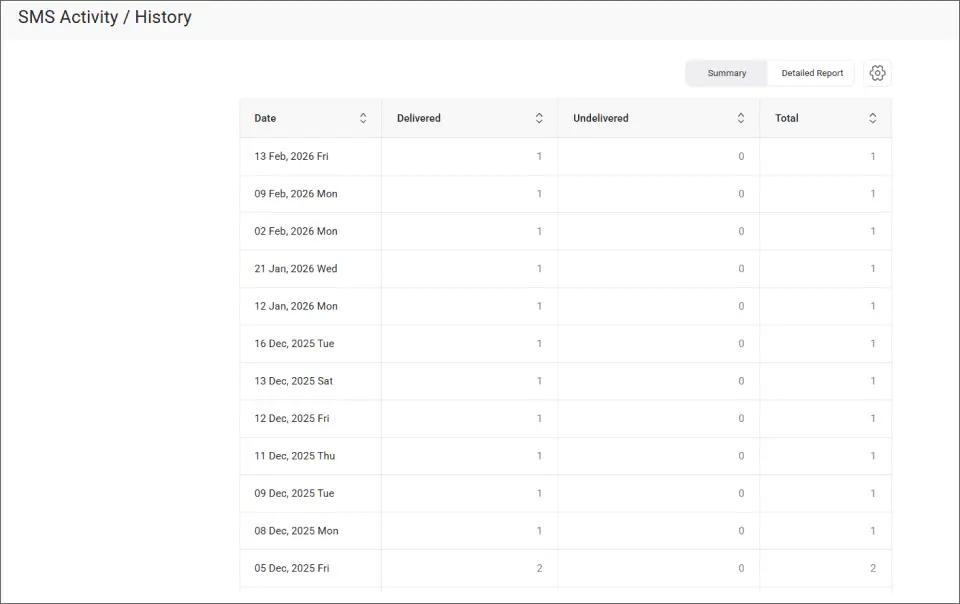
This overview makes it easy to spot delivery gaps and follow up individually with anyone whose message did not go through, protecting your firm from compliance exposure.
| Communication Type | Best Channel | Why |
| Routine announcements | Low urgency, can wait | |
| Policy changes | SMS alert | Requires immediate awareness |
| Compliance deadlines | SMS alert | Time-sensitive, high stakes |
| Procedural updates | SMS alert | Staff need to act before next task |
| Meeting reminders | Calendar invite | Built-in scheduling tools |
| Social events | No operational impact |
With these practices in place, maintaining consistent internal communication becomes part of your firm’s daily routine rather than an extra task.
Keep Every Attorney and Paralegal in the Loop
Send critical updates from your existing email. Start your seven-day free trial with 10 message credits.
Ready to Close the Gap Between Sending Updates and Staff Reading Them?
You can ensure legal staff see internal updates by adding one simple step to your existing workflow: send critical updates as text messages from your work email.
Email-to-SMS keeps your current tools in place. Compose an email, address it to your team’s phone numbers, and the message arrives as an SMS. No new software, no app installs, and no disruption to your business messaging platform.
500+ businesses trust TextBolt to deliver messages with an up to 98% delivery rate.* Plans start at $29 per month with 10 user accounts included. See TextBolt pricing to find the right fit for your firm.
Frequently Asked Questions
Can email-to-SMS work with our existing legal email system?
Yes. TextBolt works with Gmail, Outlook, and any email client your firm uses. No integrations or IT support needed. Compose an email to a phone number at sendemailtotext.com, and it delivers as SMS.
How many staff members can send internal SMS alerts?
All TextBolt plans include 10 user accounts with no per-user fees. Your office manager, compliance coordinator, and managing partners can each send alerts from their own email login.
Is there a daily limit on how many alerts we can send?
TextBolt does not impose daily sending limits. Your volume depends on your plan’s monthly credits and your email provider’s limits. The Basic plan includes 500 credits per month.
Can we send one alert to our entire legal team at once?
Yes. Create a group in Google Contacts with your team members. Send one email to the group, and each person receives an individual text message on their phone.
How fast do SMS alerts reach our staff?
Most messages deliver within seconds of sending the email. Delivery status confirmations appear in your TextBolt dashboard within two to five minutes.
Does TextBolt store our internal communications?
No. TextBolt uses pass-through architecture, meaning messages are not stored on TextBolt servers. Complete records stay in your firm’s email account for documentation and compliance purposes.