
- What Are Emergency Alerts to Students and Parents?
- Why Traditional Emergency Alert Systems Fail When Seconds Count
- Why SMS Delivers Emergency Alerts Faster Than Any Other Channel
- How to Set Up a School Emergency Alert System in Under 30 Minutes
- Emergency Alert Best Practices Every School Should Follow
- Emergency Alert Scenarios and How to Handle Them
- Send Emergency Alerts That Reach Parents When It Matters Most
- Frequently Asked Questions
Send Emergency Alerts Parents Actually See
How to Deliver Emergency Alerts to Students and Parents

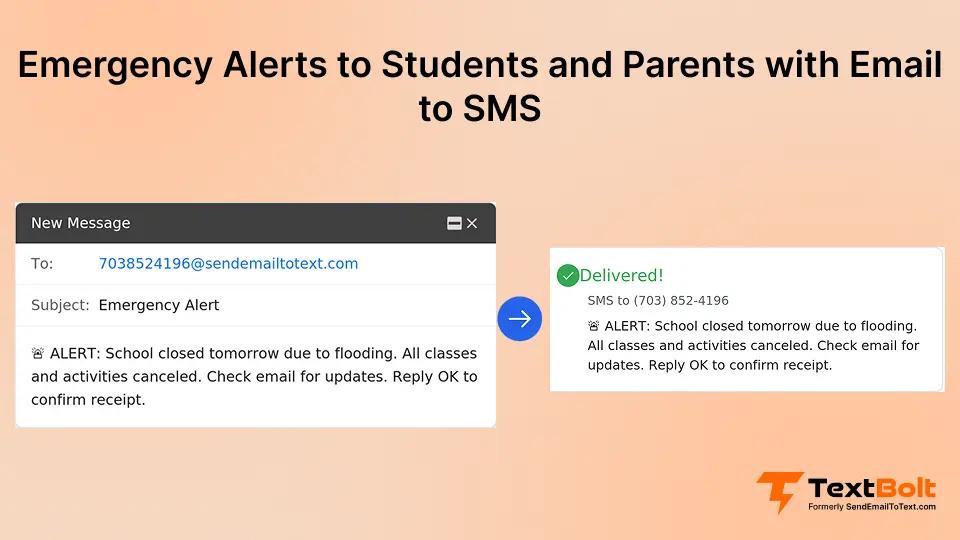
It’s 5:30 AM. A severe snowstorm is pounding your area, and you need to make the call: close school or try to open. Once you decide, you face an even bigger challenge. How do you alert 1,200 families before they start getting their kids ready and driving through dangerous conditions?
Email sits unread for hours. Robocalls get ignored or blocked. School apps require downloads that not every parent has completed. When emergencies happen, you need alerts that reach parents instantly, not eventually.
This guide shows you how to deliver emergency alerts to students and parents in seconds, not hours. You’ll learn why SMS is the fastest communication channel for time-sensitive situations, how to set up an effective alert system in under 30 minutes, and best practices that ensure your critical messages reach families when timing matters most.
For schools looking to implement email-to-SMS for emergency alerts, text messaging offers the speed and reliability traditional methods can’t match.
What Are Emergency Alerts to Students and Parents?
Emergency alerts to students and parents are critical notifications you send during situations that require immediate action or awareness. These alerts inform families about safety threats, weather emergencies, facility issues, or sudden schedule changes that affect their children.
You send these notifications for events like lockdowns, severe weather closures, early dismissals, gas leaks, power outages, security threats, or health emergencies. The defining characteristic of true emergency alerts is their time-sensitive nature. Parents need to know immediately, not when they eventually check their email or listen to a voicemail.
Here’s what effective emergency communication looks like in practice: At 5:47 AM, a snowstorm forces your school to close. You send one email to your contact list. Within 90 seconds, 1,400 parents receive a text alert on their phones.
No confusion about whether school is open. No missed messages buried in spam folders. No families showing up to locked doors.
The difference between emergency alerts that work and those that fail comes down to delivery speed and reliability. Your emergency system needs to reach parents on the devices they actually check, through channels they can’t ignore, in timeframes measured in seconds rather than hours.
Your Next Emergency Alert Shouldn’t Wait on Email Opens
Send critical alerts to thousands of families from your existing email. No apps, no training required.
Why Traditional Emergency Alert Systems Fail When Seconds Count
Your current emergency alert methods probably include email, robocalls, school apps, or social media posts. Each of these channels has fundamental weaknesses that become critical failures during actual emergencies.
1. Email Alerts Go Unread for Hours
Parents check their email sporadically throughout their busy days. Your urgent message lands in an inbox they might not open until lunch, or worse, gets filtered into spam or promotions folders where it never gets seen at all.
You have no way to guarantee parents will see your email before they leave for school drop-off or before dangerous weather conditions worsen.
2. Robocalls Get Ignored or Blocked
Spam filters automatically block calls from unknown numbers, which often includes your school’s main line if parents haven’t saved it. Even when your calls get through, parents increasingly don’t answer calls from unfamiliar numbers due to the constant barrage of spam calls everyone receives.
Those who do answer often hang up before your automated message finishes playing, and voicemail delays create confusion about the current status of your emergency.
3. School Apps Require Downloads and Logins
Not all parents have your app installed on their devices. Some downloaded it months ago and then uninstalled it to free up storage space. Others disabled push notifications because they found the daily announcements intrusive.
Login barriers slow access during time-sensitive situations, and parents who forgot their passwords can’t receive your critical alerts at all.
4. Social Media Reaches Limited Audiences
Not all parents use the same platforms where you post announcements. Facebook posts get buried in algorithmic feeds, meaning even parents who follow your page might not see your emergency alert.
You have no confirmation that your message was actually delivered to the families who need it, and parents who don’t use social media miss your alerts entirely.
The performance gap between these methods becomes clear when you compare them side by side:
| Alert Method | Typical Open Rate | Delivery Speed | Reliability |
| 20-30% | Minutes to hours | Low (spam folders) | |
| Robocalls | 10-20% | 2-5 minutes | Low (blocked/ignored) |
| School Apps | 40-50% | Instant (if installed) | Medium (setup required) |
| SMS Text | 90%+ | Seconds | High (10DLC compliant) |
Industry estimates based on communication channel research
The stakes are too high to rely on methods that fail the majority of your families. During emergencies, you need a communication channel that actually reaches parents.
Why SMS Delivers Emergency Alerts Faster Than Any Other Channel
SMS text messaging is the gold standard for time-sensitive school communication, and the data proves why. When you need to reach parents immediately, text messages deliver results that other channels simply cannot match.
1. Instant Delivery With Near-Universal Open Rates
Unlike email, which sits unopened for hours, SMS alerts trigger instant notifications on every parent’s phone. Industry research consistently shows that text messages achieve open rates above 90%, with most opened within minutes of delivery. Parents check their phones frequently throughout the day, making SMS the most reliable way to reach them during emergencies.
When you send emergency alerts via SMS, you’re reaching parents on the devices they’re already holding in their hands. TextBolt delivers messages with up to 98% delivery rate* through 10DLC compliance, ensuring your critical alerts reach families when timing matters most.
2. No App Downloads or Logins Required
SMS works on every mobile phone without additional software, downloads, or setup requirements. You eliminate all barriers between your alert and parents receiving it.
Parents don’t need to install your school app, remember a password, or enable specific notification settings. Their phones receive your text messages automatically, exactly like messages from friends and family. This universal accessibility means you reach all families equally, regardless of their technical sophistication or device preferences.
3. Cuts Through Digital Noise
Text notification sounds and vibrations grab immediate attention in ways that email notifications don’t. Your messages aren’t buried in spam folders, promotional tabs, or algorithmic social media feeds.
SMS alerts appear with clear, immediate visibility on phone lock screens, so parents see your message even if their phone is sitting on a desk or in a pocket. The combination of sound, vibration, and lock screen display makes text messages nearly impossible to miss.
4. Works During Power Outages
Cell towers have backup power systems that keep working when electrical grids fail. Parents can receive your alerts even if your school loses electricity, making SMS critical for natural disaster scenarios.
During hurricanes, tornados, ice storms, or other severe weather events that knock out power, text messaging often remains the only reliable communication channel between your school and families.
5. Delivery Confirmation You Can Track
You get visibility into which messages were delivered successfully and which families didn’t receive your alert. This allows you to follow up with alternative contact methods for parents who weren’t reached.
TextBolt’s dashboard shows delivery status 2-5 minutes after sending, giving you real-time confirmation that your emergency communication reached its intended audience. If you encounter delivery issues, you can quickly identify and resolve them.
Understanding how to craft effective alerts maximizes their impact. When creating your SMS emergency alerts, follow these best practices:
- Keep your messages under 160 characters for single-segment delivery
- Lead with the action required (“SCHOOL CLOSED TODAY” or “EARLY DISMISSAL 11 AM”)
- Include timestamp and source for credibility (“Riverside Elementary, 5:47 AM”)
- Provide clear next steps parents should take
- Avoid education jargon or unclear acronyms that might confuse families
How to Set Up a School Emergency Alert System in Under 30 Minutes
Setting up an effective emergency alert system is faster and simpler than you might expect. The key is choosing tools that work with systems your staff already use rather than adding complexity during high-stress situations.
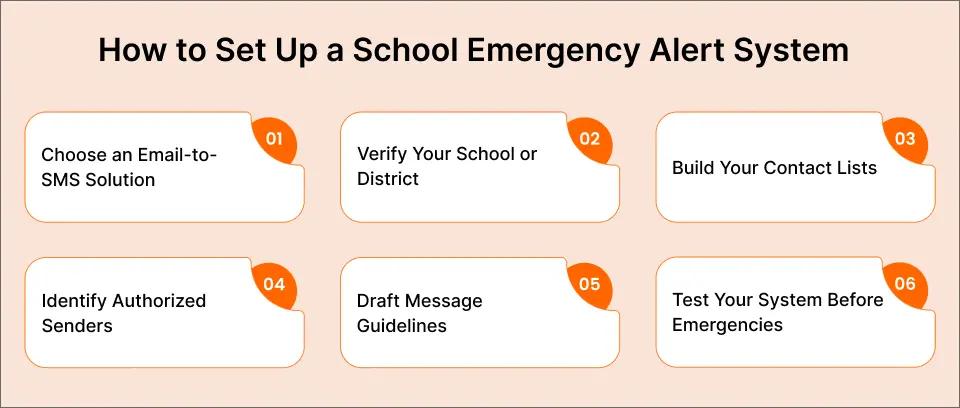
Step 1: Choose an Email-to-SMS Solution
Email-native platforms matter because your staff already know how to send emails. You avoid the delays and resistance that come with learning entirely new software during emergencies.
Look for solutions with 10DLC compliance to ensure reliable delivery. 10DLC registration is the carrier approval process that prevents your messages from being filtered as spam, giving you delivery rates up to 98%* instead of the 60-70% rates that plague non-compliant systems.
Step 2: Verify Your School or District
Your chosen platform will handle the 10DLC registration process automatically. You’ll need to provide basic information including your school’s business name, EIN, and a description of how you’ll use the service.
Account setup takes 10-30 minutes to complete. After you submit your information, 10DLC approval takes up to 48 hours before you can start sending messages. This waiting period is standard across all business texting platforms and ensures carrier compliance.
Step 3: Build Your Contact Lists
Import the parent contact information you already collect during enrollment and annual verification. Most schools already have this data in spreadsheets or student information systems.
Segment your contacts by grade level, school building, or emergency type so you can send targeted alerts when situations affect specific groups. Use Google Contacts groups for easy bulk sending to your entire parent list or specific segments. For schools using Gmail, you can schedule SMS from Gmail for planned announcements, while emergency alerts get sent immediately.
Step 4: Identify Authorized Senders
Decide which staff members should have the ability to send emergency alerts during different situations. Typically this includes principals, assistant principals, designated administrators, and emergency coordinators.
Email-native solutions require zero training because if your team can send email, they can send emergency alerts. The critical advantage here is eliminating single points of failure. You’re not dependent on one person who might be unavailable, on vacation, or facing their own emergency when a school crisis occurs. It also removes the need for staff to rely on personal devices during urgent situations, helping schools stop teachers using personal phones to text parents.
Step 5: Draft Message Guidelines
Create clear guidelines for common emergency scenarios including weather closures, lockdowns, early dismissals, and facility emergencies. Understanding message length limits helps you craft effective alerts. Standard SMS supports 160 characters per message, while messages using emojis or special characters are limited to 70 characters due to Unicode encoding.
Your guidelines should specify the key information to include: what happened, what action parents should take, and who to contact for questions. Having pre-written templates speeds up your response during actual emergencies when every second counts.
Step 6: Test Your System Before Emergencies
Send test alerts to a small group of staff members or parent volunteers before you need to use the system in a real emergency. Verify that messages deliver quickly and that recipients see them correctly on their devices.
Check your delivery confirmation dashboard to ensure you can track which messages went through successfully. Adjust your contact lists based on any bounce reports or delivery failures you discover during testing. Regular testing, announced clearly to avoid panic, keeps your system ready and your staff confident.
Email-to-SMS platforms like TextBolt work from your existing Gmail or Outlook account without requiring new software, making implementation straightforward for schools of any size.
Every Second Counts During an Emergency
Send emergency alerts to thousands of families instantly from Gmail or Outlook. No downloads, no training.
Emergency Alert Best Practices Every School Should Follow
Technology alone doesn’t guarantee effective emergency communication. Your system needs clear protocols, well-crafted messages, and proper maintenance to deliver results when crises occur.
1. Establish Clear Protocols in Advance
Define who has authority to send emergency alerts during different situations before those situations arise. Your decision tree should specify which staff members can initiate alerts for weather closures versus security threats versus facility emergencies.
Document your chain of command so everyone knows who takes over if the primary sender is unavailable, stuck in a meeting, or facing a personal emergency during the school crisis. Protocols created during calm moments prevent confusion during chaotic ones.
2. Keep Your Messages Concise and Actionable
Lead with the essential information parents need immediately, not background context they can read later. Use clear, direct language that avoids education jargon and technical terminology.
For example: “LOCKDOWN IN PROGRESS. All students safe. Do not come to school. Updates in 30 minutes.” This message tells parents the situation, their child’s status, what action to take, and when to expect more information. Everything critical fits in one screen-length text.
3. Follow Up With Additional Details
Your initial alert focuses on immediate actions parents must take right now. Follow-up messages provide context, timeline information, and next steps families should prepare for.
Your final message confirms resolution and return to normal operations. This three-part structure prevents information overload during the critical first moments while ensuring parents get complete information as situations develop.
4. Maintain Up-to-Date Contact Lists
Request parent mobile phone numbers during enrollment and send verification requests at the start of each school year. Phone numbers change frequently as families switch carriers or get new devices.
Outdated contact lists mean your alerts miss the families who need them most. Remove numbers that bounce back as undeliverable to avoid confusion in your delivery reports and to keep your contact lists accurate.
5. Test Regularly Without Causing Alarm
Schedule announced test drills in advance so parents know to expect practice messages. Use clearly marked “TEST” labels in your messages to prevent panic. “TEST: This is a practice emergency alert. Riverside Elementary is NOT closed. Testing delivery system only.”
Gather feedback on alert clarity and delivery speed from parents who receive your tests. Regular testing keeps your system functional and your staff confident in the process.
6. Comply With Privacy Regulations
FERPA considerations apply to student information included in your alerts. Manage opt-in and opt-out preferences according to your district’s policies and applicable laws.
Maintain data security for your contact lists, ensuring that parent phone numbers are protected from unauthorized access. Some states have specific requirements for school emergency notification systems, so check with your district’s legal counsel or your state’s Department of Education for guidance.
These core principles form the foundation of effective emergency communication. Here’s a quick reference guide:
| Do ✓ | Don’t ✗ |
| Lead with action required | Bury important info in details |
| Use clear, simple language | Use education jargon or acronyms |
| Follow up with additional context | Send one message and go silent |
| Test your system regularly | Wait for real emergency to test |
| Keep contact lists updated | Let old numbers stay in the system |
Emergency Alert Scenarios and How to Handle Them
Understanding how to apply these principles to specific situations helps you respond effectively when real emergencies occur. These four common scenarios demonstrate best practices in action:
Scenario 1: Severe Weather (School Closure)
Your decision point comes at 5:00 AM when the heavy snow forecast continues, and road conditions are deteriorating. You need to alert families before 6:00 AM so parents see your message before they wake their children and prepare for school.
Your alert should read: “RIVERSIDE ELEMENTARY CLOSED TODAY due to snow. No classes. No activities. Stay safe.” This message is short, clear, and tells parents exactly what they need to know. You can follow up later with information about makeup days or virtual learning plans.
Scenario 2: Security Threat (Lockdown)
Your decision point is immediate when a security threat requires lockdown procedures. You need to send alerts within 60 seconds of initiating lockdown to prevent parents from driving to campus and complicating the situation.
Your alert should read: “LOCKDOWN IN PROGRESS at Riverside Elementary. All students and staff are safe and secure. Do not come to campus. Updates every 15 minutes.” This message reassures parents about safety while giving them clear instructions not to interfere with emergency response. You follow up as promised every 15 minutes until the situation resolves.
Scenario 3: Facility Emergency (Gas Leak)
Your decision point comes when facilities staff detect a gas leak requiring immediate evacuation. You need to alert parents immediately upon making the evacuation decision so they can adjust their schedules for early pickup.
Your alert should read: “EARLY DISMISSAL 10:00 AM TODAY. Gas leak at Riverside Elementary. All students are safe. Pick up at the south parking lot.” This message explains why dismissal is early, confirms student safety, and tells parents where to go. You send a follow-up once the situation is resolved and normal operations resume.
Scenario 4: Health Emergency (Outbreak)
Your decision point comes when multiple illness cases require facility closure for deep sanitation. You alert parents the evening before closure to give families time to arrange childcare or adjust work schedules.
Your alert should read: “RIVERSIDE ELEMENTARY CLOSED Thu and Fri for deep cleaning. Online assignments posted by 9 AM. Reopening Monday.” This message gives parents advance notice, explains the reason, provides academic continuity information, and sets expectations for return.
Each scenario demonstrates the same core principle: immediate, clear communication that tells parents exactly what’s happening and what action they should take. The specific details change based on the emergency type, but the fundamental approach remains consistent.
Send Emergency Alerts That Reach Parents When It Matters Most
SMS messaging provides the speed, reliability, and universal accessibility your emergency alerts require. When crises occur, you need communication that reaches parents in seconds on devices they’re already holding, through channels they can’t ignore.
Traditional methods like email and robocalls fail too many families at the moments when communication matters most.
TextBolt enables you to send instant emergency alerts from your existing email account without requiring apps for parents to download, training for your staff, or delays when emergencies happen. Over 500+ businesses trust TextBolt for critical communication because it works with the tools your team already uses.
Your staff sends emergency alerts the same way they send regular emails, eliminating learning curves and reducing response times during high-stress situations.
Start your free 7-day trial with 10 message credits and see how fast emergency communication should be. Your families deserve alerts that actually reach them when timing matters.
Visit TextBolt pricing plans to see which option fits your school’s needs, or start your free trial today to test the system before your next emergency. For more information on how schools use text messaging for critical communication, explore our complete guide to SMS emergency alerts.
Frequently Asked Questions
How quickly do SMS emergency alerts reach parents?
SMS alerts typically reach parents within seconds of sending. Industry research shows text messages achieve open rates above 90%, with most opened within minutes of delivery, compared to email which can take hours. TextBolt provides up to 98% delivery rate* through 10DLC compliance, ensuring your critical messages reach families when timing matters most.
Do parents need to download an app to receive emergency text alerts?
No. SMS emergency alerts work on every mobile phone without requiring app downloads, logins, or special setup. Parents receive your alerts as standard text messages, making this the most accessible option for reaching all families regardless of their technology access or preferences.
Can multiple staff members send emergency alerts?
Yes. Email-to-SMS platforms allow multiple authorized staff members to send emergency alerts from their own email accounts. This eliminates single points of failure and ensures you can send alerts even if your principal or primary contact is unavailable during an emergency.
What information should be included in school emergency alerts?
Your emergency alerts should lead with the essential action, such as “SCHOOL CLOSED” or “LOCKDOWN IN PROGRESS,” followed by brief context like “due to snow,” and next steps for parents. Keep messages under 160 characters when possible and avoid jargon. You can follow up with additional details.
How do I build a contact list for emergency alerts?
Collect parent mobile phone numbers during enrollment and request annual verification at the start of each school year. Import contacts into your alert system and segment by grade level, building, or alert type for targeted messaging. Regularly update your lists to remove outdated numbers.
Are there legal requirements for school emergency notifications?
Requirements vary by state and district. Many states mandate timely notification systems for emergencies. Check with your state’s Department of Education for specific guidelines. Maintain opt-in records and comply with FERPA regulations regarding student information privacy when sending alerts.