
- Why Email to SMS Works Better for Promotional Offers
- Types of Promotional Offers Perfect for Email to SMS
- Compliance Requirements for Promotional SMS
- How to Set Up Email to SMS for Promotional Offers
- Best Practices for Promotional SMS Success
- Common Promotional SMS Mistakes to Avoid
- Email to SMS vs. Traditional SMS Marketing Platforms
- Getting Started With Promotional Email to SMS
- Frequently Asked Questions
Send Promotional SMS From Gmail
How to Send Promotional Offers via Email to SMS: The Complete Business Guide

Your promotional emails are sitting unopened. While email performs well overall, time-sensitive offers often don’t reach customers until hours after delivery sometimes after your offer expires.
That’s where SMS changes the game. Text messages are opened almost immediately, typically within just a few minutes of delivery. Instead of waiting in crowded inboxes, your promotional offers reach customers right when they matter most.
What makes this especially frustrating for businesses is the misconception that SMS marketing is complex or expensive. Many assume it requires new platforms, technical integrations, or dedicated apps their teams must learn.
In reality, you can send promotional text messages directly from your computer using tools you already use every day like email.
Why Email to SMS Works Better for Promotional Offers
Traditional promotional channels have a visibility problem. Email inboxes are flooded. Social media algorithms bury organic posts. Direct mail takes days and costs dollars per piece.
SMS cuts through all of that noise.
The Numbers That Matter for Promotional Success
When you send a promotional offer via text message, here’s what happens:
- 98% open rate compared to 20-32% for email
- 90% of texts read within 3 minutes of delivery
- 20–30% conversion or response rates for well‑targeted SMS campaigns
- Several times higher engagement than email promotions, especially for time‑sensitive offers
For a flash sale, limited-time offer, or exclusive discount, timing matters. An email sent at 10 AM might not be opened until 6 PM, long after your lunch special ended. A text message gets seen almost immediately.
Why Email-to-SMS Beats Traditional SMS Platforms
Most businesses avoid SMS marketing because the platforms seem complicated. Dashboard-based SMS tools require learning new software, managing separate contact lists, and training staff on yet another system.
Email-to-SMS eliminates these barriers.
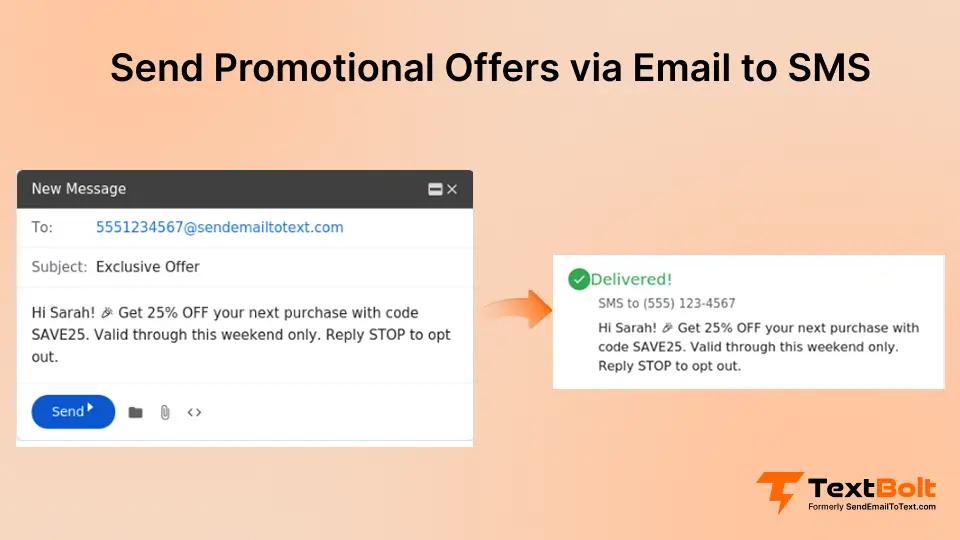
With an email to text service, you compose promotional messages in Gmail or Outlook, the same tools your team already uses. No new dashboards. No separate apps. No training sessions.
Your promotional SMS workflow becomes:
- Write your offer in an email
- Send to the recipient’s phone number at a special address
- Customer receives it as a professional SMS
That’s the entire process. If your team can send an email, they can send promotional texts. For a detailed walkthrough, see our guide on how to send email to text.
Turn Gmail Into a Promotional SMS Channel
Stop relying on unopened promotional emails. Send offers as SMS directly from Gmail—no dashboards, no APIs, no new tools to learn.
Types of Promotional Offers Perfect for Email to SMS
Not every promotion belongs in a text message. SMS works best for time-sensitive, high-value offers that benefit from immediate visibility.
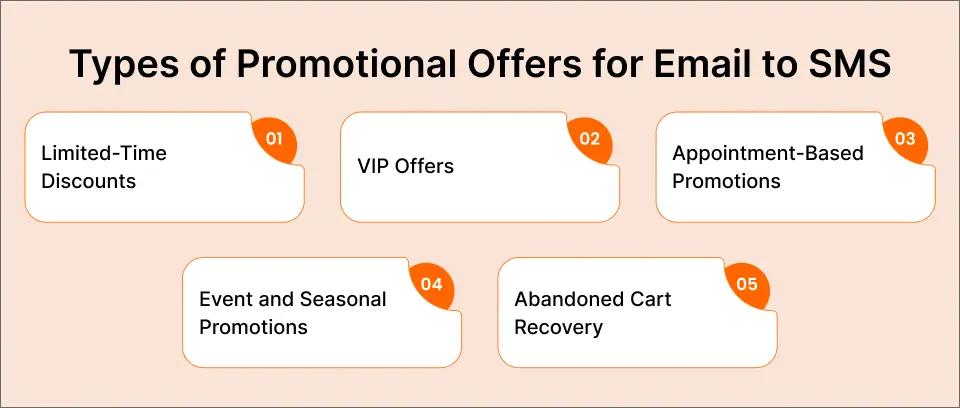
Flash Sales and Limited-Time Discounts
Flash sales depend on urgency. A 24-hour sale announcement sent by email might not be seen until the sale ends. Text messages create immediate awareness.
Example promotional SMS:
FLASH SALE: 30% off all services today only! Use code FLASH30 at checkout or mention this text. Offer expires at midnight. Reply STOP to opt out.
Exclusive Member or VIP Offers
Customers who opt in to text notifications expect special treatment. Reward them with exclusive offers they can’t get elsewhere.
Example promotional SMS:
VIP EXCLUSIVE: You’re getting early access to our summer collection – 25% off before anyone else. Shop now at [link]. Reply STOP to unsubscribe.
Appointment-Based Promotions
For service businesses, promotional texts tied to appointments drive additional revenue without feeling pushy. Learn more about sending appointment reminders via email to maximize this strategy.
Example promotional SMS:
Hi Sarah! Your appointment is confirmed for tomorrow at 2pm. Book a friend this month and you both get 15% off your next visit! Reply STOP to opt out.
Event and Seasonal Promotions
Holiday sales, anniversary specials, and seasonal promotions benefit from the immediacy of SMS.
Example promotional SMS:
Happy Birthday from [Business Name]! Enjoy 20% off your next purchase this month. Show this text to redeem. We appreciate you! Reply STOP to unsubscribe.
Abandoned Cart Recovery
For e-commerce businesses, a well-timed text about an abandoned cart converts better than email follow-ups.
Example promotional SMS:
You left something behind! Complete your order in the next 2 hours and get free shipping. [link] Questions? Reply to this text. Reply STOP to opt out.
Compliance Requirements for Promotional SMS
Before sending your first promotional text, you need to understand the rules. Promotional SMS is heavily regulated, and violations carry significant penalties.
TCPA Requirements for Promotional Texts
The Telephone Consumer Protection Act (TCPA) governs promotional text messages in the United States. Key requirements include:
Express Written Consent Required
Unlike transactional messages (appointment reminders, order confirmations), promotional texts require express written consent before you can send them. This means:
- Customers must actively opt in to receive promotional texts
- The opt-in must be documented and stored
- Consent cannot be a condition of purchase
- Customers must be informed about what they’re signing up for
Clear Opt-Out Instructions
Every promotional message must include a way to unsubscribe. Standard practice is including “Reply STOP to opt out” or similar language.
Identification Requirements
Recipients must be able to identify who sent the message. Include your business name in promotional texts.
For complete details on SMS compliance requirements, review the SMS compliance laws that govern business text messaging.
CTIA Guidelines for Commercial Messages
The Cellular Telecommunications Industry Association (CTIA) provides messaging best practices that carriers enforce:
- Message frequency must match what customers agreed to
- Content must be relevant to the consent provided
- Opt-out requests should be processed as quickly as possible and no later than a few business days
- Message content must not be deceptive or misleading
10DLC Registration for Business Messaging
If you’re sending promotional SMS from a business, 10DLC (10-Digit Long Code) registration is required. This carrier registration:
- Verifies your business identity
- Improves delivery rates (up to 98% vs. unregistered senders)
- Prevents your messages from being filtered as spam
- Ensures compliance with carrier requirements
Professional email-to-SMS services like TextBolt help handle 10DLC registration during setup and guide you through the required information, so you don’t have to manage the process alone.
How to Set Up Email to SMS for Promotional Offers
Setting up an email-to-SMS system for promotional messages is quick on the technical side and can be done in under an hour. Building a compliant, high‑quality list may take a bit longer. Here’s the step-by-step process.
Step 1: Choose Your Email-to-SMS Provider
Your email-to-SMS provider determines delivery rates, compliance handling, and ease of use. Look for:
- 10DLC compliance included (ensures deliverability)
- Works with your email client (Gmail, Outlook, etc.)
- Two-way messaging (customers can reply)
- Team access (multiple staff can send promotions)
- Message logging (audit trail for compliance)
TextBolt’s Gmail text integration handles all of these requirements while letting you send promotional SMS directly from your inbox.
Step 2: Complete Business Verification
10DLC registration requires business verification. You’ll need:
- Business name and address
- EIN or business registration number
- Website URL
- Brief description of your messaging use case (promotional offers, customer communication, etc.)
This verification process takes 1-2 days in the background while you continue setup.
Step 3: Build Your Opt-In List
You cannot send promotional texts to customers who haven’t explicitly opted in. Build your list through:
Website Opt-In Forms
Add a checkbox to your contact forms: “Yes, I’d like to receive exclusive offers and promotions via text message.”
In-Store Sign-Up
Train staff to ask: “Would you like to receive exclusive text-only deals? We’ll send 2-4 messages per month.”
Existing Customer Outreach
Send an email to existing customers inviting them to join your SMS list: “Get exclusive deals sent directly to your phone. Text JOIN to [number] to subscribe.”
Important: Never assume existing email subscribers want text messages. SMS opt-in must be separate and explicit.
Step 4: Segment Your Contact Groups
Not every promotional offer applies to every customer. Use Google Contacts groups to segment your list:
- VIP Customers: Highest-value clients who get early access
- New Customers: Recent sign-ups who need onboarding offers
- Lapsed Customers: Haven’t purchased recently, need reactivation
- Location-Based: Customers near specific store locations
- Interest-Based: Customers who’ve shown interest in specific products/services
Segmentation improves response rates and reduces opt-outs. A customer who signed up for “salon specials” doesn’t want automotive service promotions.
Step 5: Create Your Promotional Message Templates
Effective promotional SMS messages share common characteristics:
Keep It Short
SMS has a 160-character limit for standard messages. Longer messages split into multiple segments (using additional credits). Aim for one clear message per text.
Lead With Value
Don’t bury the offer. Start with what the customer gets: “25% OFF” or “FREE shipping” should come early in the message.
To further improve response rates, you can apply tactics from this guide on increase lead conversion with email-to-SMS, which explains how leading with a clear benefit drives higher engagement.
Include Clear Action
Tell customers exactly what to do: “Show this text,” “Use code SAVE25,” “Click here,” or “Reply YES.”
Add Urgency When Appropriate
“Today only,” “Expires midnight,” or “While supplies last” drive faster action.
Always Include Opt-Out
Every promotional message must include opt-out instructions: “Reply STOP to unsubscribe.”
Step 6: Send Your First Promotional Campaign
With your email-to-SMS service configured and opt-in list ready:
- Open Gmail (or your email client)
- Select the contact group for this promotion
- Compose your promotional message
- Send to the group using your email-to-SMS address format
- Monitor delivery confirmations and responses
For businesses sending promotional SMS regularly, this process becomes as natural as sending any other email.
Best Practices for Promotional SMS Success
The difference between promotional SMS that drives revenue and texts that get ignored comes down to execution.
Timing Your Promotional Messages
For even more control over delivery timing, you can schedule SMS from Gmail to ensure messages arrive at optimal moments.
Best times for promotional SMS:
- Retail promotions: 10 AM-12 PM or 5-7 PM (when people have time to shop)
- Restaurant offers: 10:30 AM (lunch decisions) or 4 PM (dinner planning)
- Service businesses: Tuesday-Thursday, mid-morning
- Flash sales: Match the urgency to your offer timing
Times to avoid:
- Before 8 AM or after 9 PM (respect quiet hours)
- During major holidays (unless your offer is holiday-specific)
- Too frequently (2-4 promotional texts per month is typical)
Message Frequency Guidelines
Sending too many promotional texts leads to opt-outs. Too few, and customers forget they signed up.
Recommended frequency by business type:
- Retail: 2-4 per month
- Restaurants: 1-2 per week (meals are recurring purchases)
- Service businesses: 1-2 per month
- E-commerce: 2-4 per month, plus triggered messages (abandoned cart)
Always match frequency to what customers agreed to during opt-in. Also, Keep an eye on opt‑out rates. If a particular campaign causes a spike in unsubscribes, reduce the frequency or adjust your content so messages stay valuable, not annoying.
Personalization That Works
Generic blasts get ignored. Personalized offers convert.
Effective personalization:
- Use first names when available
- Reference previous purchases or services
- Acknowledge customer status (VIP, member since, etc.)
- Tailor offers to demonstrated interests
Example personalized promotional SMS:
Hi Maria! Your favorite shampoo is 20% off this week. Stock up before your next appointment on the 15th. Show this text to save. Reply STOP to opt out.
Tracking Promotional SMS Performance
Unlike email, SMS doesn’t have built-in open tracking. Measure success through:
- Redemption rates: How many customers used the offer code or mentioned the text
- Reply rates: Customer responses to promotional messages
- Opt-out rates: If opt-outs spike, adjust frequency or content
- Revenue attribution: Track sales tied to specific promotional campaigns
Common Promotional SMS Mistakes to Avoid
Learning from others’ mistakes saves you from compliance issues and customer frustration.
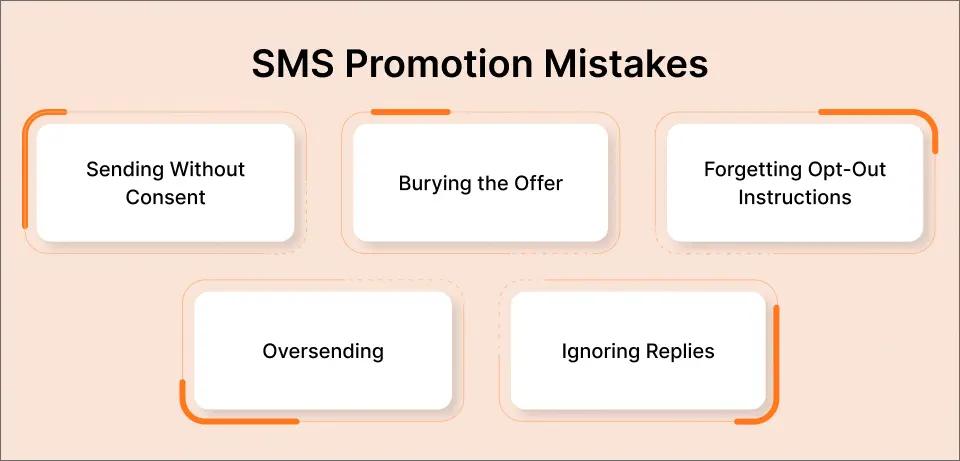
Mistake 1: Sending Without Consent
This is the most serious mistake. Sending promotional texts to customers who haven’t opted in violates TCPA and can result in:
- Fines up to $1,500 per unsolicited message
- Carrier blocking of your messages
- Damage to your business reputation
Solution: Only send to customers with documented opt-in consent. When in doubt, don’t send.
Mistake 2: Burying the Offer
Some businesses write promotional texts like emails, with greetings and context before getting to the offer. SMS isn’t email.
Wrong approach:
Hi! We hope you’re having a great week. We wanted to let you know that we’re running a special promotion right now where you can save 20% on…
Better approach:
20% OFF your next visit! Use code SAVE20 at checkout. Valid through Sunday. [Business Name] Reply STOP to unsubscribe.
Mistake 3: Forgetting Opt-Out Instructions
Every promotional message needs opt-out instructions. Carriers increasingly filter messages that don’t include them.
Mistake 4: Oversending
The fastest way to destroy an SMS list is by sending too many messages. Each promotional text should be valuable enough that customers look forward to receiving it.
Mistake 5: Ignoring Replies
When customers reply to promotional texts, they expect responses. Email-to-SMS services deliver replies to your inbox. Check and respond promptly.
Email to SMS vs. Traditional SMS Marketing Platforms
Businesses evaluating promotional SMS have options. Here’s how email-to-SMS compares to traditional platforms.
| Feature | Email-to-SMS (TextBolt) | Traditional SMS Platforms |
| Learning curve | None (use existing email) | Hours of training required |
| Monthly cost | $29-99/month | $50-500/month |
| Team access | Any email user | Per-seat licensing |
| Setup time | 30 minutes | Hours to days |
| Contact management | Google Contacts | Separate system required |
| Two-way messaging | Replies in inbox | Separate dashboard |
| 10DLC compliance | Assistance included | Often additional setup |
For small businesses running promotional campaigns, email-to-SMS provides enterprise-level SMS marketing without enterprise complexity.
Stop Sending Promotions That Get Ignored
Your customers check texts first. Start sending promotional offers they actually see—directly from Gmail.
Getting Started With Promotional Email to SMS
You’ve seen the open rates. You understand the compliance requirements. You know the best practices.
Now it’s time to send your first promotional text.
Here’s your action plan:
- Set up your email-to-SMS service (30 minutes)
- Build your opt-in form (add to website and in-store sign-up)
- Import opted-in contacts to Google Contacts groups
- Write your first promotional template using the examples above
- Send to a small test group and measure results
- Scale based on performance
Businesses seeing around 98% open rates and 45% response rates on their promotional offers aren’t using magic. They’re using SMS a proven way to boost customer engagement.
Ready to turn your email into a promotional SMS powerhouse?
Check out TextBolt pricing to find the plan that fits your promotional messaging volume. Most businesses start with the Standard plan at $49/month, which includes 1,000 message credits and team access for multiple staff members.
Your promotional emails are being ignored. Your promotional texts won’t be.
Frequently Asked Questions
Can I send promotional texts to my existing email subscribers?
No. SMS opt-in must be separate from email opt-in. You need explicit consent specifically for text message promotions. Send an email inviting existing subscribers to join your SMS list with clear language about what they’re signing up for.
What’s the character limit for promotional SMS?
Standard SMS messages are 160 characters when you use normal text. Messages that include emojis or certain special characters are limited to 70 characters per segment. If you go over the limit, your text is split into multiple segments, and each segment uses one message credit.
How often can I send promotional texts?
Most businesses send 2-4 promotional texts per month. Restaurants and businesses with recurring purchases may send 1-2 per week. Match your frequency to what customers agreed to during opt-in. Higher frequency increases opt-outs.
Do I need special software to send promotional SMS from email?
You need an email-to-SMS service that handles the conversion and ensures 10DLC compliance. TextBolt works directly with Gmail, Outlook, or any email client. No additional software installation required.
What happens if someone replies “STOP” to my promotional text?
Professional email-to-SMS services automatically process opt-out requests. The customer is removed from your list and won’t receive future promotional texts, and many platforms send a one‑time confirmation message. You should never send further promotions to that number after a STOP reply, because texting someone who has opted out can violate TCPA regulations.
Can I include links in promotional SMS?
Yes. Short links work well in promotional texts. Be aware that shortened URLs (like bit.ly) may trigger spam filters on some carriers. Use your own domain or your email-to-SMS provider’s link shortener when available.
Is email to SMS HIPAA compliant for healthcare promotions?
Email-to-SMS can be used for promotional messages in healthcare settings, but promotional texts require separate opt-in from appointment reminders. Promotional content should never include protected health information. Consult your compliance team for specific requirements.