
- Why Traditional Product Launch Announcements Fall Short
- Why SMS Dominates Email for Product Launch Announcements
- How Email-to-SMS Works for Product Launches
- Pre-Launch Strategy: Building Anticipation via Email to SMS
- Launch Day Tactics: Making Your Announcement Unmissable
- Post-Launch Follow-Up: Keeping Momentum Going
- Product Launch SMS Templates You Can Use Today
- Best Practices for Product Launch SMS Compliance
- Setting Up Email-to-SMS for Your Next Product Launch
- Your Product Launch Deserves Better Visibility
- Frequently Asked Questions
Launch Announcements That Get Opened
How to Use Email to SMS for Product Launch Announcements That Actually Get Opened

You’ve spent months developing a new product. The landing page is perfect. The marketing emails are queued. Launch day arrives, and you hit send on that carefully crafted email campaign.
Then you wait. And wait.
Here’s the uncomfortable truth about email-only product launches: the average email open rate hovers around 17-28%, which means up to 80% of your audience might never see your announcement. For a product launch where timing is everything, that’s a devastating gap.
SMS changes the equation entirely. Text messages achieve open rates as high as 98%, with most messages read within 90 seconds of delivery. But here’s what most businesses don’t realize: you can send SMS product launch announcements directly from your email inbox, without learning a new platform or hiring developers.
This guide shows you exactly how to use email to SMS for product launch announcements that actually reach your customers. You’ll learn the strategic framework for pre-launch, launch day, and post-launch messaging, plus get ready-to-use templates you can adapt for your next release.
Why Traditional Product Launch Announcements Fall Short
Before diving into solutions, let’s be honest about what’s broken with current product launch communication. Most businesses face the same frustrating challenges.
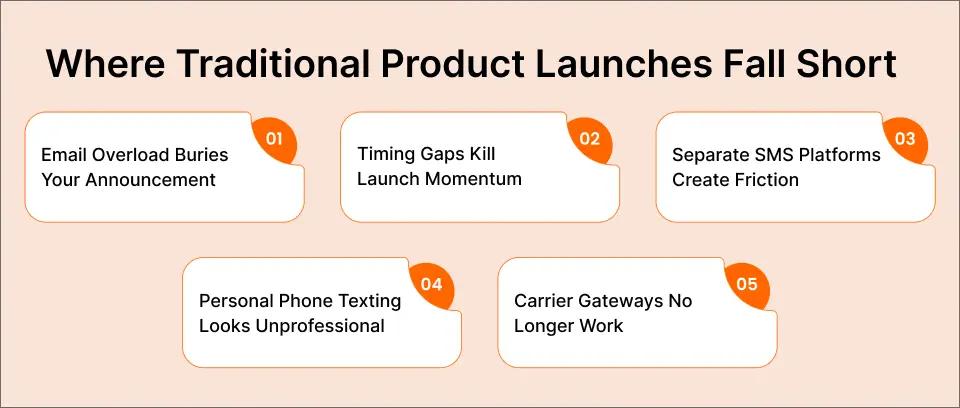
Challenge 1: Email Overload Buries Your Announcement
Your customers receive an average of 121 business emails per day. Your product launch email competes with meeting invites, newsletters, promotions, and spam. Even if your subject line is compelling, it might sit unread for hours or days, long after the launch excitement has faded.
Challenge 2: Timing Gaps Kill Launch Momentum
You schedule a 9 AM launch email, but your customer doesn’t check their inbox until 2 PM. By then, early-bird pricing has expired, limited inventory is gone, and the urgency you carefully crafted has evaporated. Email doesn’t deliver instant visibility when you need it most.
Challenge 3: Separate SMS Platforms Create Friction
You know SMS works better for urgent announcements, but most SMS platforms require learning new dashboards, managing separate contact lists, and switching between tools. That friction means SMS gets skipped or executed poorly.
Challenge 4: Personal Phone Texting Looks Unprofessional
Some businesses resort to texting customers from personal phones. This approach fails for multiple reasons: it looks unprofessional, creates compliance risks, depends on one person being available, and leaves no audit trail for marketing documentation.
Challenge 5: Carrier Gateways No Longer Work
If you previously used carrier email gateways like @txt.att.net or @vtext.com for product announcements, those services shut down in 2025. Businesses that relied on free carrier gateways now face silent delivery failures with no alternative.
The good news? There’s a way to combine the reach of SMS with the workflow you already know: email-to-SMS technology that lets you send text messages directly from Gmail or Outlook.
Tired of Product Launches That Miss Your Audience?
Your next product deserves better than a 20% open rate. TextBolt lets you send SMS announcements directly from Gmail, no new platform to learn.
Why SMS Dominates Email for Product Launch Announcements
The data overwhelmingly favors SMS for time-sensitive announcements like product launches.
| Metric | SMS | |
| Open Rate | Up to 98% | 17-28% |
| Response Rate | 45% | 6% |
| Average Response Time | 90 seconds | 90 minutes |
| Delivery Confirmation | Immediate | Often unknown |
These numbers matter because product launches depend on timing. A 98% open rate means your announcement reaches nearly everyone on your list. A 90-second response time means customers can act immediately on early-bird pricing or limited availability.
According to research, automated SMS messages generate 147% higher click rates and 118% better conversion rates than standard campaigns. For product launches where every conversion counts, those improvements translate directly to revenue.
When Email Still Makes Sense
Email remains valuable for detailed product information, feature explanations, and visual storytelling. The smart approach combines both channels: use email for comprehensive product details and SMS for urgent notifications that cut through the noise.
This is where comparing SMS marketing vs email marketing becomes essential. The winning strategy uses each channel for its strengths.
How Email-to-SMS Works for Product Launches
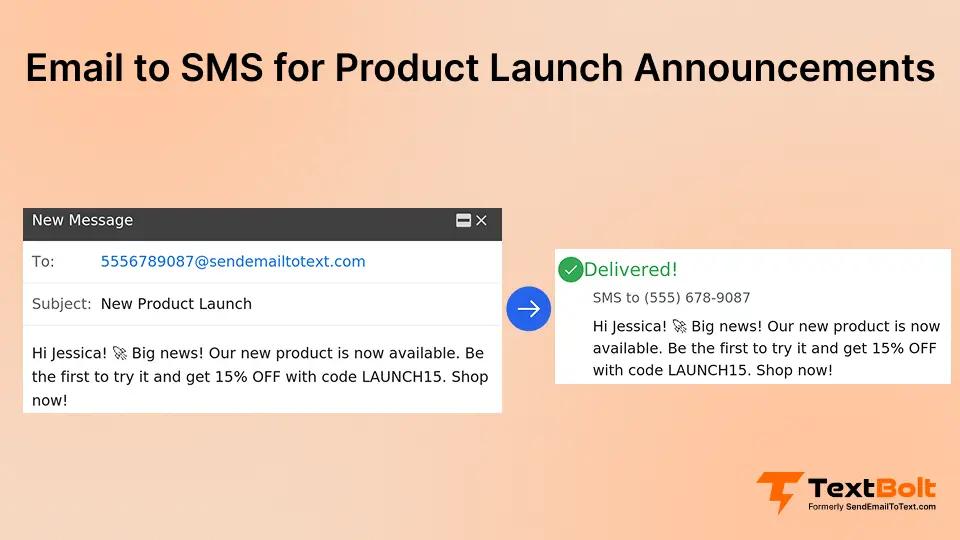
Email-to-SMS technology bridges the gap between the tools you already use and the channel your customers actually notice. Instead of learning a separate SMS dashboard or hiring developers to build API integrations, you send text messages by composing regular emails.
The concept is straightforward: you write an email, address it to a special format that includes the recipient’s phone number, and the email-to-SMS service converts your message into a text delivered from a professional business number.
Here’s how this works in practice with an email-to-SMS service like TextBolt:
- Compose an email in Gmail or Outlook, just like you normally would
- Address it to the phone number using a gateway format (for example: 5551234567@sendemailtotext.com)
- Write your product announcement in the email body
- Hit send and the service delivers it as a professional SMS from your business number
The recipient sees your message as a normal text from your company, not a random email address or unknown sender. When they reply, their response comes back to your email inbox as a threaded conversation. This same workflow also works for event invitations sent via email-to-SMS and customer notifications.
Why This Approach Works for Product Launches
Email-to-SMS offers distinct advantages for product launch campaigns that traditional SMS platforms don’t match:
- Team-wide access without training: Your entire marketing team can send launch announcements from their own email accounts, all appearing from the same business number. No more bottlenecks where only one person knows how to use the SMS dashboard. When Sarah is swamped on launch day, Tom can help send the afternoon reminder without any handoff friction.
- Built-in scheduling: Gmail and Outlook already have scheduling features. You can schedule SMS messages from Gmail for your pre-launch teasers, launch day blasts, and follow-up sequences, all queued up days in advance.
- Automatic documentation: Every message is logged in your email account with timestamps, sender identification, and delivery confirmation. This creates a complete audit trail for marketing attribution and compliance documentation.
- Carrier compliance handled: Modern email-to-SMS services like TextBolt include 10DLC registration, which ensures your product announcements meet carrier requirements and achieve up to 98% delivery rates instead of getting filtered as spam.
Pre-Launch Strategy: Building Anticipation via Email to SMS
The most successful product launches don’t start on launch day. They build anticipation over days or weeks leading up to the release.
Countdown Messages That Create Excitement
Start your countdown 7-10 days before launch. Each message should reveal something new while maintaining mystery.
Template 1: Initial Teaser (7 Days Out)
Something big is coming to [Brand]. 7 days until the reveal. Reply EARLY for exclusive first access. Reply STOP to opt out.
Template 2: Feature Hint (5 Days Out)
[Brand] sneak peek: Imagine [key benefit] in half the time. 5 days until you can try it yourself. Stay tuned.
Template 3: Early Access Offer (3 Days Out)
[First Name], you’re on our VIP list. Get [Product] 24hrs before everyone else: [link]. Launch in 3 days.
Building Your SMS List Before Launch
You can’t send product launch SMS without subscribers who’ve opted in. Here are proven list-building tactics:
- Website keyword signup: Add a short code or keyword to your product waitlist page. “Text WAITLIST to 55555 for early access.”
- Email list conversion: Include SMS opt-in in your pre-launch emails. “Want launch-day alerts via text? Reply YES or click here to add your number.”
- Social media teasers: Promote SMS-exclusive early access on Instagram, Twitter, and LinkedIn.
For detailed guidance on triggering SMS notifications from email, check our complete setup tutorial.
Launch Day Tactics: Making Your Announcement Unmissable
Launch day is when email-to-SMS truly shines. While competitors’ emails sit unread in crowded inboxes, your SMS announcement pops up immediately on every subscriber’s phone.
The Three-Message Launch Day Sequence
Message 1: Early Morning Announcement (6-8 AM local time)
IT’S HERE! [Product Name] is now live at [Brand]. First 50 orders get 20% off with code LAUNCH20. Shop now: [link]
Message 2: Mid-Day Reminder (12-1 PM)
[Product Name] is selling fast. Only 23 left at launch pricing. Don’t miss out: [link]
Message 3: Evening Last Chance (6-7 PM)
Final hours for [Product] launch pricing. The price goes up at midnight. Get yours: [link]
Creating Urgency That Converts
Fear of missing out (FOMO) drives action. Use these proven urgency tactics:
- Limited quantity: “Only 50 units available at launch price”
- Time-bound offers: “Launch discount ends in 4 hours”
- Early access expiration: “VIP early access closes at noon”
- Social proof: “127 people bought in the first hour”
The key is authenticity. False urgency destroys trust. Only create scarcity if it’s real. For more tactics on creating compelling offers, see our guide on email to SMS for promotional offers.
Ready to Launch Like the Pros?
Your product launch deserves 98% visibility, not 20%. Send SMS announcements from the email inbox you already use.
Post-Launch Follow-Up: Keeping Momentum Going
The launch doesn’t end when you ship. Post-launch SMS keeps customers engaged and drives additional revenue. The key is setting up automated text message sequences that nurture buyers without manual effort.
Follow-Up Message Templates
Template 1: Thank You + Next Steps (Day 1 After Purchase)
Thanks for being a [Product] early adopter, [First Name]! Your order ships today. Questions? Reply to this text.
Template 2: Usage Tips (Day 3)
Getting started with [Product]? Here’s the #1 tip from our team: [brief tip]. Full guide: [link]
Template 3: Review Request (Day 7)
[First Name], how’s [Product] working for you? Your review helps other customers. Takes 30 seconds: [link]
Template 4: Referral Opportunity (Day 14)
Love [Product]? Share with a friend and you both get 15% off the next purchase. Your unique link: [referral link]
Re-Engaging Non-Buyers
Not everyone buys on launch day. Use SMS to recapture interested prospects who didn’t convert.
Template: Cart Abandonment Recovery
[First Name], you left [Product] in your cart. Still interested? We saved your 15% launch discount for 24 more hours. Complete your order: [link]
Template: Low Inventory Alert
[Product] is almost sold out. Only 7 units remain in [size/color]. Grab yours before it’s gone: [link]
Product Launch SMS Templates You Can Use Today
Here are 10 ready-to-customize templates for your next product launch. Each follows SMS best practices: clear value, urgent call-to-action, and compliance-friendly opt-out language.
Pre-Launch Templates
1. Waitlist Confirmation
You’re on the list! [Product Name] launches [Date]. You’ll hear from us first. Reply STOP to opt out.
2. Exclusive Preview
VIP sneak peek: [Product] does [key benefit]. Launching [Date]. You’ll get early access. Watch the preview: [link]
3. Countdown Reminder
24 hours until [Product] goes live! Your early access code: EARLY20. Bookmark: [link]
Launch Day Templates
4. Launch Announcement
[Product Name] is LIVE! Shop now and get free shipping on launch orders: [link]. Limited time only.
5. Flash Sale Alert
LAUNCH FLASH SALE: 25% off [Product] for the next 2 hours. Code: FLASH25. Shop now: [link]
6. Last Units Warning
Running low! Only 12 [Product] left at launch price. After these, the price goes up $50. Don’t wait: [link]
Post-Launch Templates
7. Shipping Notification
Great news! Your [Product] just shipped. Track your order: [tracking link]. Questions? Reply to this text.
8. Getting Started Tips
Your [Product] arrives tomorrow! Pro tip: [quick usage tip]
9. Review Request
Enjoying [Product]? We’d love your feedback! Leave a quick review (takes 30 sec): [link]. Thank you!
10. Referral Reward
Share [Product] with friends! Give them 15% off, you get $15 credit. Your link: [referral link]
Best Practices for Product Launch SMS Compliance
Commercial SMS messages must follow specific regulations. Here’s what you need to know for product launch announcements.
10DLC Registration Requirements
Since 2024, all business SMS in the United States require 10DLC (10-Digit Long Code) registration. This carrier-mandated process verifies your business identity and improves delivery rates.
Why it matters for product launches: Unregistered SMS often gets filtered as spam. Registered messages achieve up to 98% delivery rates. TextBolt handles 10DLC registration automatically during account setup.
TCPA Compliance Essentials
The Telephone Consumer Protection Act (TCPA) requires:
- Express written consent before sending marketing SMS
- Clear opt-out instructions in every message (“Reply STOP to opt out”)
- Immediate opt-out processing when customers unsubscribe
- Identification of your business in messages
Message Content Guidelines
- Keep messages under 160 characters when possible (or 70 if using emojis)
- Include your business name for identification
- Provide clear value and call-to-action
- Avoid spam trigger words and excessive punctuation
- Always include opt-out instructions
For complete compliance details, see our SMS compliance laws guide.
Setting Up Email-to-SMS for Your Next Product Launch
Getting started with email-to-SMS typically takes about 30 minutes. While each provider has slightly different steps, here’s what the process looks like using TextBolt as an example.
Step 1: Connect Your Email Client
Most email-to-SMS services offer Gmail add-ons or Outlook integrations. With TextBolt, you install directly from the Google Workspace Marketplace. The add-on integrates with your existing Gmail account without requiring a separate login.
Step 2: Complete Business Verification
10DLC registration is now required for business SMS in the United States. Good email-to-SMS providers handle this paperwork for you. You’ll provide basic business information (company name, address, use case), and verification typically completes within 1-2 business days.
Step 3: Import Your Launch Contact List
Sync your Google Contacts or upload your product waitlist. Look for services that support bulk sending to contact groups, so you can message your entire launch list with a single email.
Step 4: Compose Your First Launch Announcement
Write your message in Gmail, addressing it to the recipient’s phone number using the gateway format. For example: 5551234567@sendemailtotext.com. For group sends, select your imported contact list.
Step 5: Schedule or Send Immediately
Use Gmail’s native Schedule Send feature for timed announcements, or hit send for instant delivery. Your message converts to SMS and delivers from your professional business number.
Your Product Launch Deserves Better Visibility
Stop letting 80% of your launch announcements go unseen. With TextBolt, you send SMS from the email inbox you already use, with up to 98% delivery rates and professional business numbers.
Setup takes 30 minutes. Your team already knows how to send email. No new platform to learn, no developers required.
Frequently Asked Questions
Can I send product launch SMS from my regular email?
Yes. Email-to-SMS services let you compose a regular email in Gmail or Outlook and send it to a special address format. The service converts your email to SMS and delivers it from a professional business number. No separate SMS platform or app required.
How many characters can I include in a product launch text?
Standard SMS allows 160 characters per segment. Messages with emojis or special characters use 70 characters per segment due to Unicode encoding. Most email-to-SMS services support longer messages by automatically splitting them across multiple segments.
Do I need customer consent to send product launch SMS?
Yes. TCPA regulations require express written consent before sending marketing SMS, including product launch announcements. Build your list through opt-in methods like waitlist signups, keyword campaigns, or checkbox consent on your website.
What’s the best time to send product launch SMS?
For launch day announcements, early morning (6-8 AM) catches customers as they start their day. Follow up mid-day (12-1 PM) and evening (6-7 PM) for additional touches. Avoid late night sends, and consider your audience’s time zones.
How does email-to-SMS help with team product launches?
Multiple team members can send SMS announcements from their own email accounts, all appearing from the same business number. This eliminates the single-point-of-failure problem where only one person knows how to use the texting system. When launch day gets hectic, anyone on the team can help.
What happens if someone replies to my product launch text?
With two-way email-to-SMS services, replies come back to your email inbox as threaded conversations. You can continue the conversation without switching tools, which is helpful for handling launch-day customer questions or concerns.