
- Why Traditional Payment Reminder Methods Fail
- What Is Email-to-SMS for Payment Reminders?
- Why SMS Payment Reminders Outperform Every Other Method
- How to Send Payment Reminder SMS From Gmail Using TextBolt
- Payment Reminder SMS Templates That Get Results
- Best Practices for Payment Reminder SMS
- Industries That Benefit Most From SMS Payment Reminders
- TextBolt vs. Other Payment Reminder Solutions
- Setting Up Automated Payment Reminder Sequences
- Stop Chasing Payments, Start Getting Paid
- Frequently Asked Questions
Increase On-Time Payments
How to Send Payment Reminder SMS from Email (Reduce Late Payments Faster)

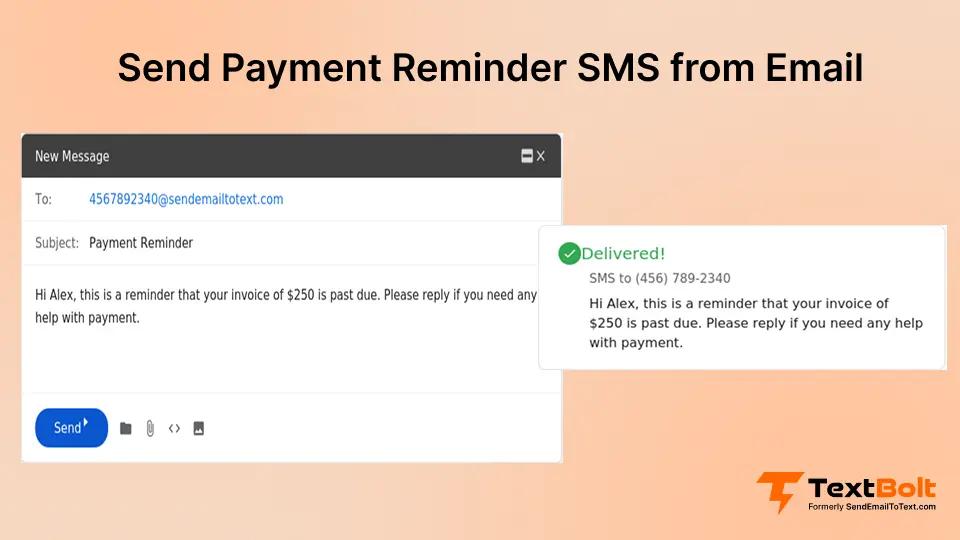
Late payments cost small businesses an average of $17,000 per year in lost cash flow, according to Intuit QuickBooks’ 2025. You send emails, leave voicemails, and mail paper invoices, but customers keep paying late or not at all. The frustrating reality is that most payment reminder emails sit unread in crowded inboxes, while voicemails get deleted without a listen.
Here’s what changes everything: SMS messages have an average open rate of 98%, and 90% are read within 3 minutes.
That’s why businesses across every industry are switching to SMS payment reminders sent directly from their email inbox. No new software to learn. No complicated billing integrations. Just compose an email in Gmail, and it arrives on your customer’s phone as a text message.
This guide shows you exactly how to set up email-to-SMS payment reminders using TextBolt, the specific types of reminders that get results, and the proven templates that turn overdue accounts into paid invoices.
Why Traditional Payment Reminder Methods Fail
Before exploring the email-to-SMS solution, it’s worth understanding why your current payment collection efforts underperform. Most businesses face a predictable pattern of challenges.
Challenge 1: Emails Get Lost in Crowded Inboxes
Your carefully crafted payment reminder competes with dozens of other emails your customer receives every day. Spam filters often catch legitimate billing notifications, and even emails that make it to the inbox can sit unread for days or weeks. By the time customers see your reminder, the urgency has faded.
Challenge 2: Phone Calls Waste Time and Go Unanswered
The average collection call takes 7 minutes when someone answers. But 80% of calls go straight to voicemail. Your staff spends hours dialing, waiting, leaving messages that customers delete without listening. Meanwhile, actual work piles up.
Challenge 3: Paper Mail Arrives Too Late
Mailed invoices take 3-5 days to arrive, plus another week before customers get around to opening them. By then, your payment is already overdue. The postage and printing costs add up, and you have no confirmation anyone received your reminder.
Challenge 4: Current SMS Tools Are Complicated
Many SMS platforms require learning new dashboards, importing contacts, and managing separate systems. Staff resist adopting another tool. The person who knows how to use it goes on vacation, and payment reminders stop going out entirely.
Challenge 5: Carrier Gateways No Longer Work
If you previously sent texts using @vtext.com or @txt.att.net addresses, those days are over. Verizon, AT&T, and T-Mobile shut down their email-to-text gateways in 2025 due to spam abuse and reliability issues. Businesses that relied on these free services scrambled to find VText alternatives and AT&T email-to-text replacements.
The good news? There’s a professional solution that works directly from your existing email.
Tired of Chasing Late Payments?
TextBolt turns your email into a payment reminder system. Send SMS directly from Gmail with up to 98% delivery rate. No new software to learn.
What Is Email-to-SMS for Payment Reminders?
Email-to-SMS allows you to send text messages to customers by composing a regular email. Instead of learning a new platform or dashboard, you simply address your email to a special format and hit send. The service converts your email into an SMS message that arrives on your customer’s phone.
For payment reminders specifically, this means:
- Write your reminder in Gmail or Outlook just like any other email
- Send to the customer’s phone number using a special address format
- Customer receives it as a text message that they actually read
- Replies come back to your email inbox for easy conversation tracking
This approach works because you’re using tools everyone already knows. Your bookkeeper, office manager, or accounts receivable person can send payment reminder texts without any training. For a complete tutorial, see our guide on how to send email to text.
Why SMS Payment Reminders Outperform Every Other Method
The numbers tell the story. SMS dramatically outperforms email, phone calls, and mail for payment collection.
Higher Open Rates Mean More Payments
| Reminder Method | Open Rate | Average Response Time |
| 20-32% | 6-24 hours | |
| Voicemail | 5-10% | 24-48 hours |
| 40-50% | 5-10 days | |
| SMS | 98% | 3 minutes |
When 98% of your customers actually see your payment reminder within minutes, collection rates improve dramatically.
The Psychology Behind SMS Effectiveness
Text messages feel different than emails. They’re personal, immediate, and hard to ignore. A text notification creates a small sense of urgency that prompts action. Customers can respond, pay, or call you back instantly from the same screen where they read your message.
How to Send Payment Reminder SMS From Gmail Using TextBolt
Setting up email-to-SMS payment reminders takes about 30 minutes. Here’s the step-by-step process.
Step 1: Install TextBolt From Google Workspace Marketplace
Go to the Google Workspace Marketplace and search for TextBolt. Click Install and grant the necessary permissions for your Gmail account.
Step 2: Complete Business Verification
TextBolt uses 10DLC registration to ensure your messages actually reach customers. This verification process:
- Confirms your business identity
- Registers your dedicated business number
- Ensures carrier compliance for reliable delivery
- Takes 1-2 business days to complete
This step is what separates professional SMS services from the unreliable carrier gateways that shut down in 2026.
Step 3: Set Up Your Customer Contact List
You have three options for managing customer phone numbers:
- Sync with Google Contacts – If you already store customer info in Google Contacts, TextBolt can access it directly
- Import from spreadsheet – Upload a CSV with customer names and phone numbers
- Enter manually – Add phone numbers directly when composing emails
Step 4: Compose Your Payment Reminder Email
Open Gmail and click Compose. Here’s where the magic happens:
To field: Enter the phone number followed by @sendemailtotext.com
Example: 5551234567@sendemailtotext.com
Subject line: Leave blank (SMS doesn’t use subjects) or use for your internal reference
Message body: Write your payment reminder (keep it under 160 characters for best results)
Step 5: Send or Schedule Your Reminder
Click Send for immediate delivery, or use Gmail’s Schedule Send feature to time your reminder perfectly. For a detailed walkthrough, see our guide on how to schedule SMS messages from Gmail. Most businesses find that payment reminders sent Tuesday-Thursday between 10am-2pm get the best response rates.
Step 6: Track Replies in Your Gmail Inbox
When customers reply to your text, their response arrives as an email in your inbox. You can continue the conversation, answer questions about the invoice, or direct them to your payment portal.
Payment Reminder SMS Templates That Get Results
The words you use matter. Here are proven templates for different stages of the payment cycle.
Pre-Due Date Reminder (3-5 Days Before)
Hi [Name], friendly reminder that your invoice #[Number] for $[Amount] is due on [Date]. Pay easily at [Link]. Questions? Reply to this text. -[Business Name]
Why it works: Gentle, helpful tone. Gives customer time to pay before they’re late. Includes easy payment option.
Due Date Reminder (Day Of)
[Name], your payment of $[Amount] is due today. Pay now at [Link] to keep your account current. Thanks! -[Business Name]
Why it works: Creates appropriate urgency without being aggressive. Clear call to action.
First Overdue Notice (3-7 Days Late)
Hi [Name], your payment of $[Amount] is now [X] days past due. Please pay at [Link] or reply if you need to discuss payment options. -[Business Name]
Why it works: Acknowledges the overdue status while offering flexibility. Opens door for conversation.
Second Overdue Notice (14-21 Days Late)
[Name], your account has an overdue balance of $[Amount]. Please pay today at [Link] to avoid additional fees. Call us at [Phone] with questions. -[Business Name]
Why it works: More direct tone. Mentions consequences. Provides phone number for customers who need to talk.
Final Notice (30+ Days Late)
IMPORTANT: [Name], your $[Amount] payment is 30+ days overdue. Pay immediately at [Link] or call [Phone] to discuss. This is our final notice before further action. -[Business Name]
Why it works: Urgency is appropriate at this stage. Clear deadline and consequences. Still offers conversation options.
Best Practices for Payment Reminder SMS
Follow these guidelines to maximize collection rates while maintaining customer relationships.
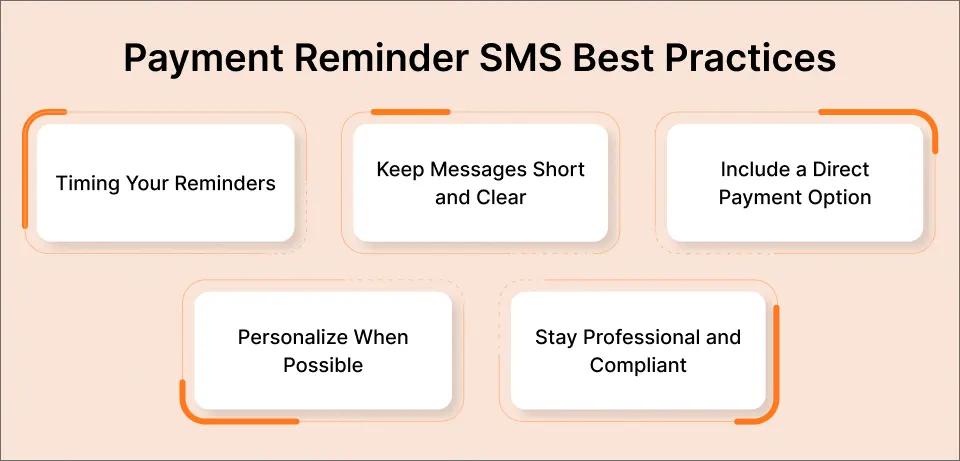
Timing Your Reminders
| Days Relative to Due Date | Reminder Type | Tone |
| -5 days | Pre-due reminder | Friendly |
| Due date | Day-of reminder | Neutral |
| +3 days | First overdue | Concerned |
| +14 days | Second overdue | Firm |
| +30 days | Final notice | Urgent |
Keep Messages Short and Clear
SMS has a 160-character limit for standard messages. While TextBolt supports longer messages (they’ll split into multiple segments), shorter reminders perform better. Include only:
- Customer name
- Amount owed
- Due date or days overdue
- Payment link or instructions
- Your business name
Include a Direct Payment Option
Every reminder should make it easy to pay immediately. Include a link to your payment portal, online invoice, or instructions for paying by phone. The fewer steps between reading your reminder and paying, the better.
Personalize When Possible
Using the customer’s name and specific invoice details increases response rates by 15-20%. Generic “Dear Customer” messages feel like spam.
Stay Professional and Compliant
SMS payment reminders must comply with TCPA regulations. Best practices include:
- Get consent first – Customers should opt-in to receive text reminders
- Identify your business – Always include your business name
- Provide opt-out – Honor STOP requests immediately
- Respect quiet hours – Don’t send reminders before 8am or after 9pm local time
TextBolt handles opt-out compliance automatically, unsubscribing customers who reply STOP.
Industries That Benefit Most From SMS Payment Reminders
Email-to-SMS payment reminders work for any business that invoices customers, but some industries see particularly strong results.
Healthcare and Medical Practices
Patient billing is notoriously difficult. Insurance complications, multiple statements, and confusion about what’s owed lead to slow payment. SMS reminders cut through the noise:
- Pre-appointment balance reminders
- Post-visit payment due notices
- Payment plan installment reminders
- Final balance notifications
Healthcare providers using TextBolt report up to 35% improvement in patient collection rates. Many practices also use email-to-SMS for appointment reminders, combining scheduling and payment notifications in one workflow.
Service-Based Businesses
Contractors, plumbers, electricians, landscapers, and other service providers often deal with slow-paying customers:
- Invoice delivery confirmation
- Net-30 payment reminders
- Overdue balance alerts
- Final notices before collections
Professional Services
Accountants, lawyers, consultants, and other professionals bill for time and expertise:
- Retainer replenishment reminders
- Monthly invoice notifications
- Overdue payment alerts
- Year-end balance notices
Property Management and Real Estate
Rent collection and HOA dues benefit enormously from SMS reminders:
- Rent due date reminders
- Late payment notices
- HOA assessment reminders
- Lease renewal payment notifications
Small Business and Retail
Any business that extends credit or sends invoices can benefit. Small business owners particularly appreciate the simplicity of email-to-SMS:
- B2B invoice reminders
- Subscription renewal notices
- Layaway payment reminders
- Custom order balance due alerts
TextBolt vs. Other Payment Reminder Solutions
How does email-to-SMS with TextBolt compare to other options for sending payment reminders?
| Feature | TextBolt | Billing Software SMS | Twilio API | Phone Calls |
| Works from Gmail | ✅ Yes | ❌ Separate system | ❌ Requires coding | ❌ No |
| Setup Time | 30 minutes | 2-4 hours | Days/weeks | N/A |
| Learning Curve | None (you know email) | Medium | High (developers) | N/A |
| Cost | $29-99/month | $50-200/month | Variable + dev costs | Staff time |
| Delivery Rate | Up to 98% | Varies | Up to 98% | 20% answer rate |
| Two-Way Replies | ✅ In Gmail | ✅ In their system | ✅ Via API | ✅ Real-time |
| Team Access | ✅ Anyone with email | Limited | Requires setup | Anyone can call |
Why TextBolt Wins for Most Businesses
TextBolt is ideal for businesses that want effective SMS payment reminders without:
- Learning new software
- Hiring developers
- Paying enterprise prices
- Managing multiple systems
Your accounts receivable person can start sending text messages from their computer in 30 minutes using the Gmail they already know. When that person is sick or on vacation, anyone else on your team can cover.
For businesses needing simple, reliable email-to-SMS, TextBolt provides the fastest path from “we should text customers about payments” to actually doing it.
Setting Up Automated Payment Reminder Sequences
While TextBolt doesn’t automate sequences directly, you can create an efficient workflow using Gmail’s built-in features.
Option 1: Gmail Schedule Send
When you create an invoice, immediately compose all 3-5 reminder emails and schedule them:
- Pre-due reminder scheduled 5 days before due date
- Due-date reminder scheduled for the morning of
- First overdue notice scheduled 3 days after
- Second notice scheduled 14 days after
- Final notice scheduled 30 days after
If a customer pays early, simply delete the scheduled emails.
Option 2: Google Sheets + Mail Merge
For higher volume, create a tracking spreadsheet with customer payment status. Use mail merge tools to send batch reminders to all customers at each stage.
Option 3: Integration With Your Billing System
Many accounting systems (QuickBooks, FreshBooks, Xero) can trigger email notifications. If your system sends emails, you can potentially route those through TextBolt’s email-to-SMS gateway.
Start Collecting Payments Faster Today
Join 500+ businesses using TextBolt to send payment reminders from Gmail. Up to 98% delivery rate. 30-minute setup. 7 days free trial.
Stop Chasing Payments, Start Getting Paid
Late payments don’t have to be a constant struggle. By sending payment reminders via SMS instead of easily-ignored emails, you’ll reach 98% of your customers instantly. They’ll see your reminder within 3 minutes and can pay, reply, or call you right from their phone.
The best part is that you don’t need new software, complicated integrations, or technical skills. If you can send an email, you can send payment reminder texts using TextBolt. The same approach also works for recurring invoices, helping businesses stay consistent with SMS billing reminders instead of chasing overdue payments
Get started in minutes:
- Sign up for TextBolt’s free 7-day trial
- Send a payment reminder to an overdue customer
- See faster responses compared to email reminders
Frequently Asked Questions
Can I send payment reminders to any phone number?
Yes, TextBolt works with all major US and Canadian mobile carriers. Your payment reminder texts will reach customers regardless of whether they use Verizon, AT&T, T-Mobile, or other carriers.
Is sending payment reminders via text legal?
Yes, when done properly. You need prior consent from customers to send SMS, you must identify your business, and you must honor opt-out requests. TextBolt handles opt-out compliance automatically. For specific legal questions, consult with your attorney about TCPA compliance.
Can my whole team send payment reminders?
Yes, TextBolt supports multi-user access on Standard and higher plans. Any team member with email access can send payment reminder texts from your shared business number. This eliminates the single point of failure problem.
What happens when a customer replies to my payment reminder?
Their reply arrives in your email inbox as a regular email. You can respond via text (using TextBolt) or call them back. All conversations are documented in your Gmail for future reference.
How is TextBolt different from the old carrier email gateways?
The old @vtext.com and @txt.att.net addresses were free but unreliable, with delivery rates often below 50%. They were shut down in 2025. TextBolt uses registered 10DLC numbers with carrier-approved delivery, achieving up to 98% delivery rates. It’s a professional email-to-SMS service built for business use.