
- Why Email Alerts Fail During Emergencies
- What Is Email to SMS for Emergency Alerts?
- Who Needs Email to SMS Emergency Alerts?
- Why Carrier Email Gateways No Longer Work
- What Makes an Email to SMS Service Reliable for Emergencies?
- How to Set Up Email to SMS Emergency Alerts
- Best Practices for Emergency SMS Alerts
- Email to SMS vs. Other Emergency Alert Solutions
- Getting Started With Email to SMS Emergency Alerts
- Why Email to SMS Is the Most Reliable Choice for Emergency Alerts
- Frequently Asked Questions
Never Miss a Critical Alert
Email to SMS for Emergency Alerts: How to Ensure Critical Messages Get Delivered

When your server crashes at 3 AM, your building alarm triggers, or a weather emergency threatens operations, the last thing you need is a notification sitting unread in someone’s email inbox. Yet that’s exactly what happens to millions of critical alerts every day.
Email open rates hover around 20-32%. SMS open rates around 98%, with most messages read within three minutes.
For businesses that depend on rapid emergency response, the difference between an email alert and an SMS alert can mean the difference between a 10-minute fix and an 8-hour outage. Between a minor inconvenience and a major safety incident.
This guide explains how email to SMS for emergency alerts works, why it’s become essential for IT departments, healthcare facilities, schools, and safety-conscious businesses, and how to implement a reliable system in under 30 minutes.
Why Email Alerts Fail During Emergencies
Before diving into solutions, it’s worth understanding why traditional email alerts fall short when seconds matter.
The Inbox Problem
Your IT team receives dozens of automated emails daily. System notifications, ticket updates, vendor newsletters, and meeting reminders all compete for attention. When a critical server alert lands in that same inbox, it doesn’t stand out. It becomes noise.
Worse, email clients increasingly filter automated text messages into spam folders or secondary tabs. A 2026 email deliverability study found that around 20% of permission-based marketing emails never reach the primary inbox.
In emergencies, even one missed message can lead to significant damage.
The Timing Problem
People check email on their schedule. They might look at their inbox every hour during work hours, but what about at 11 PM on a Saturday? Emergency situations don’t wait for convenient timing.
SMS messages trigger immediate attention. The notification sound, the vibration, the lock screen preview all bypass the “I’ll check it later” mentality that kills email responsiveness.
The Access Problem
Accessing email often requires opening an app or logging into a client. During true emergencies, like building evacuations or active security threats, nobody is opening their laptop to check for updates.
Text messages arrive regardless of what the recipient is doing. They work when there’s no WiFi, when phones are locked, and when people are away from their desks.
What Is Email to SMS for Emergency Alerts?
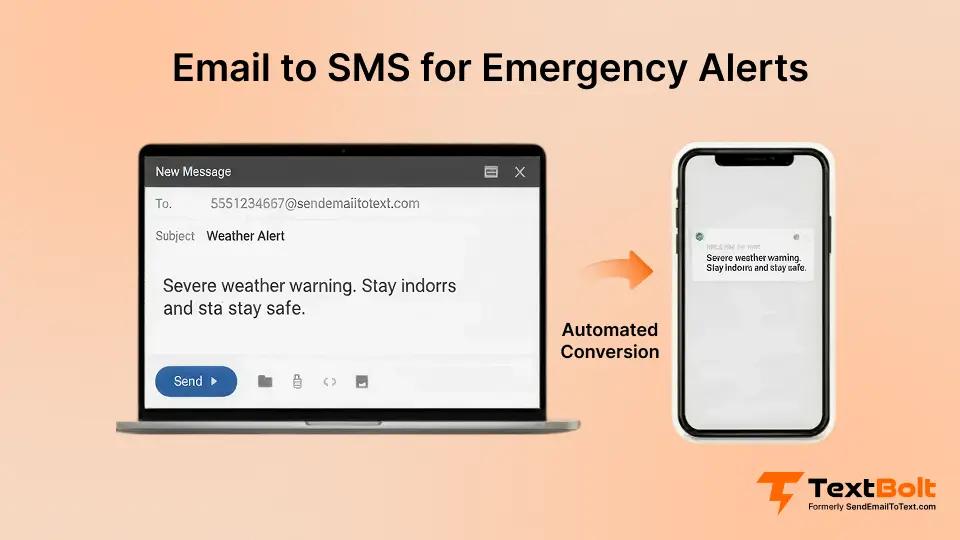
Email to SMS for emergency alerts is a system that converts outgoing emails into text messages delivered directly to mobile phones. You send a standard email to a special address format, and the recipient gets it as an SMS.
This approach offers a critical advantage: you can trigger SMS notifications from any system that sends email.
That means your:
- Server monitoring tools (Nagios, Zabbix, PRTG)
- Security systems and building automation
- Healthcare management systems
- School administration platforms
- CRM and ticketing systems
- Custom scripts and automation workflows
All of these can send SMS alerts without API integration, custom development, or additional software.
How It Works
The process is straightforward:
- Your monitoring system or application detects an emergency condition
- It sends an email to [phonenumber]@sendemailtotext.com
- The email is converted to SMS and delivered to the recipient’s phone
- The recipient receives the alert within seconds, regardless of email access
For IT teams, this means existing alerting infrastructure works immediately. For safety managers, it means emergency notification systems can reach everyone’s pocket, not just their inbox.
Ready to Send Emergency Alerts That Actually Get Seen?
Set up email to SMS in under 10 minutes. No coding needed. Your monitoring tools already send email, now make those emails arrive as texts.
Who Needs Email to SMS Emergency Alerts?
Email-to-SMS alerts are especially important in industries where delays, missed messages, or unread emails can lead to financial loss, safety risks, or operational downtime. The same technology is also used for operational communications where timely delivery matters. For example, many organizations use email-to-SMS for job application updates to ensure candidates see interview requests or status notifications quickly.
IT Departments and DevOps Teams
Server outages can cost businesses significant amounts of money every minute they remain unresolved, according to industry research from firms like Gartner and the Uptime Institute. When critical systems fail, response time directly correlates with financial, operational, and reputational impact.
IT teams need alerts that:
- Reach on-call engineers immediately, even at 3 AM
- Work when engineers are away from their computers
- Provide clear, actionable information
- Create audit trails for incident response
Email to SMS delivers on all of these requirements. Your existing monitoring tools, whether Nagios, Zabbix, PRTG, or custom scripts, can send SMS alerts simply by changing the email destination address.
Common IT emergency alert use cases:
- Server down notifications
- CPU and memory threshold warnings
- Database replication failures
- Security breach detection
- Certificate expiration alerts
- Backup failure notifications
- Network connectivity issues
- Storage capacity warnings
Healthcare Facilities
In healthcare, emergency communication can be life-critical. Facilities need reliable systems for:
Clinical emergencies:
- Code Blue and rapid response alerts
- Lab critical value notifications
- Patient deterioration warnings
- Blood bank urgent requests
Operational emergencies:
- Facility lockdowns
- Weather-related closures
- Mass casualty incident coordination
- Staff recall for emergencies
HIPAA considerations: Email to SMS through TextBolt uses direct transmission without storing patient data on external servers, making it suitable for urgent notifications that need to reach clinical staff immediately. Beyond emergencies, healthcare facilities also use email to SMS for routine appointment reminders that reduce no-shows by up to 38%.
Schools and Educational Institutions
School administrators face unique emergency communication challenges. They must reach parents, staff, and sometimes students across thousands of phone numbers, often with minutes of notice. Many schools rely on systems for sending emergency alerts to students and parents to ensure critical updates are delivered instantly.
School emergency scenarios:
- Weather closures and early dismissals
- Lockdown notifications
- Evacuation instructions
- Bus delays and route changes
- Active threat communications
- Unexpected schedule changes
The traditional approach, a phone tree where each person calls the next, fails at scale. It’s slow, unreliable, and breaks down when people don’t answer. Email to SMS allows a single administrator to notify thousands of recipients in seconds.
Manufacturing and Industrial Operations
Industrial facilities rely on continuous monitoring of equipment, environmental conditions, and safety systems. When something goes wrong, the response window is often measured in minutes.
Industrial alert requirements:
- SCADA system failures
- Environmental monitoring (temperature, pressure, gas levels)
- Equipment malfunction warnings
- Safety system activations
- Production line stoppages
- Compliance violation alerts
Many industrial operations previously used WIN-911 or carrier email gateways for these alerts. With carrier gateways shutting down, email to SMS through a dedicated provider like TextBolt offers a reliable WIN-911 alternative without complex migration.
Property Management and Facilities
Building managers need to communicate emergencies to tenants, maintenance staff, and security teams quickly.
Facilities emergency alerts:
- Fire alarm activations
- Elevator entrapments
- HVAC system failures
- Water leak detection
- Power outages
- Security incidents
- Building access issues
Why Carrier Email Gateways No Longer Work
For years, many organizations used carrier email-to-text gateways like @txt.att.net, @vtext.com, and @tmomail.net for emergency alerts. These free services allowed simple email-to-SMS conversion.
Those days are over.
AT&T discontinued @txt.att.net in June 2025. Verizon and T-Mobile followed with their own shutdowns. Organizations that relied on these gateways suddenly found their emergency alert systems broken. If you’re looking for alternatives, see our guide on VText alternatives for reliable business texting.
But even before the shutdowns, carrier gateways had serious problems:
- Delivery was unreliable. Messages were filtered as spam, delayed for hours, or silently dropped. Delivery rates fell as low as 30-40%.
- No delivery confirmation. You never knew if your emergency alert actually arrived. In a true crisis, that uncertainty is unacceptable.
- Carrier-dependent. You needed to know which carrier each recipient used. Wrong carrier? Message never arrives.
- No business authentication. Messages came from random email addresses, often triggering spam filters on the recipient’s phone.
Organizations still using carrier gateways need to migrate to a professional email to SMS service before their emergency alert systems fail completely.
What Makes an Email to SMS Service Reliable for Emergencies?
Not all email to SMS services are created equal. For emergency alerts, you need specific capabilities that consumer-grade solutions don’t provide.
10DLC Compliance and Carrier Trust
The single most important factor in emergency alert delivery is carrier trust. 10DLC (10-Digit Long Code) registration identifies your organization to carriers as a legitimate business sender, not a spam operation.
With 10DLC compliance, your messages:
- Receive priority routing through carrier networks
- Avoid aggressive spam filtering
- Achieve delivery rates up to 98%
- Arrive within seconds, not minutes or hours
TextBolt handles 10DLC registration automatically during setup, ensuring your emergency alerts get carrier-approved treatment from day one.
Delivery Confirmation and Audit Trails
During and after emergencies, you need documentation. Who received the alert? When did it arrive? Who was on-call?
A proper IT alert text messaging system provides complete audit trails through your email client. Every sent message is logged with timestamps and delivery status.
No Single Point of Failure
Emergency alert systems must work even when other systems fail. That means:
- Multiple team members can send alerts from their own email accounts
- No physical device dependency (phone batteries die, devices get lost)
- Works from any location with internet access
- No specialized software that might itself fail during a crisis
Rapid Deployment
When carrier gateways shut down or your current solution fails, you need a replacement that works immediately. TextBolt deploys in under 30 minutes with no IT involvement, API integration, or coding required.
How to Set Up Email to SMS Emergency Alerts
Implementing email to SMS for emergency alerts is simpler than you might expect. For a detailed walkthrough, see our complete guide on how to send email to text. Here’s the process:
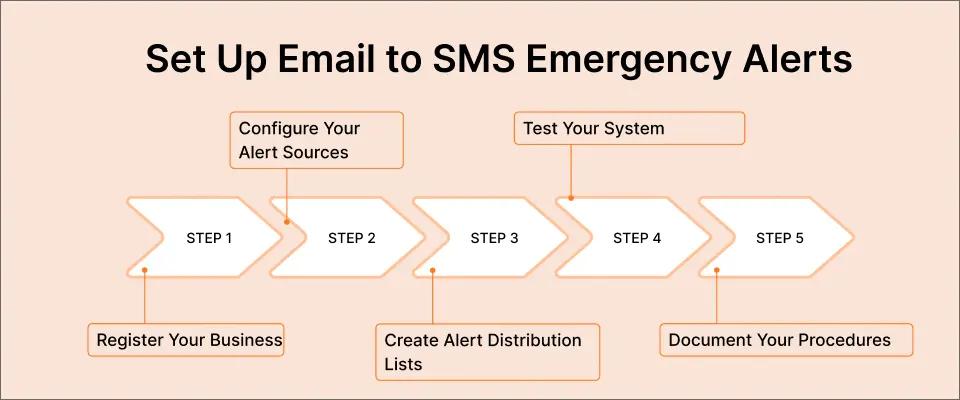
Step 1: Register Your Business
Sign up for a TextBolt account and complete business verification. This process typically takes 10-15 minutes and includes:
- Basic business information
- Verification of your legitimate business purpose
- 10DLC registration (handled by TextBolt)
Step 2: Configure Your Alert Sources
Identify which systems need to send SMS alerts. For most organizations, this includes:
- Monitoring systems: Configure Nagios, Zabbix, PRTG, or your custom monitoring to send email alerts to the @sendemailtotext.com format instead of (or in addition to) regular email addresses.
- Building systems: Update fire alarm panels, HVAC controllers, security systems, and other building automation to use the new email-to-SMS format.
- Custom applications: Any application or script that can send email can now send SMS. Simply change the destination address.
Step 3: Create Your Alert Distribution Lists
Organize recipients into logical groups:
- On-call IT team
- Building safety officers
- Department heads
- All-staff emergency list
- Parent notification list
With Google Contacts integration, you can manage these groups directly from your existing contact infrastructure.
Step 4: Test Your System
Before relying on email to SMS for real emergencies, verify that:
- Alerts arrive within seconds of being sent
- All intended recipients receive messages
- Message content displays correctly on mobile devices
- Your team understands the alert format
Step 5: Document Your Procedures
Create clear documentation for:
- Who can send emergency alerts
- What constitutes an emergency requiring SMS notification
- Escalation procedures if alerts don’t resolve the situation
- Regular testing schedule (monthly recommended)
Best Practices for Emergency SMS Alerts
Effective emergency alerts require more than just reliable delivery. The content and strategy matter too.
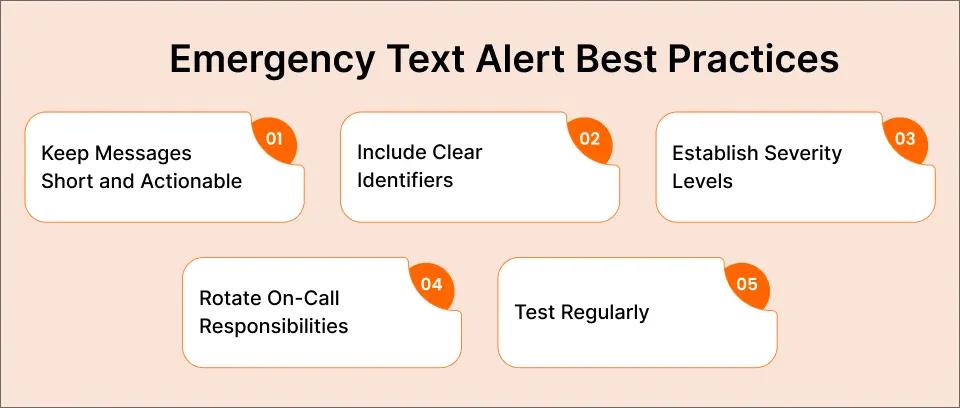
Keep Messages Short and Actionable
SMS has character limits (160 characters per segment). For emergencies, brevity is actually an advantage. It forces you to communicate only essential information.
Good example: “SERVER ALERT: Production DB offline. Check the monitoring dashboard. On-call: respond within 5 min.”
Poor example: “This is an automated notification from our IT monitoring system to inform you that we have detected an issue with one of our production database servers which appears to have gone offline at approximately.”
Include Clear Identifiers
Recipients should immediately know:
- What system generated the alert
- What the problem is
- What action is required
- Who to contact for more information
Establish Severity Levels
Not every alert deserves the same treatment. Create a tiered system:
- Critical: Immediate response required. Wake people up at 3 AM.
- High: Response needed within 15-30 minutes. Send during business hours.
- Medium: Response needed within 2-4 hours. Maybe email-only.
- Low: Informational. Email is sufficient.
Reserve SMS for critical and high-severity alerts to avoid alert fatigue.
Rotate On-Call Responsibilities
Email to SMS enables seamless on-call rotation because alerts can go to whoever is currently responsible. When the schedule changes, update the alert distribution list. No physical phone handoffs required.
Test Regularly
Monthly test messages verify that:
- Your sending systems still work
- Phone numbers are current
- Recipients recognize and understand alert format
- Response procedures are followed
You can even schedule SMS messages from Gmail to automate your monthly test alerts at a consistent time.
Email to SMS vs. Other Emergency Alert Solutions
Organizations evaluating emergency communication tools often face three common options: dedicated emergency notification platforms, SMS APIs, or manual phone-based texting. Each has its place but for many teams, email to SMS strikes the best balance between speed, simplicity, and cost.
Email to SMS vs. Dedicated Emergency Notification Platforms
Enterprise emergency notification systems (like Everbridge or AlertMedia) offer sophisticated features for large organizations:
- Mass notification to thousands
- Multi-channel delivery (voice, SMS, email, app)
- Two-way confirmation
- GIS-based targeting
However, this level of sophistication comes with trade-offs. These systems often cost tens of thousands of dollars per year and require lengthy onboarding, configuration, and training before teams can send their first alert.
For many organizations, email to SMS provides 90% of the functionality at 10% of the cost. If your needs are straightforward, like alerting an IT team, notifying parents about school closures, or reaching building occupants, TextBolt delivers everything you need for $29-99/month.
Email to SMS vs. SMS APIs (Twilio, MessageBird)
API-based solutions offer flexibility but require:
- Dedicated developer time for setup and integration
- Ongoing maintenance as APIs change
- Technical expertise to troubleshoot problems
- Managing API keys and credentials securely
Email to SMS requires none of this. Your monitoring system already sends email. Just change the destination address.
Email to SMS vs. Phone-Based Texting
Sending emergency alerts from a phone creates serious problems:
- One person must be available to send
- Phone battery, damage, or loss disrupts the system
- No audit trail of sent messages
- Slow and error-prone for multiple recipients
- After-hours alerts require personal phone access
Email to SMS eliminates all of these issues while maintaining the simplicity of text-based alerts. Learn more about sending text messages from a computer for your team’s workflow.
Getting Started With Email to SMS Emergency Alerts
If your organization needs reliable emergency communication, implementing email to SMS takes less time than most meetings.
- Step 1: Start your free 7-day trial at TextBolt.
- Step 2: Complete business verification (10-15 minutes).
- Step 3: Configure your first alert source to use the @sendemailtotext.com format.
- Step 4: Send a test message to verify delivery.
- Step 5: Roll out to your full alert infrastructure.
Most organizations complete the entire process in under 30 minutes. No IT projects, no API integration, no training required.
Your monitoring tools already send email. Your team already knows how to use email. Now every critical alert becomes an SMS that actually gets seen.
Because when seconds count, you need messages that arrive in seconds.
Ensure Critical Alerts Are Seen Instantly
Convert your email alerts into SMS and reach your team within seconds—no extra apps, APIs, or complicated setups required.
Why Email to SMS Is the Most Reliable Choice for Emergency Alerts
Email to SMS for emergency alerts solves a simple but critical problem: ensuring that urgent messages actually reach the people who need to see them.
Whether you’re managing IT infrastructure, coordinating healthcare responses, running a school district, or maintaining industrial facilities, speed and visibility determine the effectiveness of any emergency response. Traditional email alerts are often delayed, filtered, or missed entirely during high-pressure situations. SMS, on the other hand, reaches recipients directly on their phones and is typically seen within minutes.
That difference matters when systems are down, safety is at risk, or rapid coordination is required.
Carrier-based email-to-SMS gateways from providers like AT&T, Verizon, and T-Mobile are increasingly unreliable or no longer supported, leaving many organizations without a dependable alerting path. Email to SMS solves this by working with any system that can send email, without requiring new integrations, APIs, or development work.
With 10DLC-compliant messaging and two-way delivery, teams gain higher reliability, clearer accountability, and better audit trails—all while continuing to use the tools they already know. Implementation takes less than 30 minutes, and costs start at $29 per month, making it far more accessible than enterprise emergency notification platforms or custom-built alerting systems.
Your monitoring tools, building systems, and applications already generate email alerts. Converting those messages into SMS transforms unreliable notifications into alerts that are delivered, read, and acted on when it matters most.
Start your free TextBolt trial and strengthen your emergency response without adding complexity.
Frequently Asked Questions
How fast are SMS alerts delivered?
Most messages arrive within 5-15 seconds of being sent. For comparison, email delivery can take minutes to hours depending on server queues and spam filtering.
What if I need to alert hundreds of people?
TextBolt supports bulk sending to entire contact groups. Send one email, deliver hundreds of texts. For very large organizations (10,000+ recipients), enterprise plans provide the capacity and throughput needed.
Can recipients reply to emergency alerts?
Yes. Two-way messaging is included on all TextBolt plans. Replies arrive in your email inbox, enabling coordination during ongoing emergencies.
What about international phone numbers?
TextBolt currently supports U.S. and Canadian mobile numbers.
Is there a character limit?
Standard SMS supports 160 characters per segment. Longer messages automatically split into multiple segments (each using one credit). For emergency alerts, shorter messages are generally more effective anyway.
What happens during carrier outages?
TextBolt routes through multiple carrier connections for redundancy. If one carrier experiences issues, messages route through alternatives. This provides significantly better reliability than depending on a single carrier’s email gateway.