
- What Are Class Cancellation Notifications?
- Why Do Email, LMS, and Phone Trees Fail for Last-Minute Cancellations?
- How Does SMS Solve Last-Minute Class Cancellation Alerts?
- 1. Text Messages Get Opened, Most Within Minutes of Delivery
- 2. Cancellation Text Reaches Students Before They Leave Home
- 3. No Apps, No Logins, No Data Plans Required
- 4. Any Faculty Member Can Send Cancellations Without Creating Bottlenecks
- 5. Every Notification Creates a Searchable Email Record With Timestamps
- 6. Students Trust Alerts From a Recognized Institutional Number, Not Random Senders
- How Do You Set Up Email-to-SMS for Instant Class Cancellation Alerts?
- What Are the Best Practices for Sending Class Cancellation Alerts via SMS?
- 1. Send Planned Cancellations 24-48 Hours Early, Last-Minute Alerts Immediately
- 2. Always Include Course Code, Date, Reason, Next Class Date, and Contact Info
- 3. Good vs Bad Alert Examples: What Students Actually Read and Act On
- 4. Document Who Can Send Cancellations and Create a Backup Process
- 5. Follow FERPA-Compliant Consent and Keep Email Records for Audits
- What Mistakes Should Schools Avoid When Sending Cancellation Alerts?
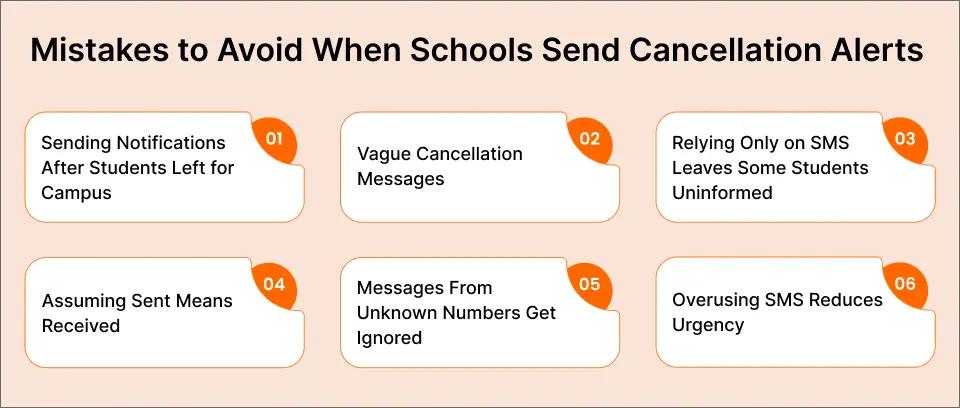
- Mistake #1: Sending Notifications After Students Already Left for Campus Defeats the Purpose
- Mistake #2: Vague Language Like ‘Class Might Be Cancelled’ Leaves Students Guessing
- Mistake #3: Relying Only on SMS Without Email Backup Leaves Opted-Out Students Uninformed
- Mistake #4: Assuming Sent Equals Received Ignores Delivery Failures
- Mistake #5: Messages From Random Numbers Look Like Spam and Get Ignored
- Mistake #6: Using SMS for Non-Urgent Updates Trains Students to Ignore All Texts
- How Does Email-to-SMS Preserve Institutional Documentation Standards?
- Streamline Class Cancellations with Email-to-SMS
- Frequently Asked Questions
Last-Minute Class Cancellations?
How Email-to-SMS Delivers Instant Cancellation Alerts to Students

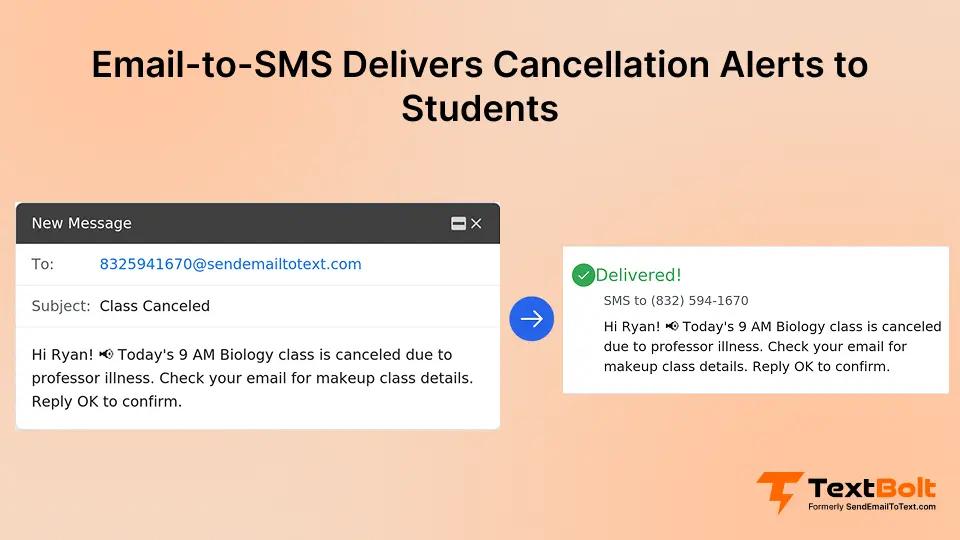
You wake up at 6:30 AM with a 102-degree fever. Your 9 AM lecture has 85 students. They’re already getting ready, packing bags, heading to campus. You need to notify them NOW, but how?
Email gets buried in crowded inboxes. Your LMS announcements go unchecked until students log in for assignments. By the time students see your cancellation notice, they’re already walking into an empty lecture hall, frustrated and wondering why nobody told them.
This guide shows you how to notify students about class cancellations instantly, reaching them within minutes on the device they actually check, using the email-to-SMS service built for education you already know. Learn more about email-to-SMS for emergency alerts for broader school notification strategies.
What Are Class Cancellation Notifications?
Class cancellation notifications are time-sensitive messages sent to students when scheduled classes won’t meet as planned due to instructor illness, weather, facility issues, or other disruptions.
These notifications matter because students avoid wasted commute time, campus confusion decreases, your institutional credibility stays intact, and you show respect for students’ schedules. Without effective notifications, students waste time and money traveling to campus for classes that aren’t happening.
Here’s a typical scenario: You develop laryngitis overnight. Your Modern Literature lecture starts in 90 minutes. Your 35 students are already commuting to campus. An instant SMS notification reaches all of them within 5 minutes of you hitting send. They turn around before wasting the trip.
The problem with current methods? Most schools rely on email (students don’t check it before morning classes), LMS announcements (students log in only when checking assignments), or nothing at all. Students miss critical information when they need it most.
The same communication gap appears during class schedule changes and when classes shift online with little notice, which is why many institutions now use email-to-SMS for all time-sensitive student updates.
Stop Losing Students in Email Inboxes—Reach Them on the Device They Actually Check
Send class cancellation alerts directly to students’ phones using your existing Gmail or Outlook. TextBolt handles 10DLC compliance automatically, includes 10 user accounts in every plan.
Why Do Email, LMS, and Phone Trees Fail for Last-Minute Cancellations?
Traditional notification methods consistently fail to reach students in time for last-minute cancellations. Understanding why these methods fail helps you choose a better solution.
1. Email Gets Buried
Students receive dozens of emails daily. Your cancellation notice gets lost in promotional clutter, newsletter subscriptions, and automated system messages. According to a Bowling Green State University study covered by Inside Higher Ed, 54% of students don’t always read emails from their university or academic departments, and more than a third skip emails from academic advisers entirely. Many students don’t check email before morning classes, and some check email only a few times daily, often later in the day.
Many students don’t check email before morning classes, and some check email only a few times daily, often later in the day.
When you send a cancellation email at 7 AM for your 8 AM class, students who are already on their way to campus won’t see it until they check their inbox hours later.
2. LMS Announcements Go Unseen
Learning management systems work well for assignments and grades, but they fail for urgent notifications. Students log into your LMS only when they need to submit work or check grades, not daily. The platform has no push notifications by default, and it assumes students check daily (they don’t).
Platform fatigue is real. Students already monitor multiple systems (email, text messages, social media), and adding LMS checks to their morning routine simply doesn’t happen.
3. Phone Trees Don’t Scale
Having one staff member call 30+ students can take 45 minutes or more. Students miss calls, ignore unknown numbers, and rarely listen to voicemails. This method creates a single point of failure where only one person (usually a department administrator) knows how to execute the notification process.
Phone trees become especially problematic during actual emergencies when you need to notify hundreds of students across multiple sections simultaneously.
4. Social Media Is Unreliable
Not all students follow course accounts on social media platforms. Platform algorithms change constantly, meaning your post might not appear in student feeds even if they do follow you. Social media feels informal and unprofessional for official institutional notices.
There’s no guarantee of reach. A student scrolling through their feed might miss your cancellation post entirely, even if they checked social media that morning.
5. The Real Cost
These failed notification methods create frustrated students who made wasted trips to campus, damaged institutional credibility when communication breakdowns happen repeatedly, staff are overwhelmed trying multiple channels to reach everyone, and critical time wasted during actual emergencies when every minute counts.
The solution isn’t adding another platform students won’t check. It’s using the channel they already monitor constantly: text messages.
How Does SMS Solve Last-Minute Class Cancellation Alerts?
Text message notifications solve the core problem of reaching students instantly, regardless of which platforms they check regularly.
1. Text Messages Get Opened, Most Within Minutes of Delivery
SMS has an industry-standard open rate of approximately 98%, with most messages read within minutes of delivery. According to a rigorous evaluation by the Institute of Education Sciences (IES) involving 26,000 students across 108 schools, text messaging strategies reduced chronic absenteeism by 12 to 18 percent — demonstrating that when institutions reach people via text, they act on the information. Students carry phones constantly. They don’t need to download apps or remember login credentials. Text messages work for commuters, on-campus students, and everyone in between.
2. Cancellation Text Reaches Students Before They Leave Home
When you send a cancellation notification at 7 AM, students typically see it within minutes. This catches students before they leave home, preventing wasted commutes and parking costs while reducing campus congestion from confused students showing up to cancelled classes.
3. No Apps, No Logins, No Data Plans Required
Every student has a phone number. SMS works on smartphones and basic phones alike. There are no technology barriers or platform requirements. This inclusive communication method reaches students universally who have provided phone numbers.
Example – One Email at 6:45 AM Reaches 450 Students Across 12 Classes Before Most Wake Up
Monday morning, 6:45 AM. Facilities discovers a burst pipe in your Science Building. All classes in the building are cancelled for the day. You compose one email in Gmail addressed to your student contact group. Within minutes, 450 students across 12 classes receive individual text notifications. The crisis is managed before most students even wake up.
4. Any Faculty Member Can Send Cancellations Without Creating Bottlenecks
Multiple faculty members can send cancellations without creating single points of failure. Your department chair, instructors, teaching assistants, and administrative staff all have access. Every team member uses the same contact groups, ensuring consistent message formatting.
TextBolt includes 10 user accounts in every plan (1 administrator plus 9 individual faculty or staff members) at no additional cost per user. This is a massive advantage over platforms like SimpleTexting that charge $20/month per additional user or EZ Texting at $10/month per user. Your entire department can send notifications without inflating costs.
5. Every Notification Creates a Searchable Email Record With Timestamps
Every notification you send creates an email record with full timestamps, sender identification, and delivery confirmation. This documentation supports compliance reviews, creates accountability for staff actions, and provides proof of communication if disputes arise. You always know who sent what and when.
Read more about Gmail text integration for technical implementation details.
6. Students Trust Alerts From a Recognized Institutional Number, Not Random Senders
Unlike email notifications that come from random addresses or carrier gateways that show strange sender IDs, SMS notifications from TextBolt appear from your institution’s professional business number. This builds trust with students because they know the message is official, not spam.
Professional numbers see up to 98% delivery rates* compared to inconsistent delivery from consumer-grade services.
*Delivery rates vary based on carrier policies, message content, and compliance factors.
How Do You Set Up Email-to-SMS for Instant Class Cancellation Alerts?
Sending instant cancellation notifications requires initial setup but becomes effortless once your system is in place. Here’s exactly how to implement this process.
Before the Semester Starts
Step 1: Collect student phone numbers with consent
Include opt-in language on your course syllabus explaining how you’ll use phone numbers for time-sensitive class notifications. Follow FERPA-compliant consent processes and store numbers in Google Contacts or your email system. Organize contacts by course and section for easy access.
Step 2: Organize contacts by course, section, building, and time slots
Create contact groups by course (ENGL 101-A, CHEM 202-B) and by building or time slot (8 AM classes, Science Building courses). Use nested groups for department-wide alerts. Test each group with a sample message before the semester starts to verify all numbers are correct.
Step 3: Pre-Write templates for illness, weather, and emergency cancellations
Develop standard templates for different scenarios:
- Standard cancellation format
- Weather closure template
- Emergency cancellation template
Example template: “CANCELLED: [Course Code] [Section] on [Date]. [Reason]. Next class: [Date]. Contact: [Email]”
When Cancellation Happens
Step 1: Compose an email to the student group
Open Gmail or Outlook and address your message to [student-phone-numbers]@sendemailtotext.com. If you’re new to the process, here’s a detailed walkthrough on how to send email to text. Use your pre-written template and personalize the reason and details. The entire process takes 30 seconds from decision to delivery.
Step 2: Hit send — the system converts your email to individual SMS message
Click send. The system converts your email to individual SMS messages, and each student receives a personal text notification. No additional steps required.
Step 3: Check your dashboard for delivery status within 2-5 minutes
Check your dashboard for delivery status updates, which appear within 2-5 minutes after sending. Resend to any failed numbers and follow up via email for redundancy if needed.
Example Walkthrough
You develop flu symptoms at 6:30 AM. Your 9 AM Statistics class has 42 students enrolled. You grab your phone, open Gmail, and compose one message: “CANCELLED: STAT 301 today (March 15) due to instructor illness. Review Chapter 7 for Wednesday. Email with questions.”
You hit send at 6:32 AM. By 6:35 AM, all 42 students have received the notification on their phones. Zero students show up in an empty classroom.
Time Savings Comparison
- Email only: 6-24 hours for students to see it
- Phone tree: 45-60 minutes to call everyone
- SMS notification: 2-5 minutes for universal reach
- Your time invested: 30 seconds vs 45+ minutes
Learn more about how to send SMS from Outlook if your institution uses Microsoft email systems.
Your Faculty Already Knows How to Send Email—Now They Can Send Instant Alerts
No new software to learn, no student app downloads required, no IT department intervention needed. Get your account set up in 10-30 minutes. TextBolt handles 10DLC compliance registration.
What Are the Best Practices for Sending Class Cancellation Alerts via SMS?
Following best practices ensures your notifications reach students effectively while maintaining professional standards. Let’s start with the most critical factor: timing.
1. Send Planned Cancellations 24-48 Hours Early, Last-Minute Alerts Immediately
For Planned Cancellations
Send 24-48 hours in advance whenever possible. This allows students to adjust study schedules, reduces surprise and frustration, and gives them time to plan around the cancelled class. Always include the next class date and any homework adjustments.
For planned cancellations where you know a day or more in advance, you can schedule SMS from Gmail to send the notification at the optimal time — early enough that students adjust their plans, but not so early they forget.
For Last-Minute Cancellations
Send immediately upon making the cancellation decision. Earlier is always better, even if you’re notifying students at 6 AM for an 8 AM class. Students need maximum notice to change their plans. Consider typical commute times in your area when deciding notification timing.
2. Always Include Course Code, Date, Reason, Next Class Date, and Contact Info
Once you’ve got the timing right, focus on what your message should contain.
Always Include
Every cancellation notification should contain:
- Course code and section number
- Cancellation date
- Brief reason (illness, weather, emergency)
- Next scheduled class date
- How to reach you with questions
Keep It Concise
SMS has a 160-character sweet spot for single-segment delivery. Put critical information first. Use clear abbreviations that students understand. Save detailed explanations for a follow-up email.
3. Good vs Bad Alert Examples: What Students Actually Read and Act On
Good example: “CANCELLED: ENGL 205-B today (Jan 12) – instructor illness. Resume Wed Jan 14. Check your email for the reading assignment. Questions: smith@university.edu”
Bad example: “Hey everyone, unfortunately I’m not feeling well today and won’t be able to make it to class, so today’s English 205 section B class is cancelled, but we’ll pick back up on Wednesday…”
The good example is clear, concise, and provides all necessary information. The bad example is conversational but too long and buries important details.
4. Document Who Can Send Cancellations and Create a Backup Process
Beyond message content, establish clear processes for who can send notifications and when.
Establish Clear Ownership
Document who can send cancellations (instructor, department chair, administrator), create a backup process if the primary instructor is unavailable, identify an emergency contact for technical issues, and maintain written procedures everyone can reference.
Create Response Plan
Use standard templates to reduce errors. Implement an approval process for department-wide cancellations. Establish escalation procedures for emergency building closures. Coordinate with campus security and facilities teams.
5. Follow FERPA-Compliant Consent and Keep Email Records for Audits
Finally, ensure your notification system meets institutional compliance requirements.
Student Consent
Follow FERPA-compliant opt-in processes by documenting consent in student records. Provide an opt-out option and renew consent annually at the start of each academic year.
Message Retention
Keep email records of all notifications for audit trails and administrative review. These records help resolve student disputes (“I never got notified”) and support institutional compliance requirements.
What Mistakes Should Schools Avoid When Sending Cancellation Alerts?
Avoiding these common mistakes ensures your notification system works reliably when you need it most.
Mistake #1: Sending Notifications After Students Already Left for Campus Defeats the Purpose
Problem: Sending notifications after students already left for campus creates the exact frustration you’re trying to prevent.
Impact: Wasted commutes, frustrated students, and damaged credibility when it happens repeatedly.
Fix: Set internal deadlines such as “cancellations decided by 6 AM for morning classes” so students receive notice before leaving home.
Mistake #2: Vague Language Like ‘Class Might Be Cancelled’ Leaves Students Guessing
Problem: Using vague language like “Class might be cancelled” or failing to specify which section leaves students confused about whether to attend.
Impact: Students don’t know whether to show up, leading to some attending cancelled classes while others skip active ones.
Fix: Use definitive language, specify exact dates and sections, and provide clear next steps.
Mistake #3: Relying Only on SMS Without Email Backup Leaves Opted-Out Students Uninformed
Problem: Relying solely on SMS without email backup means students who opted out miss critical notifications.
Impact: Some students remain uninformed despite your notification efforts.
Fix: Implement a multi-channel approach where SMS serves as the primary urgent notification and email provides backup with more details.
Mistake #4: Assuming Sent Equals Received Ignores Delivery Failures
Problem: Assuming notification sent equals notification received ignores potential delivery failures.
Impact: Delivery failures go unnoticed, leaving some students without notification.
Fix: Check your delivery status dashboard within 2-5 minutes after sending and resend to any failed numbers.
Mistake #5: Messages From Random Numbers Look Like Spam and Get Ignored
Problem: Messages coming from random phone numbers or email addresses that change frequently look like spam to students.
Impact: Students ignore notifications from unfamiliar senders.
Fix: Use a consistent sender ID and professional business number so students recognize official institutional messages.
Mistake #6: Using SMS for Non-Urgent Updates Trains Students to Ignore All Texts
Problem: Using SMS for non-critical announcements like optional review sessions or general reminders.
Impact: Students start ignoring all text notifications, including important cancellations.
Fix: Reserve SMS exclusively for time-sensitive cancellations and emergencies. Use email for routine course updates.
Example of Consequences
Imagine you send a cancellation email at 7:30 PM the night before class. Students don’t check their email before bed. The next morning, 40% show up to the cancelled 8 AM class. Campus parking becomes chaotic. Students wait 20 minutes before giving up and leaving. Complaints flood the department office.
All of this was preventable with a 6:30 AM text notification that students would have seen before leaving home.
How Does Email-to-SMS Preserve Institutional Documentation Standards?
Educational institutions value process and documentation. Email-to-SMS preserves all institutional standards while adding the urgency of SMS delivery. Here’s how it maintains those standards:
1. Professional Documentation
Every notification exists as an email record with searchable history for compliance reviews and full audit trails with timestamps. You never face “he said, she said” disputes about whether notifications were sent.
2. Team Coordination
Faculty send from their own email addresses, maintaining individual accountability. Department chairs can send on behalf of sick instructors. Administrative staff can handle building-wide cancellations. The system requires no shared passwords or single-person bottlenecks.
3. Scalability
The same process works whether you’re notifying 1 student or 1,000 students across buildings or campuses. No manual phone number entry is required. Contact groups handle all the complexity. One email converts to hundreds of individual text messages automatically making it ideal for structured multi-branch school communication where consistency across locations matters.
4. Integration with Existing Workflows
The system works with Gmail, Outlook, and any email system your institution uses. It leverages Google Contacts or Outlook contacts you already maintain. Faculty face no learning curve because they already know how to send an email. Your IT department doesn’t need to provision new accounts or manage additional platforms.
5. Why This Matters for Education
Educational institutions need reliable communication that doesn’t disrupt established workflows. Email-to-SMS preserves all your professional infrastructure while delivering messages with SMS urgency. Faculty don’t change how they work, they just get better results.
Many institutions are now adopting this approach to add SMS communication without requiring staff training or new tools, making implementation fast and frictionless.
This instant visibility is what makes SMS the most effective channel for time-sensitive student communications. For a deeper look at why text messaging consistently outperforms other channels, see how schools are boosting customer engagement via SMS across every communication touchpoint
6. Contrast with Other Solutions
Dedicated SMS platforms require new logins, platform training, and disrupt established workflows. Mass notification systems are expensive, complex, and overkill for routine cancellations. Manual texting from personal phones provides no documentation, creates compliance nightmares, and doesn’t scale beyond small sections.
Email-to-SMS offers professional infrastructure, instant delivery, and zero friction in adoption.
Learn more about TextBolt’s business messaging platform for broader institutional use cases beyond class cancellations.
Streamline Class Cancellations with Email-to-SMS
Class cancellations are inevitable. Instructor illness, weather emergencies, and facility issues happen at every institution. The difference between student frustration and smooth communication comes down to notification speed and reliability.
Email doesn’t reach students in time. Phone trees don’t scale. LMS announcements go unread. SMS notifications solve both problems by reaching students instantly on the device they check constantly, while preserving the professional documentation standards educational institutions require.
TextBolt’s email-to-text service lets your faculty send those critical notifications from their existing email, with no new platform to learn, no student app downloads, and no IT complexity. Just instant alerts that actually reach students before they leave for campus. Start your free trial and see how simple class cancellation notifications can be, or view pricing to find the plan that fits your institution’s needs. Just instant alerts that actually reach students before they leave for campus.
How to Get Started with TextBolt for Your Institution
- Create your account (10–30 minutes)
- Complete 10DLC carrier registration (up to 48 hours for approval)
- Collect student phone numbers with opt-in consent on your course syllabus
- Organize contacts by course, section, building, and time slot in Google Contacts or Outlook
- Pre-write cancellation templates for illness, weather, and emergency scenarios
- Send a test message to your own number to verify delivery
- Brief department faculty — anyone with email access can send
Frequently Asked Questions
How Quickly Do Students Receive SMS Notifications Compared to Email?
SMS notifications typically reach students within 2-5 minutes of sending, with most students reading messages within minutes of delivery. Email often goes unchecked for hours or even a full day, making it too slow for last-minute cancellations.
Do All Students Need Smartphones to Receive Class Cancellation Texts?
No. SMS notifications work on any phone with text messaging capability, including basic phones without internet access. Students don’t need smartphones, data plans, or any apps installed.
What Information Should Be Included in a Class Cancellation Notification?
Always include course code, section number, cancellation date, brief reason, next class meeting date, and instructor contact information for questions. Keep messages under 160 characters for optimal delivery as a single SMS segment.
How Do Schools Collect Student Phone Numbers for Notifications?
Schools typically include opt-in consent on course syllabi or registration forms. Students provide phone numbers voluntarily with clear explanation of how numbers will be used, maintaining FERPA compliance through documented consent processes.
Can Multiple Faculty Members Send Cancellation Notifications for the Same Course?
Yes. Instructors, teaching assistants, department chairs, and administrative staff can all send notifications from their own email addresses using the same student contact groups. TextBolt includes 10 user accounts in every plan with no per-user fees.
What Happens if a Student Doesn’t Receive the Cancellation Notification?
Check the delivery status dashboard within 2-5 minutes after sending. Failed deliveries appear immediately, allowing you to resend to specific numbers or follow up via email as a backup notification method.