
- Why Do Email Billing Reminders Fail?
- How Does Email-to-SMS Work for Billing Reminders?
- How to Send Billing Reminders with TextBolt
- What Are the Best Templates for SMS Billing Reminders?
- What Compliance Rules Apply to SMS Billing Reminders?
- How to Measure the Impact of SMS Billing Reminders?
- Start Sending SMS Billing Reminders with TextBolt Today
- Frequently Asked Questions
Get Paid Faster With SMS Reminders
How to Send Billing Reminders via Email to SMS

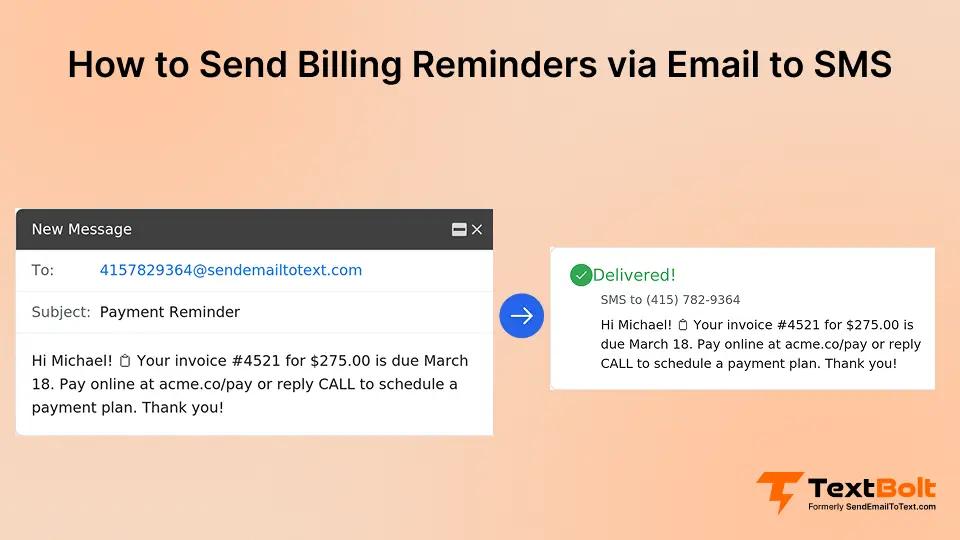
Late payments drain small businesses. US small businesses carry over $17,000 in outstanding invoices on average, with nearly half overdue by 30 or more days.
Email reminders are part of the problem. They land in crowded inboxes, get filtered into promotions tabs, and sit unread for hours or days.
SMS billing reminders take a different approach. Text messages get read within minutes, not days. Customers see payment requests on their phone screens and respond quickly.
Research shows that most consumers read text messages within five minutes of delivery.
With an email-to-text service, you can send billing reminders as text messages directly from Gmail or Outlook. No new software to learn. No dashboards to manage.
This guide covers why email reminders fall short, how email-to-SMS works, proven templates, compliance rules, and how to measure results.
Why Do Email Billing Reminders Fail?
Email billing reminders fail because they get buried in crowded inboxes, filtered into promotions tabs, and lack the urgency that drives timely payments.
1. Your Reminder Is Buried in a Crowded Inbox
The average person receives over 100 business emails per day. Your billing reminder competes with newsletters, meeting invites, and vendor pitches. Most customers scan subject lines and move on.
2. Email Filters Work Against You
Gmail filters a large percentage of commercial emails into its Promotions folder. Read rates in that tab drop below 20%. Your reminder might be well written, but it does not matter if customers never see it.
3. Email Creates No Sense of Urgency
The average email response time is around 90 minutes. Text messages get responses in about 90 seconds. That speed difference determines whether a customer pays today or forgets for another week.
Research suggests that most consumers read text messages within five minutes of receiving them. SMS billing reminders create an immediate touchpoint that prompts action.
4. The Financial Cost of Late Payments
QuickBooks research shows that 55% of all B2B invoiced sales in the US are overdue. The average annual cost from late payments reaches $39,406 per company.
Late payments force businesses to delay vendor payments, miss growth opportunities, and spend hours on collection calls. Staff time spent chasing overdue invoices adds up to over eight days per year.
Increased borrowing compounds the problem. Businesses affected by late payments report higher usage of loans and credit lines to cover cash flow gaps. Every day an invoice sits unpaid puts more pressure on your operating budget.
Getting customers to see your reminder is the first step toward getting paid. SMS solves the visibility problem that makes email billing reminders ineffective.
Send Billing Reminders That Actually Get Read
Turn your email into a text message. Customers respond in minutes, not days.
How Does Email-to-SMS Work for Billing Reminders?
Email-to-SMS converts any email into a text message delivered to your customer’s phone. You compose the message in your inbox, and the service handles delivery.
How the Process Works
With TextBolt, sending a billing reminder works like sending any email. Open Gmail or Outlook, address your message to the customer’s phone number @sendemailtotext.com, type your reminder, and click send.
The subject line is for your internal records only. It does not appear in the text message. Only the email body gets delivered as SMS.
Your customer receives a professional text message from your business number. They can reply directly, and that reply arrives in your email inbox. All billing conversations stay in one place.
Why Email-to-SMS Beats Traditional SMS Platforms
Dedicated SMS platforms require staff to log into a separate system. When things get busy, reminders do not get sent. Email-to-SMS removes that friction entirely.
Training is also simpler. If your team knows how to send an email, they already know how to send a billing reminder. New hires need no onboarding on a separate platform.
Cost is another advantage. Many SMS platforms charge $50 to $300 per month plus per-message and per-user fees. TextBolt includes 10 user accounts on every plan with no per-user fees, starting at $29 per month for 500 message credits.
How to Send Billing Reminders with TextBolt
Setting up TextBolt takes about 30 minutes, and your team can start sending billing reminders from Gmail or Outlook the same day. No new software, no training required just follow these steps.
Step 1: Sign Up and Verify Your Business
Getting started with TextBolt’s Gmail text integration takes about 30 minutes.
Sign up at TextBolt.com and verify your business for 10DLC compliance. This ensures reliable message delivery instead of spam filtering.
During verification, you provide your business name, EIN, and a brief use case description. TextBolt handles the 10DLC registration paperwork automatically. This process runs in the background while you start sending right away.
Step 2: Save Your Sending Format
You receive a dedicated business phone number. Customers see this number on all outgoing texts, which builds recognition and trust.
Save the sending format to your contacts: [phone-number]@sendemailtotext.com.
Step 3: Send Your First Billing Reminder
Compose your first reminder in the email body, click send, and your customer receives it as a text within seconds.
Every message is logged in your sent folder with delivery confirmation. Customer replies arrive in your email inbox, creating a complete audit trail.
Proven templates make it easy to write billing reminders that get results. The next section covers message formats for every stage of the payment cycle.
What Are the Best Templates for SMS Billing Reminders?
The best SMS billing reminders are short, specific, and include a direct payment link. Timing and tone should match how overdue the payment is.
Here are proven templates for different billing stages.
1. Friendly First Reminder (3-5 Days Before Due)
Hi [Name], friendly reminder that invoice #[number] for $[amount] is due [date]. Pay online: [link]. Questions? Reply here. -[Business]
Why it works: No pressure, helpful tone, and a clear action step.
2. Due Date Reminder (Day Of)
[Name], your payment of $[amount] is due today. Pay now: [link]. Having trouble? Reply and we will help. -[Business]
Why it works: Creates urgency without being aggressive.
3. Past Due Reminder (7 Days Late)
Hi [Name], your account shows $[amount] past due since [date]. Please pay at [link] to avoid late fees. Questions? Reply here. -[Business]
Why it works: States facts clearly, offers help, and mentions consequences.
4. Final Notice (30 Days Late)
[Name], your account is 30 days past due. To avoid service interruption, please pay $[amount] at [link] or call us today. -[Business]
Why it works: Serious but professional, with clear consequences and multiple options.
Adjust the tone and urgency level based on your relationship with the customer. Repeat clients may respond better to a softer approach, even at the past due stage.
Best Practices for Billing SMS
Follow these guidelines for the best results:
- Keep messages under 160 characters to avoid splitting into multiple texts
- Include the specific amount owed so customers know exactly what you need
- Provide a direct payment link to remove friction
- Identify your business clearly so the message is not mistaken for spam
- Offer a reply option for customers who have questions
- Send reminders between 9 AM and 7 PM local time
For higher volume, Gmail’s ‘Schedule Send’ feature lets you prepare reminders in advance. See our guide on scheduling SMS from Gmail.
You can also connect your accounting software to TextBolt. QuickBooks, FreshBooks, and Xero all support email notifications that TextBolt converts to SMS.
Sending compliant billing reminders protects your business and builds customer trust. Here is what you need to know about the rules.
Stop Chasing Payments. Start Collecting
Send professional billing reminders from your inbox. No per-user fees, no contracts.
What Compliance Rules Apply to SMS Billing Reminders?
Billing reminders are transactional messages with different consent rules than marketing texts, but you still must follow SMS compliance laws guide and honor opt-out requests.
TCPA Requirements
The Telephone Consumer Protection Act governs how businesses send automated texts. Billing reminders fall under transactional messaging. Here is what applies.
You can send payment reminders to customers who owe you money under an existing business relationship. However, you should document consent during onboarding.
Every message must identify your business by name. Customers must be able to stop messages by replying STOP or similar keywords.
The FCC now requires businesses to honor opt-out requests within ten business days. The definition of valid opt-outs includes any reasonable manner a consumer expresses their desire to stop receiving messages.
Best Practices for Compliant Billing SMS
- Send reminders only to customers with actual outstanding balances
- Limit frequency to two or three messages per billing cycle
- Send only between 8:00 AM and 9:00 PM in the recipient’s local time zone
- Include your business name in every message
- Provide a way to dispute or discuss the bill
- Never include sensitive information like full account numbers
TextBolt handles STOP keyword processing automatically. When a customer replies STOP, they are removed from receiving further messages.
The right compliance practices protect your business. Measuring your results helps you improve your billing reminder strategy over time.
How to Measure the Impact of SMS Billing Reminders?
Businesses that add SMS to their billing reminder strategy collect payments significantly faster, with research showing improvements of 28% to 56% across multiple studies.
Chaser’s 2022 Late Payments Report found that businesses using SMS and email reminders together were 56% more likely to get paid within a week of the invoice due date. That is compared to businesses using email alone.
The Consumer Financial Protection Bureau found that automated text reminders reduced late payments by 32% across participating financial institutions.
An Australian government and bank trial reported that SMS reminders increased credit card repayments by roughly 28%. Email reminders in the same trial had no measurable effect. These findings held across different customer demographics and account types.
Key Metrics to Track
Monitor these numbers after implementing SMS billing reminders:
- Days sales outstanding (DSO) before and after SMS adoption
- Payment rate within 7 days of the reminder
- Customer response rate to billing messages
- Reduction in collection calls and follow-up time
- Percentage of invoices paid before the due date
Operational Benefits
The impact of SMS billing reminders goes beyond faster payments. Businesses typically see a few benefits right after switching from email-only reminders. Here is how payment reminders via email to SMS beats an uncomfortable phone call weeks after the due date.
- Every reminder that works is a collection call your staff does not have to make
- SMS has a 45% response rate compared to 6% for email, according to Velocify research
- Billing conversations stay professional and friendly over text instead of escalating to uncomfortable phone calls
- A timely text reminder is less confrontational than a collection call, which improves customer relationships
- Most customers appreciate the convenience of paying through a link on their phone
In the first month, most businesses see a noticeable improvement in payment speed. The full impact becomes clear within 60 to 90 days as customers adjust to receiving text reminders.
The data supports a clear conclusion: SMS billing reminders deliver measurable results that emails or phonecalls alone cannot match.
Start Sending SMS Billing Reminders with TextBolt Today
You can start sending SMS billing reminders within 30 minutes using your existing Gmail or Outlook inbox, with no new software to install.
TextBolt’s email-to-SMS service turns your email into a billing reminder delivery system. Sign up, verify your business, and send your first reminder the same day.
Every plan includes 10 user accounts with no per-user fees. Your team sends reminders from the tools they already use.
Late payments cost time, money, and relationships. SMS billing reminders solve the problem at the source by putting your payment requests where customers actually see them.
Visit TextBolt pricing to find the right plan for your business.
Frequently Asked Questions
Can I send billing reminders from Gmail?
Yes. With TextBolt, you compose a regular email addressed to the recipient’s phone number @sendemailtotext.com. Your message is delivered as an SMS to their phone within seconds.
What should I include in a billing reminder text?
Include the customer’s name, the specific amount owed, a payment link, your business name, and a way to contact you. Keep messages under 160 characters.
Do I need customer consent to send billing reminders?
Billing reminders are transactional messages generally permitted under the TCPA for customers with outstanding balances. You must allow opt-outs and comply with all regulations.
How quickly do SMS billing reminders get delivered?
TextBolt delivers messages within seconds of sending. With 10DLC-compliant business messaging, your reminders reach customers reliably across all major carriers.
How much can SMS reminders reduce late payments?
Research shows improvements ranging from 28% to 56%. The Consumer Financial Protection Bureau found a 32% reduction in late payments from automated text reminders.
Can I automate billing reminders from my accounting software?
Yes. TextBolt works with QuickBooks, FreshBooks, Xero, and other systems that send email notifications. Wherever your software sends an email alert, TextBolt converts it to SMS.