
- Why Multi-Location Auto Shops Lose Messages Between Locations
- How Does Email-to-SMS Help Coordinate Messaging Across Locations?
- What Are the Benefits of a Shared Inbox for Multi-Location Auto Shops?
- What Are Best Practices for Multi-Location Customer Messaging?
- Ready to Connect All Your Shops Under One Number?
- Frequently Asked Questions
Unify Every Location Under One Number
How to Coordinate Customer Messaging Across Multiple Locations with Email-to-SMS

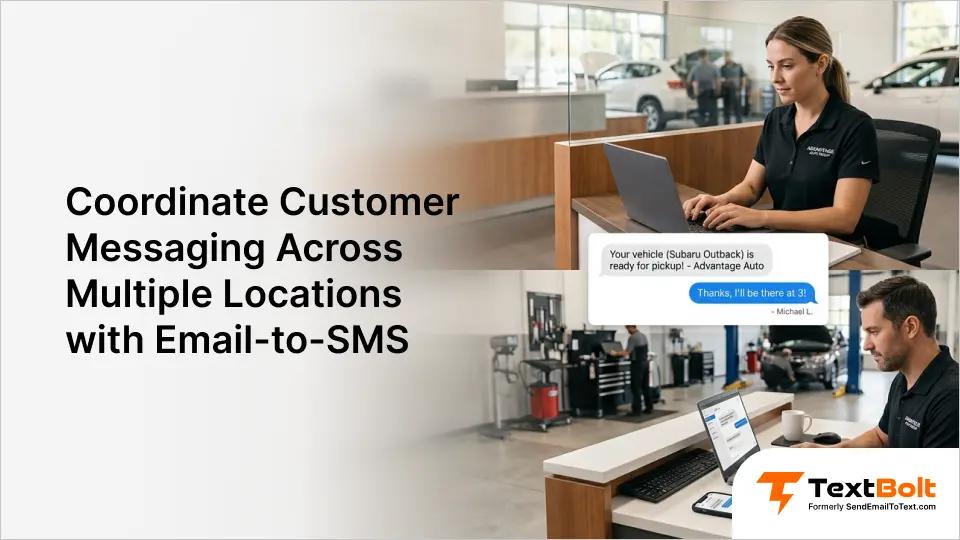
Running multiple auto shop locations means juggling customer updates across different teams, schedules, and workflows. A customer drops off their vehicle at one location, but the status update comes from another. Messages fall through the cracks.
When each location uses its own phone or texting method, there’s no shared visibility. One advisor sends a pickup reminder. Another forgets entirely. The customer experience feels inconsistent, and your brand suffers.
An email-to-text service solves this by letting every location send and receive texts from a shared business number. This guide covers why multi-location messaging breaks down, how email-to-SMS fixes it, and the best practices that keep your shops running in sync. It’s a practical text messaging service for automotive businesses that need consistent communication across all locations.
Why Multi-Location Auto Shops Lose Messages Between Locations
Each location operating in its own communication silo, with no shared visibility into what’s been sent or received, is the root cause. Add more shops and the complexity multiplies fast.
Here are the most common reasons coordination falls apart.
1. Separate Phones Create Isolated Customer Conversations
Most shops rely on a single phone for texting. The service advisor at Location A texts from their cell. Location B uses a different phone entirely.
When a customer’s vehicle gets transferred, the new team has zero context. They don’t know what promises were made or when the last update was sent.
The customer ends up repeating themselves. Or worse, they hear conflicting information from two different numbers. Trust erodes quickly when communication feels disorganized.
2. No Shared Message History
Personal phone texting leaves no audit trail accessible to other team members. If the advisor who sent a message is off duty, nobody can check what was communicated.
This becomes a real problem when a customer disputes a quote or claims they were told a different pickup time. Without shared records, there is no way to verify what happened.
A business messaging platform eliminates this gap by keeping every message in a searchable email thread accessible to your whole team.
3. Staff Turnover Disrupts Every Workflow
Automotive service departments see frequent staff changes. When a service advisor leaves, their personal phone goes with them, along with every customer conversation stored on it.
The new hire starts from scratch with no message history and no context about ongoing jobs. Customers who had a rapport with the previous advisor feel the disconnect immediately.
4. Inconsistent Experience Across Locations
Without a unified system, each location develops its own texting habits. One shop sends detailed status updates. Another barely texts at all.
Customers who visit multiple locations notice the inconsistency. The location that communicates well sets an expectation that the other location fails to meet.
This inconsistency is difficult to fix without a shared tool. You can write process documents, but enforcement is nearly impossible when every location uses different devices and methods.
These problems share a common root: fragmented tools that prevent cross-location visibility. The fix is a messaging system built on shared infrastructure, and email provides exactly that.
How Does Email-to-SMS Help Coordinate Messaging Across Locations?
Email-to-SMS gives every location the ability to send and receive customer texts from a single business number, using the email accounts your team already has.
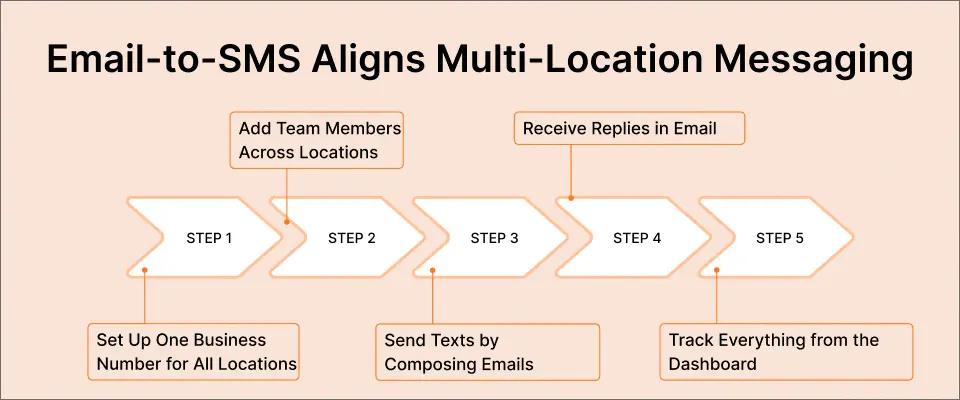
The process requires no technical setup beyond initial account creation. Here is how each step works for a multi-location auto shop.
Step 1: Set Up One Business Number for All Locations
When you set up TextBolt, you get a dedicated business number. Every message sent from any location uses this same number. Customers always see one consistent sender.
This eliminates confusion. Whether the customer is dealing with your downtown shop or your suburban location, the texts come from the same professional number.
Step 2: Add Team Members Across Locations
All TextBolt plans include 10 user accounts with no per-user fees. That means you can add service advisors from multiple locations to the same account.
Each person uses their own email login. There is no shared password or device to manage. When someone leaves, you simply remove their access.
Step 3: Send Texts by Composing Emails
Any authorized team member composes a regular email to the customer’s phone number at sendemailtotext.com. TextBolt converts it to SMS and delivers it from your business number.
The advisor does not need to learn new software. If they can send an email, they can send a text. Training time drops to near zero.
Step 4: Receive Replies in Email
When a customer replies to a text, the response arrives as an email in your inbox. Any team member with access can view and respond.
This is where cross-location coordination gets powerful. If Location A started the conversation but the vehicle moved to Location B, the new team can see the full thread and respond without missing context.
Step 5: Track Everything from the Dashboard
TextBolt’s dashboard shows message history, delivery status, and sender details across all users. Managers can see which location sent what, when, and whether it was delivered.
The Summary view gives you a quick snapshot of daily message volumes and delivery outcomes across your entire operation.
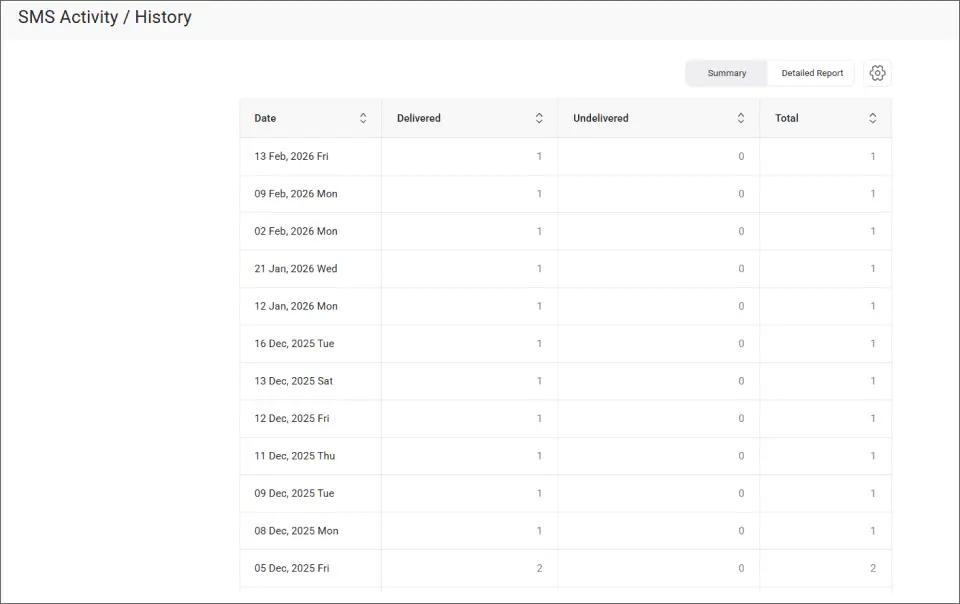
This centralized view lets you spot if one location is falling behind on customer updates without checking each advisor’s inbox individually.
For shops looking to automate routine messages, TextBolt also works with Gmail’s scheduling feature. Service advisors can compose pickup reminders in advance and let Gmail send them at the right time.
The combination of shared access and email-native workflow means your team can coordinate without learning anything new. Now let’s look at the specific benefits this delivers.
What Are the Benefits of a Shared Inbox for Multi-Location Auto Shops?
A shared inbox improves response times, eliminates communication gaps between locations, and creates a complete audit trail for every customer interaction.
Beyond solving the coordination problem, centralizing your messaging delivers advantages that compound over time.
1. Any Location Can Cover for Any Other
When your downtown shop gets slammed on a Monday morning, a quieter location can help send updates or respond to customer questions. The customer never knows the difference.
This flexibility means your team operates as one unit. Sick days, vacations, and shift gaps no longer create communication blackouts at any location.
2. Customers See One Professional Number
Every text comes from the same business number. This builds trust and recognition over time. Customers save your number and know exactly who is reaching out.
Compare this to personal cell phone texting, where customers might see three different numbers from three different advisors. That looks disorganized.
3. Every Message Is Logged With Timestamps and Sender Details
Every message is logged in email with timestamps and sender identification. If a customer disputes a quote or claims they were never notified about a completed repair, you pull up the exact message in seconds.
When you need to verify a specific conversation, the dashboard shows the full details of each individual message.
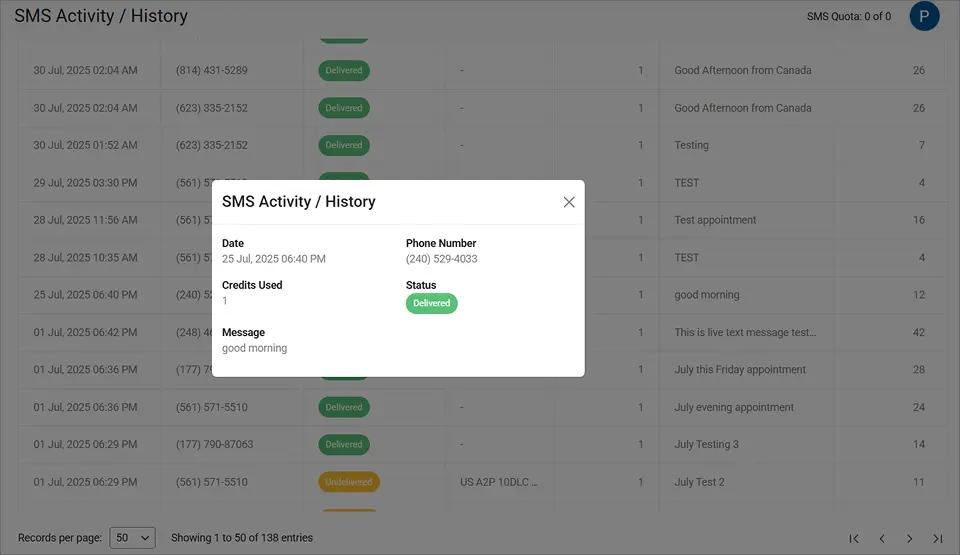
This level of documentation protects your business and keeps every advisor accountable, regardless of which location they work at.
4. Faster Onboarding for New Hires
New service advisors already know how to send email. That is the entire skill required. No software training, no app downloads, and no IT support needed.
New hires can start sending customer updates on their first day. The learning curve is essentially zero, which matters in an industry with high turnover.
5. Scalable to Any Number of Locations
Adding a new location does not require new tools or infrastructure. You add the new team members to your existing TextBolt account and they start messaging immediately.
Whether you have two locations or twelve, the workflow stays the same. With plans starting at $29 per month, scaling your communication does not mean scaling your costs proportionally.
These benefits address the core challenges that make multi-location management stressful. The key is that email-to-SMS works with what your team already uses, so adoption happens naturally.
Ready to Unify Your Shop Communication?
Give every location the same number and the same tools. Try TextBolt free for 7 days.
With the benefits clear, let’s look at how to get the most out of multi-location messaging with proven best practices.
What Are Best Practices for Multi-Location Customer Messaging?
The best multi-location messaging follows consistent templates, clear ownership rules, and regular audits to keep every shop aligned.
Setting up the tool is the easy part. Maintaining consistency across locations requires a few deliberate practices. Here are the most impactful ones.
1. Create Message Templates for Common Scenarios
Write standard templates for the messages your shops send most often. Cover vehicle ready for pickup, service in progress, parts on order, and estimate follow-ups.
Share these templates with every location so customers receive the same quality of communication regardless of which shop they visit. Templates also save advisors time during busy hours.
2. Assign Clear Ownership for Each Customer
When a vehicle is at Location A, Location A owns the communication. When it transfers, ownership transfers too. Make this handoff explicit, not assumed.
A quick internal note in the email thread can flag the transfer. The receiving location then picks up the conversation with full context from previous messages.
3. Respond to Customer Replies Within 15 Minutes
Most text messages are read within minutes. Customers expect a fast reply when they text back. Set a team standard of responding within 15 minutes during business hours.
Because replies land in email, advisors can monitor their inbox as part of their normal workflow. No extra app to check and no notification fatigue from a separate platform.
4. Use Scheduling for Predictable Messages
Pickup reminders and appointment confirmations can be scheduled in advance from Gmail. This ensures messages go out at the right time, even if the advisor gets pulled into another task.
Scheduling is especially useful for early morning reminders. Compose the message the night before and let Gmail deliver it when the shop opens.
5. Audit Message Quality Monthly
Pull up message history from the TextBolt dashboard once a month. Review a sample of messages from each location. Look for response times, tone consistency, and completeness.
This keeps standards high across all locations without micromanaging. When you spot a location falling behind, address it early before customers notice the gap.
| Practice | What It Prevents | Effort Level |
| Standard templates | Inconsistent messaging | Low (one-time setup) |
| Clear ownership rules | Duplicate or missed messages | Low (process change) |
| 15-minute response target | Slow replies, frustrated customers | Medium (ongoing) |
| Scheduled messages | Forgotten reminders | Low (per-message) |
| Monthly audits | Quality drift across locations | Low (monthly review) |
These practices work together to create a system where every location delivers the same standard of communication. The tools handle the technical side, and your processes handle the human side.
Ready to Connect All Your Shops Under One Number?
The coordination problems that multi-location auto shops face come from fragmented tools, and the fix is simpler than most shop owners expect.
With TextBolt, your team sends texts from their existing email. Every location shares one professional number. Replies land in email where anyone can respond. The dashboard gives you visibility across all shops.
Setup takes 10 to 30 minutes, with 10DLC approval typically completing within 48 hours. All plans include 10 user accounts at no extra per-user cost. View TextBolt pricing and pick the plan that fits your volume.
Over 500 businesses already use TextBolt to streamline their messaging. Start your free 7-day trial with 10 message credits.
*Delivery rates vary based on carrier policies, message content, and compliance factors.
Frequently Asked Questions
Can multiple locations send texts from the same business number?
Yes. With email-to-SMS, every authorized team member sends texts from the same dedicated business number, regardless of which location they work at. Customers always see one consistent sender.
Do I need separate accounts for each location?
No. One TextBolt account supports up to 10 users across all your locations. Each person logs in with their own email. There are no per-user fees on any plan.
Can managers see messages sent by all locations?
Yes. The TextBolt dashboard displays message history, delivery status, and sender details for every user on the account. This provides centralized oversight across all shops.
How quickly can we get started?
Account setup takes 10 to 30 minutes. 10DLC business verification typically completes within 48 hours. After approval, your team can start sending texts immediately from their email.
Does this work with Outlook and other email clients?
Yes. TextBolt works with Gmail, Outlook, Apple Mail, Zoho, and any email client that supports SMTP. Your team uses whichever email they already have.