
- Why Clients Ignore Traditional Payment Reminders From Law Firms
- How Law Firms Send Payment Reminders Through Email-to-SMS
- How SMS Payment Reminders Improve Collection Rates for Law Firms
- Best Practices for Legal Payment Reminder Messages
- Ready to Reduce Late Payments Without Adding More Work?
- Frequently Asked Questions
Stop Chasing Overdue Invoices
How to Make Sure Clients Never Miss Payment Deadlines With Email-to-SMS Reminders

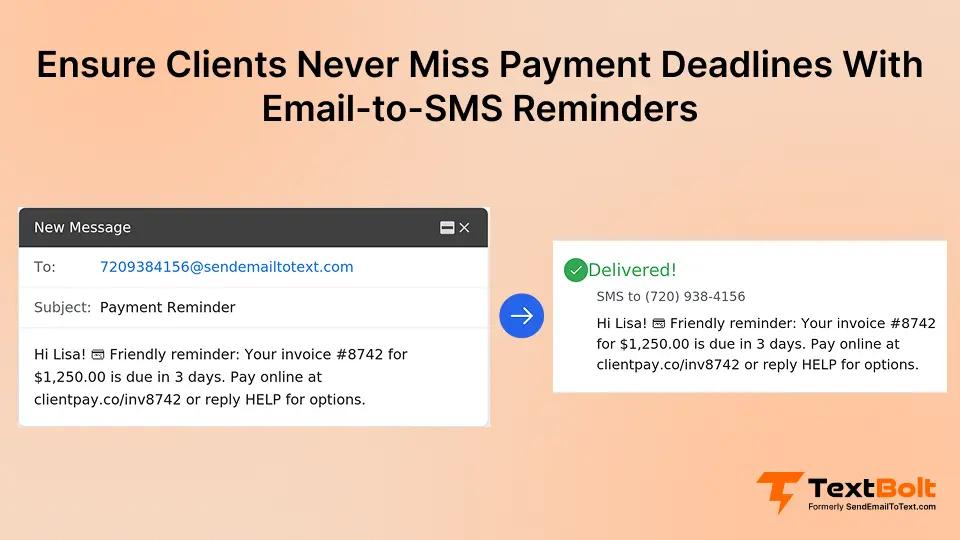
Late payments drain law firms and financial service providers. You send invoices, follow up by email, and still wait weeks for clients to pay retainers, legal fees, and outstanding balances.
The problem is not forgetfulness alone. Most payment reminders go unread because they get buried in crowded inboxes. By the time clients notice them, the deadline has already passed.
SMS changes that equation. Text messages reach clients in seconds and get read almost immediately. With email-to-SMS services for financial institutions, you send payment reminders straight from your existing inbox, no new software, no extra steps.
This guide covers why payment emails get ignored, how scheduled SMS reminders work for legal billing, and what to say when your message lands on a client’s phone.
Why Clients Ignore Traditional Payment Reminders From Law Firms
Clients ignore traditional payment reminders because emails blend into cluttered inboxes, arrive at the wrong time, and lack the urgency that prompts immediate action.
Most late payments are not caused by unwillingness to pay. They are caused by a communication channel that fails to break through the noise.
1. Inbox Overload Buries Retainer and Invoice Emails
The average professional receives dozens of emails daily. Your retainer replenishment notice competes with newsletters, promotions, and internal messages for attention.
Even clients who intend to pay on time lose track. Your reminder gets buried beneath newer messages, and by the time they scroll back, the due date has passed.
This is not a matter of intent. Clients want to pay their legal fees. They simply lose the reminder before acting on it.
2. Fixed Email Schedules Miss the Window for Client Action
Most payment emails go out on a rigid schedule. The invoice arrives on day one, and maybe a follow-up hits a week later.
But clients do not check email on your schedule. A reminder sent Monday morning might not get opened until Wednesday afternoon, well past the deadline.
Effective reminders need to land when clients are most likely to see them and act. Static email timing cannot deliver that precision.
3. Emails Lack the Urgency Signals That Prompt Immediate Payment
An email notification looks the same whether it is a retainer deadline or a marketing newsletter. No visual or auditory cue demands immediate attention.
Text messages trigger phone notifications that clients see right away. The format itself signals urgency without bold text or exclamation marks.
When a trust account needs funding this week, SMS is the channel that matches the deadline. Firms looking to automate text messages find this urgency difference significant. The same principle applies beyond billing firms that reduce missed appointments with SMS reminders see similar gains in client responsiveness.
| Channel | Typical Read Time | Urgency Level | Effort to Send |
| Hours to days | Low | Low | |
| Phone call | Immediate | High | High |
| SMS via email | Minutes | High | Low |
SMS combines the reach of email with the immediacy of a phone call, without the time commitment of dialing each client individually. That makes it the right channel for time-sensitive billing communication and critical account updates clients cannot afford to miss.
How Law Firms Send Payment Reminders Through Email-to-SMS
Email-to-SMS lets you compose payment reminders in your regular email client and deliver them as text messages at the optimal time. If you already know how to send email to text, you can send an SMS payment reminder through TextBolt in minutes.
Step 1: Set Up Your TextBolt Account and Complete Verification
Sign up at TextBolt and complete business verification. Follow the setup guide for step-by-step instructions. TextBolt handles 10DLC registration, which ensures carrier-approved delivery with up to 98% delivery rates.*
Account creation takes 10 to 30 minutes. 10DLC approval typically follows within 48 hours. After approval, you are ready to send.
Step 2: Compose a Payment Reminder in Your Email Client
Open Gmail, Outlook, or your preferred email to text service and address the message to [phonenumber]@sendemailtotext.com. For bulk reminders, address it to an entire contact group.
Keep the message under 160 characters. Include the amount due, the deadline, and a clear way to pay. Example: “Smith & Partners: $2,400 retainer due March 10. Pay at portal.com/pay or call 555-0123.”
Step 3: Schedule Delivery for Two Days Before the Deadline
Use Gmail’s schedule SMS from Gmail feature or your email client’s equivalent. Choose the date and time your reminder should arrive.
For best results, schedule delivery during business hours, one to two days before the payment deadline. For firms managing billing reminders at scale, batch scheduling saves significant time. You can also trigger SMS notifications from email rules in your practice management software so reminders fire automatically when invoices hit a set age. This gives clients enough time to arrange payment without feeling rushed.
Step 4: Monitor Delivery Status and Reply to Client Responses
After sending, check the TextBolt dashboard for delivery confirmation. The dashboard shows which messages were delivered, message length, and recipient details within two to five minutes.
The Summary view provides a quick snapshot of your daily message volume, showing delivered and undelivered counts at a glance.
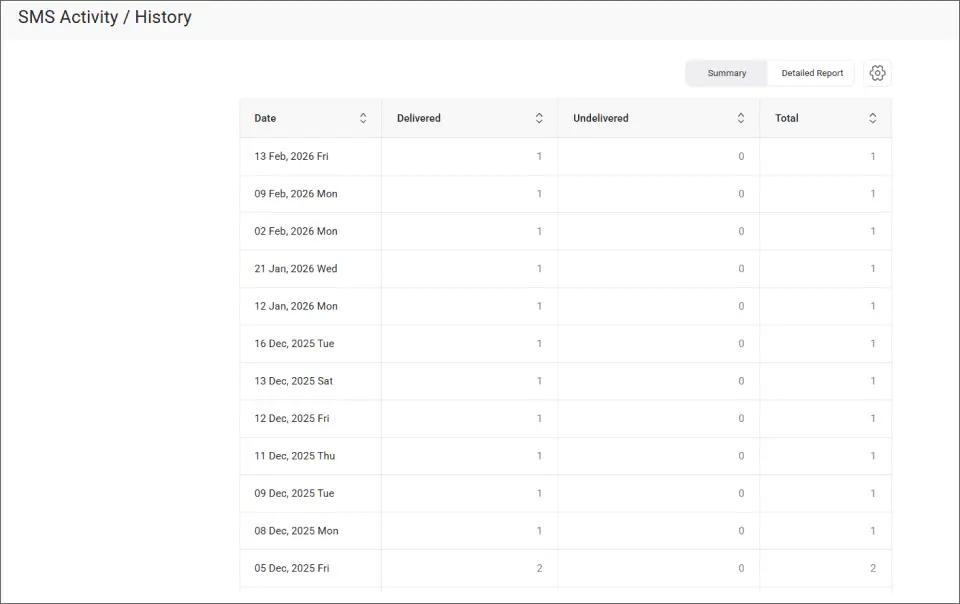
This overview helps your billing team confirm that the day’s payment reminders reached clients before the deadline window closes.
Client replies come back as standard emails in your inbox. Continue the conversation about payment arrangements without switching platforms. This seamless integration means your team can use SMS without replacing email workflows they already depend on for case management and client communication.
With your payment reminder workflow in place, the real question is how much of a difference SMS reminders make for your firm’s bottom line.
Stop Chasing Late Payments by Email
Send payment reminders that clients actually read. Try TextBolt free for seven days.
How SMS Payment Reminders Improve Collection Rates for Law Firms
SMS payment reminders improve collection rates by reaching clients faster, getting read sooner, and prompting action before the deadline passes.
1. Faster Payment Cycles From Reminders Clients Actually Read
Text messages get read within minutes. When a client sees a reminder two days before a retainer deadline, they have time to act.
When the same reminder sits buried in email for three days, the opportunity is gone. Firms that add SMS to their billing workflow consistently report shorter payment cycles and fewer overdue accounts. This speed advantage also helps reduce customer churn by keeping clients engaged.
This speed advantage compounds across dozens or hundreds of client accounts each billing cycle. Firms that enhance customer satisfaction with timely texts also find that proactive reminders strengthen client relationships beyond just the billing interaction.
2. Team-Wide Coverage Prevents Billing Gaps When Staff Are Out
With TextBolt, any authorized team member can send payment reminders from their email. All plans include 10 user accounts with no per-user fees.
When your billing coordinator is out sick or on vacation, someone else covers immediately. Same business number, same contact list, zero missed reminders.
This eliminates the single-point-of-failure problem that plagues firms relying on one person’s phone or email account for all billing communication.
3. Complete Payment Records Create an Audit Trail for Disputes
Every SMS reminder sent through TextBolt is logged in your email account. You have timestamps, sender identification, message content, and delivery confirmation.
When a client disputes a late fee, you can show exactly when the reminder was sent and confirm it was delivered. This documentation protects your firm and maintains professional credibility.
For detailed proof of individual message delivery, the TextBolt dashboard shows the exact status and content of each sent message.
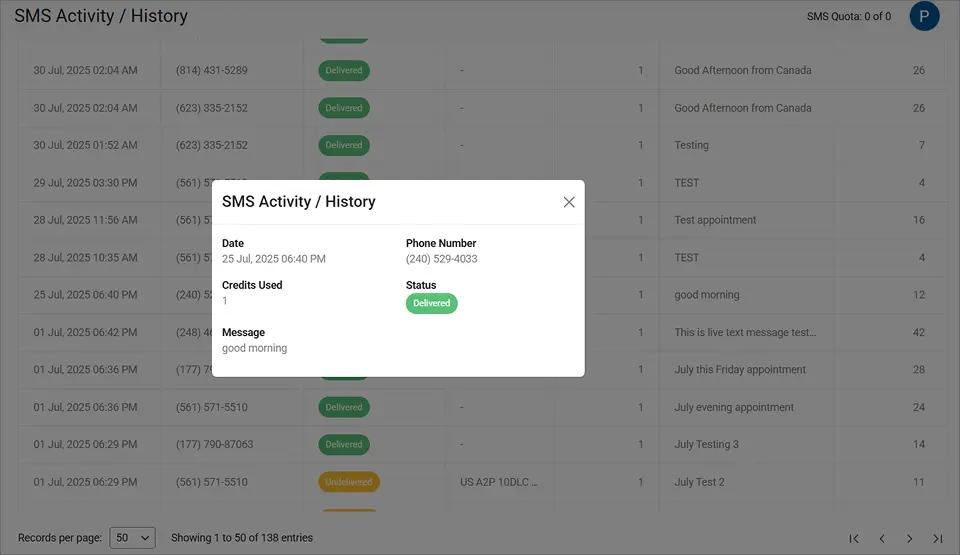
This level of detail provides clear evidence that your firm fulfilled its obligation to notify the client before the deadline passed.
Messages also arrive from your dedicated business number, not a personal cell phone. Firms that stop advisors from texting clients on personal phones keep every conversation documented, consistent, and owned by the organization.
These improvements translate directly into healthier cash flow. The next step is crafting reminder messages that prompt clients to pay immediately.
Stop Losing Revenue to Late Payments
Automate payment reminders from your email. Reach clients before deadlines pass. Start your free trial today.
Best Practices for Legal Payment Reminder Messages
Following these practices helps law firms and financial advisors get paid faster while maintaining professional client relationships.
1. Include the Exact Amount and Due Date in Every Reminder
Vague reminders get vague responses. “You have a payment coming up” is easy to dismiss. “$2,400 retainer due March 10” demands attention.
Specific numbers create a concrete action item. The client knows exactly what they owe and when. That clarity drives faster responses.
For detailed information on SMS character limits and how segments work, review the technical guidelines before building your templates.
2. Send Two Business Days Before the Payment Deadline
Timing determines whether your reminder prevents a late payment or simply documents one. Two business days gives clients enough time to process without feeling rushed.
For larger invoices like settlement payments or quarterly retainers, consider a second reminder on the morning of the due date. You can also send appointment reminders via email to coordinate payment discussions alongside scheduled consultations. Two well-timed texts outperform five poorly timed emails.
3. Use a Consistent Business Number Clients Learn to Recognize
Clients learn to associate your business number with legitimate payment requests over time. Changing numbers or using personal phones creates confusion and reduces trust.
TextBolt provides a dedicated business number that stays consistent across all team members. When clients see that number, they know it is a real billing communication from your firm.
4. Provide a Direct Payment Link to Remove Friction
Every reminder should tell the client exactly how to pay. Include a brief instruction: “Pay at portal.com/pay” or “Reply to arrange payment.”
The easier you make it to pay, the faster clients act. Removing even one extra step from the payment process measurably improves collection rates.
| Practice | Example | Why It Works |
| Specific amount | “$2,400 retainer due March 10” | Creates concrete action item |
| Two-day lead time | Wednesday for Friday deadline | Gives time to process |
| Under 160 characters | One SMS segment | Nothing gets truncated |
| Direct payment path | “Pay at portal.com/pay” | Reduces friction to act |
These practices apply whether you send five reminders a week or 500. The message structure stays the same while only the client details change.
Ready to Reduce Late Payments Without Adding More Work?
Late payments cost law firms time, revenue, and client goodwill. Faster collections also help increase lead conversion because a firm known for clear, professional communication attracts more referrals. Email reminders alone cannot solve the problem because they lack the visibility and urgency that SMS provides.
With TextBolt, you send payment reminders by composing a regular email. Schedule it in advance, and the message arrives as a text at the right time. Your whole team can send from their own email using the same business number.
Over 500 businesses already use TextBolt to reach clients where they pay attention. See pricing and start your 7-day free trial with 10 message credits included.
Frequently Asked Questions
How does email-to-SMS work for payment reminders?
Compose an email addressed to [phonenumber]@sendemailtotext.com. TextBolt converts it to SMS delivered to your client’s phone. Replies come back to your email inbox. No separate app needed.
Can I schedule payment reminders in advance?
Yes. Use Gmail’s “Schedule Send” or your email client’s scheduling feature. Set the date and time, and the reminder delivers as SMS automatically at your chosen moment.
Is TextBolt suitable for legal and financial communications?
TextBolt uses TLS encryption and pass-through architecture that does not store messages on its servers. Review SMS compliance laws and consult your compliance team to ensure it fits your specific regulatory requirements.
What happens if a client replies to a payment reminder?
Replies arrive as standard emails in your inbox. Continue the conversation from your email client without switching platforms or logging into a separate dashboard.
How much does TextBolt cost for payment reminders?
Plans start at $29 per month for 500 credits. The Standard plan at $49 per month includes 1,000 credits and is popular with growing firms. A 7-day free trial with 10 credits is available.