
- Why Phone-Based Business Texting Creates Dangerous Single Points of Failure
- How Email-to-SMS Replaces Phone-Based Business Texting
- Why Removing Phone Dependency Improves Business Texting
- What are the Best Practices for Phone-Free Business Texting?
- Ready to Eliminate Phone Dependency for Your Business Texts?
- Frequently Asked Questions
Text Your Customers Without a Phone
How to Avoid Depending on a Mobile Phone for Business SMS Using Email-to-Text

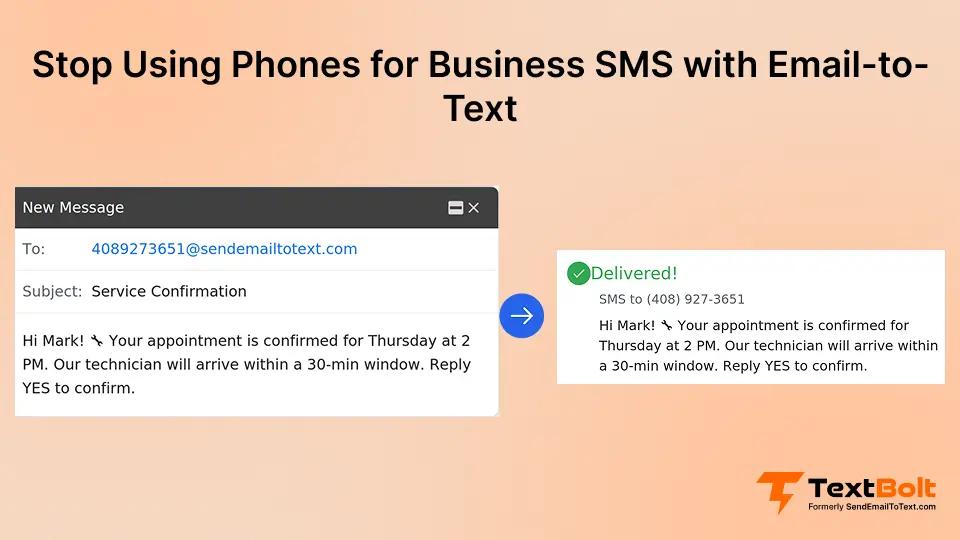
One person. One phone. Every appointment reminder, customer follow-up, and service notification runs through a single device in a single pocket.
That setup works until it doesn’t. A sick day, a lost phone, or an unexpected resignation, and your entire customer communication channel goes dark.
Avoiding mobile device dependency for SMS isn’t just a preference. It’s a business continuity strategy. An email-to-text service eliminates this vulnerability by letting your team send texts from their existing email inbox.
This guide covers why phone-based texting creates dangerous single points of failure, how email-to-SMS replaces the phone entirely, and what best practices keep your messaging reliable no matter who is in the office.
Why Phone-Based Business Texting Creates Dangerous Single Points of Failure
Most businesses start texting customers the old-fashioned way: They’d grab a phone and start typing. It works at first. But as the business grows, the cracks show in ways that cost real money.
According to business continuity research, single points of failure rank among the most common causes of operational disruption in small businesses. Phone-based texting is one of the most overlooked examples.
1. One Person Controls Your Entire Texting Workflow
When one employee owns the texting phone, you’ve built a critical vulnerability into your operations. That person gets sick, goes on vacation, or quits, and customer communication stops immediately.
Consider what happens over a three-day absence:
- Day one: 15 no-shows because nobody can send reminders.
- Day two: someone tracks down the phone but can’t get past the passcode.
- Day three: a temporary staffer figures out the workflow but sends messages to the wrong contact group.
The result: Confused customers, wasted staff hours, and revenue you can’t recover.
Healthcare practices lose an average of $200 per missed appointment. Fifteen no-shows from one sick day means $3,000 gone. Service businesses lose clients who never got the reminder. Schools miss the window to notify parents about closures.
The problem lies in building critical business communications on a foundation designed for personal use.
2. Security and Compliance Gaps Grow With Every Text
Personal phones mixing with business communication create serious risks. A phone left in a taxi or lost at a job site exposes your entire customer contact list and message history.
There is no centralized audit trail when texts live on personal devices. When disputes arise, you have no documentation of what was sent, when, or by whom.
Regulations like TCPA require consent records and message documentation that personal phones cannot provide. For businesses handling sensitive information, this gap creates real compliance exposure under SMS compliance laws.
When an employee leaves, those customer conversations walk out the door. There is no way to recover or transfer that message history from a personal device.
3. Manual Texting Hits a Scalability Wall
Phone-based texting doesn’t scale. One person, one phone, one message at a time. What happens when you need to send 200 appointment reminders before opening or alert 500 contacts about a schedule change?
The labor cost alone adds up fast. A staff member spending 90 minutes per day tapping out reminders burns 7.5 hours per week. At $20 per hour, that’s $7,800 annually on manual message entry alone.
That figure doesn’t count the missed appointments and lost revenue from days when nobody is available to send. Phone-free business SMS solves this scalability problem entirely.
| Communication Method | Team Access | Audit Trail | Scalability |
| Personal phone texts | One device only | None | One message at a time |
| Phone calls | Whoever answers the call | Manual notes | Message quantity is limited by the staff members |
| Email-to-SMS | Any team member with an email | Automatic in email | Hundreds of messages in seconds |
Phone-based texting falls short across every metric that matters for business reliability. Here is how email-to-SMS eliminates each of these vulnerabilities.
Stop Letting One Phone Control Your Business Texts
Eliminate single points of failure by sending business texts from email. Try TextBolt free for seven days.
How Email-to-SMS Replaces Phone-Based Business Texting
Email-to-SMS lets your team send and receive text messages directly from their email inbox. You compose a regular email, and TextBolt converts it into a standard SMS delivered to your customer’s phone.
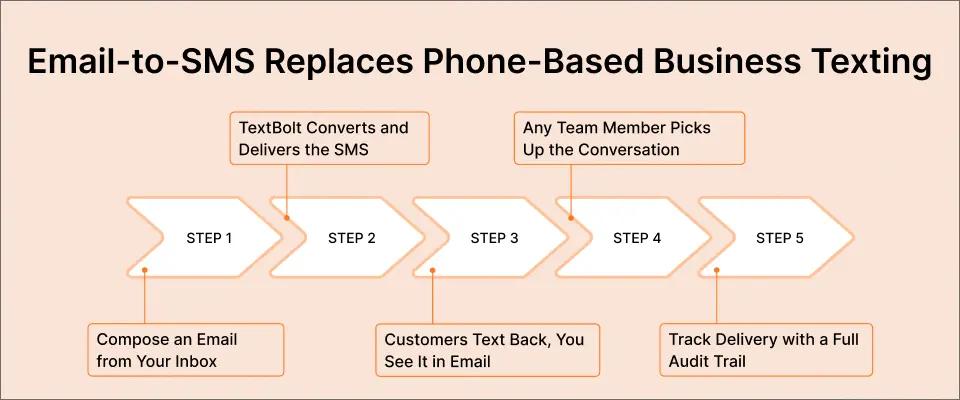
The message arrives from your dedicated business number. There is no app to install, no dashboard to learn, and no phone required at any step. With carrier email-to-text gateways from AT&T, Verizon, and T-Mobile now shut down, a dedicated email-to-text service is the reliable path to phone-free texting.
Here is the workflow from start to finish.
Step 1: Compose a Standard Email in Your Existing Inbox
Open Gmail, Outlook, or whichever email client your business uses. In the “To” field, type the recipient’s 10-digit phone number followed by @sendemailtotext.com.
For example: 5551234567@sendemailtotext.com. Type your message in the email body and press send. That is the entire process for your team.
Step 2: TextBolt Converts and Delivers the SMS
When you press send, TextBolt converts the email into a standard text message. The SMS is delivered to your customer’s phone within seconds from your dedicated business number.
TextBolt’s 10DLC-registered number ensures carrier-approved routing with up to 98% delivery rates.* This is far more reliable than personal phone numbers, which carriers increasingly filter as potential spam.
Step 3: Customers Reply by Text and You See It in Email
Your customer reads the message and replies from their phone’s standard texting app. They don’t need to download anything or create an account.
That reply shows up as a standard email response in your inbox, within the same conversation thread you started. Any team member with access to that email can read it and respond.
Step 4: Any Team Member Picks Up the Conversation
Because replies route to email, your texting workflow doesn’t depend on one person. If your usual sender is out sick, another team member covers with zero disruption.
Customers never know the difference. The business number stays the same. The workflow stays the same. Only the person at the keyboard changes.
Step 5: Track Delivery and Maintain a Complete Audit Trail
Every message you send and every reply you receive is logged permanently in your email account. TextBolt’s dashboard provides delivery status tracking within two to five minutes of sending.
You have a searchable, timestamped record of every customer interaction. No conversation is lost when employees change shifts, take time off, or leave the company.
What customers see:
- A text from a professional business number
- A normal texting experience on their phone
- No apps to download or accounts to create
What you need to get started:
- Any email account (Gmail, Outlook, or other)
- A TextBolt account with 10DLC approval
- Customer phone numbers in your contacts
You can also schedule SMS from Gmail to send reminders and follow-ups at the right time without relying on manual effort.
With the mechanics covered, here is why removing the phone from your texting workflow delivers measurable business advantages.
Your Team Already Knows How to Send Email
That is the only skill required for phone-free business texting. No training, no new apps, no phone.
Why Removing Phone Dependency Improves Business Texting
Eliminating the mobile phone from your texting workflow does more than solve the single-point-of-failure problem. It creates operational advantages that phone-based texting cannot match, regardless of your industry or team size.
1. Team Coverage Eliminates Communication Downtime
With email-based texting, coverage during vacation, sick days, and shift changes becomes automatic. Anyone with email access can send messages from the shared business number.
All TextBolt plans include 10 user accounts with no per-user fees. Your entire front desk, support team, or administrative staff can participate without adding per-seat costs.
Healthcare practices sending 50 to 100 daily reminders protect revenue directly with this redundancy. IT departments ensure critical alerts reach the right engineer regardless of who is on call. Schools send emergency notifications from any administrator’s device at any hour.
2. A Professional Business Number Builds Customer Trust
Messages arrive from your dedicated business number, not a personal cell phone. Recipients see a consistent, recognizable sender they trust.
Industry research shows SMS messages have open rates as high as 98%, with most messages read within three minutes of delivery. But this only works when recipients recognize the sender.
Messages from unknown personal numbers get ignored or blocked. A dedicated business number ensures your texts get read, whether you’re sending appointment reminders, service updates, or payment notices.
3. Complete Documentation Supports Compliance
Every text is logged in your email system: who sent it, when they sent it, what it said, and whether it was delivered. For healthcare providers needing messaging with HIPAA considerations or any business facing potential disputes, this documentation is invaluable.
Compare this to phone-based texting, where message history lives on a personal device that might walk out the door with a departing employee.
4. Any Device With Email Access Becomes a Texting Station
Email-to-SMS works wherever email works. You can send text messages from a computer, laptop, tablet, or even a phone through its email app.
You’re not tied to one specific device. You’re not dependent on cell reception or battery life. If you can send an email, you can send a business text.
Small businesses use this flexibility to keep customer communication flowing from home, the office, or on the road. Schools use it to send closure alerts before dawn from any connected device.
These advantages apply to every business that currently relies on a single phone for customer texts. The following best practices help you get the most from your phone-free texting workflow.
What are the Best Practices for Phone-Free Business Texting?
Effective email-to-SMS messaging follows a few straightforward rules. Keep messages short, stay compliant, and make sure your team knows who covers when. These practices help you maintain professional, reliable communication.
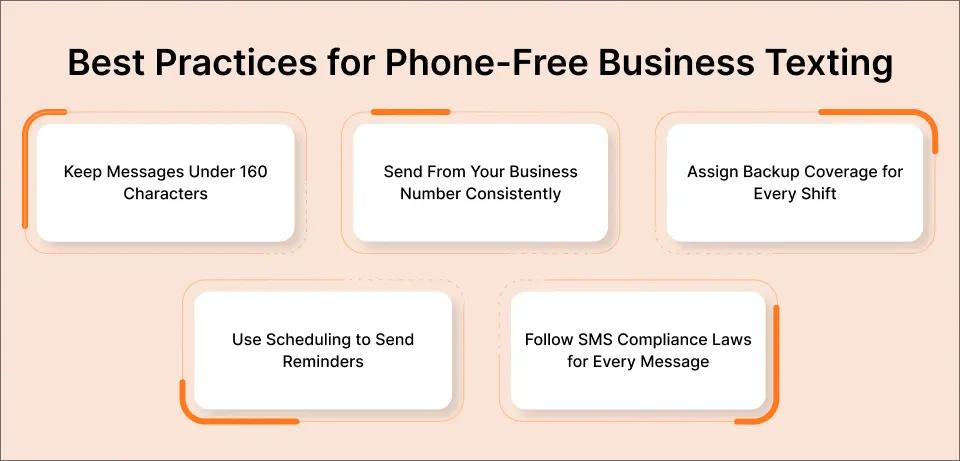
1. Keep Messages Under 160 Characters When Possible
Standard SMS supports 160 characters per segment. Longer messages automatically split into multiple segments, with each segment using one credit.
With Unicode characters or emojis, the limit drops to 70 characters per segment. Shorter messages consistently get faster replies. Lead with the key information and include a clear next step.
2. Send From Your Business Number Consistently
Always send from the same dedicated business number. Customers learn to recognize and trust messages from that number over time.
Switching between personal phones and business numbers confuses recipients and increases the chance of being blocked. Consistency builds the kind of sender reputation that drives high open rates.
3. Assign Backup Coverage for Every Shift
Create a simple rotation so someone is always available to handle incoming text replies. Because email-to-SMS works through a shared inbox, backup coverage means adding someone to the email access list.
No phone to hand off. No passcodes to share. Just email access.
4. Use Scheduling to Send Reminders in Advance
Gmail’s built-in schedule send feature lets you compose texts in advance and deliver them at the right time. This works well for appointment reminders, payment notices, and service follow-ups.
Automated text messages help your team stay proactive without adding manual tasks to the daily routine. Set it up once and let the system handle timing.
5. Follow SMS Compliance Laws for Every Message
All business text messaging must follow TCPA regulations. TextBolt includes built-in STOP keyword handling so customers can opt out at any time.
Make sure your team never messages contacts who have opted out. Following SMS compliance laws protects your business from penalties and preserves the trust you’ve built with your customers.
| Best Practice | Why It Matters | Implementation Tip |
| Under 160 characters | Uses fewer credits, gets faster replies | Include one idea per message |
| Consistent business number | Builds recognition and trust for your business | Never send from personal phones |
| Backup coverage rotation | Eliminates communication downtime with customers | Use shared email access for 24/7 uptime |
| Schedule reminders ahead | Consistent, timely follow-up with customers | Use the Gmail schedule send feature |
| Follow compliance laws | Ensures legal protection and trust | Never override any STOP requests from customers |
With these practices in place, maintaining reliable, phone-free customer communication becomes second nature for your team.
Ready to Text Without a Phone?
Set up in under 30 minutes. Send business texts from email with zero phone dependency.
Ready to Eliminate Phone Dependency for Your Business Texts?
Phone-free business SMS is simpler than most businesses expect. Your team sends texts from the email they already know, every reply stays documented, and no single device can shut down your customer communication.
TextBolt makes this work with no new software, no coding, and plans starting at $29 per month. Setup takes 10 to 30 minutes, and all plans include 10 user accounts with no per-user fees.
More than 500 businesses already trust TextBolt to keep their customer communication reliable and accessible. Your staff already knows how to send an email. Now they know how to send email to text too.
Frequently Asked Questions
Can my team send texts without any phones at all?
Yes. TextBolt converts emails into SMS messages. Your team composes an email, and the recipient receives a standard text. No phone is needed to send or receive business messages.
What happens when a customer replies to a text?
The reply arrives in your email inbox as a standard email response within the same conversation thread. Any team member with email access can view and continue the conversation.
How long does it take to set up TextBolt?
Account creation takes 10 to 30 minutes. After that, 10DLC compliance approval takes up to 48 hours before your team can start sending messages.
Does TextBolt work with email clients other than Gmail?
Yes. TextBolt works with Gmail, Outlook, Apple Mail, Zoho, ProtonMail, and any email client that supports standard email sending.
How many people can send texts from one account?
All TextBolt plans include 10 user accounts with no per-user fees. Each user sends from the same shared business number, and every message is logged individually.
What does TextBolt cost?
Plans start at $29 per month for 500 message credits. A seven-day free trial with 10 credits is available. No per-user fees apply to any plan.