
- What Is an Automated Text Message?
- Why Businesses Struggle With SMS Automation
- How Email-to-SMS Automation Works
- How to Send Automated Text Messages From Gmail
- Best Use Cases for Automated Text Messages
- Automated Texting by Industry
- What to Look for in Automated Texting Software
- Is Automated Texting Legal?
- How Much Does Automated Texting Cost?
- Start Sending Automated Text Messages Today
- Frequently Asked Questions
No API. No New Software.
How to Send Automated Text Messages From Email (No New Software Required)

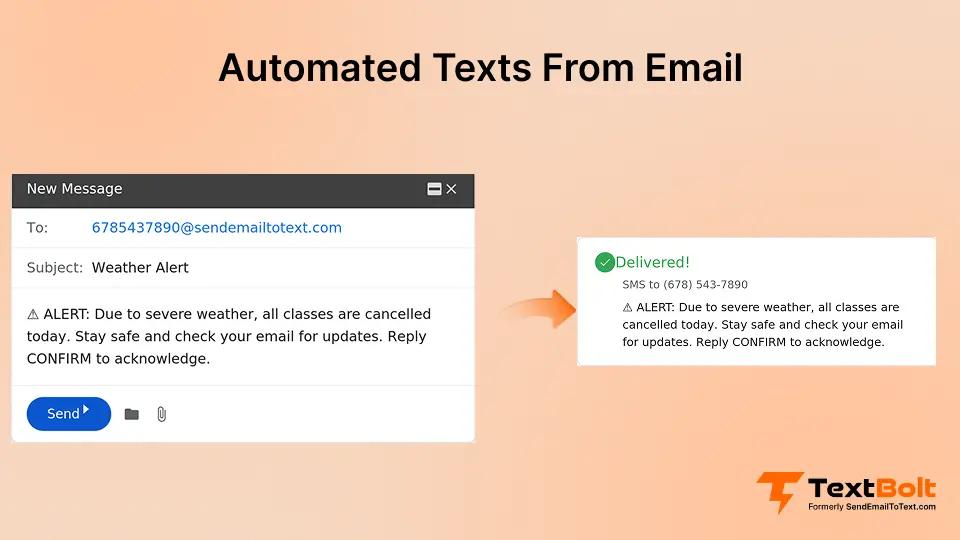
Automated text messages have become essential for businesses that want to reduce no-shows, improve customer communication, and save hours of manual work. But here’s what most guides won’t tell you: you don’t need to learn a new platform, hire developers, or pay enterprise pricing to automate your business texting.
If you can send an email, you can send an automated text message.
This guide shows you exactly how to set up automated SMS directly from Gmail or Outlook, without complex software dashboards, without API integrations, and without the steep learning curve that comes with traditional SMS platforms.
Whether you’re sending appointment reminders, customer notifications, or internal alerts, you’ll discover why email-to-SMS automation is the simplest path to reliable text messaging for your business.
What Is an Automated Text Message?
An automated text message is an SMS sent without manual intervention based on a trigger, schedule, or workflow. Instead of typing and sending each message individually, automation handles the delivery so you can focus on running your business.
Common types of automated text messages include:
- Scheduled messages: Texts sent at a specific date and time you choose in advance
- Recurring messages: Regular texts that repeat on a set schedule (daily, weekly, monthly)
- Trigger-based messages: Texts sent automatically when something happens (new appointment booked, payment due, system alert)
- Drip sequences: A series of messages sent over time to nurture leads or onboard customers
The goal is simple: get the right message to the right person at the right time, without you having to remember to send it.
Why Businesses Struggle With SMS Automation
Before diving into solutions, it’s worth understanding why so many businesses give up on automated texting. The challenges are real, and recognizing them helps you choose the right approach.
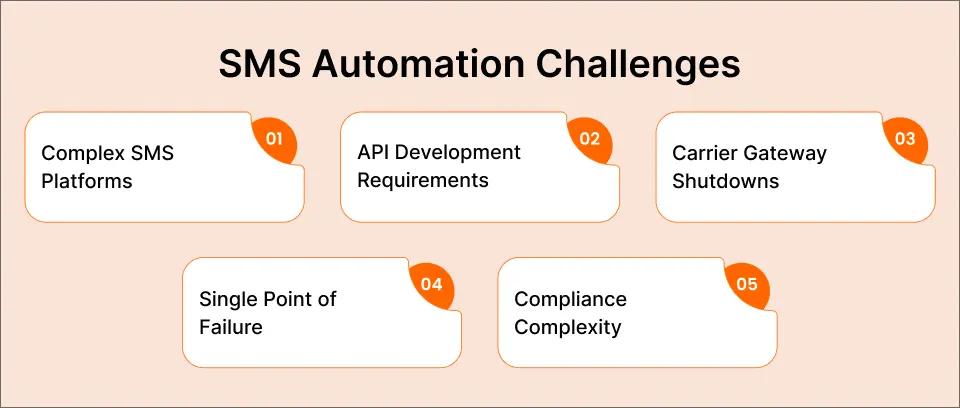
Challenge 1: Complex Platforms With Steep Learning Curves
Most SMS automation platforms require you to learn entirely new software. Dashboards, contact imports, campaign builders, analytics panels. Your staff already knows how to use email. Learning a new platform means training time, adoption resistance, and inevitably, someone who “just sends it from their phone” because the system is too complicated.
Challenge 2: API Development Requirements
Platforms like Twilio offer powerful automation, but they require developers to build and maintain integrations. For small businesses without technical staff, this means $5,000+ in development costs before sending a single text. And when something breaks, you’re waiting on a developer to fix it.
Challenge 3: Carrier Gateway Shutdowns
For years, businesses used free carrier email-to-text gateways to automate messages. Those services are now shut down. AT&T discontinued their gateway in June 2025, with Verizon and T-Mobile following in August 2025. Businesses that relied on these “free” methods found their automations suddenly broken. If you’re looking for replacements, see our roundup of VText alternatives for reliable business texting.
Challenge 4: Single Point of Failure
Traditional phone-based texting creates a dangerous dependency. When the one person who manages your texting calls in sick, or when the shared phone gets left at home, your automated reminders don’t go out. Fifty patients don’t get their appointment reminders. That’s $22,500 in potential lost revenue from a single sick day.
Challenge 5: Compliance Complexity
Business texting in the US requires 10DLC registration, TCPA compliance, and proper opt-out handling. Most small businesses don’t have the expertise to navigate these requirements, and getting it wrong means carrier filtering or legal liability.
The good news? There’s a simpler approach that solves all five challenges using tools you already know.
Tired of Complex SMS Platforms?
TextBolt lets you send automated text messages directly from Gmail. No new software to learn, no developers required.
How Email-to-SMS Automation Works
Email-to-SMS automation lets you send text messages by composing a regular email. Instead of logging into a separate platform, you write your message in Gmail or Outlook and send it to a special address format. The service converts your email into an SMS and delivers it to the recipient’s phone.
Here’s the basic workflow:
- Compose an email in your normal email client
- Address it to the recipient’s phone number using a specific format (like 5551234567@sendemailtotext.com)
- Write your message just like any email
- Hit send and your email becomes a text message
The recipient receives a standard SMS on their phone. They can reply, and that reply comes back to your email inbox as a regular email. No app switching, no separate logins, no new system to learn. If you prefer working from your desktop, check out our guide on how to send text messages from a computer.
Why Email-to-SMS Beats Traditional SMS Platforms
| Feature | Email-to-SMS (TextBolt) | Traditional SMS Platform | API Solution (Twilio) |
| Learning curve | None (use Gmail) | Medium-High | High (developer required) |
| Setup time | 30 minutes | 2-4 hours | Days to weeks |
| Team access | Anyone with email | Per-user fees | Complex permissions |
| Message scheduling | Gmail Schedule Send | Platform scheduler | Custom development |
| Audit trail | Email records | Platform logs | Custom logging |
| Monthly cost | $29-99/month | $50-300+/month | Variable + dev costs |
| 10DLC compliance | Included | Usually included | Self-managed |
For businesses that want automation without complexity, email-to-SMS offers the path of least resistance.
How to Send Automated Text Messages From Gmail
Setting up automated text messaging from Gmail takes about 30 minutes. Here’s exactly how to do it with TextBolt.
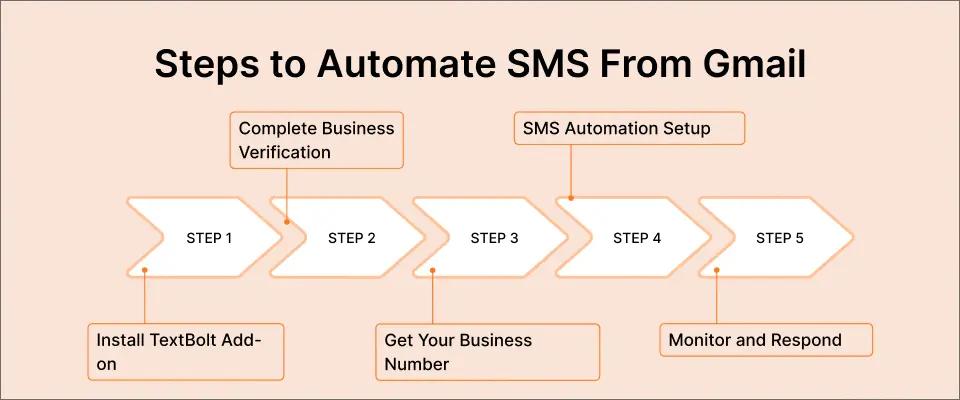
Step 1: Install the TextBolt Gmail Add-on
Go to the Google Workspace Marketplace and search for TextBolt. Click install and authorize the add-on to work with your Gmail account. This takes about 2 minutes.
Step 2: Complete Business Verification
TextBolt handles your 10DLC registration automatically. You’ll provide basic business information (business name, EIN, use case description), and TextBolt submits your registration to carriers. This runs in the background and takes 1-2 business days, though you can start sending immediately on your free trial.
Step 3: Get Your Business Number
You’ll receive a dedicated toll-free business number. This is the number recipients see when they get your texts. It looks professional, builds trust, and enables two-way conversations.
Step 4: Set Up Your Automation Workflow
Here’s where email-to-SMS automation shines. Since you’re using Gmail, you have access to Gmail’s native scheduling features:
For scheduled messages (appointment reminders):
- Compose your reminder email
- Address it to the recipient’s number @sendemailtotext.com
- Click the dropdown arrow next to “Send”
- Select “Schedule send”
- Choose your date and time
- Gmail sends the email at that time, TextBolt converts it to SMS
For a detailed walkthrough, see our guide on how to schedule SMS messages from Gmail.
For recurring messages:
- Create a template email with your recurring message
- Use Google Calendar events with email reminders
- Set up a simple Google Apps Script to send on schedule
For bulk messages (group notifications):
- Create a Google Contact group with all recipients
- Compose one email to the group
- TextBolt delivers individual SMS to each contact
Step 5: Monitor and Respond
All SMS replies come back to your Gmail inbox as regular emails. You can respond instantly, search message history, and maintain a complete audit trail of every conversation.
Best Use Cases for Automated Text Messages
Automated texting delivers the highest ROI for time-sensitive, high-value communications. Here are the use cases where businesses see the biggest impact.
Appointment Reminders
No-shows cost service businesses $200 per missed appointment on average. Text reminders reduce no-shows by up to 38%. With email-to-SMS automation, you schedule reminders when you book the appointment, and they go out automatically.
Example workflow:
- Patient books appointment for Friday at 2pm
- You schedule a reminder email for Thursday at 2pm
- TextBolt delivers it as SMS: “Hi Sarah, reminder of your appointment tomorrow at 2pm. Reply YES to confirm or RESCHEDULE to change.”
- Sarah’s reply appears in your inbox
Healthcare providers, dental offices, salons, auto shops, and any appointment-based business can dramatically reduce no-shows with this simple automation. Learn more in our complete guide to sending appointment reminders via email to SMS.
Customer Notifications
Order updates, service completions, delivery confirmations. These notifications build trust and reduce “where’s my order” calls. Instead of hoping customers check their email, send a text that appears instantly on their phone.
Example: “Hi John, your car is ready for pickup at ABC Auto. We’re open until 6pm. Questions? Reply to this text.”
Payment and Billing Reminders
Late payments hurt cash flow. A friendly text reminder the day before a payment is due can significantly improve collection rates. Automated reminders mean no more manual follow-up calls.
Internal Team Alerts
Shift changes, schedule updates, urgent operational messages. When you need to reach your team fast, text beats email. IT departments use automated SMS for server alerts, security notifications, and on-call rotations.
Emergency and Time-Sensitive Communications
School closures, service outages, weather delays. When timing matters, automated text messages ensure your audience gets the message immediately.
Automated Texting by Industry
Different industries have different automation needs. Here’s how businesses in key sectors use email-to-SMS automation.
Healthcare Providers
- Appointment reminders (24-hour and 2-hour before)
- Lab result notifications
- Prescription refill reminders
- Post-visit follow-up instructions
- Mass patient notifications (office closures, schedule changes)
Healthcare providers need HIPAA-conscious communication. TextBolt’s direct transmission architecture means messages aren’t stored on third-party servers, supporting compliance requirements.
IT Departments
- Server down alerts
- CPU/memory threshold warnings
- Security incident notifications
- On-call engineer alerts
- Backup failure notifications
IT teams integrate email-to-SMS with monitoring tools like Nagios, Zabbix, and PRTG. When your monitoring system sends an email alert, TextBolt can convert it to SMS for immediate attention.
Small Businesses
- Appointment confirmations
- Service completion notifications
- Follow-up messages
- Payment reminders
- Staff schedule alerts
Small businesses benefit most from the simplicity of email-to-SMS. No dedicated SMS administrator needed. Anyone on the team can send texts from their email.
Schools and Educational Institutions
- Emergency notifications
- Snow day announcements
- Event reminders
- Parent-teacher communication
- Bus delay notifications
Schools need to reach thousands of parents instantly. One email to a contact group becomes thousands of individual text messages delivered in seconds.
What to Look for in Automated Texting Software
If you’re evaluating SMS automation options, here are the features that matter most for business use.
Deliverability and 10DLC Compliance
Without proper 10DLC registration, your messages may be filtered as spam. Look for services that include 10DLC registration and achieve delivery rates above 95%. TextBolt delivers up to 98% of messages through carrier-approved business routes.
Ease of Use
The best automation tool is one your team will actually use. If it requires extensive training or technical expertise, adoption will suffer. Email-to-SMS wins here because your team already knows email.
Team Access Without Per-User Fees
Many SMS platforms charge $10-25 per user per month. For a team of 5, that’s $50-125/month just for access. Look for solutions that include team access in the base price.
Two-Way Messaging
One-way blasts are useful, but two-way conversations build relationships. Make sure replies come back to a central location where your team can respond.
Audit Trail and Compliance
For regulated industries (healthcare, finance), you need records of every message sent. Email-to-SMS automatically creates an audit trail in your email system.
Integration With Existing Tools
The fewer new tools you introduce, the better. Email-to-SMS works with your existing email client, calendar, and contact management.
Is Automated Texting Legal?
Yes, automated business texting is legal when done correctly. Here’s what you need to know about compliance.
TCPA Requirements
The Telephone Consumer Protection Act (TCPA) requires:
- Prior express consent for marketing messages
- Opt-out mechanism in every message (STOP to unsubscribe)
- Business identification so recipients know who’s texting
TextBolt handles opt-out processing automatically. When someone replies STOP, they’re automatically unsubscribed. Learn more about SMS compliance laws to ensure your messaging stays compliant.
10DLC Registration
Since 2023, carriers require businesses to register their phone numbers and use cases through the 10DLC (10-Digit Long Code) system. Unregistered numbers see significantly reduced delivery rates and may be blocked entirely.
TextBolt includes 10DLC registration as part of the setup process. You provide your business information, and TextBolt handles the carrier submissions.
Industry-Specific Compliance
Healthcare providers should ensure their texting solution doesn’t store patient data unnecessarily. Financial services may have additional record-keeping requirements. Always consult your compliance team for industry-specific guidance.
How Much Does Automated Texting Cost?
Pricing varies widely across SMS automation platforms. Here’s a realistic comparison.
Traditional SMS Platforms
- Base subscription: $50-300/month
- Per-user fees: $10-25/user/month
- Message credits: $0.01-0.05 per message
- Setup fees: $0-100
- Hidden costs: Telecom fees, premium numbers, add-on features
For a team of 3 sending 1,000 messages/month, traditional platforms often cost $150-400/month.
API Solutions (Twilio, etc.)
- Per-message cost: $0.0075-0.02 per message
- Development cost: $5,000-15,000 initial build
- Maintenance: $500-2,000/month in developer time
- Phone number rental: $1-2/month per number
API solutions are cost-effective at scale but require significant upfront investment and ongoing technical maintenance.
Email-to-SMS (TextBolt)
- Basic: $29/month for 500 credits
- Standard: $49/month for 1,000 credits
- Professional: $99/month for 2,500 credits
- Enterprise: Custom pricing for 5,000+ credits
No per-user fees, no development costs, no hidden telecom charges. Team access is included on Standard plans and above.
For most small to medium businesses, email-to-SMS provides the best balance of functionality, simplicity, and cost.
Stop Manually Sending Text Messages
Automate appointment reminders, notifications, and alerts using the email tools your team already knows.
Start Sending Automated Text Messages Today
Automated text messaging doesn’t require complex platforms, expensive developers, or steep learning curves. With email-to-SMS automation, you can start sending appointment reminders, customer notifications, and team alerts directly from the email client you already use.
Here’s what you get with TextBolt:
- Immediate setup: Send your first automated text in 30 minutes
- No new software: Works directly from Gmail or Outlook
- Team access included: Anyone on your team can send texts
- Up to 98% delivery rate: 10DLC compliant for carrier-approved delivery
- Two-way messaging: Replies come right back to your email
- Complete audit trail: Every message logged automatically
Whether you’re a healthcare provider reducing no-shows, a small business improving customer communication, or an IT team ensuring critical alerts get through, email-to-SMS automation delivers reliability without complexity.
Frequently Asked Questions
Can I send automated text messages from Gmail??
Yes. With TextBolt, you compose your message in Gmail and send it to a special address format (phonenumber@sendemailtotext.com). Your email becomes an SMS delivered to the recipient’s phone. You can use Gmail’s schedule send feature to automate the timing.
What happened to carrier email-to-text gateways?
Carriers like AT&T, Verizon, and T-Mobile shut down their free email-to-text gateways in June, 2025. These legacy services were discontinued due to spam abuse and delivery problems. Businesses now need a professional email-to-SMS service like TextBolt for reliable delivery.
Is automated texting HIPAA compliant?
TextBolt uses direct transmission architecture where messages aren’t stored on our servers, supporting HIPAA compliance for healthcare communications. However, you should always consult your compliance team and avoid including protected health information (PHI) in text messages.
Can multiple people on my team send automated texts?
Yes. With email-to-SMS, anyone on your team can send texts from their own email account using the same business number. This eliminates the single point of failure problem where texting depends on one person or one phone.
How many characters can I include in an automated text?
Standard SMS supports 160 characters per message segment. TextBolt supports up to 303 characters per SMS (2 segments) and 909 characters total (6 segments). Longer messages automatically split and are billed as multiple credits.
Do recipients know the message is automated?
Recipients see a normal text message from your business number. They don’t know whether you typed it manually or scheduled it in advance. The experience is identical to any other SMS conversation.