
- Why Loan Applicants Ignore Your Follow-Up Emails and Calls
- How Loan Officers Send Follow-Up Texts Directly From Email
- Step 1: Complete Your TextBolt Account and 10DLC Verification
- Step 2: Organize Applicant Contacts by Loan Type and Stage
- Step 3: Compose a Follow-Up Message and Address It to the Applicant’s Phone
- Step 4: Schedule a Full Week of Follow-Ups on Monday Morning
- Step 5: Track Delivery Status and Reply From Your Inbox
- Why SMS Follow-Ups Close More Loans Than Phone Calls or Emails
- How to Write Loan Follow-Up Texts That Borrowers Actually Answer
- Ready to Close More Loans Without Growing Your Team?
- Frequently Asked Questions
Close More Loans Without More Staff
How to Automate Loan Follow-Ups Without Extra Staff Using Email to Text Messaging

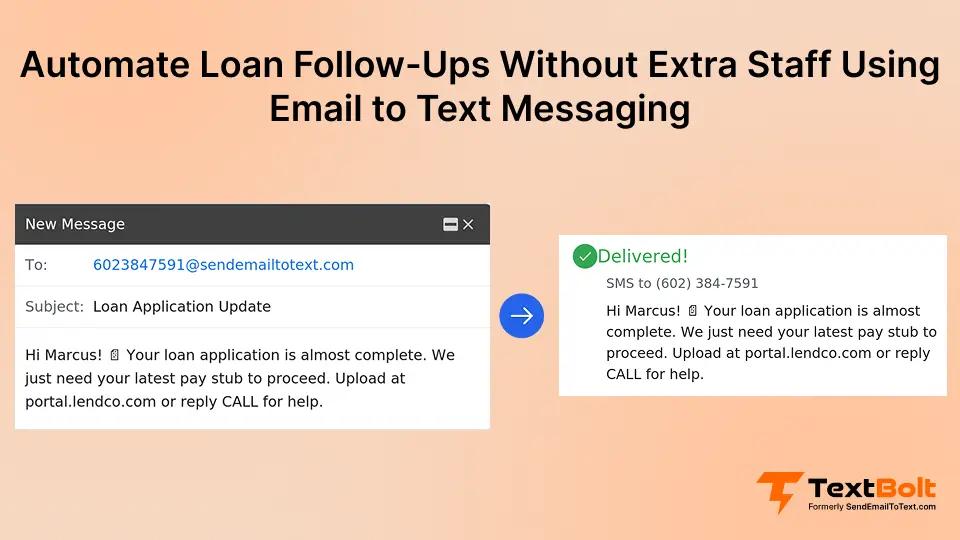
Loan officers know the frustration. You spend time qualifying an applicant, send the follow-up email, and hear nothing back.
The application sits untouched. Deadlines pass. The borrower moves to a competitor who simply picked up the phone first.
Manual follow-ups don’t scale. Calling every applicant takes hours your team doesn’t have, and emails sit buried in crowded inboxes.
There’s a faster way. With email-to-SMS for banks and lending, you can follow up with every loan applicant in seconds straight from your existing email. No extra staff, no new software, just a system that runs itself.
Why Loan Applicants Ignore Your Follow-Up Emails and Calls
Most loan follow-ups get ignored because they arrive in channels applicants rarely check, arrive too late, or feel too intrusive. Borrowers are often shopping multiple lenders at once. The lender who reaches them first and most conveniently wins the business.
1. Follow-Up Emails Compete With Dozens of Unread Messages
The average person receives dozens of emails every day. Your follow-up competes with promotional newsletters, work messages, and spam.
Most applicants don’t actively search their inbox for loan updates. They scan subject lines quickly, and a message from an unfamiliar sender gets skipped.
Email open rates for financial services tend to be low, meaning a significant portion of your follow-ups are never read at all. Even when applicants do open your email, they often plan to “respond later” and forget.
2. Phone Calls Go Straight to Voicemail During Work Hours
Many borrowers screen unknown numbers, especially during work hours. Your call goes straight to voicemail, and many people never listen to voicemails.
Phone tag wastes your loan officers’ hours. Each round of calling, waiting, and redialing eats into time better spent processing applications. For a team managing dozens of active applications, calling every applicant multiple times isn’t realistic without hiring additional staff.
3. Every Hour of Delay Pushes Applicants to Faster Competitors
Speed matters in lending. Applicants who don’t hear back within a few hours often assume you’re not interested.
Manual follow-up processes create natural delays. Your team handles applications in batches, so some borrowers wait a full day before anyone reaches out. During that gap, a competitor who responded quickly has already built rapport. Faster response times significantly increase lead conversion across every lending category.
When you compare these three channels side by side, the difference becomes clear.
| Follow-Up Method | Typical Engagement | Typical Response Time |
| Many go unread | Hours to days | |
| Phone call | Often unanswered | Immediate if answered |
| Text message (SMS) | Most read within minutes | Minutes |
Text messages consistently reach borrowers faster and get read more often. The question is how to put this channel to work without adding complexity to your operation.
How Loan Officers Send Follow-Up Texts Directly From Email
Email-to-SMS turns your existing email workflow into a text messaging system that reaches applicants within seconds of sending. Here’s the step-by-step process.
Step 1: Complete Your TextBolt Account and 10DLC Verification
Sign up for TextBolt and complete business verification. This takes about 10 to 30 minutes.
TextBolt handles 10DLC registration on your behalf. This carrier compliance step ensures your messages get delivered reliably. 10DLC approval takes up to 48 hours, and once approved, you’re ready to start sending follow-up texts.
Step 2: Organize Applicant Contacts by Loan Type and Stage
Add loan applicant phone numbers to Google Contacts or your preferred contact management system.
Organize contacts into groups based on loan type, application stage, or follow-up priority. This lets you target the right applicants with the right messages. The email-to-text setup process works with any contacts already in your system.
Step 3: Compose a Follow-Up Message and Address It to the Applicant’s Phone
Open Gmail, Outlook, or any email client. In the “To” field, type the applicant’s phone number followed by @sendemailtotext.com. Write your follow-up message in the email body, keeping it concise and focused on the next step the borrower needs to take.
For group follow-ups, select an entire contact group and send one email. TextBolt delivers individual texts to each applicant separately.
Step 4: Schedule a Full Week of Follow-Ups on Monday Morning
For immediate follow-ups, hit send. TextBolt converts the email to SMS and delivers it to the applicant’s phone within seconds.
For timed follow-ups, use Gmail’s built-in “Schedule Send” feature. Choose the date and time, and Gmail sends the email automatically. TextBolt then delivers it as a text.
Schedule a day-one acknowledgment, a day-three check-in, and a day-seven final reminder without touching your inbox again. Your loan officers can prepare a full week of follow-ups in one sitting. The rest happens automatically.
Step 5: Track Delivery Status and Reply From Your Inbox
Check your TextBolt dashboard for delivery status updates. You’ll see which messages were delivered within two to five minutes of sending.
The dashboard lets you filter by delivery status, so your team can quickly identify which applicants received their follow-up and which messages need attention.
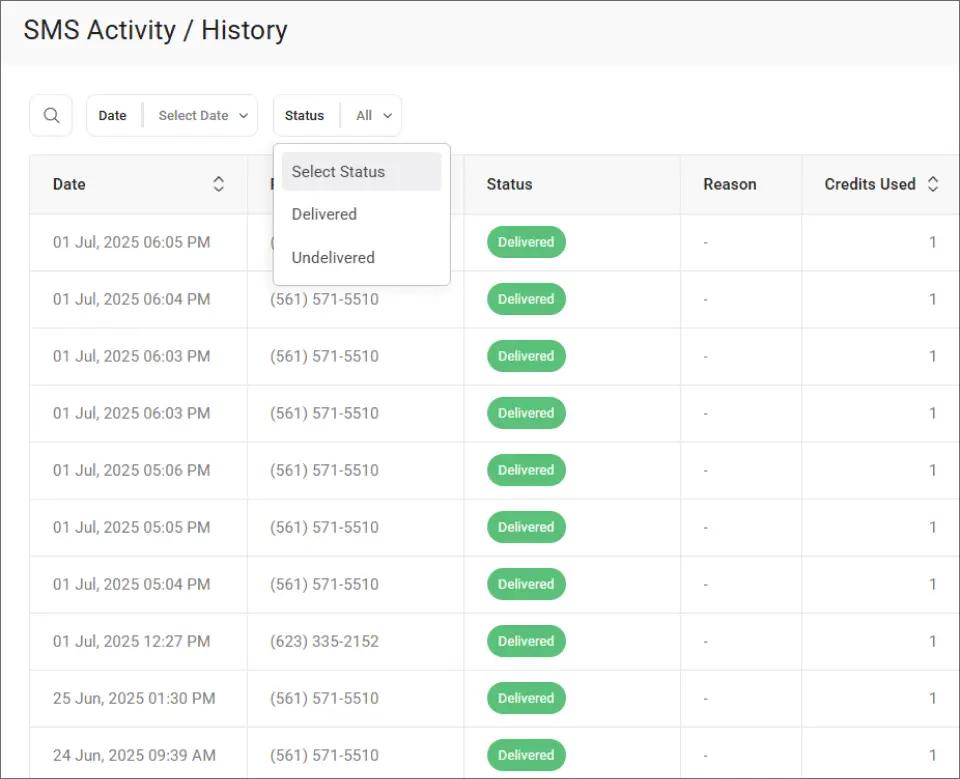
This filtering makes it easy to spot any undelivered messages and resend them before an applicant slips through the cracks.
Applicant replies arrive as standard email responses in your inbox. Continue the conversation without switching between apps. All conversations are documented in your email, creating a complete audit trail for compliance and record-keeping.
Once your follow-up system is running, the benefits extend well beyond saving time on phone calls.
Stop Losing Loan Applicants to Slow Follow-Ups
Turn every email into an instant text message. Follow up with borrowers before competitors do.
Why SMS Follow-Ups Close More Loans Than Phone Calls or Emails
Automated SMS follow-ups improve conversion rates by reaching applicants faster, more consistently, and through a channel they actually read.
1. Sub-Minute Speed-to-Lead Beats Every Other Channel
The first lender to make contact wins the deal more often than not. With email-to-SMS, your follow-up reaches the applicant’s phone within seconds of sending.
No waiting for them to check their inbox. No hoping they answer an unknown number. This speed advantage compounds across your entire pipeline. When every applicant gets a fast follow-up, your overall conversion rate climbs. The same speed-to-lead principle applies when notifying clients about time-sensitive investment opportunities.
2. Scheduled Sequences Ensure No Applicant Falls Through the Cracks
Manual processes break down as volume increases. When your team processes 50 applications a week, some follow-ups inevitably slip through the cracks.
Email-to-SMS eliminates that inconsistency. You can schedule SMS from Gmail and ensure every applicant receives follow-up at the right intervals. No applicant gets forgotten because someone was busy with another task.
3. Text Messages Get Read, Emails Get Buried
Most text messages are read within minutes of delivery. Compare that to email, where many messages sit unread for hours or get ignored entirely.
When an applicant reads your follow-up text, they’re far more likely to take action. Higher engagement means more applicants moving through your pipeline and fewer abandoned applications.
4. $29/Month Replaces Hours of Daily Dial-and-Wait
Hiring additional staff to handle phone follow-ups costs thousands per month in salary and benefits. Email-to-SMS plans start at $29 per month with 500 message credits.
That’s significantly less than one hour of a loan officer’s daily time spent making calls. Your existing team handles more applications without burning out.
When volume spikes during refinance season or rate drops, your follow-up capacity scales without adding headcount. The TextBolt dashboard helps you monitor message delivery across the team.
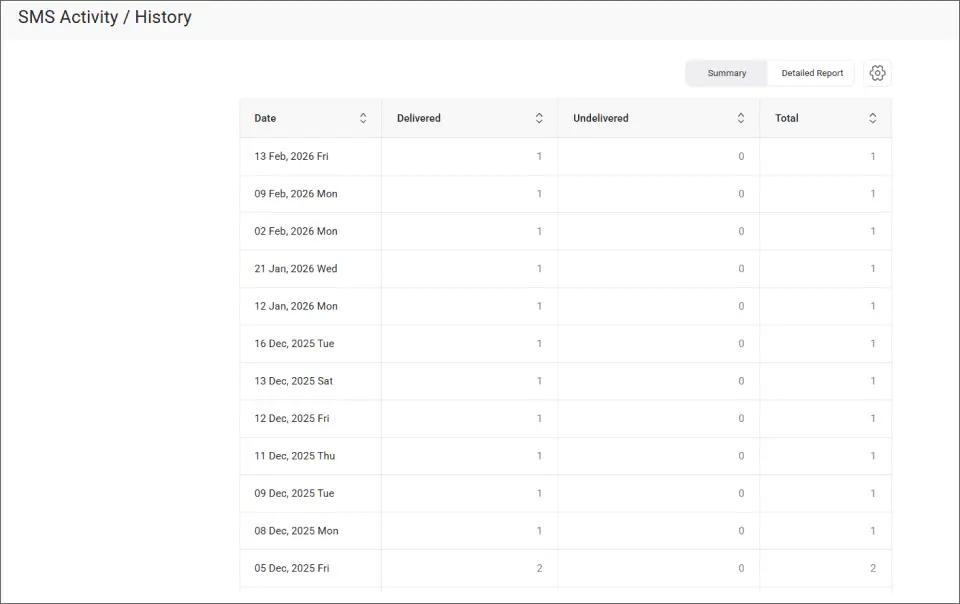
The Summary view gives your branch manager a daily snapshot of how many follow-ups went out and whether they were delivered, making it easy to spot gaps in your outreach.
5. Any Loan Officer Covers Follow-Ups When a Colleague Is Out
When a loan officer is out sick, on vacation, or simply overloaded, follow-ups don’t stop. Any team member can send texts from their own email using the same business number.
All plans include 10 user accounts with no per-user fees. Applicants always hear from your organization on time, regardless of who’s in the office. This consistency helps boost customer engagement and builds trust with borrowers.
The right follow-up system is only as good as the messages it sends. Here are the guidelines that separate effective loan follow-up texts from ones that get ignored.
Your Loan Pipeline Shouldn’t Depend on Manual Follow-Ups
Send follow-up texts from your email in minutes. No new software. No extra hires.
How to Write Loan Follow-Up Texts That Borrowers Actually Answer
The most effective loan follow-up texts are short, specific, and focused on one clear next step for the borrower.
1. Stay Under 160 Characters for a Clean Single-Text Delivery
Standard SMS allows 160 characters per segment. Staying within that limit means your message uses one credit and arrives as a single text.
Longer messages get split into multiple segments, which can look fragmented on the recipient’s phone. For more details, review SMS character limits. For a follow-up, you rarely need more than two sentences.
2. Tell the Borrower Exactly What to Do Next
Every follow-up text should tell the applicant exactly what to do. Vague messages get ignored.
Instead of “Just checking in on your application,” try “Your loan application needs one more document. Reply YES and we’ll send details.” The simpler the next step, the more likely they are to take it.
3. Send the First Text Within Minutes, Then Day 3 and Day 7
Send the first follow-up within minutes of application submission. This confirms receipt and sets expectations for the process.
Schedule a second follow-up for two to three days later if the applicant hasn’t responded. A third at day seven provides one final touchpoint. Avoid sending before 9 a.m. or after 7 p.m. in the applicant’s time zone.
4. Reference the Loan Type but Keep Sensitive Data Out of the Text
Include the applicant’s first name and reference their specific loan type when possible. A message like “Hi Alex, your auto loan application is in review” feels personal and relevant.
Avoid including loan amounts, credit scores, or account numbers via SMS. Use the text to prompt a phone call or secure portal visit for detailed discussions.
5. Include Opt-Out Language and Follow TCPA Requirements
Ensure you have proper consent before texting loan applicants. Include opt-out language like “Reply STOP to unsubscribe” in your messages.
TextBolt handles STOP keyword processing automatically. Follow all applicable SMS compliance laws including TCPA requirements. Your compliance team should review messaging templates before launch.
| Element | Good Example | Avoid |
| Length | “Hi Alex, your loan docs are ready. Reply YES to proceed.” | Long paragraphs explaining the entire loan process |
| Next step | “Call us at 555-0100 to finalize your rate.” | “Just following up on your application.” |
| Timing | Within minutes of application, then days 3 and 7 | Random times, weekends, late nights |
| Tone | Professional, helpful, brief | Overly casual or pushy |
Ready to Close More Loans Without Growing Your Team?
Automated email-to-SMS follow-ups let your existing team reach every applicant faster, more reliably, and at a fraction of the cost of manual processes.
With TextBolt, your team sends follow-up texts directly from Gmail or Outlook. Setup takes 10 to 30 minutes, and all plans include 10 user accounts with no per-user fees.
500+ businesses already use TextBolt for time-sensitive communication. See TextBolt pricing to find the plan that fits your lending operation.
Frequently Asked Questions
How does email-to-SMS work for loan follow-ups?
You compose an email addressed to the applicant’s phone number @sendemailtotext.com. TextBolt converts that email into a standard SMS delivered to their phone. Replies come back to your email inbox.
Do I need technical skills to set up automated loan follow-ups?
No. If you can send an email, you can use TextBolt. There’s no coding, no API integration, and no special software to install. Setup takes 10 to 30 minutes.
Is it compliant to text loan applicants?
Yes, with proper consent. TextBolt includes built-in STOP keyword handling for opt-outs. Consult your compliance team to ensure your messaging meets TCPA and industry requirements.
How many follow-up texts can I send per month?
Plans range from 500 to 2,500+ credits per month. Each standard 160-character message uses one credit. Longer messages use additional credits based on segment count.
Can multiple loan officers use the same TextBolt account?
Yes. All plans include 10 user accounts at no extra per-user cost. Each team member sends texts from their own email using the same business number.