Send Text from M2M Services: Carrier Gateway Replacement for Alarm Dealers
Turn any M2M Services Portal email alert into an instant SMS with TextBolt. Add a forwarding rule from your dealer admin inbox, point it at +1[phone]@sendemailtotext.com, and panel offline, SIM failover, and supervision alerts arrive on technicians’ phones in seconds. Flat monthly plan, 10DLC compliant, no webhook to build.
-
 Forward Portal Center alert emails and they arrive as SMS
-
Replaces the dead @txt.att.net, @tmomail.net, @vtext.com gateways
-
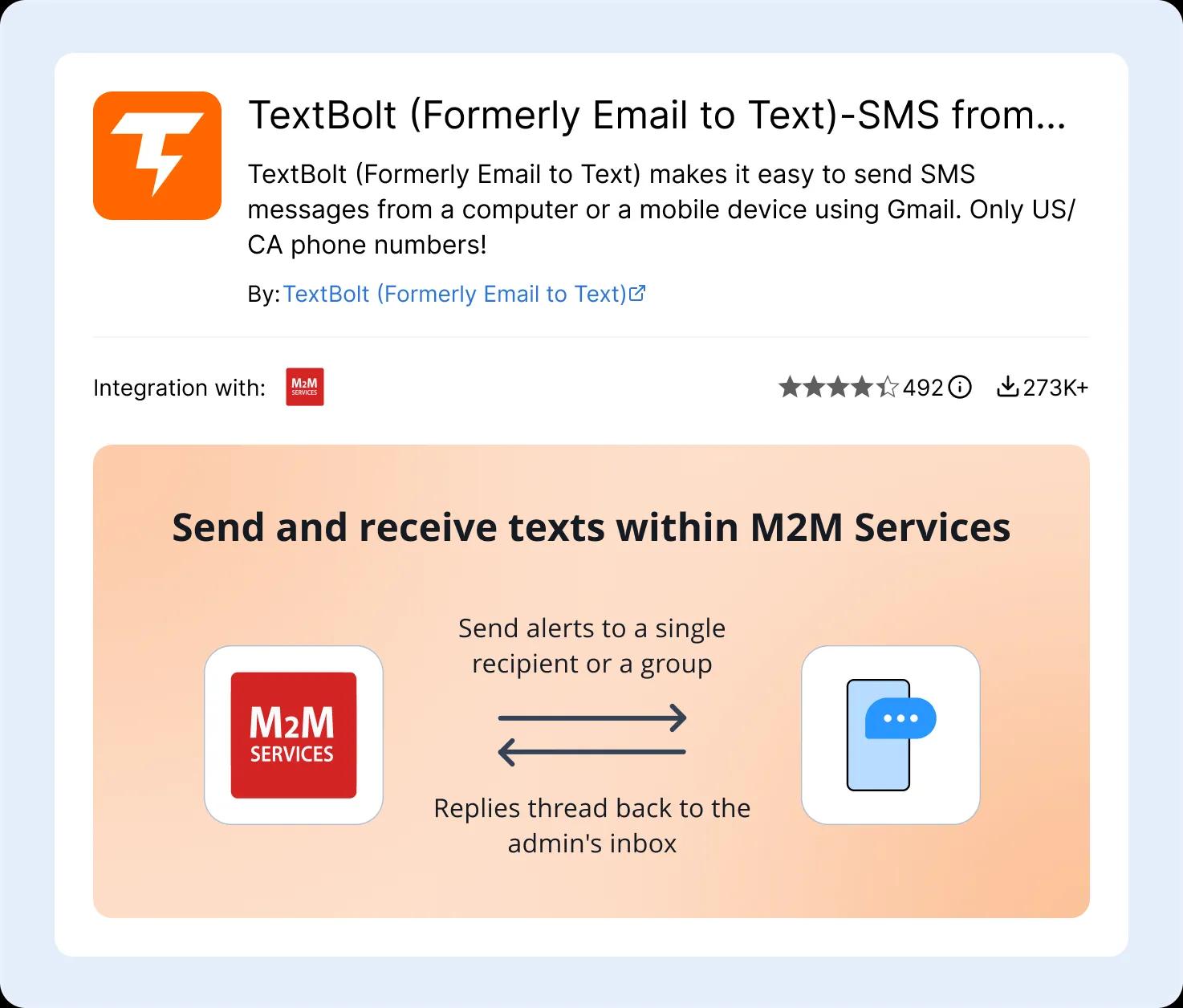
Replies thread back to the dealer admin inbox


Adding Compliant SMS on Top of M2M Services Portal Alerts
Alarm dealers, central station operators, field service technicians, and fire and life-safety service managers using M2M Services face six SMS gaps. Portal alerts arrive as email to the dealer admin account. The carrier gateway bridge is dead, and the replacements demand either engineering hours or per-seat IRM fees. TextBolt closes all six.

SIM Failover and Supervision Notifications Are Time-Sensitive Yet Quietest
The MN01 series dual-SIM design keeps the alarm signal path online when the primary carrier drops. The signal continues uninterrupted, by design. The dealer still needs to know failover happened, because the primary carrier issue is now a developing problem on that site and likely affecting other accounts on the same carrier or region. Account-level supervision misses behave the same way. These alerts trickle in overnight, when no one is at a dealer workstation.

Portal Email Alerts Sit in the Dealer Inbox, Not on Technician Phones
The M2M Services Portal Center sends supervision and event notifications to the registered dealer admin account by email. Field technicians check email rarely, and almost never overnight. Dispatch staff need to triage events in seconds, not at the next inbox refresh. Panel-offline events on residential and small-commercial accounts sit unread until the homeowner calls the central station the next morning, by which point the on-call tech is hours behind a problem that should have been a 15-minute fix.

Carrier Email-to-SMS Gateways Dealer Dispatch Tools Used Are Shut Down
For roughly two decades, alarm dealer offices routed Portal alerts and dispatch emails to technician phones using 5551234567@txt.att.net, @tmomail.net, and @vtext.com. T-Mobile retired its gateway on December 14, 2024. AT&T retired on June 17, 2025. Verizon’s vText path is scheduled to retire on March 31, 2027. Mail to those addresses today bounces or vanishes silently, no error in the admin inbox. Most dealers do not discover the gap until a missed alert produces an incident.
Custom Twilio Webhook Routes Require Engineering Time Alarm Dealers Don’t Have
The M2M Portal Center does not post to Twilio webhooks directly. Routing Portal alerts through Twilio requires middleware that parses the alert email, extracts the fields, calls the Twilio API, and handles fan-out to multiple recipients. That is 40 to 80 hours of initial engineering, plus 5 to 10 hours per quarter for maintenance as Twilio rotates API versions and 10DLC rules change. Most alarm dealers are operations companies, not software shops.

PagerDuty and OnPage Stack Per-Seat Costs On Top of M2M Subscriptions
Pager-app platforms typically charge $20 to $40 per user per month. A six-technician alarm dealer faces $120 to $240 monthly for SMS escalation alone, on top of M2M Portal fees, central station receiver fees, and dealer software subscriptions. The pager-app model also requires every tech to install something on their phone, log in, accept push permissions, and keep the app updated. That is a real adoption tax in field service teams where phones are tools, not productivity devices.

No 10DLC Compliance and No Two-Way Reply for Field Acknowledgment
US carrier rules require all application-to-person business SMS to be registered under A2P 10DLC. A homemade gateway, an unregistered long code, or a leftover carrier-gateway path is not compliant. Dealers also need two-way acknowledgment so the next tech is not double-paged on an event the first tech already rolled to. Most pager apps either do not thread replies back to the original admin inbox, or they require dispatch to learn a separate console to see acknowledgments.
How TextBolt Adds SMS to M2M Services
TextBolt is a business-verified email-to-SMS gateway. M2M Services Portal email alerts (or any panel-event email that arrives in the dealer admin inbox today) get forwarded to a TextBolt gateway address. TextBolt converts the email to a compliant SMS and delivers it to up to 10 staff phones over a 10DLC-compliant toll-free number. No webhooks, no app install, no changes to the M2M Portal or to your communicators.

SMS to Technicians and Dispatch in Seconds
Portal email arrives in the dealer admin inbox, a forwarding rule sends a copy to TextBolt’s gateway address, TextBolt converts the body to a compliant SMS, and the message reaches all configured recipients typically within seconds. Up to 98% delivery rate on registered 10DLC routes. No polling, no batch jobs, no inbox refresh delay.

10DLC-Compliant Business Toll-Free Number
TextBolt provisions a US or Canada toll-free business number for $45/year, and files A2P 10DLC business verification with The Campaign Registry on the dealer’s behalf. Verification typically clears in 1 to 2 business days. Once verified, messages route over carrier-trusted lanes with audit trail kept on every delivery.

Replies Thread Back to the Admin Inbox
When a tech replies “ACK,” “rolling,” or any short message, the reply lands in the dealer admin inbox as a threaded email on the original alert. Dispatch sees acknowledgment in real time, in the same channel the alert originated. The two-way messaging flow keeps the audit trail in one place without an IRM seat.

Forward Portal Alert Emails to a TextBolt Gateway Address
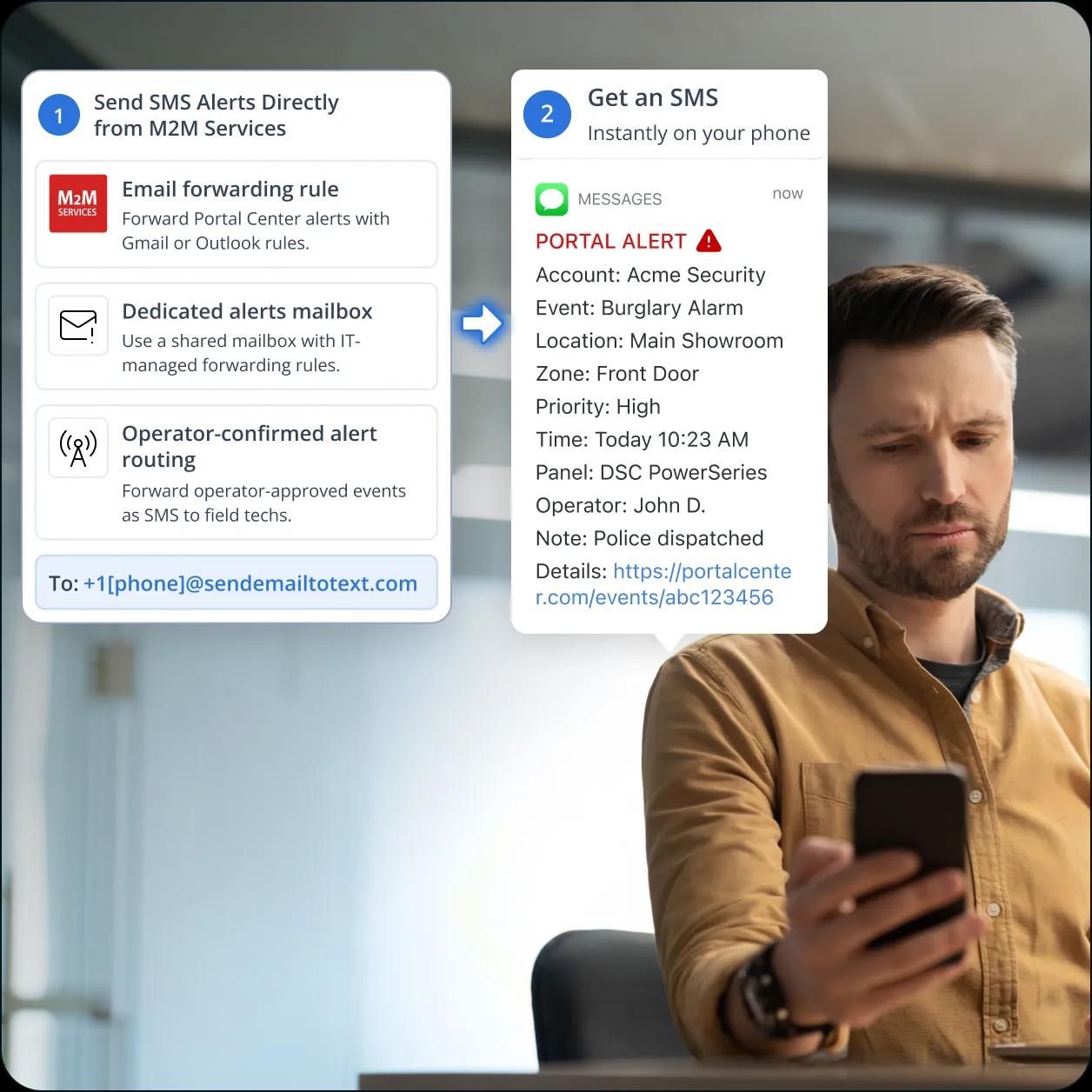
Add a forwarding rule in Gmail, Outlook, Microsoft 365, or your dealer admin mail server that sends Portal Center alerts to +1[phone]@sendemailtotext.com. Optional filters narrow the route, so only specific event types (panel offline, communication failure, SIM failover) get converted to SMS, while routine logs stay in email for normal triage.
No Webhook, No Custom Code, No M2M Portal Changes
Setup is a forwarding rule in the dealer admin inbox. No middleware to deploy, no Twilio API key to rotate, no JSON payload to parse, no change required inside the M2M Portal. The same setup pattern dealers already use to forward emails between staff accounts is the pattern that bridges M2M alerts to SMS. TextBolt’s Standard plan is $49/month with multi-user access for up to 10 team members.

Works Across MN01 Series Events and Portal Center Notifications
Any email the Portal Center emits, or any operator-event email a central station’s automation software sends to dealers, can be routed to SMS. Categories include communication failure, panel offline, SIM failover, supervision miss, periodic test fail, tamper, AC fail, low battery, low signal strength, and restore signals. One TextBolt account covers your entire account portfolio.
Performance Metrics

Up to 98%
SMS Delivery Rate

Two-Way
SMS Replies to Your Inbox

Carrier-Grade
Routes & Infrastructure

Up to 10
Team Members on Shared Account
Set Up M2M Services SMS in About 30 Minutes
Hands-on setup takes around 30 minutes. TextBolt handles 10DLC business verification with The Campaign Registry on your behalf in parallel, which typically clears in 1 to 2 business days before sending goes live. No 3-year contract, no engineering project, no M2M Portal reconfiguration, no Twilio webhook receiver to deploy.
01 Sign Up for TextBolt
Create your TextBolt account using your dealer admin email. Account creation takes about 2 minutes.
02 Choose a Toll-Free Business Number
Pick a dedicated toll-free number for outbound SMS. $45/year setup fee. The number is the sender ID on every SMS your dealer office sends through TextBolt, tied to your company brand and visible on insurance and AHJ documentation if needed.
03 TextBolt Handles 10DLC Business Verification
Provide your business details. TextBolt files the brand profile and campaign registration with The Campaign Registry, classifying the use case as transactional notifications for alarm operations. Verification typically clears in 1 to 2 business days. You do not interact with carrier portals.
04 Forward M2M Portal Alert Emails to TextBolt
In Gmail, Outlook, Microsoft 365, or your dealer admin mail server, add a forwarding rule that sends M2M Portal Center notification emails to +15551234567@sendemailtotext.com using the tech’s actual phone number. Optional filters route specific event types only (e.g., panel offline and SIM failover get SMS, sign-in logs stay in email).
05 Trigger a Test Alert and Wire Per-Event Recipients
Generate a test from the M2M Portal or simulate a panel event on a bench unit. Confirm the SMS arrives on each recipient phone within seconds. Different forwarding rules can route different event categories to different recipient groups (supervision losses to on-call, install-day connectivity issues to the active tech).
06 Add Up to 10 Team Members for Dispatch and On-Call
Invite dispatch staff, on-call technicians, central station operators, and the operations manager to the shared TextBolt account. Each receives the same SMS in parallel. Replies thread back to the admin inbox for acknowledgment and audit. One shared business number for the entire dealer office.
Three Ways to Send SMS from M2M Services
1. Direct Email Forwarding From the Portal Recipient (Most Common)
The dealer admin inbox is already the registered recipient for Portal Center alerts. Add a Gmail or Outlook forwarding rule that copies inbound Portal emails to +1[phone]@sendemailtotext.com. Setup time under 10 minutes for most configurations. Default path for small and mid-sized dealers.
2. Inbox Rule on a Dedicated Alerts Mailbox (Locked-Down Systems)
For dealer offices on Microsoft 365 or Google Workspace tenants that restrict user-level forwarding, create a dedicated alerts mailbox that IT controls. Point Portal Center notifications there and apply a server-side or mail-flow rule to forward to TextBolt. Common at multi-location dealers with central IT, SSO, and audit policies.
3. Routing Through Central Station Automation Email Layer
Central stations using Bold Manitou, SedonaOffice, DICE Matrix, MASterMind, or Stages emit operator-event emails when an operator classifies and acts on a signal. Forward those operator-classified emails to TextBolt for a triage layer between raw panel signals and tech-grade SMS. Field techs see only events an operator confirmed as actionable.
M2M Services Alert Types That Use TextBolt SMS
Six common Portal Center and MN01 communicator alert categories where SMS to the on-call tech replaces an inbox-buried email or a dead carrier-gateway message. The same forwarding rule works across every category.
Communication Failure and Panel Offline
The MN01 communicator’s entire job is to keep the alarm signal path online. When panel-to-receiver communication breaks, the dealer needs to know fast. Forward Portal communication-failure and panel-offline alerts to TextBolt and the on-call tech sees the event on a phone in seconds. Highest-volume, highest-priority alert category for most dealers.
SIM Failover and Cellular Path Change
The MN01 series supports dual SIM with automatic failover. The alarm signal continues uninterrupted, by design. The dealer still needs to know failover triggered, because the primary carrier issue is likely affecting other accounts on the same carrier or region. SIM-failover alerts to SMS surface the developing pattern in time to act on it.
Periodic Test Missed and Account Supervision Loss
Periodic test signals are the early-warning system for slow-degrading paths. A single missed test is not actionable, but two missed tests indicate a real problem brewing. Routing supervision and test-fail emails to SMS surfaces the trend before the panel actually goes dark on a live event. Cheapest preventive workflow in alarm operations.
Tamper, AC Fail, and Low Battery
Where the Portal Center or central station emails on tamper, AC fail, or low battery, those are physical-world events warranting same-shift response. AC fail in particular often precedes a low-battery event by 4 to 8 hours, so catching AC fail by SMS lets the dispatcher plan a tech roll before the panel actually goes dark.
Low Signal Strength and Cellular Trouble
Low signal warnings precede hard communication failures by hours or days. Forwarding signal-strength alerts to SMS lets dealers proactively dispatch a tech to relocate the antenna, swap the SIM plan, or upgrade the device before signal degrades into a hard failure. The cheapest preventive workflow in alarm operations.
Restore Signals and Event Close-Outs
Restore events confirm an issue resolved on its own or after a tech roll. Routing restore SMS to the same recipient list as the original alert closes the loop and keeps dispatch in sync without a separate phone call. The audit trail in the dealer admin inbox shows the original alert, every recipient’s acknowledgment reply, and the restore, all in one threaded view.

Built for Compliance and Security

10DLC Compliant

Carrier Approved

Complete Audit Trail
M2M Services SMS Options: Twilio DIY, TextBolt, or PagerDuty Stack
Three realistic paths for converting M2M Services email alerts into SMS, with the tradeoffs each one carries. Twilio webhook DIY requires engineering hours. PagerDuty-style IRM stacks per-seat costs. TextBolt slots in via the forwarding mechanism your dealer admin inbox already supports.
Twilio Webhook + Custom Middleware (DIY)
Self-hosted middleware plus Twilio per-message billing
Build a webhook receiver that parses Portal Center email alerts, calls the Twilio API, handles fan-out, and manages 10DLC registration yourself. Cheaper at high SMS volume, defeats the simplicity that drew you to M2M Services.
-
 40-80 hours initial engineering build
-
5-10 hours quarterly maintenance on Twilio API and 10DLC rules
-
Self-managed 10DLC Campaign Registry filing
-
Custom fan-out code per recipient list
-
Email parser breaks on Portal template changes
-
No two-way replies without extra code
Recommended

$49/month with multi-user access for up to 10 team members (Standard plan)
Email-to-SMS gateway. Add a forwarding rule on the dealer admin inbox pointing at +1[phone]@sendemailtotext.com. The same M2M Portal you already use, no panel or communicator reconfiguration. Now flat-rate, compliant, audit-trailed, two-way, and cancellable month-to-month.
-
 Up to 98% delivery rate
-
10DLC-compliant business number
-
Works across MN01 events and Portal Center notifications
-
Multi-user access: up to 10 team members
-
Two-way replies in manager’s email inbox
-
Flat monthly plan, no engineering project
PagerDuty, OnPage, or OpsGenie
$20-$40 per user per month, app install required
Enterprise pager-app platforms designed for IT incident management. Strong escalation chains built for IT, less so for alarm dispatch workflows. App install on every tech’s phone, with login and updates.
-
$20-$40 per user per month
-
App install required on every tech’s phone
-
Escalation chains built for IT, not alarm dispatch
-
Separate console for dispatch to see acknowledgments
-
OpsGenie absorbed into Jira Service Management
-
Per-seat cost stacks on top of M2M Portal fees
How Teams Use TextBolt with M2M Services
Three patterns alarm dealers, central station operators, and fire and life-safety contractors use to route M2M Services alerts to technician phones with TextBolt.
Why Alarm Dealers Pick TextBolt for M2M Services SMS
The numbers that matter when wiring SMS into a dealer office without engineering hours or per-seat IRM fees.
Up to 98%
SMS Delivery Rate
30 min
End-to-End Setup
$49/mo
Standard Plan, 10 Users
4.4★
Workspace Marketplace (493 reviews)
Frequently Asked Questions
Does M2M Services have native SMS notifications?
The M2M Services Portal Center sends alert notifications by email to the registered dealer admin account. There is no built-in SMS feature, which is why most dealers add an email-to-SMS layer like TextBolt to reach technicians on their phones in real time. With TextBolt, a forwarding rule on the dealer admin inbox is all that is required.
What replaced the carrier email-to-text gateways my dealer office relied on?
Carrier email-to-SMS gateways shut down in waves: T-Mobile retired @tmomail.net on December 14, 2024, AT&T retired @txt.att.net on June 17, 2025, and Verizon’s @vtext.com is scheduled to retire March 31, 2027. TextBolt is a compliant replacement that uses a registered 10DLC business toll-free number instead of an unregistered carrier gateway path.
How do I send SMS from M2M Services without writing webhook code?
Add a forwarding rule in your dealer admin email account that sends M2M Portal alert emails to +1[phone]@sendemailtotext.com through your TextBolt account. TextBolt converts the email body to SMS and delivers it to all configured recipients. No webhook, no API, no custom code, and no changes inside the M2M Portal are required.
Can I forward existing M2M Portal alert emails to TextBolt?
Yes. TextBolt accepts forwarded emails from any source: Gmail, Outlook, Microsoft 365, Google Workspace, or your own mail server. Forward all Portal alerts, or use email filters to forward only specific event types such as panel offline, communication failure, or SIM failover. The M2M Portal Center continues sending alerts to the registered dealer admin account unchanged.
How is this different from PagerDuty or OnPage for M2M Services alerts?
PagerDuty, OnPage, OpsGenie, and similar pager-app platforms charge $20 to $40 per user per month and require every technician to install an app on their phone. TextBolt charges a flat monthly plan, includes up to 10 team members on the Standard plan, and delivers SMS to any phone with no app install.
Is M2M Services SMS via TextBolt 10DLC compliant?
Yes. TextBolt registers your sender identity with The Campaign Registry during onboarding, typically clearing in 1-2 business days. Outbound messages route over registered, compliant carrier lanes with an exportable audit trail. SMS arrives from a toll-free business number registered to your dealer office.
Can technicians reply to acknowledge an alert from M2M Services?
Yes. Replies to the SMS arrive in the dealer admin inbox as a threaded email on the original alert. Dispatch tracks acknowledgments in the same channel the alert originated, with timestamps captured in the audit log. The full event lifecycle (alert sent, acknowledgment received, restore signal) stays in one threaded view.
How much does it cost to send SMS from M2M Services with TextBolt?
Basic $29/month (500 SMS credits, single user), Standard $49/month with multi-user access for up to 10 team members (1,000 credits), Professional $99/month with multi-user access for up to 10 team members (2,500 credits), Enterprise custom (5,000+ credits). $45 a year recurring toll-free fee for the dedicated business number. Annual plans are 20% off and remain cancellable month-to-month. Credits renew with each billing cycle.
How long does it take to set up M2M-Services-to-SMS with TextBolt?
About 30 minutes of hands-on configuration: account creation, toll-free number selection, and adding the email forwarding rule from your dealer admin inbox to +1[phone]@sendemailtotext.com. TextBolt handles 10DLC business verification with The Campaign Registry on your behalf in parallel, which typically clears in 1 to 2 business days. Once the carriers approve the number, your team can start sending SMS.
Can central station automation software route alerts through TextBolt?
Yes. Central stations using Bold Manitou, SedonaOffice, DICE Matrix, MASterMind, or Stages emit operator-event emails when an operator classifies and acts on an incoming signal. Forwarding those operator-classified emails to TextBolt gives you a triage layer between raw panel signals and tech-grade SMS. Field techs see only the events an operator has confirmed as actionable.
Keep Your Dealer Operations Informed of Every M2M Services Alert
Forward M2M Services Portal alerts to SMS in about 30 minutes. Flat-rate, 10DLC compliant, two-way.