
Add SMS to Email, Don’t Replace It
How to Add SMS to Your Healthcare Practice Without Replacing Email Workflows

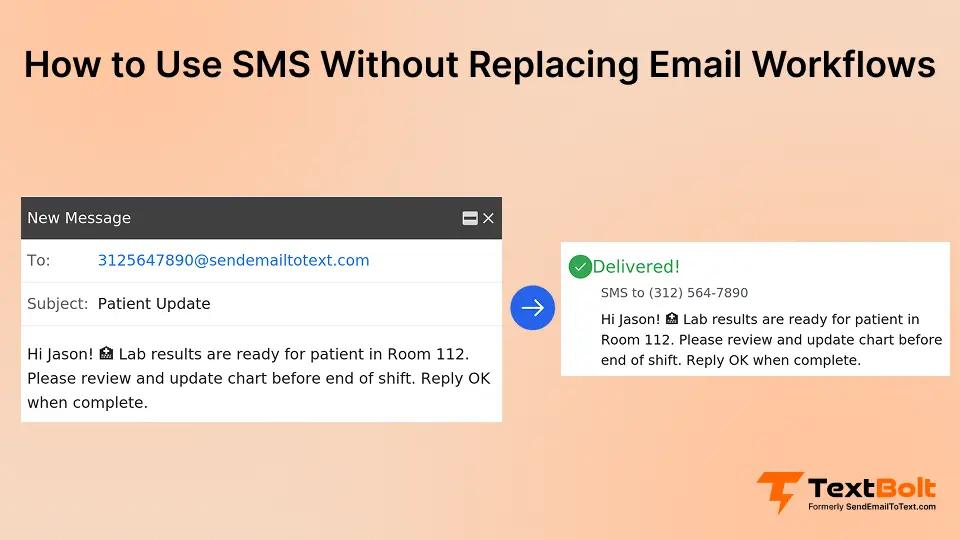
Most healthcare practices run on multiple communication systems. Patient portals handle detailed documentation. Email manages routine reminders and confirmations. Phone calls cover urgent matters. Each system serves a purpose. Staff learned the workflows. Patients adapted to the channels.
Then someone suggests adding SMS for appointment reminders. The immediate concern: Are we replacing email? Do we abandon the portal we just implemented? Does this mean learning another platform and training staff on new workflows?
This creates an impossible choice: continue missing appointments because patients don’t check email frequently enough, or disrupt established workflows by forcing staff to adopt yet another communication platform.
The solution is not replacing email with SMS. The solution is adding SMS as a delivery option within your existing email workflow. This email to text service approach means staff continue using Gmail or Outlook exactly as they do now. The only difference: choosing whether each specific message goes to an email address or phone number. No new platform. No workflow disruption. Both channels working together.
According to a 2024 NIH review, texts open within 3 minutes 95% of the time, while email averages 20% open rates within the same window. This urgency advantage matters for time-sensitive reminders, but both channels serve different purposes. The question is not which one to use exclusively. The question is when to use each one.
Why Healthcare Practices Fear Adding SMS to Existing Workflows
Practices invest heavily in communication tools. Staff spend months learning new systems. Patients slowly adopt portals. When a new solution appears, the fear is immediate: Does this make everything we learned obsolete?
1. Current System Investments Feel Threatened
Practices invested $10,000 to $50,000 in patient portal systems. Staff completed 200+ hours of training. 40% of patients finally enrolled. The logic: We paid for this portal. Staff use it correctly now. Patients adopted it. We cannot abandon it just when it’s starting to work.
This represents sunk cost anxiety combined with legitimate concerns about wasted effort. Previous vendor messaging reinforced replacement thinking. Digital transformation consultants pushed wholesale changes. Legacy solutions required migration, not integration.
2. Staff Have Already Experienced Multiple Disruptive Transitions
Most practices recently implemented major systems. EMR rollouts took 6 to 12 months. Patient portal adoption required constant patient education. Each implementation consumed staff time and energy.
Staff hear “add SMS” and translate it to “learn another system.” The resistance is protective. Staff protect their sanity and their ability to serve patients well. Another platform change feels impossible after recent implementation cycles.
3. Uncertainty About Managing Two Communication Channels
Nobody wants to manage two separate communication streams. The mental overhead of deciding “SMS or email for this message?” multiplies daily workload.
Practices believe adopting SMS means abandoning email entirely. This creates paralysis. Email works for some things. SMS would help others. But adopting SMS seems to require giving up email entirely. So practices do nothing.
The final fear: Are we creating unsustainable communication expectations where patients expect instant SMS responses to all questions?
4. Software Vendors Position SMS as Email’s Replacement
Digital transformation vendors frame solutions as replacements. “Modernize your practice.” “Move beyond outdated email.” “Replace your legacy systems.” This messaging implies email is obsolete. You must migrate to SMS.
This framing creates resistance because email works for many scenarios. Staff know how to use it. Patients respond reasonably well for routine communications.
5. Migration Projects Produced Frustration and Lost Productivity
Each past migration meant lost productivity, frustrated staff, and confused patients. Practices learned to fear “new solutions” because they actually meant “start over from scratch.”
Change fatigue compounds the problem. The idea of another major change, another learning curve, another disruption feels unbearable when the team cannot handle more upheaval right now.
Need Help Mapping Channel Strategy for Your Practice?
We walk through phased adoption approaches that preserve existing workflows while adding SMS for specific high-value scenarios. No migration required.
How to Add SMS to Your Practice While Keeping Email and Portal Intact
This approach preserves existing workflows while solving specific problems where email falls short. The key principle: SMS and email coexist. Staff choose the appropriate channel per message based on urgency and information complexity.
1. Email for Most Messages, SMS for Urgent Needs Only
Email remains your default channel. SMS handles urgent and time-sensitive communication where immediate visibility matters.
Why this works: Preserves existing workflow. Staff continue using email for 80% of communication. No wholesale replacement required.
Scenario: Patient books an appointment three weeks out. Send confirmation via email. Patient receives detailed information, adds to calendar, and has reference documentation. The day before the appointment, send an SMS reminder. Patient sees immediate notification, confirms quickly.
Another example: Patient portal hosts discharge instructions with medication schedules and wound care details. Email notifies patient that instructions are ready. SMS sends critical reminder: “Start antibiotic tonight at 6 pm. Full instructions in your portal.”
TextBolt implementation: Staff compose messages in their existing email client and select the appropriate channel per message. When immediacy matters, send to the phone number. When documentation matters, send it to the email address. Email remains the default for detailed information.
2. Same Staff Workflow, Different Delivery Format
Staff compose messages in Gmail or Outlook exactly as they do now. The only difference is choosing the recipient format per message based on urgency.
Why this works: Zero new platform. Same email client. Staff decide, case by case, whether this specific message needs email visibility or SMS urgency. No separate login. No unfamiliar dashboard.
Scenario: Routine follow-up appointment reminder scheduled two weeks out. Staff compose in Gmail. Sends to the patient’s email address. Patient receives email with full details.
Critical day-before reminder: Staff composes in Gmail. Sends to the patient’s phone number using email-to-text format. Patient receives SMS. Same compose window. Same send button. Different recipient format.
TextBolt implementation: SMS delivery happens directly from Gmail or Outlook without changing how staff compose messages. Staff stay in familiar tools. The workflow remains identical except for recipient format selection.
3. Both Channels Complement Each Other Strategically
SMS and email serve different purposes. Email excels at detailed information. SMS excels at immediate visibility. A complete communication toolkit means choosing the right channel for each message type.
Why this works: Using both strategically delivers better outcomes than forcing one channel for everything.
Scenario: Patient discharged after minor surgery. Detailed wound care instructions, medication schedule, warning signs, and follow-up appointment details were sent via email and posted to the patient portal. These require documentation and reference ability.
Day after discharge: SMS check-in. “Hi, how is your pain level today, 1 to 10? Any unusual swelling? Call us at 555-0123 if concerned.” This requires immediate visibility and a simple response.
The detailed email provides comprehensive information. The timely SMS ensures patient engagement and early problem detection. Together, they create better care than either channel alone.
TextBolt implementation: SMS serves as a notification and urgency layer while email and portals retain detailed content. The healthcare communication strategy leverages existing tools rather than replacing them.
Understanding the difference between SMS and email marketing helps your practice assign the right channel to each message type.
Ready to See How This Works in Your Existing Email Setup?
We’ll show you exactly how to add SMS delivery to Gmail or Outlook without disrupting current workflows. Test with your team before committing.
Examples of Phased SMS Adoption
The following scenarios illustrate common patterns we observe when practices add SMS alongside email. Specific outcomes vary by practice size, patient demographics, and implementation approach.
Example 1: Primary Care Practice
Situation: Practice worried that SMS would require abandoning the email workflow staff finally mastered after patient portal implementation. The office manager resisted because the team barely recovered from the portal launch.
Implementation approach: Started with SMS for day-before appointment reminders only. Email remained the default for everything else: appointment bookings, confirmations, billing, and results.
Observed pattern: Staff adapted in two days because the workflow barely changed. No disruption to portal usage. Patients appreciated both channels serving different purposes. No-show reduction was observed but varied by patient segment.
Example 2: Multi-Specialty Clinic
Situation: Just launched the patient portal six months prior. Worried SMS would undermine portal adoption because patients would ignore the portal if texts provided the same information.
Implementation approach: Patient portal remained the primary hub for documents, test results, billing statements, and comprehensive information. SMS served as a notification layer, driving patients to the portal: “Lab results ready in your portal,” rather than duplicating content.
Observed pattern: Portal engagement increased because SMS drove patients to check the portal promptly. Each channel strengthened the other rather than competing.
Example 3: Dental Practice
Situation: Wanted SMS benefits without forcing immediate change across all communication types. The team was cautious after a bad experience with a previous platform that promised integration but required full migration.
Implementation approach: Started with SMS for day-before reminders only. Appointment bookings continued via email. Insurance information continued via email. Billing statements continued via email. Only urgent reminders were shifted to SMS.
Observed pattern: No-show reduction was observed from SMS reminders. Staff confidence grew over three months. Gradually expanded SMS to schedule changes and urgent updates. Email still handles most communication. Careful expansion prevented overwhelm and proved value incrementally.
How TextBolt Adds SMS to Gmail and Outlook Without Replacing Email
TextBolt’s email-to-SMS service positions SMS as email’s second delivery channel, not email’s replacement. Staff members keep using Gmail or Outlook. The same email client they already know. No new platform. No new dashboard. No separate login.
The staff compose messages exactly as they do now. When routine information needs documentation and reference, send it to the patient’s email address. When a critical reminder needs immediate visibility, send it to the patient’s phone number in the TextBolt address format.
The choice happens per message, not per platform migration. Patient portal remains primary hub. Email remains the default channel. SMS joins them for specific situations requiring immediate attention.
Key benefit: Email address or phone number as the recipient. Same compose window. Same workflow. More flexibility.
You’re not replacing email. You’re adding SMS as an option. Email for most messages. SMS when it matters. Same workflow. More flexibility.
Patients receive texts with up to 98% open rates.* Gmail text integration keeps your team working in familiar tools.
Setup takes 30 minutes. Test with your team. Add SMS without disrupting email. Start your free 7-day trial now.
*Delivery rates vary based on carrier policies, message content, and compliance factors.
Frequently Asked Questions
Can we use both email and SMS for the same patient?
Yes. Most practices use email as the default and SMS for urgent messages only. Same patient receives appointment booking via email with full details, day-before reminder via SMS for visibility, and post-visit instructions via email and portal. This layered approach to appointment reminders helps reduce no-shows without overwhelming staff with platform changes.
Will adding SMS reduce our patient portal usage?
Not if you use SMS to drive portal engagement. Send detailed content to portal. Use SMS to notify patients when information is ready. This increases portal checks rather than replacing portal content.
How do we decide which messages to send via SMS versus email?
Ask: Does this require action within 24 hours? Consider SMS. Does this need documentation or detailed information? Use email. Urgent schedule change: SMS. Comprehensive discharge instructions: Email and portal with SMS notification.
Do we need to stop sending emails once we start using SMS?
No. Email remains your primary channel for most communications. SMS handles situations where immediate visibility matters, like day-before reminders and urgent updates. Most practices use SMS for 10% to 30% of communication, keeping email for everything else.
Can we start small with SMS and expand later?
Yes. Start with day-before appointment reminders only via SMS. Keep everything else in the email. After staff gain confidence, gradually expand to schedule changes, then urgent updates. Incremental adoption reduces risk and proves value before wider implementation.
How do staff learn which channel to use for different message types?
Most practices develop simple guidelines based on urgency and detail level. Time-sensitive messages requiring quick action go via SMS. Detailed information requiring reference goes via email. Staff typically establish consistent patterns within the first week of use.