
- What Is A Business SMS Number For Schools?
- 6 Risks Of Using Your Personal Phone To Text Parents
- 3 Major Problems With Personal Phone-Based Parent Communication
- 3 Ways Business SMS Numbers Protect You And Your School
- How To Implement Email-To-SMS For Your School District
- 4 Best Practices For School Text Messaging Without Personal Phones
- Email-To-SMS Vs. Other School Communication Solutions
- Give Your Teachers A Professional Communication Channel That Respects Their Time
- Frequently Asked Questions
How to Stop Teachers Using Personal Phones to Text Parents

You’re grading papers on Sunday evening when your phone buzzes. It’s a parent texting about tomorrow’s homework assignment. An hour later, another text asks if the field trip permission slip is due this week. By bedtime, you’ve received five parent texts on your personal phone.
The problem with teachers using personal phones to text parents goes beyond inconvenience. When you give out your personal phone number for parent communication, you lose control over your time, your privacy, and your professional boundaries.
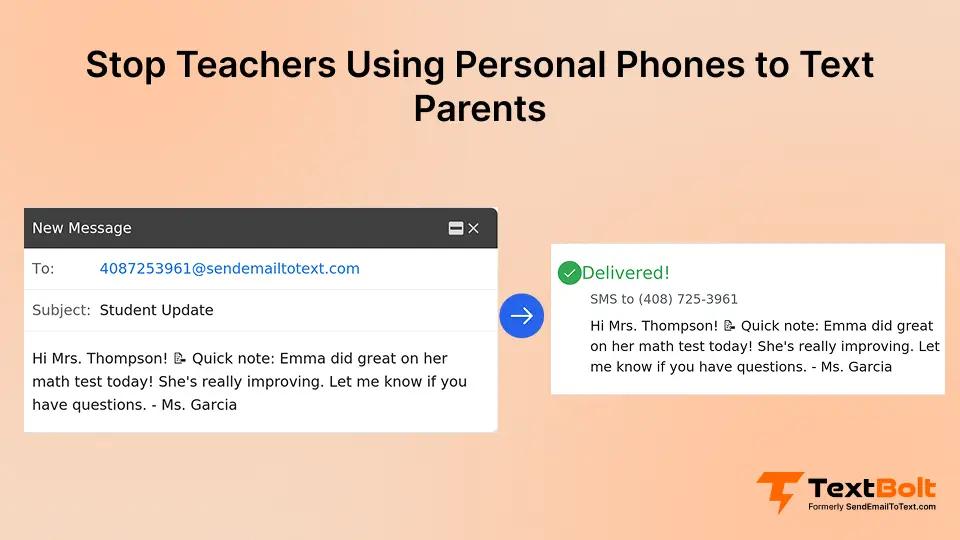
Your school can provide a business SMS number that lets you text parents from your existing work email using a business messaging platform instead of personal phones. No app downloads, no personal phone number sharing, and no more work texts invading your personal life.
This guide shows you how to implement professional school text messaging that protects your privacy while improving parent communication.
What Is A Business SMS Number For Schools?
A business SMS number is a dedicated phone number owned by your school district that you and your colleagues can use to send text messages without revealing your personal contact information, especially when paired with an email-to-text service that runs through your existing inbox.
The system works through your existing work email, so you don’t need to download apps or learn new software.
Here’s how it works in practice. Instead of parents texting your personal cell phone, they text your school’s official number (555-0100). When they send a message, it arrives as an email in your work inbox. When you want to reply, you simply respond to that email from your Gmail or Outlook account. TextBolt converts your email response into an SMS message sent from the school’s number, and the parent receives it as a standard text message on their phone.
This approach keeps your personal phone number private while giving parents the instant communication they expect. The school owns the number and all message records, creating proper documentation for compliance and institutional continuity.
You Shouldn’t Need Your Personal Phone Plan To Do Your Job
TextBolt lets your entire staff text parents from one professional number using existing email. Zero apps, zero privacy concerns.
6 Risks Of Using Your Personal Phone To Text Parents
Many teachers start using their personal phones for parent communication because the alternatives seem inconvenient or unavailable. Your school doesn’t provide an official texting system. Parents demand instant responses that email can’t deliver. Phone calls take too much time during your busy day. Gradually, your personal number becomes the default communication channel for your entire class.
This creates immediate convenience but serious long-term problems. Once parents have your personal phone number, you can’t take it back. They text you on weekends, during dinner, and late at night with questions that could wait until Monday. Your work life bleeds into your personal time because there’s no boundary between your teacher role and your private life.
1. Privacy Violations
Parents have your personal number permanently, even after their child leaves your class. Your phone number follows you beyond the school year, creating ongoing accessibility expectations.
2. Work-Life Boundary Erosion
Texts arrive at all hours with no “off-duty” time. You can’t separate your professional responsibilities from your personal life when both use the same device.
3. Single Point of Failure
Only you have the parent contact list, so your absences halt communication entirely. When you’re sick or on vacation, parent communication stops.
4. Legal and Compliance Issues
No message records exist for administrators to review if disputes arise. Personal phone communications leave no institutional trail.
5. Turnover Problems
When you leave the school, you take institutional knowledge and parent contacts with you. New teachers start from scratch without any historical context.
6. Professional Liability
Personal communication channels lack the oversight and documentation that schools need. Every message exists outside official school systems.
3 Major Problems With Personal Phone-Based Parent Communication
Using your personal phone for parent communication creates three significant challenges that affect both you and your school, but each has a practical solution your district can implement quickly. These problems compound over time and create risks that extend beyond simple inconvenience, which is why many schools are moving to business SMS systems that work from existing email instead of personal phones.
Problem 1: Your Privacy Concerns
When parents have your personal phone number, they treat it like a 24/7 helpline. You receive texts during dinner asking about homework. Weekend mornings bring questions about Monday’s schedule. Late-night messages interrupt your sleep with concerns that could easily wait until school hours. Your personal number becomes a permanent contact that follows you even after students move to other classes or graduate.
Solution:
You can’t “clock out” from work when your personal phone serves as your school communication device. The boundary between professional and personal time disappears entirely. Some teachers create separate work phones to solve this problem, but that means carrying two devices and paying for two phone plans just to do the job.
A simpler solution is to route all parent texts through a school-owned business SMS number that delivers messages to your work email, so parents never see your personal number, and communication naturally stays within school hours.
Problem 2: Your School District’s Liability
Your personal phone creates serious compliance and liability issues for your school district. Administrators have no way to review message history when disputes arise. Text conversations happen entirely outside official channels, making it impossible to verify what was communicated, when, or by whom. This lack of documentation creates problems for FERPA considerations around student information privacy.
Solution:
When you leave the school, whether for another position or retirement, all those parent contacts and message histories go with you. The institution loses valuable knowledge about parent communication patterns, common questions, and effective responses. New teachers start from scratch without any reference material or historical context.
By shifting to a centralized business SMS system that logs every message in school-owned email accounts and dashboards, your district gains a complete audit trail, shared contact history, and the ability to review communications for compliance and dispute resolution.
Problem 3: Operational Inefficiencies You Experience
Personal phone-based communication creates a single point of failure in your school’s parent communication system. When you’re sick, there’s no parent communication that day because only you have access to the contact list and message history. Your colleagues can’t step in to help because they don’t have the necessary information or access.
Solution:
New teachers joining your school face the daunting task of building their own parent contact lists from zero. Each teacher maintains a separate, fragmented system with no consistency across your building or district. Backup coverage during your absences becomes impossible because your personal phone-based approach doesn’t support team collaboration.
A shared school texting number with team-based access centralizes contacts and message history so any authorized staff member can step in, maintain consistent communication, and ensure continuity when roles change or absences occur.
3 Ways Business SMS Numbers Protect You And Your School
Business SMS numbers solve the problems created by personal phone communication while adding professional features your school needs. Here are the three most important protections they provide.
1. Professional Boundaries You Can Maintain
A business SMS number keeps your personal phone number completely private. When parents text your school’s official number, they see that business contact instead of your personal information. You control when work communication happens because messages arrive in your work email, not your personal phone. This creates clear separation between your professional role during school hours and your personal time after work.
You can close your work email at the end of the day and truly disconnect. Parents learn to respect professional boundaries because the system itself enforces them. No more weekend texts about routine matters. No more dinner interruptions. No more sacrificing your personal privacy to do your job effectively.
2. Institutional Ownership And Control
Your school owns the business number and all associated message records. Administrators can review communications when needed for dispute resolution or compliance verification. Every text sent through the system creates a permanent audit trail with timestamps, sender identification, and delivery confirmation. This documentation protects both you and your school if questions arise about what was communicated.
When staff changes occur, the transition becomes seamless. The business number stays with the school, not with individual teachers. New staff can access message templates, common questions, and effective responses from previous years. Your school maintains institutional knowledge instead of losing it every time a teacher moves to a new position.
3. Team-Based Resilience
You and your colleagues can all use the same school number, creating true team-based communication. When you’re absent, another staff member can cover parent communication without any disruption. Parents text the same number they always use, and a colleague responds from their work email. The system supports shared parent contact databases, so your entire team has access to the information they need.
This approach eliminates single points of failure in your school’s communication system. Absences don’t create communication blackouts. New teachers don’t start from scratch. Your school maintains consistent, professional parent communication regardless of individual staffing situations.
How To Implement Email-To-SMS For Your School District
Once you decide to move parent communication off personal phones, the next step is putting a simple, school-owned texting system in place.
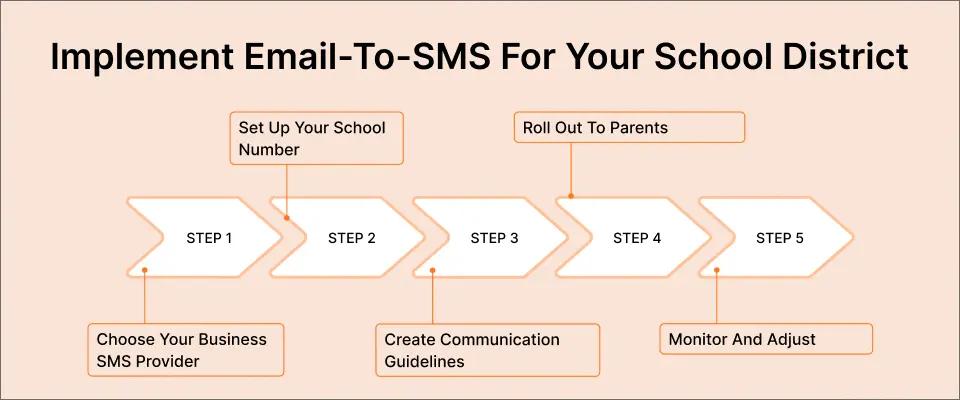
Use these steps to roll out email-to-SMS district-wide without adding new apps or complex workflows.
Step 1. Choose Your Business SMS Provider
Look for email-native solutions that work directly from Gmail or Outlook rather than requiring separate apps or platforms. This approach eliminates training time and adoption barriers because your staff already knows how to send an email. Verify that the provider offers 10DLC compliance, which ensures high delivery rates and carrier approval for business messaging.
Check whether multi-user access comes at no extra cost. Some platforms charge additional fees for each staff member who needs access. Others, like TextBolt, include up to 10 user accounts on all plans with no per-user fees. This pricing structure makes a significant difference for schools with multiple teachers needing parent communication access.
Step 2. Set Up Your School Number
Request a dedicated toll-free or local number for your school. Toll-free numbers often achieve higher message open rates because they appear more professional to parents. Your provider will handle business verification, which typically takes up to 48 hours for 10DLC approval. During this period, your school submits basic information like your organization name and communication use cases.
Once approved, add your authorized staff members to the system. The initial setup of TextBolt takes 10-30 minutes for account configuration. Each staff member connects their work email address to the shared school number, giving them immediate access to send and receive parent text messages from their existing inbox.
Step 3. Create Communication Guidelines
Define clear policies for when and how staff should use the business SMS system. Establish response time expectations so parents know when to expect replies. Set “business hours” for parent communications, such as 7:00 AM to 6:00 PM on school days. This helps maintain the professional boundaries that personal phone texting destroyed.
Develop message templates for common scenarios. Create standard responses for absence notifications, homework reminders, event updates, and permission slip deadlines. Templates ensure consistency across your staff and save time on repetitive communication. Train your teachers on appropriate message content, emphasizing a brief, factual, professional tone in all parent texts.
Step 4. Roll Out To Parents
Announce your new school texting number through multiple channels. Update your parent handbook, school website, and back-to-school communications with the new contact information. Explain the benefits parents will experience, including faster responses and official documentation of all school communications.
Set clear expectations for reply times. Let parents know that messages sent during business hours typically receive responses within a few hours, while after-hours messages will be addressed the next school day. This helps parents understand that your new professional system respects both their need for communication and your staff’s need for work-life balance.
Step 5. Monitor And Adjust
Review message logs periodically to ensure compliance with your communication policies. Gather feedback from your teaching team about what’s working well and what needs improvement. Some teachers may want additional templates for specific situations. Others may identify opportunities to streamline workflows or automate routine communications.
Train new staff members as they join your team. The learning curve is minimal because the system uses familiar email, but new teachers should understand your school’s specific policies and available message templates. Regular check-ins help you optimize the system based on real-world usage patterns.
Stop Sacrificing Your Personal Privacy For Your Job
Over 500 businesses use TextBolt for professional staff communication from existing email. Setup takes 10-30 minutes with zero training required.
4 Best Practices For School Text Messaging Without Personal Phones
Once you implement a business SMS system, these four practices help you maximize effectiveness while maintaining professional standards. Following these guidelines ensures consistent, appropriate communication across your entire staff.
1. Establish Clear Policies
Document who can send messages and under what circumstances. Some schools limit parent texting to classroom teachers and office staff, while others include specialists and support staff. Define what constitutes appropriate message content. Focus on factual information about school activities, student attendance, and routine updates rather than detailed academic discussions, better suited for conferences or email.
Set clear parent opt-in requirements to ensure compliance with messaging regulations. Create escalation procedures for true emergencies that require immediate all-school communication versus routine updates that can follow normal channels. These policies protect your staff and ensure consistent, professional communication across your school.
2. Use Templates For Common Scenarios
Create standardized messages for situations that occur frequently throughout the school year. Template examples include absence notifications (“Your student was marked absent from class today”), homework reminders (“Math homework pages 45-47 are due tomorrow”), event updates (“Tomorrow’s assembly will begin at 9:00 AM”), emergency alerts (“School dismissal is delayed due to weather”), and permission slip reminders (“Field trip forms are due by Friday”).
Templates save time and ensure consistency in your school’s parent communication. Teachers don’t need to compose similar messages repeatedly. New staff can use proven templates immediately rather than inventing their own approach. Parents receive professional, clear information regardless of which staff member sends the message.
3. Maintain Professional Tone
Keep your messages brief and factual. Text messaging works best for straightforward information that doesn’t require lengthy explanation. Avoid sending texts during after-hours unless the situation genuinely requires immediate communication. Most routine school updates can wait until the next business day.
Use proper grammar and spelling in all parent texts. Your messages represent your school’s professionalism. Respond only during established business hours unless facing true emergencies. This consistency helps parents understand when they can expect replies and reinforces healthy professional boundaries for your staff.
4. Leverage Team Features
Assign backup senders for each classroom so absences don’t disrupt parent communication. Share message templates across your entire staff through a centralized resource that everyone can access. Use contact groups to send class-specific alerts efficiently. One teacher can message all parents in their homeroom with a single email that TextBolt converts into individual text messages to each family.
Maintain a centralized parent contact database that authorized staff can access. This ensures continuity when teachers change roles or leave the school. New staff inherit organized contact information rather than starting from scratch. Your school maintains institutional knowledge about parent communication preferences and effective messaging strategies.
Email-To-SMS Vs. Other School Communication Solutions
Different approaches to parent communication look similar on the surface, but they create very different realities for your staff, admins, and families. Use this breakdown to decide what actually fits how your school runs day to day.
1. Your Personal Phone
Using personal cell phones gives you instant access to parents with tools you already know, but it comes at the cost of your privacy and work-life boundaries. There is no audit trail, no way for admins to review messages, and no easy way for colleagues to step in when you are out sick or change schools.
This option also makes your number a permanent contact for families, even after their child leaves your class, and turns you into a single point of failure for all communication with that homeroom.
2. Dedicated School Apps
School communication apps centralize messages, announcements, and sometimes grades in one place and can look impressive on paper. In practice, they require parents to download yet another app, remember passwords, and check a separate inbox that often competes with text messages for attention.
Your staff also needs training and ongoing support to use these platforms correctly, and many vendors charge per-user fees that add up quickly for larger districts.
3. Traditional Robocalls And One-Way Alerts
Robocalls and one-way alert systems work well for true emergencies or all-school notifications when you need to reach every family at once. However, they rarely support two-way conversations, parents often ignore them after repeated use, and the experience feels outdated compared to quick text threads.
These tools should supplement, not replace, a daily communication channel between teachers and families.
4. Email-To-SMS
Email-to-SMS gives your school a dedicated business texting number that every authorized staff member can use directly from their existing email, without installing new apps, similar to how sending SMS notifications from a work email works in other organizations. Parents get simple text messages from a professional school number, while your teachers keep their personal phones private and work from the same inbox they already use all day.
Because the number and message history are owned by the school, you get a complete audit trail, team access for coverage during absences, and continuity when staff turn over. All plans include multiple users without per-seat fees, so you can roll out a single, consistent texting channel across your building instead of patching together personal phones, apps, and robocalls.
Give Your Teachers A Professional Communication Channel That Respects Their Time
You deserve privacy protection while doing your job effectively. Your school needs professional communication tools that create proper documentation and institutional continuity. Business SMS numbers solve both problems by giving you a work communication channel that stays at work.
TextBolt’s Email-to-SMS service offers the simplest implementation path because it works with the tools you already use every day. You don’t need to convince parents to download apps or train staff on complicated platforms. Send an email, and the text message is delivered automatically.
TextBolt provides a business number that works with your existing email workflow. All plans include 10 users with no per-user fees, making it budget-friendly for schools of any size. The 7-day free trial includes 10 message credits so you can test the system with real parent communication. Setup takes 10-30 minutes for account creation, and 10DLC approval typically completes within 48 hours.
Stop sacrificing your personal privacy and professional boundaries. Give your teaching team the communication tools they need to reach parents effectively without giving away their personal phone numbers.
Frequently Asked Questions
How quickly can our school start using a business SMS number?
Account setup takes 10-30 minutes to complete. After you submit your school’s business verification information, 10DLC approval typically processes within 48 hours. Once approved, you can start sending messages immediately using your existing email. Your staff doesn’t need any training because the system works through familiar email clients like Gmail and Outlook.
Can multiple teachers send from the same school number?
Yes. All TextBolt plans include 10 user accounts with no per-user fees. Your entire staff can send messages from the same professional school number using their individual email accounts. When parents reply, the response goes to the specific teacher who sent the original message, maintaining clear communication threads.
What happens when parents reply to school messages?
All parent replies come back as standard email responses in your inbox. You can continue the conversation by replying to the email, and TextBolt converts your response to SMS automatically. The entire conversation thread appears in your email, creating a complete record you can reference later or forward to administrators if needed.
Do we need to download an app or learn new software?
No. TextBolt works directly from your existing email through Gmail text integration, Outlook SMS, or any email client your school uses. If you can send an email, you can send a text message. This eliminates the training time and adoption resistance that plague app-based school communication platforms.
How do we ensure message compliance and record-keeping?
Every message is logged in your email account and the TextBolt dashboard with timestamps, sender identification, and delivery confirmation. This creates a complete audit trail for compliance purposes. Administrators can review communication patterns, and you have documentation if questions arise about what was communicated to parents.
What if we previously used personal teacher phones for parent communication?
The transition is straightforward. Announce your school’s new business texting number to parents through your normal communication channels. Update your website, parent handbook, and school newsletter with the new contact information. Teachers start sending messages from their work email instead of their personal phones. Parents text the school number, and you respond through email. The workflow change is minimal, but the privacy and professional boundary benefits are substantial.