
- Why Personal Phone Texting Takes Root at Law Firms
- What Personal Phone Texting Costs Your Firm in Risk and Records
- How Law Firms Send Client Texts From Email Instead of Personal Phones
- Why a Firm-Owned SMS Number Strengthens Legal Practice
- Best Practices for Implementing a Law Firm Text Messaging Policy
- Ready to Move Client Texts Off Personal Phones?
- Frequently Asked Questions
Your Client Texts Deserve a Business Number
How to Stop Staff Using Personal Phones for Client Communication With Email-to-Text

Your staff member just texted a client about their case from a personal phone. That text thread now lives on a device your firm does not own or control.
This happens every day at law firms across the country. Staff reach for personal phones because texting feels faster than calling. But every personal text creates a compliance gap, an ethical risk, and a record your firm cannot access.
An email to text service gives your entire team a firm-owned SMS number they can use from their existing email. No personal phones involved. No client data on personal devices. TextBolt’s legal industry SMS solutions are built for exactly this challenge.
Understanding why this pattern develops is the first step toward eliminating it.
Why Personal Phone Texting Takes Root at Law Firms
Most firms never planned for staff to text clients. The practice grows organically, driven by client expectations and the absence of a practical alternative.
1. One Quick Paralegal Text Becomes a Firm-Wide Habit
A client calls. The line is busy. A team member sends a quick text from their personal phone: “We received your documents.” The client responds. A texting habit begins.
Personal phones are always within reach. Staff do not need IT approval, software training, or a new login. The path of least resistance wins every time.
Over weeks, these quick texts become the primary communication channel. Case updates, hearing reminders that help clients make every court date, and document requests all flow through personal devices.
No one sets out to create a compliance problem. Each individual text seems harmless. But the cumulative effect is a communication system operating entirely outside the firm’s control.
Management often does not realize the extent until a problem surfaces. By then, months of privileged client communication exist only on a personal phone.
2. Clients Initiate Texts and Staff Have No Business Channel to Offer
Many clients prefer texts over phone calls or lengthy emails. They respond faster, actually see their invoices when sent via text, and often initiate text conversations themselves.
When a client texts a staff member’s personal number, that staff member responds on the same device. The firm has no alternative channel to offer.
Asking clients to stop texting feels like poor service. The pattern becomes nearly impossible to reverse without providing a better option that matches the speed clients expect.
3. Enterprise SMS Platforms Feel Too Complex for Small and Mid-Size Firms
Most firms know personal phone texting is a problem. The available alternatives, however, seem complicated or expensive.
Enterprise SMS platforms require dedicated setup, staff training, and monthly per-user fees that add up quickly. Dedicated business phones add hardware costs and another device to carry.
Neither option feels practical for a five-attorney or 20-person firm. The status quo continues, and personal phone use grows unchecked across case teams.
The risks that accumulate from this pattern, however, are far more costly than any of those alternatives.
What Personal Phone Texting Costs Your Firm in Risk and Records
Personal phone texting exposes law firms to bar complaints, data loss, and discovery failures that can trigger disciplinary action or malpractice claims.
Bar Complaints and Malpractice Exposure From Unsecured Text Threads
State bar associations require attorneys to safeguard client confidentiality. Text messages on personal devices are difficult to protect under Rule 1.6 obligations.
Personal phones can be lost, stolen, or accessed by family members. A single unlocked phone in a coffee shop could expose privileged attorney-client communications to unauthorized parties.
If privileged information leaks through a lost personal phone, your firm faces potential bar complaints and malpractice claims. The financial and reputational cost far exceeds implementing a proper texting system.
Many jurisdictions also require firms to retain client communications for a set period. Personal phone texts are rarely archived, creating potential violations of record retention rules.
Firms subject to SMS compliance laws face additional consent and opt-out requirements that personal phones cannot support.
Departing Employees Take Client Conversations With Them
When a staff member leaves your firm, their personal phone goes with them. Every client conversation on that device disappears from your firm’s records.
This creates gaps in case files that surface during litigation or audits. Opposing counsel could request text message records your firm can no longer produce.
Even cooperative departing employees present challenges. Forensic text extraction costs thousands of dollars, with no guarantee of recovering complete conversation threads relevant to open matters.
The problem compounds with each departure. Over time, your firm’s communication history fragments across devices you will never see again.
Personal Phone Texts Are Discoverable but Hard to Produce
Client texts on personal phones are discoverable in litigation. If your firm faces a malpractice claim, opposing counsel can subpoena those personal devices.
Staff members may resist turning over personal phones for legal review. This creates conflict between the firm’s obligations and employee privacy expectations.
Courts increasingly treat text messages as discoverable evidence. Firms that cannot produce complete text records risk sanctions or adverse inferences drawn by the court.
Personal phones also lack centralized audit trails. There is no firm-level log of who sent what, when, or whether the message was delivered.
Eliminating personal phone texting removes these risks entirely, and the solution is simpler than most firms expect.
How Law Firms Send Client Texts From Email Instead of Personal Phones
Email-to-SMS lets any authorized team member send and receive client texts from their work email, using a single firm-owned phone number.
The process works like sending a regular email. Compose a message in Gmail, Outlook, or any email client. Instead of entering an email address, type the client’s phone number followed by @sendemailtotext.com.
To text a client at (555) 123-4567, address the email to 5551234567@sendemailtotext.com. Type your message in the email body and click send.
TextBolt converts that email into a standard SMS delivered from your firm’s dedicated business number. The client sees a professional text, not a message from a random personal cell.
When clients reply, their responses arrive in your email inbox as standard email replies. You continue the conversation without switching tools or leaving your case management workflow.
Your entire team shares the same business number. When a team member is in court, a colleague picks up the conversation with no disruption and no personal phones involved.
TextBolt’s dashboard provides delivery confirmation for every message your firm sends, typically updating within 2 to 5 minutes.
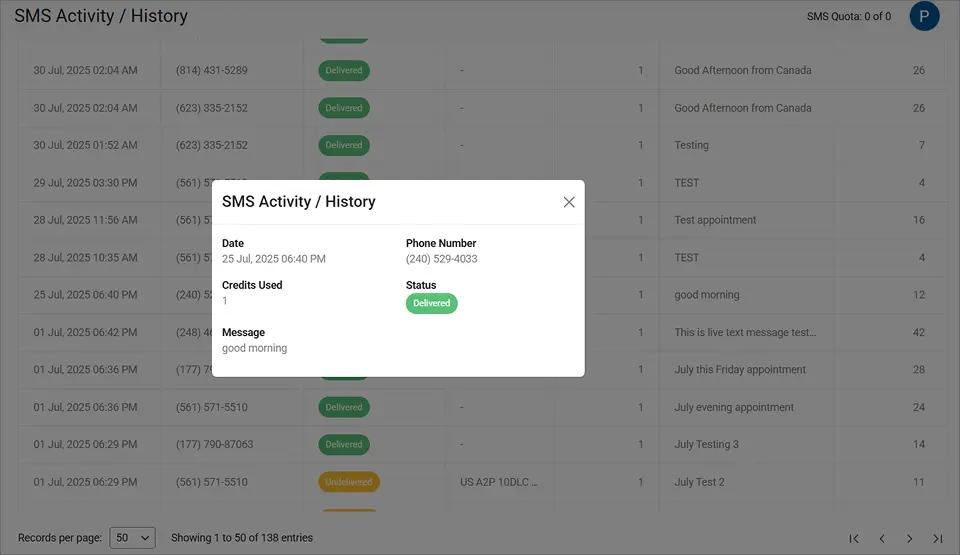
This delivery confirmation gives your firm documented proof that each client notification was sent and received, strengthening your case files and audit records.
You can set up TextBolt in under 30 minutes. After 10DLC compliance approval, which takes up to 48 hours, your firm is ready to send.
With personal phones out of the picture, a firm-owned SMS number delivers benefits that go well beyond convenience.
Your Firm’s Client Texts Belong on a Business Number
Send and receive client texts from your work email. No personal phones, no compliance gaps.
Why a Firm-Owned SMS Number Strengthens Legal Practice
A firm-owned number gives your practice control over every client text, from the moment it is sent to long after the case is closed.
1. Complete Records Stay With the Firm, Not Individual Staff
When your firm owns the SMS number, every message belongs to the firm. Text histories stay with the practice, not with individual employees or their personal devices.
Staff departures no longer create gaps in your communication records. The business number, contact history, and conversation threads remain intact regardless of turnover.
Every text sent through TextBolt is logged in your email system with timestamps, sender identification, and delivery confirmation.
You can search, export, and reference any SMS notification sent from work email when case files, compliance reviews, or dispute resolution require it.
2. Any Attorney or Paralegal Can Cover Client Texts From Their Own Login
All plans include 10 user accounts with no per-user fees. Any authorized team member sends or receives client texts from their own email login.
When your office manager is on vacation, a colleague covers client texts from their own email. Clients never know the difference. The firm’s responsiveness stays consistent throughout PTO, sick days, and case reassignments.
This eliminates the single-point-of-failure risk that personal phone texting creates. Client communication never stops because one person is unavailable.
3. Clients See a Professional Business Number, Not a Personal Cell
Clients receive texts from a dedicated business number, not a personal cell phone. This reinforces your firm’s professional image from the first intake text to the final resolution update.
A consistent sender number helps clients recognize your messages immediately. They are more likely to read and respond to texts from a familiar business number than from an unfamiliar personal one.
4. 10DLC Registration and Opt-Out Handling Run Automatically
TextBolt handles 10DLC registration, ensuring your firm’s messages meet carrier requirements for business texting. Built-in STOP keyword support automates opt-out handling for every recipient.
Your firm’s messages travel through compliant, carrier-approved channels with up to 98% delivery rates.* This means less risk of client notifications being flagged as spam or blocked by carriers.
The dashboard’s Detailed Report lets you verify the delivery status of every message your team sends, organized by date, recipient, and outcome.
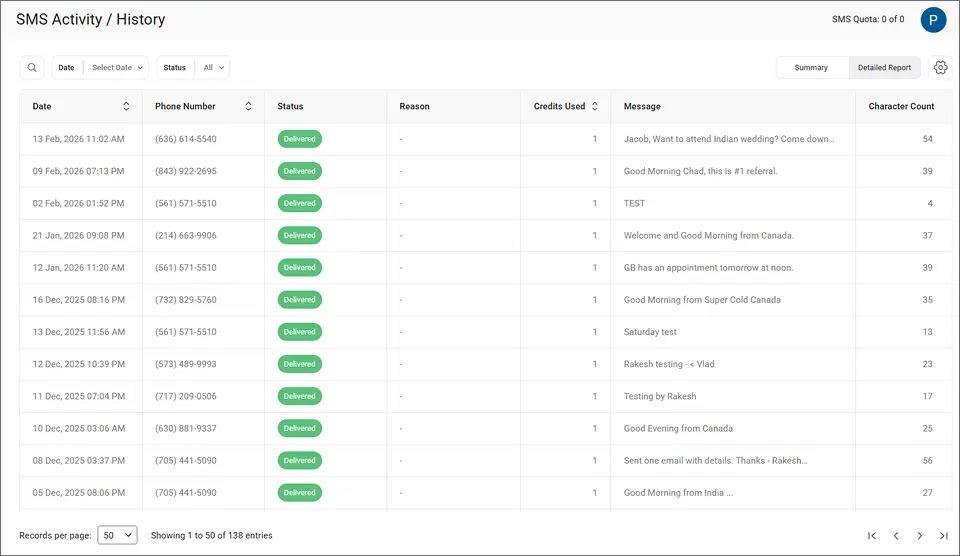
Each row shows the recipient number, delivery status, credits used, and message content, giving your firm a searchable compliance record for any case or audit.
Pairing the right tool with clear internal policies gives your firm the strongest foundation for professional client communication.
Take Client Texts Off Personal Phones Today
Give your team a professional business number they can use from any email client. Plans start at $29 per month.
Best Practices for Implementing a Law Firm Text Messaging Policy
The most effective approach combines a written policy with a communication tool that enforces it automatically.
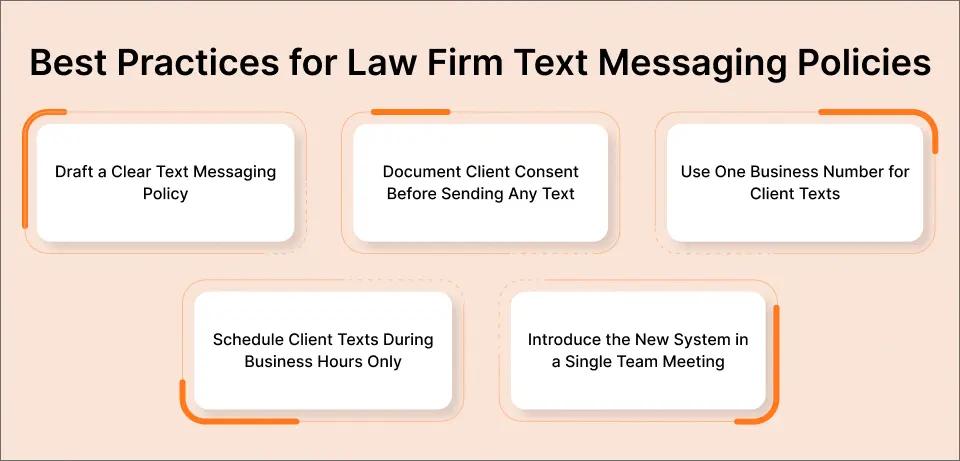
1. Draft a Written Text Messaging Policy With Clear Boundaries
Document which staff roles are authorized to text clients, what types of messages are appropriate, and which topics require a phone call or formal letter instead.
Include examples of appropriate texts: hearing date confirmations, document receipt acknowledgments, and scheduling updates. Specify what should never go via text, such as detailed legal strategy or sensitive settlement figures.
Make clear that personal phone texting for client communication is no longer permitted. Distribute the policy during onboarding and review it annually.
2. Document Client Consent Before Sending Any Text
Before texting any client, obtain written consent that includes the phone number they prefer and their acknowledgment of text as a communication channel.
Store consent records in your case management system alongside the engagement letter. This protects your firm if a client later disputes receiving text messages or files a bar complaint.
Many state bar associations consider text consent a best practice. Having it on file demonstrates your firm takes communication boundaries seriously.
3. Route All Client Texts Through a Single Business Number
Use a centralized firm-owned number that logs every message in your email system. This eliminates the need to chase down personal phone records during audits or discovery requests.
TextBolt’s search feature lets your team find any client conversation instantly by typing a name, phone number, or keyword into the dashboard.
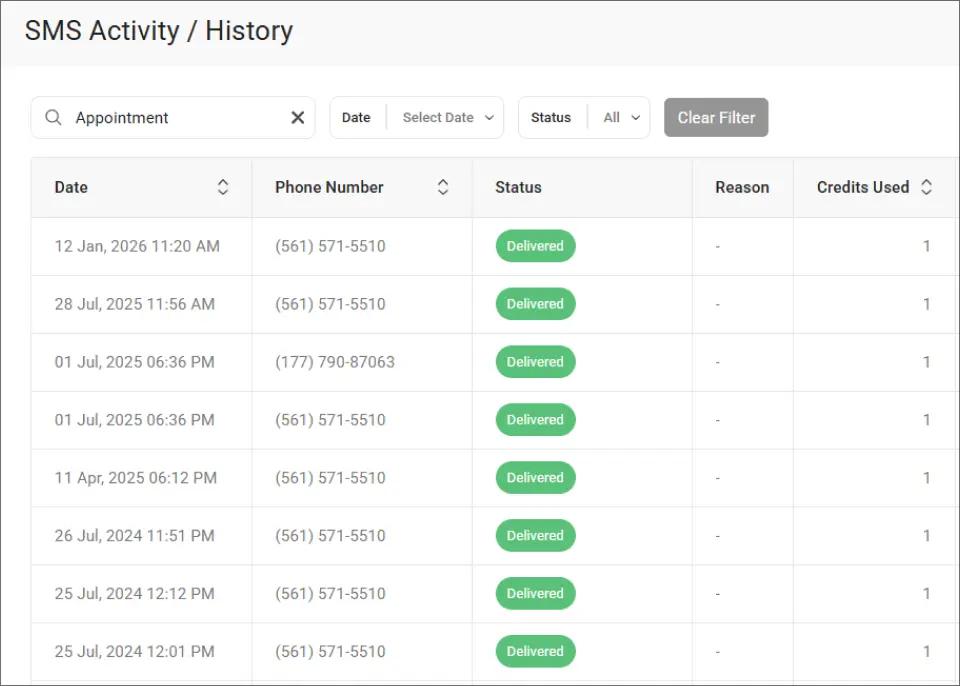
When a judge or opposing counsel requests specific text records, your firm produces them in seconds rather than hiring a forensic extraction vendor.
4. Schedule Client Texts During Business Hours Only
Configure automated text messages to send during business hours only. Late-night texts from personal phones set poor boundaries and can create professional liability.
Gmail’s scheduling feature lets your team compose texts during case prep and deliver them at appropriate times. Clients receive messages when they expect them, and your staff maintains healthy work boundaries.
5. Introduce the New System in a Single Team Meeting
Show staff how to send a text from email in under two minutes. Emphasize that the change protects them personally: their personal phone number stays private, and they are no longer responsible for retaining client texts on personal devices.
Most attorneys and staff prefer the new system once they try it. Keeping personal numbers private and removing bar compliance risk from personal devices is a relief.
| Feature | Personal Phone Texting | Business Email-to-SMS |
| Message ownership | Employee | Firm |
| Audit trail | None | Full email records |
| Staff departure impact | Communication lost | Records preserved |
| Client perception | Unprofessional | Professional business number |
| Compliance capability | Manual | Automated opt-out handling |
| Team coverage | Single person | Any authorized staff member |
With a written policy and a firm-owned SMS number in place, your practice has every tool it needs to eliminate personal phone texting for client communication.
Ready to Move Client Texts Off Personal Phones?
Moving client texts onto a firm-owned number protects your firm, your staff, and your clients. The transition is simpler and faster than most firms expect.
Your team sends texts from their existing email. Clients receive messages from a professional business number. Every conversation is archived, searchable, and accessible to authorized staff.
TextBolt gives law firms a straightforward way to send email to text for professional client communication. 500+ businesses trust the platform. Setup takes under 30 minutes, and TextBolt pricing starts at $29 per month.
Frequently Asked Questions
Can law firms legally communicate with clients via text message?
Yes, law firms can text clients with proper consent and adherence to state bar guidelines for electronic communication. Document client consent before initiating texts. Check your jurisdiction’s specific rules on attorney-client communication channels.
Does TextBolt store client text messages on its servers?
TextBolt uses a pass-through architecture. Messages transmit directly without storage on TextBolt servers. Complete records stay in your firm’s email account, giving you full control over message retention and access.
How does TextBolt handle confidential attorney-client communications?
TextBolt transmits messages with TLS encryption and does not store content on its servers. Consult your compliance team to ensure TextBolt fits your firm’s specific confidentiality and data handling requirements.
What happens to client text history when a staff member leaves the firm?
All conversations stay in your firm’s email system because messages route through business email accounts. The departing employee’s personal devices contain no client text history. Your records remain complete and accessible.
Can multiple attorneys use the same business texting number?
Yes, all TextBolt plans include 10 user accounts at no additional per-user cost. Multiple attorneys and staff send and receive texts from the same business number using their individual email logins.