
- What Is Email-to-SMS for School Communication?
- Why Do Phone Calls Fail as a School Communication Method?
- How Email-to-SMS Replaces Phone Calls for School Updates
- 1. Send One Email, Deliver Hundreds of Parent Texts Instantly
- 2. Same Effort for 10 Parents or 500: How Email-to-Text Scales
- 3. Any Staff Member Can Text Parents — No Single Point of Failure
- 4. Parents Get a Normal Text — No App Downloads or Logins
- 5. 5:45 AM Snow Day: One Email Reaches 200 Families by 5:52 AM
- How Do You Set Up Email-to-Text for Your School?
- Step 1. Organize Parent Contacts by Grade, Bus Route, and Activity
- Step 2. Set Up Email-to-Text: Account, 10DLC, and First Test Message
- Step 3. Write School Texts That Parents Actually Read (Under 160 Characters)
- Step 4. Text 200 Parents at Once From Gmail
- Step 5. Schedule Snow Day Alerts and Recurring Reminders in Gmail
- When Should Schools Use Email-to-Text vs. Phone Calls?
- What Compliance Rules Apply to School Text Messaging?
- 1. Parent Consent Gets Collected at Enrollment With a Simple Checkbox
- 2. 10DLC Registration Prevents Your Messages From Being Flagged as Spam
- 3. FERPA Limits What Student Information You Can Include in Texts
- 4. Non-Emergency Texts Stay Between 7 AM and 9 PM
- 5. Staff Permissions Define Who Can Send Mass Messages and When
- Streamline School-to-Parent Communication With TextBolt
- Frequently Asked Questions
Stop Dialing. Start Texting Parents in Seconds
How Schools Use Email-to-SMS to Stop Calling 200+ Parents Daily

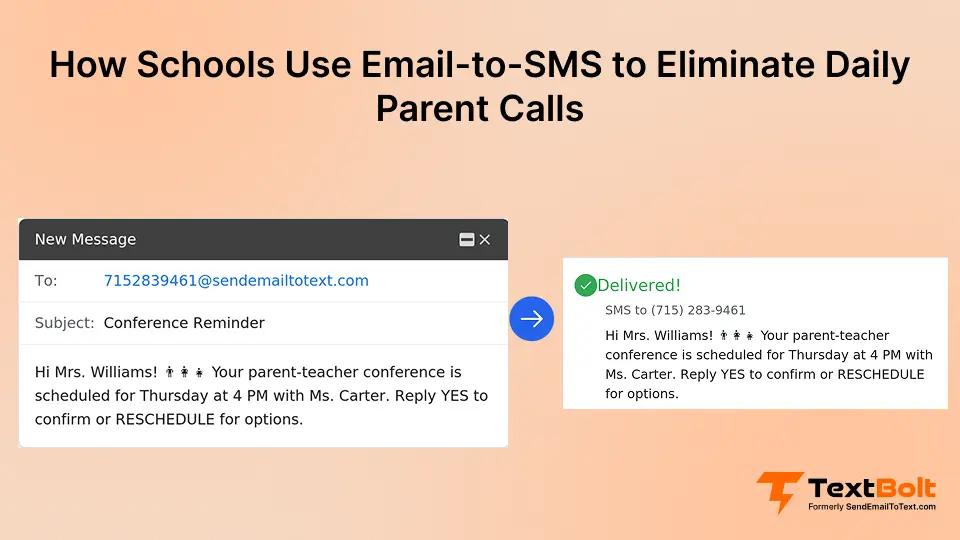
Phone calls worked when schools served 50 families. Today, schools serve hundreds or thousands of students, and phone calls create bottlenecks, delays, and staff burnout. When you’re the only one who can send routine updates (attendance alerts, schedule changes, event reminders), the system breaks down the moment you’re unavailable.
Email-to-SMS lets you send one message that reaches hundreds of parents as individual texts in seconds. From your existing Gmail or Outlook. No parent apps to manage. No new software to learn. Whether you’re sending emergency alerts at 5 AM or field trip reminders at 3 PM, one email delivers hundreds of text messages instantly.
Here’s how schools are replacing time-consuming calls with scalable text messaging using the email systems they already have.
What Is Email-to-SMS for School Communication?
Email-to-SMS for school communication is a method that converts standard emails into text messages sent to parents’ mobile phones. School staff compose one email in Gmail or Outlook, address it to a group of parent phone numbers, and the system automatically delivers individual SMS messages to each recipient.
How it works in three steps:
- You compose a regular email in your existing email client
- Address it to your parent contact group (from Google Contacts or Outlook)
- The system converts your email to individual text messages. Parents receive standard SMS.
Here’s a practical example:
You send one email to your “Grade 3 Parents” group. Within seconds, 45 parents receive individual texts: “Grade 3 field trip tomorrow. Students need sack lunch and a permission slip.”
Unlike phone call chains (slow, incomplete reach) or parent apps (require downloads, logins, training), email-to-SMS works from your existing email inbox and reaches parents via standard text messaging they already use daily. Parents don’t download anything. You don’t learn new software. The barrier to entry is zero on both sides.
Stop Spending Mornings on the Phone, Send 200 Parent Updates in One Email
Send texts from your existing Gmail or Outlook. No new software. Setup takes 10-30 minutes plus 10DLC approval.
Why Do Phone Calls Fail as a School Communication Method?
Phone calls seem like the reliable fallback for reaching parents, but the reality tells a different story. Here’s what actually happens when phone calls are your primary communication method.
1. 200 Calls Take 6-10 Hours for a Single Update
Let’s break down the actual numbers. Typical call length is around 45 seconds if a parent answers immediately. Reality? Often 2-3 minutes per attempt. Voicemail. Callbacks. Wrong numbers. Brief conversations explaining the same update 200 times.
200 parents can mean 6-10 hours of your time for ONE update.
That’s a full workday (or more) spent on the phone for a single piece of information. Multiply that by weekly schedule changes, monthly event reminders, and seasonal updates. You’re spending entire weeks annually just dialing phone numbers.
2. One Staff Member Out Means Zero Messages Sent
You’re the only one with the parent phone list. When you’re out sick or on vacation, nobody else can send updates. After-hours emergencies depend entirely on your availability. The system breaks down the moment you’re unavailable.
What happens on a snow day when you’re sick? What happens when you’re at a family event, and the principal needs to notify parents about a facility emergency? The communication system grinds to a halt because it depends on one person’s presence.
3. No Delivery Confirmation Leaves Parents Unreached
Phone tag becomes inevitable. Parents at work can’t answer during school hours. Voicemails get ignored or heard too late to be useful. You have no delivery confirmation. No idea if everyone got the message. No record of who you reached versus who you missed.
When you’re making 200 calls, you can’t track who answered, who you left a voicemail for, and who never picked up. There’s no audit trail. No way to prove you attempted contact. No systematic follow-up for missed calls.
4. Snow Days and Emergencies Can’t Wait for Call Lists
Some updates can’t wait for hours of phone calls, for example:
- Snow day announcements at 5:30 AM (you’re calling before sunrise)
- Mid-day emergency notifications (you’re interrupting classes to make calls)
- Last-minute event changes (scrambling to reach 100+ families in hours)
- Facility emergencies requiring immediate parent action
Every minute you spend dialing is a minute parents don’t have critical information they need to make decisions about their children.
5. Every Hour Dialing Is an Hour Away From Students
Every hour you spend calling parents is an hour you can’t spend supporting students, handling administrative tasks, or managing actual emergencies. Your job isn’t “professional phone dialer,” but that’s what it becomes when phone calls are your only mass communication tool.
The real cost isn’t just your time. It’s everything else you’re not doing while you’re on the phone.
| Task | Your Phone Calls | Email-to-SMS |
| Reach 200 parents | 6-10 hours (at 1-3 minutes per call) | 2 minutes |
| Staff required | Only you (bottleneck) | Anyone with email access |
| Delivery confirmation | Yes, but requires manual tracking | Yes, automatically, within minutes |
| After-hours capability | Depends on your availability | Any staff member, any time |
| Parent response rate | Varies widely | ~98% open rate |
How Email-to-SMS Replaces Phone Calls for School Updates
Email-to-Text solves every pain point of phone-based outreach while preserving the workflow your staff already knows. Here’s how it transforms school-to-parent communication.
1. Send One Email, Deliver Hundreds of Parent Texts Instantly
You maintain parent contact groups in Google Contacts or Outlook. Groups organized by grade level, homeroom, sports teams, bus routes, and event participants. Whatever segmentation makes sense for your school.
You send one email to the group address. The system converts it to individual SMS messages. Parents receive standard texts. No app required on their end.
Messages appear from your school’s professional business number, not a random carrier address or personal phone. Parents recognize and trust the sender immediately.
2. Same Effort for 10 Parents or 500: How Email-to-Text Scales
Same effort whether you’re reaching 10 parents or 500 parents. No speed penalty for volume in 99% of cases. Entire district reachable in minutes, not days. You’re not limited by how fast you can dial phone numbers or how many hours you have in a day.
One email. Hundreds of parents. Seconds.
3. Any Staff Member Can Text Parents — No Single Point of Failure
Anyone with email access can send updates. Up to 10 staff members are included on all plans. Your principal can send from their office. The athletic director can notify sports parents. Front desk staff can handle attendance alerts. No single point of failure when you’re unavailable.
The communication system doesn’t break when one person is out. It’s distributed across your team, resilient to absences, and accessible to whoever needs to send updates when the situation demands it.
4. Parents Get a Normal Text — No App Downloads or Logins
Parents receive messages as normal texts on their phones. They can reply with questions (comes back as an email to your school inbox). No app to download. No password to remember. Works on any phone. Smartphone or basic flip phone.
From their perspective, they’re getting a text from the school. Simple. Familiar. Instant.
5. 5:45 AM Snow Day: One Email Reaches 200 Families by 5:52 AM
Scenario: 2-hour weather delay announced at 5:45 AM.
Old workflow: You call 200 families from your personal phone. Reach 80 by 7:30 AM. Miss 120 families who either don’t answer or whose voicemails you’re still leaving when buses start running.
New workflow: You send one email from your phone regarding the class cancellation at 5:50 AM. All 200 families receive texts by 5:52 AM. You go back to sleep, knowing everyone has the information they need.
Message Types You Can Send
- Daily attendance alerts
- Schedule changes and early dismissals
- Event reminders (parent-teacher conferences, picture day)
- Emergency notifications (lockdowns, evacuations)
- Sports practice and game updates
- Bus route changes
- School closure and delay announcements
Email-to-SMS works particularly well for event invitations like parent-teacher conferences and school picture day. One email reminder sent to all parents means higher attendance and fewer no-shows.
How Do You Set Up Email-to-Text for Your School?
Getting started with email-to-SMS takes less time than calling 20 parents. Follow these steps to replace phone calls with scalable text messaging.
Step 1. Organize Parent Contacts by Grade, Bus Route, and Activity
This step applies regardless of which email-to-SMS service you choose:
Import parent phone numbers into Google Contacts or Outlook. Create groups by grade, homeroom, bus route, and activity. Label groups clearly: “Grade 3 Parents,” “Bus 12 Families,” “Soccer Team Parents.”
Update contact lists at the start of the school year. Mid-year for roster changes (new students, withdrawals, phone number updates). Accurate contact data is the foundation of effective messaging.
Step 2. Set Up Email-to-Text: Account, 10DLC, and First Test Message
- Choose an email-to-SMS service
- Verify your school or district as a business user (10DLC compliance)
- Connect your email account (Gmail, Outlook, Office 365)
- Test send to small group (5-10 parents) before mass rollout
- Train your staff on message format and best practices
Setup timeline: Account creation takes 10-30 minutes. 10DLC compliance approval typically takes up to 48 hours before you can start sending messages.
For detailed step-by-step instructions: Setup TextBolt.
Step 3. Write School Texts That Parents Actually Read (Under 160 Characters)
Keep messages under 160 characters when possible (1 SMS segment). Use clear, direct language without jargon. Include date and time for time-sensitive updates. Add school name or identifier for context.
Example: “Lincoln Elementary: 2-hour delay tomorrow (Wed 1/30) due to weather. Buses run 2 hours late. School starts at 10 AM.”
Clear. Specific. Actionable. No room for confusion about what parents need to know or do.
Step 4. Text 200 Parents at Once From Gmail
- Compose a new email in your inbox
- In “To” field: Select “Grade 3 Parents” contact group
- Each parent’s number becomes: [phonenumber]@sendemailtotext.com
- Write your message in the email body
- Send. All parents receive individual texts within seconds.
The process is identical to sending a regular email. If you can email your contact groups now, you can text them the same way.
Step 5. Schedule Snow Day Alerts and Recurring Reminders in Gmail
Use Gmail’s “Schedule Send” for planned messages. Event reminders. Recurring updates. Set up email filters and rules for automated notifications (attendance system triggers). Create templates for common messages. Snow day. Early dismissal. Event reminder.
Reduce repetitive typing for messages you send frequently. Build your library of templates over time as you identify patterns in the types of updates you send.
Process Steps recap:
- Organize parent contacts into groups
- Set up email-to-SMS service (10-30 min + 48 hrs approval)
- Test with a small group first
- Train staff on messaging format
- Send first mass update
- Refine based on parent feedback
Your School Already Uses Gmail—Now Use It to Text 200 Parents in 30 Seconds
Send one email, reach every parent with up to 98% delivery.* Setup in 10-30 minutes plus 10DLC approval.
When Should Schools Use Email-to-Text vs. Phone Calls?
Email-to-SMS doesn’t replace phone calls entirely. It replaces them for the right situations. Here’s when each channel works best.
1. Mass Alerts Like Snow Days and Closures Go Through Email-to-Text
Snow days and weather delays. You need to reach 500 families before sunrise, before buses run, before parents make childcare decisions.
Emergency lockdowns or evacuations. Seconds matter. Getting accurate information to hundreds of parents simultaneously prevents panic, confusion, and parents showing up at school during active emergencies.
Unexpected school closures. Facility issues. Power outages. Water main breaks. Gas leaks. Situations where you need instant, widespread notification without spending hours on the phone.
Last-minute schedule changes. Assembly cancellations. Early dismissal. Field trip delays. Updates that affect everyone simultaneously and require immediate communication making reliable emergency alerts to students and parents essential.
2. Routine Reminders Like Picture Day and Permission Slips Go Through Email-to-Text
Picture day reminders. Permission slip deadlines. Lunch account low balance alerts. Absence and tardy notifications. Event reminders like parent-teacher conferences and open house.
Updates that affect everyone simultaneously. Messages where the content is the same for all recipients. Notifications that don’t require personalization or two-way conversation.
3. Student Injuries and Sensitive Issues Still Need a Phone Call
Individual student emergencies. Injury. Illness requiring immediate pickup. Medical situations where you need to have a real-time conversation with a parent about their child’s condition.
Sensitive behavioral issues requiring discussion. Complex situations needing two-way conversation. First contact with new families (establishing a relationship). When parents have specifically requested phone calls only.
Some situations require the nuance, empathy, and immediate back-and-forth that only a phone conversation provides. Email-to-SMS doesn’t replace phone calls for these scenarios. It complements them by handling the mass updates that don’t require individualized conversation.
4. Combining Both Channels Gives Parents Complete Coverage
Email-to-SMS for broad updates and reminders. Scales to hundreds. Phone calls for individualized, sensitive, or complex communications. Match your channel to message type and urgency.
Let parents opt into text updates while keeping the phone option available for those who prefer it. Some parents want texts for everything. Others want phone calls for anything related to their child. Honor preferences while defaulting to the most efficient channel for each message type.
| Situation | Best Channel | Why |
| Snow day announcement | Email-to-SMS | Reach 500+ families in minutes before buses run |
| Individual student injury | Phone call | Requires immediate two-way conversation |
| Picture day reminder | Email-to-SMS | Simple, routine, mass notification |
| Behavioral concern | Phone call | Sensitive topic needing discussion and documentation |
| Event reminder | Email-to-SMS | Scales to entire grade or school efficiently |
| Parent conference scheduling | Email-to-SMS + Phone | Text initial reminder, call for conflicts or questions |
What Compliance Rules Apply to School Text Messaging?
School text messaging requires following specific compliance rules to protect student privacy and maintain carrier trust. These five practices keep your messaging program compliant and effective.
1. Parent Consent Gets Collected at Enrollment With a Simple Checkbox
Obtain opt-in at enrollment or start of school year. Include text messaging consent on registration forms. Offer opt-out at any time (STOP keyword, written request). Keep records of consent for compliance documentation.
Consent doesn’t have to be complicated. Simple checkbox: “I consent to receive text messages from [School Name] regarding school updates, emergency notifications, and event reminders. I understand I can opt out at any time by replying STOP.”
2. 10DLC Registration Prevents Your Messages From Being Flagged as Spam
Your school must register as a verified business for reliable delivery. This ensures your messages aren’t flagged as spam by carriers. Required by carriers for bulk text messaging. One-time setup handled by your email-to-SMS provider. Approval typically takes up to 48 hours.
Without 10DLC registration, your messages may be blocked, delayed, or sent to spam folders. Carriers treat unregistered bulk messages as potential spam. Registration verifies you’re a legitimate school sending authorized communications to consenting recipients.
3. FERPA Limits What Student Information You Can Include in Texts
Keep messages factual and direct. Avoid promotional language. These are operational texts, not marketing. Include school identification in each message. Respect parents’ privacy. No student names in group messages unless necessary for context.
Follow FERPA guidelines for student information protection. Group messages should contain only information appropriate for all recipients to see. Individual student details (grades, behavior, medical information) require individual communication through appropriate channels.
4. Non-Emergency Texts Stay Between 7 AM and 9 PM
Respect reasonable hours. Avoid 10 PM to 6 AM unless a true emergency. Snow days at 5:30 AM? Acceptable. Reminder about picture day at 11 PM? Not acceptable.
Limit frequency to prevent message fatigue in parents. Consolidate multiple updates into a single message when possible. Emergency alerts are exempt from timing restrictions. Consider parents’ work schedules when timing non-urgent messages.
If you’re sending more than one message per day on average, evaluate whether you’re over-communicating or whether some updates could be combined.
5. Staff Permissions Define Who Can Send Mass Messages and When
Clarify who has permission to send mass messages. Establish an approval process for non-emergency communications. Provide templates for common message types. Create an escalation protocol for urgent situations. Document guidelines for consistent messaging.
Your front desk staff should know they can send attendance alerts without approval. Your principal should know they can send emergency notifications immediately. Your athletic director should know they need approval before sending schedule changes to all parents.
Best Practices Checklist:
- Obtain parent consent at enrollment
- Include opt-out instructions in messages
- Register your school for 10DLC compliance
- Limit non-emergency texts to school hours (7 AM to 9 PM)
- Train staff on appropriate message content
- Keep message archive for record-keeping and compliance
Streamline School-to-Parent Communication With TextBolt
Phone calls worked when schools served 50 families. Today’s schools serve hundreds or thousands, and phone calls create bottlenecks, delays, and staff burnout. Email-to-SMS eliminates the bottleneck by letting any authorized staff member send SMS from their existing Gmail or Outlook inbox.
One email reaches every parent as an individual text message in seconds. Whether it’s a snow day announcement at 5 AM or a field trip reminder at 3 PM. You stop being the single point of failure for all school-to-parent communication. Your team can cover for each other. Parents get information when they need it, not when you finally reach them on the phone.
Schools looking to strengthen broader family communication strategies often extend this approach with email-to-SMS for parents to ensure urgent school alerts, early dismissals, and emergency updates reach guardians without delay.
TextBolt converts your school emails into text messages without requiring new software, parent apps, or staff training. Your team already knows how to send an email. Now you can reach 200 parents instantly. Account setup takes 10-30 minutes. 10DLC approval up to 48 hours. Start replacing phone calls with scalable SMS today through the email-to-text service you can set up this afternoon.
Try TextBolt Free
Frequently Asked Questions
Do parents need to download an app to receive school texts?
No. Email-to-SMS sends standard text messages to parents’ existing phone numbers. They receive your school updates the same way they’d receive any other text message. No app, login, or special setup required on their end.
How many parents can receive a single message at once?
Email-to-SMS platforms can send to hundreds or thousands of recipients simultaneously. The limit typically depends on your email provider (Gmail allows 500 emails per day for personal accounts, 2,000 for Google Workspace) rather than the SMS service itself.
What happens if a parent doesn’t want text messages?
Parents can opt out by replying STOP to any message, submitting a written request to your school office, or declining consent at enrollment. You should maintain opt-out lists and honor preferences while offering alternative communication channels (email, phone calls, website updates).
How much does email-to-text cost for schools?
Pricing varies by provider and message volume. Most services charge per message sent or offer monthly plans with included message credits. Schools sending 1,000 messages monthly typically pay $30-$50/month depending on the service. For current pricing details, see TextBolt pricing.
Is email-to-text secure for school communications?
Email-to-SMS services use encrypted transmission and comply with telecommunications regulations. However, you must follow FERPA guidelines. Avoid including sensitive student information in mass messages. Use email-to-SMS for general updates. Use phone calls for private student matters requiring confidentiality.
Can multiple staff members send from the same school number?
Yes. Email-to-SMS platforms support multi-user access (up to 10 users included on all plans), allowing your principal, secretaries, and other authorized staff to send messages from their individual email accounts while messages appear from your school’s verified business number.