
Start Texting Patients Today
How to Start Sending Patient SMS in Under 30 Minutes

Your EMR rollout consumed six months. Vendor calls every week. The IT team is buried in configuration. Staff productivity crashed during training. Three months passed before anyone felt competent using the system.
That implementation nightmare is why you haven’t added patient SMS. You know patients respond better to texts than phone calls. You see no-show rates costing thousands monthly. You watch staff waste hours on phone tag. But the thought of another complex software rollout stops you from moving forward.
Patient SMS doesn’t require project plans or IT teams. No vendor calls. No training sessions. No productivity crashes. Setup takes 30 minutes from account creation to the first text sent. The same day you decide to start. Zero technical skills required.
This guide shows how to add patient SMS without implementation trauma.
Why Fast Setup Matters for Healthcare Practices
Implementation fear creates decision paralysis. Every new system promises to help. Every rollout consumes months of time and staff goodwill. Fast setup removes this barrier by making the decision reversible and the testing period immediate.
1. Time Scarcity Blocks Decision Making
Your front desk runs appointments. Providers see patients. Nobody has bandwidth for six weeks of vendor demos or three months of implementation planning.
Fast setup removes the implementation barrier entirely. Decide today, implement today. Test with real patients this week. Evaluate actual results instead of imagining theoretical benefits based on vendor promises.
2. Budget Anxiety About Sunk Costs
Traditional platforms require upfront investment before seeing results. Purchase annual licenses. Pay implementation fees. Commit to training time. All before sending a single message to a patient.
When setup takes 30 minutes, you test with minimal investment. Send 10 messages. Measure patient response. Decide based on real data instead of sales presentations.
3. Urgent Needs Cannot Wait Months
Your no-show rate spiked last quarter. Insurance audits require better communication and documentation. Patient satisfaction scores dropped. These problems cost money today. Solutions that take months to implement arrive too late to address current operational issues.
Immediate implementation means immediate impact. Start sending reminders this week. Reduce no-shows next month. Document results for next quarter’s review.
4. Decision Paralysis From Implementation Fear
The real barrier isn’t cost. It’s the fear of another painful rollout. Fear staff will resist. Fear IT will push back. Fear of disrupting workflows that barely function now.
Fast setup eliminates this paralysis. Test without disrupting anything. One person, 30 minutes, proves whether it works. Then expand when you’re confident instead of committing before testing.
5. Change Fatigue Makes Staff Resistant
Staff remember the EMR disaster. They remember the billing platform that never worked right. They remember training sessions that wasted whole days. Past implementations created trauma that makes them resist new systems automatically.
When there’s no training required and no workflow change, resistance disappears. Staff keep using the email they already know. Patients get texts. Nobody suffered through implementation sessions.
Why Traditional SMS Platforms Take Weeks to Deploy
Most healthcare texting platforms market themselves as easy. Then implementation begins and weeks disappear into setup tasks you didn’t expect. Understanding these common delays helps you identify faster alternatives.
1. API Integration Requires IT Involvement
Platform documentation assumes you have developers available. Integration guides reference REST APIs and webhooks. Setup requires technical knowledge that your practice doesn’t have on staff.
You need IT help. IT is busy with other priorities. You submit a ticket. Weeks pass. Eventually, IT says they need vendor support. More weeks pass while your urgent no-show problem waits on technical dependencies.
Some platforms connect to your EMR or scheduling system. This sounds convenient until you discover your EMR version isn’t supported. Or the integration costs extra. Or IT won’t approve API access for security reasons.
2. Vendor Onboarding Creates Delays
Sales demos take weeks to schedule. Implementation kickoff calls add more delays. The vendor assigns an onboarding specialist. That person is booked three weeks out.
Each call reveals new requirements you didn’t expect. Configure user roles. Set up department hierarchies. Define message templates. Map data fields. Every step adds time between the decision and the first message sent.
You wanted to send appointment reminders. You’re stuck in project management mode instead.
3. Training Requirements Consume Resources
Traditional platforms require training because interfaces are unfamiliar. Schedule training sessions. Pull staff from patient care. Spend hours learning new dashboards and workflows.
Then the staff forget because they don’t use it daily. You schedule refresher training. More time away from patients. Productivity dips. Patient care suffers during the learning curve.
4. Technical Requirements Block Progress
Some platforms require specific email providers. Others need firewall exceptions. Some won’t work with your security policies. Each technical requirement adds approval steps and delay.
IT reviews security documentation. Compliance reviews data handling policies. Each department has questions. Approval chains take weeks while your patient communication problem continues unsolved.
The real cost isn’t the monthly fee. It’s the operational cost of complex implementation. Staff time is diverted from patient care. Delayed impact. Opportunity cost while problems continue.
If you’re evaluating alternatives, compare traditional platforms with email-to-SMS solutions vs custom SMS systems to understand the differences.
Want to Skip the Implementation Nightmare?
See how practices start texting patients the same day they sign up. No IT help. No training sessions. No workflow disruption.
How to Start Sending Patient SMS in 30 Minutes
The solution isn’t finding better implementation consultants. It’s choosing tools that need no implementation at all. Tools that work with systems you already use daily.
Here’s how to go from decision to first text sent in three 10-minute segments. No IT help. No training sessions. No complex setup procedures.
Minutes 0 to 10: Create Account and Get Your Number
Visit the TextBolt signup page and enter your practice name and email address. Verify your email. Choose your business phone number. TextBolt provides instant account creation with no vendor calls or sales pressure required.
Account creation: Two minutes.
Number selection: One minute. You now have a professional business number that patients will see when receiving texts from your practice.
No payment required yet: No commitment; free trial includes message credits to test with real patients. Test first, evaluate results, decide later based on actual performance.
Minutes 10 to 20: Complete Business Verification
Mobile carriers require business verification for SMS to prevent spam and protect patients. This process is called 10DLC registration. TextBolt handles the technical carrier compliance automatically while you complete a simple form.
Enter your practice information. Business name. Address. Tax ID. Takes five minutes to input basic details. Carriers verify business legitimacy. Approval typically happens within 10 minutes for established businesses.
One-time verification: Complete it once. Send texts forever. No recurring verification or reapproval needed for future messages.
Minutes 20 to 30: Send Your First Text
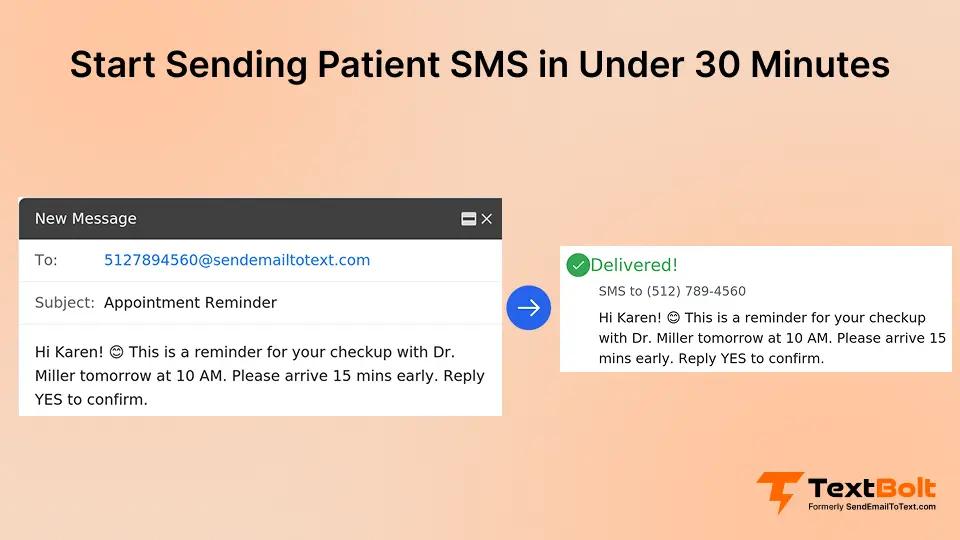
Open Gmail or Outlook. Same email you use 50 times daily. Compose a new message as you would send to a patient’s email address. TextBolt enables sending SMS directly from your existing email client using a simple address format.
Instead of patientname@email.com, address it to 5551234567@sendemailtotext.com. Use the patient’s actual phone number. Add your message in the email body. Click send.
TextBolt converts your email to SMS instantly. Patient receives it as a text from your business number. You see delivery confirmation in seconds. No separate dashboard to learn. No new interface to master.
Test first: Send yourself a message. Confirm it arrives as SMS. Verify the sender shows your practice name. Takes two minutes to validate everything works.
Then send to real patients: Appointment reminder. Schedule confirmation. Post-visit check-in. Whatever communication need you’re solving. Real message to real patient within 30 minutes of signup.
This is the complete setup. No additional configuration needed. No settings to adjust. No integrations to build. Send as many messages as you need using the same email workflow you already know.
Ready to Test Patient SMS Without Implementation Pain?
Start texting patients today using the email you already use. 30-minute setup. Zero training required.
Examples: Practices That Started Same Day
The following scenarios are illustrative examples reflecting common fast-adoption patterns. These are not audited case studies but represent typical experiences when practices implement email-based SMS.
Example 1: Solo Family Medicine Practice
Dr. Chen decided Monday morning to try SMS reminders after the no-show rate reached 18%. She knew she needed better patient communication, but dreaded another software implementation.
Implementation: Signed up during lunch break. 12:15 PM account created. 12:25 PM business verified. 12:30 PM sent test message to own phone. 12:35 PM sent reminder to afternoon patient about 3 PM appointment.
Outcome: Patient texted back confirmation within two minutes. Dr. Chen sent five more reminders that afternoon. Patients confirmed or rescheduled. Fewer wasted appointment slots that week.
Total time: 30 minutes. No IT help. No training. No workflow change. Just started sending texts immediately.
Example 2: Multi-Provider Dental Practice
Four dentists sharing front desk staff. The office manager approved the SMS on Tuesday morning. The staff member set up the account before lunch. Business verification was completed while she ate at her desk.
Implementation: The afternoon schedule had 12 appointments. Sent confirmation texts to all 12 patients using Gmail contacts. Most responded within an hour. Two called to reschedule. The front desk adjusted the schedule proactively.
Expansion: The next morning, the staff showed two colleagues the email address format. 60-second explanation. Both sent their first texts within five minutes. The entire practice is texting patients by day two.
Result: No training meeting scheduled. No productivity loss. No implementation project. Started Tuesday. Fully operational on Wednesday.
Example 3: Physical Therapy clinic
High patient volume requires frequent appointment reminders. The clinic manager heard about email-based SMS on Thursday afternoon. Set up the account on Friday morning between patient check-ins.
Implementation: Sent test text at 9:15 AM. Sent first patient reminder at 9:18 AM. By 10 AM, had texted next day’s full schedule. By noon, received confirmations and identified schedule gaps in advance to fill slots.
Team adoption: Showed therapists the setup during lunch. They started texting exercise reminders that afternoon. No formal training. No implementation timeline. No project planning.
Timeline: Decided Thursday. Operational Friday.
How TextBolt Helps Healthcare Practices Start Texting Immediately
Implementation trauma from past software rollouts makes you delay necessary improvements. You know patient SMS works. You can’t face another complex deployment that consumes weeks and disrupts operations.
The barrier isn’t whether SMS helps patients. It’s whether setup pain outweighs communication benefits. When implementation takes months, you postpone indefinitely. When implementation takes 30 minutes, you start today.
TextBolt eliminates implementation barriers by working with tools you already use. Staff keep using Gmail or Outlook. No training required. Patients receive texts from your professional number with up to 98% delivery rates.* You get patient communication improvements without suffering through deployment projects.
This is operational relief. Not another system to learn. Not another vendor to manage. Not another implementation project consuming staff time. Decide today. Text patients today. Measure results this week.
Setup takes 30 minutes maximum. Test with your own number. Send real patient reminders. Evaluate actual response rates. No commitment until you see results. Start your free trial today.
Frequently Asked Questions
What is 10DLC registration, and why does it matter?
10DLC stands for 10-Digit Long Code. It’s carrier-required business verification for SMS that prevents spam and ensures message delivery. Healthcare practices provide basic business information, including name, address, and tax ID. Carriers verify automatically. Most established practices approve within 10 to 15 minutes. One-time process enables all future messaging.
Can I send texts immediately, or is there a waiting period?
After 10DLC verification is approved, you can send texts immediately. Most established healthcare practices verify within 10 to 15 minutes. Some verify instantly. Test with your own phone while waiting. Once approved, send to patients right away. No additional waiting periods or approval steps needed.
Do I need IT help to set up patient SMS?
Email-based patient SMS requires no IT involvement. If your staff can send an email, they can send SMS. No APIs to configure. No integrations to build. No technical skills needed. Most practices complete the setup without any technical assistance.
How long before staff can start using patient SMS?
Staff can start immediately after initial account setup. Show them the email address format once. Takes 30 seconds. They send the first text within two minutes. Staff who already know email become expert SMS users without learning anything new.
What information do I need to provide for business verification?
Business verification requires basic practice information: business name, physical address, and tax ID. This is the same information you provide for any business service. Verification ensures legitimate healthcare providers can reach patients while preventing spam.