
- Which Platform Fits Your Business at a Glance?
- Which Platform Is Right for Your Industry?
- How Do SMSEagle and TextBolt Pricing Models Compare?
- What Features Does Each Platform Offer?
- How Easy Is It to Get Started with Each Platform?
- Which Platform Should You Choose for Specific Use Cases?
- Final Verdict: Should You Pick SMSEagle’s Hardware or TextBolt’s Cloud Workflow?
- Frequently Asked Questions
Send Texts From Your Email in Minutes
SMSEagle vs TextBolt: Hardware Gateway or Cloud Email-to-SMS?

Choosing between a physical SMS hardware device and a cloud-based email-to-SMS service depends on your infrastructure, budget, and how your team actually sends messages.
SMSEagle is an on-premise hardware gateway. You buy the device, install a SIM card, and send SMS through the cellular network without relying on the internet.
TextBolt is a cloud service. You compose an email, address it to a phone number, and the message arrives as a standard SMS.
Both platforms offer email-to-SMS conversion, but they take fundamentally different approaches to delivery, setup, pricing, and team access. This comparison breaks down where each platform fits best.
Which Platform Fits Your Business at a Glance?
This table highlights the core differences between SMSEagle’s hardware approach and TextBolt’s cloud-based email workflow.
| Feature | SMSEagle | TextBolt |
| Type | Physical hardware device | Cloud-based email-to-SMS |
| Starting cost | ~$1,427 one-time (NXS-9750 4G) | $29/month |
| Email-to-SMS | Yes (requires network configuration) | Yes (built into every email client) |
| Internet required | No (sends via SIM/cellular) | Yes |
| MMS support | Yes | No |
| API access | Yes (HTTP REST API included) | No |
| 10DLC compliance | No (sends via SIM card) | Yes (included and managed) |
| Delivery rate | Depends on SIM carrier | Up to 98%* |
| Team users | Multiple (via web GUI with role-based access) | 10 accounts, all plans |
| Free trial | 14-day remote demo | 7-day trial with 10 credits |
| Setup time | Hours to days (hardware install + network config) | 10-30 minutes + up to 48 hours for 10DLC approval |
| Best for | IT infrastructure, air-gapped networks, on-premise security | Distributed teams, customer-facing SMS, quick deployment |
*Delivery rates vary based on carrier policies, message content, and compliance factors.
The biggest difference comes down to where the messaging happens. SMSEagle processes everything on a physical device inside your network. TextBolt processes everything through the email client your team already uses.
Your Email Workflow, Now With Texting Built In
Send SMS directly from Gmail or Outlook. No hardware, no IT setup, no new software to learn.
Which Platform Is Right for Your Industry?
The right choice depends on whether your priority is on-premise data control or team-wide email-native access. This table maps common industries to each platform’s strengths.
| Industry | Better Fit | Why |
| IT / Network Operations | SMSEagle | Offline alerting, NMS plugin ecosystem (Zabbix, PRTG, Nagios) |
| Manufacturing / Factories | SMSEagle | Digital I/O monitoring, air-gapped environments |
| Government / Defense | SMSEagle | On-premise data sovereignty, no cloud dependency |
| Building Automation | SMSEagle | Infrastructure failure alerts without internet |
| Healthcare practices | TextBolt | Distributed front desk teams, appointment reminders with HIPAA considerations |
| Education | TextBolt | Mass parent notifications from existing email, emergency alerts |
| Small businesses | TextBolt | Low cost, zero IT setup, team-wide access from day one |
| Automotive / Service | TextBolt | Pickup notifications, service reminders from any email client |
| IT departments (cloud-first) | TextBolt | Quick alert setup without hardware procurement |
| Real Estate / Legal | TextBolt | Client communication from Gmail or Outlook with full audit trail |
How Do SMSEagle and TextBolt Pricing Models Compare?
These two platforms use completely different pricing structures. SMSEagle charges a one-time hardware cost. TextBolt charges a monthly subscription. Comparing them requires looking at the total cost of ownership over time.
For a deeper breakdown of SMSEagle’s costs, see our SMSEagle pricing analysis.
SMSEagle Pricing: One-Time Hardware Purchase
SMSEagle does not publish a dedicated pricing page. Prices are listed in their online store and vary by device model.
| Model | Modems | Throughput | Price (USD) |
| NXS-9700 4G | 1 | 30 SMS/min | ~$1,190 |
| NXS-9750 4G | 2 | 60 SMS/min | $1,427 |
| NXS-9700 5G | 1 | 30 SMS/min | $1,787 |
| MHD-8100 4G | 8 | 240 SMS/min | Contact sales |
After the hardware purchase, ongoing costs include your SIM card plan (carrier-dependent) and optional warranty extensions ($240 for 3-year, $444 for 5-year). There are no per-message fees from SMSEagle itself.
However, total cost also includes IT labor for installation, network configuration, and ongoing maintenance. These hidden costs add up, especially for smaller teams.
TextBolt Pricing: Monthly Subscription
TextBolt uses a straightforward monthly plan structure. All plans include 10 user accounts with no per-user fees.
| Plan | Monthly | Annual (20% off) | Credits |
| Basic | $29 | $23.20 | 500 |
| Standard | $49 | $39.20 | 1,000 |
| Professional | $99 | $79.20 | 2,500 |
| Enterprise | Custom | Custom | 5,000+ |
The subscription model means predictable monthly costs with no upfront investment. You can start with the Basic plan and upgrade instantly as your needs grow, or cancel anytime. For full plan details, visit TextBolt pricing.
What Features Does Each Platform Offer?
The feature comparison reflects a core difference: SMSEagle is built for IT infrastructure and automation. TextBolt is built for team-based business communication from email.
1. How Does Each Platform Handle Email-to-SMS?
Both platforms convert emails into text messages, but the workflow is fundamentally different.
TextBolt:
- Address format:
phonenumber@sendemailtotext.com, works from any email client worldwide - Zero configuration: No server setup, no IP addresses, no IT involvement required
- Two-way messaging: Replies arrive as standard email replies in your inbox
SMSEagle:
- Address format:
phonenumber@DEVICE_IP_ADDRESS, routes through the device’s local network - Built-in SMTP server: Eliminates external email dependencies but requires network configuration
- Rule-based parsing: Configurable message trimming, sender whitelisting, and authentication
Key takeaway: TextBolt’s email-to-SMS works the moment you send directly from Gmail, with no server configuration required. You can also send SMS from Outlook or any other email client. SMSEagle’s email-to-SMS requires IT setup but keeps everything on your local network.
2. How Do Team Access and Multi-User Models Compare?
If multiple people on your team need to send texts, the access model matters.
TextBolt:
- 10 user accounts included on every plan, from Basic through Enterprise
- Send from any device with email access, no VPN or local network required
- Individual reply routing: Responses go directly to the sender’s email inbox
SMSEagle:
- Multiple web GUI users with role-based access controls
- Local network access only unless VPN is configured for remote users
- Centralized management: All messages managed through the device’s browser-based dashboard
Key takeaway: TextBolt gives distributed teams instant access from anywhere. SMSEagle gives centralized control within your network perimeter.
3. Which Platform Supports More Messaging Channels?
SMSEagle offers broader channel support beyond standard SMS.
TextBolt:
- SMS only: Text-based messages, no MMS or picture messages
- Scheduling: Available through Gmail’s native “Schedule Send” feature
SMSEagle:
- SMS, MMS, and voice: Supports picture messages and voice calls (with add-on)
- MQTT and SMPP protocols: For IoT and enterprise messaging integrations
Key takeaway: If you need MMS, voice calls, or IoT messaging protocols, SMSEagle has broader channel coverage. If you need reliable SMS from email, TextBolt keeps it simple.
4. How Do Compliance and Delivery Approaches Differ?
These platforms take opposite approaches to carrier compliance, and this directly affects delivery reliability for U.S. business messaging.
TextBolt:
- 10DLC registered: All messages sent through carrier-approved channels
- Up to 98% delivery rate*: Supported by compliance with TCPA and carrier regulations
- Automatic opt-out handling: Built-in STOP keyword support
SMSEagle:
- Sends via SIM card: Bypasses A2P/10DLC registration entirely
- No carrier vetting: Messages may face filtering as consumer traffic
- On-premise data control: No message data leaves your infrastructure
Key takeaway: For U.S. business messaging, 10DLC compliance improves deliverability and protects against carrier filtering. SMSEagle’s SIM-based approach trades compliance for network independence.
TextBolt’s dashboard tracks every message with delivery status and timestamps, giving your team visibility into what was sent and whether it arrived.
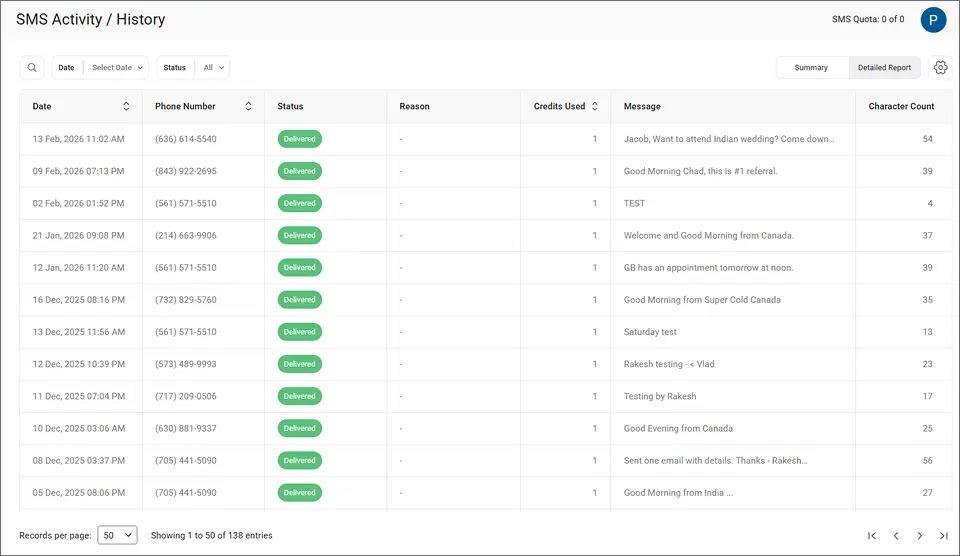
From this view, you can see each message’s recipient, delivery status, content preview, and credit usage at a glance
*Delivery rates vary based on carrier policies, message content, and compliance factors.
5. What Integration and Automation Options Does Each Platform Offer?
TextBolt:
- Email-native automation: Use Gmail filters, Google Apps Script, or Outlook rules to trigger SMS notifications from email
- No API: Designed for non-technical staff who work in email
- Google Contacts integration: Send to groups directly from your address book
SMSEagle:
- Full REST API included: Build custom integrations at no extra cost
- 40+ NMS plugins: Pre-built connectors for Zabbix, PRTG, Nagios, LibreNMS, and more
- Digital I/O monitoring: Trigger SMS based on physical sensor inputs
Key takeaway: SMSEagle is purpose-built for IT automation and system monitoring. TextBolt is built for business teams that already live in email.
Already Using Gmail or Outlook? You’re Ready to Send SMS.
TextBolt works with the email client your team uses every day. No new software, no training.
How Easy Is It to Get Started with Each Platform?
Setup complexity is one of the biggest differences between these two platforms. One requires hardware procurement and IT configuration. The other requires an email address.
Getting Started with SMSEagle
SMSEagle setup involves multiple steps and typically requires IT involvement.
You’ll need to purchase the physical device, wait for shipping, and then install it on-site. From there, you insert a SIM card, assign a network IP address, and configure the web GUI.
Email-to-SMS setup adds another layer. You’ll configure the built-in SMTP server, set up forwarding rules, whitelist sender addresses, and optionally configure FQDN routing.
The device itself is well-documented, and SMSEagle’s support team responds quickly (24-minute average first reply). But this is not a same-day deployment for most teams.
For a broader look at the platform’s strengths and trade-offs, see our SMSEagle reviews breakdown.
Getting Started with TextBolt
TextBolt setup takes 10-30 minutes for account creation. After that, 10DLC approval takes up to 48 hours before you can send.
Once approved, you send email to text by composing a regular email to phonenumber@sendemailtotext.com. No server configuration, no IP addresses, no IT department needed.
Your team can start your free 7-day trial and test the workflow with 10 message credits before committing to a plan.
TextBolt’s dashboard also lets you filter message history by date range, delivery status, or keyword search to find specific messages quickly.
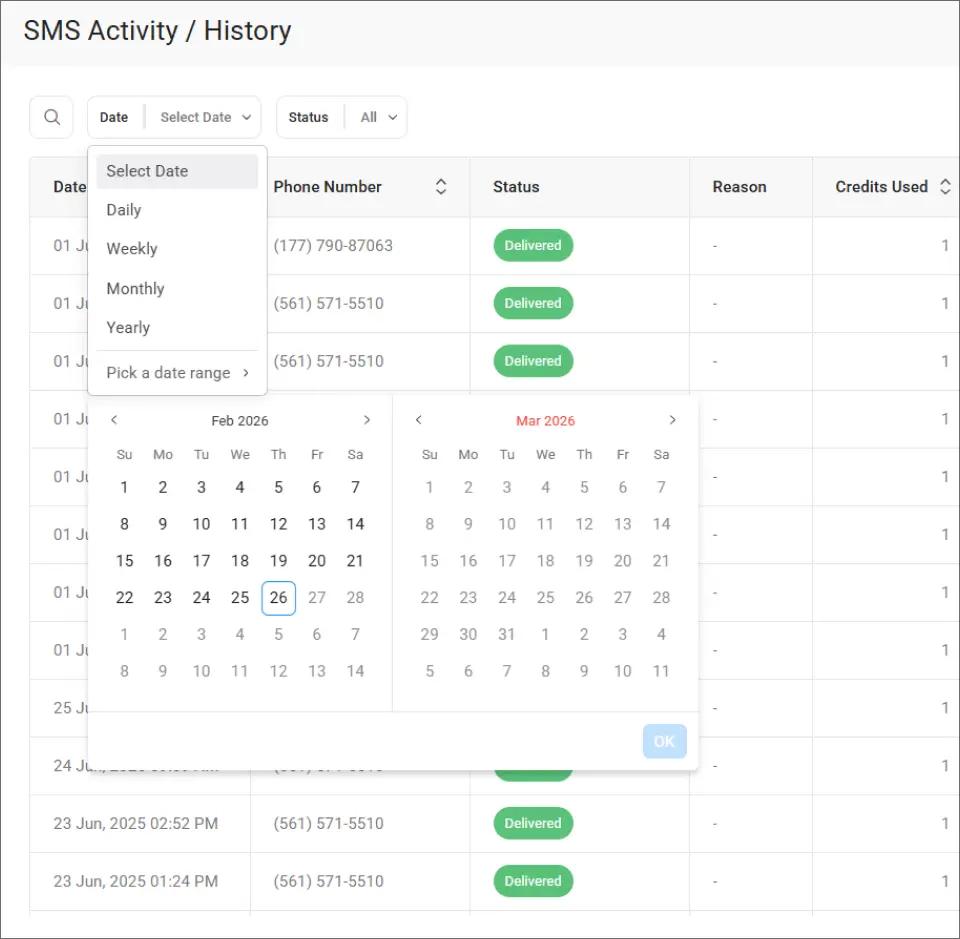
This filtering is especially useful when multiple team members share the same credit pool and you need to track who sent what.
Which Platform Should You Choose for Specific Use Cases?
1. IT Infrastructure Monitoring and Alerts
Your network monitoring system detects a server failure at 2 a.m. The alert needs to reach the on-call engineer instantly, even if the internet is down.
Why SMSEagle fits here:
- Offline delivery: Sends via cellular modem, independent of internet connectivity
- NMS plugins: Pre-built integrations with Zabbix, PRTG, Nagios, and 40+ other monitoring tools
- Digital I/O: Can trigger alerts from physical sensor inputs like temperature probes or water leak detectors
TextBolt gap: Requires internet connectivity. Not designed for air-gapped or isolated network environments.
Better choice: SMSEagle, for offline reliability and deep NMS integration.
2. Distributed Team Communication and Appointment Reminders
Your front desk team sends 80 appointment reminders every morning. When one person is out sick, someone else needs to cover without disruption.
Why TextBolt fits here:
- Any team member can cover: All 10 users send from their own email, using the same send SMS notifications from work email workflow
- No single point of failure: Not dependent on one device, one phone, or one location
- Audit trail: Message history visible in both the dashboard and each sender’s email
SMSEagle gap: Requires local network access or VPN for remote team members. Not designed for distributed, non-technical staff.
Better choice: TextBolt, for team resilience and zero-training deployment.
3. Offline and Air-Gapped Environments
Your facility operates in a location with no internet access, or your security policy prohibits cloud services entirely.
Why SMSEagle fits here:
- No internet dependency: Sends SMS through its built-in cellular modem using a SIM card
- Complete data sovereignty: All messages are stored locally in the device’s SQL database, aligning with on-premise security frameworks
- Physical security: The device sits inside your secured infrastructure
TextBolt gap: Cloud-based service requires internet connectivity at all times.
Better choice: SMSEagle, for air-gapped networks and data sovereignty requirements.
4. Small Business Customer-Facing Messaging
You run a dental office, auto shop, or law firm. You need to send appointment reminders, payment confirmations, or follow-ups to clients without adding complexity.
Why TextBolt fits here:
- Start at $29/month: No hardware investment, no IT costs
- 10DLC compliant: Messages arrive from a registered business number, not a random SIM
- Works from existing tools: Your receptionist sends texts from the same Gmail or Outlook they already use
SMSEagle gap: $1,400+ upfront cost is difficult to justify for a small office. IT configuration is overkill for basic customer communication.
Better choice: TextBolt, for low cost and immediate team-wide access.
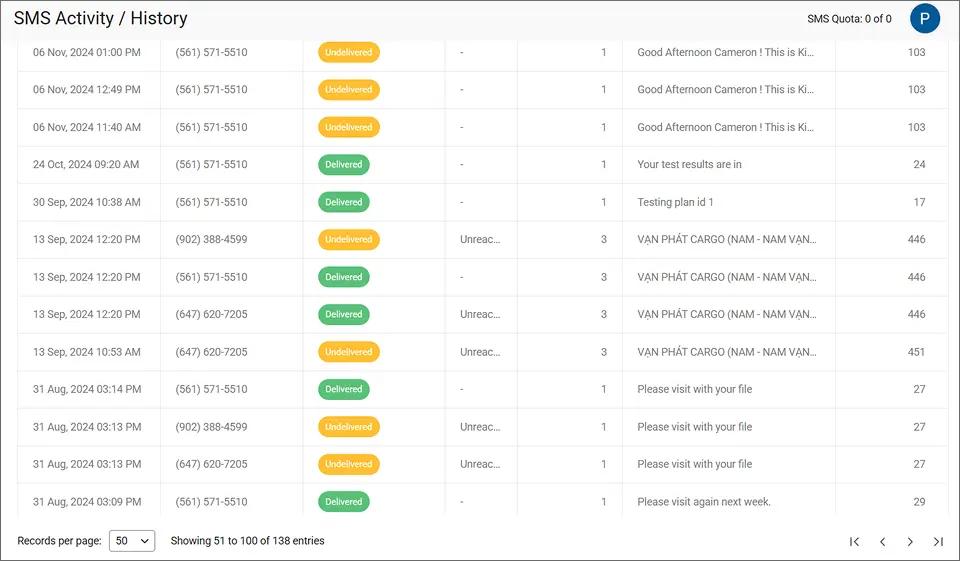
TextBolt’s summary dashboard gives you a quick daily snapshot of delivered and undelivered messages, helping you spot delivery patterns across your team’s outreach.
Final Verdict: Should You Pick SMSEagle’s Hardware or TextBolt’s Cloud Workflow?
This is not a ‘better-or-worse’ decision. It’s a ‘right tool for the right job’ decision.
Choose SMSEagle if your messaging needs are infrastructure-driven. If you operate in air-gapped environments, need offline SMS delivery, or run a network operations center with Zabbix or Nagios, SMSEagle’s hardware approach gives you independence from cloud services and total data control.
Choose TextBolt if your messaging needs are people-driven. If your team sends appointment reminders, customer notifications, or emergency alerts from email, TextBolt’s cloud workflow eliminates hardware, IT setup, and training. Your team already knows how to send an email.
For most businesses that need reliable, compliant SMS without IT overhead, TextBolt’s email-to-text service is the faster, simpler, and more cost-effective path.
Start your free 7-day trial to see how it works with your existing email workflow.
Frequently Asked Questions
Does SMSEagle require the internet to send SMS?
No. SMSEagle sends messages through its built-in cellular modem using a SIM card. An Internet connection is only needed for features like the web GUI, email-to-SMS conversion, API access, or firmware updates.
Can TextBolt work without internet?
No. TextBolt is a cloud-based service that converts emails to SMS through its servers. An active internet connection is required to send and receive messages.
Which platform is cheaper for a small business?
TextBolt starts at $29 per month with no upfront costs. SMSEagle requires a hardware purchase starting around $1,190 to $1,427, plus a SIM card plan and potential IT setup costs. For most small businesses, TextBolt’s subscription model is more accessible.
Does SMSEagle support 10DLC compliance?
No. SMSEagle sends SMS directly through SIM cards on the cellular network, bypassing the A2P/10DLC registration process. For U.S. business messaging, this means messages may face carrier filtering. TextBolt includes 10DLC compliance on all plans.
Can both platforms send texts from email?
Yes. TextBolt sends to phonenumber@sendemailtotext.com from any email client with no setup. SMSEagle sends to phonenumber@DEVICE_IP and requires network configuration, SMTP setup, and sender whitelisting on the local device.