
- What is SMS?
- What is MMS?
- SMS vs MMS: Key Differences Explained
- How Much Do SMS And MMS Cost?
- When To Use SMS For Business
- When To Use MMS For Business
- How TextBolt Simplifies SMS For Business
- Which Format Should Your Industry Use?
- 1. Healthcare: Use SMS For Reliability
- 2. IT And Technology: Use SMS For Critical Alerts
- 3. Real Estate: Use MMS For Listings, SMS For Coordination
- 4. Retail And E-Commerce: Use MMS For Promotions, SMS For Transactions
- 5. Restaurants And Food Service: Use MMS For Visual Menu Promotions
- 6. Professional Services: Use SMS For Appointment Management
- 7. Schools And Education: Use SMS For Emergency Communications
- Key Takeaways: SMS vs MMS
- Start Sending The Right Messages Today
- Frequently Asked Questions
Send Business Texts From Email In Minutes
SMS vs MMS: Which Message Type Works Best For Your Business?

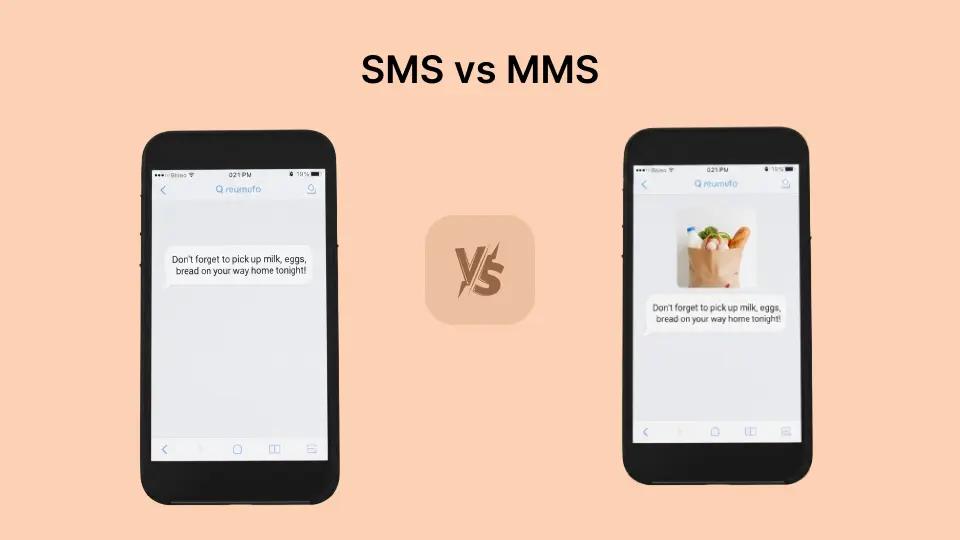
You need to send a message to your customers. But should you use SMS vs MMS? It sounds like a simple question. Yet choosing the wrong format can mean wasted money, undelivered messages, or missed opportunities to connect with your audience.
For small-to-medium businesses, understanding the difference between SMS and MMS is not just technical knowledge. It directly impacts your bottom line. A dental office sending appointment reminders has different needs than a real estate agent sharing property photos. An IT department alerting staff about server outages needs something entirely different from a salon promoting a holiday special.
This guide breaks down everything you need to know about SMS vs MMS for business messaging, including technical differences, costs, and real-world use cases.
We’ll also look at how an email-to-SMS tool like TextBolt simplifies business messaging by letting you send the right type of message directly from Gmail or Outlook without APIs, new dashboards, or complex setup, so you can focus on what works best for your audience.
What is SMS?
SMS stands for Short Message Service. It is the original text messaging format that has been around since 1992. SMS delivers plain text messages between mobile devices using standardized cellular protocols.
Here is what you need to know about SMS:
- Character Limit: 160 characters per message (using standard GSM-7 encoding)
- Content Type: Text only. No images, videos, or files.
- Delivery Method: Carrier networks using signaling channels
- Device Compatibility: Works on virtually every mobile phone ever made
SMS remains the workhorse of business messaging for good reason. It is reliable, universal, and cost-effective. When you send an appointment reminder or a delivery notification, SMS gets the job done without unnecessary complexity.
The 160-character limit might seem restrictive. But it forces clarity. “Your appointment is tomorrow at 2 PM. Reply YES to confirm or call 555-1234 to reschedule.” That message contains everything a patient needs to know.
For businesses sending notifications, alerts, and reminders, SMS delivers up to 98% delivery rates when using proper 10DLC compliance. Compare that to email, where 20-30% open rates are considered good.
What is MMS?
MMS stands for Multimedia Messaging Service. Introduced in the early 2000s, MMS extends text messaging to include images, audio, video, and longer text content.
Key characteristics of MMS:
- Character Limit: Up to 1,600 characters (varies by carrier)
- Content Types: Images, GIFs, audio clips, video files, and rich text
- Supported Formats: JPG, PNG, GIF for images; MP4 for video; MP3 for audio
- File Size: Typically 300KB to 600KB maximum (carrier-dependent)
- Delivery Method: Data network with carrier routing
MMS messages can include:
- Product photos and promotional images
- Short video clips showcasing services
- Audio messages or voice recordings
- PDF attachments in some implementations
- Branded graphics and visual CTAs
When a real estate agent sends a quick snapshot of a kitchen with updated appliances, that is MMS. When a retailer shares a flash sale graphic, that is MMS. The visual element transforms a text message into a mini marketing piece.
The engagement difference can be significant. MMS messages often achieve higher click-through rates than SMS, and adding images to messages can dramatically improve engagement. MMS messages are also more likely to be shared with others.
However, MMS comes with tradeoffs. File size limits mean video quality suffers. Not all carriers handle MMS identically. And the cost per message increases significantly.
Need Reliable SMS Without The Complexity?
TextBolt delivers text messages directly from Gmail or Outlook. No new platforms, no training required.
SMS vs MMS: Key Differences Explained
Understanding the technical differences helps you make informed decisions for your business messaging strategy.
| Feature | SMS (Short Message Service) | MMS (Multimedia Messaging Service) |
| Character Limit | Limited to 160 characters using standard GSM-7 encoding. Messages with emojis or special characters drop to 70 characters, and longer texts are split into multiple billable segments. Best for short, direct communication. | Supports up to ~1,600 characters in a single message, allowing longer descriptions or combined messaging without segmentation concerns. |
| Media Support | Text only. No images, videos, or audio. Ideal when the message goal is clarity, speed, and simplicity. | Supports images, GIFs, audio, and video, making it suitable for visual storytelling, promotions, and branded messaging. |
| File Size Limits | Not applicable, since SMS does not support media attachments. | Typically limited to 300KB–600KB, depending on the carrier. Media must be compressed, which can reduce image or video quality. |
| Delivery Speed | Near-instant delivery via carrier signaling channels. Highly reliable for time-sensitive notifications like alerts and reminders. | Slightly slower than SMS because media files must be processed and routed over data networks. |
| Device Compatibility | Works on virtually all mobile phones, including older feature phones and devices without active data plans. | Works on most modern smartphones (≈95%+), but may fail on older devices, phones with disabled data, or certain international networks. |
| Cost Per Message | Lower cost, making it ideal for high-volume transactional messages such as appointment reminders, OTPs, and system alerts. | Generally 2–3× more expensive than SMS due to media handling and data usage. Best used when visuals directly improve engagement or ROI. |
| Carrier Handling | Highly standardized across carriers, resulting in consistent delivery behavior and predictable performance. | Varies by carrier, which can impact file size limits, rendering, and delivery reliability. |
1. Character Limits In Detail
Standard SMS uses GSM-7 encoding, which supports 128 characters including letters, numbers, and common punctuation. This encoding allows 160 characters per message segment.
When you include emojis, special characters, or non-Latin alphabets, the message switches to Unicode encoding (UCS-2). Unicode limits each segment to 70 characters.
Longer messages get split into multiple segments. A 200-character standard SMS becomes two message segments. Each segment counts as a separate message for billing purposes. Understanding SMS character limits prevents unexpected costs.
MMS handles longer text naturally. But remember that MMS costs more per message regardless of text length.
2. Delivery And Compatibility
SMS wins on universal delivery. Feature phones from 2005 receive SMS just as reliably as the latest smartphone. No data connection required. No app needed.
MMS requires data connectivity and smartphone capabilities. While smartphone adoption exceeds 85% in the United States, edge cases exist. Older devices, disabled data plans, and international recipients may experience MMS delivery issues.
For critical business communications like appointment reminders, security alerts, or delivery notifications, SMS reliability is often worth the format restrictions.
3. Cost per message
The price gap between SMS and MMS is significant enough to shape your entire messaging strategy. SMS typically costs between $0.01 and $0.05 per message, while MMS runs 2-3x higher at $0.10 to $0.15 per message.For a business sending 1,000 messages monthly, that difference adds up to $600-$1,200 annually.
The cost makes sense when visual content drives measurable results, like a real estate agency generating listing inquiries. But for transactional messages like appointment reminders or verification codes, paying the MMS premium adds cost without adding value.We break down exact pricing scenarios and when MMS cost is justified in the cost section below.
Many businesses use both. Appointment reminders go via SMS. Promotional campaigns use MMS. The right format depends on the specific message purpose.
How Much Do SMS And MMS Cost?
Cost is where many businesses make their SMS vs MMS decision. The price difference is significant.
1. Typical SMS Pricing
Business SMS platforms generally charge between $0.01 and $0.05 per SMS segment. Volume discounts can reduce costs further.
With TextBolt email to text service, a 500-credit monthly plan starts at $29. That works out to roughly $0.058 per message. The Standard plan at $49 per month includes 1,000 credits, bringing the cost per message to $0.049.
2. Typical MMS Pricing
MMS generally costs 2-3 times more than SMS. If SMS costs $0.05, MMS often runs $0.10 to $0.15 per message. Some platforms charge even higher premiums.
The math matters for volume senders. A healthcare practice sending 1,000 appointment reminders monthly might pay roughly $50 for SMS. The same messages as MMS could cost $100-150. That represents a significant annual difference for the same information delivered with an unnecessary image.
When To Use SMS For Business
SMS excels for transactional and time-sensitive communications. Here is where SMS delivers maximum value:
1. Appointment Reminders
“Your dental appointment is tomorrow, June 15 at 10:30 AM with Dr. Martinez. Reply C to confirm or R to reschedule.”
No image needed. The information is clear. SMS costs less and delivers reliably. For healthcare providers sending hundreds of reminders weekly, SMS is the obvious choice.
2. Order And Delivery Notifications
“Your order #12345 shipped! Track at: bit. ly/track12345. Delivery expected Thursday.”
Customers want the tracking link, not a company logo. SMS provides exactly what they need.
3. Two-Factor Authentication
“Your verification code is 847293. Valid for 10 minutes. Do not share this code.”
Security codes must arrive instantly and reliably. SMS excels at this critical function.
4. Emergency Alerts
Schools need to notify thousands of parents about sudden closures or emergencies. IT departments alert staff about critical system outages. Speed and reliability matter more than formatting.
5. Payment Reminders
“Your payment of $75 is due on March 5. Pay online at clientportal. com or call 555-9876.”
Financial notifications work perfectly in text format.
6. Service Confirmations
Auto shops, salons, HVAC companies, and contractors use SMS to confirm scheduled service calls. Recipients know who is coming, when they arrive, and how to reschedule if needed.
When To Use MMS For Business
MMS shines when visual content genuinely enhances the message value. Here is where the multimedia format earns its higher cost:
1. Real Estate Listings
“New listing: 3 bed, 2 bath in Riverside! [Photo] Open house Sunday 1-4 PM. Details: bit. ly/house234.”
The property photo makes the message. Text alone misses the opportunity.
2. Before And After Transformations
Landscapers, contractors, and service businesses show the value they deliver through visual evidence. Before-and-after images create impact that descriptive text cannot match.
3. Product Launches And Promotions
Retailers sending flash sale announcements benefit from eye-catching product images. The visual component drives clicks and conversions.
4. Event Invitations
When visual branding matters, MMS delivers. A catering company sending event images, a fitness studio sharing class schedules with graphics, or a venue promoting concerts with poster art use MMS effectively.
5. Visual Proof Of Service
Delivery services, field technicians, and service providers send MMS proof-of-delivery photos or completed work images. The visual verification resolves disputes and provides documentation.
6. Restaurant Specials
A photo of a featured dish does more to drive orders than a text description. Restaurants use MMS to showcase specials, new menu items, or limited-time offerings.
A single image communicates value that would take paragraphs to describe.
7. Abandoned Cart Recovery
E-commerce businesses use MMS to show customers exactly what they left behind. An image of the abandoned product with a discount code creates urgency and recognition that plain text cannot match.
Ready For Professional SMS That Your Team Can Use Today?
Send appointment reminders, alerts, and notifications directly from Gmail or Outlook with 10DLC compliance and up to 98% delivery rates included.
How TextBolt Simplifies SMS For Business
TextBolt focuses on email-to-text messaging for businesses. Here is how SMS works through the platform:
1. Simple Workflow
Send a text message by sending an email. Type your message in Gmail or Outlook. Address it to [phonenumber]@sendemailtotext. com. Hit send. Your recipient receives an SMS from your business number.
No apps to install. No new software to learn. Your team already knows how to send email.
2. Team Access Without Single Points Of Failure
When Sarah calls in sick, anyone on your team can send texts from their own email account. No shared phone passwords. No, “only one person knows how to do it.” Complete coverage, every day.
3. 10DLC Compliance Included
TextBolt handles 10DLC registration automatically. Your messages route through carrier-approved channels with up to 98% delivery rates. No spam filtering. No blocked messages.
Unlike short codes (5-6 digit numbers used for high-volume marketing), 10DLC uses standard 10-digit phone numbers that customers recognize and trust. This approach balances deliverability with cost-effectiveness for small and medium businesses.
4. Message Credits
Standard SMS uses one credit per 160-character segment. Longer messages use additional credits. Check TextBolt pricing for your volume needs.
Which Format Should Your Industry Use?
1. Healthcare: Use SMS For Reliability
Appointment reminders, prescription notifications, and patient communications work perfectly in text format. SMS reliability matters when patients need to receive information. HIPAA considerations also favor minimal data transfer.
2. IT And Technology: Use SMS For Critical Alerts
System alerts, monitoring notifications, and authentication codes demand instant, reliable delivery. No image makes a server alert more urgent.
3. Real Estate: Use MMS For Listings, SMS For Coordination
Property photos drive engagement and inquiries. Send listing updates and open house invitations via MMS. Use SMS for appointment confirmations and showing reminders.
4. Retail And E-Commerce: Use MMS For Promotions, SMS For Transactions
Product launches, flash sales, and promotional campaigns benefit from visual MMS. Order confirmations, shipping updates, and delivery notifications work well as SMS.
5. Restaurants And Food Service: Use MMS For Visual Menu Promotions
Daily specials, new menu items, and limited-time offerings benefit from food photography via MMS. Reservation confirmations and pickup notifications work fine as SMS.
6. Professional Services: Use SMS For Appointment Management
Law firms, accounting practices, consulting firms, and other professional services rarely need images. SMS keeps costs low and reliability high for appointment reminders, meeting confirmations, and service updates.
7. Schools And Education: Use SMS For Emergency Communications
Emergency alerts, absence notifications, and event reminders prioritize speed and reliability over visual appeal. SMS delivers when parents need critical information immediately.
Key Takeaways: SMS vs MMS
- SMS: 160 characters, text only, lower cost, universal compatibility, ideal for alerts and reminders
- MMS: Up to 1,600 characters plus media, generally 2-3x higher cost, great for visual marketing
- Cost Difference: MMS often costs 2-3 times more per message than SMS
- Reliability: SMS has slightly higher delivery reliability due to broader device compatibility
- Best Practice: Use SMS for transactional messages, MMS only when visual content adds genuine value
- Business Recommendation: Many businesses benefit from SMS for the majority of their messaging needs
Start Sending The Right Messages Today
Choosing between SMS and MMS comes down to your specific message purpose. For appointment reminders, security codes, and operational alerts, SMS delivers reliability and cost-effectiveness. When product photos, event graphics, or visual proof matter, MMS justifies its higher cost. Most businesses use both formats strategically.
TextBolt makes business texting simple. Send SMS directly from Gmail or Outlook. Your entire team can participate without new software or complex setup. 10DLC compliance handled automatically. Up to 98% delivery rates included. Start your free 7-day trial and send your first text in minutes.
Frequently Asked Questions
Can I send pictures through SMS?
No, standard SMS supports text only. To send images, you need MMS or you can include a link to a hosted image in your SMS message. The link approach maintains SMS reliability and cost while still providing visual content access.
Do all phones support MMS?
Most smartphones support MMS, but not all phones do. Feature phones, devices with disabled data, and some international carriers may not receive MMS messages. SMS has nearly universal compatibility, making it more reliable for critical communications.
Does MMS have better open rates than SMS?
Not necessarily. Both SMS and MMS achieve very high open rates because they appear directly in the recipient’s message app. The difference lies in engagement and action rates, which vary by content quality and relevance rather than format.
How do I know if my message will be SMS or MMS?
If your message contains only text and stays under the character limit, it sends as SMS. Adding any media (images, video, audio) converts it to MMS. Some platforms automatically send as MMS if text exceeds standard SMS limits.
Are there legal differences between SMS and MMS?
Both formats fall under the same regulations (TCPA, CTIA guidelines). You need consent to send either type. Compliance requirements do not differ based on format.