
- What Does It Mean to Send SMS from a Work Email?
- Why Businesses Need to Send SMS Notifications From Work Email
- The Problem With Traditional SMS Notification Methods
- How Email-to-Text Works for Business Notifications
- Step-by-Step: Setting Up SMS Notifications From Work Email
- Best Practices for Business SMS Notifications
- Use Cases by Industry
- Comparing SMS Notification Methods
- Send SMS Notifications From Work Email Easily With TextBolt
- Frequently Asked Questions
Send SMS From Your Work Email
How to Send SMS Notifications From Your Work Email: Step-By-Step Guide

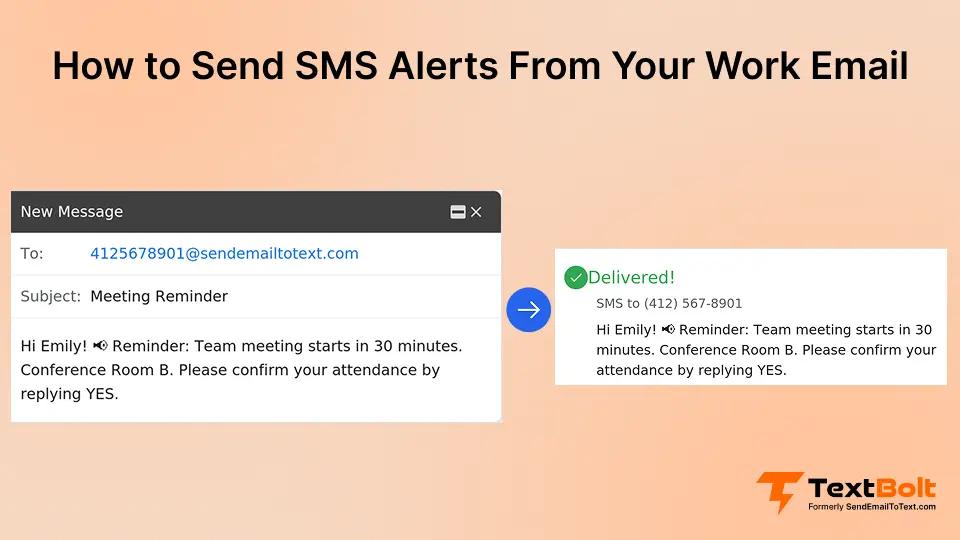
Important notifications often get buried in crowded inboxes. By the time an email is opened, the moment to act may already be gone. As per Campaign Monitor research, SMS messages have open rates as high as 98%, compared to just 17–28% for email. This gap explains why businesses increasingly rely on SMS for urgent and time-sensitive communication.
Sending SMS notifications from your work email bridges this gap. It lets you turn a simple email into an instant text message that reaches recipients wherever they are, without logging into new tools or building complex integrations. For teams that already rely on email for daily communication, email to SMS offers a practical way to add speed without friction.
In this guide, you will learn how sending SMS from a work email works, why businesses use it for alerts and notifications, and how an email to SMS service like TextBolt makes it easy to get started with minimal setup and cost.
What Does It Mean to Send SMS from a Work Email?
Sending SMS from a work email means using email to SMS technology to turn a standard email message into a text message that is delivered directly to a mobile phone. Instead of logging into an SMS platform or using APIs, you simply use an email-to-SMS service to compose an email from your existing work inbox and send it to a designated SMS address. The content of that email is then converted into an SMS and delivered to the recipient’s phone number.
This approach is different from traditional SMS tools that require separate dashboards, technical setup, or development work. With email-based SMS, teams continue using the tools they already know, which reduces friction and speeds up adoption across the organization.
Sending SMS from a work email is especially useful for businesses that depend on email for daily operations but need a faster way to reach people when timing matters. It combines the familiarity of email with the immediacy of SMS, creating a simple and reliable communication channel for notifications, updates, and alerts.
Why Businesses Need to Send SMS Notifications From Work Email
Email works well for detailed communication. But for time-sensitive messages, SMS delivers results that email cannot match.
Consider these scenarios:
- Appointment reminders: A dental practice sends 50 appointment reminders daily. Emails go unread. Patients miss appointments. Each no-show costs the practice $200 in lost revenue. That adds up to $10,000 in monthly losses.
- IT alerts: Your server goes down at 2 AM. The monitoring system sends an email alert. The on-call engineer’s phone doesn’t buzz because email notifications are muted.
- Emergency notifications: A school needs to notify 2,000 parents about a snow day at 5 AM. Email deliverability varies. Some parents check their email at 8 AM, after their kids have already left for the bus.
SMS solves these problems because text messages demand immediate attention. Your phone buzzes. The message appears on your lock screen. You read it within three minutes.
The question isn’t whether to use SMS notifications. The question is how to send them without adding complexity to your workflow.
The Problem With Traditional SMS Notification Methods
Before diving into solutions, understand why older methods no longer work reliably.
Carrier Email-to-Text Gateways (Discontinued)
For years, businesses used free carrier gateways to send texts via email. You’d compose an email to 5551234567@txt.att.net, and AT&T would deliver it as a text message.
This method died in 2025.
AT&T discontinued their @txt.att.net gateway in June 2025. Verizon shut down @vtext.com in August 2025. T-Mobile’s @tmomail.net gateway no longer works reliably.
Why did carriers kill these services?
- Spam abuse overwhelmed the gateways
- No sender verification created security risks
- Delivery rates dropped to 30-40% as carriers added spam filters
- No business registration meant messages looked like junk
If you’re still trying to use carrier gateways, your messages likely aren’t arriving. For a full comparison of alternatives, see our guide on VText alternatives for reliable business texting.
Personal Phone Texting (Risky for Businesses)
Many businesses have one person, often a receptionist or office manager, send texts from their personal phone or a shared office phone.
This approach creates serious problems:
- Single point of failure: When Sarah calls in sick, nobody can send appointment reminders. Fifty patients don’t show up. That’s $10,000 in lost revenue from one sick day.
- No audit trail: Who sent what message? When? You have no records for compliance or dispute resolution.
- Security risks: If the phone is lost or stolen, patient data goes with it.
- Scalability issues: One person tapping out 80 messages takes 90 minutes. That’s an expensive use of staff time.
Enterprise SMS Platforms (Expensive and Complex)
Platforms like Twilio require developers to build integrations. SimpleTexting and EZ Texting charge $10-15 per user monthly on top of message costs. These solutions work for large enterprises but overwhelm small businesses with complexity and expense.
Most small practices don’t need marketing automation, drip campaigns, or CRM integrations. They need to send a reminder that says “Your appointment is tomorrow at 3 PM.”
How Email-to-Text Works for Business Notifications
Modern email-to-text services solve the problems above by combining email simplicity with professional SMS delivery.
Concept of Email-to-SMS
- You compose a regular email in Gmail, Outlook, or any email client
- Instead of an email address, you send to phonenumber@sendemailtotext.com
- The service converts your email into an SMS and delivers it to the recipient’s phone
- The recipient sees a text message from your business number
- If they reply, you receive their response in your email inbox
This workflow preserves everything you already know about sending email. No new software to learn. No apps to download. No passwords to remember.
The key difference from discontinued carrier gateways: modern services use 10DLC (10-Digit Long Code) registration with carriers. This carrier-approved business verification delivers up to 98% delivery rates because your messages route through legitimate business channels.
Simplify Business Notifications with TextBolt’s Email-to-SMS Service
Stop juggling multiple apps. Send urgent alerts, updates, and reminders from your email straight to mobile phones.
Step-by-Step: Setting Up SMS Notifications From Work Email
Getting started takes about 30 minutes. Here’s the complete process.
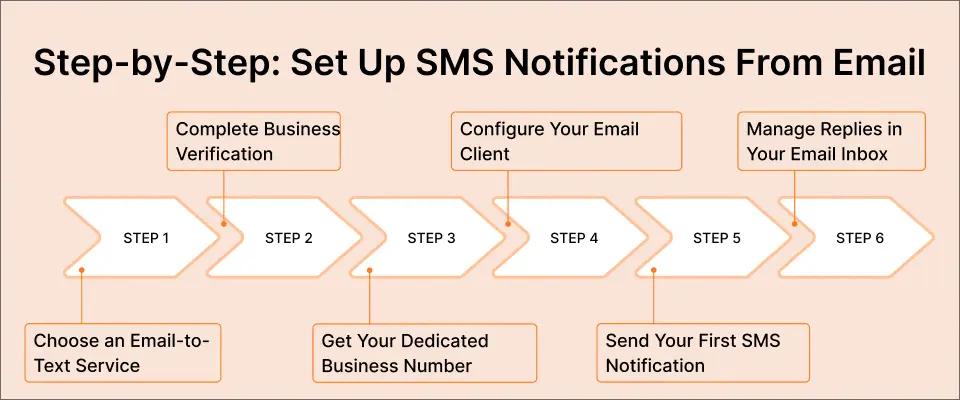
Step 1: Choose an Email-to-Text Service
Select a professional email-to-text service that offers:
- 10DLC compliance for carrier-approved delivery
- Two-way messaging so recipients can reply
- Works with your existing email client (Gmail, Outlook, etc.)
- No developer or API setup required
- Team access so multiple staff members can send messages
TextBolt handles 10DLC registration automatically during signup, eliminating the technical complexity.
Step 2: Complete Business Verification
Business verification takes 10-15 minutes and includes:
- Company information: Business name, address, EIN or registration number
- Use case declaration: Appointment reminders, alerts, notifications, etc.
- Opt-in compliance: How recipients consent to receive messages
This verification is required for all legitimate business SMS. It tells carriers your messages are authorized, which is why 10DLC-registered messages achieve up to 98% delivery rates versus 30-40% for unregistered sources.
Step 3: Get Your Dedicated Business Number
You’ll receive a toll-free or local business number exclusively for your organization.
Messages sent through this number look professional to recipients. Instead of seeing a random email address or carrier domain, they see a recognizable business phone number.
This professional appearance increases trust and response rates.
Step 4: Configure Your Email Client
For Gmail users, our Gmail text messaging integration makes setup simple. Install the TextBolt Gmail add-on from Google Workspace Marketplace.
For Outlook, Apple Mail, or other clients, save your service’s SMS gateway address (like @sendemailtotext.com) in your contacts for quick access.
Step 5: Send Your First SMS Notification
Open your email client and compose a new message:
To: 5551234567@sendemailtotext.com (replace with actual phone number)
Subject: Leave blank or add internal reference (won’t appear in SMS)
Body: Your message (keep under 160 characters for best delivery)
Hit send. Your recipient receives a text message within seconds.
Step 6: Manage Replies in Your Email Inbox
When recipients reply to your text, their response arrives in your email inbox. You can continue the conversation without switching between apps.
This two-way capability turns one-off notifications into complete conversations. You can also send texts from your computer using multiple methods for even more flexibility.
Best Practices for Business SMS Notifications
Sending SMS notifications from a work email works best when you follow these guidelines.
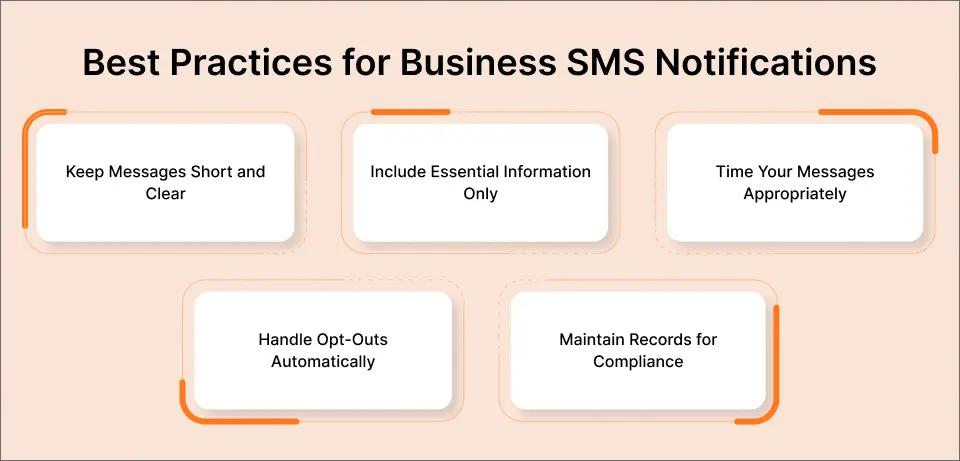
Keep Messages Short and Clear
Standard SMS supports 160 characters per message segment. Longer messages split into multiple segments, each using one message credit.
Write concisely:
Good: “Hi John, reminder: Your appointment is tomorrow at 3 PM. Reply YES to confirm or call 555-1234 to reschedule.”
Too long: “Hello John, this is a friendly reminder from ABC Dental that you have an appointment scheduled for tomorrow afternoon at 3:00 PM. Please reply to this message to confirm your attendance or give us a call if you need to reschedule.”
Include Essential Information Only
Every notification should answer these questions:
- Who is this from?
- What do they need to know?
- What should they do next?
Skip pleasantries and filler words. Get to the point.
Time Your Messages Appropriately
Send appointment reminders 24 hours before, then again 2 hours before. This timing reduces no-shows by up to 38%, according to healthcare industry studies.
For IT alerts, send immediately. Every minute of delay during an outage costs money.
For general business notifications, send during business hours (9 AM – 6 PM) unless urgency requires otherwise.
Handle Opt-Outs Automatically
TCPA regulations require honoring opt-out requests. When someone replies “STOP,” your system should automatically unsubscribe them.
Professional email-to-text services handle opt-out compliance automatically, so you don’t have to manage it manually.
Maintain Records for Compliance
Every message you send from email creates an automatic audit trail in your sent folder. This documentation proves invaluable for:
- HIPAA compliance in healthcare
- Dispute resolution with customers
- Staff accountability
- Legal protection
Use Cases by Industry
Different industries leverage email-to-SMS notifications for specific purposes.
Healthcare Providers
Healthcare text messaging reduces no-shows and improves patient communication:
- Appointment reminders and confirmations
- Lab result availability notifications
- Prescription refill reminders
- Pre-procedure instructions
- Post-visit follow-up messages
A typical dental practice sending 50 reminders daily prevents 10-15 no-shows monthly. At $200 per appointment, that’s $2,000-3,000 in recovered revenue. For detailed strategies, see our guide on sending appointment reminders via email to SMS.
IT Departments
IT alert text messaging ensures critical notifications reach on-call staff:
- Server down alerts
- Security incident notifications
- Backup failure warnings
- Certificate expiration reminders
- On-call rotation notifications
When your Nagios or Zabbix monitoring system detects a problem, it sends an email. That email converts to an SMS that wakes up your engineer at 2 AM before customers notice the outage.
Small Businesses
Small business text messaging handles everyday customer communication:
- Appointment confirmations
- Service completion notifications
- Payment reminders
- Order status updates
- Staff scheduling changes
An auto repair shop texts customers when their car is ready. A salon confirms tomorrow’s appointments. A tutoring service reminds parents about upcoming sessions.
Schools and Educational Institutions
Emergency and routine notifications reach parents instantly:
- Snow day announcements
- School closure alerts
- Event reminders
- Bus delay notifications
- Report card availability
One email at 5 AM delivers 2,000 text messages before families wake up.
Comparing SMS Notification Methods
This comparison helps you choose the right approach.
| Method | Setup Time | Delivery Rate | Monthly Cost | Team Access |
| Carrier gateways (@txt.att.net) | N/A | Discontinued | N/A | N/A |
| Personal phone texting | Immediate | 70-80% | Free + time cost | No |
| Enterprise platforms (Twilio) | Weeks + developer | 95%+ | $500+ with dev costs | Yes |
| Email-to-text service | 30 minutes | Up to 98% | $29-99/month | Yes |
Email-to-text services offer the best balance of simplicity, reliability, and cost for most businesses.
Send SMS Notifications Directly from Your Work Email
Turn any email into an instant text message with TextBolt. Keep your teams and customers informed in real time without logging into extra tools.
Send SMS Notifications From Work Email Easily With TextBolt
Email remains central to how teams communicate, but it is not always the fastest way to deliver messages that demand immediate attention. As inboxes get busier and response times slow down, businesses need a simpler way to make sure critical notifications are seen and acted on without delay. Sending SMS notifications from a work email solves this problem by combining the familiarity of email with the speed and visibility of SMS.
TextBolt is built specifically to make this process easy. It lets you send SMS notifications directly from your work email, without APIs, complex setup, or additional dashboards.
Whether you are sending internal alerts, customer updates, or time-sensitive operational messages, TextBolt helps you reach the right people instantly while keeping your existing workflows intact. The result is faster responses, fewer missed notifications, and smoother communication across teams.
If you are looking for a straightforward and cost-effective way to streamline business notifications, TextBolt is a strong place to start. Try Start your free 7-day trial and send your first SMS notification from your work email in the next 30 minutes.
Frequently Asked Questions
Can I Send Bulk Notifications through email?
Yes. Most email-to-text services support sending to multiple recipients. Some integrate with Google Contacts, letting you message entire contact groups with one email.
For large-scale notifications (hundreds or thousands of messages), check your provider’s bulk sending capabilities and throughput limits.
What Happens if Recipients Reply?
Replies arrive in your email inbox. You can respond by email, and your response converts to SMS. This two-way messaging enables complete conversations without switching tools.
Is This HIPAA Compliant?
Email-to-text services that use pass-through architecture, meaning they don’t store message content on their servers, may satisfy HIPAA requirements for appointment reminders and similar notifications.
How Much Does It Cost?
TextBolt email-to-text services start around $29/month for 500 messages.
Can Multiple Team Members Send Notifications?
Yes. Unlike personal phone texting, email-to-text allows your entire team to send messages from their individual email accounts using your shared business number.
When Sarah calls in sick, Tom covers her appointment reminders. Patients receive messages from the same business number with zero disruption.