
- What Causes Missed Appointments?
- Why SMS Reminders Are the Most Effective Solution
- When SMS Appointment Reminders Make the Most Sense
- Common Problems with Traditional Reminder Methods
- Email vs SMS Appointment Reminders (Quick Comparison)
- How TextBolt Helps Reduce Missed Appointments
- SMS Reminder Timing That Reduces No-Shows
- SMS Appointment Reminder Examples
- Best Practices for High-Response SMS Reminders
- How to Set Up SMS Appointment Reminders with TextBolt
- Why Businesses Choose TextBolt for Appointment Reminders
- How TextBolt Helps You Reduce No-Shows
- Frequently Asked Questions
Reduce No-Shows Instantly
How to Reduce Missed Appointments With SMS Reminders (Complete Guide)

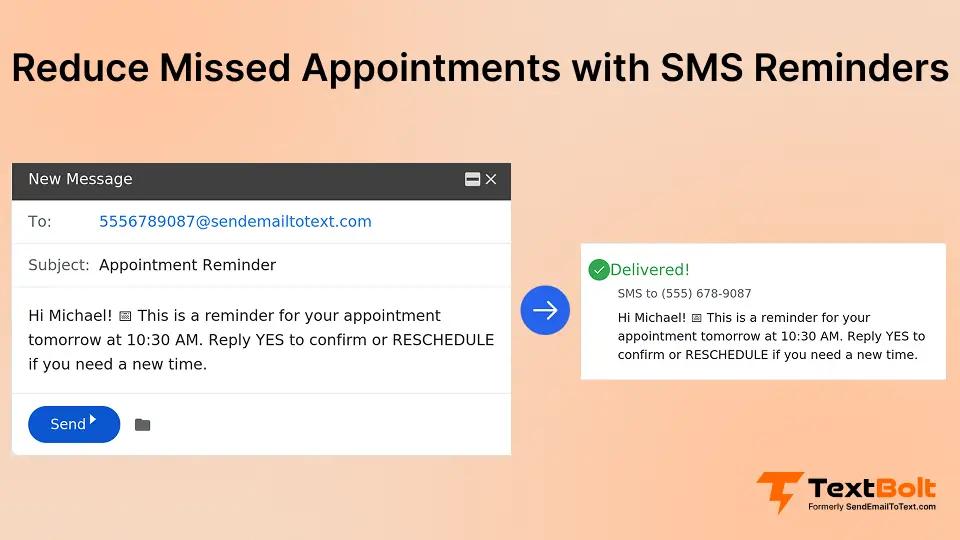
Missed appointments don’t just disrupt schedules, they directly impact revenue, productivity, and customer experience. Whether it’s a clinic, salon, consulting firm, or service business, no-shows waste valuable time and leave gaps that could have been filled by other customers.
Traditional email reminders often fail because they’re easy to overlook, buried in crowded inboxes, or read too late to act on. Phone calls, while effective, are time-consuming and difficult to scale.
That’s why more businesses are turning to SMS appointment reminders. Text messages are seen almost instantly, prompt faster responses, and significantly reduce no-shows. With TextBolt, businesses can send SMS reminders directly from Gmail, making the process simple, fast, and team-friendly without adding new tools or dashboards.
What Causes Missed Appointments?
Even when customers genuinely intend to show up, small gaps in communication and convenience can quickly turn into no-shows. This section breaks down the most common, preventable reasons people miss their appointments and where better reminders can make a difference.
1. Busy Schedules and Simple Forgetfulness
Life is hectic, and appointments booked days or weeks in advance are easy to forget. Without timely, clear reminders, many customers simply lose track of the date or time.
2. Emails Going Unread or to Spam
Even if businesses send reminders, they often rely only on email, which is easy to miss. Reminder emails can land in cluttered inboxes or spam folders, so customers either never see them or notice them too late to react.
3. Last-Minute Schedule Changes
Plans can change suddenly, and many people don’t have a quick, convenient way to notify the business. When customers are rushing, updating or canceling an appointment often falls to the bottom of the list.
4. Lack of Easy Cancel or Reschedule Options
If canceling or rescheduling requires calling during business hours or searching for an old email, many customers simply don’t bother. When communication feels difficult, it leads to silent no-shows instead of quick updates the business could act on.
Why SMS Reminders Are the Most Effective Solution
A lot of missed appointments happen because people don’t see reminders in time or find it hard to respond. SMS reminders solve this by putting clear, simple messages right where people look most, their phone screen.
1. SMS Gets Seen Almost Instantly
People keep their phones with them all day, so text messages are usually seen within minutes. This makes SMS much more reliable than email for time-sensitive reminders.
2. Customers Can Quickly Confirm or Reschedule
With SMS, customers can reply in seconds to confirm or ask to reschedule. This reduces silence, gives you clear answers, and helps you fill gaps in your schedule faster.
3. Works Without Apps or Internet
Text messages don’t require any app installs or internet access. As long as someone has a mobile phone and network signal, they can receive and reply to your reminders.
4. Perfect for Time-Sensitive Reminders
SMS is ideal for reminders sent 24–48 hours or a few hours before the appointment. It gives customers just enough time to plan, confirm, or reschedule if needed.
Reduce No-Shows with Real Time SMS Reminder
Reach customers where they respond fastest—right on their phones.
When SMS Appointment Reminders Make the Most Sense
SMS reminders work especially well for businesses that rely on scheduled time slots and regular client visits. Any time a missed appointment means lost revenue or wasted staff time, SMS can make a big difference.
- Healthcare businesses: Clinics, dental practices, and therapy centers can use SMS to reduce patient no-shows and keep schedules full.
- Beauty, fitness, and wellness services: Salons, spas, gyms, and personal trainers benefit from SMS reminders because quick confirmations help them fill valuable appointment slots and reduce empty gaps.
- Professional services: Consultants, lawyers, accountants, and agencies can use SMS to remind clients about meetings, calls, and sessions so important appointments aren’t missed.
- Education and coaching: Schools, tutors, and coaching centers can send SMS reminders for classes, lessons, and sessions to keep attendance steady.
- Field service and on-site work: Electricians, plumbers, cleaning services, and repair businesses can send SMS reminders before home or office visits so someone is ready on-site when the team arrives.
- Any service based business: Any service based business that relies on booked time slots online or in-person can use SMS reminders to reduce no-shows, keep calendars full, and make better use of staff time.
Common Problems with Traditional Reminder Methods
Traditional reminder methods often sound good in theory but don’t work well in daily use. They are easy for customers to miss and create extra work for your team.
- Email only reminders are easy to ignore: Inbox overload means many people simply don’t see reminder emails in time. Even if they do, they may open them later and forget to act.
- Manual calling is time consuming: Calling each customer takes a lot of staff time and energy. As your business grows, it becomes almost impossible to call everyone for every appointment.
- Generic SMS tools add another dashboard: Many SMS tools require a separate login, new interface, and constant tab switching. This makes reminders feel like extra work instead of a smooth part of your existing workflow.
- No visibility for teams or shared inboxes: When messages and replies are spread across different tools or personal phones, the team can’t see what’s happening. This can lead to missed replies, double messages, or confusion about who confirmed what.
Email vs SMS Appointment Reminders (Quick Comparison)
Businesses have relied on email reminders for years—but when it comes to reducing no-shows, SMS consistently outperforms email. Here’s a simple comparison to show why
Email Appointment Reminders
- Lower open rates — emails often get buried in crowded inboxes or land in spam.
- Delayed visibility — customers may see the reminder hours or days later.
- One-way communication — confirmations or rescheduling usually require extra steps.
- Less effective for last-minute changes — same-day updates are often missed.
- Email still works well for detailed appointment information, policies, or long explanations but it’s not ideal for urgency.
SMS Appointment Reminders
- Extremely high open rates — most texts are read within minutes.
- Instant visibility — messages appear directly on the customer’s phone screen.
- Two-way interaction — customers can reply “YES” to confirm or ask to reschedule.
- Perfect for time sensitive reminders — same-day or last-hour alerts get noticed fast.
- No apps or internet required — works on any mobile phone.
Best Approach: Email + SMS Together
The most effective appointment reminder strategy uses both channels:
- Email for full appointment details, intake forms, or instructions
- SMS for quick reminders, confirmations, and last-minute updates
With TextBolt, you don’t have to choose one or the other. You can send SMS reminders directly from Gmail, ensuring every critical appointment message is seen on time without adding new tools or dashboards. See our step-by-step guide to sending text messages from your computer for more details.
How TextBolt Helps Reduce Missed Appointments
After seeing where traditional reminders fall short, TextBolt steps in to make SMS reminders simple, fast, and easy for your whole team to use.
Send SMS Reminders Directly From Gmail
With TextBolt email to text service, you can send SMS appointment reminders straight from your Gmail inbox. There’s no need to learn a new system, switch tabs, or manage another dashboard.
Automated Appointment Reminder Messages
You can set up automated SMS reminders based on your existing emails, calendar events, or simple rules. Once set, reminders go out on time without your team having to remember each one.
Two-Way SMS Replies Inside Gmail
Customers can reply with “YES” to confirm or send a quick message to reschedule. Their replies appear right inside the same Gmail threads, so your team can see the full conversation in one place.
Verified Business Messaging for Reliability
TextBolt supports verified business messaging (such as 10DLC and toll-free numbers), which helps improve deliverability and trust. Customers are more likely to open and respond to messages from a recognized, verified sender.
Team-Friendly for Offices and Clinics
Because messages live inside shared inboxes, your whole team can see reminders, replies, and history. This makes it easy for front-desk staff, coordinators, and managers to stay aligned and handle follow-ups.
SMS Reminder Timing That Reduces No-Shows
The timing of your SMS reminders matters as much as the message itself. Sending texts too early or too late can reduce impact, while well-timed reminders make it easy for customers to show up or reschedule.
- 24–48 hours before the appointment to remind customers and give them time to adjust plans if needed.
- Same-day reminder (2–4 hours before) so the appointment is fresh in their mind when they’re getting ready to leave.
- Optional follow-up if there’s no response, to prompt a quick confirmation or reschedule instead of a silent no-show.
SMS Appointment Reminder Examples
Not every business owner knows exactly what to say in a text, so here are a few simple SMS reminder examples you can adapt for your own appointments.
Confirmation Reminder (24–48 Hours Before)
“Hi [Name], this is a reminder of your appointment with [Business Name] on [Date] at [Time]. Please reply YES to confirm or NO to cancel. Thank you!”
Same-Day Reminder (2–4 Hours Before)
“Hi [Name], your appointment is today at 3:00 PM. Reply YES to confirm.”
Reschedule Option Reminder
“Hi [Name], your appointment with [Business Name] is on [Date] at [Time]. If you need to reschedule, just reply RESCHEDULE and we’ll help you pick a new time.”
Missed Appointment Follow-Up
“Hi [Name], we missed you at your appointment today with [Business Name]. If you’d like to book a new time, reply REBOOK and we’ll help you schedule a new appointment.
Best Practices for High-Response SMS Reminders
Good timing and tools are important, but how you write your messages has a big impact on how often customers reply and show up.
- Keep messages short and clear so customers can understand them at a glance.
- Always include the date, time, and location (if needed) so there’s no confusion.
- Use a friendly, human tone that sounds like a real person, not a robot.
- Add opt-out language like “Reply STOP to opt out” to stay transparent and compliant.
- Avoid over-texting so customers don’t feel spammed—stick to key moments like booking, 24–48 hours before, and same-day reminders.
How to Set Up SMS Appointment Reminders with TextBolt
Once you know what to say and when to send it, the next step is putting a simple system in place. TextBolt lets you do this right inside Gmail, so you can start sending SMS reminders without changing how your team already works. Here is the step-by-step process:
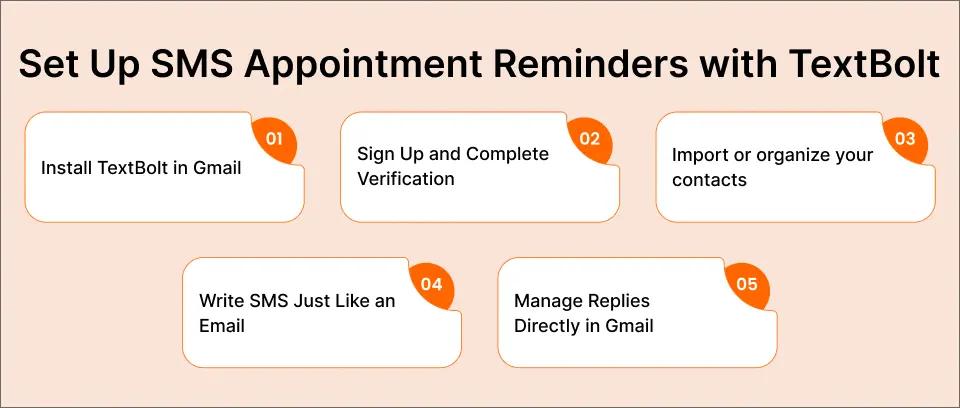
Step 1: Install TextBolt in Gmail
Install the TextBolt add on from the Google Workspace Marketplace, and it will appear in your Gmail sidebar so you can start using it right from your inbox.
Step 2: Sign Up and Complete Verification
Create your TextBolt account and complete the required business and number verification so your SMS messages are trusted and delivered reliably.
Step 3: Import or organize your contacts
Make sure customer phone numbers are saved and organized (by segment, list, or use case) so you can send the right messages to the right people instead of blasting everyone at once.
Step 4: Write SMS Just Like an Email
Type your message in Gmail the same way you’d write an email, but keep it short and clear so it works well as a text.
Step 5: Manage Replies Directly in Gmail
Explain that confirmations, reschedule requests, and questions all show up in Gmail threads, so the team can reply just like normal email.
Never Miss Another Appointment with TextBolt
Send appointment reminders directly from Gmail and reduce no-shows automatically.
Why Businesses Choose TextBolt for Appointment Reminders
Businesses don’t just need SMS they need a tool that fits easily into how they already work. TextBolt stands out because it keeps everything inside Gmail while still giving the power of automated SMS reminders.
- Gmail-native experience, so teams work from the inbox they already use every day.
- No APIs or complex integrations required, which makes setup fast for both small and large teams.
- High delivery rates through verified business messaging and proper number registration (like 10DLC), improving reliability.
- Simple automation options so reminders are sent at the right time without manual effort.
- Works well for small offices up to larger clinics or multi-location teams that need shared visibility and consistency.
How TextBolt Helps You Reduce No-Shows
Missed appointments hurt revenue, waste staff time, and create a poor experience for customers, but many no-shows can be reduced with better reminders. SMS reminders work well because they are seen quickly, are easy to act on, and do not require apps or logins.
TextBolt makes SMS appointment reminders simple by bringing them straight into Gmail, so your team can send, automate, and manage texts from the inbox they already use. By combining email and SMS through TextBolt, your business can reduce no-shows, get faster confirmations, and keep schedules running smoothly.
Start your 7 day free trial of TextBolt today and send your first SMS appointment reminders directly from Gmail.
Frequently Asked Questions
How effective are SMS reminders at reducing missed appointments?
SMS reminders are one of the most effective ways to reduce no-shows because text messages are usually read within minutes. Many businesses see no-show rates drop by 30–40% after switching to SMS reminders.
Can customers reply to SMS reminders to confirm or reschedule?
Yes. With TextBolt, customers can reply directly to SMS messages to confirm, cancel, or reschedule appointments. Their replies appear inside Gmail, making follow-ups easy for your team.
Are SMS appointment reminders legal?
Yes, as long as you follow best practices such as getting customer consent, identifying your business, and including opt-out instructions. TextBolt supports compliant, verified business messaging.
Is SMS better than email for appointment reminders?
SMS works better for urgency and confirmations, while email is useful for detailed information. The best approach is using both—email for details and SMS for reminders.
Can multiple staff members see SMS replies?
Yes. TextBolt works inside shared Gmail inboxes, so your entire team can view message history, confirmations, and replies in one place.
Do customers need an app to receive SMS reminders?
No. SMS works on any mobile phone and does not require apps, logins, or internet access.