
- What is Customer Churn and Why Does it Matter for Revenue?
- How Does Email-to-SMS Help Retain At-Risk Customers?
- What Are the Most Effective Email-to-SMS Retention Strategies?
- What Mistakes Should You Avoid With SMS Customer Retention?
- How Do You Measure the Impact of SMS on Customer Churn?
- Start Reducing Customer Churn With TextBolt Today
- Frequently Asked Questions
Reduce Churn With SMS From Email
How to Reduce Customer Churn Through Email-to-SMS Updates

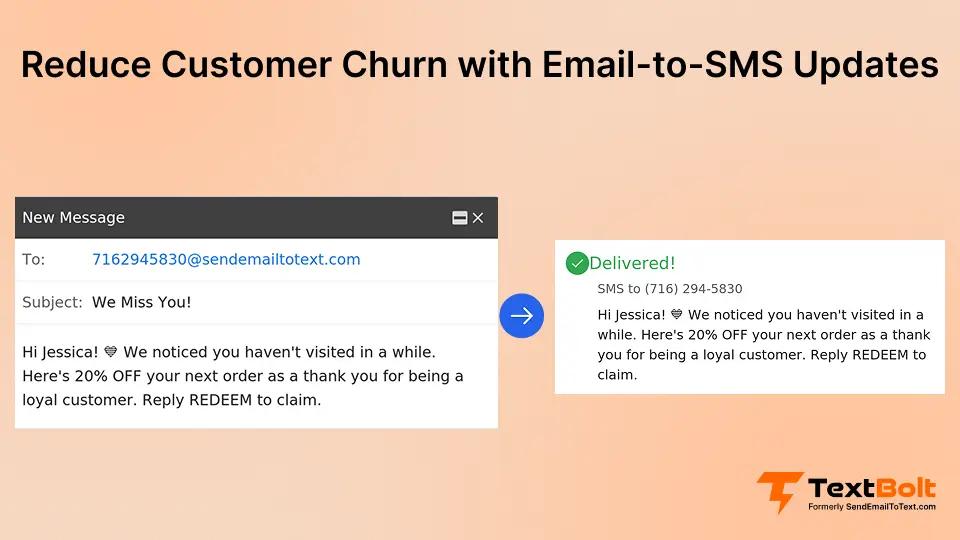
Every business loses customers. But reducing customer churn doesn’t require expensive loyalty programs or complex software. Sometimes, the right message at the right time makes all the difference.
The problem is that emails get buried and phone calls go unanswered. Customers quietly slip away before you notice they’re gone.
SMS changes that equation. Text messages see open rates near 98%, and most are read within minutes. With email-to-SMS service, your team sends texts directly from Gmail or Outlook, putting messages in front of customers before they forget about you.
In this guide, you’ll discover how to use email-to-SMS communication to reduce customer churn, keep clients engaged, and turn one-time buyers into loyal repeat customers.
What is Customer Churn and Why Does it Matter for Revenue?
Customer churn is the rate at which people stop buying from or engaging with your business. Customer churn measures how many customers stop doing business with you over a given period, and even small churn rates create significant revenue losses.
A 5% monthly churn rate might sound small, but it compounds quickly. Over a year, that rate means losing a large share of your customer base. Additionally, acquiring a new customer often costs significantly more than retaining an existing one. Even a modest improvement in retention can boost profits.
For a small business with a few thousand active clients, a 10% annual churn rate means hundreds of lost customers. When each customer represents hundreds of dollars in annual revenue, the losses add up fast.
That’s before you count the cost of finding replacement customers through ads, referrals, or outreach.
The impact goes beyond direct revenue loss. Churned customers don’t refer new business, don’t leave positive reviews, and don’t contribute to the word-of-mouth growth that small businesses depend on.
The most common reasons customers leave are tied to communication.
- They feel unappreciated
- They experience poor follow-up
- They receive no proactive outreach between transactions.
Fixing this communication gap is the fastest path to reducing churn.
Understanding why customers leave was the first step. The next question is how to reach them through a channel they actually check.
Turn Emails Into Churn-Reducing Text Messages
Send appointment reminders, follow-ups, and alerts directly from Gmail or Outlook. No new software required.
How Does Email-to-SMS Help Retain At-Risk Customers?
SMS reaches customers on the channel they check most, and email-to-SMS lets your team send texts without learning new tools.
1. SMS Outperforms Every Other Channel for Retention
SMS outperforms other channels for customer retention. According to Mobile Marketing Watch, text messages see open rates near 98%, and most are read within minutes.
According to 50Folds, e-mail open rates hover around 21%. Phone calls from unknown numbers go unanswered roughly 80% of the time. Push notifications require a dedicated app that most small businesses don’t have.
The gap is even larger when you look at response times. Most text responses arrive within 90 seconds, while email responses take hours on average.
2. Customers Actually Prefer Text Updates
Research shows most consumers prefer receiving reminders and updates via text. Businesses that implement proactive SMS communication tend to see measurable reductions in churn over time.
3. Traditional SMS Platforms Create Too Much Friction
The problem with traditional SMS platforms is friction. They require new software, staff training, and separate logins. Most small businesses try texting once and abandon it because of the hassle.
4. Email-to-SMS Removes the Friction Entirely
Email-to-SMS through TextBolt removes that friction. Your team sends SMS from Outlook or Gmail using skills they already have. Compose an email, and it arrives as a text. Customer replies come straight back to your inbox.
No new dashboards. No training sessions. No per-user fees. Your existing email workflow becomes your texting workflow. This simplicity means your team will actually use it consistently. And consistency is the key to reducing churn.
With the right channel in place, the question becomes what to send. These seven strategies give you a proven playbook for keeping customers engaged.
What Are the Most Effective Email-to-SMS Retention Strategies?
Seven proven strategies, from appointment reminders to feedback requests, keep customers engaged at every stage of their journey.
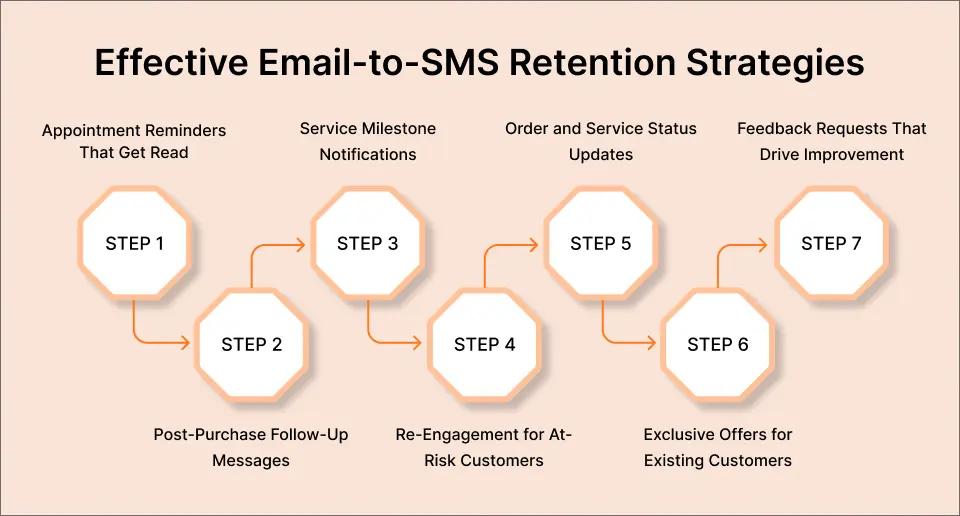
1. Appointment Reminders That Actually Get Read
No-shows signal disengagement. A customer who misses two appointments rarely returns for a third.
SMS reminders keep customers engaged and reduce missed appointments. Send a reminder 24 hours before each appointment with your business name, the appointment time, and a way to confirm or reschedule.
The key is two-way communication. When customers can reply to confirm or reschedule, they feel heard. Those replies come back to your email inbox, so your team responds without switching tools.
2. Post-Purchase Follow-Up Messages
The period right after a purchase is critical for retention. Customers are most engaged after buying, yet most businesses go silent until they want another sale.
A simple follow-up text breaks this pattern. Thank the customer, offer a direct channel for questions, and set expectations for the next touchpoint.
This combination shows you care about the experience beyond the transaction. Businesses that send post-purchase follow-ups tend to see higher repeat purchase rates compared to those that don’t follow up at all.
3. Service Milestone Notifications
Every business has natural milestones that call for outreach. Annual checkups, maintenance reminders, contract renewals, and seasonal service alerts all give you a reason to reconnect.
These proactive messages position you as a partner invested in your customer’s well-being. Instead of waiting for customers to remember you exist, you stay top of mind at the moments that matter most.
The key is identifying your business’s natural service intervals and creating a simple calendar of outreach touchpoints for each customer.
4. Re-Engagement Campaigns for At-Risk Customers
Some customers show warning signs before they leave. They cancel appointments, stop opening emails, or miss payments.
SMS re-engagement messages reach these at-risk customers before they’re gone for good. A personal, direct text makes customers feel individually valued rather than receiving a mass marketing blast.
You can use automated text messages to trigger re-engagement based on inactivity, so no one slips through the cracks.
5. Order and Service Status Updates
Nothing frustrates customers more than uncertainty. When will my order arrive? Was my payment received? Is the technician on the way?
Proactive status updates eliminate that anxiety and demonstrate reliability. They also reduce inbound service calls, freeing your team to focus on higher-value work.
Send updates at key moments: when an order ships, when a service is completed, or when a payment is confirmed. Customers who receive proactive updates are less likely to call with questions, saving your team time every day.
6. Exclusive Offers for Existing Customers
Customers churn when they see discounts reserved for new customers only. Flip the script by rewarding loyalty through exclusive SMS offers.
Send SMS for promotional offers, anniversary acknowledgments, and loyalty discounts. These messages reinforce the value of staying with your business instead of switching to a competitor.
7. Feedback Requests That Drive Improvement
Customers who provide feedback are less likely to churn. They’re invested in helping you improve.
A simple post-service customer feedback request asking for a quick rating opens a dialogue. Low ratings give you a chance to recover before the customer leaves. High ratings reinforce positive experiences and build loyalty.
These strategies work best when you avoid the common pitfalls that can undermine even the best SMS retention program.
Keep More Customers With TextBolt
Start sending retention texts from your existing email in under 30 minutes. No dashboards or training needed.
What Mistakes Should You Avoid With SMS Customer Retention?
Over-messaging, impersonal content, and ignored replies are the fastest ways to turn a retention tool into a reason customers leave.
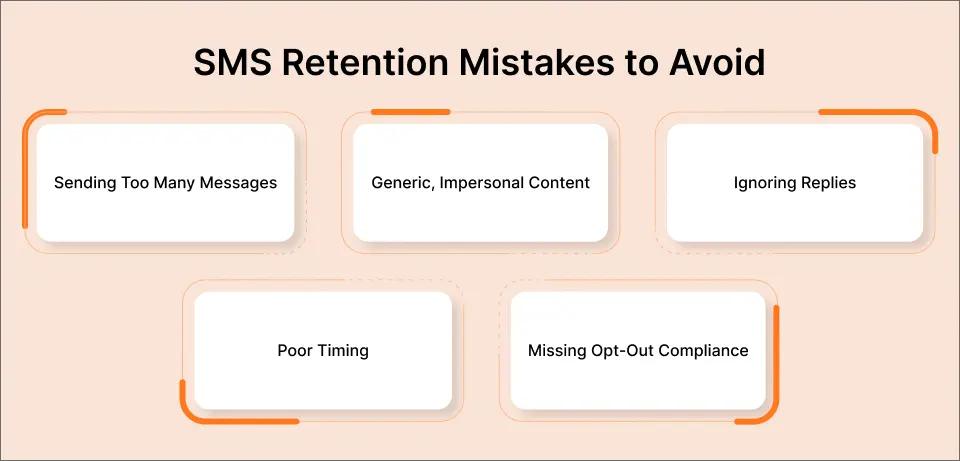
1. Sending Too Many Messages
More messages don’t equal more retention. Customers who receive excessive texts unsubscribe entirely.
What to do instead – Limit non-transactional messages to two to four per month.
2. Generic, Impersonal Content
“Dear Valued Customer” signals mass marketing, which might result in people losing interest in the message.
What to do instead – Use customer names and reference specific services, appointments, or purchases to make each message feel personal.
3. Ignoring Replies
Two-way messaging means nothing if customers text back and hear silence.
What to do instead – Make sure someone monitors incoming replies daily and responds promptly.
4. Poor Timing
A 6 AM text about your weekend sale won’t build loyalty. We should aim for the most optimal hours for the best opening rates.
What to do instead – Send business messages during reasonable hours, typically 9 AM to 7 PM local time.
5. Missing Opt-Out Compliance
Every business text must include an opt-out option.
What to do instead – “Reply STOP to unsubscribe” protects you legally and respects customer preferences. Additionally, review SMS compliance laws to make sure your messaging meets all regulatory requirements.
Avoiding these mistakes keeps your SMS program effective. Tracking the right metrics tells you whether it’s actually reducing churn.
How Do You Measure the Impact of SMS on Customer Churn?
Track both retention metrics and SMS engagement metrics to see whether your messaging is keeping customers around longer.
The Two Categories of Metrics to Measure the Impact of SMS on Churn Rate
1. Retention Metrics That Measure Business Outcomes
Track your monthly churn rate, customer lifetime value, repeat purchase rate, and average time between purchases. These tell you whether customers are actually staying longer.
2. SMS Engagement Metrics That Show Whether Messages Land
Monitor response rates, opt-out trends, appointment attendance rates, and feedback scores. A rising opt-out rate signals over-messaging or irrelevant content.
Research supports the impact of SMS on retention. A systematic review from the NIH found that automated reminders reduced appointment non-attendance by roughly 29%. Another NIH study found that SMS reminders specifically cut no-shows by 38%.
Proactive communication, including status updates and follow-ups, can also reduce inbound support volume.
How Small Businesses Can Measure the Impact of SMS on Churn Rate
For small businesses, even modest improvements in these metrics translate directly to the bottom line. A business that prevents five customers from churning each month saves thousands in annual acquisition costs.
Direct churn reduction depends on your industry, customer base, and how consistently you follow through. But fewer no-shows, more repeat visits, and fewer frustrated calls all compound into lower churn over time.
When the data confirms your SMS retention program is working, the next step is to scale what’s effective and cut what isn’t.
Start Reducing Customer Churn With TextBolt Today
Reducing customer churn doesn’t require enterprise software or a dedicated marketing team. It requires consistent, timely, personal communication. Start with three message templates, connect your existing email, and test the results for 30 days.
With email-to-SMS through TextBolt, your team sends reminders, follow-ups, and updates from Gmail or Outlook. No new software to learn. No per-user fees.
Start by identifying your highest-churn customer segment. Write three message templates for key touchpoints. Then test the workflow for 30 days and track your results.
Every customer who stays represents saved acquisition costs and increased lifetime value. Boost customer engagement via SMS from the email tools your team already uses.
Frequently Asked Questions
How quickly can email-to-SMS reduce customer churn?
Most businesses see measurable improvement within 60 to 90 days of consistent SMS communication. Appointment-based businesses often notice reduced no-shows within the first month.
Will customers find business texts intrusive?
Research shows most consumers prefer receiving reminders and updates via text. The key is relevance. Appointment reminders and service updates are welcomed, while excessive promotional messages are not.
How does email-to-SMS differ from traditional SMS platforms?
Traditional platforms require separate logins, new interfaces, and staff training. Email-to-SMS lets you send texts directly from Gmail or Outlook using workflows your team already knows. Replies come to your inbox.
What industries benefit most from SMS customer retention?
Any business with repeat customers benefits. The highest impact is in healthcare, professional services, home services, fitness, salons, and subscription-based businesses, where regular touchpoints exist naturally.
How many texts should I send per month to retain customers?
Limit non-transactional messages to two to four per month. Transactional messages like appointment reminders and status updates can be sent as needed without risking opt-outs.
Do I need special software to start sending retention texts?
No. With TextBolt, you send texts by composing an email. There is no app to install, no dashboard to learn, and no per-user fees. Setup takes about 30 minutes.