
Get Critical Messages Read Instantly
How to Make Priority Healthcare Messages Impossible to Ignore

Healthcare staff manage 50 to 100+ emails daily. Routine updates, vendor messages, administrative requests, and patient communications all flow through the same inbox. Critical lab results requiring immediate attention arrive looking identical to lunch menu announcements.
This creates an impossible choice: continue letting urgent messages get buried in email overload where staff see them hours late, or force already-overwhelmed teams to learn another messaging platform with separate logins and workflows.
The problem isn’t that staff ignore important messages. Critical communications get buried in email volume where everything looks equally urgent. Email provides no urgency signaling beyond subject lines that staff scan while managing patients and answering phones.
The solution is routing critical alerts through SMS while keeping routine updates in email. Text message arrival signals genuine urgency. Email arrival means handle when convenient. No new platform required — staff send from their existing Gmail or Outlook accounts.
Why Critical Messages Get Buried in Healthcare Inboxes
Email handles everything in healthcare operations. Appointment scheduling, patient questions, billing issues, vendor communications, and administrative updates all flow through the same channel. Healthcare staff check email sporadically between patient care tasks, often missing urgent items for 2 to 4 hours. That’s why many providers are turning to dedicated healthcare communication solutions like TextBolt for Healthcare to ensure critical messages reach staff instantly.
1. The Email Overload Problem
Critical messages look identical to routine ones. Subject lines provide the only distinction. Staff scan subject lines while managing patients, answering phones, and documenting visits. Important alerts get missed during busy periods when attention focuses on immediate patient needs rather than inbox monitoring.
The gap between channels is massive when urgency matters. According to a 2024 NIH review, about 95% of text messages are opened and read within 3 minutes, while email open rates average about 20%. This difference becomes critical when patient safety depends on immediate staff awareness.
2. What Gets Lost in Email
Critical lab results require same-day provider review. Patient emergencies trigger urgent family questions. Medication errors need immediate correction. Schedule changes affect afternoon patients. Equipment failures require backup plans.
Each situation demands immediate staff awareness, but email provides no urgency signaling beyond subject line. Staff check email between patients, during brief breaks, and at day’s end. Delays accumulate. Some messages sit unread for hours while patients wait for care that depends on that information.
3. The Cost of Delayed Visibility
Patient safety risks increase when critical information reaches providers hours late. Staff frustration builds from handling preventable emergencies that could have been addressed earlier. Operational chaos follows when time-sensitive coordination fails because the right person didn’t see the message in time. Revenue drops when urgent appointment opportunities go unfilled because staff discovered the opening too late.
The accumulated risk from dozens of missed critical communications weekly creates systemic vulnerability. Individual delays compound into patterns that threaten both patient outcomes and practice efficiency.
4. Email Filters Break Down in Clinical Settings
- Filters require constant maintenance. New staff members, new vendors, new EMR alerts all bypass existing rules. Someone must update filters regularly. This rarely happens consistently during busy clinical operations, leaving gaps that allow critical messages through unflagged.
- False positives undermine trust. When 40% of flagged messages aren’t actually urgent, staff stop trusting the filter. They learn to ignore priority markers because too many routine messages get flagged. The system intended to highlight urgency becomes noise.
- Mobile email defeats filtering. Staff check email on phones between patients. Filters often don’t apply to mobile email apps. The carefully configured Outlook rules don’t work in Gmail app. Critical messages appear unflagged on mobile devices where staff actually read most messages.
- Human behavior adaptation reduces effectiveness. Staff develop filter blindness. After seeing 20 flagged routine messages, they stop giving flagged emails special attention. The psychological impact reverses the filter’s purpose, making important messages blend into the background.
5. Adding More Email Rules Makes It Worse
Each new rule increases system complexity. Staff must remember which color means what urgency level. New hires face a learning curve understanding the practice’s filter taxonomy. Mistakes multiply when system gets too complex for busy clinical staff to maintain mental models while managing patients.
The fundamental problem remains: email treats everything as asynchronous communication. Check it when convenient. Priority lives in metadata like flags, colors, and folders. But staff attention during patient care focuses on immediate tasks, not email metadata interpretation.
Different urgency levels need different channels. Email handles routine communication well. Critical messages that demand immediate attention need a channel that guarantees visibility without requiring staff to check and interpret inbox organization.
Can Critical Messages Cut Through Inbox Chaos Without More Email Rules?
When email filters fail and staff miss urgent alerts buried in 80+ daily messages, the solution isn’t better organization. Route priority messages through SMS while keeping routine communication in email.
How to Route Priority Messages Without Adding New Software
Better email organization won’t solve the core problem. Route critical messages outside email entirely while keeping routine communications where they belong. This approach preserves email for what it handles well while adding a distinct urgency channel for what email can’t signal effectively.
1. Establish Two-Channel Communication Strategy
Route routine messages through email. Staff check email between patients, during lunch, at day’s end. No urgency expectation. Messages can wait 2 to 4 hours for response without operational impact.
Route critical messages through SMS. Staff check texts immediately upon notification. SMS arrival signals urgency through channel selection itself. Practice policy: receiving text means stop current task and check message now.
Channel itself communicates urgency level. Staff don’t need to read subject line or check sender. Text arrival equals immediate attention required. Email arrival equals handle when convenient. This eliminates the interpretation step that makes email filters fail.
TextBolt enables this two-channel approach by routing critical emails as SMS while routine communications stay in email. Staff send from Gmail or Outlook exactly as they do now. Only truly urgent messages trigger SMS delivery, preserving email for everything else and maintaining the urgency signal that makes SMS effective.
2. Define Clear Urgency Criteria
Not every message qualifies as text-worthy. Overusing SMS destroys its effectiveness. Staff tune out texts when too many arrive for non-urgent situations, recreating the same problem email filters created.
True urgency indicators: Patient safety issue requiring action within 1 hour. Critical lab result needing same-day provider review. Equipment failure affecting current patient care. Emergency schedule changes impacting patients currently traveling to office.
Non-urgent situations stay in email: Routine lab results. General announcements. Policy updates. Scheduling for next week. Vendor communications. Administrative requests.
Train staff to ask: Does this require awareness or action within the next hour? Yes means text. No means email. This simple decision rule prevents SMS channel degradation while ensuring genuinely urgent messages get immediate visibility.
TextBolt supports criteria-based messaging by allowing staff to choose routing at composition. Critical alert gets texted. Routine update gets emailed. Same workflow, different channel based on defined urgency criteria that preserve SMS effectiveness.
3. Preserve SMS Scarcity to Maintain Impact
Effectiveness depends on restraint. SMS maintains a 45% response rate and 90-second average response time when recipients trust that texts signal true urgency, according to Textedly research. These numbers only hold when staff know every text matters.
Send 20 texts daily for non-urgent items and staff begin ignoring texts like they ignore emails. Send 2 texts daily for genuinely critical situations and staff maintain immediate response behavior. The difference between these scenarios determines whether SMS remains an effective urgency signal.
Set practice-wide guidelines: Maximum texts per staff member per day. Regular audits of what messages went via SMS versus email. Team discussion when someone texts non-urgent information. These guardrails prevent SMS channel degradation.
TextBolt’s email-based approach naturally encourages restraint by making staff consciously choose SMS routing. The deliberate act of emailing a phone number instead of an email address creates a decision point that reduces casual overuse and maintains the urgency signal.
4. Make SMS Accessible Without New Software
Staff already drowning in platforms resist learning new texting systems. The solution must work through tools they use every minute: their email. Adding another dashboard, another login, another workflow defeats the purpose of improving communication efficiency.
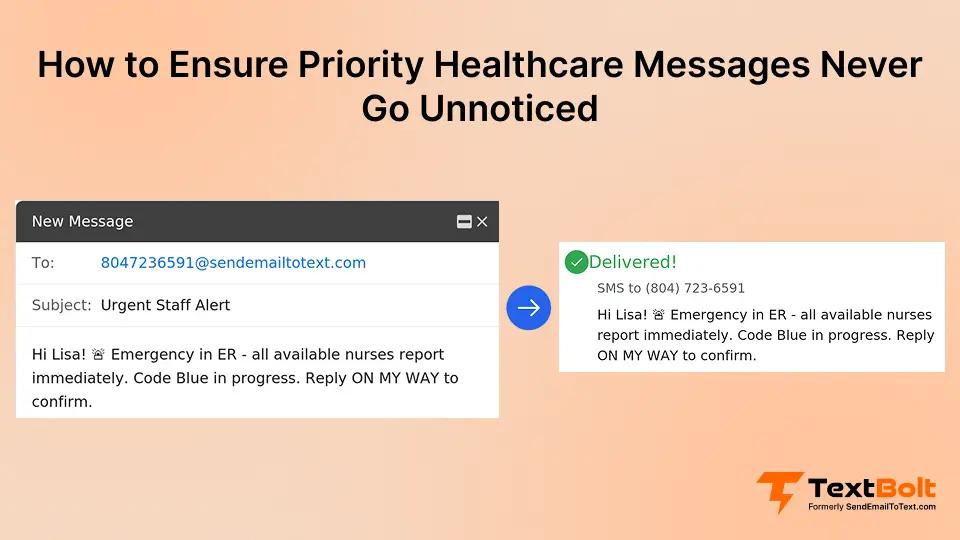
Send texts by emailing phone numbers instead of email addresses. Staff compose in Gmail or Outlook exactly as they do now. The recipient field becomes a phone number at a special domain instead of an email address. Message delivers as SMS to recipient’s phone within seconds.
Example: Critical lab result needs to reach Dr. Martinez immediately. Lab coordinator composes email in Outlook. Instead of sending to martinez@clinic.com, sends to 5551234567@sendemailtotext.com. Dr. Martinez receives text within seconds. Replies come back to lab coordinator’s email inbox.
TextBolt works directly from existing email accounts. Zero training required. Zero new logins. Zero separate platforms. Staff productive with priority message routing in under 5 minutes by sending texts from their Gmail accounts. The workflow they already know stays unchanged.
Does Your Team Need Immediate Visibility for Critical Alerts?
Route urgent messages via SMS from Gmail or Outlook. Staff see priority communications in under 2 minutes. No new software. No training sessions.
Examples: How Clinics Made Priority Messages Visible
The following examples represent common priority-routing patterns observed across healthcare practices. Specific outcomes vary by implementation and practice environment.
Example 1: Multi-Provider Family Medicine Clinic
Four physicians sharing front desk and nursing staff. Previous approach: all communication via email and office phone system. Critical patient situations regularly missed for 2 to 4 hours because staff didn’t see emails during patient rush.
Implementation: Established two-channel strategy. Routine updates via email. Critical patient situations, urgent provider needs, and same-day schedule emergencies via SMS. Staff send texts from their existing Gmail accounts. Messages appear from clinic’s business number.
Result: Critical message visibility improved significantly, with average response time dropping from hours to minutes. Patient safety incidents from delayed communication decreased. Staff report lower stress because they trust they won’t miss urgent situations.
Example 2: Hospital Outpatient Lab
Lab processes 200+ specimens daily. Critical results requiring immediate provider notification. Previous method: email to ordering provider. Average response time: 3 hours. Some critical results not seen until next business day.
Setup: Lab technicians text critical results directly to ordering provider’s mobile. Email used for routine results. Clear criteria: any result requiring same-day intervention gets texted.
Outcome: Average provider response time improved substantially. Critical results receive faster attention. Providers appreciate knowing texts mean genuine urgency. Email volume decreased because routine results no longer clutter provider inboxes.
Example 3: Dental Practice with Multiple Locations
Three locations, shared administrative staff. Coordination challenges when staff needed immediate help. Previous system: email and hoping someone checked it. Resulted in duplicate work, missed supply requests, and delayed patient care.
Approach: Location-to-location urgent requests via text. Administrative questions and routine coordination via email. Staff maintain shared contacts list for quick texting.
Impact: Response time for urgent needs decreased significantly. Staff coverage gaps reduced. Patient wait times improved because supply requests and assistance needs get addressed faster. Email became useful again because critical items no longer buried in inbox.
How TextBolt Routes Priority Messages From Gmail and Outlook
Critical messages can’t afford email delays. The solution isn’t organizing email better or adding more filters. Route urgent communications through a channel that guarantees immediate visibility while preserving email for routine updates.
TextBolt makes priority routing simple by delivering critical emails as SMS while keeping routine communications in email. Your staff keeps using Gmail or Outlook with zero training required, and recipients receive texts with up to 98% rates. You get the urgency signaling that ensures critical messages never get buried.
The emails your staff compose for urgent situations become text messages. The contact lists they already maintain work exactly the same. The workflow they already know stays unchanged. Only the delivery channel shifts when priority demands it.
Setup takes 30 minutes. Test with your own number, then start routing priority messages today. Start your 7-day free trial at TextBolt.
*Delivery rates vary based on carrier policies, message content, and compliance factors.
Frequently Asked Questions
How do we decide what messages warrant SMS versus email?
Use the one-hour rule. If the message requires awareness or action within one hour, send via SMS. Everything else goes to email. Review decisions weekly as a team to calibrate urgency definitions and prevent SMS overuse.
What if staff start overusing SMS for non-urgent messages?
Set clear practice guidelines. Maximum texts per person per day. Regular monthly reviews of SMS usage. When someone texts non-urgent information, provide immediate feedback. Channel effectiveness depends on maintaining scarcity and trust in the urgency signal.
How does email-to-SMS work from existing email accounts?
Staff compose messages in their regular email client. Instead of sending to an email address, they send to a phone number at a special domain. The message routes as SMS to the recipient’s phone. Replies return to the sender’s email inbox.
Can we route texts to multiple staff members for urgent situations?
Yes. Send one email to multiple phone numbers. Each recipient receives the text. First available person can respond. This works well for urgent situations requiring any available staff member rather than a specific individual.
How are text messages documented for compliance purposes?
Messages sent via email save automatically in your email sent folder with complete timestamps, recipient phone numbers, and message content. Email retention policies apply to text records, providing the same documentation standards your practice already maintains.