
- What Happens When Patients Aren’t Notified About Schedule Changes
- Why Phone Calls and Emails Fail to Notify Patients About Schedule Changes
- Phone vs Email vs SMS: Best Way to Notify Patients About Schedule Changes
- Why Email-to-SMS Reaches Patients Faster Than Phone Calls or Email
- Examples: How 3 Medical Practices Use Email-to-SMS for Schedule Change Notifications
- Send Schedule Change Texts Directly From Gmail or Outlook With TextBolt
- Frequently Asked Questions
Notify Patients Instantly From Your Inbox
How to Notify Patients About Schedule Changes Directly From Your Mailbox

Schedule delays happen in every medical practice. Emergency cases run long. Providers get stuck in traffic. Equipment malfunctions force last-minute rescheduling.
When these disruptions occur, front desk teams face a communication problem: how do you notify patients before they waste time driving to delayed appointments?
Most practices default to phone calls. Staff spend 30-40 minutes working through the patient list. Half the calls go to voicemail. By the time you reach the last patient, the first few are already in your parking lot.
Email notifications don’t fare better. Patients check email sporadically—often after they’ve already arrived at your clinic. Patient portals sit unopened until patients need test results or booking links.
The gap isn’t in your communication effort. It’s in the channel. You’re sending notifications to places patients don’t check before leaving home.
Text messages solve this. According to a 2024 NIH review, about 95% of SMS messages are read within 3 minutes, and patients see texts on their lock screens immediately. Patients see texts on their lock screens immediately. But most SMS platforms require new logins, staff training, and workflows separate from your existing tools.
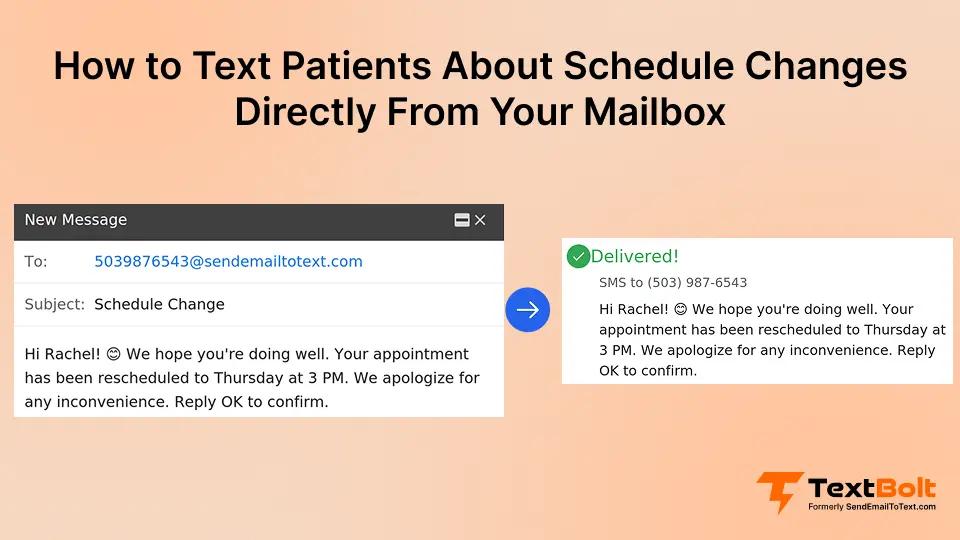
There’s a simpler approach: Send schedule change texts directly from Gmail or Outlook using email-to-SMS gateway TextBolt. Your front desk keeps the same workflow. Patients receive instant SMS alerts. No new software to learn.
This guide walks through why traditional notification methods fail for schedule changes, how email-to-SMS reaches patients before they leave home, and the specific steps medical practices use to implement instant text alerts without disrupting existing front desk workflows.
First, let’s examine the real cost of poor schedule change communication—because understanding what’s at stake makes the solution more urgent.
What Happens When Patients Aren’t Notified About Schedule Changes
Every practice experiences daily schedule disruptions. A provider running late due to emergency cases. Previous appointments taking longer than expected. Doctors stuck in traffic. Equipment malfunctions requiring rescheduling. Staff illness forcing appointment moves.
These disruptions are inevitable. But when patients aren’t notified before they leave home, manageable delays turn into operational chaos. Here’s what happens when schedule change communication fails:
1. Lost Revenue When Delayed Patients Walk Out
When patients arrive uninformed about delays, they wait. Then they get frustrated and leave. Consider the impact: if each walk-out represents $200-$450 in lost revenue, and a practice experiences 3-5 schedule disruptions weekly, the monthly cost could reach thousands of dollars. The exact number varies by specialty and patient volume, but the pattern is consistent: uninformed patients leave, and revenue disappears. This is a separate problem from no-shows, but both stem from communication gaps—patients who don’t receive clear, timely updates are more likely to miss or abandon appointments. The same SMS notification approach that prevents delay-related walk-outs also helps reduce patient no-shows for routine appointments.
2. Staff Time Wasted Calling Patients About Delays
When a provider runs late, front desk staff must call every affected patient on the schedule. This takes 30-40 minutes per delay event. Half the calls go to voicemail. Many patients don’t answer because they’re already driving. By the time staff finishes calling the sixth patient, the first two are already in the parking lot. Meanwhile, the front desk can’t check in arriving patients, answer other calls, or handle walk-in questions—all because they’re stuck making notification calls that mostly don’t reach patients in time.
3. Patient Trust Broken by Late Schedule Notifications
Patients feel disrespected when their time isn’t valued. They waste gas and parking fees driving to appointments that won’t happen on time. Caregivers take time off work unnecessarily. One bad experience makes patients less likely to return, refer friends, or leave positive reviews—and in competitive healthcare markets, that reputation damage is hard to recover.
The common thread across all three problems? Patients aren’t being reached before they leave home. But why do traditional notification methods consistently fail to prevent these issues?
Why Phone Calls and Emails Fail to Notify Patients About Schedule Changes
When delays happen, most practices call patients down the list. Leave voicemails. Hope patients check messages before leaving home.
Phone Calls Take Too Long to Reach Everyone
Monday morning emergency case pushes Dr. Chen’s schedule back one hour. Six afternoon appointments affected. The front desk calls all six patients. Three don’t answer. Two are already driving.
One checks voicemail after arriving at the clinic. By the time the front desk finishes calling everyone, the first patient is already in the parking lot.
Email Notifications Sit Unread
Patient checks email twice daily. Schedule change email arrives at 1:15 pm for a 2 pm appointment. The patient already left home at 1:30 pm and saw the email at 4 pm after wasting an hour in the waiting room. Email response times average 90 minutes—far too slow when patients need to adjust plans in the next 30-45 minutes.
Patient Portal Messages Go Completely Unnoticed
Most patients only check portals when booking appointments or viewing test results. Almost nobody checks portals before heading to appointments. A schedule change posted to the portal at noon goes unnoticed until the frustrated patient is already sitting in your waiting room. A schedule change posted to the portal at noon goes unnoticed until the frustrated patient is already sitting in your waiting room.
The real problem isn’t that you lack a notification method. Your notifications arrive in places patients don’t check before leaving home. Phone calls reach too few patients too slowly. Email gets checked sporadically.
You need a channel that patients see immediately. Text messages appear on lock screens within seconds. Patients read them before leaving home. An email-to-text service bridges this gap by delivering messages where patients actually look—without requiring your staff to learn new software or change their workflow.
But how do these notification methods actually compare when time matters most? Here’s what the data shows:
Stop Apologizing to Frustrated Patients in Your Waiting Room
Real-time SMS alerts reach patients before they waste time driving to delayed appointments. The front desk sends updates the moment schedules shift. Patients adjust plans while still at home.
Phone vs Email vs SMS: Best Way to Notify Patients About Schedule Changes
When a provider runs late, you have a narrow window to reach patients before they leave home. The notification method you choose determines whether patients adjust their plans or waste time driving to delayed appointments.
Here’s how the three most common notification methods compare for time-sensitive schedule changes:
Phone Calls: Too Slow When Every Minute Counts
Front desk staff must call each affected patient individually. Most calls go to voicemail. Patients who answer are often already driving and can’t easily turn around. By the time staff finishes the call list, the earliest patients have already arrived at the clinic. Phone calls require significant staff time during an already chaotic situation—time that could be spent managing check-ins and handling other patient needs.
Email: Checked Too Infrequently for Urgent Updates
Most patients check email a few times daily—morning, lunch, and evening. When a schedule change email arrives mid-afternoon, it often sits unread until well after the appointment time. Email works for advance appointment reminders but fails for same-day, time-sensitive notifications. Patients simply don’t check email frequently enough to catch last-minute changes before leaving home.
Patient Portals: Almost Never Checked Before Appointments
Patients use portals for booking appointments and viewing test results—not for checking updates before heading out the door. A schedule change posted to the portal typically goes unnoticed until the patient is already in the waiting room. Portals aren’t designed for urgent communication, and patient behavior reflects that.
Email-to-SMS: Reaches Patients Where They Actually Look
Text messages appear on lock screens immediately. Patients see them within minutes, giving them time to adjust plans before leaving home. Unlike phone calls, SMS doesn’t require staff to spend time calling each patient individually. Unlike email and portals, text messages get checked immediately. Patients can respond directly from their lock screen to confirm or request rescheduling—creating two-way communication without phone tag.
The key difference: Phone calls, emails, and portals require patients to actively check messages or answer calls. Text messages reach patients passively—notifications appear whether patients are looking for them or not. For time-sensitive schedule changes, that immediate visibility makes all the difference.
Why Email-to-SMS Reaches Patients Faster Than Phone Calls or Email
The solution isn’t calling faster or sending more emails. The solution is reaching patients where they actually look before leaving home.
1. Reach Patients Where They Actually Check Messages
Patients keep their phones with them constantly. Text notifications appear on lock screens. They see schedule changes before leaving home or while driving.
Why timing matters: Patients who learn about delays while still at home can reschedule or plan accordingly. Patients who learn about delays after arriving get frustrated and leave. According to a 2024 NIH review, about 95% of text messages are opened and read within 3 minutes, while email open rates average about 20%.
TextBolt delivers real-time SMS alerts directly from your email inbox the moment delays are known. Your front desk composes messages in Gmail or sends SMS from Outlook. Patients receive them as instant SMS alerts. Replies come back to your email inbox. No new platform. No training. No workflow changes.
TextBolt sends it as an SMS. Patients receive immediate notification before leaving home. This works alongside your appointment reminder system for complete patient communication.
2. Include Clear Next Steps in Every Notification
Tell patients exactly what to do. Don’t just announce the delay—give them options and action steps.
Bad notification: “Dr. Smith is running 45 minutes behind schedule today.”
Good notification: “Dr. Smith is running 45 min behind. Your 2 pm appointment is now closer to 2:45 pm. Still work for you? Text back YES or call to reschedule.”
Patients can confirm or reschedule immediately. No need to call and ask “What should I do?” The front desk gets fewer inbound calls because the message provides clear options. Replies come back to your email inbox, so your team sees confirmations and reschedule requests in real-time.
With this system, you see confirmations and reschedule requests immediately, reducing call volume during already-busy delay situations.
3. Send Updates as Soon as Delays Are Known
Send the notification the moment you know the schedule is disrupted. Don’t wait until “things settle down” or “we know exactly how delayed.” Immediate partial information beats perfect information that arrives too late. Like urgent patient updates, schedule changes require instant delivery.
Text messages get responses within minutes, while email responses typically take much longer. Patients respond quickly when reached via SMS. They can tell you immediately if the delayed time still works, allowing your front desk to adjust the schedule in real-time rather than managing chaos later.
These three elements—immediate visibility, clear next steps, and instant delivery—explain why medical practices are shifting from phone calls to email-to-SMS for schedule change notifications. But how does this work in real-world clinic settings?
Give Patients Time to Adjust Before They Leave Home
TextBolt allows real-time SMS updates sent from your existing email reduce waiting room frustration and wasted patient time. No training required; no new software to learn.
Examples: How 3 Medical Practices Use Email-to-SMS for Schedule Change Notifications
These scenarios represent common communication patterns observed in healthcare practices that shifted from phone calls to email-to-SMS for schedule change alerts.
1. Family Medicine Clinic: Three Doctors, One Overwhelmed Front Desk
The challenge: Three providers shared one front desk coordinator. When any provider ran late, the coordinator spent 30-40 minutes calling affected patients. Most calls went to voicemail. By the time she finished, several patients had already arrived—uninformed and frustrated.
The shift: The coordinator now composes a single message in Outlook and sends it to all affected patients as SMS. Patients receive texts instantly. Replies come back to her inbox.
The outcome: Patients typically respond within minutes—either confirming the new time or requesting to reschedule. Waiting room confrontations dropped significantly. The coordinator spends less time on delay management and more time handling check-ins.
2. Pediatric Practice: Parents Traveling With Multiple Kids
The challenge: Sick visit appointments frequently ran over, creating cascading delays throughout the day. Parents often traveled with multiple young children. A wasted trip meant loading everyone in the car, driving across town, then returning home frustrated—only to reschedule for another day.
The shift: The front desk keeps a Gmail compose window open with a delay notification template. When delays occur, they send batch SMS to the next 4-6 appointments. Parents receive texts before leaving home.
The outcome: Parents adjust plans before packing up the kids. Rescheduling happens proactively instead of reactively. One parent mentioned in a Google review: “Finally, a practice that respects my time. The text alerts have been a game-changer.”
3. Surgical Practice: Long Procedures, Long-Distance Patients
The challenge: Surgical procedures sometimes ran longer than scheduled, affecting afternoon appointments. Many patients traveled 45+ minutes to the clinic. By the time staff called to notify them, patients were often already en route—committed to the drive but facing a 2-hour wait upon arrival.
The shift: The surgical coordinator sends text alerts when delays exceed 30 minutes. Messages include the new estimated time and an option to reschedule: “Dr. Lee’s procedure running long. Your 2pm apt now closer to 3:15pm. Still work? Reply YES or call to reschedule.”
The outcome: Patients can stop for lunch, run an errand, or reschedule without wasting the drive. Fewer patients arrive only to leave immediately. The practice maintained better appointment adherence even during disrupted days.
What these three practices have in common: they stopped using phone calls for schedule change notifications and started sending texts directly from their email inbox. The shift took less than an hour to implement, required no staff training, and immediately reduced waiting room chaos.
Ready to make the same shift in your practice? Here’s how email-to-SMS works without disrupting your front desk workflow
Send Schedule Change Texts Directly From Gmail or Outlook With TextBolt
Stop spending 30-40 minutes calling patients when delays happen. Send instant text alerts from the same inbox your front desk already uses.
How it works:
- Compose a message in Gmail or Outlook like you would any email
- Add patient mobile numbers to the “To:” field
- Hit send—TextBolt converts it to SMS and delivers instantly
- Patients receive lock screen alerts before leaving home
- Replies come back to your inbox as emails
No new software to learn. No separate platform to log into. No training sessions required.
Your front desk keeps the exact same workflow—typing in their familiar email interface—but patients receive messages as texts instead of emails that sit unread.
Setup takes 30 minutes. Connect your email account, test with your own number, then start sending real-time schedule updates. Most practices are operational within the hour.
Start your free 7-day trial. See how quickly you can reach patients before they leave home.
Frequently Asked Questions
Do patients need to opt in before receiving schedule change texts?
Yes. Collect mobile numbers and SMS consent during appointment scheduling. Simple script: “May we text you if your appointment time changes? This helps us reach you faster than phone calls.” Most patients agree when you explain the benefit.
What if the delay is only 15-20 minutes?
Use your judgment based on patient volume and travel patterns. For packed schedules where patients arrive early, notify even for short delays. For relaxed schedules with buffer time, 30 minutes is a reasonable threshold.
Should patients be able to reply to schedule change notifications?
Two-way communication works best. Patients can confirm they received the message or request to reschedule immediately. This reduces inbound phone calls during already-busy delay situations.
What if we need to cancel the entire day due to an emergency?
Send the same message to all patients scheduled for that day. Include clear rescheduling instructions and your phone number. Batch sending ensures everyone receives the notification simultaneously.
What happens if we send a notification to a landline?
Text messages won’t deliver to traditional landlines. Most patients provide mobile numbers when booking appointments. For patients with landlines only, keep phone calls as backup communication.
Is TextBolt HIPAA-compliant for patient notifications?
Yes, when configured properly. TextBolt supports secure transmission of schedule change notifications. For details on how to reduce compliance risk in patient messaging, review our compliance guide during setup.
How do I know if patients received my schedule change text?
You can confirm message delivery through delivery reports and patient replies. When patients respond to your text, their reply comes directly to your email inbox, confirming they received and read your message. For a detailed guide, see how to confirm patient message delivery.