
- What Is Multi-Branch School Communication?
- 5 Communication Challenges Multi-Branch Schools Face
- 4 Benefits Of Team-Based Email-To-SMS For Multi-Branch Schools
- 4-Step Setup Process For Multi-Branch Email-To-SMS
- 6 Best Practices For Multi-Campus Coordination
- 1. Standardize Your Message Templates Across Campuses
- 2. Designate Primary And Backup Senders At Each Campus
- 3. Use Consistent Tagging For Your Message Categories
- 4. Review Your Message History Weekly As A Team
- 5. Train Your Staff On Coordination Protocols, Not Software
- 6. Designate Staff To Monitor Replies Across Campuses
- Simplify Multi-Campus Communication With TextBolt
- Frequently Asked Questions
Stop Juggling Multiple Campus Communication Systems
How To Coordinate Multi-Branch Communication Easily

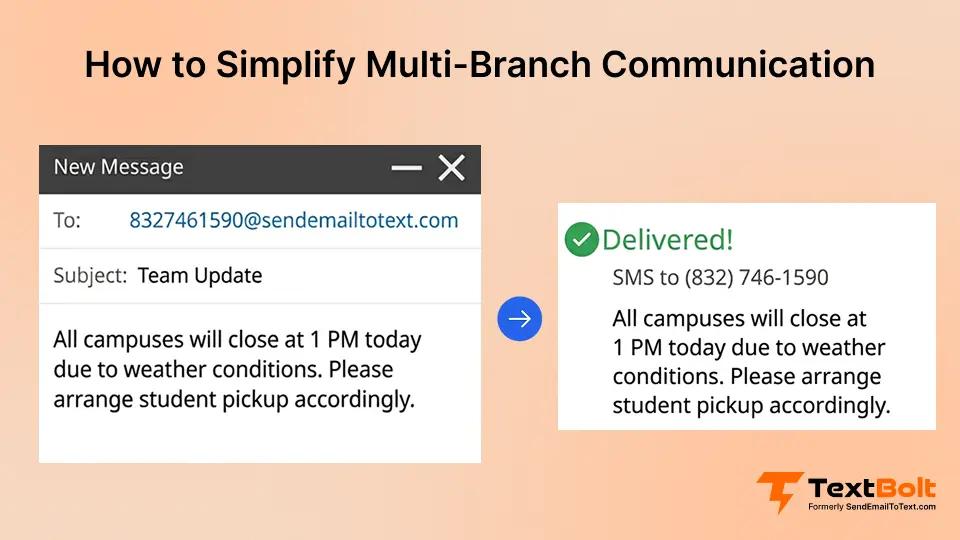
When your elementary campus closes for weather, but the high school stays open, how do you coordinate that message? You’re juggling different schedules, different administrators, and different communication needs across multiple campuses.
The result: mixed messages, delayed alerts, and parents confused about which campus information applies to their children. Shared visibility and team coordination through email-to-SMS services gives your district the unified communication system you need without replacing the workflows your staff already know. Multi-branch communication doesn’t have to be chaotic when you have the right tools.
What Is Multi-Branch School Communication?
Multi-branch school communication is the process of coordinating messaging and alerts across multiple school campuses or locations within a single district while maintaining centralized oversight and unified parent communication. Your district operates elementary, middle, and high school campuses, and each needs to send campus-specific messages while ensuring district-wide consistency.
For example, your elementary campus needs different pickup times than the middle school, but both campuses must send unified snow day alerts that don’t conflict or confuse families. The challenge lies in ensuring the right message reaches the right families while maintaining central office visibility and preventing communication gaps when key staff are unavailable.
Traditional single-point communication systems break down when you scale across multiple locations. You need shared access, centralized tracking, and flexible coverage that works across your entire district’s education messaging needs.
Stop Coordinating Chaos Across Your Campuses
TextBolt lets your entire district send, track, and coordinate messages from one platform using existing email accounts.
5 Communication Challenges Multi-Branch Schools Face
Understanding these coordination problems helps you recognize why traditional texting systems fail at scale. Here are the five most common challenges multi-campus districts face with conventional communication approaches.
Challenge 1: Your Coverage Breaks When Key Staff Are Unavailable
When your elementary campus secretary calls in sick, no one else can access the texting system to send that campus’s messages. Parents miss critical pickup changes because the one person with access wasn’t available. Your communication shouldn’t depend on one person’s presence at each location.
Challenge 2: You Have No Visibility Across Branches
Your central office doesn’t know what messages went out from which campus until parents call with questions. By then, conflicting information has already created confusion. You’re reacting to communication problems instead of preventing them because you lack real-time visibility into what each campus is sending.
Challenge 3: You’re Multiplying Platforms And Training Requirements
Three campuses mean three different texting systems, three training sessions for new staff, and three monthly bills. Your budget and your team’s time both suffer. Every new campus you add compounds the complexity instead of integrating into one unified system.
Challenge 4: Your Messages Conflict And Confuse Families
Your elementary campus sends “School closed” while your high school sends “Late start” causing parent panic about which information applies to their children. When different campuses use different communication tools, coordination becomes guesswork instead of process.
Challenge 5: You Lack Accountability Tracking
When a parent disputes receiving the early dismissal notification, you have no way to verify which administrator sent which message to which families, or whether it was delivered at all. Without delivery tracking and message history, every dispute becomes your word against theirs.
| Your Current Approach | The Problem You Face |
| Each campus has its own texter | Coverage breaks when that person is unavailable |
| Separate systems per location | No unified view of district communication |
| Campus-level access only | Central office can’t monitor or step in |
| No delivery tracking | No proof messages reached families |
These coordination failures don’t reflect poorly on your staff. They reflect poorly on systems that weren’t built for multi-campus coordination. Team-based email-to-SMS with shared message tracking solves these structural problems by giving your entire team visibility and access through the email accounts they already use.
4 Benefits Of Team-Based Email-To-SMS For Multi-Branch Schools
Team-based email-to-SMS transforms your chaotic multi-campus messaging into unified, visible communication where every authorized team member can see message history through the dashboard and step in when you need coverage. This approach leverages email’s natural simplicity to create emergency alerts without requiring new software training.
1. You Get Unified Message Visibility Across All Your Campuses
Your principal at South Campus can view the message history dashboard and see exactly what North Campus sent. No duplicate messages. No conflicting information. Your central office monitors all branch communication through the tracking dashboard. When parents call asking why they received different messages, you have immediate answers because everyone on your team can access the same message history and delivery tracking.
This visibility extends beyond just reading past messages. Through the dashboard, you see delivery confirmation and message details across all your campuses from one centralized location. Your team coordinates based on complete information, not assumptions about what other campuses might have sent.
2. Any Authorized Team Member On Your Team Can Send From Any Location
When your elementary secretary calls in sick, your assistant principal covers the morning messages with zero disruption. Different campuses, same access, same professional appearance to families. You’re no longer dependent on one person’s availability at each location because any authorized team member can send messages from their existing email account.
Coverage flexibility means your communication continues during staff vacations, sick days, or emergency absences. Your families receive the same timely, professional messages regardless of which administrator happens to be available that day.
3. You Can Target Campus-Specific Messages While Maintaining District-Wide Oversight
Send snow day alerts to all families across all your branches with one message. Or target just your middle school families for late bus notifications. Your central office sees everything sent across every campus while individual branches control their own urgent updates. You maintain coordination without micromanaging.
This targeting flexibility means you send relevant information to relevant families. Elementary parents don’t receive high school sports schedule changes. Middle school families don’t get elementary playground closure notices. Yet your central office maintains complete visibility into all business messaging across every campus.
4. You Build Complete Audit Trails For Multi-Campus Accountability
When a parent questions whether they received the early dismissal message from the high school, you know exactly who sent it, when it was delivered, and to which phone number. Every message you send is tracked with timestamps, sender identification, and delivery confirmation across all your campuses.
This accountability protects your district from disputes while helping you improve communication effectiveness. You identify which messages get high engagement, which campuses need additional coordination support, and where communication gaps exist before they become parent complaints.
4-Step Setup Process For Multi-Branch Email-To-SMS
TextBolt’s email-native approach means your district doesn’t replace existing workflows. You enhance them with shared visibility and team access. Setting up TextBolt takes 10-30 minutes with 10DLC approval typically completed within 48 hours.
Step 1: Assign User Accounts Across Your Campuses
All TextBolt plans include 10 user accounts at no additional cost. Assign access to key staff at each branch: your principals, assistant principals, office managers, and central office administrators. You control who has access without paying per-user fees regardless of how many campuses you operate.
This multi-user access creates natural redundancy. Your elementary campus gets three authorized senders. Your middle school gets two. Your central office gets administrative oversight. Everyone works from their existing email accounts with no new passwords to remember or systems to log into separately.
Step 2: Organize Your Contact Groups By Campus And Grade Level
Use Google Contacts to segment families by campus (North Elementary, South Elementary, Middle School) and grade level for targeted messaging. When you need to reach all middle school families or just the South Campus parents, you select the group and send without manual sorting.
Contact organization mirrors your district structure. Create groups for all-district announcements, campus-specific notifications, grade-level updates, and special programs. Your messaging becomes precise instead of broadcasting everything to everyone and hoping families filter what applies to them.
Step 3: Establish Your Team’s Coordination Protocols
Create simple guidelines your team can follow: Who sends what messages from which campus. Who monitors the shared inbox for replies. How to tag messages for visibility. You’re establishing coordination practices, not learning complex software.
These protocols clarify responsibility without creating bureaucracy. Your elementary campus handles their own attendance notifications. Your athletic director sends sports updates. Your superintendent sends district-wide announcements. Everyone knows their role, and everyone can see the complete picture.
Step 4: Monitor And Track From Your Central Office
Your central office sees all messages sent across all campuses with full delivery tracking and conversation history. You maintain oversight and accountability without micromanaging individual campus administrators or disrupting their autonomy.
Centralized monitoring helps you identify patterns. Which campuses send the most effective messages? Where do families engage most? What types of communication generate the most replies? You improve district-wide effectiveness based on data instead of assumptions.
Your District Shouldn’t Need Three Different Texting Systems
TextBolt gives every campus shared access and central office oversight from your existing email accounts.
6 Best Practices For Multi-Campus Coordination
Shared visibility only works when your teams follow consistent practices across branches. These six best practices help your district maximize coordination while maintaining campus autonomy.
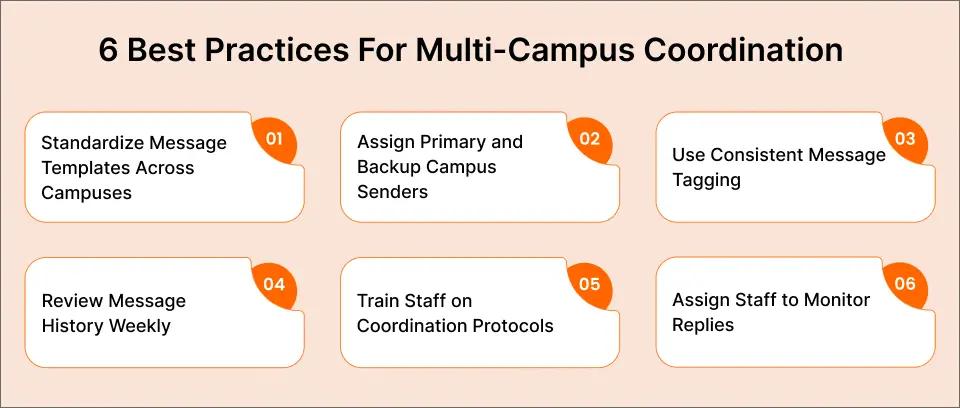
1. Standardize Your Message Templates Across Campuses
Why it matters: Your families recognize official district communication regardless of which campus sends it. Consistency builds trust and reduces confusion when messages come from different authorized senders throughout the school year.
How to implement: Create templates for common scenarios (weather closures, early dismissal, event reminders) that all your campuses use with minor customization. Your elementary campus adapts the snow day template to their schedule. Your high school uses the same template with different timing. Families recognize the format and trust the source.
2. Designate Primary And Backup Senders At Each Campus
Why it matters: You maintain clear ownership with built-in redundancy when key staff are unavailable. Communication doesn’t stop because one person took a sick day or went on vacation.
How to implement: Each of your campuses assigns one primary message sender and two backups who all have access via their existing email accounts. Your elementary secretary sends routine messages. Your assistant principal covers when she’s out. Your principal serves as secondary backup. Coverage becomes automatic, not crisis management.
3. Use Consistent Tagging For Your Message Categories
Why it matters: Your central office can quickly filter and review emergency alerts versus routine reminders without reading every message. You identify urgent situations faster and track communication patterns across all campuses.
How to implement: Establish simple subject line conventions your team follows (e.g., [EMERGENCY], [ROUTINE], [CAMPUS-SPECIFIC]). Your monitoring staff scan for emergency tags first. Your monthly reviews filter by category to assess communication volume and effectiveness.
4. Review Your Message History Weekly As A Team
Why it matters: You identify communication gaps, duplicate messages, or coordination issues before they become parent complaints. Proactive review prevents problems instead of reacting to them after families are already confused.
How to implement: Schedule 15-minute reviews of the message history dashboard each Monday morning with your key administrators. What worked well last week? What messages generated confusion? Where did coordination break down? Your team learns and improves continuously based on recent real-world experience.
5. Train Your Staff On Coordination Protocols, Not Software
Why it matters: Your staff already know how to send email. Focus your training on when to coordinate across campuses versus when to send independently. You’re teaching collaboration practices, not technology skills.
How to implement: Create a one-page protocol document plus 10-minute orientation for new staff members. What requires district-wide coordination? When can individual campuses act independently? Who approves emergency messages? Your training focuses on decision-making and coordination practices, not clicking buttons.
6. Designate Staff To Monitor Replies Across Campuses
Why it matters: When families reply to messages, those replies come to the sender’s email inbox as standard email responses. Clear ownership ensures no parent question goes unanswered when different staff members send messages throughout the day.
How to implement: Assign monitoring responsibility based on who typically sends messages at each campus. Your elementary secretary checks their inbox for replies to morning messages. Your assistant principal monitors their inbox after sending afternoon updates. Create simple forwarding protocols when questions need escalation to central office or other campus staff.
Simplify Multi-Campus Communication With TextBolt
Your multi-branch schools no longer need separate communication systems creating coordination chaos. Team-based email-to-SMS with shared message tracking gives your entire district team unified visibility, flexible access, and central oversight without replacing the workflows your staff already know. Every campus sends from the same professional number. Your central office can monitor message history through the dashboard. Families receive clear, coordinated messages regardless of which branch their student attends.
TextBolt makes multi-campus coordination as simple as sending an email. Start your free trial today and give your district team the shared visibility they need to coordinate effectively across every branch. See how simple unified communication can be when your entire team works from the same shared platform without learning new software or paying per-user fees. Get started now or view pricing to find the plan that fits your district.
Frequently Asked Questions
How quickly can your multi-campus district start using team-based email-to-SMS?
Account setup takes 10-30 minutes. TextBolt handles 10DLC compliance registration (typically approved within 48 hours). Once approved, you assign user accounts across your campuses and start coordinating messages immediately. No separate systems to install at each branch.
Can your different campuses send messages independently while central office monitors?
Yes. Each campus operates with autonomy while your central office maintains visibility into all communication. Authorized team members at any location can send messages from their email accounts. Message history and delivery tracking appear in the dashboard accessible by designated staff across all your branches.
What happens when a campus administrator who sends messages is unavailable?
Any authorized team member at that campus (or central office) can cover instantly. All plans include 10 user accounts with shared access at no additional cost. You avoid single points of failure when key staff are out sick, on vacation, or unavailable during emergencies.
How do your families know which campus a message comes from?
Messages appear from your district’s professional business number. Include campus identification in the message content itself (e.g., “Lincoln Elementary:” or “From South Campus:”). Your families receive clear, branded communication regardless of which authorized team member sent it.
Does setting up multi-branch coordination require IT support?
No. TextBolt works from your existing email accounts (Gmail, Outlook, any email client). No coding, no integrations, no IT dependency. You assign user access through the dashboard and coordinate via the email workflows your team already uses daily.
Can you target specific campuses or grade levels without sending district-wide?
Yes. Use Google Contacts to organize families by campus, grade level, or any segmentation you need. Send to all families across all branches with one message, or target just middle school families or just one elementary campus as the situation requires.