
- What Is Shared Inbox SMS for Automotive Shops?
- Why Do Automotive Shops Lose Context When Multiple Staff Text Customers?
- How Does Email-to-SMS Keep Every Team Member on the Same Page?
- What Are the Benefits of Shared Texting Access for Automotive Teams?
- What Are Best Practices for Multi-Staff Customer Texting in Auto Shops?
- How Can You Give Your Whole Team Texting Access Today?
- Frequently Asked Questions
Your Whole Team Can Text Customers Today
How to Let Multiple Staff Text Customers from Email Without Losing Context


Running an automotive shop means juggling service updates, pickup notifications, and appointment confirmations throughout the day. When only one person handles customer texts, every sick day or shift change creates chaos.
Messages go unanswered. Customers call wondering about their vehicles. Your team scrambles to figure out who said what.
The fix is simpler than you think. An email to text service for automotive lets your entire team send and receive customer texts from their own email accounts, with every conversation visible to everyone.
This guide shows you how to let multiple staff members text customers without losing context, so your shop keeps running no matter who’s on shift.
What Is Shared Inbox SMS for Automotive Shops?
Shared inbox SMS gives your entire service team the ability to text customers from one business number using their individual email accounts.
Here’s how it works. Your shop gets a dedicated business phone number through TextBolt. Any team member can compose an email to [phonenumber]@sendemailtotext.com, and the customer receives a standard text message.
When the customer replies, that response arrives as an email in your inbox. Every team member with access can see the full conversation history right in their email.
Think of it like a shared mailbox, but for texting. Your service advisor sends a pickup notification in the morning. The afternoon shift sees exactly what was sent; no one has to ask, “Did we already text this customer about their vehicle?”
Unlike passing around a shop phone, this approach keeps a permanent, searchable record of every message in your email account.
With shared access covered, the next question is why automotive shops struggle with multi-staff texting in the first place.
Stop Losing Customer Messages Between Shifts
Let your whole team text from one business number, with complete conversation history in email. No shared phones. No lost context.
Why Do Automotive Shops Lose Context When Multiple Staff Text Customers?
Most shops lose context because customer texts live on one person’s phone, with no shared visibility or conversation history.
The problem isn’t a lack of effort. It’s that traditional texting tools weren’t built for teams. Here’s why context breaks down.
1. Personal Phones Create Information Silos
When your service advisor texts customers from a personal cell phone, those messages stay on that device. Nobody else can see them.
If that advisor goes home for the day, switches shifts, or calls in sick, every conversation goes with them. The next person on the desk starts from zero.
Customers get frustrated repeating themselves. Your team wastes time tracking down answers that already exist on someone else’s phone.
2. Shift Changes Break Conversation Threads
Automotive shops often run multiple shifts. The advisor who promised a 3 p.m. pickup might not be there when the customer responds at 4 p.m.
Without a shared record, the closing team has no idea what was communicated earlier. They might send duplicate updates or miss critical details about a special-order part.
This confusion directly affects customer trust and satisfaction.
3. No Audit Trail Means No Accountability
When texts live on personal phones, there’s no record of who sent what. If a customer disputes a quote or claims they were never notified, your shop has no proof.
This matters especially for high-value repair authorizations. A verbal “go ahead” over text on a personal phone disappears the moment someone clears their messages.
Shops that send appointment reminders via email solve this by keeping every message documented and accessible to the whole team.
Now that you understand why context breaks down, let’s look at how email-to-SMS keeps your team connected.
How Does Email-to-SMS Keep Every Team Member on the Same Page?
Email-to-SMS works by routing all customer texts through your team’s email accounts, so every conversation is visible, searchable, and permanent.
The process is straightforward. Here’s the step-by-step breakdown.
Step 1: Sign Up and Get Your Business Number
Create a TextBolt account in under 30 minutes. Your shop receives a dedicated business number that customers will see on every text.
All plans include up to 10 user accounts with no per-user fees. That means your entire front desk and service team can access the system.
Step 2: Add Your Team Members
Add each team member through the TextBolt dashboard. They’ll use their own email addresses, whether that’s Gmail, Outlook, or any other provider.
No special software or apps needed. If they can send an email, they can send a text.
Step 3: Compose and Send Customer Texts
To text a customer, any team member composes an email to the customer’s phone number @sendemailtotext.com. For example: 5551234567@sendemailtotext.com.
The customer receives a standard SMS from your business number. They won’t know it came from email.
Step 4: Receive Replies in Your Inbox
When customers reply, their responses arrive as email replies. The full conversation threads naturally in your inbox.
Any team member can see the reply and respond. The customer always sees your business number, regardless of which staff member handles the conversation.
Step 5: Search and Reference Past Conversations
Every text is permanently stored in your email account. Need to check what was promised to a customer last Tuesday? Search your inbox.
This creates a complete audit trail. You can setup TextBolt and start building that searchable history right away.
With the process covered, let’s explore the specific benefits this brings to your automotive team.
What Are the Benefits of Shared Texting Access for Automotive Teams?
Shared texting access eliminates single points of failure, improves response times, and creates accountability across your entire shop. Operations running more than one branch need to go further and coordinate customer messaging across multiple locations through one shared inbox so every site speaks with one voice.
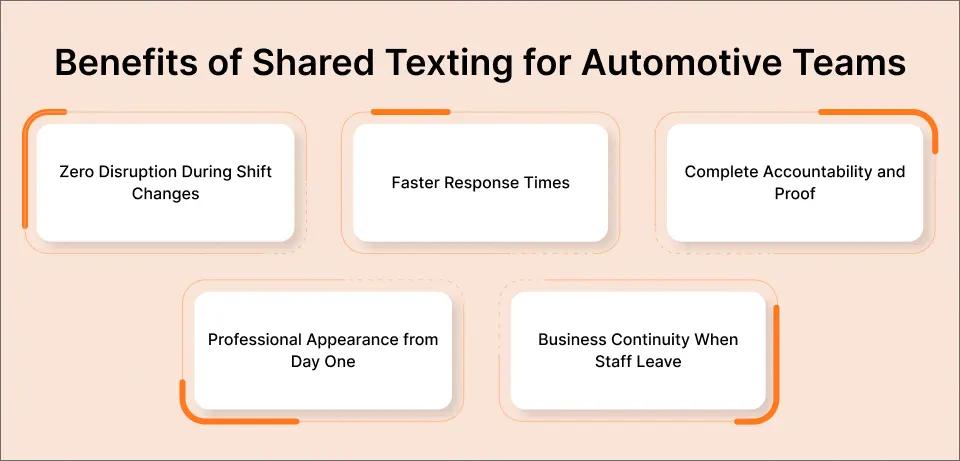
The benefits go far beyond convenience. Here’s what changes when your whole team can text customers.
1. Zero Disruption During Shift Changes
When every text lives in email, shift handoffs become effortless. The closing team sees exactly what the morning crew communicated.
No sticky notes. No verbal handoffs that get forgotten. The conversation history speaks for itself.
Customers experience consistent, professional communication regardless of who’s working.
2. Faster Response Times
With multiple staff members monitoring customer texts, messages get answered faster. If the service advisor is under a car, the front desk can respond.
This matters because most text messages are read within minutes. A fast reply keeps your customer engaged and your schedule on track.
Shops using automated text messages alongside team access see even bigger improvements in response speed.
3. Complete Accountability and Proof
Every message is timestamped and tied to a sender in your email system. You know exactly who told the customer what, and when.
This protects your shop if a customer disputes a quote, claims they weren’t notified, or questions a charge. Your records are right there in email.
4. Professional Appearance from Day One
All messages come from your dedicated business number. Customers see a professional sender, not a random personal cell number.
This builds trust. It also means staff don’t have to share personal phone numbers with customers.
5. Business Continuity When Staff Leave
When an employee quits, they don’t take your customer conversations with them. Everything stays in your email system.
Their TextBolt access gets removed through the dashboard. Your customer relationships and message history remain completely intact.
These benefits only work well when your team follows some key communication practices. Let’s cover those next.
Stop Depending on One Person’s Phone
Give your whole team texting access from their email. All plans include 10 users with no extra per-user fees.
What Are Best Practices for Multi-Staff Customer Texting in Auto Shops?
The best practices center on clear message templates, consistent timing, and team-wide communication standards.
Getting the tools right is only half the equation. Your team also needs shared habits. Here are five practices that keep multi-staff texting running smoothly.
1. Create Standard Message Templates
Write templates for your most common texts: appointment confirmations, vehicle ready notifications, repair authorization requests, and follow-ups.
Share these templates with every team member. This way customers get a consistent experience, no matter who’s texting them.
Keep templates under 160 characters to use just one message credit per text.
2. Include Key Details in Every Message
Every customer text should include the customer’s name, their vehicle description, and the specific update or action needed.
This helps whichever team member reads the reply understand the context instantly. A text saying “your car is ready” is less useful than “your 2019 Camry brake job is complete.”
3. Use Consistent Timing for Updates
Set standard times for different types of updates. For example, send appointment reminders 24 hours before the visit. Send status updates by noon.
When every shift follows the same timing, customers know what to expect. Your team avoids sending duplicate messages.
You can boost customer engagement via SMS by making your communication predictable and reliable.
4. Establish Response Time Standards
Set a team-wide goal for how quickly customer texts should be answered. A 15-minute response window during business hours is a solid benchmark.
When multiple people can see incoming messages, hitting this target becomes realistic. If the primary contact is busy, someone else picks it up.
5. Review Message History Before Responding
Before any team member replies to a customer, they should scroll through the email thread to see what’s already been communicated.
This takes 30 seconds and prevents contradictions, duplicate messages, and confusion. It’s the simplest way to maintain context across shifts.
| Practice | Without Shared Access | With Shared SMS Access |
| Shift handoffs | Verbal, often forgotten | Automatic via email history |
| Customer disputes | No proof of communication | Full timestamped record |
| Staff absence | Texting stops completely | Any team member covers |
| Response time | Depends on one person | Multiple responders available |
| Onboarding new staff | Weeks to learn contacts | Instant access to templates and history |
This comparison shows why shared access changes daily operations for automotive shops. Now let’s look at what getting started actually involves.
How Can You Give Your Whole Team Texting Access Today?
You can set up shared team texting in under 30 minutes using your existing email accounts, with no new software to learn.
Your automotive shop doesn’t need an expensive platform or IT support to fix the multi-staff texting problem. TextBolt works with the email your team already uses every day.
All plans include 10 user accounts with no per-user fees. Your service advisors, front desk staff, and managers all get access at no extra cost.
500+ businesses already use TextBolt for team-based customer communication. Check TextBolt pricing to find the right plan for your team’s message volume, and start your 7-day free trial with 10 message credits.
Frequently Asked Questions
How many team members can use TextBolt at the same time?
All TextBolt plans include 10 user accounts with one admin and nine individual users. Everyone shares the same credit pool. There are no per-user fees on any plan.
Do customers see different numbers when different staff text them?
No. All messages come from your single dedicated business number. Customers see the same sender regardless of which team member sends the text.
Can I remove a staff member’s access if they leave?
Yes. Remove their account through the TextBolt dashboard. All conversation history stays in your email system. The departing employee loses access immediately.
Does TextBolt work with Outlook and other email clients?
Yes. TextBolt works with Gmail, Outlook, Apple Mail, Zoho, ProtonMail, and any email client that supports SMTP. Your team can use whichever email they prefer.
How long does it take to get started?
Account setup takes 10 to 30 minutes. After that, 10DLC compliance approval takes up to 48 hours before your team can start sending messages.
Can customers reply to our text messages?
Yes. Customer replies arrive as standard email replies in your inbox. Any team member can see and respond to the reply, keeping the conversation going.