
- Why Emailed Invoices Disappear in Legal Clients’ Inboxes
- How Law Firms Send Invoice Reminders From Email to SMS
- How SMS Invoice Notifications Speed Up Collections
- What Law Firms Need to Know About SMS Billing Compliance
- Best Practices for Legal Invoice Text Messages
- How Can Your Firm Get Invoices Noticed Without Extra Work?
- Frequently Asked Questions
Stop Chasing Clients for Payment
How to Make Sure Legal Clients See Their Invoices With Email to Text Messaging

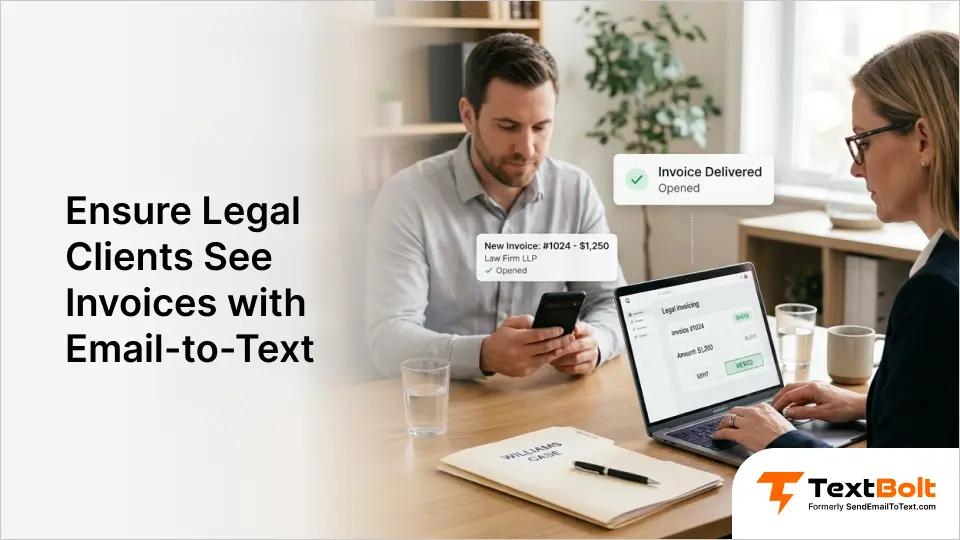
Payments stall, follow-up calls pile up, and your firm’s cash flow becomes unpredictable. For most law firms, late payments trace back to one root cause: clients never opened the invoice email.
You draft a detailed billing statement, send it by email, and wait. Days pass with no payment and no acknowledgment. The invoice sits buried alongside hundreds of unread messages.
Chasing payments by phone eats into billable hours your team cannot afford to lose. Adding SMS as a second delivery channel through automated text messages puts your invoices where clients actually look.
This guide covers why emailed invoices go unnoticed, how email-to-SMS works for law firms, and the best practices that help your practice collect on time. See how other firms use TextBolt’s SMS solutions for legal practices to streamline client communication.
Why Emailed Invoices Disappear in Legal Clients’ Inboxes
Most clients do not ignore invoices deliberately. The emails simply never reach their attention due to inbox clutter, spam filtering, and the passive nature of email as a billing channel. Understanding the root causes helps your firm choose the right fix.
1. Spam Filters and Promotions Tabs Bury Billing Emails
Email providers like Gmail automatically sort messages into categories. Invoices containing links, PDF attachments, or formatted templates often trigger promotional or spam filters.
Your client’s primary inbox may be clean while your invoice sits in a tab they never check. This happens frequently when billing emails include payment portal links or accounting software formatting.
Some email clients also deprioritize messages from senders that recipients rarely interact with. If a client has never replied to a billing email, future invoices may rank lower automatically.
The result: your billing system shows “sent” while the client genuinely has no idea they owe you money.
2. Crowded Inboxes Push Invoices Out of Sight
The average professional receives well over 100 emails per day. Legal clients who run businesses, manage teams, or oversee operations face even heavier volume.
Your invoice arrives alongside vendor proposals, meeting invitations, marketing newsletters, and internal correspondence. Without a subject line that demands immediate action, it gets scrolled past.
Email requires active effort to open and process. Many clients see a billing email, intend to handle it later, and never return to it. A text message, by contrast, appears directly on a phone’s lock screen and demands attention in the moment.
3. Email Lacks the Urgency Billing Requires
Clients associate email with tasks they can address at their convenience. An invoice in the inbox feels like something to handle next week, not today.
This perception creates a growing gap between when you send the invoice and when the client looks at it. Overdue balances accumulate and collection conversations become uncomfortable for everyone.
Email-to-SMS payment reminders change that dynamic. A text notification carries a natural sense of immediacy that email cannot match, prompting faster client responses.
Adding a second channel does not replace your email invoicing. It adds a visible prompt that makes clients aware an invoice is waiting and needs their attention. The good news: adding SMS requires no new software and no changes to your existing invoicing process.
How Law Firms Send Invoice Reminders From Email to SMS
Your billing coordinator opens Gmail, Outlook, or any email client and creates a new message. In the “To” field, they enter the client’s 10-digit phone number followed by @sendemailtotext.com. For example: 5551234567@sendemailtotext.com.
The email body becomes the text message content. TextBolt converts and delivers it as a standard SMS to the client’s phone. The client receives it like any other text, with no app required on their end.
When clients reply, their response arrives in your email inbox as a regular reply. This two-way messaging lets your team handle billing questions without switching platforms. If you already know how to send email to text, adding invoice notifications takes just a few minutes.
Your firm’s existing contact lists, email templates, and scheduling tools all work with this approach. Using Gmail’s built-in Schedule Send feature, you can queue invoice texts to go out at optimal times, like midweek mornings when clients are reviewing business communications.
The setup process takes 10 to 30 minutes for account creation. TextBolt then handles 10DLC business verification, which typically completes within 24 to 48 hours. Once approved, your firm is ready to send.
With the workflow in place, the real question is what impact SMS has on your firm’s collection rates.
Turn Billing Emails Into Texts Clients Actually Read
Send invoice reminders from your existing email. No new software to learn and no extra logins.
How SMS Invoice Notifications Speed Up Collections
SMS notifications shorten the gap between sending an invoice and receiving payment. When clients see your billing message within minutes instead of days, they act faster. Moving from email-only billing to a dual-channel approach creates measurable improvements across your firm’s collections.
1. Invoices Reach Clients Within Minutes, Not Days
Text messages appear directly on a client’s phone screen. There is no spam filter to bypass, no promotions tab to check, and no app to open before reading the notification.
This immediate visibility matters most for invoices with approaching due dates. A client who reads a billing reminder in the moment is far more likely to act while the amount and deadline are still top of mind.
2. Follow-Up Phone Calls Drop Significantly
Every call your staff makes to chase a payment is time not spent on billable work. For a mid-size firm handling dozens of active matters, payment follow-up alone can consume hours each week.
SMS reminders prompt payment before the follow-up call becomes necessary. Your administrative team can redirect those hours toward client service, case preparation, and intake tasks that keep the firm running.
3. Billing Disputes Surface Sooner and Resolve Faster
Clients who see an invoice on the same day it is sent raise questions sooner. A client who notices an unexpected line item can reply directly to the text. Your team receives the response as an email and can clarify immediately.
This back-and-forth happens in minutes, not over a chain of missed phone calls. Disputes get resolved in days rather than weeks, keeping your accounts receivable cycle shorter and more predictable.
4. Any Authorized Staff Member Can Cover Billing
With a business messaging platform like TextBolt, any authorized staff member can send invoice texts from their own email account. All plans include 10 user accounts with no per-user fees.
If your billing coordinator is on vacation or out sick, a paralegal or office manager takes over without needing a personal phone, a shared password, or a separate login. The firm’s billing number stays the same regardless of who sends the message. This is also how firms stop staff from texting clients on personal phones where billing conversations disappear when employees leave.
5. Every Message Creates an Auditable Record
Each text sent through TextBolt is logged in your email account with timestamps, message content, and delivery status. For practices where documentation matters, having proof that a client received an invoice reminder can resolve payment disputes before they escalate.
TextBolt’s dashboard lets you verify delivery status for every message your firm sends, updated within 2 to 5 minutes.
The Status filter on the dashboard lets you quickly sort messages by delivery outcome, so your billing team can verify which invoice notifications went through and which need follow-up.
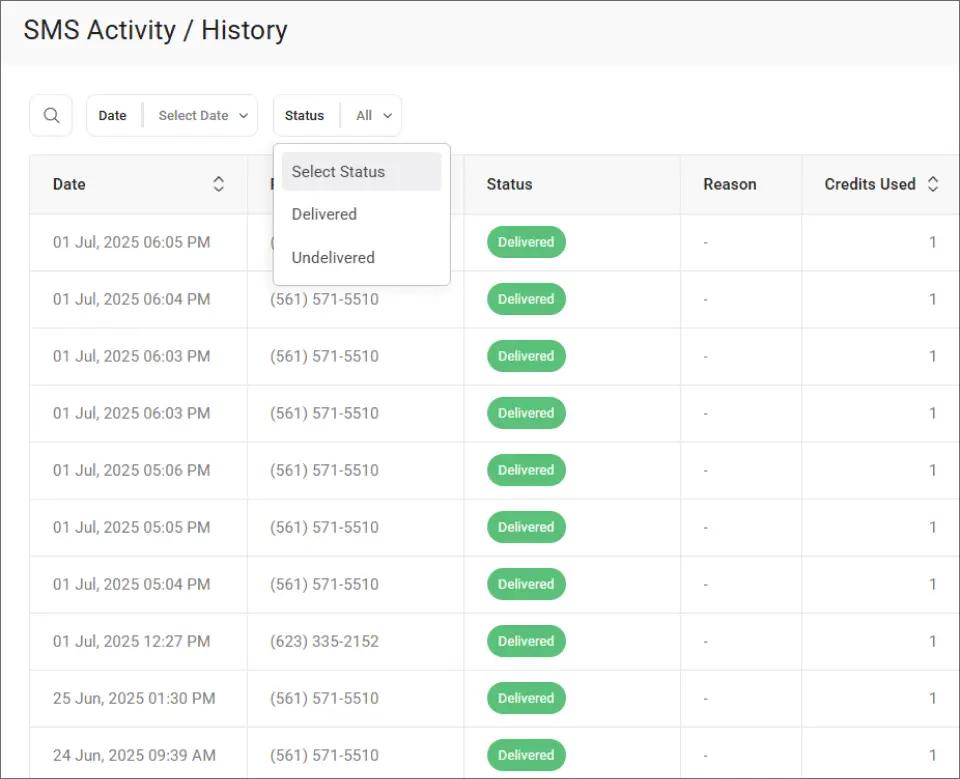
This filtering makes it easy to spot any undelivered messages and resend them before a payment deadline passes.
Unlike phone conversations, text messages cannot be disputed or misremembered. The exact wording, send time, and delivery confirmation are all documented automatically.
These collection benefits come with straightforward compliance requirements that most law firms can address in a few minutes.
Collect Payments Faster From Your Existing Email
Stop chasing clients with phone calls. Send invoice reminders they actually read, right from Gmail or Outlook.
What Law Firms Need to Know About SMS Billing Compliance
Federal and state regulations require client consent before sending billing texts. Most law firms satisfy this requirement by adding SMS authorization to their engagement letters or intake forms.
1. Add Texting Consent to Your Engagement Agreement
The Telephone Consumer Protection Act (TCPA) requires businesses to obtain consent before sending text messages. For law firms, the simplest approach is to include texting authorization in your client engagement agreement.
A brief clause stating that the firm may send billing notifications by text, with the client’s signature, satisfies this requirement. Many firms also add a texting consent checkbox to their intake paperwork.
If your firm already collects email consent for billing, adding text message consent to the same form is a minimal change. Clients rarely object when they understand it helps them stay informed about outstanding balances and never miss important court dates.
2. Rely on Built-In Opt-Out Handling
TextBolt automatically processes STOP keyword requests. If a client replies STOP to any text, they are removed from receiving future messages through the platform.
This built-in handling helps your firm stay compliant without manual tracking. You can review SMS compliance laws for additional detail on federal and state messaging regulations.
Include instructions in your internal policy for how to handle clients who opt out, so staff know to revert to phone or email follow-up for those individuals.
3. Keep Message Content Minimal and Non-Sensitive
Invoice texts should contain only the information needed to prompt payment: amount owed, due date, and how to respond. Avoid including case details, legal strategy references, or other privileged information in text messages.
Text messages are inherently less secure than encrypted email or client portals. Limit SMS content to billing logistics, and direct clients to secure channels for any substantive case discussions.
If a client asks a billing question via text reply, respond with a brief acknowledgment and offer to discuss further by phone or email.
4. Document Your Firm’s Texting Policy
Create a brief internal policy covering when staff should send invoice texts, what information to include, and how to handle client responses. This protects your firm and ensures consistency across all team members.
Having a written policy also demonstrates good faith compliance if questions arise during a bar review or client complaint. With compliance covered, your firm can focus on crafting messages that prompt faster payment.
Best Practices for Legal Invoice Text Messages
The most effective invoice texts are concise, specific, and include a clear next step. Every message should tell clients what they owe, when it is due, and how to pay.
1. Include the Amount and Due Date in Every Message
Clients need two pieces of information to act on an invoice: how much they owe and when payment is due. Include both in every billing text.
A clear example: “Your invoice for $3,200 from [Firm Name] is due April 10. Reply with any questions.” This gives the client everything they need in one glance.
Avoid vague language like “You have an outstanding balance.” Without specifics, clients are more likely to set the message aside and forget about it.
2. Stay Under 160 Characters to Control Costs
Standard SMS allows 160 characters per segment. Messages within this limit use one credit and arrive as a single text. Longer messages automatically split into multiple segments, each consuming one credit.
For invoice reminders, shorter is better. A brief, clear notification is more likely to be read and acted on than a lengthy paragraph. Review SMS character limits for details on how segmentation works.
Avoid emojis or special characters in billing texts. These trigger Unicode encoding, which reduces the per-segment limit to 70 characters.
3. Send Reminders at Three Strategic Touchpoints
Send the first SMS notification the same day you email the invoice. This ensures the client knows the invoice exists even if the email gets filtered.
Follow up three to five days before the due date with a second reminder. A final text on the due date itself provides one last prompt.
Limit reminders to three per invoice cycle. More than that risks damaging the client relationship. If payment has not arrived after three texts, a phone call or formal letter is more appropriate.
4. Maintain a Professional, Neutral Tone
Legal clients expect the same professionalism in texts that they receive in your emails and letters. Avoid exclamation marks, all-caps phrasing, or language that implies urgency beyond the actual due date.
Good: “Your $1,800 invoice from [Firm Name] is due March 28. Let us know if you have questions.” Avoid: “URGENT! Pay your invoice NOW!”
5. Direct Clients Toward Payment or a Conversation
Every invoice text should point clients toward a payment method or invite them to reply with questions. Without a next step, even a client who reads the message may postpone acting.
TextBolt’s two-way messaging means clients can reply directly. Their response arrives as an email in your inbox, making it simple to continue the conversation or clarify billing details.
If your firm uses an online payment portal, include the link in the message. Keep it short and recognizable so clients feel comfortable clicking through.
To confirm which invoice reminders reached clients, TextBolt’s dashboard provides a searchable record of every message, including delivery status, timestamps, and message content.
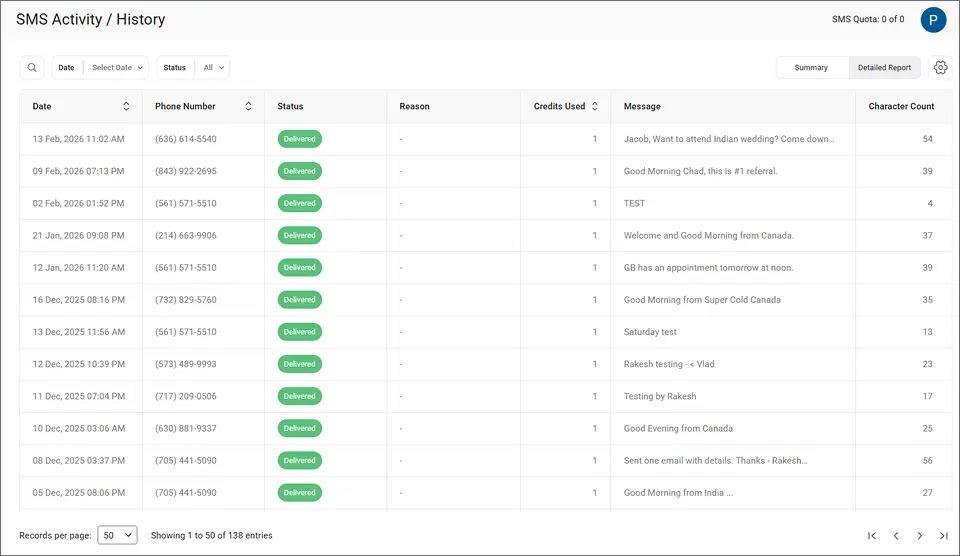
This detailed view gives your billing team a clear picture of which clients received their reminder and which messages need to be resent.
| Factor | Email-Only Billing | Email + SMS Billing |
| Invoice visibility | Depends on inbox behavior | Text appears on lock screen |
| Typical response time | Days to weeks | Hours to days |
| Follow-up calls needed | Frequent | Significantly fewer |
| Audit trail | Email records only | Email and SMS records |
| Staff coverage | Tied to one account | Any team member can send |
Together, email invoicing and SMS notifications reinforce each other, giving your firm better visibility into billing and faster payments from clients.
How Can Your Firm Get Invoices Noticed Without Extra Work?
Adding SMS to your billing process takes the tools you already use and gives them a second, more visible delivery channel. You compose an email. Your client gets a text. Payment comes faster.
The firms that collect most efficiently are not the ones with the most complex billing software. They are the ones whose invoices actually reach clients at the right moment, on the right channel.
TextBolt makes that possible from your existing email account, with plans starting at $29 per month and pricing designed for small and mid-size firms. All plans include 10 user accounts, so your entire billing team can send reminders without per-user fees.
*Delivery rates vary based on carrier policies, message content, and compliance factors.
Frequently Asked Questions
Do clients need to install an app to receive invoice texts?
No. Invoice reminders arrive as standard SMS on any mobile phone. Clients do not need to download an app or create an account. They receive and reply to texts normally.
Can I send invoice reminders to multiple clients at once?
Yes. Using Google Contacts groups, you can send one email that delivers individual text messages to each client. This works well for batch billing at the end of each month.
How much does it cost to send invoice reminders by text?
TextBolt plans start at $29 per month for 500 message credits. Each standard text message of 160 characters or fewer uses one credit. Longer messages use additional credits based on segment count.
Is it legal to send billing reminders via text message?
Yes, provided you have client consent. Most law firms obtain this during intake. TextBolt includes built-in opt-out handling through STOP keyword support to maintain TCPA compliance.
What happens if a client replies to an invoice text?
The reply arrives as a standard email in your inbox. You can continue the conversation by responding to that email, and TextBolt delivers your response as another text to the client.