
- What is Student Onboarding Communication?
- What are the Reasons Students Miss Onboarding Information?
- How to Build an Effective Pre-Boarding Strategy?
- How to Build a Multi-Channel Onboarding System?
- What are the Essential Onboarding Phases?
- How does SMS Reinforce Email-Based Onboarding?
- How can Higher Education Teams Actually Use Email-to-SMS?
- How to Measure Onboarding Effectiveness: 4 Key Metrics
- Strengthen Onboarding Communication with Email-to-SMS
- Frequently Asked Questions
Stop Losing Students Between Acceptance and Arrival
How to Improve Student Onboarding Communication with Email-to-Text

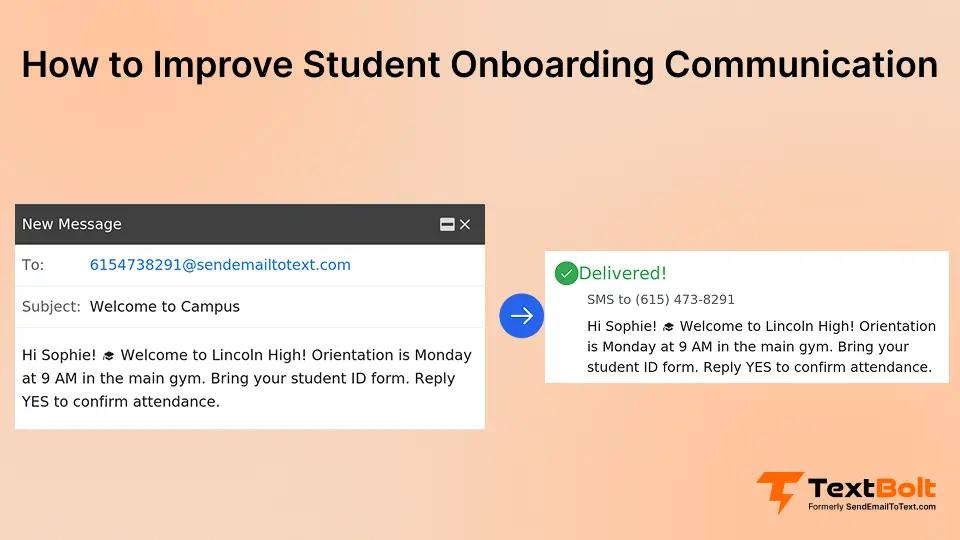
The “acceptance ghosting” problem costs higher education institutions more than reputation — it costs enrollments. Broken student onboarding communication is the root cause. According to the Governing, U.S. college enrollment declined by approximately 1.1 million students between 2019 and 2023, making retention of admitted students more critical than ever.
Your admissions team sends the acceptance letter, then communications go quiet for weeks while you focus on the next round. Meanwhile, new students receive portal login credentials buried in twelve-email welcome threads, miss housing deposit deadlines mentioned in page-seven footnotes, and arrive on campus confused about what they were supposed to complete.
Critical onboarding information gets lost in inbox clutter, spam filters, and information overload, exactly where email-to-SMS service helps you cut through and actually reach students. Your students don’t know whether to check email, the portal, or the website, so they check nothing and hope for the best.
From this guide, you will learn:
- Why do students miss critical onboarding information despite receiving it
- How to build a pre-boarding communication strategy that starts within 48 hours of acceptance
- Which communication channel works best for each type of onboarding information
- How SMS reinforces email-based onboarding without repeating content
- What metrics reveal whether your onboarding communication actually works
What is Student Onboarding Communication?
Student onboarding communication is the systematic process of sharing essential information, deadlines, and resources with newly admitted students from acceptance through their first semester. Unlike sporadic updates or single information dumps, effective onboarding creates a predictable cadence of touchpoints that guide students through enrollment requirements.
What Fragmented Student Onboarding Looks Like
You send portal login credentials via email on Monday, mention the housing deadline in a PDF attachment on Wednesday, post the orientation schedule on your website on Friday, and email course selection instructions the following week.
Your student opens three of the seven emails, misses the PDF entirely, never checks the website, and arrives on campus having completed two of the eight required tasks.
What Coordinated Email-SMS Onboarding Looks Like
You coordinate touchpoints across email-to-SMS for client onboarding, your student portal (documents and forms), and SMS (time-sensitive deadline reminders). Each channel reinforces the others.
Email provides the “what,” your portal houses the “where,” and SMS delivers the “when.” Your student knows exactly what to do, where to find it, and when it’s due.
Turn Onboarding Chaos into Clear, Timely Communication
Most students miss critical steps because information arrives all at once or not at all. A structured communication plan keeps new admissions informed without overwhelming them.
What are the Reasons Students Miss Onboarding Information?
Your onboarding communication fails when you create information gaps that students can’t bridge on their own. Here’s what causes the breakdown:
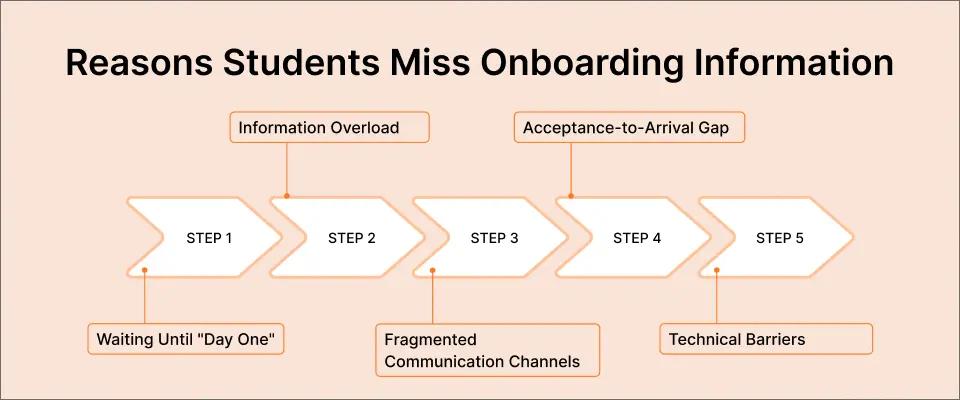
1. Waiting Until “Day One”
You delay crucial information until arrival, assuming orientation will cover everything. Your student receives the acceptance letter in March, hears nothing substantive until August, then faces a forty-seven-page welcome packet during move-in chaos. They’re overwhelmed, you’re rushed, and essential deadlines have already passed.
2. Information Overload
You send comprehensive welcome emails with everything a student might possibly need: housing instructions, course registration details, financial aid requirements, orientation schedules, parking permits, health forms, and technology setup, all in one message. Your student opens it, sees eight paragraphs and three PDF attachments, saves it for “later,” and never returns. Critical deadlines disappear into the wall of text.
3. Fragmented Communication Channels
You post login credentials in email, housing forms in your portal, orientation schedules on your website that never get reinforced with a dedicated SMS service for schools, and course selection instructions in a different email thread. Your student doesn’t know which platform to check first, so they check their email once, assume they saw everything, and miss the portal entirely. Three weeks later, you’re sending “urgent reminder” emails about tasks they never knew existed.
4. The Acceptance-to-Arrival Gap
You send the acceptance letter with enthusiasm, then communications go silent for weeks or months while your admissions team focuses on the next enrollment cycle. Your student feels abandoned, loses momentum, and disengages. By the time you resume contact closer to move-in, they’ve mentally checked out or assumed they missed something important.
5. Technical Barriers
Your portal credentials email lands in spam, your authentication system rejects their password reset, or your instructions assume technical knowledge they don’t have (“Navigate to the SSO portal via the registrar’s subdomain”). Your student can’t complete the first step, doesn’t know who to contact for help, and gives up.
Common Onboarding Failure Points
Here are a few common failure points when onboarding students to your school or university:
| The Problem | What Students Experience | The Result |
| Single comprehensive email | Twelve-paragraph message with buried deadlines | Read first paragraph, skip rest, miss critical dates |
| Portal access sent once | Credentials arrive before student actively checks .edu email | Email deleted as spam, student never logs in |
| Multi-platform information | Portal for forms, email for deadlines, website for schedules | Checks email only, misses portal and website entirely |
| Acceptance-day silence | No contact for 6 weeks post-acceptance | Student disengages, assumes they missed something |
| Generic help desk contact | “For questions, email admissions@university.edu” | Student doesn’t know specific question to ask, never reaches out |
How to Build an Effective Pre-Boarding Strategy?
Shift your communication timeline earlier to close the acceptance-to-arrival gap. Pre-boarding means structured engagement begins within forty-eight to seventy-two hours of acceptance, not weeks later when students have already tuned out.
1. Welcome Sequence Structure
Your initial welcome email arrives immediately after acceptance with clear next steps. Forty-eight hours later, you follow up confirming they received portal credentials and can log in successfully. Weekly touchpoints maintain engagement without overwhelming: housing application opening, orientation registration deadline that reduces missed academic deadlines, course selection window, and pre-arrival checklist.
Each message builds on the previous one, creating a predictable cadence your student learns to expect. They’re never surprised by deadlines because you’ve established a pattern of timely communication.
2. Verify Student Completion Instead of Assuming It
Don’t assume completion; verify it. After sending the portal access, you check whether the student actually logged in. Three days with no login? You send a follow-up: “Having trouble accessing your student portal? Here’s the direct link and step-by-step instructions.” After housing applications open, you monitor submission status and remind students forty-eight hours before the deadline.
These checkpoints catch students before they fall behind, when a simple nudge is all they need to get back on track.
3. Preventing the “Ghosting” Effect
Consistent communication prevents students from feeling abandoned. You don’t need daily messages; weekly touchpoints with a clear purpose maintain connection. Your student knows that every Tuesday, they’ll hear from your admissions team about the next important step. This predictability builds trust and keeps them engaged through enrollment.
Pre-Boarding Communication Timeline
- Day 1 (Acceptance): Welcome email with congratulations and immediate next step (accept offer)
- Day 3: Portal access credentials with login confirmation request
- Week 1: Housing application opening notification with deadline
- Week 3: Financial aid verification deadline reminder (if applicable)
- Week 5: Orientation registration opening with schedule options
- Week 7: Course selection preparation with advisor contact information
- Week 9: Pre-arrival checklist with move-in logistics
- Week 10: Final week countdown with essential arrival information
How to Build a Multi-Channel Onboarding System?
Your students live in a multi-channel world, but each communication channel serves a different purpose. Effective onboarding doesn’t mean using every platform; it means using the right platform for each type of information.
1. Email for Depth
Use email when you need to provide comprehensive instructions, attach documents, or explain complex processes. Your housing application email includes step-by-step form completion instructions, roommate selection guidelines, payment deadline details, and a PDF with frequently asked questions. Students read it on their own timeline, reference it when completing the application, and forward it to parents who have questions.
Email creates a permanent record that students can search and revisit. When they can’t remember the orientation schedule, they search their inbox for “orientation” and find your message from three weeks ago with all the details still accessible.
2. Student Portal for Documents
Your portal houses official forms, required submissions, and task checklists. Students upload health records, complete housing contracts, submit financial aid documents, and track completion status. The portal becomes their single source of truth for “what’s done and what’s still needed.”
Portal access requires intentional login, making it perfect for sensitive information and official requirements, but terrible for time-sensitive reminders that students might miss if they’re not actively checking.
3. SMS for Urgency and Reinforcement
Text messages work when you need immediate attention on critical deadlines. Your student received your detailed housing email two weeks ago with the deposit deadline clearly stated. Forty-eight hours before the deadline, you send a quick SMS: “Housing deposit due Friday. Check your email for the payment link; spots are filling fast.”
This isn’t new information; it’s reinforcement of the deadline buried in that comprehensive email they read once and forgot. SMS catches students wherever they are, prompting immediate action without requiring them to hunt through old emails or remember to check their portal.
This same urgency applies to email to SMS for emergency alerts during campus emergencies.
4. How Channels Complement Each Other
Your email explains the housing application process in detail. Your portal hosts the actual application form. Your SMS reminds students that the deadline is approaching. Each channel plays its role: email provides the “what” (complete housing application), portal houses the “where” (submit form here), SMS delivers the “when” (deadline in forty-eight hours).
Students appreciate this coordination because they’re not hunting for information across disconnected platforms. They know email contains the details, the portal holds the forms, and SMS alerts them when action is needed now.
When to Use Each Communication Channel
Here’s a quick breakdown of when you should use which communication channel during student onboarding:
| Channel | Best Use Case | Example |
| Detailed instructions, comprehensive information, document attachments | Complete housing application guide with roommate selection process | |
| Student Portal | Official forms, document submissions, completion tracking | Housing contract upload, health records submission, task checklist |
| SMS | Time-sensitive deadline reminders, urgent action prompts | “Orientation registration closes tomorrow; check email for link” |
| Website | Public information, event calendars, general resources | Campus map, academic calendar, department contact directory |
Make Sure Critical Deadlines Don’t Get Lost in Inbox Clutter
Email provides the details. SMS ensures students actually see the time-sensitive parts. Build a communication system where nothing falls through the cracks.
What are the Essential Onboarding Phases?
Your students need different information at different stages. Structure your communication around the natural progression from acceptance to arrival, delivering each piece exactly when students need to act on it.
1. Acceptance to Enrollment Window
Immediately after acceptance, your student needs to know how to accept the offer, access their student portal, and understand the deposit deadline. Within seventy-two hours, you confirm they successfully logged into the portal and can access essential resources. One week post-acceptance, you open housing applications with clear deadlines and instructions.
This window sets the foundation. Students who successfully complete these initial steps stay engaged through the entire onboarding process.
2. Pre-Arrival Preparations (Six to Eight Weeks Before)
Your focus shifts to activities students must complete before arriving on campus. Orientation registration opens with date options and agenda details, and you treat it with the same urgency as SMS exam schedule change alerts, so students do not miss key academic milestones. Course selection windows approach, requiring advisor consultations and registration preparation. Financial aid verification needs to be completed before tuition bills are generated.
Each of these touchpoints includes both the comprehensive email with full details and SMS reminders as deadlines approach. Your student knows what’s coming, when it’s due, and where to find the information they need.
3. First Week Essentials (Week of Arrival)
Move-in logistics become your priority: parking permits, ID card pickup locations, residence hall check-in times, and first-day schedules. Your communication shifts from “prepare for arrival” to “here’s exactly what to do when you arrive.”
These messages need precise timing. Sending move-in day logistics too early and students lose the information when they actually need it. Send them forty-eight hours before arrival with clear step-by-step instructions.
4. Ongoing Support (Post-Arrival)
Onboarding doesn’t end when students arrive. Your first-week messages include academic advisor meeting schedules, student services resources (tutoring, counseling, career services), campus safety information, and help desk contacts for technical issues.
Continued communication during the first semester reinforces that your admissions team remains available even after enrollment completes, building long-term student success and retention.
New Student Communication Checklist
Month Before Arrival:
- Housing assignment notification
- Roommate introduction (if applicable)
- Orientation registration confirmation
- Course selection preparation with advisor contact
- Campus services overview (dining, parking, health services)
Week Before Arrival:
- Move-in day logistics (date, time, parking instructions)
- ID card and parking permit pickup locations
- Required documents checklist (health forms, immunization records)
- First-week schedule preview
- Campus map with key locations highlighted
Day of Arrival:
- Welcome message with immediate next steps
- Orientation schedule confirmation
- Dining hall hours and locations
- Emergency contacts and campus safety information
- Help desk contacts for technical issues
How does SMS Reinforce Email-Based Onboarding?
SMS doesn’t replace your detailed email communication; it reinforces the time-sensitive actions buried in comprehensive messages. Your students need the depth email provides, but they also need the urgency SMS delivers when deadlines approach.
1. The Nudge, Not the Novel
Your housing deposit email includes payment instructions, roommate selection guidelines, deadline details, FAQ links, and contact information for questions. That’s eight paragraphs of essential information your student needs to read carefully. Two days before the deposit deadline, you send a quick text: “Housing deposit due Friday. Check your email for the payment link.”
This isn’t repeating the entire housing process via text; it’s prompting students to revisit that comprehensive email they read two weeks ago and take action before the deadline passes.
2. Preventing Registration Drop-Off
You send a ten-page orientation email with schedule options, session descriptions, registration instructions, and campus map. Your student reads the first page, appreciates the thorough information, saves it for later review, and forgets about it entirely. Twenty-four hours before orientation registration closes, you send an SMS reminder. They immediately open that saved email, complete registration, and secure their preferred time slot.
3. Financial Aid Verification Deadlines
Financial aid verification windows have tight deadlines that directly impact tuition billing. Your detailed verification email explains the required documents, the submission process, and the consequences of missing the deadline. The email sits unread in your student’s inbox. Forty-eight hours before the window closes, your SMS alert prompts them to check their email and submit documents before losing aid eligibility.
4. Course Registration Timing
Course registration opens at midnight, when most students aren’t monitoring their email. Your SMS notification at 11:45 PM ensures students don’t miss their registration time slot, preventing schedule conflicts and closed course frustrations.
5. Faster Response Times
Your comprehensive email sent at 2 PM might not be read until evening, or the next day, or never. SMS messages are typically opened within minutes of delivery. When deadlines matter, those minutes make the difference between timely completion and missed opportunities.
How can Higher Education Teams Actually Use Email-to-SMS?
Your admissions office sends detailed onboarding emails with all necessary information. Three days before critical deadlines (housing deposits, orientation registration, course selection windows), you send SMS reminders from your work email; no separate platform, no new dashboard to learn.
You compose the reminder as a regular email to the student’s phone number (example: 5551234567@sendemailtotext.com) from your Gmail or Outlook account. TextBolt converts it to SMS and delivers it to the student’s phone as a standard text message. Your workflow stays in email, where you already work.
Email-Only Approach:
You send a comprehensive orientation registration email three weeks before the deadline. Students read it, appreciate the detail, and plan to register “later this week.” Two weeks pass. The deadline arrives. Many students forgot to register and now have limited time slot options or miss orientation entirely.
Email + SMS Reinforcement:
You sent the same comprehensive orientation email three weeks before the deadline. Twenty-four hours before registration closes, you send an SMS reminder: “Orientation registration closes tomorrow. Check your email for the link; morning sessions filling fast.” Students who forgot immediately register. Your on-time registration rate increases measurably, and fewer students miss orientation due to simple oversight.
How to Measure Onboarding Effectiveness: 4 Key Metrics
Your communication strategy works only if students actually complete required tasks on time. Track specific metrics that reveal where your system succeeds and where students still fall through the cracks.
1. Task Completion Rates
What percentage of your students complete portal setup, housing applications, and orientation registration by stated deadlines? > If 85% of portal setups are completed within 48 hours of receiving credentials, your initial welcome sequence works. If only 60% of housing applications are completed by the deadline, your housing communication needs strengthening.
Break down completion rates by communication method. Compare students who received email-only communication versus students who received email plus SMS reminders for the same task. The difference reveals whether multi-channel communication actually improves outcomes or just adds noise.
2. Response Time Metrics
How quickly do your students act after receiving communication? Portal login attempts spike within hours of sending credentials email? Your welcome sequence has an immediate impact. Housing application submissions cluster in the final twenty-four hours before the deadline despite weeks of advance notice? Your early communication isn’t creating urgency; students wait until the last minute regardless.
Compare response timing for email-only versus email-plus-SMS communication. Students who receive SMS reminders forty-eight hours before deadlines typically act faster than students relying solely on calendar memory or saved emails.
3. Engagement Indicators
Lower help desk inquiry volume often indicates clearer initial communication. If your students contact your help desk asking basic questions already covered in welcome emails, your information presentation needs simplification. If portal login support tickets decrease after adding SMS reminders about portal access, you’ve successfully closed a communication gap.
Monitor portal login frequency during the pre-arrival period. Students who log in weekly are engaged and tracking their progress. Students who haven’t logged in for three weeks likely missed communications or encountered technical barriers you need to address.
4. Post-onboarding Surveys That Reveal Communication Gaps
Post-onboarding surveys asking about communication clarity and timeliness reveal the student perspective. Did they feel overwhelmed by too much information? Did they receive reminders when needed? Were instructions clear enough to complete tasks without assistance?
This qualitative data complements your quantitative metrics, showing not just whether students completed tasks, but whether your communication made completion easy or frustrating.
Key Onboarding Metrics to Track
- Portal activation within 48 hours: Target 85%+
- Housing application completion before deadline: Target 90%+
- Orientation registration on-time completion: Target 95%+
- Help desk tickets for basic onboarding questions: Target <10% of admitted students
- Students requiring deadline extension requests: Target <5%
- Average time from email send to task completion: Compare email-only vs email+SMS
- Student survey rating for communication clarity: Target 4.5/5 or higher
New students miss onboarding information when your communication is fragmented, overwhelming, or poorly timed. A structured pre-boarding strategy with coordinated email, portal, and SMS touchpoints closes the gap between acceptance and arrival. SMS reinforces critical deadlines buried in detailed emails, ensuring students take action on time-sensitive requirements without recreating comprehensive instructions in every reminder.
Your admissions team already sends detailed onboarding emails. Adding SMS reminders for urgent deadlines doesn’t require new software; you can send texts directly from Gmail or Outlook, keeping your workflow simple while measurably improving completion rates. Start building a more effective onboarding system with automated text message solutions that work from your existing email account.
Strengthen Onboarding Communication with Email-to-SMS
TextBolt lets your admissions team send SMS reminders directly from existing email accounts; no new platform to learn, no separate dashboard to manage. When housing deadlines approach or orientation registration is closing, your staff composes a quick text message as a regular email (example: 5551234567@sendemailtotext.com) from Gmail or Outlook. The message is delivered as a standard SMS to the student’s phone.
Your detailed onboarding emails stay as emails. Critical deadline reminders get the urgency of SMS. Up to 98% delivery rate* with 10DLC compliance ensures messages actually reach students. Setup takes 10-30 minutes, with 10DLC approval typically completed within 48 hours. Once approved, your entire admissions team (up to 10 users included on all plans) can send from their own email accounts.
Frequently Asked Questions
When should onboarding communication start after a student accepts admission?
Begin structured communication within forty-eight to seventy-two hours of acceptance. Immediate welcome messaging prevents the “ghosting” gap and establishes a predictable communication cadence that keeps students engaged through enrollment and arrival.
How many communication touchpoints are appropriate during the pre-arrival period?
Plan for four to six major touchpoints between acceptance and move-in day: initial welcome, portal setup confirmation, housing deadline reminder, orientation registration, pre-arrival checklist, and arrival week logistics. Adjust frequency based on your timeline; monthly admissions may need more frequent contact than rolling admissions.
Should all onboarding information be sent via email, or should some use SMS?
Email works best for detailed instructions, documents, and comprehensive resources. Reserve SMS for time-sensitive reminders about critical deadlines or actions buried in longer emails. The two channels complement each other; email provides depth, SMS ensures urgency.
What causes students to miss portal login credentials during onboarding?
Portal credentials often get buried in welcome email clutter, filtered to spam, or sent before students actively check their new .edu email address. Send credentials via the student’s primary contact email, confirm receipt with follow-up SMS, and provide alternative access recovery options.
How can we tell if our onboarding communication strategy is working?
Track portal activation rates within forty-eight hours, housing application completion before deadlines, orientation registration completion, and help desk inquiry volume. Compare completion rates before and after implementing multi-channel communication. Lower help desk volume typically indicates clearer initial communication.
What’s the biggest mistake in new student communication?
Waiting until move-in day or orientation to share critical information. Students need structured communication starting immediately after acceptance; portal access, housing deadlines, and course registration windows can’t wait until they arrive on campus. Front-load essential information with reinforcement reminders as deadlines approach.
How do universities communicate with incoming students?
Most universities rely on email, student portals, and websites to share onboarding information. Effective programs add SMS reminders for time-sensitive deadlines, creating a multi-channel system where email provides details, the portal houses forms, and text messages prompt action before deadlines pass.