
- Why Post-Visit Follow-Ups Fall Behind in Busy Practices
- How Your Team Sends Follow-Up Texts From Their Existing Inbox
- How Automated Follow-Ups Improve Patient Outcomes and Practice Revenue
- Which Follow-Up Messages to Send and How to Get Each One Right
- Ready to Automate Post-Visit Follow-Ups From Your Inbox?
- Frequently Asked Questions
Stop Losing Patients to Missed Follow-Ups
How to Improve Post-Visit Follow-Ups With Email-to-SMS Automation

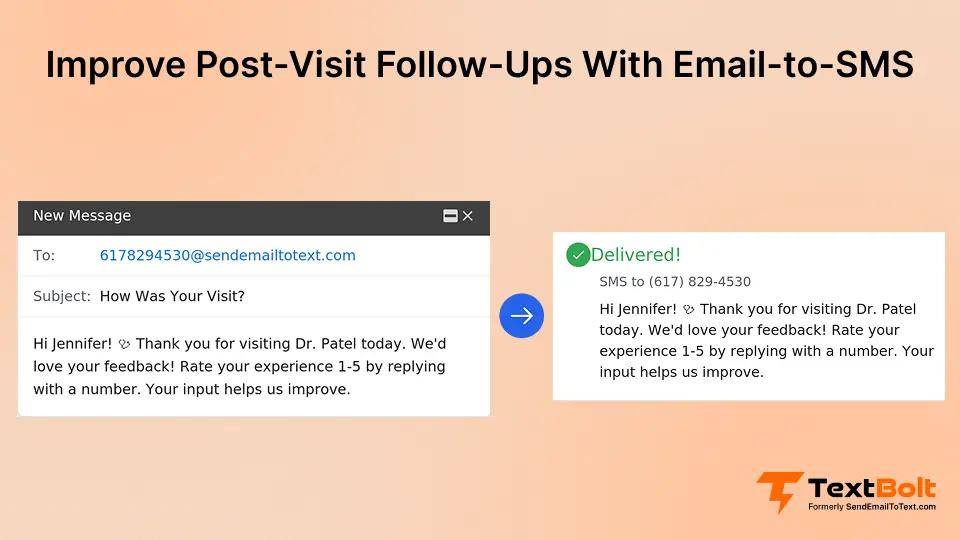
Post-visit follow-ups are critical to patient care, yet they’re among the first tasks to fall behind when your front desk gets busy. Staff prioritize the patients in front of them, and follow-up calls pile up.
The result? Missed medication checks. Delayed wound assessments. Patients who skip critical lab reviews. Each missed follow-up creates clinical risk and lost revenue for your practice. Many practices already struggle to reduce patient no-shows, and missed follow-ups compound the problem.
You can reduce missed appointments with SMS reminders by automating follow-ups through your existing email. No new platforms, no extra admin hours, no workflow changes.
This guide shows you how to improve post-visit follow-ups without adding staff or software, using TextBolt email-to-SMS service automation your team can start using today.
Why Post-Visit Follow-Ups Fall Behind in Busy Practices
Follow-ups get missed because they depend on manual effort during the busiest part of the clinical day. Staff prioritize patients in the waiting room over calls to patients who already left.
1. Front Desk Teams Juggle Too Many Roles to Make Follow-Up Calls
Your front desk handles check-ins, phone calls, insurance questions, and scheduling. Adding 30 follow-up calls to their afternoon doesn’t work.
When the afternoon rush hits, those calls get pushed to “later.” Tomorrow will be later. Tomorrow never.
Most practices don’t have dedicated follow-up staff. The same people answering phones and greeting patients are expected to make outbound calls between tasks.
2. Phone Tag Wastes Hours Without Reaching Patients
Calling patients for follow-ups means playing phone tag. You call, they don’t answer. They call back, you’re with another patient. The cycle repeats all week.
A single follow-up call takes five to seven minutes when you factor in dialing, waiting, voicemails, and charting the attempt. Multiply that by 20 patients, and you’re looking at two hours of phone time that rarely produces a live conversation.
3. Paper Lists and Sticky Notes Break Down Between Shifts
Most practices track follow-ups on paper lists, sticky notes, or mental reminders. These systems collapse when staff are absent, overwhelmed, or transitioning between shifts.
Without a reliable system, follow-ups depend entirely on individual memory. When your healthcare texting workflow relies on one person remembering, patients inevitably fall through the cracks.
The problem compounds over time. Patients who miss one follow-up are more likely to skip future appointments, creating a widening gap in their care plan.
These gaps make it clear why practices need a different approach. The fix doesn’t require new software or added headcount, just a smarter use of tools your staff already have.
How Your Team Sends Follow-Up Texts From Their Existing Inbox
Email-to-SMS lets your clinical staff send text follow-ups by composing a regular email. No new login, no separate app, no training sessions required.
Here’s how it works with TextBolt. Your staff opens Gmail, Outlook, or whatever email client they use daily. Instead of a regular email address, they type the patient’s phone number followed by @sendemailtotext.com.
To follow up with a patient at 555-123-4567, your staff sends an email to 5551234567@sendemailtotext.com. The email body becomes an SMS delivered to the patient’s phone within minutes.
When the patient replies by text, the response lands as a regular email reply in your staff’s inbox. The entire conversation stays in one thread with no app switching. You can even confirm patient message delivery through the TextBolt dashboard.
You can also use Gmail’s Schedule Send feature to queue follow-ups in advance. After a morning of patient visits, your team drafts all follow-up messages and schedules them for delivery the next day.
This fits inside workflows your staff already know. Your team can send appointment reminders via email and extend the same process to post-visit check-ins, medication reminders, and care instructions.
TextBolt’s dashboard tracks delivery status for every message your team sends, updated within two to five minutes.
The Detailed Report view shows each message with its delivery status, recipient number, and content. Your office manager can verify that follow-ups actually reached patients.
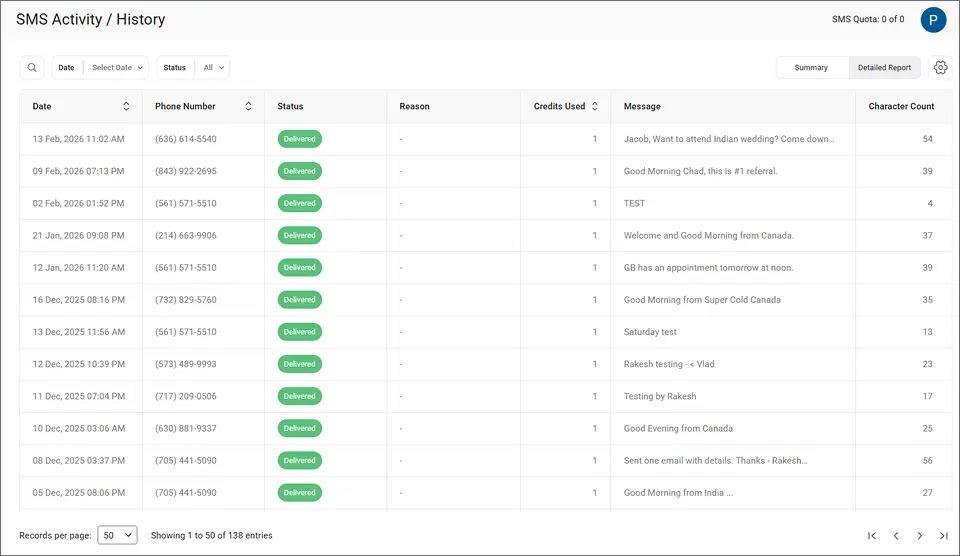
This visibility replaces guesswork with proof. Your team knows exactly which follow-ups were delivered and which need a second attempt.
With the process in place, the next question is how these automated follow-ups translate to measurable results for your practice.
Send Follow-Ups Without the Phone Tag
Automate post-visit texts from your existing email. No new software, no extra staff hours.
How Automated Follow-Ups Improve Patient Outcomes and Practice Revenue
Automated text follow-ups improve both clinical results and your bottom line by ensuring patients receive timely post-visit communication every single time.
1. Patients Follow Care Instructions More Consistently
Most patients forget a significant portion of what their provider told them within hours of leaving. A follow-up text reinforcing key instructions bridges that gap.
A message like “Remember to take your prescribed medication with food for the next seven days” takes seconds to send. It can prevent complications that lead to emergency calls or unplanned return visits. When updates are time-sensitive, SMS ensures patients get urgent patient updates faster than email alone.
2. Fewer Patients Drop Off the Care Continuum
When patients don’t hear from your practice after a visit, they assume everything is fine. Some skip follow-up appointments entirely, even when they need ongoing monitoring.
An automated text message sent 24 to 48 hours after a visit keeps your practice visible. It reminds patients to book their next appointment before the visit fades from memory.
3. Recovered Revenue From Follow-Up Appointments That Would Otherwise Be Missed
Every missed follow-up visit is lost revenue. At $200 per appointment, a practice losing just 10 follow-up visits per week loses $8,000 per month.
Automated text reminders bring patients back without requiring staff phone calls. Messages go out on schedule regardless of how hectic the office gets that day.
4. Stronger Patient Satisfaction Scores and Higher Retention
Patients notice when their provider follows up after a visit. It signals that the practice cares about outcomes, not just billing.
Practices that communicate proactively see higher patient retention and more positive online reviews. You can rebuild patient trust with proactive text updates that show patients you care beyond the visit.
You can filter your dashboard by delivery status to confirm which follow-up messages reached patients. The Status filter lets your team sort by delivery outcome and flag texts that need resending.
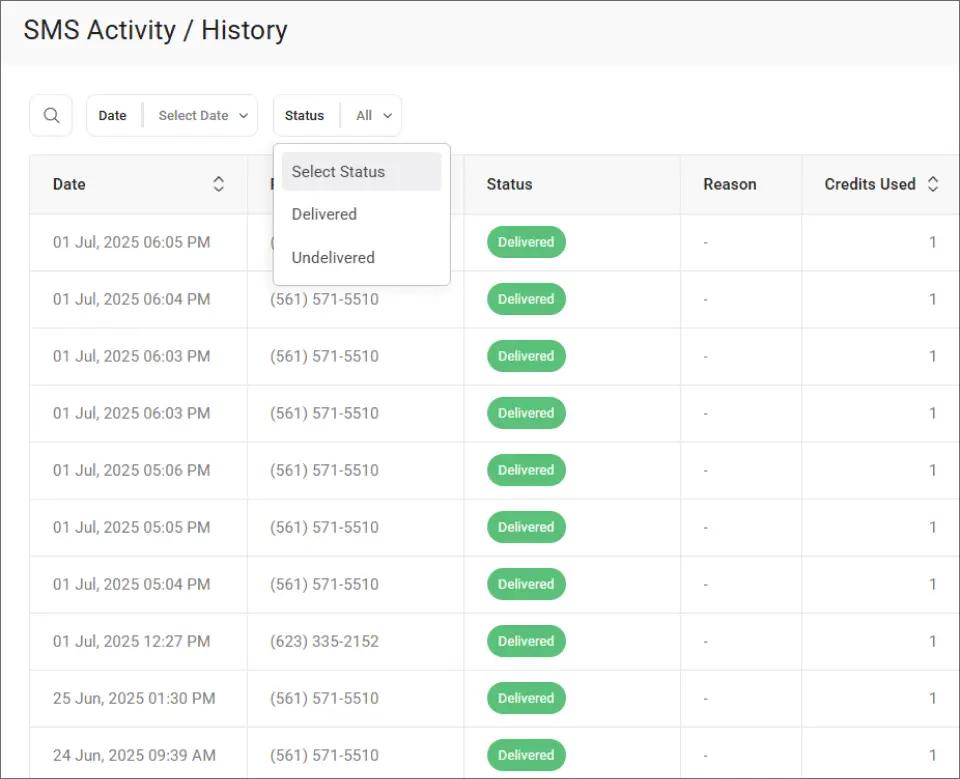
Spotting undelivered messages early means your staff can call those patients directly before a gap in care develops.
These improvements add up quickly. The next step is knowing exactly what to say in each follow-up and when to send it.
Turn Every Visit Into a Follow-Up Opportunity
Text patients after visits using your Gmail or Outlook. Set up in under 30 minutes.
Which Follow-Up Messages to Send and How to Get Each One Right
Effective follow-ups address specific patient needs rather than sending generic “how are you feeling” messages. Tailoring your texts by visit type increases response rates.
1. Same-Day Care Instruction Reminders
Send a brief text summarizing key post-visit instructions within two to four hours of the appointment. Focus on the one or two most critical actions the patient needs to take.
Keep messages under 160 characters to use a single credit. Example: “Ice your knee 20 min every 2 hrs today. Call Valley Medical at 555-0147 if swelling increases.”
Always include your practice name so patients know who’s texting. Messages without clear identification get ignored or reported as spam.
2. Next-Day Appointment Scheduling Prompts
Send a text 24 to 48 hours after the visit prompting patients to schedule their next appointment. Most patients intend to schedule but forget once they get home.
You can schedule an SMS from Gmail right after the visit so the message goes out automatically the next morning. A direct prompt like “Dr. Patel recommends a follow-up in two weeks. Call 555-0147 to schedule” makes it easy for patients to act.
3. Medication Check-Ins Three to Five Days After New Prescriptions
For patients starting new medications, a follow-up text asking about side effects shows proactive care. It also catches potential issues before they escalate into urgent calls or ER visits.
Keep it simple: “How are you feeling on the new medication? Reply here or call our office if you have questions.” TextBolt delivers replies straight to your staff’s inbox for easy follow-through.
4. Lab and Test Result Ready Notifications
Let patients know when results are available rather than waiting for them to call. “Your lab results are ready. Check your patient portal or call our office” reduces inbound call volume significantly.
This saves your front desk from fielding repeated “are my results in yet” calls throughout the day. That time goes back to higher-value tasks like helping patients in the office.
5. Post-Visit Satisfaction and Feedback Requests
Wait at least 48 hours after the visit, then send a brief text asking about their experience. Keep it short and focused on one action.
These messages show patients you value their input. They also help you catch service gaps before they become negative online reviews that affect your practice’s reputation.
For all message types, keep texts concise and focused on a single action. Avoid sending during early morning or late evening hours. Messages sent during business hours get higher response rates and feel more professional.
TextBolt delivers patient text replies directly to your email inbox. Encourage patients to reply when appropriate. Simple responses like “YES to confirm” or “Call me back” give your team a clear next step without switching platforms.
For practices with messaging involving HIPAA considerations, learn how to text patients while staying in control of compliance. Every text sent through TextBolt is logged in your email with timestamps and delivery confirmation. Consult your compliance team to ensure TextBolt fits your specific requirements.
When a follow-up is delivered, your team can confirm the details directly from the TextBolt dashboard. The message detail view shows content, delivery time, and status for each individual text.
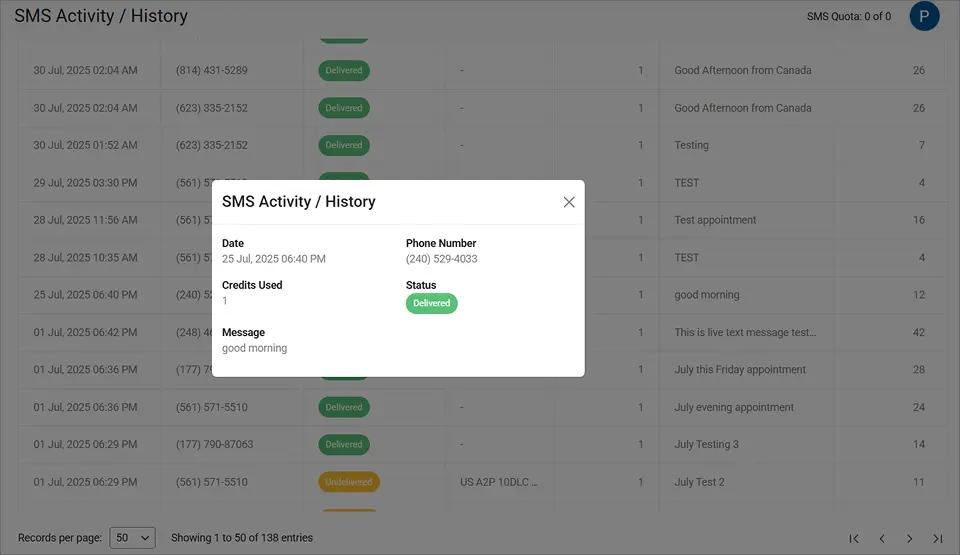
This gives your practice documentation that the follow-up was sent and received, which matters for both care coordination and compliance records.
| Follow-Up Type | Timing | Example Message |
| Care instructions | Same day, 2-4 hours post-visit | “Ice 20 min every 2 hrs. Call if swelling increases.” |
| Appointment prompt | 24-48 hours post-visit | “Provider recommends follow-up in 2 weeks. Call to schedule.” |
| Medication check-in | 3-5 days post-visit | “How are you feeling on the new medication? Reply or call us.” |
| Lab results ready | When available | “Lab results are ready. Check your portal or call our office.” |
| Satisfaction request | 48+ hours post-visit | “How was your recent visit? We value your feedback.” |
Getting started is faster than most practices expect.
Ready to Automate Post-Visit Follow-Ups From Your Inbox?
Post-visit follow-ups don’t need to be another task on an already full to-do list. With email-to-SMS, your team sends follow-up texts as easily as sending an email. No new software, no training sessions, no added admin hours.
Whether your practice needs care instruction reminders, medication check-ins, or appointment prompts, the process is the same: compose an email, hit send, and TextBolt handles the rest.
500+ healthcare practices and businesses already trust TextBolt for reliable text messaging with up to 98% delivery rates.* Check TextBolt pricing to find the right plan for your practice.
Frequently Asked Questions
How long does it take to set up TextBolt for post-visit follow-ups?
Account creation takes 10 to 30 minutes. After that, 10DLC compliance approval takes up to 48 hours before your practice can start sending patient messages.
Can multiple staff members send follow-up texts?
Yes. All TextBolt plans include 10 user accounts. Any team member with email access can send and receive texts from your shared business number with no per-user fees.
Do patients need to install an app to receive follow-up texts?
No. Messages arrive as standard SMS on any mobile phone. Patients don’t need to download anything or create an account to receive or reply to follow-up texts.
Is email-to-SMS appropriate for messages involving patient health information?
TextBolt uses pass-through architecture with no message storage on its servers. Learn more about HIPAA-compliant patient texting and consult your compliance team before sending protected health information.
How much does it cost to send post-visit follow-up texts?
Plans start at $29 per month for 500 credits. Each standard 160-character SMS segment uses one credit. All plans include 10 user accounts with no per-user fees.