
- Why Clients Miss Critical Financial Alerts and What It Costs Your Firm
- How Financial Advisors Send Account Alerts From Their Existing Inbox
- How SMS Account Alerts Build Client Trust and Reduce Financial Losses
- Best Practices for Writing Financial SMS Alerts That Drive Action
- Ready to Make Sure Every Client Alert Gets Read?
- Frequently Asked Questions
Stop Losing Clients to Missed Alerts
How to Ensure Clients See Important Account Updates Instantly With Email to SMS

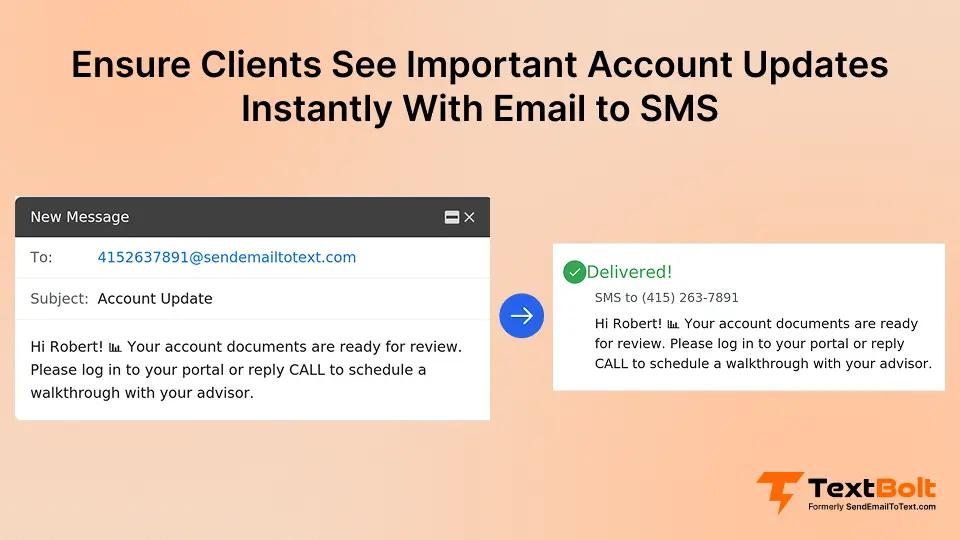
Your clients are missing important account alerts. Fraud warnings, payment confirmations, and balance notifications sit unread in crowded inboxes while time-sensitive issues escalate.
For financial professionals, a missed alert is not just an inconvenience. It can mean unauthorized transactions go unnoticed, deadlines pass, and client trust erodes.
Email alone is not reliable for urgent financial communications. Most people check email a few times per day, but they read text messages within minutes.
Email-to-SMS service bridges that gap. By converting your existing email alerts into text messages, you ensure clients see important account updates instantly without adopting new software.
This guide covers how text message delivery through email-to-SMS works for financial services and why it keeps clients informed when it matters most.
Why Clients Miss Critical Financial Alerts and What It Costs Your Firm
Most financial firms already send alerts. The problem is not the alerts themselves but the channels used to deliver them. Here is why the most common methods fall short.
1. Overcrowded Inboxes Bury Fraud Warnings and Payment Notices
The average professional receives dozens of emails per day. Financial alerts compete with newsletters, promotions, and internal communications for attention.
Even with filters, urgent messages land in secondary tabs or spam folders. A fraud alert buried under unread emails might not get seen for hours. For critical scenarios, email-to-SMS for emergency alerts ensures the warning reaches clients immediately.
Automated financial alerts sometimes trigger spam detection algorithms, sending critical messages directly to junk folders. By that point, unauthorized charges continue, payment windows close, time-sensitive investment opportunities expire, and clients feel blindsided.
2. Push Notifications Get Silenced Alongside Social Media Pings
Many financial institutions rely on app-based push notifications. But clients frequently disable notifications or ignore them alongside dozens of other app alerts.
Notification fatigue is real. When every app on a phone demands attention, critical financial alerts blend into the noise. Important account warnings compete with social media, shopping, and news apps for lock screen space.
Text messages stand apart because they arrive in the native messaging app. Most people read SMS within minutes of receiving it. That immediacy is why businesses across industries are finding ways to boost customer engagement via SMS rather than relying on channels clients routinely ignore.
3. Response Windows Close Before Slow Channels Deliver
When a suspicious transaction triggers an alert, every minute counts. But if the alert reaches the client hours later via email, the window to act has already closed.
A payment reminder that arrives after the due date does not prevent late fees. It only documents the missed deadline. That is why firms using SMS ensure clients never miss payment deadlines in the first place.
SMS creates an urgency layer that matches the time sensitivity of the alert itself.
| Alert Channel | Typical Read Time | Engagement | Client Action Speed |
| Hours | Low | Delayed | |
| App Push Notification | Minutes to hours | Variable | Inconsistent |
| SMS Text Message | Minutes | High | Fast |
These delivery gaps make the case for adding SMS to your alert workflow. The next question is how email-to-SMS actually works for financial professionals.
How Financial Advisors Send Account Alerts From Their Existing Inbox
You do not need to learn new software or hire developers. If you can send an email, you already know the basics of how to send email to text. Email-to-SMS converts your standard email notifications into text messages that arrive on clients’ phones within minutes.
Step 1: Compose a Client Alert in Gmail, Outlook, or Any Email Client
Open your email platform like Gmail or Outlook and write the alert message in the body, just like a regular email. Keep it concise and actionable.
For example, a fraud alert might read: “Unusual activity detected on your account ending in 4521. Reply CONFIRM if authorized or call us at 555-0123.”
Keep messages under 160 characters for single-segment delivery. Review SMS character limits for details on how segments work. Financial alerts work best when they focus on one action item.
Step 2: Address It to the Client’s Phone Number
Instead of typing an email address, enter the client’s phone number followed by @sendemailtotext.com. The format is 5551234567@sendemailtotext.com.
TextBolt recognizes this format and routes the message as SMS. Your client receives a text from your professional business number, not a random email address.
Step 3: Send and Track Delivery on the Dashboard
Hit send. TextBolt receives the email, strips formatting, and delivers the content as a standard text message. No app download required on the client’s end.
Delivery typically happens within minutes. You can track delivery status through the TextBolt dashboard to confirm each message reached its destination.
The dashboard’s Detailed Report view lets you verify which alerts went through and which need follow-up, so no client notification falls through the cracks.
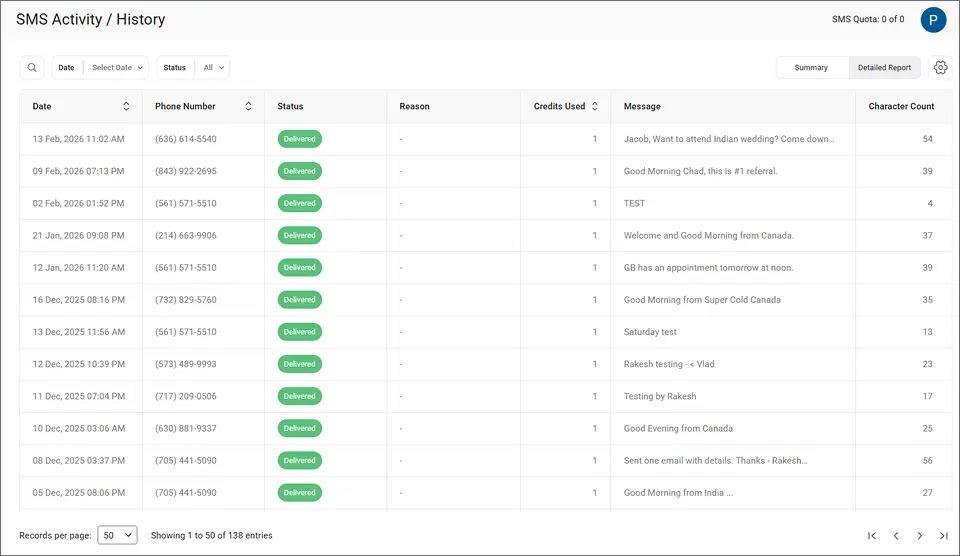
This delivery tracking gives your compliance team documentation that time-sensitive alerts were sent and received, creating an audit trail for regulatory requirements.
Step 4: Continue the Conversation When Clients Reply by Text
When your client replies to the text, their response arrives in your email inbox as a standard reply. You can confirm fraud alerts, verify transactions, or answer account questions directly from email.
This two-way messaging keeps conversations in one place without switching platforms. The approach fits naturally into your existing workflow because it lets you use SMS without replacing email workflows your team already relies on.
Step 5: Schedule Recurring Alerts Like Payment Reminders in Advance
For recurring alerts like payment due dates, use Gmail’s schedule SMS from Gmail feature. Compose the message, choose the delivery date and time, and Gmail sends it automatically.
TextBolt converts and delivers it as SMS at the scheduled time. This works well for monthly statement notifications, quarterly review reminders, and annual policy renewal alerts. For firms that want alerts to fire automatically based on system events, you can also trigger SMS notifications from email workflows already running in your CRM or accounting software.
Now that the process is clear, the question becomes how SMS alerts translate into measurable business results for your firm and your clients.
Ready to Deliver Urgent Alerts Clients Actually See?
Turn your email notifications into instant text messages. No new software for your team to learn.
How SMS Account Alerts Build Client Trust and Reduce Financial Losses
The benefits of sending SMS notifications from work email extend well beyond faster delivery. Here is how they strengthen client relationships in financial services.
1. Fraud Alerts Reach Clients Before Unauthorized Charges Multiply
When a suspicious transaction triggers an alert, every minute counts. SMS delivers that warning while the client can still take action.
A client who catches fraud within minutes can freeze their card, dispute the charge, and prevent further unauthorized activity. Clients remember who warned them in time, and that loyalty translates to long-term retention and referrals.
2. Payment Reminders Arrive Before Deadlines, Not After
Late payments hurt clients and create administrative work for financial institutions. SMS reminders arrive before the deadline, giving clients time to act.
When clients avoid late fees because your firm texted them a reminder, they associate your service with looking out for their interests. Fewer late payments also means less time spent on collections follow-up. Learn more about setting up email-to-SMS for payment reminders.
3. Wire Transfer Confirmations Provide Immediate Peace of Mind
Clients want to know their money is safe. Instant SMS confirmations for wire transfers, large withdrawals, and account changes provide that assurance.
Instead of wondering whether a transfer went through, clients get immediate confirmation. This reduces inbound calls to your support team. Confirmation messages also serve as documentation that the activity was acknowledged.
4. Regulatory Notifications Meet Strict Compliance Deadlines
Financial services operate under strict regulatory timelines. Certain disclosures and notifications must reach clients within specific windows.
SMS ensures time-sensitive compliance communications are seen promptly. Many state and federal regulations have strict notification deadlines, and an alert that arrives a day late could create liability for your firm.
SMS also plays a key role during client onboarding, where setting expectations about alert delivery from day one builds confidence in your communication process.
When your clients receive alerts on your business number, the TextBolt dashboard provides delivery confirmation you can reference if regulators ever ask for proof of notification.
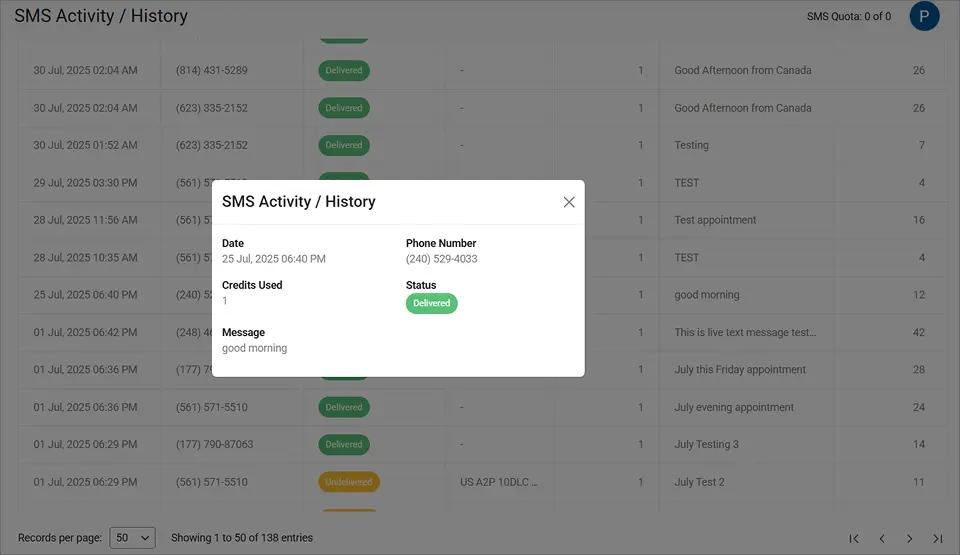
This message-level detail shows the exact timestamp, delivery status, and content of each alert, giving your compliance team the documentation they need.
5. Any Advisor Can Cover Alerts When a Colleague Is Out
With TextBolt, any authorized team member can send client alerts from their email. All plans include 10 user accounts with no per-user fees.
Your team shares a single business number and credit pool. This eliminates the single-point-of-failure problem where one person’s absence means clients miss critical alerts. It also means firms can stop advisors from texting clients on personal phones where conversations disappear when staff leave.
Crafting the right message is just as important as choosing the right channel. Here are best practices for writing financial SMS notifications that clients read and act on.
Your Clients Deserve Alerts They Actually See
Add an SMS urgency layer to your financial communications. Start with a 7-day free trial and 10 message credits.
Best Practices for Writing Financial SMS Alerts That Drive Action
Getting the content right matters as much as the delivery channel. These practices help financial professionals write SMS alerts that clients trust and respond to.
1. Lead With Your Firm Name So Clients Recognize the Sender
Clients receive texts from many sources. Start each message with your firm name so recipients immediately know who is contacting them.
Example: “ABC Financial: Payment of $1,250 due March 15. Reply PAID when complete or call 555-0123.” This builds trust and reduces the chance clients report the message as spam.
2. Stay Under 160 Characters for Clean, Single-Text Delivery
Standard SMS allows 160 characters per segment. Staying within that limit keeps your message in a single text and uses only one credit.
Front-load the most important information. Lead with the alert type and required action. If your message needs more detail, include a phone number clients can call for the full information.
3. Tell the Client Exactly What to Do Next
Every financial SMS should include a specific call to action. Vague alerts create confusion and increase inbound calls.
Use clear instructions: “Reply YES to confirm,” “Call us at 555-0123,” or “Log in to review activity.” Specific actions speed up response times and enhance customer satisfaction.
4. Match Alert Timing to Urgency Level
Send fraud alerts and security warnings immediately regardless of time. For payment reminders, send two to three days before the deadline to give clients time to arrange payment.
Use scheduling to queue messages in advance so delivery happens at the optimal time. Review SMS compliance laws to ensure your messaging program meets all regulatory requirements, including TCPA consent and built-in STOP keyword opt-out handling.
| Message Type | Recommended Timing | Priority Level |
| Fraud/Security Alerts | Immediate, any time | Critical |
| Payment Reminders | 2-3 days before deadline | High |
| Account Confirmations | Within minutes of activity | High |
| Regulatory Notices | Within compliance window | Medium-High |
| General Updates | Business hours | Standard |
Matching your alert timing to the urgency level ensures clients receive the right message at the right moment without feeling overwhelmed by notifications.
Ready to Make Sure Every Client Alert Gets Read?
Email-to-SMS turns your standard email client into a financial alert delivery system. Your team sends messages the same way they always have. The only change is the recipient address whether it’s fraud alerts, payment reminders, service outage notifications, or automated loan follow-ups.
With TextBolt, setup takes 10 to 30 minutes. Plans start at $29 per month, and all plans include 10 user accounts with no per-user fees.
Over 500 businesses trust TextBolt to deliver more than 500,000 messages with up to 98% delivery rates.* Your clients get the alerts they need, when they need them.
Check TextBolt pricing to find the right plan for your firm.
Frequently Asked Questions
Do clients need to install an app to receive SMS alerts?
No. Messages arrive as standard text messages in the client’s native messaging app. There is nothing to download or set up on the client’s end.
Is email-to-SMS secure enough for financial communications?
TextBolt uses TLS encryption for message transmission and does not store messages on its servers. Consult your compliance team to ensure it fits your specific requirements.
How many clients can we message at once?
You can send to contact groups using Google Contacts integration. There is no TextBolt-imposed daily limit, though your email provider may have sending limits.
What happens if a client replies to an SMS alert?
Replies arrive in your email inbox as standard email responses. You can continue the conversation without switching to a separate platform.
Can multiple team members send alerts from the same business number?
Yes. All TextBolt plans include 10 user accounts sharing one business number and credit pool. Any authorized team member can send and receive.