
Stop Losing Cases to Missed Court Dates
How to Ensure Clients Never Miss Court Dates With Email-to-Text Reminders

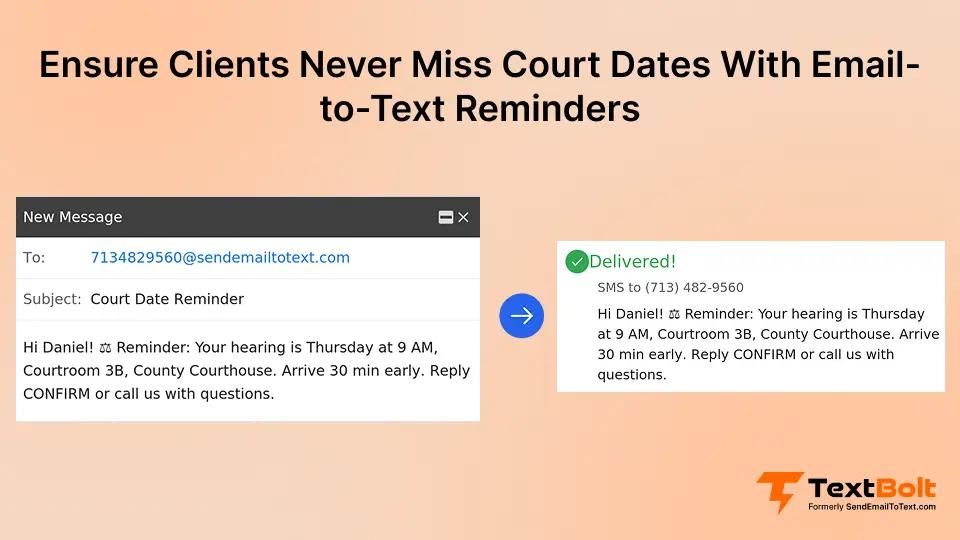
A missed court date can trigger a bench warrant, case dismissal, or default judgment. For attorneys and legal staff, chasing clients by phone the day before a hearing wastes hours better spent on case preparation.
The problem is not client negligence. Clients lose track of dates, confuse courtroom numbers, or never check their mail in time. Phone calls go to voicemail. Emails sit unread for days.
Scheduled email-to-SMS reminders give legal teams a reliable way to reach clients through business text messaging. Many firms already use email-to-SMS for law firms to cut no-shows and keep cases on track. Your firm sends a reminder from email. The client gets a text on their phone.
This guide covers why court date no-shows happen, how email-to-text reminders work for law firms, and best practices for keeping every client on track.
Why Legal Clients Miss Court Appearances
Missed court appearances rarely stem from negligence. They come from communication gaps that law firms can close with better timing and the right delivery channel.
1. Postal Mail and Email Notices Get Buried Before Hearing Day
Court date notices often arrive by mail weeks in advance. By the hearing date, that letter is buried under a stack of bills. Many legal clients do not check email regularly either.
Even clients who read the notice when it arrives forget the details two weeks later. A notice that gets filed away once does not keep the court date top of mind.
Text messages get read within minutes of delivery. That immediate visibility makes SMS the most reliable channel for time-sensitive legal deadlines.
2. Phone Calls From Your Office Go Straight to Voicemail
Most people screen calls from unknown numbers. Even calls from their attorney’s office get sent to voicemail. Your paralegal spends 20 minutes making calls with no way to verify the message landed.
Leaving voicemails creates zero confirmation that the client received the information. Follow-up calls double the workload with the same uncertain results.
A text sits on the client’s lock screen until they read it. No phone tag, no callbacks, no guesswork.
3. Multiple Hearings Cause Date, Time, and Courtroom Confusion
A client juggling a custody modification, a traffic violation, and a civil matter may have three hearings in different courts within a single month. Without a clear, timely reminder, confusion is nearly guaranteed.
Text reminders include every critical detail in a short, scannable format. Clients can screenshot the message or reference it on their way to the courthouse.
| Reminder Method | Read Rate | Timeliness | Detail Delivery | Staff Effort |
| Postal Mail | Low | Weeks early | Full but buried | High |
| Moderate | Variable | Full but skipped | Medium | |
| Phone Call | Low | Day-of only | Verbal, forgettable | Very High |
| SMS Reminder | High | Precise timing | Concise, scannable | Low |
Each method has trade-offs, but SMS consistently outperforms for urgent, time-bound legal communications. Scheduling automated text messages at the right intervals closes these gaps without adding work for your staff.
How Law Firms Send Court Date Reminders From Email
Sending court date reminders through TextBolt works like sending any other email. The difference is that your message arrives as a text on your client’s phone.
Step 1: Draft the Court Date Reminder in Your Firm’s Email Client
Open Gmail, Outlook, or whichever email client your firm already uses. Write a brief message with the hearing date, time, courtroom location, judge name, and case reference number.
Keep the text short and direct. Clients need logistics, not legal analysis. A clear reminder under 160 characters uses just one message credit.
Step 2: Address the Email to Your Client’s Phone Number
Instead of typing an email address, enter the client’s 10-digit phone number followed by @sendemailtotext.com. For example: 5551234567@sendemailtotext.com.
Your firm can store these formatted addresses in Google Contacts. Group clients by case type or hearing week to send batch reminders with a single email.
Step 3: Schedule Delivery for the Right Reminder Windows
Use your email client’s built-in scheduling feature. In Gmail, click “Schedule Send” and pick the exact date and time. Set one reminder for one week before the hearing and a second for the morning of.
This two-touch approach gives clients time to arrange transportation or childcare while keeping the court date front and center on hearing day.
Step 4: Send, Confirm Delivery, and Handle Client Replies
Hit send or let the scheduled email go out automatically. TextBolt converts your email into a standard SMS and delivers it to the client’s phone.
Your firm’s dashboard tracks delivery status so you can confirm the message reached the client. Every sent reminder also stays in your email as a permanent, searchable record.
You can verify that a specific court date reminder was delivered by checking the message details in your TextBolt dashboard.
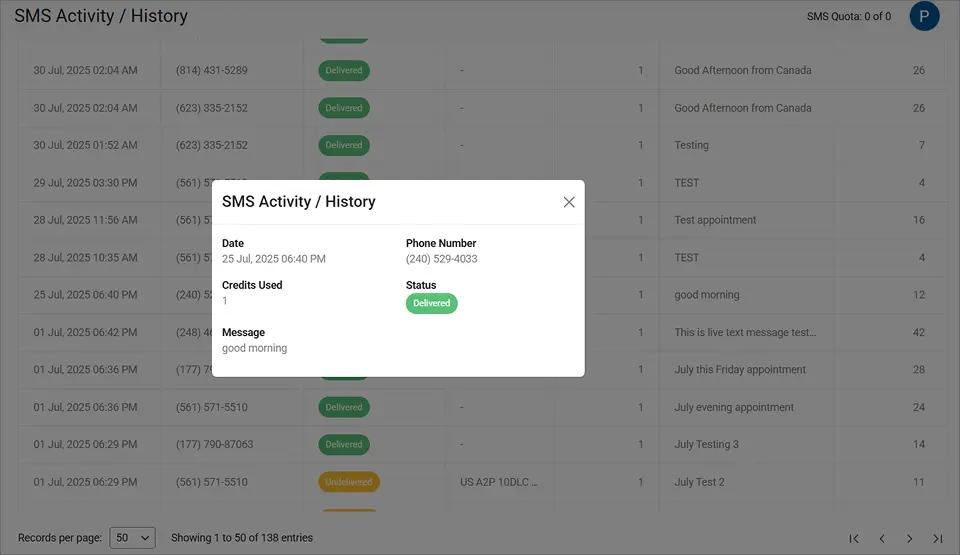
The delivery confirmation and message content shown here give your firm the documentation it needs if a client later disputes whether they received notice.
If the client replies, their response arrives in your email inbox. You can confirm attendance or answer questions without switching tools. Learn more about the full process in this email-to-text guide.
Knowing how the system works is just the starting point. The real value shows up when you see how these reminders protect your clients and your practice from costly consequences.
Ready to Reduce Missed Court Dates?
Send scheduled reminders from the email your legal team already uses. Setup takes minutes.
How Scheduled Text Reminders Protect Clients and Your Practice
Court date reminders do more than reduce no-shows. They create a documented communication trail that protects both the client and the firm from avoidable consequences.
1. Fewer Bench Warrants and Case Dismissals From No-Shows
When a client misses a hearing, judges may issue a bench warrant. In criminal cases, your client could be arrested at a routine traffic stop. In civil cases, the court may dismiss their claim or enter a default judgment against them.
A single text reminder sent the morning of the hearing significantly reduces this risk. Clients who see a reminder on their lock screen are far more likely to appear on time.
2. Paralegals Reclaim Hours Lost to Phone Tag With Clients
Legal assistants at many firms spend hours each week calling clients about upcoming dates. Most calls go to voicemail. Follow-up attempts double the workload without confirming receipt.
With scheduled email-to-SMS, your team writes one message and schedules it. No calling lists, no voicemail scripts, no callback tracking. That reclaimed time goes back to case support, client service, and other client communication like ensuring clients see their invoices without chasing them by phone.
3. Every Reminder Builds a Timestamped Record for Your Files
Every reminder sent through TextBolt is stored in your firm’s email account with a timestamp and delivery confirmation. This creates verifiable proof that your office communicated the court date to the client.
Your dashboard’s detailed report view shows every message your firm has sent, including delivery status, date, and message content.
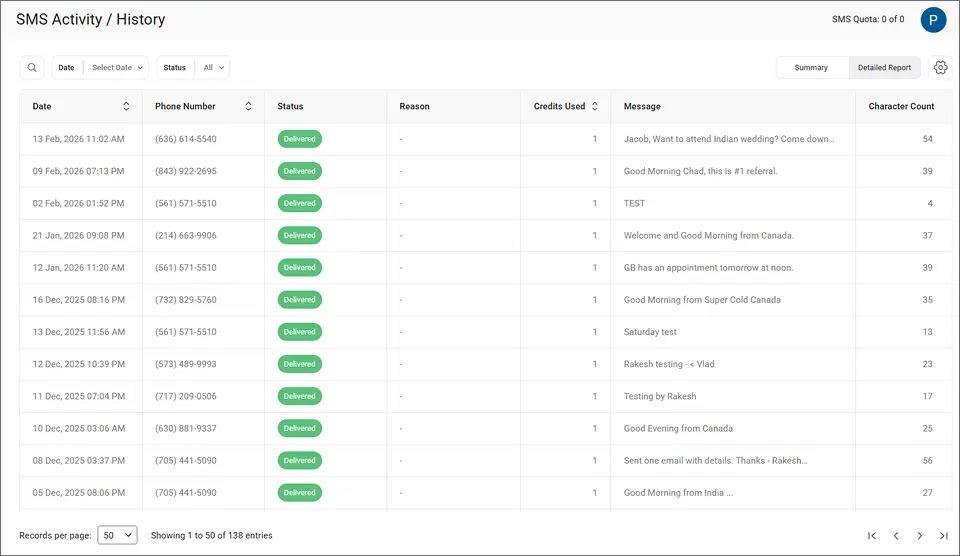
This documentation matters when a client claims they were never notified about a hearing. It can also protect your firm in malpractice disputes or fee disagreements.
4. Any Team Member Covers Court Date Reminders Without Disruption
When reminders depend on one paralegal remembering to call, coverage gaps are inevitable. Vacations, sick days, and turnover all create missed communications.
Any team member with email access can send or schedule court date texts. All TextBolt plans include 10 user accounts with no per-user fees. Your entire office stays covered even when key staff are out, another reason firms stop staff from using personal phones for client texting altogether.
Reliable court date communication is one of the simplest ways to boost client engagement without adding complexity to your firm’s workflow.
With delivery protection in place, the next step is making sure every reminder follows legal communication best practices.
Stop Court Date No-Shows Before They Start
Send scheduled court reminders from Gmail or Outlook. No software to install. No training required.
Best Practices for Court Date SMS Reminders
Effective court date reminders follow rules specific to legal communications. Getting the timing, content, and compliance right determines whether a reminder helps your client or creates risk for your firm.
1. Schedule Two Reminders Per Hearing at Strategic Intervals
One reminder is not enough for most clients. Schedule the first one week before the court date. Schedule the second the morning of the hearing.
The first gives clients time to arrange transportation, childcare, or time off work. The morning text keeps the hearing top of mind when it matters most.
2. Include Date, Time, Courtroom, and Arrival Instructions in Every Message
Each reminder should state the hearing date, time, courtroom number, judge name, and courthouse address. Never assume the client remembers details from a phone call weeks ago.
Keep it concise and scannable. Example: “Reminder: Your hearing is April 15 at 9:00 a.m., Courtroom 3B, County Courthouse, 200 Main St. Arrive 15 min early. – Smith Law”
Sign off with your firm name so the client identifies the source immediately. A professional message builds confidence that the firm takes their case seriously.
3. Never Include Case Details or Confidential Information in SMS
Text messages are not encrypted end-to-end. Never include charges, case specifics, opposing party names, or sensitive legal information in a reminder.
Stick to logistics: date, time, location, and arrival instructions. If the client needs case-related information, direct them to call your office. This protects attorney-client privilege and keeps your firm on solid ethical ground.
4. Collect Written Text Consent During Client Intake
Before sending text reminders, confirm that your client consents to SMS communication. Add a text consent checkbox to your intake forms alongside your engagement letter.
TextBolt includes built-in STOP keyword handling for SMS compliance. Clients can opt out at any time by replying STOP, keeping your firm compliant with TCPA requirements.
If your firm needs to verify which reminders were sent to a specific client, the dashboard lets you search by keyword or phone number.
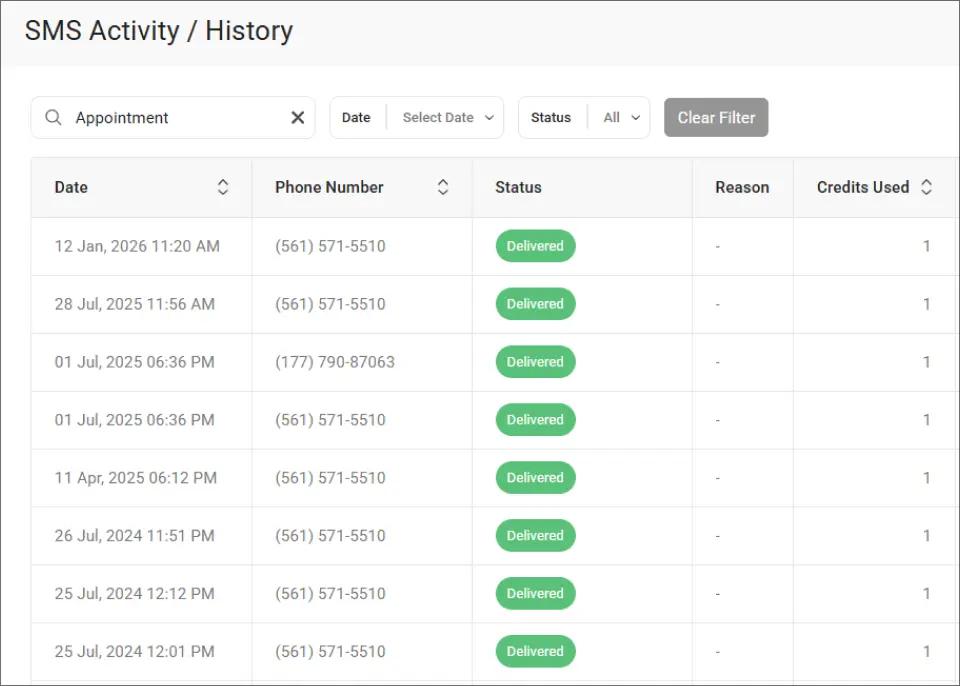
This search capability helps your team pull communication records quickly during case reviews, audits, or client disputes.
| Practice | Why It Matters for Law Firms |
| Two reminders per hearing | Covers the planning window and day-of recall |
| All logistics included | Eliminates courtroom and timing confusion |
| No case details in SMS | Protects attorney-client privilege |
| Professional firm sign-off | Builds client confidence in your practice |
| Written consent at intake | Meets TCPA compliance requirements |
Following these practices ensures that every court date reminder strengthens your firm’s professionalism and your client’s confidence.
Ready to Eliminate Missed Court Dates at Your Firm?
Missed court dates cost your firm time, credibility, and client trust. They put clients at risk of bench warrants, dismissed cases, and unnecessary legal complications.
Scheduled email-to-SMS reminders solve this with tools your legal team already uses. Compose an email, address it to a phone number, and schedule it. TextBolt handles the delivery and tracking.
500+ businesses trust TextBolt for reliable messaging with an up to 98% delivery rate.* Setup takes 10 to 30 minutes. TextBolt Plans start at $29 per month with 10 user accounts included on every plan.
*Delivery rates vary based on carrier policies, message content, and compliance factors.
Frequently Asked Questions
Can I schedule court date reminders in advance from Gmail?
Yes. Compose your reminder email, address it to the client’s phone number @sendemailtotext.com, then use Gmail’s “Schedule Send” feature to pick the exact delivery date and time.
Is it safe to send legal reminders via text message?
Text reminders are safe for logistics like dates, times, and locations. Never include confidential case details, charges, or privileged legal information in any SMS.
How quickly do clients receive the text after I send the email?
Most messages deliver within minutes. TextBolt’s dashboard shows delivery status updates within two to five minutes so your staff can confirm receipt before the hearing.
Can multiple attorneys and paralegals send reminders from one account?
Yes. All TextBolt plans include 10 user accounts with no per-user fees. Each team member sends from their own email while messages appear from your firm’s business number.
What happens if a client replies to the court date reminder?
Their reply arrives in your email inbox as a standard email response. You can confirm attendance or answer logistics questions without switching to a separate messaging app.