
- Why Timely SMS Communication Matters for Customer Satisfaction
- Challenges Businesses Face Without Timely SMS Communication
- How Timely SMS Instantly Improves Customer Satisfaction
- Best Practices for Enhancing Customer Satisfaction with Timely SMS
- Real-World Use Cases for Timely SMS Communication
- How TextBolt Helps You Send Timely Texts From Gmail
- 7 Easy Steps to SMS Success with TextBolt
- Ready to Revolutionize Your Communication?
- Frequently Asked Questions
Never Let Customers Miss an Update
Enhancing Customer Satisfaction with Timely SMS Communication

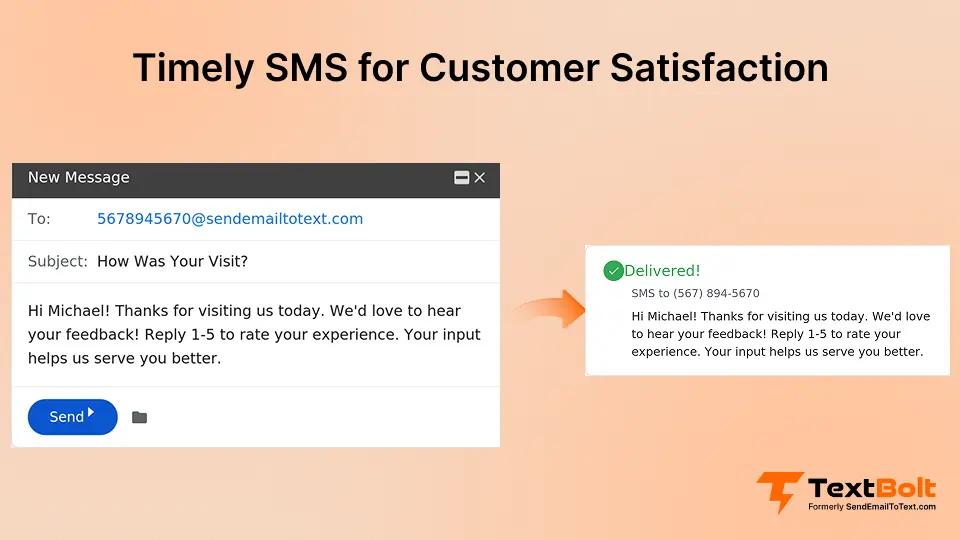
Customers today expect speed, clarity, and reliability. Whether it’s appointment confirmations, delivery notifications, service reminders, or urgent updates timing is everything. When customers don’t receive information at the right moment, confusion increases, responsiveness drops, and overall satisfaction takes a hit.
Email inboxes are crowded. App notifications get muted. But SMS? It gets seen—instantly.
That’s why timely SMS communication is now one of the biggest drivers of higher customer satisfaction for service based businesses, healthcare providers, schools, logistics teams, and nearly every customer-facing industry.
In this guide, you’ll learn:
- Why timely SMS communication improves customer satisfaction
- Common challenges businesses face when relying on email
- How Timely SMS Instantly Improves Customer Satisfaction
- Best practices to send effective, customer-friendly SMS alerts
- Real world use cases across different industries
- How TextBolt helps businesses send timely SMS directly from Gmail
- 7 Easy Steps to SMS Success with TextBolt
Let’s dive in.
Why Timely SMS Communication Matters for Customer Satisfaction
Customers today expect quick, clear updates especially when it comes to appointments or important services. If something changes, they don’t want to be left in the dark or spend hours checking emails for news. A timely text message solves this problem instantly.
By sending SMS alerts at the right moment, you:
- Keep customers in the loop as things happen, not after the fact
- Minimize misunderstandings and last-minute surprises
- Greatly reduce missed appointments, late arrivals, or wasted time
- Show that you care about your customers and value their time
- Create a smoother, more stress free experience for everyone
Simple texts like “Your technician is on the way,” “We’re running a little late,” or “Your appointment is confirmed for tomorrow at 2 PM” make customers feel respected and informed. These updates build trust, reduce frustration, and help make every service interaction feel reliable and personal.
Challenges Businesses Face Without Timely SMS Communication
Keeping in touch with customers isn’t always easy. Staff often get busy and forget to make follow-up calls. Important emails can get lost in busy inboxes or ignored. Last minute changes are tough to share quickly, and sending reminders manually takes up a lot of time. Without one simple system, some messages are sent too late or not at all. Old texting tools may not work well or messages don’t arrive when they should.
TextBolt email to sms services makes all of this easier by letting you send instant texts straight from Gmail:
Problem: Staff get too busy to call or send manual reminders.
Solution: TextBolt lets you automate SMS alerts and confirmations straight from Gmail, saving staff time and keeping everyone informed.
Problem: Customers miss important emails.
Solution: TextBolt delivers SMS directly to customers’ phones making sure time sensitive updates are seen right away.
Problem: Last minute schedule changes are hard to communicate.
Solution: Send instant SMS notifications from Gmail so customers and teams get crucial updates without delay.
Problem: Manual reminders eat up valuable hours.
Solution: With TextBolt, you can schedule or automate bulk text reminders, reducing repetitive tasks and freeing up your team.
Problem: No unified system for quick updates creates confusion.
Solution: TextBolt centralizes all alerts and replies inside Gmail, making it easy to track conversations and communication history.
Problem: Outdated email-to-SMS gateways sometimes fail or delay messages.
Solution: TextBolt uses carrier-verified routing and modern technology, ensuring reliable and secure SMS delivery every time.
Stop Missed Messages. Start Stronger Customer Connections.
TextBolt ensures your updates reach customers instantly—every time.
How Timely SMS Instantly Improves Customer Satisfaction
Sending the right text at the right moment can make a big difference for your customers and your business. Here’s how timely SMS helps:
- Instant delivery: Customers get your message within seconds, so they’re ready to respond or take action right away.
- Clear instructions: Short texts are easy to read and understand, so there’s less chance for mistakes or confusion.
- A professional touch: Quick, reliable updates show you care and build trust with your clients.
- Fewer no-shows: Friendly reminders make it easy for customers to remember appointments and show up on time, saving everyone hassle.
- Consistent communication: Regular updates let customers know you’re always looking out for them, whether it’s service updates or ongoing billing reminders.
- Better customer loyalty: Happy customers who get prompt info are more likely to come back—and recommend you to others.
A simple, well timed text does more than just share news; it helps customers feel valued, informed, and confident in your service. That’s customer satisfaction made easy.
Best Practices for Enhancing Customer Satisfaction with Timely SMS
To make your SMS messages truly helpful and keep customers coming back, these guidelines make a real difference:
- Keep messages short and clear: Customers want quick, easy-to-understand texts. Stick to simple wording and keep your message under 160 characters.
- Send texts at a thoughtful time: Respect your customers’ schedules and avoid early mornings or late nights.
- Add a personal touch: Use your customer’s name and specific details to make messages feel genuine. Example: “Hi Sarah, your haircut is scheduled for tomorrow at 4 PM.”
- Share only what’s important: Only send updates that really matter—like reminders, confirmations, or urgent alerts. Avoid sending too many texts.
- Offer a clear action: Let customers know what to do next. Example: “Reply YES to confirm” or “Track your package with this link.”
- Always honor consent and privacy rules: Only text customers who have agreed to receive messages. TextBolt automatically takes care of compliance with carrier rules and opt-outs.
- Make opt out simple: Customers should be able to reply “STOP” anytime if they don’t want more texts.
- Use a business number they recognize: With TextBolt, your number is verified helping customers trust your texts and avoid spam worries.
- Be friendly and professional: Keep your language polite and approachable, not pushy or too sales-focused.
- Learn and adjust: Pay attention to how customers respond. Track delivery rates and feedback so you can make your messages even better over time.
With these simple practices, your SMS communication will feel timely, caring, and personal turning everyday updates into great customer experiences.
Real-World Use Cases for Timely SMS Communication
Timely texts boost satisfaction across all kinds of businesses. Here’s how SMS makes a real impact:
- Appointment-based services: Quickly remind clients of their bookings or let them know about openings, reducing cancellations and wait times.
- Service & repair teams: Notify customers when a technician is on the way, update job status, and confirm when work is finished so everyone stays in sync.
- Retail & delivery: Send pickup and delivery notifications, keep customers updated on timing, and easily manage last-minute changes.
- Education & tutoring: Remind students and parents about classes, tests, and payment deadlines so nothing gets missed.
- Insurance & finance: Deliver reminders for renewals and paperwork, and send fast follow-ups on important documents.
- Real estate: Text showing updates, appointment confirmations, and follow-up messages to clients and leads all in real time.
- Event management: Notify attendees of schedule changes, cancellations, or important updates in real time.
- Internal team coordination: Send shift changes, meeting alerts, or urgent notifications instantly to staff members to improve workplace efficiency. See how email-to-SMS speeds up team coordination in healthcare and other fast-paced environments.
- Customer feedback & engagement: Request feedback or reviews quickly after interactions, so customers can respond while their experience is fresh. To learn more about using SMS for feedback collection, see our email-to-SMS feedback request guide.
Whether you’re managing appointments, keeping clients informed, or following up on important tasks, timely texts make communication simple—and keep your business moving forward.
How TextBolt Helps You Send Timely Texts From Gmail
TextBolt puts the power of instant texting right inside Gmail, the tool your team already knows and uses every day. No need to switch apps or wrestle with complicated tech. Everything becomes simple and seamless.
Here’s what you get with TextBolt:
- Instant SMS delivery: Messages reach your customers in seconds, so you never miss a moment.
- Exceptional reliability: With carrier verified 10DLC registration and secure toll-free numbers, your texts see up to 98% delivery rates meaning your updates actually get through.
- SMS without leaving Gmail: Send and receive texts as easy as sending an email, keeping conversations organized in one place.
- Team friendly access: Multiple users can send, reply, and see message history, so everyone is on the same page.
- Two way SMS in your inbox: Clients can reply to your SMS reminders, and their messages appear directly in a Gmail thread making it easy to track conversations and follow up.
- Scalable and affordable: TextBolt pricing grows with your needs whether you’re a solo owner, small team, or a large organization. Choose from flexible monthly plans that fit any budget, with options for both low and high messaging volumes.
TextBolt Pricing Plans:
| Plan | Monthly Price | Message Credits | Best For |
| Basic | $29/month | 500 credits | Solo practitioners, consultants |
| Standard | $49/month | 1,000 credits | Growing businesses, medical practices |
| Professional | $99/month | 2,500 credits | Busy practices, multi-locations |
| Enterprise | Custom | 5,000+ credits | Large organizations, healthcare networks |
With TextBolt, communication is fast, visible, and hassle-free. You can focus on serving your customers, confident that every important message is delivered where and when it’s needed.
7 Easy Steps to SMS Success with TextBolt
Getting started with TextBolt is straightforward; it fits right into your everyday workflow, so you don’t lose time learning new tools or processes.
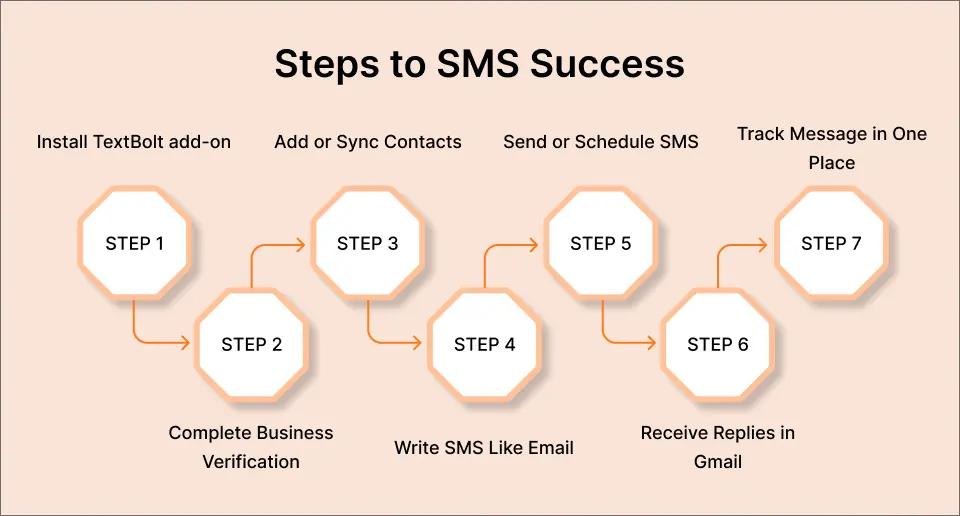
Step 1: Install TextBolt from Google Workspace Marketplace
Install the TextBolt add-on from the Google Workspace Marketplace, and it will appear in your Gmail sidebar so you can start using it right from your inbox.
Step 2: Complete Business Verification
A quick, secure process ensures your SMS messages are trusted and delivered reliably—helping you stay compliant and boosting your delivery rates.
Step 3: Add or Sync Contacts
Bring in your customer list directly from Google Contacts or upload it manually. TextBolt lets you organize contacts easily for smooth communication.
Step 4: Write SMS Just Like an Email
Compose messages in Gmail using a simple, familiar interface. There’s no need to learn a new way to write, just type and go.
Step 5: Send Instantly or Schedule for Later
Choose to send your SMS right away or use Gmail’s “Schedule Send” feature for perfect timing on reminders and updates.
Step 6: Receive Replies Directly in Gmail
Customer replies arrive as email threads in your inbox, so conversations stay unified and easy to manage. No switching between apps.
Step 7: Track Every Message in One Place
All your communication is stored, organized, and searchable within Gmail giving your team full visibility and control.
TextBolt takes the hassle out of customer messaging. With just a few simple steps, you can build better customer relationships and deliver instant, reliable updates right from your inbox.
Power Up Your Business Communication
Discover how easy it is to send reliable, professional texts, no switching apps, no confusion.
Ready to Revolutionize Your Communication?
Modern customers expect instant updates, clear answers, and stress free scheduling. With TextBolt, you can meet those expectations by sending fast, reliable SMS alerts directly from your Gmail inbox.
No more missed messages, slow follow-ups, or confusing reminders. TextBolt makes it easy for any business to reach clients quickly, keep teams organized, and deliver the kind of service that wins trust and keeps customers coming back.
Don’t let another appointment or important update slip through the cracks.
Try TextBolt free and see how seamless texting transforms your communication making every message count.
Frequently Asked Questions
Is TextBolt difficult to set up?
No! You can install TextBolt from the Google Workspace Marketplace in minutes, and it’s ready to use in your Gmail sidebar.
Do I need any coding or technical knowledge?
Not at all. TextBolt works right from Gmail with a simple, familiar interface. Anyone who can send an email can send SMS with TextBolt.
Is TextBolt secure and compliant?
Absolutely. TextBolt uses carrier-verified routing, encrypted channels, and built-in opt-out compliance, meeting industry standards for privacy and reliability.
Does it work for teams?
Yes! TextBolt lets multiple users send, schedule, and see message history—perfect for teams or organizations of any size.
What happens if I run out of message credits?
You can upgrade your plan at any time or add extra credits as needed, so you never stop communicating.
What are the 3 C’s of customer satisfaction?
The 3 C’s are Communication, Consistency, and Caring. When you communicate clearly and quickly, provide consistent service, and show customers you truly care, satisfaction rises.
What are the 4 P’s that improve customer service?
The 4 P’s are Promptness, Politeness, Professionalism, and Personalization. Fast, polite, and professional responses tailored to each customer make every interaction better.
How do you respond to a customer’s long wait time?
Acknowledge the delay, apologize sincerely, and provide regular, honest updates through quick texts. A simple, thoughtful message (We appreciate your patience, we’re working to assist you as quickly as possible) can greatly improve how customers feel.