
- What Is Email-to-SMS Software?
- How Does Email-to-SMS Software Work?
- Key Features to Look for in Email-to-SMS Software
- Email-to-SMS Software vs. SMS Marketing Platforms
- Email-to-SMS Software Use Cases: 5 Industries & Applications
- Email-to-SMS Software Pricing Models Explained
- Choosing the Right Email-to-SMS Software for Your Business
- Streamline Business Texting With TextBolt
- Frequently Asked Questions
Send Texts from Your Existing Email
Email-to-SMS Software: Features, Use Cases & Pricing

Your texting system stopped working at 9 AM. The office manager’s phone died, and she’s the only one who can send appointment reminders. Twelve patients won’t get their confirmations today. Three will no-show, costing you $840 in lost revenue.
This happens every week in thousands of businesses:
- Single points of failure: One sick employee halts all patient communication
- Platform overload: SMS marketing tools charge $50-150/month for features you’ll never touch
- Per-user pricing traps: $15/user fees turn simple texting into $300/month for small teams
- Training tax: Two hours teaching staff another dashboard they’ll forget by next week
There’s a simpler path. Email-to-SMS software eliminates these problems entirely. Send professional texts from Gmail or Outlook—the tools your team already uses every day. No new platforms. No per-user fees. No single points of failure. Just reliable texting that works like email because it is email.
This guide covers the features that separate email-to-SMS solutions from marketing platforms, real applications across healthcare, IT, and service industries, and pricing models that help you avoid hidden costs.
What Is Email-to-SMS Software?
Email-to-SMS software converts regular emails into text messages. You send SMS directly from email clients like Gmail or Outlook by addressing messages to a special email-to-text gateway format.. Instead of typing on a phone or logging into a separate platform, you compose a standard email and send it to a phone number followed by the service’s domain.
The process works like sending any other email. Compose your message in Gmail, address it to 5551234567@sendemailtotext.com, and hit send. The software converts your email into an SMS and delivers it to the recipient’s phone. Replies come back to your email inbox as standard messages.
Example scenario: A dental office sends appointment reminders by emailing 5551234567@sendemailtotext.com from their front desk Gmail account. No new apps to install, no training required, just familiar email workflow. When the office manager is out, any front desk team member can send reminders without needing phone access or platform passwords.
Understanding the basic process helps, but knowing the step-by-step mechanics makes implementation easier.
Your Team Already Knows How to Use TextBolt
If your staff can send an email, they can send professional texts from Gmail or Outlook. No new platform to learn, no training sessions required. Setup takes 10 minutes.
How Does Email-to-SMS Software Work?
Email-to-SMS software follows a straightforward four-step process from composition to delivery.
Step 1: Compose Your Message In Your Email Client
Write your text message in Gmail, Outlook, or any SMTP-compatible email client exactly as you would compose a regular email. The subject line typically becomes part of the message, and your email body contains the text content. Most email-to-SMS software handles standard SMS (160 characters per segment) and automatically splits longer messages into multiple parts.
Your existing email infrastructure handles the heavy lifting. No special software installation, no API configuration, no developer resources needed.
Step 2: Address The Email To The Recipient’s Phone Number
Use the gateway format provided by your email-to-SMS service: the recipient’s phone number followed by the service domain. For TextBolt, that looks like 5551234567@sendemailtotext.com. For bulk messages to multiple recipients, you can use contact groups or BCC fields just like a standard email.
The phone number must include the area code, but typically doesn’t need country codes for domestic messages. Some platforms support international formatting for global texting.
Step 3: Send The Email, And It Delivers As SMS
Hit send, and your email routes through the service’s SMTP gateway. The platform converts your email content into SMS format, handles carrier routing through 10DLC channels for business compliance, and delivers the message to the recipient’s phone. Delivery confirmation typically comes back to your email as a status notification.
Business-grade email-to-SMS software includes carrier approval and 10DLC registration, ensuring up to 98% delivery rates* versus consumer gateways that get blocked as spam.
Step 4: Receive Replies In Your Email Inbox
When recipients reply via text, their responses land in your email inbox as standard messages. You can continue the conversation naturally without switching tools or checking separate dashboards. All communication history stays in your email, providing a complete audit trail with timestamps and message content.
Two-way messaging transforms text from one-way broadcasts into real conversations, handled entirely within your familiar email interface.
Now that you understand the mechanics, certain features separate basic email-to-SMS from business-grade solutions.
Key Features to Look for in Email-to-SMS Software
Look for these seven essential features when evaluating email-to-SMS platforms for business use.
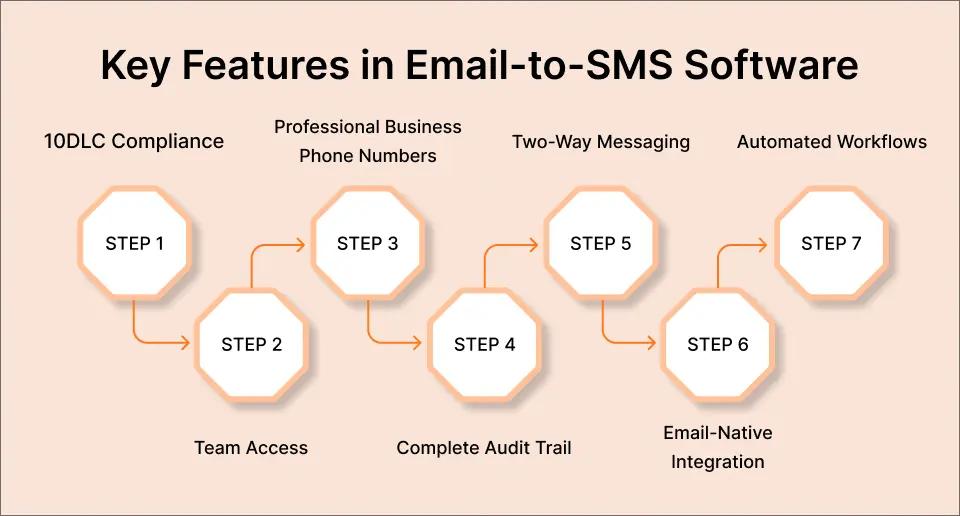
1. 10DLC Compliance And Carrier Approval
10DLC (10-Digit Long Code) compliance determines whether your messages actually reach recipients. Business-grade email-to-SMS software handles carrier registration and approval automatically, delivering up to 98% delivery rates*. Consumer gateways and non-compliant services get filtered as spam, with delivery rates dropping to 60-70% or lower.Understanding email-to-SMS limitations helps you avoid non-compliant services that damage deliverability.
Manual 10DLC setup requires business verification paperwork, campaign registration, and ongoing compliance management. Quality email-to-SMS software completes this process during onboarding, so you start sending immediately without compliance headaches.
2. Team Access Without Per-User Fees
Email-native platforms eliminate single points of failure by letting multiple team members send texts from their own email accounts. When one staff member is out sick or on vacation, others can cover seamlessly without sharing phone passcodes or platform logins.
Watch for per-user pricing models that charge $10-20 per additional team member. These fees inflate quickly as teams grow. Email-to-SMS software that works with existing email infrastructure includes team access naturally, since every team member already has email.
3. Professional Business Phone Numbers
Messages appearing from your dedicated business number build trust and maintain brand consistency. Recipients see your company name or toll-free number, not random carrier addresses like “Message from email” or personal cell phone numbers.
Texts from recognized business numbers typically receive higher open rates than unknown senders or carrier gateways, improving engagement and response rates.
4. Complete Audit Trail And Documentation
Every message needs timestamps, sender identification, and delivery status for compliance and accountability. Healthcare practices need documentation for HIPAA considerations. Financial services require transaction records. Any business benefits from knowing exactly who sent what message and when.
Email-based systems automatically create this audit trail since all messages live in your email account. Separate SMS platforms require logging into dashboards to review message history, creating extra steps and potential gaps in documentation.
5. Two-Way Messaging Capabilities
One-way texting forces recipients to call you back or find another communication channel. Two-way messaging enables real conversations via text, with replies landing directly in your email inbox.
This feature transforms appointment confirmations into conversations. Patients can ask questions, request different times, or confirm receipt without picking up the phone. All responses stay in your email thread with the original message for complete context.
6. Email-Native Integration
The best email-to-SMS software requires zero platform learning because it works with tools your team already uses daily. Gmail users keep using Gmail. Outlook users keep using Outlook. No separate dashboards, no training sessions, no workflow disruption.
Dashboard-heavy SMS platforms require staff to log in, navigate unfamiliar interfaces, and remember yet another password. Email-native solutions eliminate these friction points.
7. Automated Workflows And Triggers
Scheduled messages, auto-responses, and triggered alerts extend email-to-SMS beyond manual sends. Set up appointment reminder sequences, configure monitoring tool alerts, or create scheduled updates without ongoing manual work.
IT departments particularly value this feature for integrating with Nagios, Zabbix, or custom monitoring scripts. Any system that can send email can trigger SMS alerts automatically when servers go down, disk space runs low, or security events occur.
These features distinguish email-to-SMS software from SMS marketing platforms, which serve different business needs.
Get All Seven Features Without the Complexity
TextBolt delivers 10DLC compliance, team access, professional numbers, and complete audit trails, all from your existing email. No per-user fees, no dashboard learning curve, no compromise on reliability.
Email-to-SMS Software vs. SMS Marketing Platforms
Email-to-SMS software and SMS marketing platforms serve different purposes despite both sending text messages. Understanding the distinction helps you avoid paying for features you’ll never use.
1. Email-To-SMS Software Focuses On Operational Texting
Appointment confirmations, service updates, team coordination, IT system alerts, and customer service responses. These are transactional messages sent to specific individuals or small groups as needed. The priority is simplicity and integration with existing email workflows.
2. SMS Marketing Platforms Focus On Campaigns
Building subscriber lists, running promotional drip sequences, managing opt-ins and opt-outs, and analyzing campaign performance across thousands of recipients. These platforms include advanced segmentation, A/B testing, and bulk sending features designed for marketing teams running ongoing promotional campaigns.
3. The Workflow Difference Matters Most
Email-to-SMS software works within your existing email client. Compose in Gmail, send to the gateway address, done. SMS marketing platforms require logging into separate dashboards, uploading contact lists, building campaign templates, and managing subscribers through platform-specific interfaces.
Bottom line: If you need to send appointment reminders or system alerts from your existing email, email-to-SMS software is simpler than marketing platforms like EZ Texting or SimpleTexting that focus on promotional campaigns. Save the marketing platform complexity for when you’re actually building subscriber lists and running promotional sequences.
Businesses across industries use email-to-SMS software for specific operational needs.
Email-to-SMS Software Use Cases: 5 Industries & Applications
Different industries leverage email-to-SMS software to solve communication challenges specific to their operations.
1. Healthcare
Healthcare practices rely on email-to-SMS for appointment reminders with HIPAA considerations, reducing no-shows by up to 38% Lab result notifications alert patients when test results are ready for review. Prescription refill reminders help with medication compliance. Post-procedure follow-ups check on patient recovery without requiring phone calls. Multi-provider practices benefit especially since any front desk staff member can send reminders from the shared office Gmail account without needing the doctor’s personal phone.
2. IT
IT departments use email-to-SMS for critical server down alerts that bypass email spam folders and reach on-call engineers immediately.Monitoring tool integrations with Nagios, Zabbix, and PRTG convert email notifications into SMS automatically. Database failures, replication lag warnings, security incident alerts, and certificate expiration notices all route through email to text for IT alerts for faster response times. After-hours incident escalation ensures problems get addressed even when engineers aren’t checking email.
3. Service Businesses
Small service businesses send appointment confirmations for plumbers, electricians, HVAC technicians, and home service providers. Service completion notifications let customers know work is finished and invoices are ready. Payment reminders reduce collections time without awkward phone calls. Booking confirmations provide peace of mind for both customers and businesses. Staff shift reminders ensure everyone knows when they’re scheduled without group text chains.
4. Schools
Schools and districts deliver emergency alerts for lockdowns, early dismissals, and safety situations requiring immediate parent notification. Weather-related closures and delays go out instantly via email-to-SMS without waiting for phone trees or hoping parents check email. Event reminders for parent-teacher conferences, sports schedule changes, and field trip details reach families reliably. Attendance alerts notify parents automatically when students miss class.
5. Professional Services
Professional services, including consultants, attorneys, accountants, and financial advisors, send client meeting reminders with a professional appearance from business numbers. Deadline notifications help clients stay on track for document submissions or payment dates. Project update alerts keep stakeholders informed without lengthy email updates that might get missed.
Example scenario: A dental practice sends 80 appointment reminders each morning from their Gmail account using email-to-SMS software. When the office manager calls in sick, any front desk staff member can cover by sending the same emails from their account. Patients receive professional reminders from the practice’s business number. Replies asking to reschedule land in the shared office inbox, where any team member can respond. No phone passcodes, no platform logins, no single point of failure.
Understanding these use cases helps, but pricing models determine long-term costs and value.
Email-to-SMS Software Pricing Models Explained
Email-to-SMS software pricing varies widely based on features, volume, and business model. Understanding these models helps you avoid hidden costs and choose the right fit for your messaging needs.
| Pricing Model | How It Works | Example Providers | What to Watch For |
| Credit-based | Pay per message segment (160 characters = 1 credit). Longer messages use multiple credits. | TextMagic ($0.049/msg), ClickSend ($0.0226+/msg) | Emoji multipliers (70 char limit), message auto-splitting, expiring credits, no refunds on unused credits |
| Monthly plans | Fixed credits per month with overage billing. Predictable costs for regular senders. | TextBolt ($29-99/month), SimpleTexting ($39+/month) | Per-user fees ($10-20 each), telecom surcharges ($5-10/month), credit rollover policies, team access limits |
| Pay-as-you-go | Variable per-message pricing based on volume tiers. No monthly minimums. | ClickSend, Plivo | Hidden carrier fees, dedicated number costs ($20+ setup), campaign approval delays, confusing tier structures |
| Per-user fees | Base platform price plus $10-20 per team member. Costs scale with team size. | TextMagic, EZ Texting, SimpleTexting | Team costs compound fast (5 users = $50-100/month extra), no value add for additional seats in email-native systems |
When comparing email-to-SMS software, calculate total monthly costs including team access, not just advertised per-message rates.
For instance, a platform charging $0.04 per message plus $10 per user reaches $100/month for a 5-person team sending 500 texts.
Email-native solutions like TextBolt include unlimited team access in monthly plans since team members use their existing email accounts.
Things to watch for:
- Hidden multipliers that inflate actual costs.
- Emojis count as two messages on some platforms due to Unicode encoding.
- Long messages are split into multiple segments automatically, each consuming credits.
- Dedicated business phone numbers often carry separate setup fees ($20-50) plus monthly carrier charges.
- International messaging rates vary dramatically by country, sometimes reaching $0.10+ per message.
Credit expiration policies matter for businesses with seasonal or irregular messaging patterns. Some platforms forfeit unused credits monthly with no rollover or refunds.
Others let credits accumulate indefinitely. For predictable costs, monthly plans with transparent overage rates work better than pay-as-you-go models with complex tier pricing.
With pricing models clear, focus on matching software features to your specific business requirements.
Choosing the Right Email-to-SMS Software for Your Business
Match your selection to your specific workflow, team structure, and compliance requirements.
If you need simple texting from Gmail or Outlook, email-native solutions eliminate platform learning curves entirely. Look for options that work directly with your existing email client without separate logins. Your team should be productive immediately without training sessions or workflow changes. TextBolt and similar email-to-SMS services require nothing more than composing standard emails with special recipient addresses.
If you’re replacing AT&T, Verizon, or T-Mobile carrier gateways:
Prioritize migration-friendly platforms with identical email workflows. Setup should take 10-30 minutes, not hours of configuration. The transition should be as simple as changing the recipient domain from @txt.att.net to your new provider’s gateway address. Everything else stays the same, including your contact lists, email templates, and sending processes.
If team access is critical for business continuity:
Avoid per-user fee models that charge $10-20 per additional team member. These costs compound quickly as teams grow. Choose platforms that include multiple team members in base pricing. Email-native solutions naturally support unlimited team access since team members use their existing email accounts with no additional platform seats required.
If compliance matters for healthcare, finance, or regulated industries:
Verify 10DLC compliance is handled automatically during onboarding, not left as a manual setup. Look for complete audit trails with timestamps, sender identification, and delivery confirmation. Healthcare texting requires documentation for HIPAA considerations. Financial services need transaction records. Automatic logging through email provides built-in compliance documentation.
If you’re non-technical or have limited IT resources:
Choose no-dashboard-needed solutions over complex platforms requiring configuration. Your staff should start sending messages within minutes, not after multi-hour training sessions. The best email-to-SMS software feels invisible because it works within tools your team already knows. Check out TextBolt pricing for straightforward plans without hidden complexity.
Disclaimer: *Delivery rates vary based on carrier policies, message content, and compliance factors.
Streamline Business Texting With TextBolt
Email-to-SMS software should simplify business communication, not complicate it. The best solutions work with your existing email, include team access without extra fees, and handle compliance automatically so you focus on your business instead of learning new platforms. Choose email-native tools that respect your time and existing workflows.
TextBolt eliminates the complexity. Send professional SMS directly from Gmail or Outlook—no platform training, no per-user fees, no workflow disruption. Your team stays in their email, and your texting just works. Team access included, setup takes 10 minutes, and 10DLC compliance is handled from our side. See how email-native texting works for appointment reminders, IT alerts, customer updates, and operational messaging. Start your free trial and send your first text in the next 10 minutes.
Frequently Asked Questions
What’s the difference between email-to-SMS software and SMS APIs?
Email-to-SMS software works with your existing email client without any coding required. You compose emails in Gmail or Outlook and send them to special gateway addresses. SMS APIs like Twilio require developer resources to build custom integrations and write code. Choose email-to-SMS if you want immediate setup without technical staff or development time.
Can multiple team members send texts using email-to-SMS software?
Yes, if the platform supports team access properly. Email-native solutions let any team member with email access send texts from their own accounts. Avoid platforms charging per-user fees since these costs add up quickly for growing teams. The best email-to-SMS software includes unlimited team members because they’re just using existing email infrastructure.
Is email-to-SMS software hipaa compliant for healthcare?
Email-to-SMS software can support HIPAA considerations when messages transmit directly without storing patient data on platform servers. The software should provide audit trails, secure transmission, and business associate agreements. Consult your compliance team to verify the specific platform meets your requirements. Learn more about HIPAA-compliant patient texting best practices.Look for features like delivery confirmation and complete message logging.
How much does email-to-SMS software cost?
Pricing ranges from $29-100+ monthly for subscription plans, or $0.02-0.06 per message for pay-as-you-go options. Watch for hidden costs, including per-user fees ($10-20 per team member), telecom surcharges ($5-10 monthly), emoji multipliers, and expiring credits. Calculate total monthly costs, including team access to compare platforms accurately.
What happens to replies when someone texts back?
Most email-to-SMS software routes replies back to your email inbox automatically, enabling two-way conversations without separate dashboards. Responses appear as standard emails in your inbox with the original context. This keeps all communication in one place and provides a complete conversation history. Check that reply functionality is included before choosing a platform.