
- What is Manual SMS Sending?
- Why Manual SMS Sending Creates Operational Bottlenecks
- How Email-to-SMS Eliminates Manual Effort
- Email-to-SMS vs Manual SMS: Key Differences
- Choosing the Right Solution for Your Business
- Use Cases Where Email-to-SMS Automation Fits Well:
- How to Transition from Manual SMS to Email-to-SMS Automation
- Streamline Your Messaging Workflow with TextBolt
- Frequently Asked Questions
Eliminate Manual SMS Workflows Today
How Email-to-SMS Automation Replaces Manual Text Message Workflows

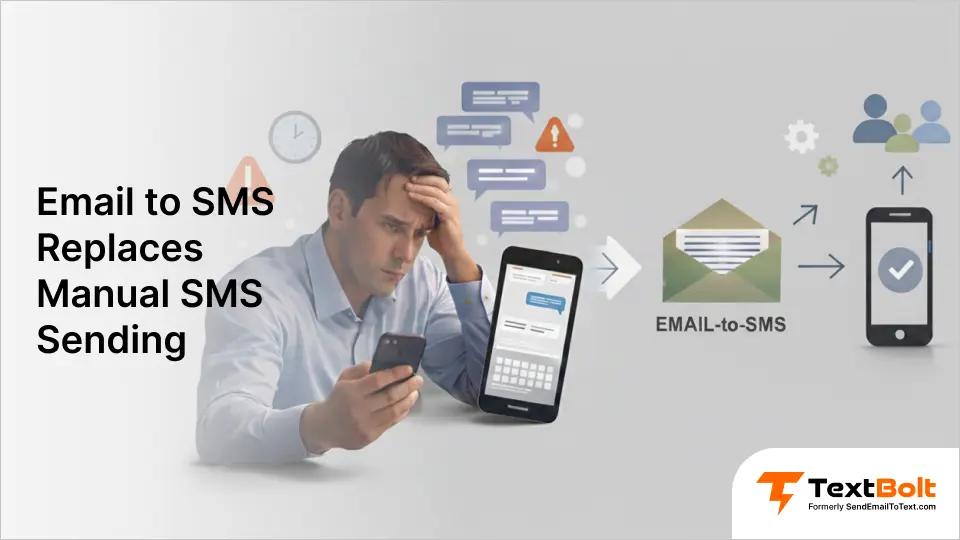
Typing 80 text messages manually every morning wastes 60-90 minutes of productive time, depending on message complexity. Whether you’re sending appointment reminders, system alerts, or customer confirmations, manual SMS sending creates time waste, single points of failure, and workflow bottlenecks that hold your team back. One broken phone or sick day can cost you $22,500 in no-shows.
Email-to-SMS automation eliminates repetitive manual effort while giving your entire team texting capability without training or new software. An email-to-SMS service like TextBolt transforms your existing email into a powerful SMS workflow automation tool.
This guide shows you how automated text messaging replaces manual workflows while maintaining the simplicity your staff already knows. Learn more about sending automated text message workflows that remove manual effort entirely.
What is Manual SMS Sending?
Manual SMS sending means individually composing and sending text messages one recipient at a time from a mobile device or CRM platform.
The process: Select a contact, type a message, customize details, send, repeat for every recipient. For 50 appointment confirmations, you’ll spend 90+ minutes on repetitive typing.
Common tools: Personal smartphones, CRM platforms (GoHighLevel, LeadSimple), practice management software, tablet devices.
Example: Your medical office sends 50 appointment confirmations daily by manually typing each message into a phone. At 1-2 minutes per message, that’s 50-100 minutes of staff time consumed by repetitive work that text message automation could eliminate.
Key limitations:
- Time-intensive because minutes per message compound quickly at scale
- Single device dependency (phone lost, broken, or dead means texting stops completely)
- No templates or bulk SMS automation capability
- Manual errors increase with volume (wrong recipient, typos in critical information)
- No audit trail for compliance or accountability
- Knowledge loss when staff turnover happens
For businesses sending more than 20 messages daily, manual methods create operational bottlenecks that slow your entire workflow. See how to send an email to text for automated alternatives that eliminate repetitive typing.
Stop Wasting 60-90 Minutes Daily on Manual Texting
Email-to-SMS automation gives your team texting capability without new software. 10 users included on all plans.
Why Manual SMS Sending Creates Operational Bottlenecks
Manual SMS workflows break down at scale across four critical failure points that impact time, money, and compliance.
1. Single Point of Failure Risk
When your texting system depends on one person’s phone, vulnerabilities compound quickly.
You call in sick, and nobody else can send reminders, so 50 patients don’t show up. Your phone breaks during a busy day, and the entire communication system goes down until you get a replacement. You take a vacation, and the backup staff doesn’t have access to the patient contact list. Staff turnover means knowledge loss because only one person knew the texting workflow.
Result: $22,500 in lost revenue from no-shows at just 50 patients (at an average of $450 per appointment in specialty practices). That’s the cost of one sick day when manual SMS creates a single point of failure. Learn how to reduce patient no-shows with automated messaging that doesn’t depend on one person.
2. Time Waste on Repetitive Tasks
Manual texting can consume 60-90 minutes daily typing the same appointment reminder messages, depending on message length and customization needs. Your staff could spend that time on higher-value patient care tasks instead. The bottleneck gets worse as your practice grows because more patients mean proportionally more manual effort.
Result: 50 messages at 1-2 minutes each can consume 50-100 minutes of pure repetitive work, depending on message complexity. Scale that to 100 messages, and you’ve consumed 2-3 hours of productive staff time on typing.
3. Error-Prone at High Volume
When you’re rushing through 50+ messages manually, mistakes happen:
- Wrong recipient receives protected health information
- Typos in medication instructions or appointment times
- Missed messages when you’re juggling multiple tasks
- No way to verify what was actually sent
One error can trigger HIPAA violations, patient safety issues, or liability exposure. Manual processes lack the safeguards that prevent costly mistakes at scale, which is why HIPAA-compliant patient texting requires automated documentation and delivery confirmation.
4. No Documentation Trail
Manual phone texting leaves no audit trail:
- Can’t prove a message was sent (liability exposure in disputes)
- No team visibility into patient communications
- Compliance gaps for regulated industries (healthcare, finance, legal)
- “I never got a reminder” disputes with no evidence
For healthcare texting specifically, a lack of documentation creates compliance risks and liability exposure. When patients claim they never received critical information, you have no proof.
How Email-to-SMS Eliminates Manual Effort
Email-to-SMS automation addresses each manual workflow failure point through five core capabilities that transform how teams communicate.
1. SMS Workflow Automation via Your Existing Email
Email-to-SMS automation converts your regular email into text messages without requiring new platform training:
- Compose once and send to multiple recipients using Google Contacts groups
- Use Gmail’s scheduled send to plan messages days in advance
- Trigger automated text messaging from calendar events or email rules
- Works with Gmail, Outlook, Apple Mail, or any SMTP email client
Your staff already know how to send an email. Now they know how to send texts. Zero learning curve, zero training sessions, immediate productivity.
2. Team Collaboration Without Manual Handoffs
All TextBolt plans include 10 user accounts (1 admin + 9 team members):
- No training required because your staff uses their existing email knowledge
- When you’re out sick, your colleague covers from their own email account
- Shared credit pool across the team (no per-user fees like competitors charge $10-20 per month each)
- No device sharing, no password handoffs, no manual coordination
The “you’re sick, and nobody can text” problem disappears completely. Any team member sends from their email. Patients never know the difference. When you let multiple staff text patients instead of relying on one person, your practice maintains continuity regardless of who’s available.
3. Template Workflows Save Repetitive Effort
Stop typing the same message 50 times:
- Save common messages as Gmail templates (appointment reminders, payment notices, service confirmations)
- Customize with recipient details before sending
- Google Contacts integration for bulk messaging (select a group, send one email, deliver individual texts)
- Scheduled sending for advance planning (set it days ahead and forget it)
When you send appointment reminders via email, you eliminate manual typing while maintaining personalized communication.
Time comparison: Manual SMS can take 60-90 minutes for 50 messages, depending on customization needs. Bulk SMS automation typically takes 5-10 minutes using contact groups. That’s 85-95% time savings on high-volume messaging workflows.
4. Complete Audit Trail for Compliance
Every message creates documentation automatically:
- Logged in to your Gmail with timestamps, sender identification, and delivery confirmation
- Dashboard shows delivery status (updated 2-5 minutes after send)
- Know exactly who sent what message and when
- Compliance documentation for HIPAA, regulatory requirements, legal disputes
No more “I never got a reminder” disputes with no proof. You have timestamped records showing message content, delivery status, and sender identity.
5. Professional Appearance Builds Trust
Messages appear from your dedicated business number (not a personal phone):
- Up to 98% delivery rate with 10DLC compliance* (*Delivery rates vary based on carrier policies, message content, and compliance factors)
- Recipients see your business name, not “Message from email” or unknown sender
- Optional toll-free numbers available for 40% higher open rates
Professional messaging builds patient trust. When your appointment reminders come from a recognized business number instead of a random personal phone, patients take them seriously. When you stop staff from using personal phones to text patients, you eliminate privacy risks and maintain professional boundaries.
Email-to-SMS vs Manual SMS: Key Differences
Here’s how the two approaches compare across the factors that matter most for business operations:
| Factor | Manual SMS | Email-to-SMS Automation |
| Setup time | No setup required. Messages are sent directly from a personal or company phone, making it suitable only for very small, one-off use cases. | Requires one-time setup, contact upload, and 10DLC approval. After approval, the system is ready for ongoing, large-scale use. |
| Time per 50 messages | Each message must be typed and sent individually, making bulk communication slow and repetitive. | A single email or trigger sends messages to an entire contact group within minutes. |
| Team access | Access is restricted to the phone holder, creating dependency on one individual. | Multiple team members can send messages from their own email accounts without sharing credentials. |
| Automation | Messages must be manually drafted and sent every time, even for repeat notifications. | Supports scheduled messages, automated follow-ups, reminders, alerts, and reusable templates. |
| Audit trail | No centralized record of sent messages, delivery times, or sender identity. | All messages are logged with timestamps in Gmail and the admin dashboard for full visibility. |
| Professional appearance | Messages are sent from a personal mobile number, which may reduce trust and brand consistency. | Messages are sent from a branded toll-free business number, improving credibility and recognition. |
| Training required | No training required, but message quality depends on individual habits. | No training required since staff already use email as part of daily workflows. |
| Workflow resilience | If the phone is lost, damaged, or the person is unavailable, messaging stops completely. | Messaging continues uninterrupted since any authorized user can send messages from email. |
| Cost per message | Costs vary by carrier and usage, making expenses harder to predict and track. | Fixed per-segment pricing ($0.040–$0.058) with clear monthly visibility and control. |
| Compliance documentation | No automatic records for consent, opt-out, or message history. | Built-in documentation and logs support compliance with 10DLC and messaging regulations. |
The comparison shows manual SMS works for very low volume (under 10 messages weekly) but breaks down at scale. Email-to-SMS automation maintains the simplicity of manual texting while adding appointment reminder automation, team collaboration, and compliance documentation.
Businesses also comparing dashboard-based SMS tools can review the operational differences in Email-to-SMS vs SMS dashboards.
The Verdict: Why Email-to-SMS Wins
Manual SMS appears simpler on the surface (instant setup, no approval wait), but this simplicity becomes a liability at scale. The single biggest failure point is team dependency: when your texting system lives on one person’s phone, every sick day, vacation, or device failure creates a communication blackout.
Email-to-SMS automation solves this through shared access across 10 team members who send from their existing email. The 48-hour 10DLC approval wait is a one-time investment that delivers ongoing reliability through 98% delivery rates and complete audit trails. For businesses sending 20+ messages daily, the 85-95% time savings (60-90 minutes reduced to 5-10 minutes for 50 messages) pays back the setup effort within the first week.
The real winner emerges when you factor in risk mitigation: manual SMS offers zero documentation for compliance, no backup when staff leave, and no protection against costly errors. Email-to-SMS provides all three, which is why it’s the clear choice for any business where texting matters to operations.
Your Team Already Knows How to Send Email
Now they know how to send texts. Zero training, zero learning curve, immediate productivity.
Choosing the Right Solution for Your Business
Not every business needs automation. Here’s when manual SMS makes sense and when email-to-SMS is the clear choice:
Choose Manual SMS from Your Phone If:
- You send fewer than 10 messages per week
- Messages are highly personal, one-off conversations requiring immediate back-and-forth
- You’re a solo operator with no team backup needs
- Compliance documentation isn’t required for your industry
- Professional business appearance isn’t critical
- Time efficiency isn’t a priority
Manual SMS makes sense for very occasional, highly personalized messaging where automation would feel robotic.
Choose Email-to-SMS Automation If:
- You send 20+ messages daily (appointment reminders, alerts, confirmations, follow-ups)
- Multiple staff need texting capability because team resilience is critical when someone’s out
- You need SMS workflow automation (scheduled sends, triggered notifications, templated messages)
- Compliance and audit trails are required (healthcare, IT, regulated industries)
- Professional appearance matters because messages from a business number, not a personal phone, build trust
- Time efficiency is a priority because 95% faster than manual typing for high-volume messaging
Use Cases Where Email-to-SMS Automation Fits Well:
1. Healthcare Practices
Appointment reminder automation, lab notifications, prescription alerts (messaging with HIPAA considerations). When you send 50+ appointment confirmations daily, manual typing consumes hours that could go toward patient care. Email automation also enables urgent patient updates when time-sensitive communication matters most. Industry research shows text reminders can reduce no-shows by up to 38%.
2. IT Departments
Server alerts, system monitoring notifications, and on-call engineer escalations. Critical alerts need delivery guarantees and audit trails that manual phone texting can’t provide.
3. Schools
Emergency alerts to parents, event reminders, and schedule change notifications. When you need to reach 2,000 parents at 5 AM for a snow day, manual texting isn’t viable.
4. Service Businesses
Booking confirmations, service completion updates, payment reminders, customer follow-ups. Professional messaging from a business number increases customer trust and response rates.
How to Transition from Manual SMS to Email-to-SMS Automation
Switching from manual texting to email-to-SMS automation takes 10-30 minutes of setup, plus up to 48 hours for 10DLC approval:
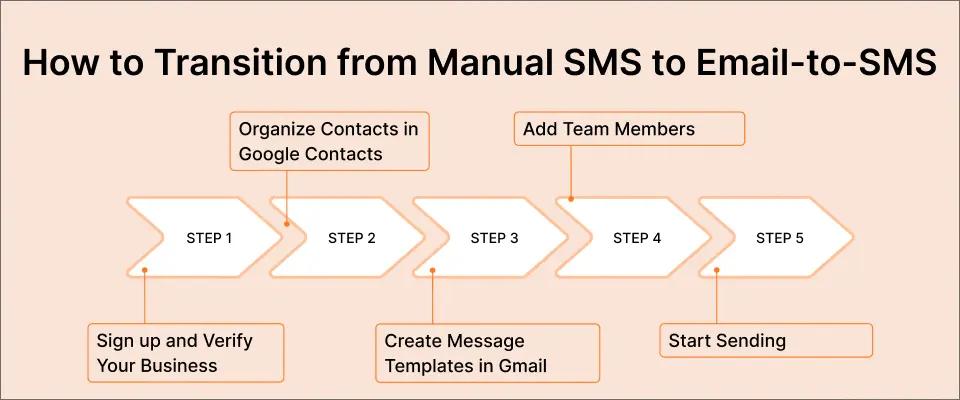
1. Sign Up and Verify Your Business
Create your TextBolt account and provide business information (name, EIN, use case description). TextBolt handles 10DLC compliance registration automatically.
2. Organize Contacts in Google Contacts
Import your existing contact list into Google Contacts. Create groups for bulk messaging (appointment reminders, payment notices, etc.).
3. Create Message Templates in Gmail
Save your most common messages as Gmail templates. Customize with recipient details before sending.
4. Add Team Members
Invite up to 9 additional users from your dashboard. Each team member sends from their own email using the shared credit pool.
5. Start Sending
Compose an email to [phonenumber]@sendemailtotext.com. Your message is delivered as SMS. Replies come back to your email inbox.
No training sessions needed because your staff already know how to send an email. Learn how to send patient texts without training your team on new software.
Streamline Your Messaging Workflow with TextBolt
Manual SMS sending creates time waste, single points of failure, and workflow bottlenecks that email-to-SMS automation eliminates. By routing text messages through your existing email (Gmail, Outlook, or any SMTP client), you remove repetitive manual effort while giving your entire team texting capability. Your staff already know how to send email, so there’s zero learning curve.
Start your free 7-day trial with 10 message credits included. Setup takes 10-30 minutes, and 10DLC approval typically completes within 48 hours. See TextBolt pricing for plan details. All plans include 10 user accounts with no per-user fees.
Frequently Asked Questions
What are the main problems with manual SMS sending?
Time waste (90+ minutes for high-volume senders), single-device dependency, no automation, error-prone at scale, no audit trail for compliance, and a lack of team collaboration when the primary sender is unavailable.
How does email-to-SMS automation reduce manual work?
Send one email to multiple recipients using Google Contacts groups. Schedule messages in advance with Gmail’s scheduled send. Use templates for recurring communications. Trigger automated text messaging from calendar events or email rules.
Can multiple team members send texts without manual handoffs?
Yes. All TextBolt plans include 10 user accounts (1 admin + 9 team members) sharing a credit pool. Team members send from their own email without training, device sharing, or coordination needed.
Is email-to-SMS automation faster than manual texting?
Significantly. Manual SMS can take 60-90 minutes for 50 messages (typing each individually). Bulk SMS automation typically takes 5-10 minutes for 50 messages (one email to a contact group). That’s 85-95% time savings depending on workflow complexity.
Does email-to-SMS automation require new software or training?
No. If your team can send emails, they can send texts. Works with Gmail, Outlook, Apple Mail, or any SMTP email client. Zero learning curve because staff use existing email knowledge.
What happens to manual SMS workflows after switching to email-to-SMS automation?
You keep the same contact lists and message content. Just change the sending method: instead of typing into your phone, send via email to [phonenumber]@sendemailtotext.com. Most businesses complete the migration in 10-30 minutes.